XtremeSystems Forums

Go Back   XtremeSystems Forums > Hardware > Intel

Reply
 
Thread Tools Rating: Thread Rating: 40 votes, 4.45 average. Display Modes
Old 12-04-2007, 09:55 AM   #1
kup
Xtreme Enthusiast
 
kup's Avatar
 
Join Date: Jan 2003
Location: Canterbury, UK
Posts: 912
The Maximus Formula Thread - Help / OCing / Guide / Rampage Conversion

This thread is intended to be a knowledge base and save people from hours of searching through the original thread on the Maximus Formula! Thank you to L.oco for starting the thread, I only hope that in time this one can be as informative and helpful!


Board Revisions

There are 2 known revisions of the Maximus Formula, the Special Edition, or SE, is the 1.02g revision, and the Non-SE version is the 1.03g revision. This is the only known difference, just a revision change to signify the difference in the package.


Asus Master FTP

ftp://ftp.asus.com/pub/ASUS/mb/socke...ximus_Formula/


Bios Versions

LATEST BIOS REVISION - MF1102

Most of the released Bios' for the Maximus Formula...

MF0401.zip

MF0504.zip

MF0505.zip

MF0602.zip

MF0701.zip

MF0702.rar

MF0802.zip

MF0901.zip

MF0902.zip

MF0903.zip

MF0907.zip

MF1003.zip

MF1004.zip

MF1006.zip

MF1102.rar

MF1201.rar


Direct Link to Maximus Formula Drivers / Software / Manuals

http://support.asus.com/download/download.aspx?SLanguage=en-us&model=Maximus%20Formula


Latest OCCT for Stabity Testing

http://www.ocbase.com/download.php?fileext=beta


AsusUpdate that allows downgrading from the 09xx series
Confirmed to work on both XP x86 and XP x64 by Nuckin_Futs.
Please ONLY flash using Asus Update with STOCK CLOCKS and settings, flashing with an overclock is not advised and will lead to a bricked board when Asus Update inevitably crashes.
The prefered method of flashing is detailed below in the MAXIMUS to RAMPAGE section. Using AFUDOS is safer and faster than Asus Update.

AsusUpdate v6

Select 'Options', tick the downgrade box and the flash with bios of choice.


Bios settings and what they do

Page 1
Page 2
Page 3

Bios Straps and Getting Them to Work!!!

400 strap set to enabled relax level 0
333 strap set to disable relax level 0
You may need to set Dram Static to Auto

If you get the DET RAM hang its usally just a matter of finding the right Trans Booster setting
No need to clear cmos and certainly no need to power down and wait the bios.


Bios Setup Template - Please use this when Listing Settings used.

Code:
Extreme Tweaker 
Ai Overclock Tuner : Manual 
OC From CPU Level Up : AUTO 
CPU Ratio Control : Manual 
- Ratio CMOS Setting : 
FSB Frequency : 
FSB Strap to North Bridge : 
PCI-E Frequency: 
DRAM Frequency: DDR2- 
DRAM Command Rate : 
DRAM Timing Control: Manual 
CAS# Latency : 
RAS# to CAS# Delay : 
RAS# Precharge : 
RAS# ActivateTime : 
RAS# to RAS# Delay : 
Row Refresh Cycle Time : 
Write Recovery Time : 
Read to Precharge Time : 

Read to Write Delay (S/D) : 
Write to Read Delay (S) : 
Write to Read Delay (D) : 
Read to Read Delay (S) : 
Read to Read Delay (D) : 
Write to Write Delay (S) : 
Write to Write Delay (D) : 
DRAM Static Read Control: 
Ai Clock Twister : 
Transaction Booster : 

CPU Voltage : 
CPU PLL Voltage : 
North Bridge Voltage : 
DRAM Voltage : 
FSB Termination Voltage : 
South Bridge Voltage : 
Loadline Calibration : 
CPU GTL Reference : 
North Bridge GTL Reference : 
DDR2 Channel A REF Voltage : 
DDR2 Channel B REF Voltage : 
DDR2 Controller REF Voltage : 
SB 1.5V Voltage : 

NB LED Selection : NB Volt 
SB LED Selection : SB Volt 
CPU LED Selection : CPU VOlt 
Voltiminder LED : 

CPU Spread Spectrum : Disabled 
PCIE Spread Spectrum : Disabled 

Advanced CPU Configuration 
CPU Ratio Control : Manual 
- Ratio CMOS Setting : 
C1E Suppport : Disabled 
CPU TM Function : Disabled 
Vanderpool Technology : Disabled 
Execute Disable Bit : Disabled 
Max CPUID Value Limit : Disabled 


USB Configuration 
USB Functions: Enabled 
Legacy USB Support : Disabled

vDroop Mod / vCore Mod / EPU Mod


Use a HB / 3B / 4B pencil, 2 or 3 strokes only.


Bios to Actual vDroop listing


This is the Anandtech setup for 450MHz FSB and 8x Mulitplier. It's a very good starting point for anyone attempting to overclock the board.
These settings are for 450MHz with a Quad Core, when using a Dual Core these same settings should be good for at least 480MHz, if not 500MHz (ram permitting).

Quote:
450FSB Quad-Core BIOS Settings
CPU Feature
Ai Overclock Tuner [Manual]
OC From CPU Level Up [Auto]
CPU Ratio Control [Manual]
Ratio CMOS Setting: [8]
FSB Frequency [450]
FSB Strap to North Bridge [400MHz] or [Auto]
PCIE Frequency [110]
DRAM Settings
DRAM Frequency [DDR2-1199MHZ] or [800MHz] or [Auto]
DRAM Command Rate [2T]
DRAM Timing Control [Manual]
CAS# Latency [5]
RAS# to CAS Delay [5]
RAS# Precharge [5]
RAS# Active Time [12]
RAS# To Ras# Delay [3]
Row Refresh Cycle Time [42]
Write Recovery Time [6]
Read To Precharge Time [3]
Read To Write Delay(S/D) [8]
Write To Read Delay(S) [3]
Write To Read Delay(D) [5]
Read To Read Delay(S) [4]
Read To Read Delay(D) [6]
Write To Write Delay(S) [4]
Write To Write Delay(D) [6]
DRAM Static Read Control [Disabled]
Ai Clock Twister [Strong]
Transaction Booster [Enabled]
Boost Level [0]
Voltage Settings
CPU Voltage [Whatever your CPU needs for 3.6GHz]
CPU PLL Voltage [Auto]
North Bridge Voltage [1.61v]
DRAM Voltage [2.16v]
FSB Termination Voltage [1.54v]
South Bridge Voltage [Auto]
Loadline Calibration [Enabled]
CPU GTL Reference [0.63x]
North Bridge GTL Reference [0.67x]
DDR2 Channel A REF Voltage [Auto]
DDR2 Channel B REF Voltage [Auto]
DDR2 Controller REF Voltage [DDR2_REF]
SB 1.5V Voltage [Auto]

Bios Strap Settings, as tested by Spyrus


User Settings

Here are several possible configs that could work for you, posted by other Maximus Formula users...

Quad Core
400x9 from Maglin
400x9 from giorgos th.
450x8 from Renegade5399
450x8 from cadaveca
450x8 from Grnfinger
450x8 from ChaosMinionX
450x8 from Zucker2k
425x8 from Grnfinger
400MHz FSB from pphx459
400MHz FSB from arfett (12 Hours Prime Small FFT Stable)

Dual Core
450x9 from Renegade5399
500x7 from Nuckin_Futs
500x7 from eSp!s0
450x8 (Ram @ 1200MHz) from eSp!s0

All have reported varying degrees of success with their specific hardware.

Maximus / P5E to Rampage Conversion.

All credit goes to The Stilt for finding the initial bios mod! And then secondly to the community for their continued support for this bios mod. This thread is intended to just be a tidy version of the work already done.

This bios mod can be performed on both the Asus P5E and the Asus Maximus Formula to turn them part way into an Asus Rampage Formula.

The Guide

1: Download the HP Bootable USB Utility from here:2: Download the Boot Files from here:3: Download the bios of your choice:4: Download AFUDOS Engineering Version here:5: Run the HP Bootable USB Utility and tick the "Create a DOS Startup Disk" option. Now navigate to the Boot Files (extract them first) and select the Folder you extracted them to.

6: Click "Start" within the HP Bootable USB Utility and it will make your USB Stick bootable.

7: Extract the AFUDOS of your choice (I personally used v2.29ES) to the USB Stick along with the bios you wish to flash and a backup bios for your board (located on the Asus Support site) so you can flash back if the need arises.

8: Reboot your system and press F8 when the splash screen appears to select the boot menu. Once the boot menu has loaded navigate to the USB Stick and hit Enter.

9: Once the DOS Prompt is ready, type the following to flash to the Rampage Bios (Example uses Bios 0219):

Code:
AFUDOS /iRF0219.rom /pbnc /n
To flash any other bios, or even back to a Maximus / P5E bios just use the following:

Code:
AFUDOS /i**INSERT*BIOS*FILENAME*HERE** /pbnc /n
Please note the "/i" that comes before the bios filename, this is required for any flash with AFUDOS. And also please note the extension on the bios file in use, you'll need to use this too.

This will erase, flash and verify the bios for you. Once it has completed you can reboot and be greeted by your new Rampage splash screen.

P5E Users Only

10: Disable the Second Gigabit LAN and the "OPT SENSOR" #1, #2 and #3 to stop the errors from appearing.

The Rampage Formula uses the same drivers as both the P5E and the Maximus Formula so you shouldn't need to reinstall anything but some users have experienced a better result with a fresh install of Windows after the flash.


For those of you suffering with voltage ripples, try this, as demostrated by Grnfinger

Quote:
Originally Posted by Grnfinger View Post
I did a test today

moved the ram from blue slots to white slots, and stopped over volting my ram from 2.2 to 2.0 ( rated for 2.1 ) Set transaction booster from disabled to Auto.
Changed
DDR2 Channel A REF Voltage : DDR2_REF
DDR2 Channel B REF Voltage : DDR2_REF
DDR2 Controller REF Voltage : DDR2_REF
to all AUTO

Some Quad overclocking advise for this board from Nuckin_Futs

Quote:
For the Quads in general, leave memory and graphics out of it till you get the CPU/mobo where you like and stable in 1:1. So for best stability, leave strap and RAM frequency to Auto, Disable both speed spectrum settings, Disable RAM Booster an drelax to 0 (1~3 as needed for stability, when stable again), Set Ai Clock Twister to Auto or light (for now, avoid "strong", as it will add stress to memory system and become unstable, destracting OC test), Enable Static Read Control. Getting higher FSB out of a quad is gonna need some more PLL and FSBT thgen in my core 2 OC. Matbe PLL up to 1.712v and FSTB to 1.504v is a good refference point.

Try this and use overvolting as little as needed for low temps and stability.

Some thoughts offered by cadavega, on PLL voltage

Quote:
I wanted to mention the importance of cpuPLL voltage. It is definately important to increase this votlage when going over 400mhz FSB with a quad. There is no specifics...each cpu will differ. For example, my B3 quad doesn't care for it...increase too much and stability was quickly lost. My G0, tho, was not stabe for 48hr prime without 1.8v...1.7v...33hrs...1.75v...38.5hrs...
Also of note is that my B3 did not need any FSB or PLL voltage change when FSB was increased(or it had negative effects), while my G0 ABSOLUTELY REQUIRED more vFSB and cpuPLL. b3 was happy with 1.2vFSB, 1.5v PLL, as a comparison.

Raid and the Maximus Formula

http://www.xtremesystems.org/forums/...d.php?t=166867


Water Cooling the Maximus Formula

http://www.xtremesystems.org/forums/...d.php?t=162085

http://www.xtremesystems.org/forums/...d.php?t=164610

Last edited by kup; 05-15-2008 at 03:31 PM.
kup is offline   Reply With Quote
Old 12-04-2007, 10:02 AM   #2
CERO
Xtreme Addict
 
CERO's Avatar
 
Join Date: May 2007
Posts: 1,339
Very usefull, great job
__________________
DFI Lanparty LT X48-T2R
Intel Q6600 L737B242 ~ VID 1.2125 ~ 4000mhZ @ 1.48 vcore {lapped}
eVGA 8800GTS (G92) 512MB {stock}
Crucial Ballistix PC8500 Tracer ~ 1200mhZ 5-5-5-12 @ 2.05v
Lian Li PC-V1000 {modded}
Corsair HX 620W
Creative X-FI ExtremeMusic
Western Digital Raptor X 150GB
Thermalright-Ultra120 Xtreme {lapped} ft. Scythe S-Flex SFF21F S-FDB ~ Push & Pull
CERO is offline   Reply With Quote
Old 12-04-2007, 10:29 AM   #3
HousERaT
Xtreme Enthusiast
 
HousERaT's Avatar
 
Join Date: Mar 2005
Location: Imladris
Posts: 957
Excellent work..... this should be a sticky.
__________________
The little air system that could.

HousERaT is offline   Reply With Quote
Old 12-04-2007, 10:32 AM   #4
Eastcoasthandle
Xtreme Guru
 
Eastcoasthandle's Avatar
 
Join Date: Jul 2005
Posts: 4,288
Compiled list of posts offering advice, tweaks, suggestions for the Max. Forumula

3 threads regarding watercooling and starting up a raid:

Official Water Cooling Thread of the Stock Maximus SE ROG NB Club:
http://www.xtremesystems.org/forums/...d.php?t=164610

Water cooling the Asus Maximus SE X38 using aftermarket blocks and sinks:
http://www.xtremesystems.org/forums/...d.php?t=162085

Getting RAID to work on the ASUS Maximus SE
http://www.xtremesystems.org/forums/...d.php?t=166867
From Talonman


FSBT is directly related to hte CPU PLL, so if not upping the FSBT a lil with the PLL and too low a GTL volt ref, it is not gonna' return as stable or high CPU and system FSB for overclock.
From Nuckin_Futs

Maximus Forumula & Q6600 G0
http://www.xtremesystems.org/forums/...postcount=3831


Below are some OC results using this motherboard with a Q6600 and E6750. I recommend that you make sure that your northbridge chips is below 47C before OC'ing. Also, as with any OC, you do so at your own risk. Please make sure you have proper cooling for N/s bridge chipsets as well as ram, CPU, etc before you OC.

Forumula Maximus & Q6600 G0
http://www.xtremesystems.org/forums/...&postcount=568

Forumula Maximus & Q6600 G0
http://www.xtremesystems.org/forums/...&postcount=530

Forumula Maximus & Q6600 G0
http://www.xtremesystems.org/forums/...&postcount=370

Formula Maximus & 6750 OC
http://www.xtremesystems.org/forums/...postcount=2703

Formula Maximus & 6750 may work for 6850
http://www.xtremesystems.org/forums/...postcount=2704

Formula Maximus & 6850 OC
http://www.xtremesystems.org/forums/...postcount=2957

voltage droop:
vcore, cpu pll, NB, DRAM, FSB T., SB
http://www.xtremesystems.org/forums/...&postcount=366

-Yes, this board can handle 4 Gigs of PC8500. However, OC'ing maybe limited. Appears that newer bios address this.
-Those upgrading from a MB with limited bios tweaking (P5W DH for example) may find the tweaking settings for the Maximus Formula's bios daunting. Please review some of the OC settings listed above to get an idea of what needs tinkering and what doesn't. Also, if your CPU OC is not found it may be better to make a formal request (in the original Maximus Formula thread, not in this thread) for bios settings using your CPU. Also look at the Anandtech article.
-Check Asus website for bios updates regarding ASUS Maximus Formula and ASUS Maximus Formula SE. Remember there are not removable bios chips for these boards. You use any bios on this forum at your own risk!
-You get better N/S Bridge temps when you remove the factory TIM and apply AS5 Ceramic.
-When updating from one bios to another RESET YOUR CURRENT BIOS TO STOCK, NONE OC SETTINGS BEFORE FLASHING
-If the fusion water block on the chipset doesn't come off you can use a hair dryer to heat it. Or, you can cool the MB in the frig for a few hours in to chill the thermal compound. Either suggestion can damage your MB, you do this at your own risk!
-If you water cool the NB (SE version) it's best to use plastic clamps or worm drive, from Anandtech
Quote:
Our biggest gripes revolve around the somewhat disappointing execution of the supplied water block design and unreliable 1/2" tubing clamps when using high flow rate pumps
-The black PCIe x1 port is proprietary for the included sound card
-Its worth the time to put a small 40mm fan on the s/b heatsink when OCing
-P5E is an excellent board if you are not looking for the features of the Maximus Formula
-Ultra 120 Extreme and clearance from the South Bridge heat sink using a 8800 http://www.xtremesystems.org/forums/...&postcount=920
-SE has option for 3 thermal sensors however you have to buy the thermal sensor cable separate
-Use a 8-pin 12V connector
-In order to get charted voltage results using OCCT, start Everest and go to: Preferences, External Applications then Enable shared memory option
-Although DDR2 1600 is found in the specification for the Maximus Formula I haven't found any posts verifying 1600MHz Memory frequency as of yet. http://www.asus.com.tw/products.aspx...11&l3=572&l4=0
-When OC'ing your ram you can obtain better results maintaining the rated DDR2 frequency or higher
example 1
example 2
example 3
Also note, that 1:1 is not the best ratio for this motherboard
Quote:
...Had we used the lower 1:1 divider on the Maximus, the scores would have been reversed (performance would have been slower). In truth, using the 1:1 divider on either board should only reduce scores by around 1-2% maximum, making some of the cheaper DDR2-1000 capable modules a wise purchase for a workstation or gaming PC. ASUS is currently working on a BIOS release that improves overclocking and we will report any performance changes shortly...
Source


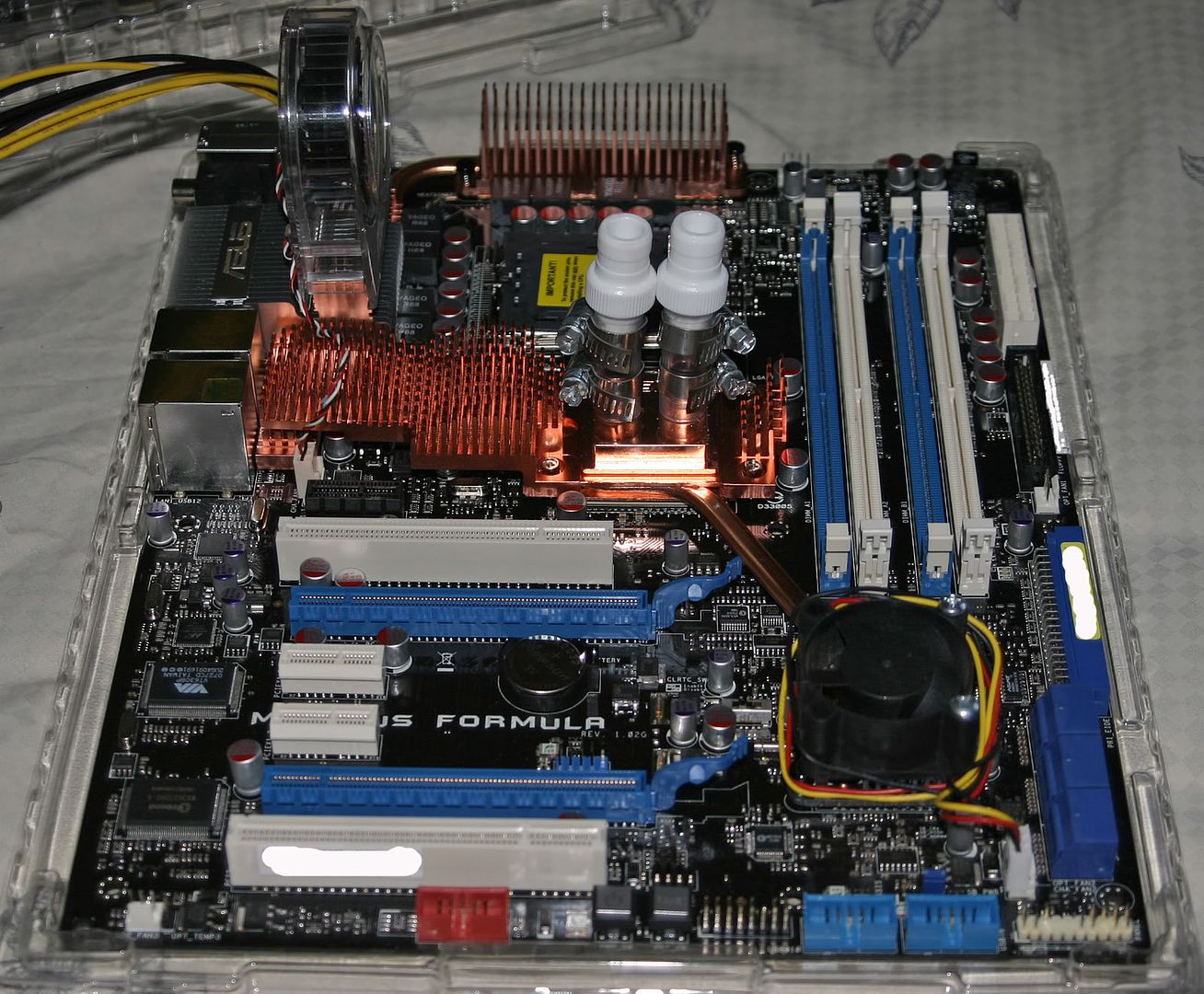
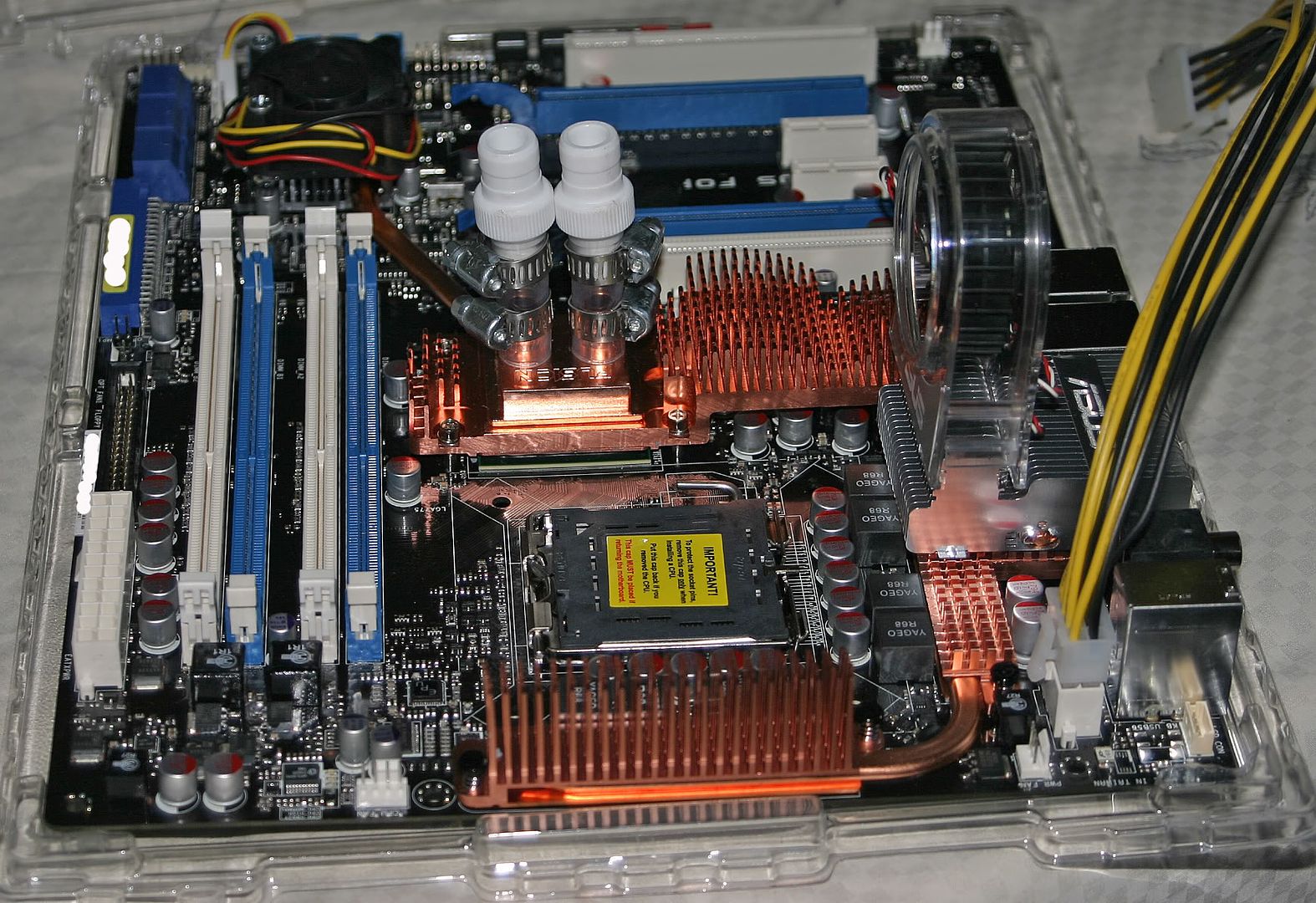
Below are some pics of the Formula Maximus prep'd for watercooling:

This pic shows the MB prep'd and ready for installation


This is another angle of the MB prep'd and ready for installation


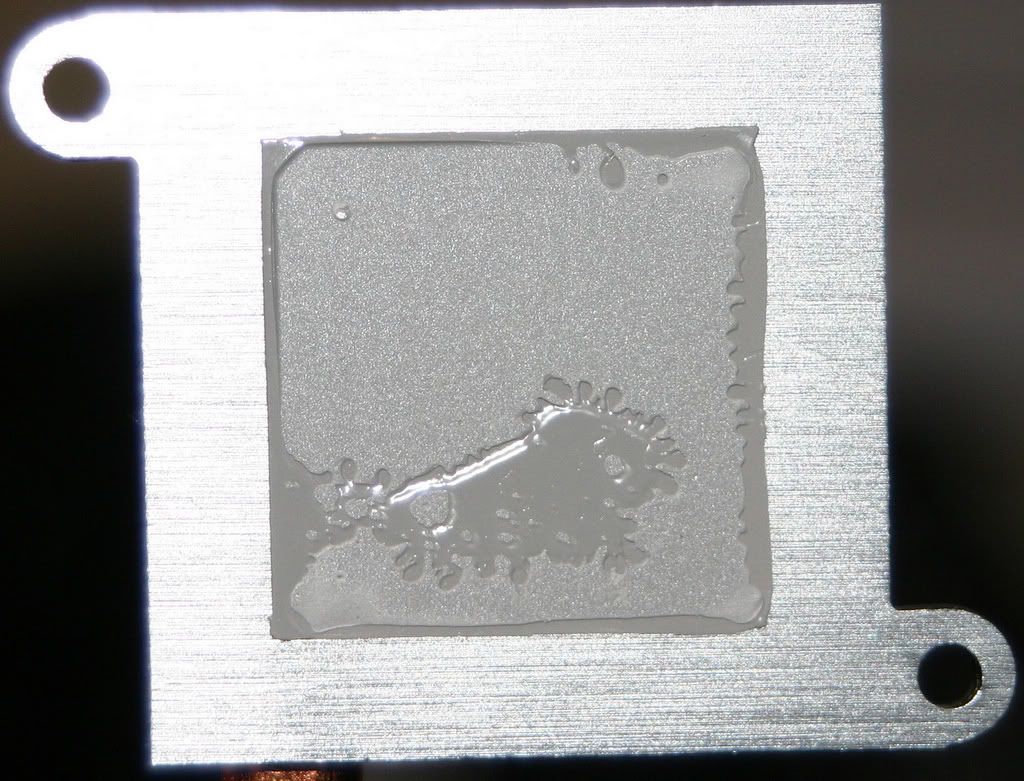
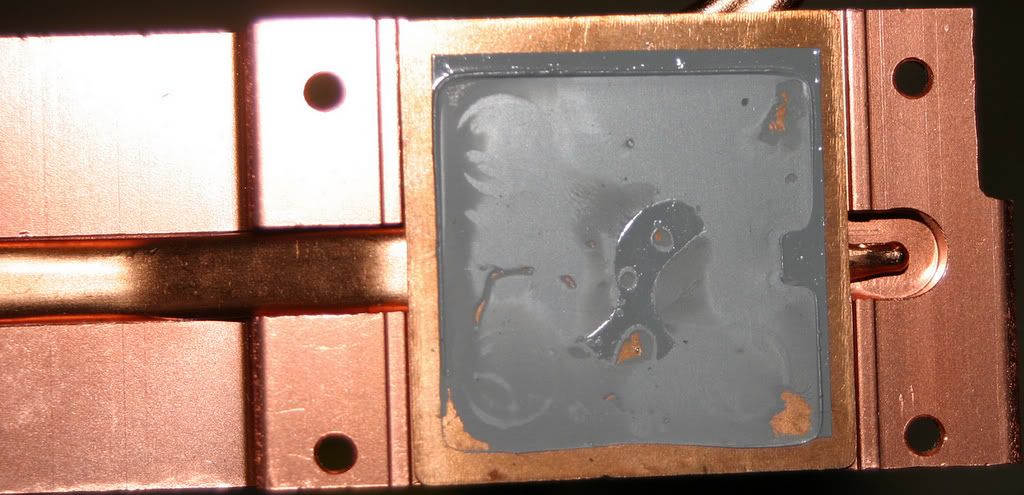
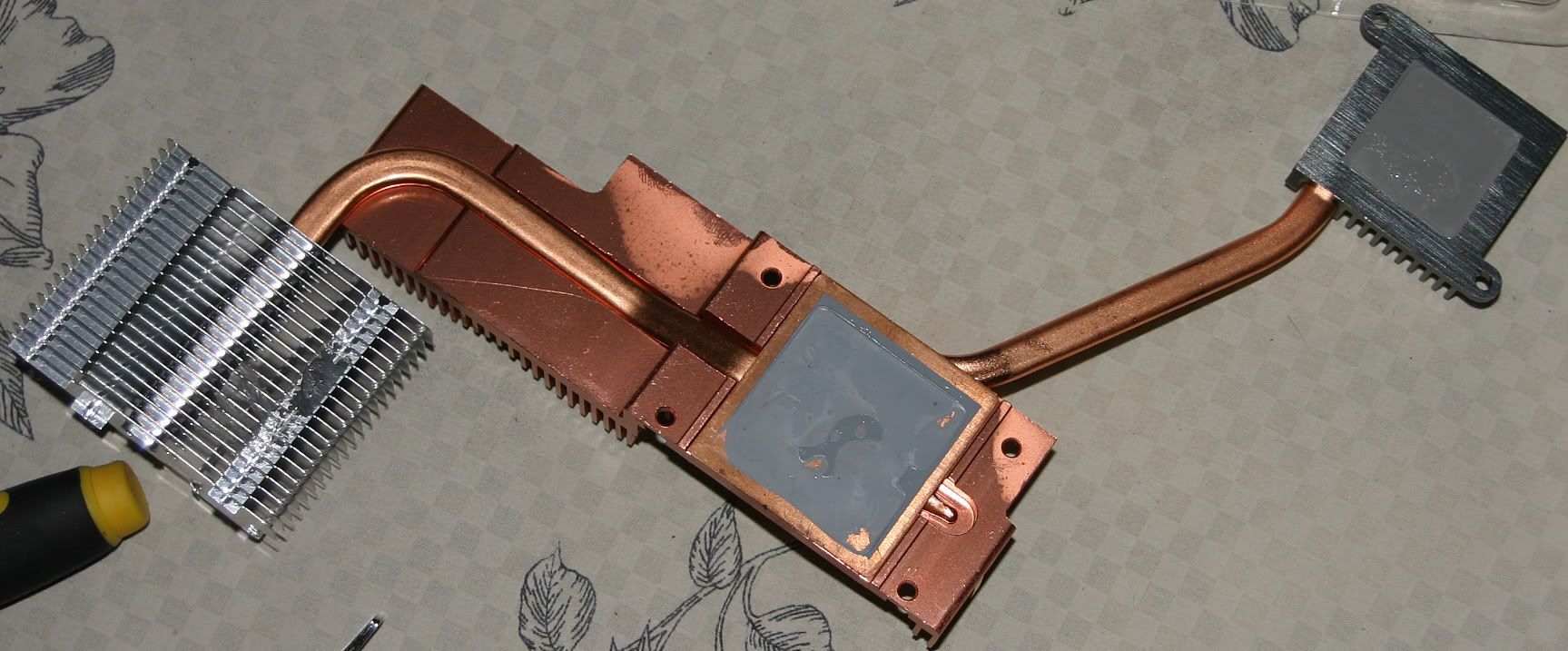
Below are some pics showing the removal of the N/S bridge heat sinks. With the help of cadaveca I came up with the idea of refrigerating the Maximus Formula MB (with the plastic covering)for 3 hours in order to remove the north/south bridge heat sinks. Heat didn't loosens the thermal compound found on this motherboard for me but cold temperatures did. Once the board was chilled for 3 hours the north/south bridge heat sinks popped right off without any real force. I offer this advice as a possible solution for removing bonded type of thermal compound from the north/south bridge heat sinks. Please keep in mind that applying either heat or cold or both temperatures can damage your motherboard. You try this at your own risk.


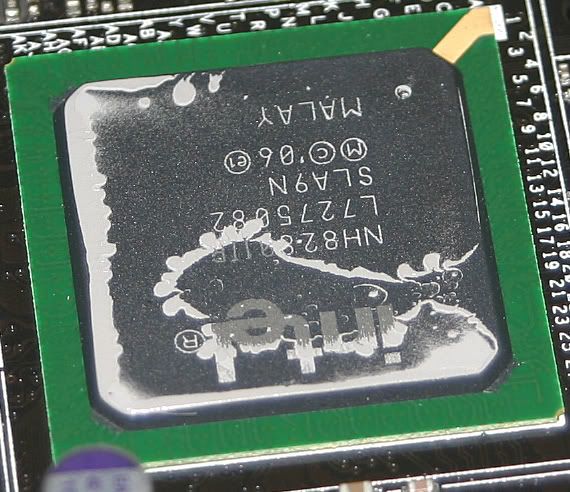
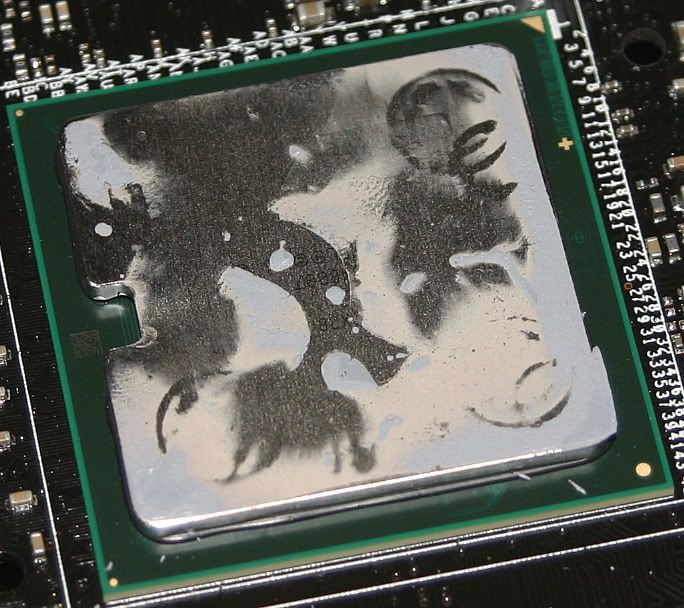
3 pics showing the south, north and combo n/s heatsinks


To the left is the southbridge chipset. To the right is the northbridge chipset after the HS was removed.
__________________

Last edited by Eastcoasthandle; 12-06-2007 at 11:27 AM.
Eastcoasthandle is offline   Reply With Quote
Old 12-04-2007, 10:38 AM   #5
leoftw
Xtreme Cruncher
 
leoftw's Avatar
 
Join Date: May 2007
Posts: 589
This board isn't for a noob
__________________

Asus Maximus Formula SE (BIOS 907)
Q6600 G0 (@ 3.2GHZ @ V1.320 )
Crucial Ballistix DDR2 800 4x1GB (2 Tracers) @ 1200MHZ
Thermaltake Toughpower Modular 750W
Tuniq Tower 120 / Tuniq Thermal Grease TX-2
BFG 8800GT OC
Cooler Master CM690
Maxtor 7200.10 320GB PATA


WWW.LEOFTW.COM
leoftw is offline   Reply With Quote
Old 12-04-2007, 10:55 AM   #6
kup
Xtreme Enthusiast
 
kup's Avatar
 
Join Date: Jan 2003
Location: Canterbury, UK
Posts: 912
No, but this thread is! Try out some of the settings listed above, for either 400 or 450MHz and see how it goes?
kup is offline   Reply With Quote
Old 12-04-2007, 11:14 AM   #7
leoftw
Xtreme Cruncher
 
leoftw's Avatar
 
Join Date: May 2007
Posts: 589
Those were listed in the last thread and I tried every single one of those .

I tried 450x8 ; 400x9 ; and they wouldn't even boot. I accidentally hit 450x9 once because I forgot to change the multiplier to 8 and I ended up booting stable with 4GHZ on air . I got scared because the temps were too high so I shut down but there was no way I could get it to 3.6
__________________

Asus Maximus Formula SE (BIOS 907)
Q6600 G0 (@ 3.2GHZ @ V1.320 )
Crucial Ballistix DDR2 800 4x1GB (2 Tracers) @ 1200MHZ
Thermaltake Toughpower Modular 750W
Tuniq Tower 120 / Tuniq Thermal Grease TX-2
BFG 8800GT OC
Cooler Master CM690
Maxtor 7200.10 320GB PATA


WWW.LEOFTW.COM
leoftw is offline   Reply With Quote
Old 12-04-2007, 11:15 AM   #8
ChaosMinionX
Xtreme New Yorker
 
ChaosMinionX's Avatar
 
Join Date: Oct 2006
Location: Boondocks, New York
Posts: 2,197
Send a message via ICQ to ChaosMinionX Send a message via AIM to ChaosMinionX Send a message via MSN to ChaosMinionX
I will put up some new configs for more recent BIOS since 0505 (which used to be my fav)

Great work though guys
__________________
===Under Construction===


[HeatWare]
ChaosMinionX is offline   Reply With Quote
Old 12-04-2007, 11:25 AM   #9
Apoc@
Registered User
 
Apoc@'s Avatar
 
Join Date: Jul 2007
Posts: 59
Nice topicstart kub, great job.
__________________
Intel Q6600 G0 @ 3600MHz
Thermalright Ultra-120 eXtreme / Papst 4412F/2GL
Asus X38 Maximus Formula SE @ 1102
G.Skill BHZ 4096MB DDR2-800 4-4-4-12 @ 2.10V
Dual Jetway ATi HD 4850 512MB @ 750 / 1100MHz
Triple WD 320GB S-ATA II 16MB
Dual Dell UltraSharp 2007WFP
Antec TruePower Quattro 1kW
Apoc@ is offline   Reply With Quote
Old 12-04-2007, 11:31 AM   #10
ElEctric_EyE
Xtreme Member
 
ElEctric_EyE's Avatar
 
Join Date: Oct 2007
Posts: 354
Downgrading the BIOS is only possible under 32bit OS I think. It doesn't work for me and some others I've read about. May need annotation...
__________________
CPU: Lapped L727A861 Q6600 3.61GHz (450x8) (1.275VID) @ 1.700V BIOS. WC w/Apogee GTX + Cu top + custom backing plate
GPU: EVGA 8800GT. WC w/MCW60 + RAMsinks
MB: ASUS Maximus Formula: Rampage Formula BIOS 0402. NB @1.61V BIOS. WC w/MCW30. FSBtV=1.38V BIOS. CPUPLLV=1.82V BIOS
RAM: Corsair Dominator PC2 8500 4x1GB 1066@1081. 2.14V BIOS
ElEctric_EyE is offline   Reply With Quote
Old 12-04-2007, 11:35 AM   #11
[XC] Hicks121
Xtreme Cruncher
 
[XC] Hicks121's Avatar
 
Join Date: Nov 2006
Location: Chicago
Posts: 1,567
Send a message via MSN to [XC] Hicks121
Wow! Thanks guys!! This is realy going to save me reading all those pages!!

GREAT JOB!
__________________
X3330 @ 3.78 on UD3P, X3210 @ 3.6 on Maximus Formula, E8400 @ 4.2 on P5B-D, E6300 @ 3.64 on P5B-D
Quote:
Originally Posted by mike047 View Post
CRUNCH HARD, it may not help me and you, but it might help the Kids.
[XC] Hicks121 is offline   Reply With Quote
Old 12-04-2007, 11:36 AM   #12
zoob
Xtreme Member
 
Join Date: Apr 2005
Location: Toronto, ON
Posts: 447
THANK YOU <3

I found the Gigabyte P35 thread so insanely difficult to find anything useful... now that I've switched to a Maximus Formula this thread will be very handy. I hope you keep the first post up to date
__________________
tj0myi7: i7 920 @ 4.0 :: r2e :: 6x2gb :: x25-m 80gb :: gtx285 :: m12d-850w :: tj07 :: pa120.3/fuzion v2/ek-fc/ddc3.2
fsvr: q8300 :: ??? :: 4x2gb :: perc5i 8x1tb wdgp :: s12-600 :: ninja :: stacker 830
test: i7 920 @ 4.2 :: r2g:: 3x2gb :: gtx285 :: antec cp-850 :: pa120.3/fuzion v1/db-1
zoob is offline   Reply With Quote
Old 12-04-2007, 11:36 AM   #13
Renegade5399
Xtreme Member
 
Renegade5399's Avatar
 
Join Date: Jun 2007
Location: Syracuse, NY
Posts: 279
Send a message via AIM to Renegade5399 Send a message via MSN to Renegade5399
My settings are for 450*9 silly man. :p
__________________
Intel i7 Xeon 3520 @ 4.41GHz (210*21) @ 1.326v
DFI T3eH8 w/ beta BIOS (4/28)
6GB Kingston HyperX DDR3 2000 @ 1680MHz 7-7-7-18-1T @ 1.66v *RMA*
XFX 5870 at 1100/1300 with 1.32v
Loop 1: Apogee GTZ CPU block, Enzotech NB block, MCR360 rad w/ Scythe fans, Micro-res, Aquaextreme 50Z pump
Loop 2: EK-FC5870 block, MCR240 rad w/ Yate Loon fans, T-line, MCR650 pump
U2-UFO case

Renegade5399 is offline   Reply With Quote
Old 12-04-2007, 11:44 AM   #14
NysoO
Xtreme Member
 
NysoO's Avatar
 
Join Date: Oct 2006
Location: Sweden
Posts: 497
Send a message via MSN to NysoO
Very nice indeed. Kinda sorts out the goodies from the previous thread.
NysoO is offline   Reply With Quote
Old 12-04-2007, 12:04 PM   #15
icecpu
Xtreme Member
 
Join Date: Dec 2006
Posts: 209
Great job , thank you very much , this is what I'm looking for , my board is coming this Friday , but I have to wait for Q9450 on Jan 8.
icecpu is offline   Reply With Quote
Old 12-04-2007, 12:15 PM   #16
kup
Xtreme Enthusiast
 
kup's Avatar
 
Join Date: Jan 2003
Location: Canterbury, UK
Posts: 912
Amendments made for the Dual Core (use Anandtech settings, they should be good for at least 480MHz as the same settings give me 470MHz with a Quad!!!)

And updated information about AsusUpdate and 32Bit/64Bit OS.
kup is offline   Reply With Quote
Old 12-04-2007, 12:23 PM   #17
cuke2u
Xtreme Member
 
Join Date: Oct 2006
Posts: 191
Hi, this is good stuff, I going to link to it from the asus maximus forumla forum, hopefully they'll sticky it...
Chris
__________________
Asus Maximus Formula SE
Intel Q6600 'GO' @ 3.6ghz
Thermochill PA120-3 Radiator
Swiftech MCRES-Micro Watercooling Resevoir
Swiftech MCP655 Pump
Swiftech MCW60R VGA Waterblock
D-Tec Fuzion CPU Block
Vista Ultimate
4x1GB Ballistix PC2-8500 memory modules
2x Samsung 320gbs SATA II
Pioneer DVR-111D DVDRW
2 x ATI HD4870
Dell 2407WFP 24" Widescreen LCD
Lian Li A71A case
Thermaltake Toughpower 850W
cuke2u is offline   Reply With Quote
Old 12-04-2007, 12:26 PM   #18
mXpS
Xtreme Member
 
Join Date: Sep 2007
Location: New Jersey
Posts: 184
When I get home on Wednesday Ill post the settings for my 9x460 E8650 OC if you guys want.
__________________
E8400 @4.3 | Asus Maximus SE | 2x2GB G.Skill PC2-8000s | Radeon X1950XT | Raptor X, Barracuda 7200.10 320GBs
mXpS is offline   Reply With Quote
Old 12-04-2007, 12:32 PM   #19
giorgos th.
I am Xtreme
 
giorgos th.'s Avatar
 
Join Date: May 2007
Location: Athens - Hellas
Posts: 443
Also,if you want to downgrade your bios,go to the options of any Asus update version and check the "bios downgradable" option.
Works 100% fine to me with XP Pro SP2 32bit - Asus update V7.11.02
Cheers.
__________________

Last edited by giorgos th.; 12-04-2007 at 12:37 PM.
giorgos th. is offline   Reply With Quote
Old 12-04-2007, 12:46 PM   #20
kup
Xtreme Enthusiast
 
kup's Avatar
 
Join Date: Jan 2003
Location: Canterbury, UK
Posts: 912
Added RAID and Water cooling links.

Updated clock settings for Dual Core CPUs.

Amended AsusUpdate instructions for downgrading.
kup is offline   Reply With Quote
Old 12-04-2007, 12:48 PM   #21
ElEctric_EyE
Xtreme Member
 
ElEctric_EyE's Avatar
 
Join Date: Oct 2007
Posts: 354
We need some clarity on what "stable" is. I can say I'm boot stable, 1 min OCCT stable, 10min OCCT stable, Prime stable? we need to agree on that b4 posting BIOS results or we'll have a quagmire of sh*t again. Maybe you should run a poll kup... Nice work so far dude. Take my criticism as constructive only plz
__________________
CPU: Lapped L727A861 Q6600 3.61GHz (450x8) (1.275VID) @ 1.700V BIOS. WC w/Apogee GTX + Cu top + custom backing plate
GPU: EVGA 8800GT. WC w/MCW60 + RAMsinks
MB: ASUS Maximus Formula: Rampage Formula BIOS 0402. NB @1.61V BIOS. WC w/MCW30. FSBtV=1.38V BIOS. CPUPLLV=1.82V BIOS
RAM: Corsair Dominator PC2 8500 4x1GB 1066@1081. 2.14V BIOS
ElEctric_EyE is offline   Reply With Quote
Old 12-04-2007, 12:56 PM   #22
giorgos th.
I am Xtreme
 
giorgos th.'s Avatar
 
Join Date: May 2007
Location: Athens - Hellas
Posts: 443
With my settings,i`m dual orthos and a lot of hours of Crysis (as we say rock rock stable.... )
__________________
giorgos th. is offline   Reply With Quote
Old 12-04-2007, 12:59 PM   #23
kup
Xtreme Enthusiast
 
kup's Avatar
 
Join Date: Jan 2003
Location: Canterbury, UK
Posts: 912
I kinda saw the settings being linked as more of a starting point, it's why I state underneath that the users experienced different results.

I'll have a think, because each user has a different level of "stable" before they're happy...
kup is offline   Reply With Quote
Old 12-04-2007, 01:22 PM   #24
NysoO
Xtreme Member
 
NysoO's Avatar
 
Join Date: Oct 2006
Location: Sweden
Posts: 497
Send a message via MSN to NysoO
What do you guys think is the thing that it is causing this 460*8 barrier. It would be really nice to get past this and raise the fsb a bit.
I actually managed to boot the system with 460 with the Anandtech settings but it wasn't so stable.
Is this BIOS related maybe? Hopefully it is, and will be corrected
NysoO is offline   Reply With Quote
Old 12-04-2007, 01:39 PM   #25
vegettoxp
Xtreme Member
 
vegettoxp's Avatar
 
Join Date: Jun 2006
Posts: 282
Hey Guys can someone comment on the revision change. I just got the board last week. I guess my question is, What's the BIG difference between the revision changes? And does it have a BIG Impact or not? Your Thoughts?

P.S. Fusion
vegettoxp is offline   Reply With Quote
Reply

Thread Tools
Display Modes Rate This Thread
Rate This Thread:

Posting Rules
You may not post new threads
You may not post replies
You may not post attachments
You may not edit your posts

BB code is On
Smilies are On
[IMG] code is On
HTML code is Off
Forum Jump


All times are GMT -8. The time now is 10:51 AM.


Powered by vBulletin® Version 3.7.0
Copyright ©2000 - 2009, Jelsoft Enterprises Ltd.
XtremeSystems