

I lapped my Q6600 & TTBT to 600 grit & dropped temps 7C...Woot




I lapped my Q6600 & TTBT to 600 grit & dropped temps 7C...Woot
i7-860 Farm with nVidia GPU's
another succesfull lap!
• DFI Lanparty LT X48-T2R
• Intel Q6600 L737B242 ~ VID 1.2125 ~ 4000mhZ @ 1.48 vcore {lapped}
• eVGA 8800GTS (G92) 512MB {stock}
• Crucial Ballistix PC8500 Tracer ~ 1200mhZ 5-5-5-12 @ 2.05v
• Lian Li PC-V1000 {modded}
• Corsair HX 620W
• Creative X-FI ExtremeMusic
• Western Digital Raptor X 150GB
• Thermalright-Ultra120 Xtreme {lapped} ft. Scythe S-Flex SFF21F S-FDB ~ Push & Pull
feeling tempted to lap mine now.... 13c drop is massive......
My CPU was almost dome shaped...TTBT was pretty good.
i7-860 Farm with nVidia GPU's
Yea I coudnt believed myself.... hold on I will get the sshots running prime as comparison , it is on my other rig lolOriginally Posted by purecain

*edit* lol I found a old post here: 16c difference but I used a slightly higher vcore before but it would be just max 3c higher.
http://www.xtremesystems.org/forums/...postcount=1390
full load 52-54c, depend on ambient and on that sshot I runned 12hour +, so it was pretty heated up lol xD
I noticed u use water, what I have seen lapping + water would get bigger gains, but I cant complain the results I got with air.
Last edited by CERO; 12-24-2007 at 02:21 PM.
• DFI Lanparty LT X48-T2R
• Intel Q6600 L737B242 ~ VID 1.2125 ~ 4000mhZ @ 1.48 vcore {lapped}
• eVGA 8800GTS (G92) 512MB {stock}
• Crucial Ballistix PC8500 Tracer ~ 1200mhZ 5-5-5-12 @ 2.05v
• Lian Li PC-V1000 {modded}
• Corsair HX 620W
• Creative X-FI ExtremeMusic
• Western Digital Raptor X 150GB
• Thermalright-Ultra120 Xtreme {lapped} ft. Scythe S-Flex SFF21F S-FDB ~ Push & Pull

I lapped my Ultra-120 to 400 gritz lately and my temps dropped by 2-4 degrees which is great... I'll lap a lil more to 1000 gritz in the new days
Main system:
Q6600 G0 L737B 3,8GHz
Maximus Formula X38
Ballistix PC2-8500 2x1GB
XFX 8800GT XT
Corsair HX620
X-Fi Platinum
150GB Raptor (Dual Boot) /2x 250GB WD Caviar (Apps)
Lian-Li V2000B Plus II
School: MacBook
Studying in: Pharmacy
Where: University of Montreal
Yea it was my first time lapping:X well I used some random sand paper, up to 800 grit, lapping both was just a 3c drop lol, I was like W#$6383, then I bought a proper lapping kit from 400-800-1200-1500-2000-2500, and did a second lap , as the first time lapping it could be the sandpaper wasnt but I think it was more user error lol, so for the second time I had a better grip on how to lap such thing, Lapping the cpu was a piece of cake but the TRUE...... was a whole different story.
• DFI Lanparty LT X48-T2R
• Intel Q6600 L737B242 ~ VID 1.2125 ~ 4000mhZ @ 1.48 vcore {lapped}
• eVGA 8800GTS (G92) 512MB {stock}
• Crucial Ballistix PC8500 Tracer ~ 1200mhZ 5-5-5-12 @ 2.05v
• Lian Li PC-V1000 {modded}
• Corsair HX 620W
• Creative X-FI ExtremeMusic
• Western Digital Raptor X 150GB
• Thermalright-Ultra120 Xtreme {lapped} ft. Scythe S-Flex SFF21F S-FDB ~ Push & Pull
will lapping make a difference for watercooling?
Nikon User
Nikon D200 (Gone =( )/D300
Nikkor 18-105mm(Gone) // Nikkor 50mm 1.8 // Nikkor 55-200VR(Gone)
Tokina 12-24 // Tamron 90mm //
Manfrotto & Benro Legs // Benro Ballhead.
Current Lust = 80-200 Or 70-200VR1 <--Pending
No more computer parts for me... Well for now until I
really REALLY need to upgrade.
Yea from the results I have seen so far, it would deffo help!
• DFI Lanparty LT X48-T2R
• Intel Q6600 L737B242 ~ VID 1.2125 ~ 4000mhZ @ 1.48 vcore {lapped}
• eVGA 8800GTS (G92) 512MB {stock}
• Crucial Ballistix PC8500 Tracer ~ 1200mhZ 5-5-5-12 @ 2.05v
• Lian Li PC-V1000 {modded}
• Corsair HX 620W
• Creative X-FI ExtremeMusic
• Western Digital Raptor X 150GB
• Thermalright-Ultra120 Xtreme {lapped} ft. Scythe S-Flex SFF21F S-FDB ~ Push & Pull
Well I went and lapped it. Looks decent. Wish I would have had finer sand paper. Such is life. Now tho coretemp wont open. I get an error. I guess I need to reset bios. Asus probe works fine but it only shows temp on one core which happens to be 17c idle. Ill have to get all 4 cores up to really see the temp change but I am sure its lower.
Ill post before and after pics in a few if not tomorrow. Im wiped out.
Merry X-Mas Everyone!!!!!
Ok here are a couple pics. Sorry my camera is on its last leg so pics suck.
Before:
After:
To get all 4 core temps I had to use speedfan but if I remember correctly speedfan temps were the same as coretemp.
Be its a tad bit cooler then it was at 930 pm The temp drop was atleast 5-7c or more. I will test more tomorrow when its warmer out. I still get core 3 reading much lower then the other 3 cores. Doesnt seem to effect oc tho. So far I am pretty satisfied with the temps.
-C2D Q6600 currently at 3840 mhz 1.47
-Swiftech GTX Extreme water block
-2x2gig G.Skill pc6400 485 fsb 5-5-5-15
-Asus P5K-E Wifi-AP
-Phillips Blu-Ray 2x Burner
-OCZ Power stream 620W
-HIS HD 4870 Stock cooler No OC yet
-Vista Ultimatex64-Xp Pro
XP-Single 3870-14194
Vistax64-Xfire 3870s-17878
Vistax64-4870 Stock-17054

Hey guys !
I also lapped my Q6600 and Ultra Extreme 120, 12C lower !!!
Regards
Sergio
Intel Core i9-7980XE@ 4.8GHz 18C/18TH (Direct Die Contact)
ASRock X299 OC Formula
ADATA XPG SPECTRIX D80 (4x8GB) DDR4-3800C17 B-Die
1x Intel Optane SSD 905P 480GB
4x HP EX950 NVMe 2TB on ASRock ULTRA M.2 CARD
EVGA RTX 2080TI KINGPIN 2190/8000 Stock Cooling AIO 240
SilverStone ST1500W-TI TITANIUM
Alphacool Custom Water Cooling
Hmm... makes me think I should give this a shot
Ive helped several friends with Qseries and they are all happily satisfied...
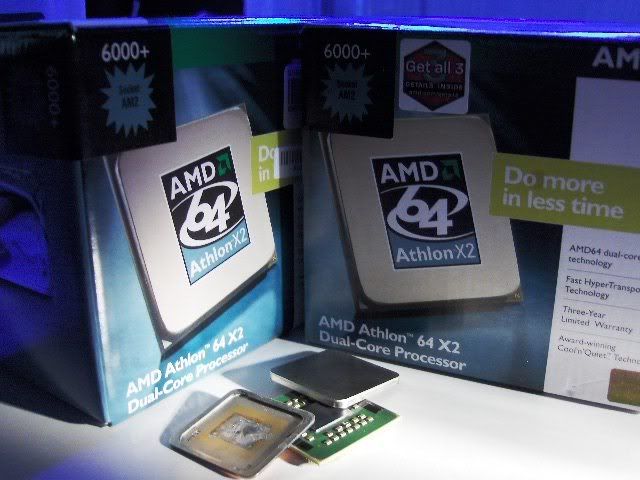
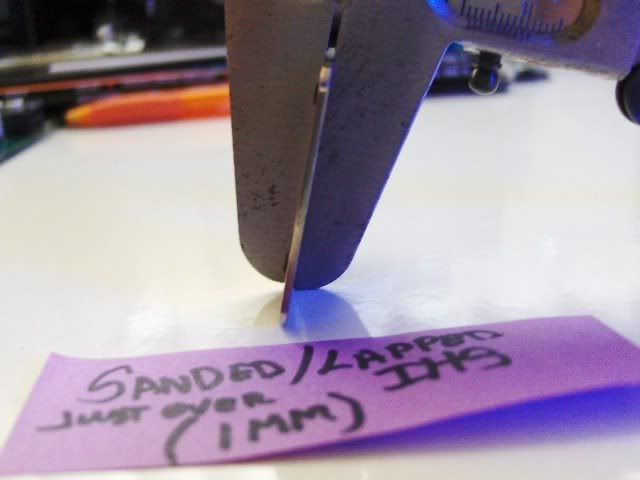
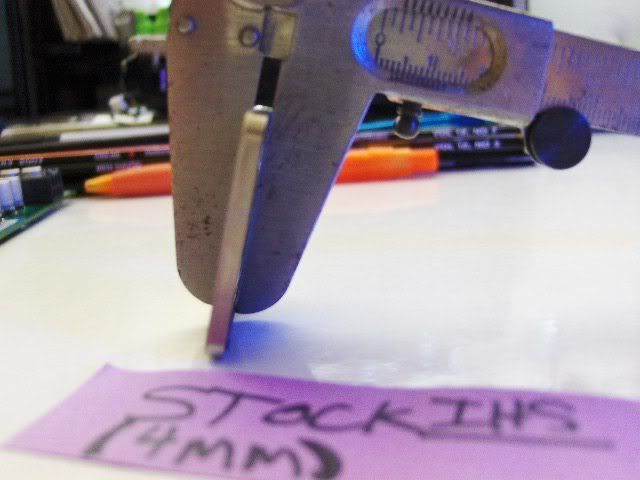
Ive also found that 2mm can be shaved off X2's Ihs before final Lap. Id post pics of Q's but dint have Camera at the time when i did this for the Intel friends i have...Either way It works bottom line On Air /water
ThemalRight120 = 22c @3.51 @1.56v X2,6000+ Load 59c @20c Ambiant
Dtek,,665,,2xBixIII = 24c @ 3.51 @ 1.56v X2,6000+ Load 46c @20c watertemp!
Id say that lapping is worth it for a chip pumping over 150-175watts overclocked
Some picks... I remove IHS to show differance in thickness...This will make any Soldered IHS disapate heat like a Bare Core,,o rvery close too It!
happy lapping and Happy New Year
"AMD...Like the perfect Storm,...Everything needs to be just right"
X555x4SuperCore@4450mhz@1.64v..........
RYZEN 7 1800x/ ASUS ROG STRIX VEGA64/ =EK NICKEL WB, Feser THC 2x360 1x480
X470 Gigabyte Aorus7, Patriot 3400mhz 16gb dual2x8
SSD Samsung 970pro,,860EVO

why exactly is this in the general memory section?
Out of curiosity, just how the heck do you actually remove the IHS off X2's? I've got a dead X2 4600+ 939 and wouldn't mind taking a peak under the hood... But DAMN those things are on solid. Didn't force it for fear of breaking it...
Q6600 G0 @ 3.51ghz (390 x 9.0)
2gb Reaper HPC PC6400
Gigabyte GA-X38-DQ6 Rev 1.0
2 x HD2900xt in Crossfire
Antec TruePower Quattro 850w PSU
SoundBlaster X-Fi XtremeMusic
Lots of fans, lots of hdd's.
Nice results but I have to ask, why is this under xtreme bandwith ???
Heatware -> http://heatware.com/eval.php?id=51939
Ebay -> http://myworld.ebay.com/onewhoisplug
Feel Free to hop in my ventrio server and chat with us
Vent6.gameservers.com:4498

Intel,,AMD cooking 101
1 cookie sheet
1 pair long plyers
1 mitt to hold pan,, dont need burnt hands
1 hot a$$ stovetop to heat the pan ON HIGH..this will be quik so be ready..
1 thing thermal paste...As5 works best
1 bottle of Southern Comfort just in case it make it easier
First cooking lesson.....Cutting cookie....
Cut the epoxy under the IHS//5600+ and Higher you need to do this very carefull...i used a feeler guage that fit the air gap in the IHS epoxy then worked around till done...Now its ready for the cookie pan...Oh make shure to evenly coat the IHS with thermal Paste...
Second cooking lesson...
Note: only place in pan long enuff for solder to melt or you chance burning Core cookie!...Ive done about 12 this way and no burnt AMD or Intel cookies
Use a old cookie pan load up the IHS with AS5 turn burner on High untill Pan smells like its burning you should see smoke


J/kidding
"AMD...Like the perfect Storm,...Everything needs to be just right"
X555x4SuperCore@4450mhz@1.64v
RYZEN 7 1800x/ ASUS ROG STRIX VEGA64/ =EK NICKEL WB, Feser THC 2x360 1x480
X470 Gigabyte Aorus7, Patriot 3400mhz 16gb dual2x8
SSD Samsung 970pro,,860EVO
 Posting Permissions


 Reply With Quote








Bookmarks