|
|
11-01-2007, 07:10 PM
|
#1
|
|
The Blue Dolphin
Join Date: Nov 2004
Location: The Netherlands
Posts: 3,006
|
8800GT bios for better overclocking! *test*
*Update*
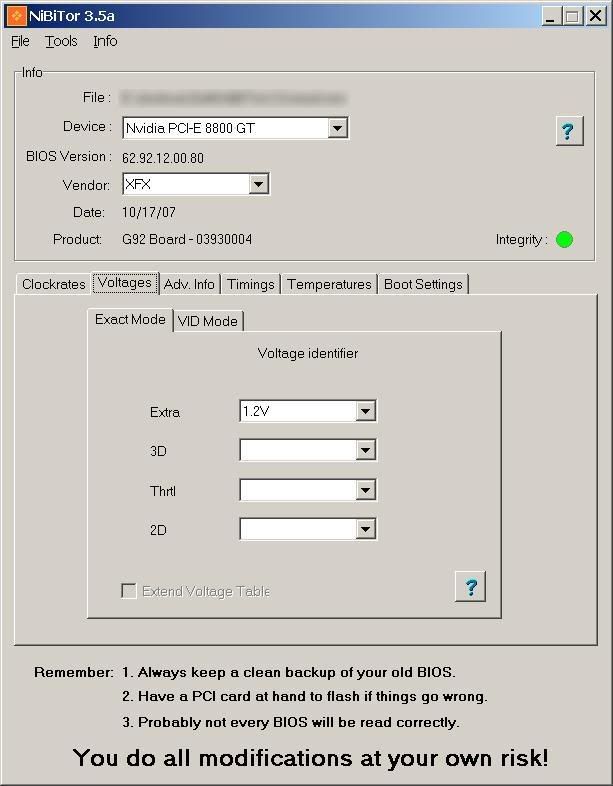
For 1.1v vGPU instead of 1.05v just choose 1.1v for the "extra" voltage under: Voltages-->Exact Mode
The "Extra" voltage is either left bank, set to 1.05v or set to 1.1v in the stock BIOS'. In the last situation your vGPU is already set to 1.1v in the bios.
Last edited by alexio; 02-16-2008 at 06:23 PM.
|
|
|
11-01-2007, 07:20 PM
|
#2
|
|
One-Eyed Killing Machine
Join Date: Sep 2006
Location: In an idiot-free environment
Posts: 5,030
|
The voltage setting isn't working as far as I know.
The timings might help a bit, but setting tighter timings could also be beneficial ( that depends )
__________________
Many thanks to: Sue Wu, Yiwen Lin, Steven Kuo, Vivian Lien, Joe Chan, Sascha Krohn, Joe James, Amy Deng, Jack Peterson, Hank Peng, Mafalda Cogliani, Olivia Lee, Marta Piccoli, Oliver Baltuch, Steffen Eisentein
ASUS CAN LICK MY COJONES
|
|
|
11-01-2007, 07:31 PM
|
#3
|
|
...you two characters
Join Date: Mar 2005
Location: Australia
Posts: 15,091
|
nvidia guys said these RAM sticks are DDR2000 rated but offically they run at 1800
if they are 2400 why can't i go past 2100 roughly LOL
i am definitely interested in RAM timings though
__________________
Team.AU
Got tube?

Quote:
Originally Posted by Gautam
In the old days, LN2 benching was "cheating". Then LOD was "cheating". And so on and so forth...
|
|
|
|
11-01-2007, 09:02 PM
|
#4
|
|
Registered User
Join Date: Jul 2004
Posts: 31
|
Whats the best tool to use for flashing these cards? I might give it a shot. My card current runs 42 idle / 58 load @ 758/1848/1040. I imagine I can push it more, but the core dies at around 775, the memory dies past 1060 and the shaders poop out past 1880.
|
|
|
11-01-2007, 09:06 PM
|
#5
|
|
One-Eyed Killing Machine
Join Date: Sep 2006
Location: In an idiot-free environment
Posts: 5,030
|
Quote:
Originally Posted by dinos22
nvidia guys said these RAM sticks are DDR2000 rated but offically they run at 1800
if they are 2400 why can't i go past 2100 roughly LOL
i am definitely interested in RAM timings though 
|
Maybe he's got a card with different ICs, and not the "suggested" 1ns modules from Samsung/Hynix.
__________________
Many thanks to: Sue Wu, Yiwen Lin, Steven Kuo, Vivian Lien, Joe Chan, Sascha Krohn, Joe James, Amy Deng, Jack Peterson, Hank Peng, Mafalda Cogliani, Olivia Lee, Marta Piccoli, Oliver Baltuch, Steffen Eisentein
ASUS CAN LICK MY COJONES
|
|
|
11-01-2007, 09:08 PM
|
#6
|
|
...you two characters
Join Date: Mar 2005
Location: Australia
Posts: 15,091
|
Quote:
Originally Posted by BenchZowner
Maybe he's got a card with different ICs, and not the "suggested" 1ns modules from Samsung/Hynix.
|
pretty sure initial reference design is all Gay-monda
eerrrrrr Qimonda
__________________
Team.AU
Got tube?

Quote:
Originally Posted by Gautam
In the old days, LN2 benching was "cheating". Then LOD was "cheating". And so on and so forth...
|
|
|
|
11-01-2007, 09:10 PM
|
#7
|
|
Registered User
Join Date: Jul 2004
Posts: 31
|
And so these Qimonda, what are they rated at ? 1ns? Its been a while since I did the conversion, isn't that 2ghz spec? Where is this 2400mhz spec coming from? Is that what qimonda rates the modules that come with the card at default?
|
|
|
11-02-2007, 05:21 AM
|
#8
|
|
The Blue Dolphin
Join Date: Nov 2004
Location: The Netherlands
Posts: 3,006
|
Quote:
Originally Posted by GregUMR
And so these Qimonda, what are they rated at ? 1ns? Its been a while since I did the conversion, isn't that 2ghz spec? Where is this 2400mhz spec coming from? Is that what qimonda rates the modules that come with the card at default?
|
Qimonda makes different bins for chips. The chips are of the exact same model, just like E6300 vs E6850, just a different speed bin. The fastest GDDR3 ICs Qimonda sells are rated 0.8ns (DDR2400) with slack timings. The stock timings of the 8800GT are somewhere between 1.0ns and 1.1ns spec. They are 1.0ns, but run DDR1800 (1.1ns speed) at 1.8v +-0.05v instead of the recommended 2.0v +-0.05v.
|
|
|
11-02-2007, 06:20 AM
|
#9
|
|
Registered User
Join Date: Jul 2004
Posts: 31
|
Ah, thanks for the clarification. I assume I should use nvflash 5.50?
|
|
|
11-02-2007, 09:38 AM
|
#10
|
|
The Blue Dolphin
Join Date: Nov 2004
Location: The Netherlands
Posts: 3,006
|
Quote:
Originally Posted by GregUMR
Ah, thanks for the clarification. I assume I should use nvflash 5.50?
|
Yes and use this command: nvflash -4 -5 -6 new_bios_name.rom
Make sure to have a PCI card at hand or you'll have to flash back blindly to recover the card if anything goes wrong. The chance is small but this is an untested bios. I've heard from other people that the 1.05v->1.1v vcore mod doesn't work, it won't bother you though. Please test it just for the timings
|
|
|
11-02-2007, 09:44 AM
|
#11
|
|
Registered User
Join Date: Jul 2004
Posts: 31
|
I used to flash vid cards all the time but its been a few years. Whats the backup current bios command and is there a nice cd/floppy image available for booting dos? I'm sure I can google it when I get off work and fine one. Do you know if it is even possible to get the voltage on a nvidia card to be increased through the bios? Man I'd love to get 1.1 or 1.15 volts on that core. I currently have 740/1836/1020 stable on atitool. I'm pretty sure with those volts I could get 775/1890/1020 stable. I don't have a pci card unfortunetely, but I can always boot blind as long as I've got a nice floppy or cd, I've done it before.  I do hope your bios isn't unstable tho!
|
|
|
11-02-2007, 10:00 AM
|
#12
|
|
The Blue Dolphin
Join Date: Nov 2004
Location: The Netherlands
Posts: 3,006
|
Quote:
Originally Posted by GregUMR
I used to flash vid cards all the time but its been a few years. Whats the backup current bios command
|
nvflash -b backup.rom
Quote:
|
and is there a nice cd/floppy image available for booting dos? I'm sure I can google it when I get off work and fine one.
|
http://www.abitfaq.it/files/drdflash.exe
Quote:
|
Do you know if it is even possible to get the voltage on a nvidia card to be increased through the bios?
|
I don't think the 8800GT has the required circuity. Older cards like the 6800GT and 6800U could supply up to 1.5v (or even 1.6v?) from 1/3/1.4v stock.
|
|
|
11-02-2007, 03:23 PM
|
#13
|
|
Registered User
Join Date: Jul 2004
Posts: 31
|
I just tried to use nvflash and it claims that it can't detect any nvidia adapters. A quick nvflash -a returns the same message. I've only got the 1 evga 8800gt in my computer. I checked my dfi lanparty sli-dr nf4 board and set the init display first to pci-express. This changed nothing. Anyone got some ideas?
I was using nvflash version 5.50. Does that not support the 8800gt or something?
|
|
|
11-02-2007, 06:37 PM
|
#15
|
|
Registered User
Join Date: Jul 2004
Posts: 31
|
Well I didn't want to flash without first successfully backing up the bios  I'll try this new version.
|
|
|
11-02-2007, 06:43 PM
|
#16
|
|
The Blue Dolphin
Join Date: Nov 2004
Location: The Netherlands
Posts: 3,006
|
Quote:
Originally Posted by GregUMR
Well I didn't want to flash without first successfully backing up the bios  I'll try this new version.
|
Nibitor can do this too, in windows. Latest version: http://www.mvktech.net/component/opt...19ab25724cb04/
Open Nibitor->tools->Read BIOS->Read into File
|
|
|
11-02-2007, 06:52 PM
|
#17
|
|
Registered User
Join Date: Jul 2004
Posts: 31
|
Ok, flashed successfully now as the new 5.57 recognized my 8800gt fine. I just reinstalled the drivers, loaded up rivatuner, 1050 mem ( which crashed on me before ) and atitool scan for artifacts....instant green artifacts and hardlock. I'll let ya know if I get any improvements in core or shader speed.
|
|
|
11-02-2007, 06:54 PM
|
#18
|
|
...you two characters
Join Date: Mar 2005
Location: Australia
Posts: 15,091
|
can you undervolt the GFX card
NOW that would also be worth flashing for for many
__________________
Team.AU
Got tube?

Quote:
Originally Posted by Gautam
In the old days, LN2 benching was "cheating". Then LOD was "cheating". And so on and so forth...
|
|
|
|
11-05-2007, 03:18 PM
|
#19
|
|
Registered User
Join Date: Nov 2007
Posts: 49
|
i haven't tried your bios but i made a custom one and tried it out,
voltage 1 and 2 set to 1.1v
voltage 3 and 4 set to 1v
this didn't help , my overclock on the core got worse, i haven't tried shaders
custom ram timings with default voltage: top-down, left-right,
40,52,30,16,16,12,12
it didn't help at all for the ram oc, looks like really crappy ram
|
|
|
11-09-2007, 03:45 PM
|
#20
|
|
Registered User
Join Date: Nov 2007
Posts: 23
|
Edit through NBitor and give it 1.2 volts. 1.15 should work too but I haven't tried it. This DOES work. I left specifics in the 8800GT volt mod thread. It looks like you raised idle and dropped 3D voltage. Edit the voltage table to give 1.2 volts and put 1.2 in extra and edit the VID for 1.2 for Extra and 3D.
Last edited by JKDC; 11-09-2007 at 03:48 PM.
|
|
|
11-10-2007, 09:48 AM
|
#21
|
|
I am Xtreme
Join Date: Oct 2006
Location: Kirghudu, Cowjackingstan
Posts: 180
|
Anyone tried setting 2D clocks/voltages and 3D clocks/voltages in BIOS?
I currently have 1.1V in Extra and 750core/1825shader/1000mem 15min AtiTool stable... Will try 1.2 next and see where she goes from here. 50C under water.
Found a thread where 2D/3D voltages were set separately. Wonder if anyone can confirm BIOS mod with DMM?
__________________
Spectre x32BV-Full HD // GA-EP45-UD3P F8F // C2D E8400 stock //
Buffalo Micron D9 DDR2 4x1Gb // HD4890 1GB // Intel Pro 1000PT PCIe //
Creative X-Fi // Intel x-18M 2x80Gb // WD1001FALS // TRUE-120 //
Antec Quattro 850W // Win7
Last edited by F@32; 11-10-2007 at 10:10 AM.
Reason: Found new info
|
|
|
11-10-2007, 10:34 PM
|
#22
|
|
Xtreme Member
Join Date: Nov 2007
Posts: 118
|
Quote:
Originally Posted by JKDC
Edit through NBitor and give it 1.2 volts. 1.15 should work too but I haven't tried it. This DOES work. I left specifics in the 8800GT volt mod thread. It looks like you raised idle and dropped 3D voltage. Edit the voltage table to give 1.2 volts and put 1.2 in extra and edit the VID for 1.2 for Extra and 3D.
|
What is stopping you from putting 1.4V in the BIOS? The chip?
|
|
|
11-10-2007, 10:56 PM
|
#23
|
|
Xtreme X.I.P.
Join Date: Aug 2004
Location: Chile
Posts: 4,231
|
Quote:
Originally Posted by JKDC
Edit through NBitor and give it 1.2 volts. 1.15 should work too but I haven't tried it. This DOES work. I left specifics in the 8800GT volt mod thread. It looks like you raised idle and dropped 3D voltage. Edit the voltage table to give 1.2 volts and put 1.2 in extra and edit the VID for 1.2 for Extra and 3D.
|
can you explain more how exactly you set over 1.1v with nibitor? i only see 1.1v as max available.
__________________
Last edited by metro.cl; 11-11-2007 at 01:08 AM.
|
|
|
11-11-2007, 01:49 AM
|
#24
|
|
Xtreme Guru
Join Date: Aug 2005
Location: Burbank, CA
Posts: 3,790
|
Tried the bios vmod, didnt work for me, no gain on OC.
__________________
|
|
|
11-11-2007, 05:17 AM
|
#25
|
|
I am Xtreme
Join Date: Oct 2006
Location: Kirghudu, Cowjackingstan
Posts: 180
|
Quote:
Originally Posted by metro.cl
can you explain more how exactly you set over 1.1v with nibitor? i only see 1.1v as max available.
|
I don't think that soft mod will feed more than 1.1v. We need someone to verify it with DMM.
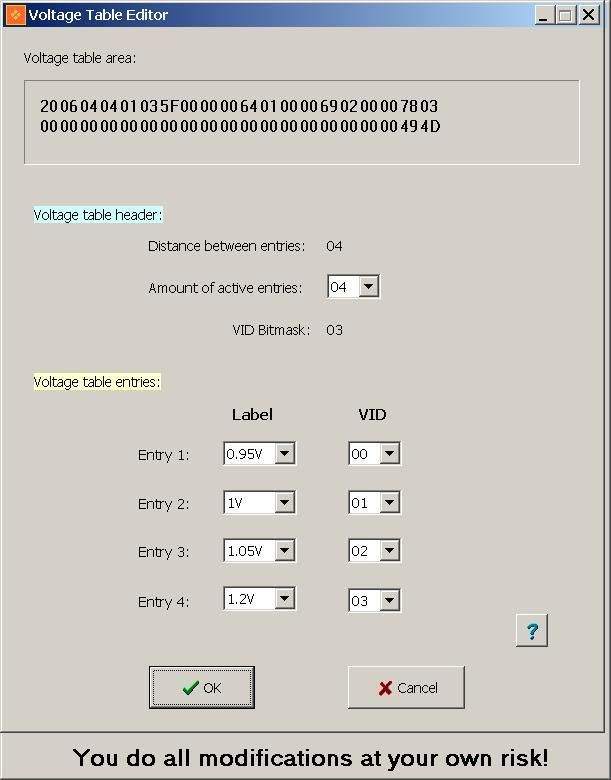
First you need to edit voltage table: Tools -> Voltage table editor (change entry 4 "VID 03" to 1.2v)
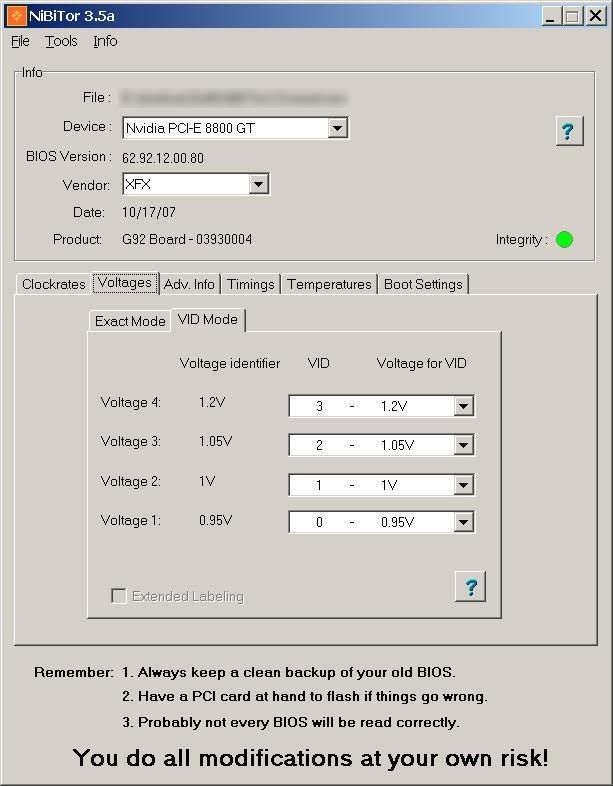
Next, update Voltages, VID mode first: Set 1.2v for "Voltage 4".
And lastly update Voltages, Exact mode "Extra":
I have set it to 1.2 and there is no difference in my OC from 1.1. I'm afraid volt mod is needed to get above that.
Next I will try to set 2D and 3D clocks. EDIT: I guess 8800GT has only Extra and no 3D, Throttle, 2D clocks in BIOS
Quote:
MKVTECH.NET
Well it is not possible, in fact since we had only some GeForce 8800 GT BIOS's we just introduced the Extra setting as the GeForce 8800 GT doesn't have 2D, Thrtl and 3D at all. It uses a new structure with a 4th performance level which is new and only that one is active. So in the next version we might just hide the 2D, Thrtl and 3D in NIBiTor for the GeForce 8800 GT as those are no longer used nor valid and will never work. And no don't blaim us... This is NVIDIA that made this change on the BIOS structure and logic.
|
__________________
Spectre x32BV-Full HD // GA-EP45-UD3P F8F // C2D E8400 stock //
Buffalo Micron D9 DDR2 4x1Gb // HD4890 1GB // Intel Pro 1000PT PCIe //
Creative X-Fi // Intel x-18M 2x80Gb // WD1001FALS // TRUE-120 //
Antec Quattro 850W // Win7
Last edited by F@32; 11-11-2007 at 06:25 AM.
Reason: Extra info
|
|
|
 |
|
| Thread Tools |
|
|
| Display Modes |
Rate This Thread |
Linear Mode
|
|
Posting Rules
|
You may not post new threads
You may not post replies
You may not post attachments
You may not edit your posts
HTML code is Off
|
|
|
All times are GMT -8. The time now is 03:03 PM.
|