XtremeSystems Forums

Go Back   XtremeSystems Forums > Hardware > Computer Cases

Reply
 
Thread Tools Rate Thread Display Modes
Old 12-11-2006, 10:52 PM   #1
bjp999
Registered User
 
Join Date: Sep 2006
Posts: 45
A Positive Look at the Antec Nine Hundred (900) Case

I bought an Antec 900 case for three reasons. I liked the styling, I liked the cooling, and I liked the price (it was on sale at CompUSA). I have slightly modded a few cases in the past to increase the fan size from 80mm to 120mm so know how to use a dremel, and planned from the beginning to mod the case. I know that there is another review (link) that is pretty negative on this case, but wanted to put forth an alternate opinion. It is possible (and not that difficult) to get a clean install in this case.

I planned to use the space behind the motherboard tray to hide wires. With some measuring I found that there was just enough room for most of the power supply cables. The adjacent area (on the back side of the drive bays) is deeper. I estimated (after looking at the case) that I could cable tie everything down so it would lay flat, and get the back panel of the case installed, but figured it would be tight.

STAGE 1 – DREMEL THE HOLES

I cut a number of holes in the motherboard tray after some measuring.


Holes and reasons (clockwise from upper left):
- 4 pin power connector on MB
- IDE and Molex power cables for DVD drives
- IDE connector on MB, PCI-E power cable
- SATA data cables, front panel cables (switch, USB, etc.)
- Power supply cables
- Factory cutout, unused
- Rear fan, SATA from J Micron

Here is a view of the back of the case (the area next to the drive bay is deeper)..


Notice two more holes. They are for passing through the power / data cables for the hard disks (more on this later).

There is one more hole, that I forgot to take a picture of. It is a slot just big enough for the led/power/reset, USB, Firewire, audio cables from the front panel. It is accessible from the top. The dremel wouldn't fit so I used a drill , chisel, and file. Here is a picture of the cables running into the back of the case to give you an idea of the positioning. BTW, I had to lengthen the front panel cable to reach the motherboard. The USB cable BARELY reached, and the firewire / audio cable are currently unattached (and probably too short).


Rear of case with cable ties installed. I used large holes so that I could put in new ones should I have to remove something!


I used a ton of cable ties so that I could flatten the wires on the rear.


STAGE 2 – DRIVE CAGE MODS

In order to get the clean appearance I wanted, I needed to mount the drives in the opposite direction as designed. I had to drill extra holes in the drive cages (in the picture below, note that the one cage has the extra holes while the other one is stock. I was able to use one of the stock holes.


The next step was to get the wires through.


This is a pretty good picture that was the result of some effort. I used a modular SATA Power connector and took off the connectors (more on this later). Routing was done in two steps. First the wires were run into the cage, and then the wires were fed through the case and the cage slid into place. What you see here is the final test to show this would really work. The drive cages CAN be removed from the case.

As I was doing this mod I realized that someone may have thought of this approach – there were little cutouts and holes in all the right places. If my SATA cables had been smaller, I would have gotten by without the hole in the case (notice the smaller rectangular cutouts).

Here it is from the case back.


Now it was time to mount the drives and plug them up.


Notice the bottom one isn’t plugged in! The right angle plug is too tall! Crap, where is the dremel?! I used a tiny little cutting bit and cut out a piece of the connector.


Putting the SATA power plugs back on was pretty easy. The are several plug styles, these are the easiest to remove and reapply.

Here I am reapplying the SATA power cables. I spaced them out at the right distance.


Here is the fully wired drive cage.


By the way, these right angle plugs are pretty important. Otherwise the drive might have to be pushed into the case a bit further to keep it from hitting the fan.

Here it is from the side with the fan installed on the front.


This is a pretty good shot of the extra drive holes. Notice the half moon cutout on the bottom. That hole was very helpful in coaxing the wires into the cage. Under the wires at the edge of the groove is a cutout necessary to slide this into the case. It was probably big enough but I used a nibbling tool to make it deeper (no picture).

Here is a picture after the drive cage is installed showing the cable bundle coming through to the back of the case.


STAGE 3 - INSTALLATION

Partially installed (power supply and misc cables)


Most of the wires are run in this picture. It’s a little hard to see, but all the power cables go through the large hole to the rear of the MB tray, except main power. The flat IDE cable (upper right) ran through this relatively small hole and folded nicely to come up in the center cutout. The floppy cable was an afterthought, but it folded and went down the same hole. (If ever I need a floppy, I can just remove the back panel and hook it up easily.) Notice the 4 pin power in the upper left, and the other cables run through the holes. The Enermax has nice long cables!

Here is a picture with the MB and lower drive cage installed.


Here is the rear of the case. The picture looks cleaner than I remember it seemed when doing it. The thickest part was dead center, around the black IDE cable tie. I was a little worried that the back of the case would have to be heavily smushed to get the rear panel installed, but it didn’t. It fit perfect, with zero buldge.


I never have to look at that!


Under the drive cages – here I keep the main power cable taught and installed a speaker (not standard).


Nice shot of the drives - 3x320G (bottom) + 750G (top)


RESULT

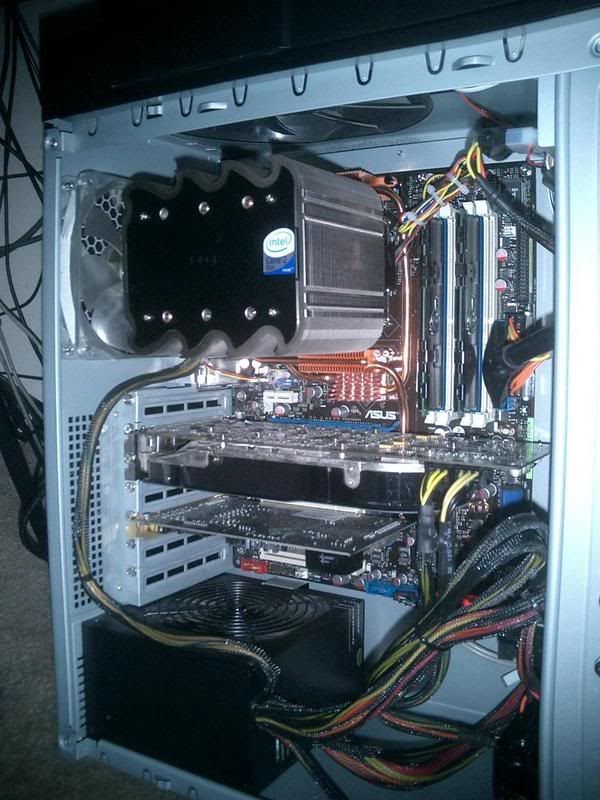
Here is the final result. Notice that the stock VGA cooler has been replaced with a HR-03 cooler, and the soundcard has been installed.

Panel removed:


Fan wiring in panel:


Panel Installed:


This picture really doesn't do it justice. I may try to take it outside and take the picture without flash. It looks very clean.

FINAL IMPRESSIONS

Computer cases are very personal decisions. Everyone’s priorities are different. Some people want absolute quiet, some people want radical styling, and some people want excellent cooling, or some combination of these and others. For me, this case was perfect. It could certainly have been easier if Antec had thought more about mounting the drives backwards and provided access to the area behind the tray without cutting. But with a little creativity and effort, I’m very happy with the result.

EDIT: I forgot to mention the cooling performance. My prior case (I'll post some pictures later on) had 4 120mm (100cfm each), and 1 92mm fan (not including PSU) and is a full tower with (what I thought) very good air flow. The Antec 900 dropped the temps 5C-6C (measured with TAT) off my E6600 core temps at load. This was much more than expected.

I’d give the case an 8/10.

Last edited by bjp999; 12-12-2006 at 07:09 AM.
bjp999 is offline   Reply With Quote
Old 12-12-2006, 03:47 AM   #2
NickS
I am Xtreme
 
NickS's Avatar
 
Join Date: Apr 2005
Location: Upstate, NY
Posts: 5,659
WOW, amazing job man! You make the Antec 900 look like an amazing case!
__________________
C2D E7200 @ 3.6GHz, 1.31v
Stock Q6600 HS/F
MSI P45 Neo3-FR
G.Skill 4GBPQ 8000's
Sapphire HD3870 Toxic 512MB
WD3200AAKS Single Platter
Enermax Liberty 500w
X-Fi XtremeMusic
CoolerMaster CM590
Vista Home Prem. X64 SP1
Westinghouse L2410NM
Logitech MX500, Saitek Eclipse, Logitech G25
NickS is offline   Reply With Quote
Old 12-12-2006, 04:56 AM   #3
gundamit
Xtreme Addict
 
gundamit's Avatar
 
Join Date: Sep 2004
Posts: 1,585
Very nice job on the wire management. Prices on the case vary quite a bit. Lowest price I could find with shipping was $110. I like the massive 200mm fan on top. Looks like the stock case is only one fan controller away from being a very good choice for an air cooled rig. If it goes on sale at Fry's with a rebate it could be a killer deal.

__________________
Bench rig now in constant change, with scraps thrown to my game rig. 2x8800GTX + e8400 = 29K 3DMark05
gundamit is offline   Reply With Quote
Old 12-12-2006, 12:06 PM   #4
afireinside
I am Xtreme
 
afireinside's Avatar
 
Join Date: Aug 2003
Location: Cherry Hill, NJ
Posts: 8,356
Send a message via AIM to afireinside Send a message via MSN to afireinside
Wow very good job with the cable management bro Last time I tried modding a case I ruined it so I left mine stock. Looks like the 900 is indeed a very good case choice is you are willing to mod it for easy wiring. Once again, good job!
__________________
Phenom II 940 BE / ASUS M4A79 / HD5770
3808mhz CPU 2720mhz NB | DDR1088 5-5-5-15 | 975/1300
afireinside is offline   Reply With Quote
Old 12-12-2006, 01:09 PM   #5
JoeBar
Xtreme Mentor
 
JoeBar's Avatar
 
Join Date: Aug 2003
Location: Athens, Greece
Posts: 3,412
I really don't like this case. But your job is top notch!
__________________
Asus Rampage II Extreme
Intel I7 920 D0 3930A @ 4.35GHz (20 X 217mhz) WC'ed
3 x 2GB G.Skill Trident 1600 @ 1740MHz (7-8-7-20-1T)
Asus 4870X2 @ 850/950MHz WC'ed
150gb Western Digital Velociraptor | 2 x 320gb Western Digital Caviar SE16 Raid0 | Seagate FreeAgent XTreme 1.5TB esata
Logitech Z-5500 | LG W2600HP 26" S-IPS LCD
MountainMods UFO | Zalman ZM-850HP psu


Watercooling setup:
1st loop -> Radiator: ThermoChill PA 120.3 | Pump: Laing DDC Ultra with Alphacool top | CPU: Swiftech Apogee XT |Chipset: Swiftech MCW-NBMAX | Tubing: PrimoFlex 1/2" Pro LRT
2nd loop -> Radiator: XSPC RX240 | Pump: Laing DDC Pro with Alphacool top |GPU: EK FC-4870X2| Tubing: PrimoFlex 1/2" Pro LRT
JoeBar is offline   Reply With Quote
Old 12-12-2006, 01:12 PM   #6
gr8golf
Xtreme Cruncher
 
gr8golf's Avatar
 
Join Date: Mar 2005
Posts: 912
Will you come over to my place and mod mine like that? This case has kept on growing on me - I love the airflow and noise levels but could really use a wiring cleanup like yours. I've got some new 120mm fans on the way and I'll be able to get rid of some molexes and fan control wires - so I'll rework some stuff then. Nice job!
__________________
Bloodrage || 920 || TRUE Black
3x 2GB HyperX 2000 ||
2x 300GB WD VR Raid 0 || 1TB Samsung F1
2x Samsung SH-S183L DVD/RW
MSI 4890 OC || LG 246WP
Sonar X-Fi || Klipsch 5.1
Lycosa || DeathAdder || Exact Mat
CM ATCS 840 || Seasonic M12D
Vista Ult x64 - Win 7 x64
gr8golf is offline   Reply With Quote
Old 12-12-2006, 03:08 PM   #7
NoRogeR
Xtreme Member
 
NoRogeR's Avatar
 
Join Date: Sep 2006
Location: Canada
Posts: 220
Send a message via MSN to NoRogeR
Great work!

I wish I had a case like that
NoRogeR is online now   Reply With Quote
Old 12-12-2006, 03:59 PM   #8
syne_24
Xtreme Cruncher
 
Join Date: Jun 2006
Location: San Jose
Posts: 1,286
Quote:
Originally Posted by JoeBar
I really don't like this case. But your job is top notch!

agreed..with all that work, imagine what you can do with a good case
__________________
For all your cooling needs: ShopPTS.com
System:
Rampage Formula // E8400 @ 4.0 (1.28v)
4x 1GB Ballistix Tracer @ 600 (5-5-5-15)
4x 74GB Raptors 16MB Raid-0 // Samsung F1 1TB
eVGA 8800GTS 512MB @ 800/1111/2000
Corsair HX620 // LG246WP
Cooling:
D-TEK FuZion // PA120.3 // 3x Yate Loon SH
MCW60GT // EK Multi-150 // DDC-2 + Petra's Top
syne_24 is offline   Reply With Quote
Old 12-12-2006, 04:26 PM   #9
DAK1640
Riptide's Dad
 
DAK1640's Avatar
 
Join Date: Oct 2005
Location: Chicago
Posts: 4,366
Send a message via AIM to DAK1640
Simply Outstanding...
__________________


Q6600 Farm with nVidia GPU's
DAK1640 is offline   Reply With Quote
Old 12-12-2006, 04:30 PM   #10
bjp999
Registered User
 
Join Date: Sep 2006
Posts: 45
Thanks everyone for your encouragement!

Here are some pictures of the prior “home”. It is a SuperMicro SC-750-A. I have modded this case big time! I created that HD cooler with the 120mm fan attached. There is a case front that goes over top that is not pictured.


And here is what it looked like on the inside:


What a mess! This case is being outfitted with my old P4 MB and a bunch of old hard disks as a backup server.

The first IDE ribbon cable I used got cut on the sharp edge of the dremeled hole in the case. I used some round felt pads to cushion the holes:


Here are some pictures of the IDE cable running to the DVD drives.


Finally a picture of the case front. I have since added the blank hard drive cover on the bottom.


Thanks again! Cheers!

Last edited by bjp999; 12-12-2006 at 04:45 PM.
bjp999 is offline   Reply With Quote
Old 12-13-2006, 09:20 AM   #11
icon57
Xtreme Enthusiast
 
icon57's Avatar
 
Join Date: Jan 2005
Location: daytona beach florida
Posts: 760
amazing wire management, thanks for some good ideas
__________________
Q6600 L723A (400 x9)
Evga 780i P02
G.skill 8 GB
Evga GTX 280
Raptor X (3) 150's Raid 0
Targen BZ 1100w
Thermalright Ultra Extreme 120
Vista Ultimate x64
Xclio
icon57 is offline   Reply With Quote
Old 12-13-2006, 09:26 PM   #12
justin_c
Xtreme Cruncher
 
justin_c's Avatar
 
Join Date: Sep 2006
Location: Canada
Posts: 1,057
look at that video card with the hr-03 bend! does the vf900 cause gfx card to bend that much?
justin_c is offline   Reply With Quote
Old 12-13-2006, 10:43 PM   #13
bjp999
Registered User
 
Join Date: Sep 2006
Posts: 45
Quote:
Originally Posted by justin_c
look at that video card with the hr-03 bend! does the vf900 cause gfx card to bend that much?
The card is not bent (I checked). Gravity may be affecting it a tiny bit with the extra weight of the HR-03 + fan. Look at the before picture with the factory fan contraption - I think it looks similar.

The HS + fan is doing an incredible job of cooling the GPU. I have not run any serious tests yet, but the GPU is idling at 35C. I've misplaced my notes of the before temps, but seems to me it was idling around 50C+ before, and that was after lapping the HS and using AS5 instead of std TIM. The graphics card is a Saphire radeon 1900xtx.
bjp999 is offline   Reply With Quote
Old 12-14-2006, 09:41 AM   #14
citat3962
Xtreme Member
 
Join Date: Aug 2006
Posts: 149
Quote:
Originally Posted by icon57
amazing wire management, thanks for some good ideas
Agreed for sure my Antec P180 will benefit from your hard work! I'm starting this same project now!
citat3962 is offline   Reply With Quote
Old 12-14-2006, 03:50 PM   #15
rob[GL]
Xtreme Enthusiast
 
rob[GL]'s Avatar
 
Join Date: Jan 2006
Posts: 564
hehe, that's not bent nearly as much as my crossfire master card, both cards liquid cooled with two maze4's, my top card is bent crazy!
__________________
Intel Core i7 920 @ 3.8GHz (183x21)
Gigabyte EX58-DS4 BIOS F5
3GB PATRIOT PC3-10666 DDR3
Sapphire Radeon HD4870 512MB BLACK
2x500GB SEAGATE SATA-II 7200.11
OCZ GameXstream 750W PSU
Antec Three Hundred Chassis
rob[GL] is offline   Reply With Quote
Old 12-14-2006, 06:35 PM   #16
bjp999
Registered User
 
Join Date: Sep 2006
Posts: 45
Quote:
Originally Posted by citat3962
Agreed for sure my Antec P180 will benefit from your hard work! I'm starting this same project now!
I'm looking forward to some pictures!

Three pieces of advice:
1. Take your time.
2. Wear eye protection and a mask while dremeling.
3. Measure twice cut once.
bjp999 is offline   Reply With Quote
Old 12-17-2006, 07:50 AM   #17
Leeghoofd
I am Xtreme
 
Leeghoofd's Avatar
 
Join Date: Sep 2006
Posts: 7,716
Will post some piccies tomorrow mate thx for the great ideas, my brain was already working on some of them before I saw your post...

I'll love it and wanna have one for my own


__________________
Question : Why do some overclockers switch into d*ckmode when money is involved

Last edited by Leeghoofd; 12-18-2006 at 12:55 PM.
Leeghoofd is offline   Reply With Quote
Old 12-19-2006, 05:52 AM   #18
bjp999
Registered User
 
Join Date: Sep 2006
Posts: 45


Cool! I like the way you ran the main power to the rear. Think how bad the inside of the case would look with all those power cables tied up in knots on the visible side.

The blue fan looks cool in the panel. Maybe I'll get one too.

Thanks for sharing!
bjp999 is offline   Reply With Quote
Old 12-19-2006, 09:26 AM   #19
trans am
Xtreme Mentor
 
trans am's Avatar
 
Join Date: Jul 2004
Location: 10009
Posts: 2,888
Best wire management I've ever seen. Really neat and clean job! I learned a lot. THnks
__________________
current computer crap:
I3 530 L939B675/ 540 L939B694
asus maximus III formula p55
gigabyte GA-P55A-UD6
single Diamond 5850 flashed to 5870 920/1300
lsi 9260-4I
2 x 64gb indilinx barfoot supertalent ME raid0
ST1000-P psu
gtx480/apogeeXT/mcp655 (bitspower d5/655 mod)
trans am is online now   Reply With Quote
Old 12-19-2006, 03:18 PM   #20
Leeghoofd
I am Xtreme
 
Leeghoofd's Avatar
 
Join Date: Sep 2006
Posts: 7,716
Well I preferred the rear fan on the sidepanel to cool the mobo passive cooling some more, also because the 200mm fan sucks all the hot air out.
If I can believe Everesthome the fan took off 4°C of the mobo temps (it's on medium setting) not really waauw but enough to put it there for me.

Only thing that annoys me is the filtermousse I placed in front of the bottom front fan, it gives a kind of slight wistling noise hehehhe

Well my friend is pretty happy with his 3200mhz E6400 and 8800GTS, noise is very bareable and temps stay great (coretemp under orthos prime 49°C)

I'm off to build my own case within a week when my Ac ryan parts arrrive , hope to build a sortlike case but just a bit wider to enable to watercool it !!

I was pretty happy to work with the antec case, took some fiddling and thinking but he overall result and performance is awesome...
__________________
Question : Why do some overclockers switch into d*ckmode when money is involved
Leeghoofd is offline   Reply With Quote
Old 12-22-2006, 07:49 PM   #21
GAR
Xtreme Guru
 
Join Date: Aug 2005
Location: Burbank, CA
Posts: 3,790
Send a message via AIM to GAR


__________________
GAR is offline   Reply With Quote
Old 12-24-2006, 07:05 AM   #22
bjp999
Registered User
 
Join Date: Sep 2006
Posts: 45
Nice job, and no dremeling! The 8800GTX definitely fits. Is there room for a drive right behind it? (Looks like maybe not from the photo, but hard to tell).

Did you try hiding that bundle of power cables in the bottom hard drive slot?
bjp999 is offline   Reply With Quote
Old 01-01-2007, 04:04 AM   #23
Sharpy
Registered User
 
Join Date: Dec 2006
Location: Northern Ireland
Posts: 2
Thanks to the original starter of this thread i made my own attempt at modding my nine hundred in a similar way.

Here's a comparitive before and after shot


Heres a shot of the back of the mobo tray, i cut 4 holes to run the cabling though, the only problem is that my GameXstream psu didnt have a 4 pin cable long enough to run all the way up the back of the case to the socket so it had to be run inside the case.


Anyway thanks again to the thread starter for the idea and im well pleased with the result.

Sharpy is offline   Reply With Quote
Old 01-01-2007, 12:48 PM   #24
m0da
Xtreme Enthusiast
 
m0da's Avatar
 
Join Date: Jul 2005
Location: ATX
Posts: 971
Send a message via AIM to m0da
crazy job, very nice!
just found a new future project
thx
__________________
m0da is offline   Reply With Quote
Old 01-02-2007, 03:58 PM   #25
GaryD
Registered User
 
Join Date: Jan 2007
Posts: 3
I have decided to slowly gather parts for my new sytem, and decided on the Antec 900 case, so I am very interested in the mods presented. I ordered the case and I am doing my early homework on ideas and issues. Some much appreciated interesting and creative work is described here. I have one question though. As near as I can tell it appears that the new holes in the sideplate were deburred. However, I worry about the edges of the holes still being sharp enough to abrade the wires over time. Although I would not expect a lot of vibration, there will some, as well as air moving constantly. Some of the wires appear to be pretty tightly bent around the new openings. Is abrasion something to really worry about? Did any of you consider some kind of grommet or edge protection around the new holes? Did any of you consider using chassis punches for some of the holes to get a cleaner cut? (I know they are fairly expensive.)
GaryD is offline   Reply With Quote
Reply

Tags
antec 900, modding

Thread Tools
Display Modes Rate This Thread
Rate This Thread:

Posting Rules
You may not post new threads
You may not post replies
You may not post attachments
You may not edit your posts

BB code is On
Smilies are On
[IMG] code is On
HTML code is Off
Forum Jump


All times are GMT -8. The time now is 12:33 PM.


Powered by vBulletin® Version 3.7.6
Copyright ©2000 - 2010, Jelsoft Enterprises Ltd.
XtremeSystems