MMM
Page 18 of 182 FirstFirst ... 8151617181920212868118 ... LastLast
Results 426 to 450 of 4539

Thread: Testing / comparing : Intel D975XBX2 / Asus P5B DX ***56K WARNING***

  1. #426
    Xtreme Enthusiast
    Join Date
    Dec 2006
    Location
    Denver, CO US
    Posts
    873
    Quote Originally Posted by malachi1313
    Ya'll lost me there. What would I need to change to get different memory dividers and which is the best?? Man I swear DDR2 is complicated....
    For me, 1:1 is the best compromise between performance and stability with the memory I have. I set the memory reference frequency to 266 and the memory freq to 533. Since I have my FSB set at 401, this makes my memory freq also 401 (I.E. DDR2-802) which is only a fraction above it's rated speed.

    Remember the BIOS reports "Memory Frequency" as the DDR2 equivalent not the actual frequency which is half that. cpuz will report the actual frequency.

    The formula is (ref / (mem / 2))

    REF MEM RATIO
    333 800 5/6
    333 667 1/1
    333 533 5/4
    333 400 5/3
    266 800 2/3
    266 667 4/5
    266 533 1/1
    266 400 4/3
    200 800 1/2
    200 667 3/5
    200 533 3/4
    200 400 1/1
    133 800 1/3
    133 667 2/5
    133 533 1/2
    133 400 2/3


    **NOTE: Not all of the above combinations will boot!!


    BERT: Intel DX48BT2, E8500, 2x 1G OCZ Plat DDR3-1800, 2xATI HD 3850, 450x9.5
    ERNIE: Intel DX38BT, Q9300, 2x 1G OCZ Plat DDR3-1800, ATI HD 3650, 400x7.5
    RALPH,ELMO,MONSTER: Intel 975XBX2, Q6600, 2x 1G OCZ DDR2-1066, 356x9
    COOKIE,OSCAR: DFI BloodIron, Q6600, 2x 1G OCZ DDR2-1066, stock

    GTJ's Intel 975XBX2 Bad Axe 2 Guide including the Memory Calculator
    GTJ's Intel DX38BT/DX48BT2 Bone Trail Memory Calculator


  2. #427
    Xtreme Enthusiast
    Join Date
    Dec 2006
    Location
    Denver, CO US
    Posts
    873
    Quote Originally Posted by heikis
    is it important which SATA port I use? there are those 4 black ones and the coloured ones belo them (blue). at the moment im using the black one.
    The black ones are connected directly to the ICH7 southbridge. They're going to give you the best performance and the most options for RAID if you decide to use it. The blue ones are connected to a secondary Marvell SATA controller.


    BERT: Intel DX48BT2, E8500, 2x 1G OCZ Plat DDR3-1800, 2xATI HD 3850, 450x9.5
    ERNIE: Intel DX38BT, Q9300, 2x 1G OCZ Plat DDR3-1800, ATI HD 3650, 400x7.5
    RALPH,ELMO,MONSTER: Intel 975XBX2, Q6600, 2x 1G OCZ DDR2-1066, 356x9
    COOKIE,OSCAR: DFI BloodIron, Q6600, 2x 1G OCZ DDR2-1066, stock

    GTJ's Intel 975XBX2 Bad Axe 2 Guide including the Memory Calculator
    GTJ's Intel DX38BT/DX48BT2 Bone Trail Memory Calculator


  3. #428
    Xtreme Member
    Join Date
    Mar 2005
    Location
    GO CANUCKS GO!!!
    Posts
    400
    Quote Originally Posted by xgman
    ouch, even in compatability mode? H m m What to use then? IDCC work in Vista?

    Let me rephraise that. IDU does work in compatability mode but IDCC keeps on crashing with an error that IDCC.exe needs to close.

    i7 3770K
    ASUS P8Z77-V Deluxe
    16GB Kingston HyperX DDR3-1600
    240GB HyperX SSD
    EVGA GTX 680 SC+
    X-Fi Fatality
    Corsair AX1200


  4. #429
    Registered User
    Join Date
    Dec 2004
    Location
    The Netherlands
    Posts
    17
    How do I change the Vcore? When I set the Vcore in the BIOS the current Vcore doesn't change.. Even when I return to the BIOS after saving the settings it shows i.e. 1.4v at the selector, but the Current Vcore stays 1.325. In Windows the IDU measures a Vcore just over 1.2v (1.212 or 1.235) so I want it higher.

  5. #430
    Xtreme Mentor
    Join Date
    Jun 2002
    Posts
    3,336
    Quote Originally Posted by NoepZor
    How do I change the Vcore? When I set the Vcore in the BIOS the current Vcore doesn't change.. Even when I return to the BIOS after saving the settings it shows i.e. 1.4v at the selector, but the Current Vcore stays 1.325. In Windows the IDU measures a Vcore just over 1.2v (1.212 or 1.235) so I want it higher.
    huh? That would be a deal killer. Does this happen to anyone else?
    {2012 27imac-3.4i7-680mx-32gb ram-768SSD+External TB Samsung840pro ssd + TB velociraptors-Moto828mkIII/Marantz/Amphion Sound-HPzR30w 2nd monitor}

  6. #431
    Xtreme Member
    Join Date
    Mar 2005
    Location
    Netherlands
    Posts
    256
    IDU does report a voltage change over here. CPUZ realy likes to report 1,163v. and that's the only number you'll get to see

    CPU Voltage Override is 1.4500 in bios, but Current processor voltage remains 1.3250v. Maybe the bios shows the default voltage? My c2d box states max 1,35v.

    I can't measure the real voltage because of the cooler above the measuring point.

  7. #432
    Xtreme Enthusiast
    Join Date
    Dec 2006
    Location
    Denver, CO US
    Posts
    873
    Quote Originally Posted by xgman
    huh? That would be a deal killer. Does this happen to anyone else?
    Yep but it IS changing. I checked it in Linux.


    BERT: Intel DX48BT2, E8500, 2x 1G OCZ Plat DDR3-1800, 2xATI HD 3850, 450x9.5
    ERNIE: Intel DX38BT, Q9300, 2x 1G OCZ Plat DDR3-1800, ATI HD 3650, 400x7.5
    RALPH,ELMO,MONSTER: Intel 975XBX2, Q6600, 2x 1G OCZ DDR2-1066, 356x9
    COOKIE,OSCAR: DFI BloodIron, Q6600, 2x 1G OCZ DDR2-1066, stock

    GTJ's Intel 975XBX2 Bad Axe 2 Guide including the Memory Calculator
    GTJ's Intel DX38BT/DX48BT2 Bone Trail Memory Calculator


  8. #433
    Registered User
    Join Date
    Dec 2004
    Location
    The Netherlands
    Posts
    17
    With the new BIOS the voltage changes
    But I can't test if the CPU is stable at a little more juice because it's running too hot on boxed cooler. I turned the window open of my room to cool down the ambient temperature and test

  9. #434
    Xtreme Member
    Join Date
    Dec 2005
    Location
    ESTONIA
    Posts
    431
    hmm, funny because I have the same problem. luckily I wont be needing more than the default vcore.

    but i will measure if it will change the vcore or not.
    Intel C2D E8400 @ 4000MHz ~1,192V
    Thermaltake Big Typhoon 120
    MSI P35 NEO2-FIR (bios v1.8)
    ADATA 2*2GB DDR2 800+ EE
    ASUS Geforce 8800GT 512MB + Accelero S1
    Seasonic S12-600

  10. #435
    Xtreme Member
    Join Date
    Sep 2006
    Posts
    110
    Quote Originally Posted by Blue078
    Any cold boot problems with this board ? The kind you have to hit reset twice to post when overclocking.
    same here. because i only use onboard power button i cant even reset. its prettey annoying.

  11. #436
    Registered User
    Join Date
    Nov 2006
    Posts
    49
    Quote Originally Posted by gtj
    For me, 1:1 is the best compromise between performance and stability with the memory I have. I set the memory reference frequency to 266 and the memory freq to 533. Since I have my FSB set at 401, this makes my memory freq also 401 (I.E. DDR2-802) which is only a fraction above it's rated speed.

    Remember the BIOS reports "Memory Frequency" as the DDR2 equivalent not the actual frequency which is half that. cpuz will report the actual frequency.

    The formula is (ref / (mem / 2))

    REF MEM RATIO
    333 800 5/6
    333 667 1/1
    333 533 5/4
    333 400 5/3
    266 800 2/3
    266 667 4/5
    266 533 1/1
    266 400 4/3
    200 800 1/2
    200 667 3/5
    200 533 3/4
    200 400 1/1
    133 800 1/3
    133 667 2/5
    133 533 1/2
    133 400 2/3


    **NOTE: Not all of the above combinations will boot!!
    Thanx man!!!!

  12. #437
    Xtreme Member
    Join Date
    Jun 2006
    Location
    Chicago, IL
    Posts
    480
    What max fsbs are you guys experiencing at 9x or 10x multis? It doesnt matter to me if its 1333 strap either.

    Asus Commando 6600 week 28B @4.2 1.475v(1.475 in bios) 525x8 4-4-3-4 1150mhz 2.3v
    2x1gb Patriot Pc-8000 Xbl | X1600 Pro | 2 Wd 36gb Raptors
    Seagate 750gb | Vapoli V2000B SS | Pc p&c Black Silencer 750


    Quote Originally Posted by chron
    Its DDR2 - doesn't it need to be ran with 2 sticks at a time?

  13. #438
    Xtreme Enthusiast
    Join Date
    May 2006
    Posts
    675
    Well I got my board on thrus, and began preping it for christmas when i recieve the last part of my build, my gfx card. Only problem is I cannot seem to remove the sb heatsink. I don't want to break something, I mean its brand new. Is there anyway to remove it ?
    Core2Duo E6600 @ 3.0 - Load @ 32c°| Gigabyte P35 DS3P | 2gb Crucial Ballistix Pc2-8500| eVGA 8800GTX| X-fi Fatal1ty | OCZ GameXStream 600w | Custom Watercooled | Custom-built Case


    Dtek Fuzion | DD Maze4 Acetal | Swiftech MCR-320 | DD D5


    3dMark01 3dMark05 3dMark06 Aq3 SuperPi


    Quote Originally Posted by Movieman View Post
    I don't beleive in passive cooling.

  14. #439
    Xtreme Enthusiast
    Join Date
    Dec 2006
    Location
    Denver, CO US
    Posts
    873
    Quote Originally Posted by Vice
    Well I got my board on thrus, and began preping it for christmas when i recieve the last part of my build, my gfx card. Only problem is I cannot seem to remove the sb heatsink. I don't want to break something, I mean its brand new. Is there anyway to remove it ?
    It's pretty tough. With the wire retaining spring still in place you should be able to rotate the heatsink a little to break the stiction. Then push down on one of the spring ends and rotate the whole thing out from under the wire loop.

    Honestly though, it's not worth it to water cool it or even change the heatsink out. Mine's just warm even with the fans off. I just took it off, put some better TIM on it and stuck it right back on.


    BERT: Intel DX48BT2, E8500, 2x 1G OCZ Plat DDR3-1800, 2xATI HD 3850, 450x9.5
    ERNIE: Intel DX38BT, Q9300, 2x 1G OCZ Plat DDR3-1800, ATI HD 3650, 400x7.5
    RALPH,ELMO,MONSTER: Intel 975XBX2, Q6600, 2x 1G OCZ DDR2-1066, 356x9
    COOKIE,OSCAR: DFI BloodIron, Q6600, 2x 1G OCZ DDR2-1066, stock

    GTJ's Intel 975XBX2 Bad Axe 2 Guide including the Memory Calculator
    GTJ's Intel DX38BT/DX48BT2 Bone Trail Memory Calculator


  15. #440
    Xtreme Enthusiast
    Join Date
    May 2006
    Posts
    675
    Yeah, I'm not planning on wc'ing the sb.. thats pointless, I just want to change out the heatsink with a copper one and replace the thermal paste w/ as5
    Core2Duo E6600 @ 3.0 - Load @ 32c°| Gigabyte P35 DS3P | 2gb Crucial Ballistix Pc2-8500| eVGA 8800GTX| X-fi Fatal1ty | OCZ GameXStream 600w | Custom Watercooled | Custom-built Case


    Dtek Fuzion | DD Maze4 Acetal | Swiftech MCR-320 | DD D5


    3dMark01 3dMark05 3dMark06 Aq3 SuperPi


    Quote Originally Posted by Movieman View Post
    I don't beleive in passive cooling.

  16. #441
    INTEL inside
    Join Date
    Oct 2004
    Location
    Québec, Canada
    Posts
    3,258
    changing the SB cooling won't give better performances/OC
    retired computer enthusiast

  17. #442
    Xtreme Member
    Join Date
    Nov 2004
    Posts
    317
    my jingting force chipset heatsink cant be used for this mobo.. so sad
    Intel Core i7 870,
    MSI P55 GD65,
    4x 2048mb DDR3 1600 Corsair Dominator,
    Sapphire 5870,
    Corsair HX850W,
    2x 640GB WD sata II,
    1x 1TB WD Sata III,

  18. #443
    Xtreme Enthusiast
    Join Date
    May 2006
    Posts
    675
    But itll make me feel better.. aluminum is the bane of my existance
    Core2Duo E6600 @ 3.0 - Load @ 32c°| Gigabyte P35 DS3P | 2gb Crucial Ballistix Pc2-8500| eVGA 8800GTX| X-fi Fatal1ty | OCZ GameXStream 600w | Custom Watercooled | Custom-built Case


    Dtek Fuzion | DD Maze4 Acetal | Swiftech MCR-320 | DD D5


    3dMark01 3dMark05 3dMark06 Aq3 SuperPi


    Quote Originally Posted by Movieman View Post
    I don't beleive in passive cooling.

  19. #444
    Xtreme Mentor
    Join Date
    Jul 2004
    Location
    Brooklyn, NY
    Posts
    2,771
    so wats the consensus on this board? good bad ugly? Consistently over 400 fsb?
    Asus Rampage Formula X48
    Intel Q9650 @ 4.33GHZ
    OCZ Platinum DDR2-800
    Palit 4870x2
    Creative Xi-Fi Extreme Music
    Corsair HX1000
    LL 343B Case
    Thermochill 120.3
    2xMCP355
    KL 350AT
    KL 4870X2 FC WB
    DD Chipset Block

  20. #445
    INTEL inside
    Join Date
    Oct 2004
    Location
    Québec, Canada
    Posts
    3,258
    Quote Originally Posted by situman
    so wats the consensus on this board? good bad ugly? Consistently over 400 fsb?
    it's VERY good
    I'm convinced many BA2 users could say the same
    retired computer enthusiast

  21. #446
    Xtreme Member
    Join Date
    Mar 2005
    Location
    GO CANUCKS GO!!!
    Posts
    400
    Excellent board....second bios only which is impressive.

    i7 3770K
    ASUS P8Z77-V Deluxe
    16GB Kingston HyperX DDR3-1600
    240GB HyperX SSD
    EVGA GTX 680 SC+
    X-Fi Fatality
    Corsair AX1200


  22. #447
    Xtreme Enthusiast
    Join Date
    Oct 2004
    Location
    Old Vizima
    Posts
    952
    Quote Originally Posted by situman
    so wats the consensus on this board? good bad ugly? Consistently over 400 fsb?
    I like it. Fast and stable. I can do DDR2 1000 4-4-4-4 @ 3.6GHz which isn't bad for i975x:


  23. #448
    Registered User
    Join Date
    Apr 2004
    Location
    Tallinn/Estonia
    Posts
    56
    Quote Originally Posted by malficar
    I like it. Fast and stable. I can do DDR2 1000 4-4-4-4 @ 3.6GHz which isn't bad for i975x:
    Your screenshot is too big
    this one is 55,7KB and is with my old Bad Axe:


    Even old Bad Axe is very nice for OC, Intel finaly make mobo for OC
    And new Bad Axe is even better, it was big suprise to see Vdimm@2,8V option in INTEL mobo
    And it works too :
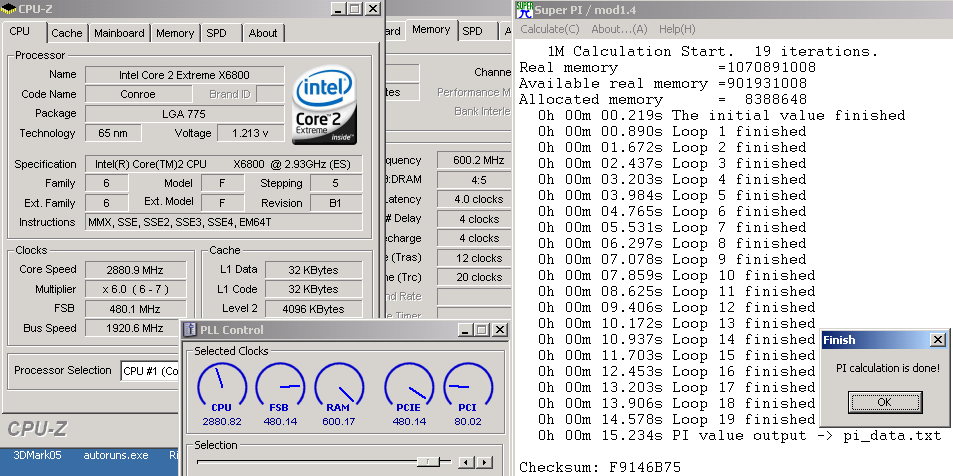
    Single FatBody testing, not maxed:


    One thing more- the old one has cold bug- some vcore related chip give up @ -70 -80*C and modo just not starting.
    With the new one this problem is gone- I found that is big PWM ISLxxxx chip is newer now- maybe thats helps.
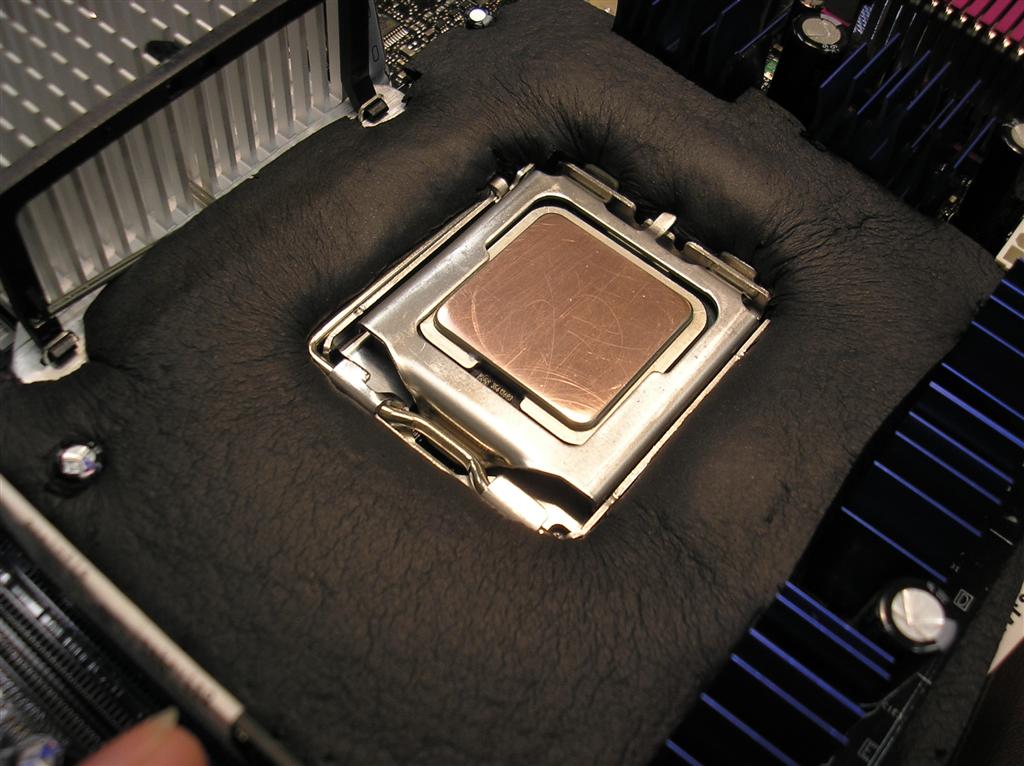
    This is my Bad Axe isolated:

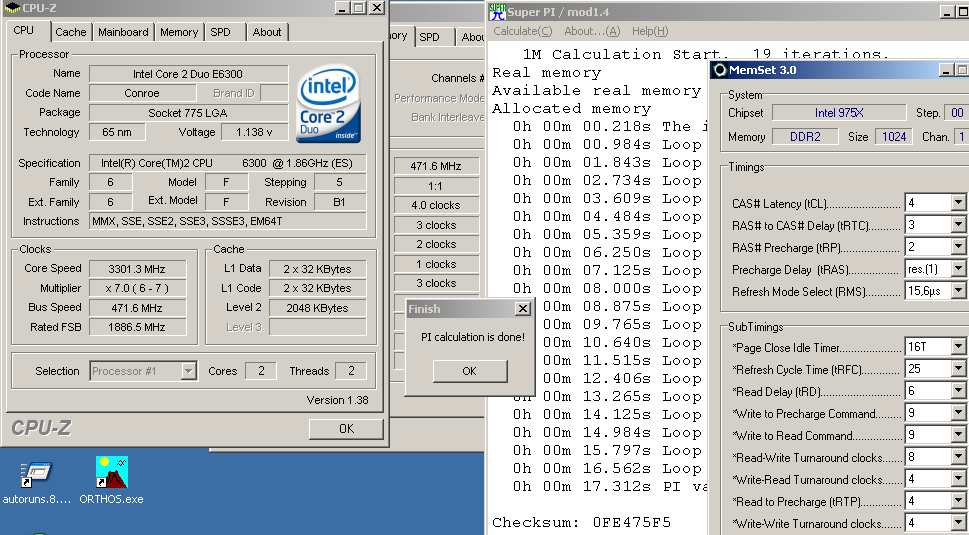
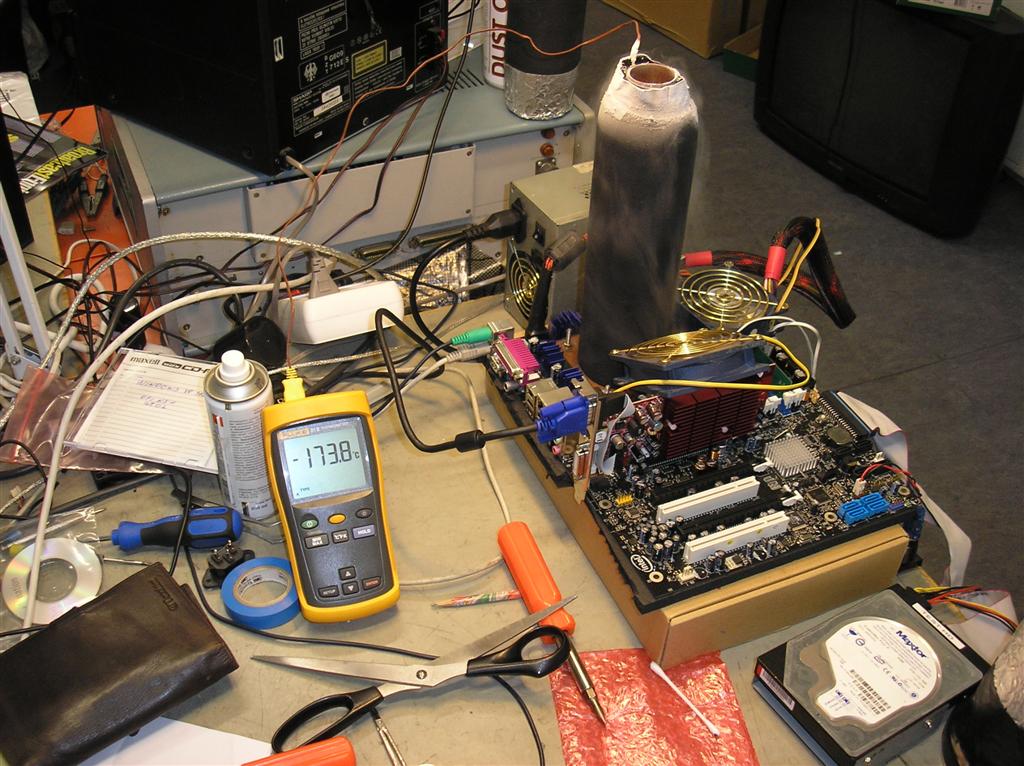
    CPU is E6700ES- it can stand down to -150*C in idle and -175*C under load :thumbsup:
    S-Pi 8M running@ -174*C:

    Only bad thig is that this mobo use new clockgen chip and this is too new to clockgen/CPUFsb/Systool etc prog- I cant change fsb in Windows. yet.

  24. #449
    Xtreme Enthusiast
    Join Date
    Oct 2004
    Location
    Old Vizima
    Posts
    952
    Quote Originally Posted by Jaan
    Your screenshot is too big
    this one is 55,7KB and is with my old Bad Axe:
    Let's see what you can do on a 9x multi.

  25. #450
    Registered User
    Join Date
    Apr 2004
    Location
    Tallinn/Estonia
    Posts
    56
    Quote Originally Posted by malficar
    Let's see what you can do on a 9x multi.
    Why 9? 9x480 is just 4320MHz, thats too small nr. with LN2 cooled X6800
    This cpu do up to 4,9GHz under LN2@ -70*C (only -70 becouse then I dont find that cold bugged Vcore chip yet )
    1M@4,9GHz, mem@ 470 was 10,6sec
    I dont have this chip on hand now, but maybe I can borrow this from friend to try this on new mobo..

Page 18 of 182 FirstFirst ... 8151617181920212868118 ... LastLast

Bookmarks

Bookmarks

Posting Permissions

  • You may not post new threads
  • You may not post replies
  • You may not post attachments
  • You may not edit your posts
  •