

Thanks burebista. I thought it might work on the 3000 series but I wasn't expecting to see it work on the 2000 series.
It does not work on my 1950XT.


Thanks burebista. I thought it might work on the 3000 series but I wasn't expecting to see it work on the 2000 series.
It does not work on my 1950XT.


Thats a great idea, BobI`m about GPU monitoring.
Intel Q9650 @500x9MHz/1,3V
Asus Maximus II Formula @Performance Level=7
OCZ OCZ2B1200LV4GK 4x2GB @1200MHz/5-5-5-15/1,8V
OCZ SSD Vertex 3 120Gb
Seagate RAID0 2x ST1000DM003
XFX HD7970 3GB @1111MHz
Thermaltake Xaser VI BWS
Seasonic Platinum SS-1000XP
M-Audio Audiophile 192
LG W2486L
Liquid Cooling System :
ThermoChill PA120.3 + Coolgate 4x120
Swiftech Apogee XT, Swiftech MCW-NBMAX Northbridge
Watercool HeatKiller GPU-X3 79X0 Ni-Bl + HeatKiller GPU Backplate 79X0
Laing 12V DDC-1Plus with XSPC Laing DDC Reservoir Top
3x Scythe S-FLEX "F", 4x Scythe Gentle Typhoon "15", Scythe Kaze Master Ace 5,25''
Apple MacBook Pro 17` Early 2011:
CPU: Sandy Bridge Intel Core i7 2720QM
RAM: Crucial 2x4GB DDR3 1333
SSD: Samsung 840 Pro 256 GB SSD
HDD: ADATA Nobility NH13 1GB White
OS: Mac OS X Mavericks


Works like a charm for me
Weissbier - breakfast of champions
Thanks for the feedback. I might have to do a minor adjustment to better support CrossFire. At the moment when a GPU goes to sleep on a x2 system, RealTemp might not be able to read the temperature history of both cores. I'll see if I can find a work around for that issue without having to wake up that core.
GPU-Z will always be my first choice for GPU monitoring but RealTemp looks OK as a second choice when you just need to see the temps.
Unclewebb:
Have you published a guide regarding idle calibration & TJ Max settings? I suspect that I need to tweak my settings...
cooldown.jpg
THANK YOU for the great tools.
Last edited by Raptor-X; 11-21-2009 at 04:48 PM. Reason: spelling
Raptor-X: Your welcome. Don't let the beta word scare you. RealTemp 3.46 is looking like a good one.
The download also includes some of the other tools I've been working on like i7 Turbo.
http://www.fileden.com/files/2008/3/...alTempBeta.zip
There is an old guide about calibrating RealTemp that was written with the 45nm Core 2 in mind but it hasn't been updated. CompuTronix over on Tom's Hardware has an extensive guide that you might want to check out.
I find that the sensors on the i7-900 series are excellent compared to the 45nm Core 2 Duo and Quad sensors so calibrating is much easier. I don't find getting too technical about calibrating to be worth it anymore. The sensors on your i7-960 seem to be working just like all of the other Core i7-920 CPUs I've seen. When installed correctly, almost all of them follow a very familiar pattern.
Core 0 tends to be the most accurate so I always recommend to just leave it as is. At full load running Prime 95 Small FFTs, core 3 always reports that it is running 5C cooler. If you haven't read the last 100 pages of this forum in your spare time then somewhere I came to the conclusion that Intel very likely sets TJMax slightly higher on this core to better control thermal throttling so all 4 cores don't reach the throttling point at the exact same time which might noticeably kill performance. The two center cores are usually somewhere in the middle and often times very similar to core 0.
Your numbers show slight differences in the slope of the temperature curves of the first 3 but they're all so similar that it's not worth trying to make them perfect with calibration factors. The quick calibration I've come up with is to simply adjust TJMax. I'd set TJMax to 100, 99, 100, 104. This should get core 0 and core 1 to line up a little better from idle to full load. Core 2 shows less Distance to TJMax at idle compared to core 0 but it shows slightly more at full load. Actual TJMax might be closer to 101 or 102 on this core but the slope error cancels some of that out at idle so I think you should just set it to 100 like core 0 and keep things simple. Core 3 shows a 4C difference at idle compared to core 0 and that difference grows to 5C at full load. Once again there is a slight amount of slope error so if you want your idle temps to look nice set Core 3 to TJMax = 104C and if you want your full load temps to be accurate then set it to 105C.
A degree one way or the other isn't worth worrying about. Slight differences in how you applied your thermal paste might be responsible for some of these slight differences but I wouldn't waste time re-doing it unless you think that you really botched it. The truth is that you can apply your paste 101 times and lap your CPU and heatsink until your hand hurts but the 5C difference between core 3 and core 0 is not going to go away. Do a quick calibration adjustment or just ignore it like everyone else seems to do.
Last edited by unclewebb; 11-21-2009 at 09:07 PM.
Unclewebb:
Thank you! As always, your efforts are greatly appreciated. I will give 3.46 a spin tonight.
Regards,
Raptor

Unclewebb:
Why RealTemp GT show only 3 cores ?

Need a Gigabyte latest BIOS?
Z370 AORUS Gaming 7,
GA-Z97X-SOC Force ,Core i7-4790K @ 4.9 GHz
GA-Z87X-UD3H ,Core i7-4770K @ 4.65 GHz
G.Skill F3-2933C12D-8GTXDG @ 3100 (12-15-14-35-CR1) @1.66V
2xSSD Corsair Force GS 128 (RAID 0), WD Caviar Black SATA3 1TB HDD,
Evga GTS 450 SC, Gigabyte Superb 720W
XSPC RayStorm D5 EX240 (Liquid Ultra)
NZXT Phantom 630 Ultra Tower
Win 7 SP1 x64;Win 10 x64
I think GT was for Gullftowns, no?
Weissbier - breakfast of champions
That's right. The GT version is designed for the 6 core Gulftown CPUs. Internally, these new CPUs are organized as 2 x 3 core CPUs. When you run RealTemp GT on a Quad, it will only show you the first 3 cores. I could probably fix this but the regular version of RealTemp should be used if you have a Dual or Quad core so I left RealTemp GT as is to encourage users to use the regular version.
RealTemp GT will also sort of work on the dual Quad Gainestown systems but at the moment it will only report the first 3 cores of each CPU.
Yeah,I suspect must be this.Maybe will be easier for you to have one common RealTemp.Originally Posted by unclewebb

Need a Gigabyte latest BIOS?
Z370 AORUS Gaming 7,
GA-Z97X-SOC Force ,Core i7-4790K @ 4.9 GHz
GA-Z87X-UD3H ,Core i7-4770K @ 4.65 GHz
G.Skill F3-2933C12D-8GTXDG @ 3100 (12-15-14-35-CR1) @1.66V
2xSSD Corsair Force GS 128 (RAID 0), WD Caviar Black SATA3 1TB HDD,
Evga GTS 450 SC, Gigabyte Superb 720W
XSPC RayStorm D5 EX240 (Liquid Ultra)
NZXT Phantom 630 Ultra Tower
Win 7 SP1 x64;Win 10 x64
It probably would have been easier for me but I was thinking about users. 99.999% of users won't be spending $1000 to have a 6 core CPU for a long time so I thought, "Why should I make the RealTemp code more bloated just for a tiny percentage of users?"
I hate inefficient software so that's why I created a separate version for the Gulftown guys. The GT version was easy to get up and running quickly without worrying about screwing up the regular version of RealTemp that most people use.
More work for me but a more efficient program for both users.
I don't know why I get intermittent "driver not loaded, run as admin." But when I run as Admin, it still doesn't work. This is on a Win7 x64. What seems to fix it temporarily is deleting the realtemp folder and installing a fresh copy.
Any ideas?
Deleting the folder shouldn't make any difference. If that does seem to help it's probably just a coincidence.
Can you give me a few more details like what version of RealTemp, where do you have it installed, what CPU and speed and what sort of hard drive are you using and how full is it. Usually if the driver doesn't get loaded it is because the computer is bogged down doing something else. If you have a virus scan or similar going on in the background, maybe that is causing the problem. Have you been using different versions of RealTemp for a while and has this problem been around for a while or is it a recent problem or not sure?
The WinRing0 driver RealTemp uses is open source and I didn't write it so I'm not sure if there's anything I'm going to be able to do to help this. Give me a few more details and I'll see if there's anything I can do to help you out. I might be able to add more delay time to RealTemp when it first starts up so it has more time and a better chance to load up the driver.
Are you in an account with Admin privileges?
It occurred with version 3.3, 3.4, and now the most current 3.46.
I have a i7 920 clocked to 4.0 prime stable 26 hours blend and 20 runs of Linx at 25k problem set.
Currently have a 500gb hard drive, using about 200gb. New windows install 2 wks ago.
Yes, I'm the admin on this system.
I find that the problem started when I made a quick batch file to launch i7 turbo, cpuz, coretemp and linx all at once.
And I launched the problem as windows was starting up.
Funny thing is once I get the "no driver" message, there's nothing I can do but recopy the files or reboot the system.
If I wait a little bit after windows boots up, it seems to work a little more consistent.
Last edited by autox; 11-24-2009 at 05:15 AM.
autox: Thanks for some more details. I'll have a look at this tomorrow. Both i7 Turbo and RealTemp depend on the same WinRing0 driver and I know you can get that error message if you try to start both programs up at approximately the same time as they both try to access the driver at the same time.
I haven't tried this yet but maybe you could create two folders, one for RealTemp and one for i7 Turbo, and copy all the WinRing0 stuff into each separate folder. I'll try a few things tomorrow like this to see if I can figure anything out.
They were in different folders. I didn't realize for the longest time the i7 turbo was included with realtemp.
@unclewebb:
congratulations for the great work!
I want to ask you if there is a gadget of Real Temp for Win Vista/7 and I want to report a small bug ... when you set a different color for the vga on the system tray, setting is not retained.
Greetings and good work.
autox: The i7 Turbo thread kind of got lost on XS due to lack of interest. I decided to include the i7 Turbo program with RealTemp so maybe a few more users could give it a try. It's not an everyday tool like RealTemp is but it's still kind of handy when testing. Of course they'll have to look inside the folder first to find it.
I tried changing my code around and I tried to introduce different amounts of delay to try and get the WinRing0 library to start up correctly, etc., etc. but I didn't have any success.
If you would like both programs to start up at approximately the same time from a batch file then you need to do something like this.
The timeout command can be used to give you a 1 second delay between the start up of each program. If I use a zero second delay, I always get the "driver not loaded" error message but with a 1 second delay, it seems OK. I tested this just at the desktop. If something like this is in your start up sequence and it still doesn't work then I guess Windows is too bogged down and doesn't multitask as well as you'd think it should.Code:@echo off start RealTemp.exe timeout /t 1 >NUL start i7Turbo.exe echo on
I don't know if Windows is to blame or if the WinRing0 library is to blame. I can't fix either one of those and I've tried rearranging my code without any success so I hope the above works for you. At the Desktop I double clicked on i7Turbo.exe as fast as I could and quickly started up 50 instances of i7 Turbo and each instance started up OK without that driver error message. That makes me think that Windows or WinRing0 are more to blame than my code is.
Sl@yerTech: Welcome to XS.
I don't use Windows gadgets so I haven't been overly motivated to do one for RealTemp yet. I might try this when I get bored or run out of things to do.
If RealTemp is located in a folder that you have permission to write to then the color settings for the System Tray icons should be saved. If you make an adjustment in the Settings window then you have to click on the OK button to exit out of the settings window to save your changes. If you only click on the Apply button then your new Settings will only be used for the current session. If you exit the Settings window by clicking on the X gadget, any changes made won't be saved. That's the default behavior for Windows programs so that's why RealTemp works like that. Give it a try and let me know if you have any problems.
Thanks, that works well.
http://www.fileden.com/files/2008/3/...alTempBeta.zip
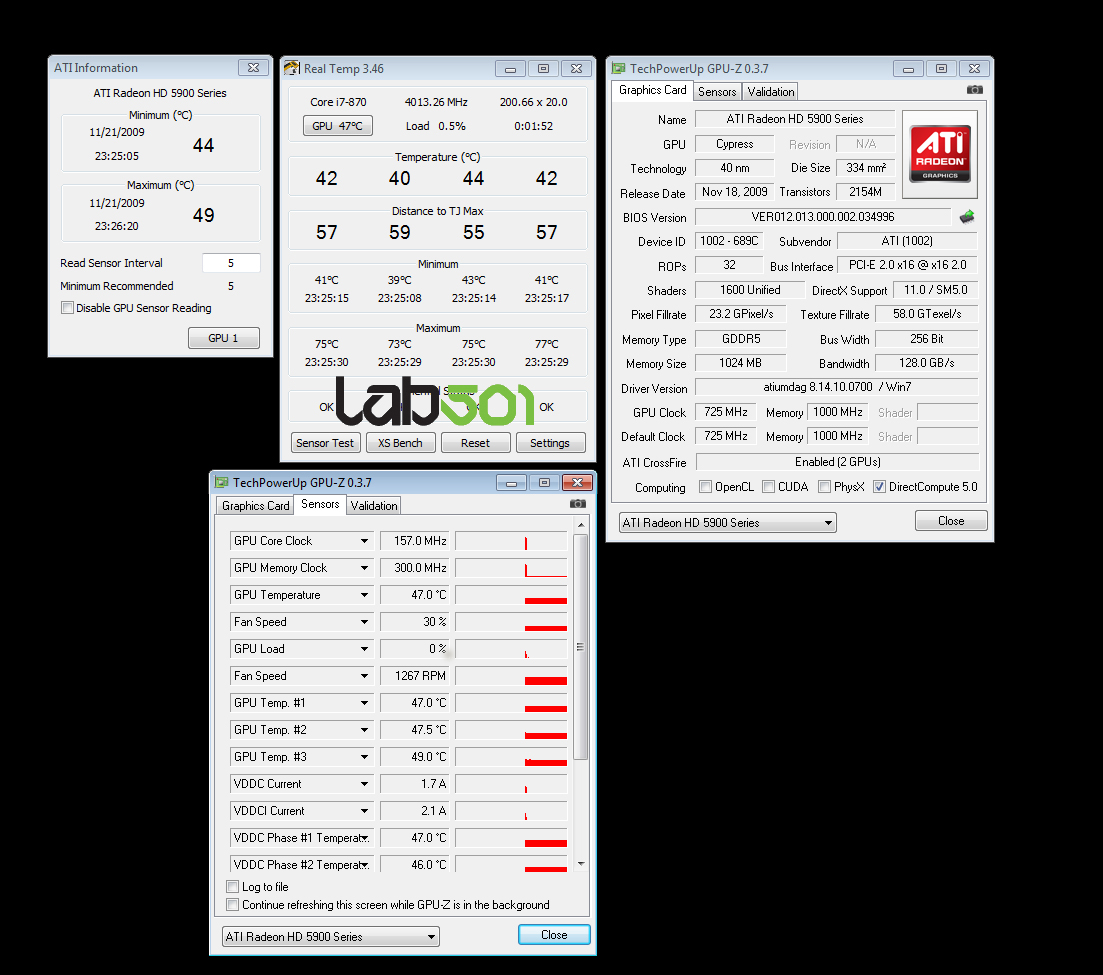
A couple of minor changes including better support for ATI x2 technology and the ability to report both ATI and Nvidia GPU temperatures when you are using graphics cards from each manufacturer at the same time. Some users run a new ATI card for 3D but keep an older Nvidia card and use that in the second PCI-E slot for PhysX purposes.
If you have this setup, click a second time on the main GPU button in RealTemp to see a pop up window for each of your GPUs. The GPU temperature in the task bar will represent the highest combined temperature.
Hosted
Will test the new ATI X2 function early next week.
Weissbier - breakfast of champions
One user I was helping had a 4870 x2 and there is a feature that shuts down one of the GPUs when working at the Desktop to save power and reduce heat. RealTemp is designed so that it doesn't wake up a sleeping core. I didn't want to screw up this useful feature. After you do some 3D gaming, if the second core gets used, then RealTemp should be able to report Min/Max temperature data for both GPUs. I think the 5970 is supposed to work similar to this.
unclewebb, Thank you, for a very nice program. Been using Real Temp for awhile, it's awesome. I was just wondering if you had any plans to include the option to show all GPU temps in the task bar (notification area), like the core temps... TIA
You're welcome. I wasn't really planning to show all of them. At the moment, RealTemp reports the highest GPU temperature in the System Tray. When you are at the desktop, do you really need to know the temperature of each GPU? If you see a really high number it should be easy enough to open up RealTemp and try to find out what GPU is causing the problem. With 6 core CPUs on the horizon, I'm thinking that maybe less temperature information is more useful than too much information.
Your GPUs tend to be at their lowest temperature when idle at the desktop. As soon as you start gaming, you can't see the System Tray so I can't see the need to show both temperatures. If you can come up with a good reason to show more GPU temperature info in the system tray I'll think about it.


 Reply With Quote


Bookmarks