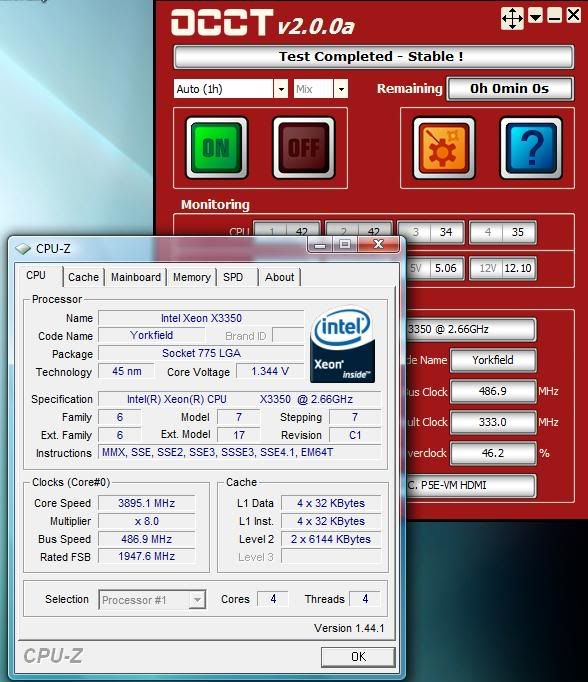
Yes, after supplying 1.300v - 1.349v to the vcore
Yes, after supplying 1.350v - 1.399v to the vcore
Yes, after supplying 1.400v - 1.449v to the vcore
Yes, after supplying 1.450v - 1.499v to the vcore
Yes, after supplying 1.500v - 1.599v to the vcore
Yes, after supplying 1.600v or more to the vcore
No, and I run my vcore at 1.300v - 1.349v 24/7
No, and I run my vcore at 1.350v - 1.399v 24/7
No, and I run my vcore at 1.400v - 1.449v 24/7
No, and I run my vcore at 1.450v or more 24/7
Last edited by mrcape; 04-02-2008 at 09:03 PM.
Well, my vCore and 3V are the only thing that stay linear. My 12V and 5V jitter... but they don't jitter that much. Here's a perfectly stable run:
http://i235.photobucket.com/albums/e...0h42-VCore.png
http://i235.photobucket.com/albums/e...0h42-Volt3.png
http://i235.photobucket.com/albums/e...0h42-Volt5.png
http://i235.photobucket.com/albums/e...h42-Volt12.png
And please pay attention to the "Ripple:" note in the picture. It'd tell you if there's any discrepancies. IMO, if vCore goes less than 1% ripple, the test may pass stable.. provided you have enough vCore for the test.
Motherboard: ASUS P5Q
CPU: Intel Core 2 Quad Q9450 @ 3.20GHz (1.07v vCore!)
RAM: 2GB Kingston HyperX 800MHz
GPU: MSI Radeon HD 4870 @ 780/1000 (default)
I have seen a few 2V spikes as well (dont remember what mb and PSU, had too many of them) but you can't be 100% if that happens for real unless you have an oscilloscope
![]()
...
I have an osciliscope but its not like IM gonna sit and stare at it for an hour looking for spikes...
UNless someone has one of those fancy LCD scopes that write everything in a file for you.
2500k @ 4.4|
|Asus Z77 Sabertooth|
|3x570GTX|
|G.Skill Ripjaws F3-12800CL9D-8GBRL |
|Corsair HX1050|
But if you can get your system stable in Vista, you know it's more than just stable.![]()
Motherboard: ASUS P5Q
CPU: Intel Core 2 Quad Q9450 @ 3.20GHz (1.07v vCore!)
RAM: 2GB Kingston HyperX 800MHz
GPU: MSI Radeon HD 4870 @ 780/1000 (default)
i7-2600k @ 4.8Ghz 1.38v L044A892
ASUS P8P67 LGA
16GB G.Skill Rip Jaws DDR3 1600Mhz Memory
1/2" ID Masterkleer, Swiftech MCP-655, Thermochill PA120.3 Rad, XSPC Rasa, MCW-60
Cooler Master UCP 1100 Watt PSU
GTX 680 1300/7000
Lian Li PC V-2000
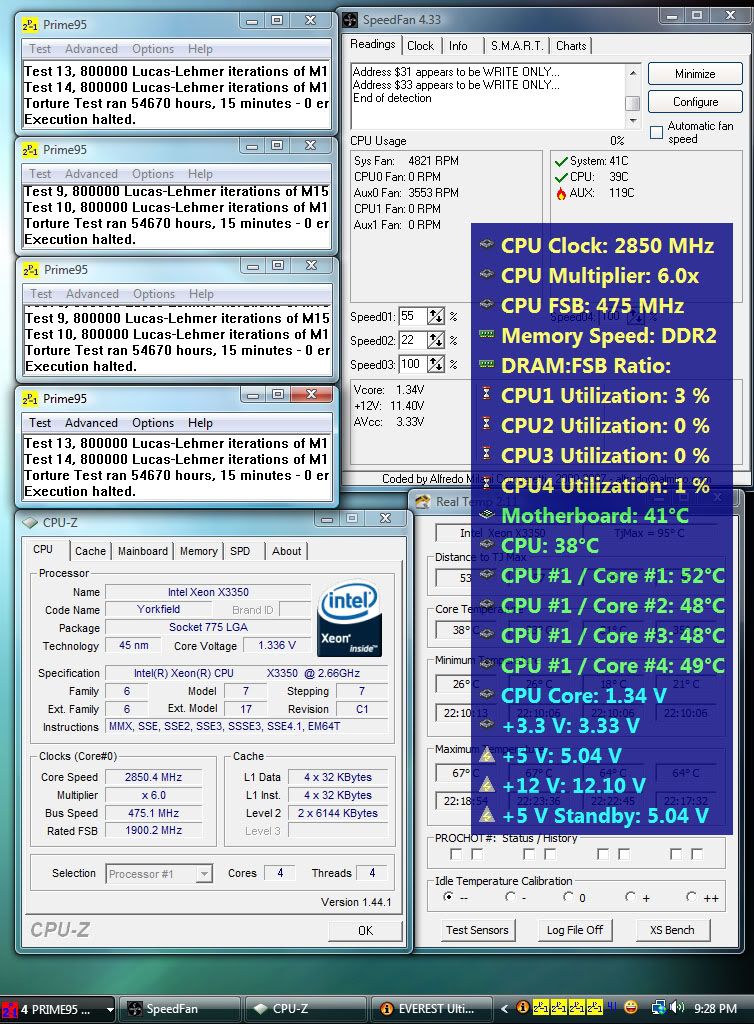
Yeah... and nothing beats a 3.90GHz quad stable in Vista IMHO.
Sometimes my OCs would boot into XP and stay stable for days... but they would not even boot into Vista. Now they do, and if they stay stable, that means the OC cannot be anymore successful.After I've run OCCT for an hour on Vista, it's usually days of Prime95 on XP.
Edit: Or maybe over 54000 hours (roughly 6 years) with Prime95 in Vista would do the trick?(please excuse C1E and SpeedStep. Real clock is 3800MHz)
![]()
Last edited by RunawayPrisoner; 04-02-2008 at 12:49 PM.
Motherboard: ASUS P5Q
CPU: Intel Core 2 Quad Q9450 @ 3.20GHz (1.07v vCore!)
RAM: 2GB Kingston HyperX 800MHz
GPU: MSI Radeon HD 4870 @ 780/1000 (default)
That's actually 1.34v... drooping down to 1.33v?
Motherboard: ASUS P5Q
CPU: Intel Core 2 Quad Q9450 @ 3.20GHz (1.07v vCore!)
RAM: 2GB Kingston HyperX 800MHz
GPU: MSI Radeon HD 4870 @ 780/1000 (default)
Yeah that's right. Just stating what was set, not assuming it's real. Real is what's on the chart..
I know. But that means... your motherboard over-volt it?
Motherboard: ASUS P5Q
CPU: Intel Core 2 Quad Q9450 @ 3.20GHz (1.07v vCore!)
RAM: 2GB Kingston HyperX 800MHz
GPU: MSI Radeon HD 4870 @ 780/1000 (default)
It seems to overvolt .01v at idle and pretty much right on at load.
Kinda dangerous... if you ask me. Did you do a vdroop mod?
Motherboard: ASUS P5Q
CPU: Intel Core 2 Quad Q9450 @ 3.20GHz (1.07v vCore!)
RAM: 2GB Kingston HyperX 800MHz
GPU: MSI Radeon HD 4870 @ 780/1000 (default)
no mods
I suppose it's dangerous as you go higher if you don't keep an eye on that. It's always behaved like that.
People, the nail is not in the coffin yet, the case is not closed! There are
still people that cannot run there initial stable clocks without
more vcore added, mrcape, and myself included, just to name a few.
I have tried other high wattage PSU's and that has not fixed anything.
One theory that got started was the voltage spike, some people have
posted graphs (myself included) showing enormous vcore spikes 1.7v and greater, and some have posted graphs that are "smooth as baby skin".
I have graphs that are smooth as baby skin too, and in fact it took
me 3 hours of running OCCT in 10 minute intervals to get the 1 graph
with spikes. Like I said earlier the sample rate of the voltage monitors
are low, (i.e. 1hz, 1 sample per second) literal hundreds of vcore spikes
could occur between samples.
So this leaves some new questions:
1. Do these 45nm cpus degrade initially to a point and then stop degrading?
2. or, are the huge vcore spikes the culprit (ultimately causing degradation)?
Also I created, and built this:
This filter should make the 12v going to the CPU ATX power very clean, and
hopefully arrest any spikes comming from the PSU.
This is what my vcore graph looks like now:
So Im hoping to not get anymore spikes, however even with the vcore this smooth I still cannot run my initial clocks without more vcore.
Last edited by CrazyNutz; 04-03-2008 at 06:39 AM.
Sandy Bridge 2500k @ 4.5ghz 1.28v | MSI p67a-gd65 B3 Mobo | Samsung ddr3 8gb |
Swiftech apogee drive II | Coolgate 120| GTX660ti w/heat killer gpu x| Seasonic x650 PSU
QX9650 @ 4ghz | P5K-E/WIFI-AP Mobo | Hyperx ddr2 1066 4gb | EVGA GTX560ti 448 core FTW @ 900mhz | OCZ 700w Modular PSU |
DD MC-TDX CPU block | DD Maze5 GPU block | Black Ice Xtreme II 240 Rad | Laing D5 Pump
Nice filter!
I'm on the same page as you with your deductions/outstanding questions. I'm thinking that what I'm experiencing is a combination of the two. Good news is that mine has really leveled off and isn't still going down. I'll continue to monitor my chip and report back if I find anything.
It will also be interesting to see how things shake out with the new stepping and newer boards/bioses.
Ownage, nice link. I think that the differences between these 45nm and 65nm paired with using an older approach to overclocking is the root of the issue. I still love the new chips though. I can't beat sitting pretty at 4.25ghz on air for $200.
Thanks.
Yeah, If these CPU's level out and don't continue to degrade I would feel
better. My cpu does seem to be leveled off also. Could be that the new
metal gates get conditioned over time, which as a side effect the performance gets dampened by a small margin (Ha another theory).
Sandy Bridge 2500k @ 4.5ghz 1.28v | MSI p67a-gd65 B3 Mobo | Samsung ddr3 8gb |
Swiftech apogee drive II | Coolgate 120| GTX660ti w/heat killer gpu x| Seasonic x650 PSU
QX9650 @ 4ghz | P5K-E/WIFI-AP Mobo | Hyperx ddr2 1066 4gb | EVGA GTX560ti 448 core FTW @ 900mhz | OCZ 700w Modular PSU |
DD MC-TDX CPU block | DD Maze5 GPU block | Black Ice Xtreme II 240 Rad | Laing D5 Pump
Well what I notice too is that some people were able to initialy run their chips at much lower Vcore then I ever could.
"4.25ghz 1.28vcore, now requires 1.325vcore "
I could never cross 4.0 with 1.28 when hte chip was just out of the box.
And there is no way I can run stable 4.25 @ 1.325
I can play around some more and drop my voltages further but I could never achieve those clocks with voltages that low in the first place.
2500k @ 4.4|
|Asus Z77 Sabertooth|
|3x570GTX|
|G.Skill Ripjaws F3-12800CL9D-8GBRL |
|Corsair HX1050|
One of the major engineering problems with high-k CMOS was reliability and degradation after transistor stress. Notably, high current stress causing a degradation in PMOS drive current (which directly affects your clock speeds). That's why you have a low voltage/temperature threshold, smaller chip area pumping out higher heat.
[Issues in High-k Gate Stack Interfaces - MRS Bull., vol. 27, no. 3, pp. 212-216, 2001]Many challenges with high-k integration have included VT pinning, mobility degradation due to soft optical phonons, and poor reliability
[Fermi Level Pinning at the Poly-Si/Metal Oxide Interface - Symposium VLSI Tech. Dig., pp. 9-10, 2003]
[Review on High-k Dielectrics Reliability - IEEE Trans. on Device and Materials Rel., vol. 5, no. 1, pp. 5-19, 2005]
[Review on High-k Dielectrics Reliability - IEEE Trans. on Device and Materials Rel., vol. 5, no. 1, pp. 5-19, 2005]TDDB and bias-temperature reliability of high-k + metal transistors have been a concern
[(100) and (110) Si surface orientation: impact on bias temperature instabilities in HfSiON/TiN MOSFETs - 37th IEEE Semiconductor Interface Specialists Conference - 2006. pp.14]Bias temperature instability has been investigated in high-k stacks with metal gate C13397, C11049. The impact of nitrogen on NBTI in HfSiO(N)-based pMOSFETs with TaN metal gates study showed that nitrided stacks either in NH3 or by DPN exhibit much more NBT degradation as compared to O2- or N2- annealed gate stacks. The additional degradation was attributed to the generation of nitrogen related bulk traps.
[Impact of nitrogen incorporation in SiOx/HfSiO gate stacks on negative bias temperature instability - 44th Annual IEEE International Reliability Physics Symposium Proceedings 2006. pp.317-324]Bias Temperature Instabilities were also investigated on (100) and (110) surface orientations on HfSiON TiN metal gate. Charge pumping current as function of stress time showed that more interface states are generated on (110) orientation for both N and PBT stress. However, a higher interface state contribution to the total degradation is observed for NBTI stress compared to PBT stress. Therefore, NBTI depends on the surface orientation while PBTI does not due to the fact that PBT degradation is dominated by bulk electron trapping rather than interface state generation. On the other hand, PBTI degradation was found to be a more severe issue than NBTI in terms of expected lifetime.
But we need more data.
Is it only Penryn 45nm that degrades this way or do other CPUs too?
How quick is this degradation from initial overclocking?
How is the degradation characterized?
How severe is the degradation?
[yes I don't need to know, I have read the thread but in the end, that's what needs to be answered and better, a post with names/level of degradation with specific CPU all aggregated for better viewing and reading]
hard to say it is degradation if one user here reported those issues and then changed the power supply and found stable settings at old clocks againprovided no setting was changed to initial testing
After reading this thread i think these CPU's just sucks. These chips are only on the market for a few months now, and people already have degradation problems. I did some tests with my 1,5 year old 65nm @ 1.61v and no degradation at all. The poll says 40.31% of 45nm owners have degradation problems, i wonder how many will have these problems after one year lol.![]()
A friend of mine gave me an interesting link.
Maybe these problems have something to do with This? It looks like Intel took a different approach how to make these silicons.
>i5-3570K
>Asrock Z77E-ITX Wifi
>Asus GTX 670 Mini
>Cooltek Coolcube Black
>CM Silent Pro M700
>Crucial M4 128Gb Msata
>Cooler Master Seidon 120M
Hell yes its a mini-ITX gaming rig!
Did you try to out of the box?
That's true. My other chip needs 1.36vcore for 4.0ghz in the same exact setup.
True that, the testing individual would have to test it accuratey to find out - like at least have everything else working good. If they change a piece of hardware and it isn't acting degraded anmore then it obviously can't have beeen, because degradation isn't a reversible proces for us![]()
Hi all.I don't have the 45nm chip myself.But a friend has one and is reporting the same problems as the threads here.He or I didn't have any answers.But I did suggest to him to do what I used to do if I had voltage fluctuations on my 3.3volt rail.Shut off the pc,Turn off the power,unplug the big 24 pin connector.Then plug it back in and fire up pc.Then my 3.3 v. was back to normal.Now what does that have to whats happening here?I don't know if it'll work or if will do anything at all.But there was mention of a power supply change by someone and the problem went away.So all I can say is maybe try it and see if it works.My friend is going to try and report back to me if he sees any differance.Good Luck Guys.
![]()
Asus X48 DDR2 Rampage Formula
Core 2 Extreme qx9650 @ 4.00 Ghz
Water Cooled with Apogee GTZ
EVGA 295 GTX,Koolance water block
4GB Corsair Twin 2X4096-8500C5DF
2 x 100 GB Raid 0 / OCZ-Vertex (LE)
Areca 1880ix RAID Host Adapter
Corsair CMPSU-1000HX PSU
Dell 2405 LCD Flat Panel Monitor
Win7 x64/SP1
Bookmarks