

slew setting?! Why don't they fix the defective sys fan control first?



slew setting?! Why don't they fix the defective sys fan control first?
what u mean?
SYS_FANs only modulate about 100rpm (instead of the fan's full range), then when mobo temp hits 50C they all go on at 100% (making a lot of noise).
Thanks !!Originally Posted by stasio


Faulty behavior with UD5H bios F15p: the F11 key "alternate boot device" selection key isn't working; whether it's hot or cold boot.
System 1: Intel 3570K, Gigabyte Z77X-UD5H (blue capacitors), dual bioses F15o/F15r, Samsung 2x 4 Gb 30nm ULV DDR3, Sony-Optiarc BD-R, dual-boot: Windows 8 Pro 64-bit, Windows XP SP3 32-bit.
System 2: Intel E8400; Gigabyte EP45-UD3R, bios F12, 2x 2 Gb G.Skill PC8800, Seagate SATA HD, nVidia 9500GT; Samsung SATA DVD-RW, dual-boot: OSX Lion, Windows 7 64-bit.
Has anybody plugged a Z77X-UD5H into a kill-a-watt? Mine uses 5 Watts when suspended or turned OFF ! That seems very high, my Sabertooth uses only 1.2W in S3 and 0 watts when off.

That's a BIOS option, ERP or something? leaves the USB ports and such powered for on/OFF charge if that option is not enabled. Many boards do this, perhaps the Sabertooth had it enabled.
Thank you, ERP is not the problem here. USB ports are powered in S3 & S5 on all new machines, but if there’s nothing connected there should be no drain (especially when shut down). If somebody has a kill-a-watt please post your readings.
I do have a kill-a-watt. without enabling ERP, I saw a cycling draw, from 1W to 7W. 1w...3w...1w...7w, repeat.
All my boards are review samples. I test power consumption both at the wall, and via 8-pin and PCIe plugs with all boards for those review.
You don't have mouse or keyboard plugged in, and still get that...? The worst boards for that, in my testing, are the new FM2 boards. :p
1 to 7 Watts for the Z77X-UD5H powered OFF or suspended? Mine is steady 5W powered off. Some draw is normal for S3 but should be ZERO when off.
Very few boards are 0W when turned off. Is not different than many electronic devices, or so I thought. I know this is not ASUS thread, but ASUS ROG boards, with their lights and such are the same, but enabled ERP, and the lights and such turn off.
And yes, some models are better than others, but I really can not think of a board that had straight 0W. Many have lower draw when at desktop and idle than when sitting stand-by. 3-5 W is normal in my testing
Perhaps I see more fluctuations because my measurement device refreshes more often? I am not sure...
I have my kill-a-watt clone plugged in power bar directly above my monitor so I can see it whenever I want, so this IS something I have noticed as well. U have reviewed 40+ boards over the past two years, all are the same.
Something just occurred to me while fixing typos here...I seem to recall that these numbers change depending on what PSU is used, so I had personally dismissed this as PSU at fault, but your info brings something else to it. I wonder how many of these boards draw from -12 V?
Last edited by cadaveca; 01-06-2013 at 04:31 PM.
I never use ERP because it disables wake-on-lan.
I guess it’s possible that the PSU and mobo don’t play well together but 5W when turned off is not right. I’ve used two Z77X-UD5H from different batches and they both use 5W when off (with seasonic x650 gold). Sys fan control is also defective on both, as many reviewers have noted. The [H]ard forum editor called fan control on the UD5H “abysmal” even though [H] generally promotes Gigabyte brand.
I’m still curious what kill-a-watt readings others are getting. I guess eXtreme overclockers are not into saving energy.
its not defected, it just isn't there, for "simplicity" as they put it. But yea i think in the future it could be different. hardforum dude is a joke if he says anything good or bad.
New F15Q Bios out for UD5H see TPU beta bios thread
Runs Nice for me......
Added extra memory options same as UP7... not that I used them
Home / Play Rig Asrock Z87 OC Formula/AC, i7 4770K L310B487, 8GB Corsair Dominator Platinum 2666 CL10, BeQuiet Dark Power Pro P8 1200W PSU, 120GB Corsair Force GT SSD, 2 x 1TB WD Sata Drives Mirrored, Palit 680GTX JetStream, Antec Kuhler 920, Windows 10 Pro, Logitech LX700 Deskset, AOC 27" Monitor.
Work 24/7 Rig Gigabyte GA-Z97X-SOC Force, i7 4790K L418C133 ,8GB Team Xtreem LV 2600, PC Power & Cooling 850WPSU, 120GB OCZ Vertex 3 SSD, 2 x 500GB Hitachi Sata Drives Mirrored, Antec Kuhler 620, Windows 10 Pro 64 Bit, Logitech LX700 Deskset, Benq 27" Monitor.
Home NAS DFI P35 T2RL Motherboard, Intel E6850 CPU, 8GB Nanya DDR2 6400, 2X 2TB Toshiba DT01ACA200 SATA Drives, ZFS RAID Mirror On Intel ICH9 AHCI, Artic Blue 850W PSU, Marvell Yukon 88E8053 Gigabit Ethernet, FreeNAS 9.2.1.5 RC, 64-Bit On 4GB USB2 SanDisk Cruizer Blade Thumb Drive.
nice man! I wanted to update with some of my PSC results on the HD4 and the UD4H:
Z77X-UD4H:
Z77-HD4(yea it has vcore control too)
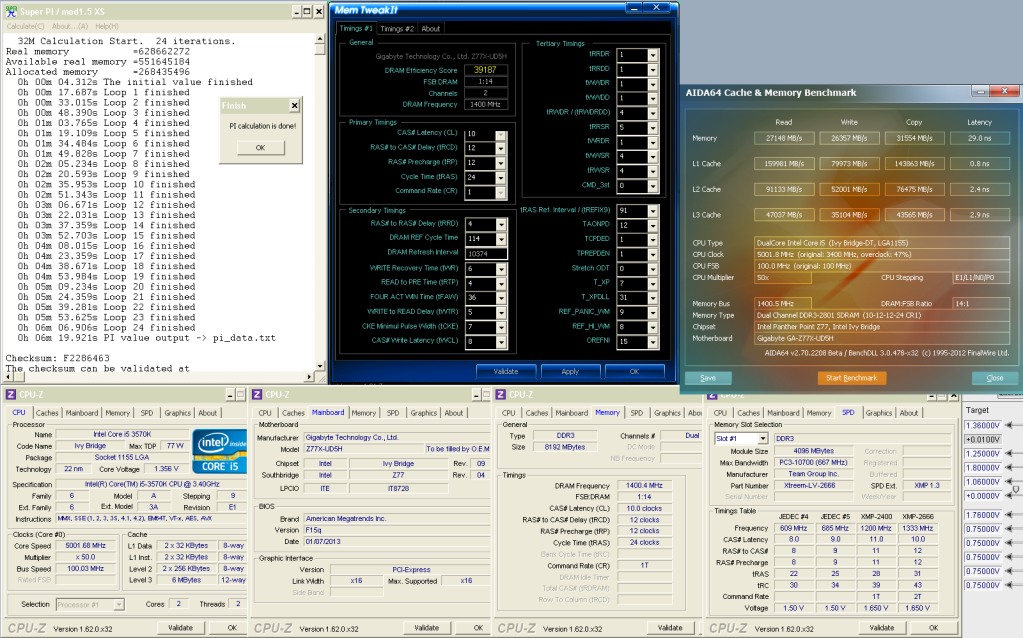
Both boards like slew rate 5 for PSC. 1m is about all this stupid sticks can do.
Just built a system for a friend with a GIGABYTE-GA-Z77X-D3H with a 3TB Seagate Barracuda internal HD. I installed Win8 and broke the drive into two major partitions but soon realized the drive was set up as MBR and there was a 700+ unallocated section that I couldn't do anything with. Went back to square one, looked in the BIOS setup and saw that it was set to UEFI & Legacy. Tried UEFI only and the drive wasn't recognized. I'm lost, how do I set this drive up as GPT so I can natively run the full 3TB without using a 3rd party software like the Seagate program? While in Disk Manager (Win8) I looked for any options to convert to GPT but saw nothing.. Thanks for any help.
@ GaryR: check the owner's manual that you're plugging into the correct SATA ports.
Ports 0 & 1 should be the faster SATA 6 ports, where the HD would connect. Ports 4 or 5 (SATA 3) should have the optical drive connected.
The 2 Marvell controller SATA ports probably shouldn't be used for a boot drive.
System 1: Intel 3570K, Gigabyte Z77X-UD5H (blue capacitors), dual bioses F15o/F15r, Samsung 2x 4 Gb 30nm ULV DDR3, Sony-Optiarc BD-R, dual-boot: Windows 8 Pro 64-bit, Windows XP SP3 32-bit.
System 2: Intel E8400; Gigabyte EP45-UD3R, bios F12, 2x 2 Gb G.Skill PC8800, Seagate SATA HD, nVidia 9500GT; Samsung SATA DVD-RW, dual-boot: OSX Lion, Windows 7 64-bit.
Hi guys please help
see my original post @ ocuk forum
http://forums.overclockers.co.uk/sho...0#post23685980
I send bouth mobo and cpu for rma but came back as ok
I just remebered that board will stuck on A6 code no post
Last edited by tommyk999; 02-12-2013 at 11:59 PM.
A6 = Ab and it means you are in the UEFI check your video/monitor.
Probably because TWCL is 6, try 7 and I am sure they should run 32m.
Picked up a Z77 UD5H, 16GB Samsung RAM and a 3770K a few days back, having read through these boards (great resource, thanks guys) and figuring that was the best value/performance combo
Put it all together with a Be Quiet RP2 and dialed in 4500/2133 with a small voltage increase on the vcore and RAM, and everything is running great, has OC'ing really become this easy? My GTX680 flies now, Skyrim fully modded has never looked or played so well
Such a sweet upgrade from my Q9650 at 4.0Ghz, ripping out all my old watercooling gear was so nice too!
Cheers!
Last edited by Mickey Padge; 02-15-2013 at 04:22 AM.
"I love her muffins more than life itself" Dexter's Laboratory
well all working fine on old setup so what to check? i tried old 460gtx same thing happened, only time i can access
Win 8 is when i use old monitor on vga cable and connect it to mobo with no graphic card on. i upgraded bios to f19h but
no change
Nice man, congrats!
Interesting, have you tried to update the driver?|
thanks i will try when i get a chance.
Never overclocked before so this is my first post in this area
Ive had my UD3 for about 2 years now with an i7-920.
Just decided to finally overclock it with a coolermaster block on it (air) and strapped 2x delta 190cfm's on either side of it.
currently at 3.6ghz but 68c running full prime.
^_^ still tinkering though. Hoping to break the 4 barrier soon.
Check out my forum: http://www.anarchyst-it.com
Using F14 on my UD5H and it seems fine, both the beta BIOS lost my keyboard function at boot and generally were unstable, losing settings and similar, which was a pain. Out of interest, how do I flash the backup BIOS? Never had a dual BIOS board before, and I would like F14 on both chips if possible, the manual makes no real mention of it
Cheers!
"I love her muffins more than life itself" Dexter's Laboratory
 Posting Permissions


 Reply With Quote


Bookmarks