MMM
Page 20 of 23 FirstFirst ... 1017181920212223 LastLast
Results 476 to 500 of 574

Thread: **[OFFICIAL]** GIGABYTE Z77X Owners Club/Discussion/Info (All Model's Welcome)

  1. #476
    GordyUK
    Guest
    [QUOTE=ZenEffect;5138236]Jentek PSU might be the culprit here. If it isnt providing stable voltage, or quick enough transient response it can create the issues you are describing. I will get a bios corrupt message if I power off at the exact right (guess its actually wrong) time or if i power cycle alot rapidly.[/QUOTE

    I got a new PSU as the Jentek turned out to be 5 years old as i got it from my dads old comp. System seems to be running fine now.

  2. #477
    Pie assassin
    Join Date
    Nov 2007
    Location
    Where lights collide
    Posts
    2,275
    [QUOTE=GordyUK;5138932]
    Quote Originally Posted by ZenEffect View Post
    Jentek PSU might be the culprit here. If it isnt providing stable voltage, or quick enough transient response it can create the issues you are describing. I will get a bios corrupt message if I power off at the exact right (guess its actually wrong) time or if i power cycle alot rapidly.[/QUOTE

    I got a new PSU as the Jentek turned out to be 5 years old as i got it from my dads old comp. System seems to be running fine now.
    tbh, ive never even heard of a Jentek PSU before you mentioned it

    glad to see its working well for you now
    Current Status - Testing & Research

  3. #478
    Xtreme Enthusiast
    Join Date
    Aug 2002
    Location
    .CA
    Posts
    853
    I am loving my G1.Sniper M3 board but I do have one small gripe. On power on the CPU fan doesn't start for a few seconds. It then spins up to quite a loud RPM before dropping back to being silent. Seems strange to me but not enough worry to go hunting for. Has anyone else experienced this?
    If my answers frighten you, stop asking such scary questions...

    • Hush V2
    • Intel i7 4770K - XSPC Raystorm - Gigabyte G1.Sniper Z87 - Crucial Ballistix DDR3-1866 - 9-9-9-24
    • Zoltac Geforce GTX 780Ti - EK-FC780GTX Ti
    • SanDisk Ultra 480GB SSD - WD Black 1TB 64MB Cache
    • Custom Water Cooled Fractal Designs Define R4 - Antec HCP-1000 Platinum
    • EK Coolstream XTC 280 - Cougar CF-V14HB Vortex HDB - XSPC EX240 - Scythe GT AP-15
    • Dazmode Storm DDC 3.25 - AquaComputer Aqualis DDC 150 Reservoir

  4. #479
    Registered User
    Join Date
    Jun 2007
    Posts
    5

    Unhappy UD5H won't post

    Parts list is in my sig.

    A little background first. I originally purchased the UD5H back in June. First one wouldn't post at all. It had power to the power switch, but nothing would happen when I pushed it. I took it back for a replacement and everything worked flawlessly with the new board. It has been running fine since that time. one thing I didn't realize is that the @Bios software was running on my PC. I must have installed it as part of the driver install process and didn't realize it. I found out when I came home a few weeks ago to see @BIOS running and attempting to download a new BIOS update. I let it do its thing even though I've never updated a BIOS like this before.

    Fast forward to 2 days ago. I boot up my PC and get a message that my BIOS is corrupt, and that it's loading the backup BIOS. That's fine I think, when I have time this weekend I'll update the first BIOS and all should be well. Yesterday when I try to boot I get no love. The PC powers up the fans for a second, I hear a click coming from what appears to be the z77 chipset area, some strange character flashes on the debug display, and then it shuts down. A few seconds later same thing happens. It just keeps doing this over and over.

    I pulled out everything but 1 stick of ram, and no difference. I decide to call it a night and pick up again today. Today same thing happens, I try clearing the CMOS, manually switching the BIOS, leaving it unplugged for a couple of hours, swapping the ram to a different slot, no change.

    Now it won't even power up. The power button still lights up, I hit the power button and nothing, doesn't even click or power up the fans.

    So the changes that I am aware of:
    1. a recent BIOS update, but it seemed to work fine after that update.
    2. I recently plugged my case fans into the MB headers as my fan controller died. I set the fan profile to silent. It seemed to work fine for a number of days after that change.
    There have been no new software installs or updates that I'm aware of.

    I've contacted Gigabyte support, but have yet to receive a reply.

    Any suggestions would be greatly appreciated. As it stands I can't even get to a point where I can flash the BIOS.

  5. #480
    I am Xtreme
    Join Date
    Dec 2004
    Location
    France
    Posts
    3,462
    The BIOS switch works when the system is powered on, but not actually in an on state. So if you get a light on your power button, then switch the dual BIOS switch and see if it works.

    Also try a full scal CMOS reset, IMO get a jumper and short the ClearCMOS pins, then take a screw driver and short the battery connector leads(remove the battery first) and do this for a small period of time, and of course unplug the PSU from the board first.

    It could be that @BIOS did something, that is very off it would try doing that.

    DoGMan: yea that is normal.

  6. #481
    Registered User
    Join Date
    Jun 2007
    Posts
    5
    Quote Originally Posted by sin0822 View Post
    The BIOS switch works when the system is powered on, but not actually in an on state. So if you get a light on your power button, then switch the dual BIOS switch and see if it works.

    Also try a full scal CMOS reset, IMO get a jumper and short the ClearCMOS pins, then take a screw driver and short the battery connector leads(remove the battery first) and do this for a small period of time, and of course unplug the PSU from the board first.

    It could be that @BIOS did something, that is very off it would try doing that.

    DoGMan: yea that is normal.
    Thanks for the reply.

    I've powered down, switched the BIOS switch, then tried restarting. No difference regardless of the position the BIOS switch is in. I've also tried switching it with power, again no difference.

    I've done a full CMOS reset. Unplugged PSU from wall. Turned off PSU switch. Removed CMOS battery. Jumped CMOS reset pins. Held in CMOS reset switch. Left everything in that state overnight. I'll try shorting the battery connectors, but have a feeling that won't make much difference.

    After a CMOS reset, it does the thing where it starts and stops a couple of times. After that it won't respond at all to a power button push.

    Right now I have the MB out of the case with just the PSU, CPU, 1 stick of RAM, and the monitor hooked up. I even tried without the monitor.
    Current System:
    GAZ77X-UDH-5H
    i5 3570K
    8GB (4x2) GSkill Ripsjaw X 1600
    Sapphire HD 6950
    Seasonic X750
    Mushkin Chronos 120GB
    Seagate Barracuda 7200 3TB
    Corsair 650D

  7. #482
    I am Xtreme
    Join Date
    Dec 2004
    Location
    France
    Posts
    3,462
    id say get an RMA. Something must have gone wrong with @BIOS..

  8. #483
    Xtreme Member
    Join Date
    Mar 2003
    Location
    AZ, USA
    Posts
    127
    @mfarlow: maybe the PSU is faulty? Try a different one.
    System 1: Intel 3570K, Gigabyte Z77X-UD5H (blue capacitors), dual bioses F15o/F15r, Samsung 2x 4 Gb 30nm ULV DDR3, Sony-Optiarc BD-R, dual-boot: Windows 8 Pro 64-bit, Windows XP SP3 32-bit.
    System 2: Intel E8400; Gigabyte EP45-UD3R, bios F12, 2x 2 Gb G.Skill PC8800, Seagate SATA HD, nVidia 9500GT; Samsung SATA DVD-RW, dual-boot: OSX Lion, Windows 7 64-bit.

  9. #484
    Registered User
    Join Date
    Jun 2007
    Posts
    5
    Quote Originally Posted by vailr View Post
    @mfarlow: maybe the PSU is faulty? Try a different one.
    Tried that. Same issue with 2 known working PSUs.
    Current System:
    GAZ77X-UDH-5H
    i5 3570K
    8GB (4x2) GSkill Ripsjaw X 1600
    Sapphire HD 6950
    Seasonic X750
    Mushkin Chronos 120GB
    Seagate Barracuda 7200 3TB
    Corsair 650D

  10. #485
    Registered User
    Join Date
    Jun 2007
    Posts
    5
    Quote Originally Posted by sin0822 View Post
    id say get an RMA. Something must have gone wrong with @BIOS..
    Yeah it's been 3 months since I've purchased it, so I'm betting they won't just replace it.
    I'll probably just buy something else. 1 bad Mobo is one thing, but 2 in a row doesn't make me feel too confident in this board.
    Current System:
    GAZ77X-UDH-5H
    i5 3570K
    8GB (4x2) GSkill Ripsjaw X 1600
    Sapphire HD 6950
    Seasonic X750
    Mushkin Chronos 120GB
    Seagate Barracuda 7200 3TB
    Corsair 650D

  11. #486
    Xtreme Addict
    Join Date
    May 2007
    Location
    Hampshire, UK
    Posts
    1,656
    @mfarlow..... If I were in your situation I would try shorting the bios chips out to see if I could force the board to boot from the other chip. I have done this once before when I killed my P67 dual bios & have to say it took many goes to finally get the board to boot but it eventually did.

    If the board will not power or spin fans this may be of no use but worth a go anyway. You may also have to power on off your PSU to reset the board but a less garbled post screen or bios light switching from main to backup should give you some evidence that you are getting there.


    Home / Play Rig Asrock Z87 OC Formula/AC, i7 4770K L310B487, 8GB Corsair Dominator Platinum 2666 CL10, BeQuiet Dark Power Pro P8 1200W PSU, 120GB Corsair Force GT SSD, 2 x 1TB WD Sata Drives Mirrored, Palit 680GTX JetStream, Antec Kuhler 920, Windows 10 Pro, Logitech LX700 Deskset, AOC 27" Monitor.

    Work 24/7 Rig Gigabyte GA-Z97X-SOC Force, i7 4790K L418C133 ,8GB Team Xtreem LV 2600, PC Power & Cooling 850WPSU, 120GB OCZ Vertex 3 SSD, 2 x 500GB Hitachi Sata Drives Mirrored, Antec Kuhler 620, Windows 10 Pro 64 Bit, Logitech LX700 Deskset, Benq 27" Monitor.

    Home NAS DFI P35 T2RL Motherboard, Intel E6850 CPU, 8GB Nanya DDR2 6400, 2X 2TB Toshiba DT01ACA200 SATA Drives, ZFS RAID Mirror On Intel ICH9 AHCI, Artic Blue 850W PSU, Marvell Yukon 88E8053 Gigabit Ethernet, FreeNAS 9.2.1.5 RC, 64-Bit On 4GB USB2 SanDisk Cruizer Blade Thumb Drive.

  12. #487
    Xtreme Enthusiast
    Join Date
    Aug 2002
    Location
    .CA
    Posts
    853
    Quote Originally Posted by sin0822 View Post
    DoGMan: yea that is normal.
    Thanks Sin is there any way to over ride this behaviour?
    If my answers frighten you, stop asking such scary questions...

    • Hush V2
    • Intel i7 4770K - XSPC Raystorm - Gigabyte G1.Sniper Z87 - Crucial Ballistix DDR3-1866 - 9-9-9-24
    • Zoltac Geforce GTX 780Ti - EK-FC780GTX Ti
    • SanDisk Ultra 480GB SSD - WD Black 1TB 64MB Cache
    • Custom Water Cooled Fractal Designs Define R4 - Antec HCP-1000 Platinum
    • EK Coolstream XTC 280 - Cougar CF-V14HB Vortex HDB - XSPC EX240 - Scythe GT AP-15
    • Dazmode Storm DDC 3.25 - AquaComputer Aqualis DDC 150 Reservoir

  13. #488
    Registered User
    Join Date
    Jun 2007
    Posts
    5
    Quote Originally Posted by C-N View Post
    @mfarlow..... If I were in your situation I would try shorting the bios chips out to see if I could force the board to boot from the other chip. I have done this once before when I killed my P67 dual bios & have to say it took many goes to finally get the board to boot but it eventually did.

    If the board will not power or spin fans this may be of no use but worth a go anyway. You may also have to power on off your PSU to reset the board but a less garbled post screen or bios light switching from main to backup should give you some evidence that you are getting there.
    Thanks for the advice how do you short the bios chip?

    Right now I'm at the point where it won't even spin up the fans, but I'm still getting power to the board (the power button lights up).
    Current System:
    GAZ77X-UDH-5H
    i5 3570K
    8GB (4x2) GSkill Ripsjaw X 1600
    Sapphire HD 6950
    Seasonic X750
    Mushkin Chronos 120GB
    Seagate Barracuda 7200 3TB
    Corsair 650D

  14. #489
    Xtreme Addict
    Join Date
    May 2007
    Location
    Hampshire, UK
    Posts
    1,656
    Short pin 6 & 7 with a screwdriver this will force the board to try the other bios.


    Home / Play Rig Asrock Z87 OC Formula/AC, i7 4770K L310B487, 8GB Corsair Dominator Platinum 2666 CL10, BeQuiet Dark Power Pro P8 1200W PSU, 120GB Corsair Force GT SSD, 2 x 1TB WD Sata Drives Mirrored, Palit 680GTX JetStream, Antec Kuhler 920, Windows 10 Pro, Logitech LX700 Deskset, AOC 27" Monitor.

    Work 24/7 Rig Gigabyte GA-Z97X-SOC Force, i7 4790K L418C133 ,8GB Team Xtreem LV 2600, PC Power & Cooling 850WPSU, 120GB OCZ Vertex 3 SSD, 2 x 500GB Hitachi Sata Drives Mirrored, Antec Kuhler 620, Windows 10 Pro 64 Bit, Logitech LX700 Deskset, Benq 27" Monitor.

    Home NAS DFI P35 T2RL Motherboard, Intel E6850 CPU, 8GB Nanya DDR2 6400, 2X 2TB Toshiba DT01ACA200 SATA Drives, ZFS RAID Mirror On Intel ICH9 AHCI, Artic Blue 850W PSU, Marvell Yukon 88E8053 Gigabit Ethernet, FreeNAS 9.2.1.5 RC, 64-Bit On 4GB USB2 SanDisk Cruizer Blade Thumb Drive.

  15. #490
    ODOC
    Join Date
    Aug 2006
    Location
    Copenhagen - Denmark
    Posts
    2,189
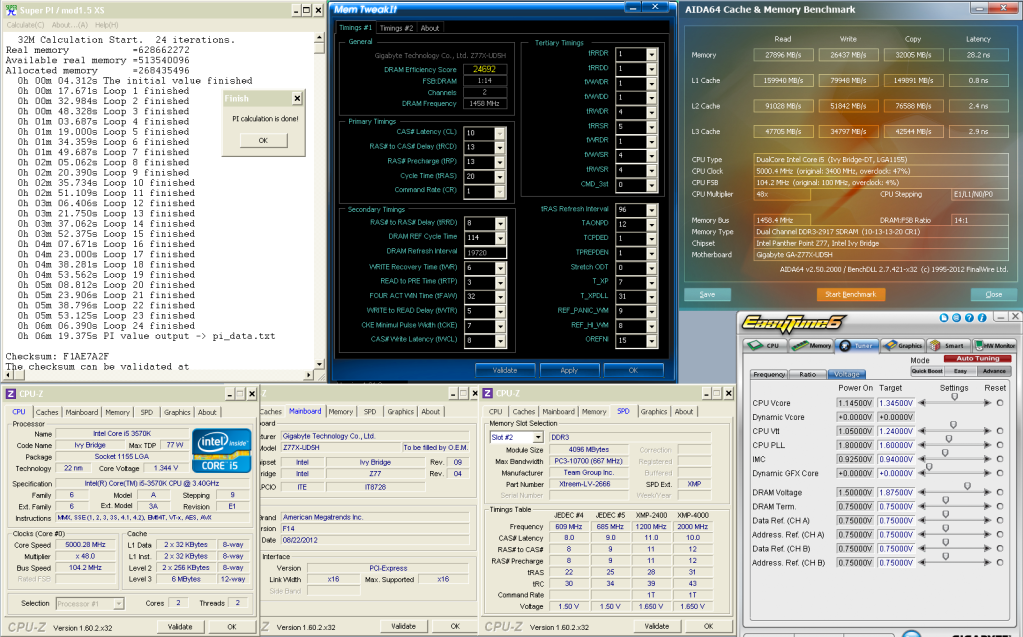
    THC and I started to see how the UP5 kicks along

    We threw in some 2666 hynix based modules and took it for a quick n dirty 32m run , exploring the DRAM overclockability alongside BCLK , CPU H100 - Memory air


  16. #491
    I am Xtreme
    Join Date
    Dec 2004
    Location
    France
    Posts
    3,462
    yea the UP5 isn't half bad. I have the BCLK WR for Z77 with it, 117 almost(116.95)

    Dogman, i don't think there is anything you can do, when it spins full throttle that is because it isn't being controlled, but then when the SIO kicks in the control it slows down.

  17. #492
    Xtreme Legend
    Join Date
    Mar 2005
    Location
    Australia
    Posts
    17,242
    damn Oliver, that's nice
    Team.AU
    Got tube?
    GIGABYTE Australia
    Need a GIGABYTE bios or support?


  18. #493
    Xtreme Addict
    Join Date
    May 2007
    Location
    Hampshire, UK
    Posts
    1,656
    Hey guys I got a little issue over here & wonder if anyone can help out?

    The problem is I've reached the limit of something most likely my RAM or my CPU & wonder if anyone can tell me what happens on their board when they hit the IMC or RAM speed limit.

    Below is about the max I can reasonably bench, it’s not as efficient as it should be but it runs. Just after this 2930 ~ 2950 it will fail SPI instantly irrespective of voltages or timings. Also as I creep over 2940 my board drops USB.... windows still runs but you can’t control it as the USB mouse/keyboard stops working.

    http://i106.photobucket.com/albums/m...A646M19375.png


    Home / Play Rig Asrock Z87 OC Formula/AC, i7 4770K L310B487, 8GB Corsair Dominator Platinum 2666 CL10, BeQuiet Dark Power Pro P8 1200W PSU, 120GB Corsair Force GT SSD, 2 x 1TB WD Sata Drives Mirrored, Palit 680GTX JetStream, Antec Kuhler 920, Windows 10 Pro, Logitech LX700 Deskset, AOC 27" Monitor.

    Work 24/7 Rig Gigabyte GA-Z97X-SOC Force, i7 4790K L418C133 ,8GB Team Xtreem LV 2600, PC Power & Cooling 850WPSU, 120GB OCZ Vertex 3 SSD, 2 x 500GB Hitachi Sata Drives Mirrored, Antec Kuhler 620, Windows 10 Pro 64 Bit, Logitech LX700 Deskset, Benq 27" Monitor.

    Home NAS DFI P35 T2RL Motherboard, Intel E6850 CPU, 8GB Nanya DDR2 6400, 2X 2TB Toshiba DT01ACA200 SATA Drives, ZFS RAID Mirror On Intel ICH9 AHCI, Artic Blue 850W PSU, Marvell Yukon 88E8053 Gigabit Ethernet, FreeNAS 9.2.1.5 RC, 64-Bit On 4GB USB2 SanDisk Cruizer Blade Thumb Drive.

  19. #494
    Xtreme Member
    Join Date
    Mar 2003
    Location
    AZ, USA
    Posts
    127
    @C-N: Ivy Bridge CPU specs require that the memory voltage stay within 5% of 1.50 volts.
    Your Team Xtreem LV 2666 in comparison seems to require 1.65 volts (at the frequency you're running at).
    One solution would be to replace with lower voltage memory, such as the 30 nm 1.35 volt 4 GB Samsung sticks.
    Either that, or be happy with what your 1.65 volt memory can do.
    Also note: the latest CPU-Z version is currently: 161.5
    System 1: Intel 3570K, Gigabyte Z77X-UD5H (blue capacitors), dual bioses F15o/F15r, Samsung 2x 4 Gb 30nm ULV DDR3, Sony-Optiarc BD-R, dual-boot: Windows 8 Pro 64-bit, Windows XP SP3 32-bit.
    System 2: Intel E8400; Gigabyte EP45-UD3R, bios F12, 2x 2 Gb G.Skill PC8800, Seagate SATA HD, nVidia 9500GT; Samsung SATA DVD-RW, dual-boot: OSX Lion, Windows 7 64-bit.

  20. #495
    Xtreme Addict
    Join Date
    May 2007
    Location
    Hampshire, UK
    Posts
    1,656
    Quote Originally Posted by vailr View Post
    @C-N: Ivy Bridge CPU specs require that the memory voltage stay within 5% of 1.50 volts.
    Your Team Xtreem LV 2666 in comparison seems to require 1.65 volts (at the frequency you're running at).
    One solution would be to replace with lower voltage memory, such as the 30 nm 1.35 volt 4 GB Samsung sticks.
    Either that, or be happy with what your 1.65 volt memory can do.
    Also note: the latest CPU-Z version is currently: 161.5
    Thanks for the reply vailr, I am happy with what I got just would like some feedback from people as to what happens on there board as you max it out.
    As for the CPU-Z version, it works so I leave it alone but thanks anyway for the info.


    Home / Play Rig Asrock Z87 OC Formula/AC, i7 4770K L310B487, 8GB Corsair Dominator Platinum 2666 CL10, BeQuiet Dark Power Pro P8 1200W PSU, 120GB Corsair Force GT SSD, 2 x 1TB WD Sata Drives Mirrored, Palit 680GTX JetStream, Antec Kuhler 920, Windows 10 Pro, Logitech LX700 Deskset, AOC 27" Monitor.

    Work 24/7 Rig Gigabyte GA-Z97X-SOC Force, i7 4790K L418C133 ,8GB Team Xtreem LV 2600, PC Power & Cooling 850WPSU, 120GB OCZ Vertex 3 SSD, 2 x 500GB Hitachi Sata Drives Mirrored, Antec Kuhler 620, Windows 10 Pro 64 Bit, Logitech LX700 Deskset, Benq 27" Monitor.

    Home NAS DFI P35 T2RL Motherboard, Intel E6850 CPU, 8GB Nanya DDR2 6400, 2X 2TB Toshiba DT01ACA200 SATA Drives, ZFS RAID Mirror On Intel ICH9 AHCI, Artic Blue 850W PSU, Marvell Yukon 88E8053 Gigabit Ethernet, FreeNAS 9.2.1.5 RC, 64-Bit On 4GB USB2 SanDisk Cruizer Blade Thumb Drive.

  21. #496
    XIP
    Join Date
    Nov 2004
    Location
    NYC
    Posts
    5,524
    @C-N Did you try to up imc and dram trm. voltages?

  22. #497
    Xtreme Addict
    Join Date
    May 2007
    Location
    Hampshire, UK
    Posts
    1,656
    I find my board/setup only needed more IMC voltage to run a bit more BCLK @ 100 .92~.93 is its sweet spot. At the above settings any more than .94 made SPI fail the more you put on the quicker it failed. I also find too much IMC voltage brings on a vdimm wall.... too much IMC voltage means the more vdimm I add don't help & fails SPI quicker & quicker if you get my drift.

    I did briefly test dram termination voltage but I have to admit not properly I just moved up & down a little but didn't find a benefit so I left it alone. Do you find it helps & if so what sort of percentage against vdimm do you find works for you?


    Home / Play Rig Asrock Z87 OC Formula/AC, i7 4770K L310B487, 8GB Corsair Dominator Platinum 2666 CL10, BeQuiet Dark Power Pro P8 1200W PSU, 120GB Corsair Force GT SSD, 2 x 1TB WD Sata Drives Mirrored, Palit 680GTX JetStream, Antec Kuhler 920, Windows 10 Pro, Logitech LX700 Deskset, AOC 27" Monitor.

    Work 24/7 Rig Gigabyte GA-Z97X-SOC Force, i7 4790K L418C133 ,8GB Team Xtreem LV 2600, PC Power & Cooling 850WPSU, 120GB OCZ Vertex 3 SSD, 2 x 500GB Hitachi Sata Drives Mirrored, Antec Kuhler 620, Windows 10 Pro 64 Bit, Logitech LX700 Deskset, Benq 27" Monitor.

    Home NAS DFI P35 T2RL Motherboard, Intel E6850 CPU, 8GB Nanya DDR2 6400, 2X 2TB Toshiba DT01ACA200 SATA Drives, ZFS RAID Mirror On Intel ICH9 AHCI, Artic Blue 850W PSU, Marvell Yukon 88E8053 Gigabit Ethernet, FreeNAS 9.2.1.5 RC, 64-Bit On 4GB USB2 SanDisk Cruizer Blade Thumb Drive.

  23. #498
    XIP
    Join Date
    Nov 2004
    Location
    NYC
    Posts
    5,524
    Quote Originally Posted by C-N View Post
    I did briefly test dram termination voltage but I have to admit not properly I just moved up & down a little but didn't find a benefit so I left it alone. Do you find it helps & if so what sort of percentage against vdimm do you find works for you?
    Its ram chip specific for my asus board. Generally around 42% from vdimm. Samsung seems to need less v than bbse/psc

  24. #499
    Xtreme Addict
    Join Date
    May 2007
    Location
    Hampshire, UK
    Posts
    1,656
    Quote Originally Posted by Dumo View Post
    Its ram chip specific for my asus board. Generally around 42% from vdimm. Samsung seems to need less v than bbse/psc
    Thanks mate I'll give it a try & ye I get the IC specific bit its always been like that with the stuff I've had too.


    Home / Play Rig Asrock Z87 OC Formula/AC, i7 4770K L310B487, 8GB Corsair Dominator Platinum 2666 CL10, BeQuiet Dark Power Pro P8 1200W PSU, 120GB Corsair Force GT SSD, 2 x 1TB WD Sata Drives Mirrored, Palit 680GTX JetStream, Antec Kuhler 920, Windows 10 Pro, Logitech LX700 Deskset, AOC 27" Monitor.

    Work 24/7 Rig Gigabyte GA-Z97X-SOC Force, i7 4790K L418C133 ,8GB Team Xtreem LV 2600, PC Power & Cooling 850WPSU, 120GB OCZ Vertex 3 SSD, 2 x 500GB Hitachi Sata Drives Mirrored, Antec Kuhler 620, Windows 10 Pro 64 Bit, Logitech LX700 Deskset, Benq 27" Monitor.

    Home NAS DFI P35 T2RL Motherboard, Intel E6850 CPU, 8GB Nanya DDR2 6400, 2X 2TB Toshiba DT01ACA200 SATA Drives, ZFS RAID Mirror On Intel ICH9 AHCI, Artic Blue 850W PSU, Marvell Yukon 88E8053 Gigabit Ethernet, FreeNAS 9.2.1.5 RC, 64-Bit On 4GB USB2 SanDisk Cruizer Blade Thumb Drive.

  25. #500
    Xtreme Member
    Join Date
    Feb 2005
    Location
    Leicester
    Posts
    129
    Quote Originally Posted by C-N View Post
    This boot cycle problem is something I have seen a handful of people complain about on just about every GB board. I have had it myself on my old p67 ud5 never on the UD5H & sure some BIOS's boot better or quicker etc but for me its always been because the board was unhappy with something settings voltages wise & once found all was well again. Some of these people with problems may just plain have dodgy boards but I bet most are setup issues or maybe something like the BIOS not fully supporting certain hardware.

    Again I see what you are saying about the early BIOS's & sort of agree maybe they were or the board was launched premature however all manufacturers do this so there's no getting away from it unless you wait for a board/bios to mature before your purchase.

    My board is a blue cap model btw & IMO it’s the best board I've had to date.

    I hope all works out ok with the board swap.

    Got mobo swapped to Asus P8Z77-V PRO all seemed fine but occasionally i would get 1 boot loop. Swapped out for Gigabyte UP5 TH same issue 4 boot loops with my i7 2600K. Swapped i7 2600K to new one thanx to Intel and voila boot loops gone. My issue was CPU not mobo or mem at all that means UD5 was fine...oh well ended up wid a crackin board and a luvely i7 2600k @ 5GHz this time with less volts & a better IMC.

    I take everything back !! Nothin to do with dual bios and crosstalk ! im absolutely happy now

    MY prev cpu was either degraded or simply weak IMC strange cos once it booted everything was fine.
    Corsair carbide 400R case
    Corsair AX-750W PSU
    Gigabyte Z77X-UP5 TH (F13a)
    Gigabyte GTX 680 OC WF3X
    Intel i7 2600K @ 4.8GHz Antec Kuhler 620
    Gskill Ripjaw 16GB DDR3 2133 (10 11 10 28 1T) 1.62v
    Samsung 840 Pro 256GB Win 8 X64
    Samsung F4 2TB
    Seagate ST3000DM001 3TB
    Pioneer 216BK DVDRW
    Liteon iHas 324 DVDRW

Page 20 of 23 FirstFirst ... 1017181920212223 LastLast

Bookmarks

Bookmarks

Posting Permissions

  • You may not post new threads
  • You may not post replies
  • You may not post attachments
  • You may not edit your posts
  •