MMM
Page 5 of 7 FirstFirst ... 234567 LastLast
Results 101 to 125 of 157

Thread: MSI HD 7970 Lightning water block

  1. #101
    Registered User
    Join Date
    Jul 2012
    Posts
    23
    Quote Originally Posted by LeoAndrade View Post
    @l88bastard: is that a completely sanded MM cube?
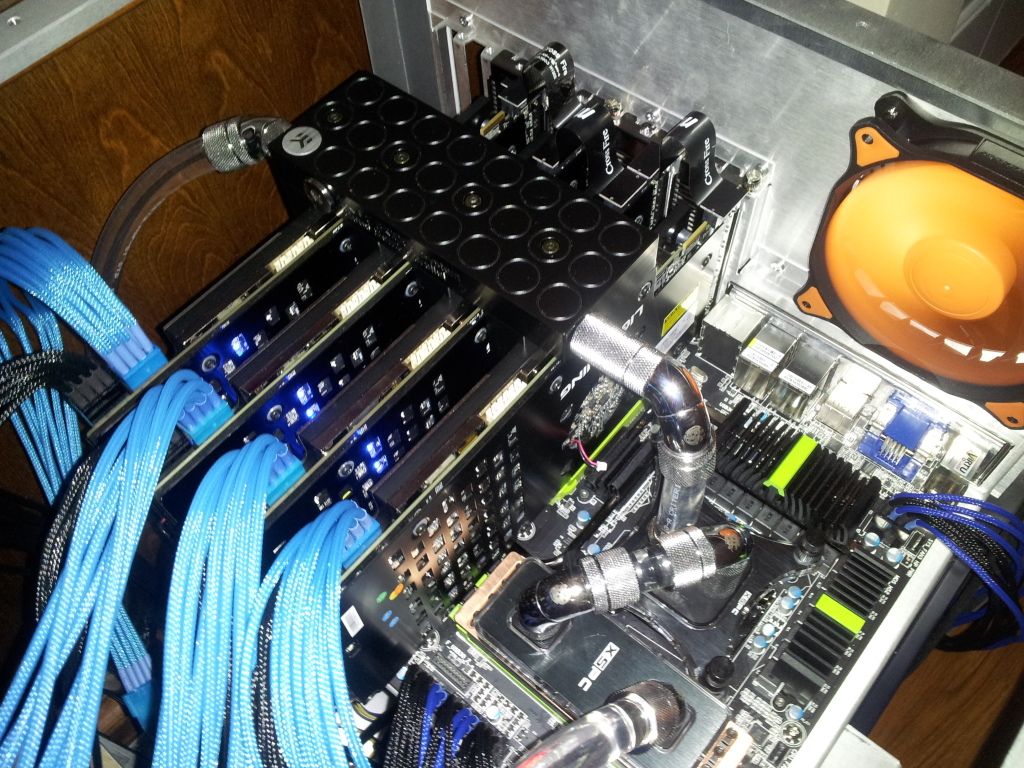
    Its the Mountainmods extended Ascension in brushed aluminum with Horizon Tray. It was expensive but worth it. Its an awesome case. Its HUGE, but very light as its all aluminum and since its on wheels it is very easy to work on.

    Quote Originally Posted by jomama22 View Post
    This post is so full of win that I feel just like that girl on the right, and you the boy on the left. Must be why I could only connect three
    Haha, don't worry I sank my own battleship with the wrong tubing! Now I am lost in candyland as I wait for replacement tubing and spare G1/4 plugs but i suppose thats LIFE

    Quote Originally Posted by tiborrr View Post
    @l88bastard: Wroom wroom!
    Indeed! Working on this case feels like working under the hood of a sports car. I love my EKWB superchargers
    Last edited by l88bastard; 08-07-2012 at 06:31 AM.

  2. #102
    Registered User
    Join Date
    Jun 2012
    Posts
    51
    I have the same case as you, bastard. Only differences is I got mirror black paint and the sr-x tray. Those damn things do cost an arm and a leg lol.

    Just opened the dhl box! Man are these blocks massive!
    Attached Images Attached Images

  3. #103
    Registered User
    Join Date
    Jul 2012
    Posts
    23
    The mirror black is sharp...I was very tempted to go with it, but I felt a bit saucey an went with door #2. I figue if I ever get tired of it I can always send it out to be powder coated whatever color I like. I had a corsair 800D which was great, but I like this MM so much more

    The blocks are very hefty...they can double as home defense weapons lol.

  4. #104
    Registered User
    Join Date
    Aug 2012
    Posts
    70
    kind of hijacking but yeh quick question, how much should i pay for a second hand koolance 7970 block?

  5. #105
    Registered User
    Join Date
    Jun 2012
    Posts
    51
    Derp....$50-$70 I'd say. $80 with shipping included.

  6. #106
    Registered User
    Join Date
    Jul 2012
    Posts
    2
    So, got mine today, shipping was a lot 40 at ek, plus another 35 at my door for duty and stuff, so 75$ to ship it, ouch.

  7. #107
    Registered User
    Join Date
    Jul 2012
    Posts
    23
    And this kids is why we SHOULD ALWAYS test our equipment before installing waterblocks
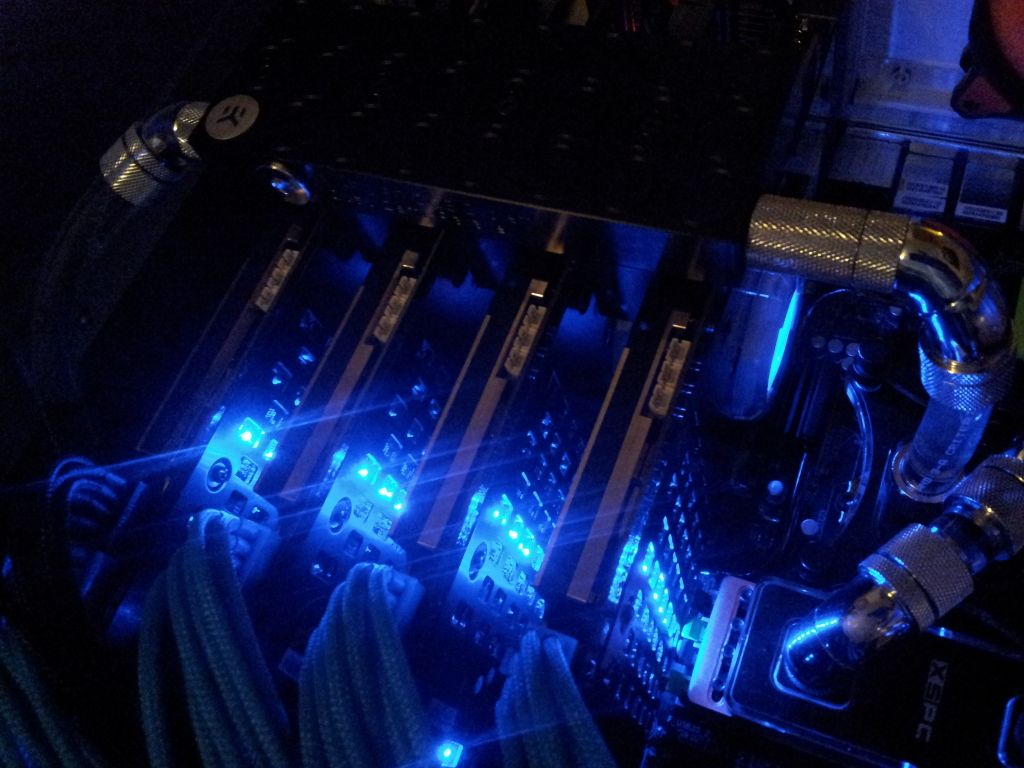
    My fourth MSI lighting which I just bought for this build is DOA. I knew I should have tested it prior but I took the lazy road out and now I am gonna pay for it. As you can see the other three GPUS are working and their blue leds are on. Card 1 is dead. I have tried pulling its reactor off and changing power cables, but that didn't help....its dead, dead, dead.
    Last edited by l88bastard; 08-10-2012 at 10:50 AM.

  8. #108
    Xtreme Member
    Join Date
    Dec 2008
    Location
    Oregon
    Posts
    135
    Sorry to hear that bastard. I hate it when I take a shortcut and it bites me!

    How have the clocks been on water? Much of an improvement for anyone?

  9. #109
    Registered User
    Join Date
    Jul 2012
    Posts
    23
    I only had time do do some minor oc testing @1150/1600 and temps were 35c under full load for all three!

  10. #110
    Xtreme Enthusiast
    Join Date
    Sep 2008
    Location
    Fort Rucker, Alabama
    Posts
    626
    My four blocks have been sitting on my table. Too busy with work. Hopefully get them installed next week.
    GPU: 4-Way SLI GTX Titan's (1202 MHz Core / 3724 MHz Mem) with EK water blocks and back-plates
    CPU: 3960X - 5.2 GHz with Koolance 380i water block
    MB: ASUS Rampage IV Extreme with EK full board water block
    RAM: 16 GB 2400 MHz Team Group with Bitspower water blocks
    DISPLAY: 3x 120Hz Portrait Perfect Motion Clarity 2D Lightboost Surround
    SOUND: Asus Xonar Essence -One- USB DAC/AMP
    PSU: EVGA SuperNOVA NEX1500
    SSD: Raid 0 - Samsung 840 Pro's
    BUILD THREAD: http://hardforum.com/showthread.php?t=1751610

  11. #111
    Registered User
    Join Date
    Jun 2012
    Posts
    51
    Quote Originally Posted by Callsign_Vega View Post
    My four blocks have been sitting on my table. Too busy with work. Hopefully get them installed next week.
    Bah same thing here. Plus I'm at Watkins Glenn all weekend so no doing until at least Tuesday.

  12. #112
    Registered User
    Join Date
    Aug 2012
    Posts
    70
    Quote Originally Posted by l88bastard View Post
    And this kids is why we SHOULD ALWAYS test our equipment before installing waterblocks
    My fourth MSI lighting which I just bought for this build is DOA. I knew I should have tested it prior but I took the lazy road out and now I am gonna pay for it. As you can see the other three GPUS are working and their blue leds are on. Card 1 is dead. I have tried pulling its reactor off and changing power cables, but that didn't help....its dead, dead, dead.
    This is why you should invest in koolance QDC quick release fittings, you can just take the cards out without taking your loop apart at all :P

  13. #113
    Registered User
    Join Date
    Jul 2012
    Posts
    23
    Quote Originally Posted by OCAUfedexpress View Post
    This is why you should invest in koolance QDC quick release fittings, you can just take the cards out without taking your loop apart at all :P
    I have disconnects, but they wont benefit me at all. As you can see in that pic, my loop is very simple: Radiator > memory block > CPU block > GPU blocks > pump/res > Radiator.

    The problem is not disconnects. The problem is the quad GPU + Waterblock assembly must come out at the same time and my hands are too big to slide in between each card and press the PCIE safety release latch. Also since you must be lifting the gpu while you press the safety release latch, it is an impossibility to do this with four gpus at the same time. Thus the GPU assembly must be broken down before the cards can be removed.

    In my situation, I tip the res over and drain water, which then results in more water coming down the loop from the gpus. So I drain some more. Once enough is out I disconnect the radiator hoses and remove the entire tray which the mobo sits, then I can tilt & drain the gpu assembly, cpu & memory blocks. Once that is all drained, I can then break down the GPU assembly and remove them.

    So you see disconnects will not help at all

  14. #114
    Xtreme Enthusiast
    Join Date
    Sep 2008
    Location
    Fort Rucker, Alabama
    Posts
    626
    Ya, a little bit of a design flaw IMO. The grooves for the O-rings should be on the FC-Link part, not the bridge. You always want the o-rings on the non-moving part, in this case the GPU's. For those of us that have GPU's that sit vertically on a horizontal motherboard, there is no way to get the o-rings to stay in the grooves on the bridge as the bridge is mounted top-down. This can cause a high likely-hood of o-rings getting pinched. If the o-ring grooves were on the FC-link side, this would be a non-issue. It would also work better if the GPU's were horizontal and the motherboard vertical with this change.

    Right now you have to lay the bridge down with the o-ring facing up and mound the GPU's upside down and install the whole GPU setup at once. Luckily my Extreme 11 has nice PCI-E "slides" instead of latches that will only lock if you want them to lock. When the motherboard is in the horizontal, PCI-E locks are a nuisance. So i can freely insert and remove 4-way GPU setup all at once with no problems. For people with locking PCI-E slots, this is a PITA!

    I just recommend EK move the o-ring grooves from the bridges to the FC-Links and problem solved.
    GPU: 4-Way SLI GTX Titan's (1202 MHz Core / 3724 MHz Mem) with EK water blocks and back-plates
    CPU: 3960X - 5.2 GHz with Koolance 380i water block
    MB: ASUS Rampage IV Extreme with EK full board water block
    RAM: 16 GB 2400 MHz Team Group with Bitspower water blocks
    DISPLAY: 3x 120Hz Portrait Perfect Motion Clarity 2D Lightboost Surround
    SOUND: Asus Xonar Essence -One- USB DAC/AMP
    PSU: EVGA SuperNOVA NEX1500
    SSD: Raid 0 - Samsung 840 Pro's
    BUILD THREAD: http://hardforum.com/showthread.php?t=1751610

  15. #115
    Xtreme Enthusiast
    Join Date
    Sep 2008
    Location
    Fort Rucker, Alabama
    Posts
    626
    Anyone got some good temperature/overclock results as of yet?
    GPU: 4-Way SLI GTX Titan's (1202 MHz Core / 3724 MHz Mem) with EK water blocks and back-plates
    CPU: 3960X - 5.2 GHz with Koolance 380i water block
    MB: ASUS Rampage IV Extreme with EK full board water block
    RAM: 16 GB 2400 MHz Team Group with Bitspower water blocks
    DISPLAY: 3x 120Hz Portrait Perfect Motion Clarity 2D Lightboost Surround
    SOUND: Asus Xonar Essence -One- USB DAC/AMP
    PSU: EVGA SuperNOVA NEX1500
    SSD: Raid 0 - Samsung 840 Pro's
    BUILD THREAD: http://hardforum.com/showthread.php?t=1751610

  16. #116
    Registered User
    Join Date
    Jul 2012
    Posts
    23
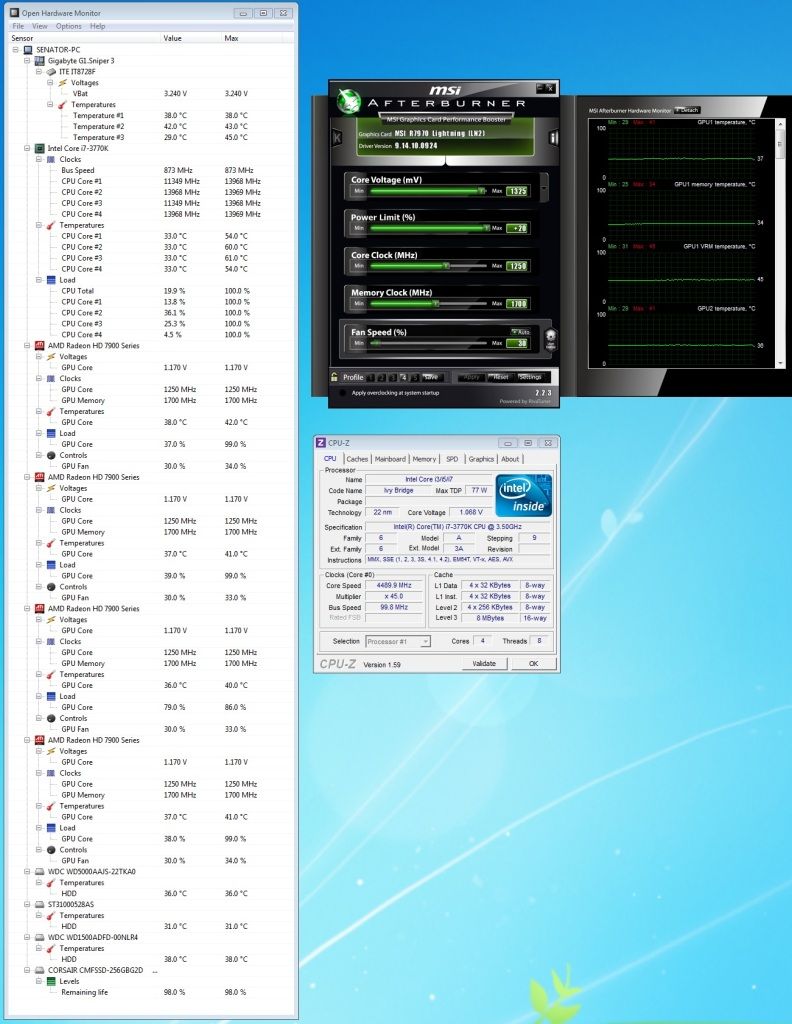
    I got my replacement card in and reinstalled everything. FINALLY everything is working perfectly. BF3 is AMAZING on 5x1 with quadfire lightnings. I am running 1250/1700 clocks @ 1325/1700mvs and temps are in the low 40s across the board. Everything is working perfect, these EK blocks are fantastic!!!


    And here is some hardware :banana::banana::banana::banana:

  17. #117
    Xtreme Enthusiast
    Join Date
    Sep 2008
    Location
    Fort Rucker, Alabama
    Posts
    626
    I'm with Bastard, the EK blocks installed look pretty good.

    Little video of my setup.

    http://www.youtube.com/watch?v=4jhrP7C3Cdg
    GPU: 4-Way SLI GTX Titan's (1202 MHz Core / 3724 MHz Mem) with EK water blocks and back-plates
    CPU: 3960X - 5.2 GHz with Koolance 380i water block
    MB: ASUS Rampage IV Extreme with EK full board water block
    RAM: 16 GB 2400 MHz Team Group with Bitspower water blocks
    DISPLAY: 3x 120Hz Portrait Perfect Motion Clarity 2D Lightboost Surround
    SOUND: Asus Xonar Essence -One- USB DAC/AMP
    PSU: EVGA SuperNOVA NEX1500
    SSD: Raid 0 - Samsung 840 Pro's
    BUILD THREAD: http://hardforum.com/showthread.php?t=1751610

  18. #118
    Registered User
    Join Date
    Jun 2012
    Posts
    51
    Sneak peek. build2.jpgbuild3.jpgbuild4.jpgAlmost done... still have to sleeve the cables and dress her up but got the loops finished. Shouldnt be long. BTW there are 2 loops in this, 1 for cpu and gfx 1, the second is the last 2 gpus. I call her the octopus, i wanted to do something different then merely a bridge connecting them all and the ek blocks allow me to do this.
    Attached Images Attached Images

  19. #119
    Xtreme Enthusiast
    Join Date
    Sep 2008
    Location
    Fort Rucker, Alabama
    Posts
    626
    Holy cow that is a lot of lines! From my testing a single loop for everything is fine. The water temp doesn't heat up enough by the time it gets to the last component to really matter.
    GPU: 4-Way SLI GTX Titan's (1202 MHz Core / 3724 MHz Mem) with EK water blocks and back-plates
    CPU: 3960X - 5.2 GHz with Koolance 380i water block
    MB: ASUS Rampage IV Extreme with EK full board water block
    RAM: 16 GB 2400 MHz Team Group with Bitspower water blocks
    DISPLAY: 3x 120Hz Portrait Perfect Motion Clarity 2D Lightboost Surround
    SOUND: Asus Xonar Essence -One- USB DAC/AMP
    PSU: EVGA SuperNOVA NEX1500
    SSD: Raid 0 - Samsung 840 Pro's
    BUILD THREAD: http://hardforum.com/showthread.php?t=1751610

  20. #120
    Registered User
    Join Date
    Jun 2012
    Posts
    51
    Quote Originally Posted by Callsign_Vega View Post
    Holy cow that is a lot of lines! From my testing a single loop for everything is fine. The water temp doesn't heat up enough by the time it gets to the last component to really matter.
    O I realized this lol. To be honest I just wanted to try something different looks wise. Also, the fact that I was going to use 4 360 rads and their placement gave me this idea. I wanted the build to also be as modular as possible. I have 10 sets of qdc on here (every rad port and the pump output as well). It looks like a mess in these photos but it looks pretty awesome in person. It plays into the theme of the case as the bottomed will be woven in sleeved wires. Really can't wait for my vision to be finished.

  21. #121
    Registered User
    Join Date
    Jul 2012
    Posts
    23
    That looks crazy Jomomma!

  22. #122
    Xtreme Member
    Join Date
    Dec 2009
    Location
    Gomel, BY
    Posts
    235
    ^^
    i'm with this man!
    *worried 'bout squid nightmares now*

  23. #123
    Registered User
    Join Date
    Jun 2012
    Posts
    51
    I don't have a screen cap but have been running some benches and games and here are the results.

    Can hit 1275/1800 (can hit 1850 but get lower fPS)@1.35v/1.7v stable in bf3/heaven 3.0/crysis 1/2.
    Temps are Max 39/36/39 (gpu 1/2/3) so I may reseat gpu 1 and 3 as gpu 2 has yet to break 36* which is mind blowing.

    At stock volts and clock, temps are Max 33/30/34 which in itself is mind blowing again.

    Idle temps are 27/25/28 with ambiant air being 70* f (21.1c)

  24. #124
    Registered User
    Join Date
    Jul 2012
    Posts
    23
    This has been the rig build from hell cause I cant get 4 lightnings to work with these blocks properly.

    I have three lightnings watercooled with these blocks and they work perfectly, but getting a fourth card working for quadfire has been a nightmare. So far in total I have gone through EIGHT yes EIGHT MSI lightnings and of the EIGHT only THREE work perfectly.

    The first defective lightning had runaway thermal temp issues with its stock cooler so I returned it. I did not try this card with a waterblock.

    The second defective lightning didn't work at all, I did not test it before installing the waterblock so I dont know if it was DOA beforehand.

    The third defective lightning worked fine with the waterblock installed for 3 days and then died

    The fourth defective lightning worked perfectly with the stock fan cooler before I installed the waterblock, but was dead immediately after I installed the water block.

    The fifth defective lightning worked perfectly with the stock fan cooler before I installed the waterblock, but was dead immediately after I installed the water block.

    Since installing the waterblock killed defective lighting 4 & 5 I am going to go out on a limb and say the same happened to defective lightning 2. When I say dead I mean paper weight dead. The led & reactor lights do not light up and the system does not recognize them at all. I have tried all four pcie slots, tried different power rails from the PSU, etc, etc...but nothing, they are dead.

    So what is happening? How did installing the waterblock kill at least three of my lightnings? Installing these waterblocks is a very easy procedure and I have successfully produced three other perfect watercooled lightnings, so I don't understand what is going wrong. I have done some research and seen that people had problems with EK waterblocks and EK backplates, but I am using the stock lightning backplates. I have seen some speculation about too much thermal paste, but I applied perfect amounts of thermal paste that did not go over the gpu. I have seen speculation about overtightning screws but I did not tighten screws once they stuck even though I could have gone another half turn or so. I have seen speculation about screws shorting out GPUs but I have used the EK plastic washers and screws.

    I don't get it, this has been a total nightmare and I am ready to give up, cut my losses and sell everything.
    Last edited by l88bastard; 08-29-2012 at 07:36 AM.

  25. #125
    Registered User
    Join Date
    Jan 2008
    Posts
    37
    I've noticed that on 2 of my lightnings the stock back plate can get easily bent and cause a short around the vrm area. Caused them to seem completely dead. After messing with it a bit and ensuring there was no more contact they worked fine. You could try sticking a sheet of paper under the back plate to make sure.
    Notice any light colored areas on the back plates where it seems the paint burned?

Page 5 of 7 FirstFirst ... 234567 LastLast

Bookmarks

Bookmarks

Posting Permissions

  • You may not post new threads
  • You may not post replies
  • You may not post attachments
  • You may not edit your posts
  •