

After a 2 day trial-and-error I seems found it's CPU-setting related...with Speedstep disabled and turbo enabled the system always fail to post when using 125Mhz. So I guess I'll just leave EIST on for this case...




After a 2 day trial-and-error I seems found it's CPU-setting related...with Speedstep disabled and turbo enabled the system always fail to post when using 125Mhz. So I guess I'll just leave EIST on for this case...
Intel XEON X5650 B1 Retail x2 3012A692
EVGA Classified SR-2 BIOS A50
Crucial Ballistix PC3-1333 CL6 D9GTR 2G Kit (Active)
Crucial Ballistix PC3-2000 CL9 D9GTS 2G Kit (Active)
Thermaltake V1R (in use, without heatpipe)
Cooler Master Silent Pro M 1000W PSU
Galaxy GTX 275 (Digital PWM)
WD 10EALX
Overclock:
Currently running @ Default.
Intel i7-2600K (L041C107, L048B284, L050A853)
Asus P8P67 Pro BIOS 1305
WC setup EK Supreme HF GOLD Edition powered by BlackICE GTX 480
G.Skill 12800CL7D-4GBECO x2 packs
WD 10EALX
Intel X25-M 120GB
MSI NGTX560Ti Twin Frozer SLI
Overclock:
40x100 4Ghz 1.15v [Currently testing L048B284]
So what CPU multiplier ratio are you using at 100 and 125 then?Originally Posted by ci2kla

ASUS North America Technical Marketing - If you are based outside North America and require technical assistance or have a query please contact ASUS Support for your region.
Rampage IV Extreme tweaking guide
ASUS Z77 UEFI Tuning Guide for overclocking
Maximus 5 Gene OC Guide
Maximus VI Series UEFI OC Guide
Using 36 for 125Mhz Strap and 45 for 100Mhz which gives 4.5Ghz clock speed. Thanks.
Intel XEON X5650 B1 Retail x2 3012A692
EVGA Classified SR-2 BIOS A50
Crucial Ballistix PC3-1333 CL6 D9GTR 2G Kit (Active)
Crucial Ballistix PC3-2000 CL9 D9GTS 2G Kit (Active)
Thermaltake V1R (in use, without heatpipe)
Cooler Master Silent Pro M 1000W PSU
Galaxy GTX 275 (Digital PWM)
WD 10EALX
Overclock:
Currently running @ Default.
Intel i7-2600K (L041C107, L048B284, L050A853)
Asus P8P67 Pro BIOS 1305
WC setup EK Supreme HF GOLD Edition powered by BlackICE GTX 480
G.Skill 12800CL7D-4GBECO x2 packs
WD 10EALX
Intel X25-M 120GB
MSI NGTX560Ti Twin Frozer SLI
Overclock:
40x100 4Ghz 1.15v [Currently testing L048B284]
Can't find ACPI S3 in bios of my Rampage IV Formula. My system when in sleep always goes in reboot cycle from sleep to desktop and so on.
Where can i config the sleep state?!.... Need help!
Windows 7 Ultimate 64bit, SP1 Power By:
Asus Rampage IV Formula
Intel SBE 3930K
Gskill RipJaws Z 14900 (1866 DDR3) 16GB 10-11-10-24
EVGA 570 GTX SLI
SSD Samsung P830 240GB
Corsair AX850
Hey,
after changing the CPU-Cooler I've got the problem that I can only use 8GB RAM instead of 16GB. All DIMM's are still listed in the DIMM Post in the BIOS. I've tried the 0005b,0006b,1101 and the 1005 bios and nothing has changed, then I increased ram,vtt voltages nothing changed either. What should I try now ? Sorry for my bad english and thanks for your help.
Check the CPU cooler is not clamped too tight, and also check the socket for any bent CPU pins.
ASUS North America Technical Marketing - If you are based outside North America and require technical assistance or have a query please contact ASUS Support for your region.
Rampage IV Extreme tweaking guide
ASUS Z77 UEFI Tuning Guide for overclocking
Maximus 5 Gene OC Guide
Maximus VI Series UEFI OC Guide
Anyone?!
Windows 7 Ultimate 64bit, SP1 Power By:
Asus Rampage IV Formula
Intel SBE 3930K
Gskill RipJaws Z 14900 (1866 DDR3) 16GB 10-11-10-24
EVGA 570 GTX SLI
SSD Samsung P830 240GB
Corsair AX850
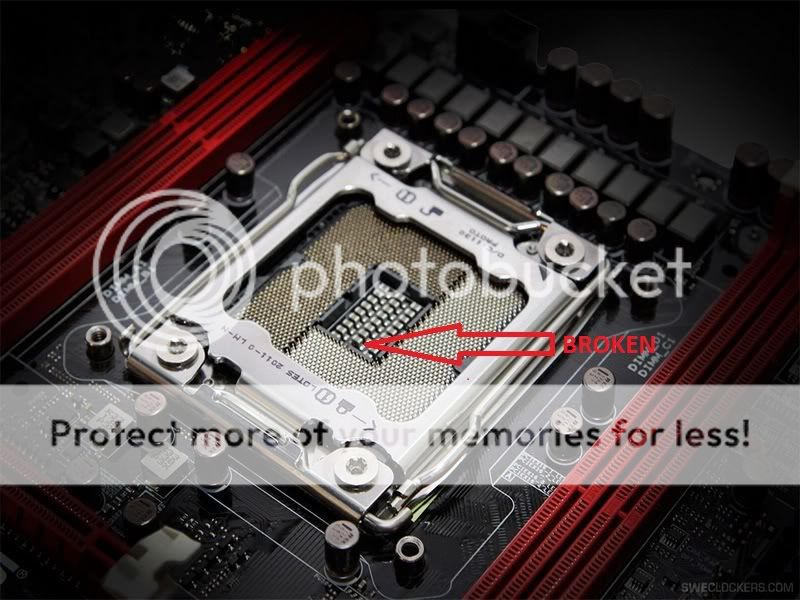
Seems like one pin broke off and some are different colored. Should I send the board to RMA?
Seems like one pin broke off and some are different colored. Should I send the board to RMA?
I doubt very much bent pins are covered under RMA . Thats user damage.
ASUS M4E
2600K @5.1 24/7, 1.45v
8GB G.Skill RipJaw 2133mhz
580 GTX Tri SLI @925, 2400
Silverstone Strider 1500w
OCZ AGility Raid 0 OS, Corsair GT's Raid 0 for data.
Win 7 64 Bit Sp1
ASUS R4E
3690x 5.125 24/7 0901 or 0083b
32GB G.Skill Ripjawz 2133mhz cas 9 or 2333mhz cas 10 or 16gb 2400mhz cas 9
580 GTX Tri SLI @925, 2400
Silverstone Strider 1500w
OCZ AGility Raid 0 OS, Corsair GT's Raid 0 for data.
Win 7 64 Bit sp1
"Only the strong will survive!" -Pazza316 when commenting on training with him!!
Managed to RMA my RIVE with broken socket big pin
this has answered why it couldn't detect all of the 8 DIMMS
SUCCESSFUL TRADE LIST RM600k+
^^ Malaysia's Overclocking Enthusiast Community Website ^^
Find us at Facebook HERE
XS Successful Trades:
G.Skill RipjawsZ 2400C9 4X4GB - sold to easegantini | G.Skill RipjawsX 2133C8 2X2GB - bought from Dumo | 2600K 57X - bought from newhit | 3770K 6750 - bought from Viss | 3770K 6750 - sold to Sniper | 3770K IMC 2800+ - bought from Dumo | G.Skill Pi 2200C7 - bought from websmile | 3770K IMC 2933+ - bought from Viss | DomGT 2kC7 3X2GB - sold to _AntLionBR_ | G.Skill Pi 2133C8 - bought from websmile | DomP 2800C11 - bought from Alex-Ro | Pi 2000C7 - bought from websmile | GTX4 + KVR 1333C9 - bought from TaPaKaH
My review of Sabertooth X79 just went live if anyone is interested.
http://www.hardwarecanucks.com/forum...rd-review.html
cheers
MB Reviewer for HWC
Team OCX Bench Team
Hi Guys, I am new to the boards but I have been lurking for quite sometime. I recently rma'd my gigabyte ud5 x79 motherboard and got an Asus x79 Pro motherboard in it's place. I installed the board tonight and was met with some issues. First, I could not install windows on my OCZ vertex 3 120 gig SSD. In trying to solve that issue I went into the bios and disabled Sata. Now my motherboard will not display anything. It powers on fine and looks as if it is working but it nothing will show up on the monitor. The LED's on the motherboard display 06. Does anyone have any idea as to why this might be happening? Did I mess something up by disabling Sata in the bios? Please help!
System:
INtel x79 chip 3930
Silverstone 1500 watt psu
XFX 6870 gpu
16 gigs of gskill quad ram
OCZ vertex 3 120 gig ssd.
Clear CMOS and start again. Can you describe with more detail "I cannot install Windows", what exactly happens?
-Raja
ASUS North America Technical Marketing - If you are based outside North America and require technical assistance or have a query please contact ASUS Support for your region.
Rampage IV Extreme tweaking guide
ASUS Z77 UEFI Tuning Guide for overclocking
Maximus 5 Gene OC Guide
Maximus VI Series UEFI OC Guide
I read. Great review man. Congratz !!
3930K C2
Asus RIVE
G.Skill PIS 2200 Mhz 7-10-10
Custom WC
Enermax 1250W+
duplicate
3930K C2
Asus RIVE
G.Skill PIS 2200 Mhz 7-10-10
Custom WC
Enermax 1250W+
So guys, I'm ready to start a new project, and I am aiming for the X79 chipset.
Of course, I will be sticking with ASUS, and so I want to ask you which board is preferable for a strong (but not extreme) OC.
Looking at running a 3960x at around 5 GHz, using 32 GB of RAM.
Sabertooth or Rampage IV Extreme?
I will be watercooling the CPU and 2 GPU's (nVidia Kepler highend), but I dont think I will be watercooling all components like on my last project.
What do people recommend?
LianLi A70-B, ASUS Maximus Formula (Bios 1004), QX9650 @ 4GHz, 4x 2GB Mushkin eXtreme Performance XP2-8500, WD Velociraptor 600GB (OS), 4x WD GreenPower 2TB, ASUS Geforce 580GTX, MIST 1000W Modular PSU, EK Supreme, EK Chipset/MOSFET blocks, EK Fullcover VGA block, ThermoChill PA 120.3, Swiftech MCP655, Swiftech MicroRes.
I Raja clearing CMOS results in a black screen. The motherboard does not recover. I could not install windows because it said windows will not install on a partitioned drive or something like that. This is odd because I was able to install windows on the gigabyte board fine on the same drive but I cannot now install it with this asus board. Should I return this board and ssd? I would get the rampage 4 instead.im so tired and frustrated at this pOint of x79. I just want it to work. Thank you for your help and advice.
Thank you
MB Reviewer for HWC
Team OCX Bench Team
Raja or whoever, any plans to sell x socket as an add on for other boards?
MB Reviewer for HWC
Team OCX Bench Team

very nice donko !!! congrats
Intel Core i9-7980XE@ 4.8GHz 18C/18TH (Direct Die Contact)
ASRock X299 OC Formula
ADATA XPG SPECTRIX D80 (4x8GB) DDR4-3800C17 B-Die
1x Intel Optane SSD 905P 480GB
4x HP EX950 NVMe 2TB on ASRock ULTRA M.2 CARD
EVGA RTX 2080TI KINGPIN 2190/8000 Stock Cooling AIO 240
SilverStone ST1500W-TI TITANIUM
Alphacool Custom Water Cooling
Ty sir. btw your pm box is full so I couldnt respond to ur pm!
MB Reviewer for HWC
Team OCX Bench Team
None that I know of. It's an ROG exclusive for now.
ASUS North America Technical Marketing - If you are based outside North America and require technical assistance or have a query please contact ASUS Support for your region.
Rampage IV Extreme tweaking guide
ASUS Z77 UEFI Tuning Guide for overclocking
Maximus 5 Gene OC Guide
Maximus VI Series UEFI OC Guide
Ok thanks. X socket is very handy for benching because pretty much all coolers and pots have backplates and typical LGA2011 mounting blocks the mb holes. Ive been using X socket from RIVE on a number of boards and it would be handy to have an option to purchase extras. GJ to whoever thought of that feature.
MB Reviewer for HWC
Team OCX Bench Team
Hi everyone...
Wanna ask:
Has anyone encounter issues with sleep, specifically waking up from sleep to discover their system halts with their Rampage IV Extreme?
I don't fold@home, so therefore to save time the next day, I tend to sleep the system during the night; usually the next morning I discover my system won't wake properly. RIVE debug status seems to get stuck in "30" - can see windows login screen, mouse pointer movable but no overall response - even after 30mins
Cheers
Asus Rampage IV Extreme
Intel Core i7-3960X 3.3Ghz (#3133B429)
@4500.05 MHz (air) /4624.98 MHz (air) /4699.92 MHz (H80) /4800.05 MHz (H80)
Corsair Memory 16GB (4x4GB) Vengeance 1600 Mhz 1.5v
Gigabyte GV-N580UD-15I @920Mhz (SLI)
OCZ Vertex 3 SATA III 2.5" SSD 120 GB (Win7)
OCZ Vertex 2 SATA II 2.5" SSD 120 GB (Linux)
Corsair Hydro Series™ H80 & AP-14 (x2) (now shopping for LC gear)
Corsair AX1200 PSU
SilverStone Raven RV02W-EW
 Posting Permissions


 Reply With Quote


Bookmarks