

Lol the cpu is a 3133B430Originally Posted by andressergio




Lol the cpu is a 3133B430
i7 3960X@5ghz, Asus Rampage IV Extreme, 8gb Gskill RipjawsZ PC19200C8, Corsair force GT 240go, 2XGTX Titan, MM Ascension, Seasonic X-serie Gold 1250W, Watercooling
i7 3930K@5ghz, Asus Rampage IV Extreme, 8gb Gskill RipjawsZ PC17000C9, OCZ Vertex 3 120go, GTX670 DCU2 Top, MM Pinnacle, Corsair AX850, Watercooling
It will fit. Just get random M4 screws to screw it to the socket.

I'm baffled on why you guys are still using the old 9128 SATAIII controller. As we all know those that usually run SATAIII uses SSD's. That being said, how does the ASmedia chip in the RIVE compare to the 9182?
Project Elegant Dreams
CPU: Intel 980x (3005F803T) @ Stock , Mobo: Rampage III Extreme, Ram: 24GB Corsair Vengeance 1600 C9 1T 1.51v GPU: SLI EK'd Vanilla GTX580, 0.875v @ idle.
Sound:Asus Xonar Xense w/Sennheiser PC350
SSD: 2x OCZ Agility 3 120GB RAID-0 on ICH10 Storage: 2x1.5TB Hitachi 5K3000, 1.5TB WD Black, 1TB F3, various other HDD's Case: Obsidian 800D, PSU: Corsair AX1200,
Water Cooling
Main Loop
EK Supreme HF
EK GTX480 blocks on EVGA 580s
MCP355 and MCP35X in serial
Dual BlackIce GTX480 Rads

lol thanks mate, i tought 1850 Watts kinda exagerated but well lol
thanks bud !
Last edited by andressergio; 11-15-2011 at 05:34 PM.
Intel Core i9-7980XE@ 4.8GHz 18C/18TH (Direct Die Contact)
ASRock X299 OC Formula
ADATA XPG SPECTRIX D80 (4x8GB) DDR4-3800C17 B-Die
1x Intel Optane SSD 905P 480GB
4x HP EX950 NVMe 2TB on ASRock ULTRA M.2 CARD
EVGA RTX 2080TI KINGPIN 2190/8000 Stock Cooling AIO 240
SilverStone ST1500W-TI TITANIUM
Alphacool Custom Water Cooling
New UEFI for the R4E:
http://www.mediafire.com/file/d20wjs...ASUS-0075b.rar
Improve memory overclocking.
ASUS North America Technical Marketing - If you are based outside North America and require technical assistance or have a query please contact ASUS Support for your region.
Rampage IV Extreme tweaking guide
ASUS Z77 UEFI Tuning Guide for overclocking
Maximus 5 Gene OC Guide
Maximus VI Series UEFI OC Guide
Hi Pinto, May I know the s/n started with 2V120112A1xxx
Going to get the same batch with close s/n, which guarantee more or less the same overclocking ability. Thanks
What will the price of the RIVE be in India?
@ Raja - SaberTooth x79
Board shipped with 604 UEFI, 709 was on Support link, but 604 would not load 709 off of NTFS in EZ Flash 2, compalined ROM not UEFI.
AI Suite II Flash updater, all 3 download servers did not have 709 on their drop points. It was able to flash using the ROM I downloaded from within Win 7.
Is there an 8XX for Saber?
Now: Asus R4E with Intel i7 IB-E 4930K @ 4.4Ghz, Patriot 2x ( 2x8GB) 2133CL11 @ 2400 CL11-12-12-30-1T-1.64v
Was: Sabertooth x79 and Intel i7 3930k @ 4.8Ghz, G.Skill 1866CL9 1.5v @ 2133 9-11-10-28-1t-1.64v
Galaxy 470 (NVidia 750Mhz/1500Mhz/1730/1.062v)
Corsair Fusion GT 256GB, Crucial C300 256GB SSD Sata III, Seagate 2TB Sata III, Seagate 3TB.
Corsair H80 WC
Flash drive needs to be formatted to FAT32 for EZ Flash. 0709 is the latest UEFI for the Sabertooth.
-Raja
ASUS North America Technical Marketing - If you are based outside North America and require technical assistance or have a query please contact ASUS Support for your region.
Rampage IV Extreme tweaking guide
ASUS Z77 UEFI Tuning Guide for overclocking
Maximus 5 Gene OC Guide
Maximus VI Series UEFI OC Guide
updated my R4E with ezflash to 75b, no problem bios seems good!
i7 3960X@5ghz, Asus Rampage IV Extreme, 8gb Gskill RipjawsZ PC19200C8, Corsair force GT 240go, 2XGTX Titan, MM Ascension, Seasonic X-serie Gold 1250W, Watercooling
i7 3930K@5ghz, Asus Rampage IV Extreme, 8gb Gskill RipjawsZ PC17000C9, OCZ Vertex 3 120go, GTX670 DCU2 Top, MM Pinnacle, Corsair AX850, Watercooling

Waiting for my chips
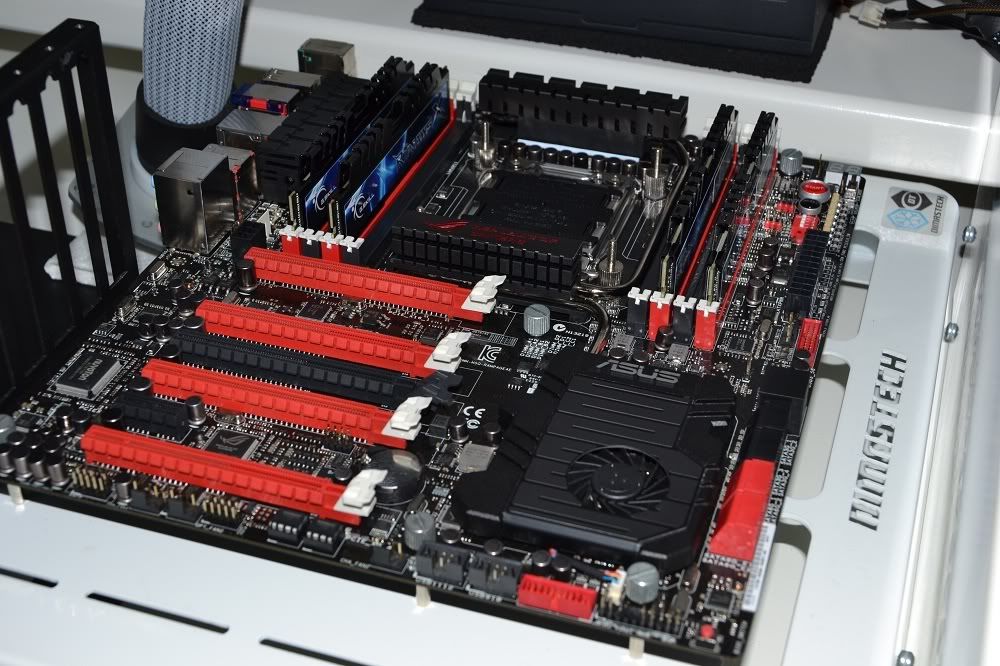
WTF, did you rob my house? Im running same setup, white dimastech, rive, even the same psu haha

Last edited by Eldonko; 11-16-2011 at 01:19 PM.
MB Reviewer for HWC
Team OCX Bench Team
nice little air chip, push pull on venomous X hits 62c max during test
too bad ln2 max is 5.42
Just got one of these from Newegg--where is the manual posted so I can download it to study for tomorrows install? I heard that the extra SATA 6gbs ports (2 in back and the 2 esata) that run off the different controller doesn't allow raid 0,1----if that's true I don't know what Asus was thinking doing something like that, nothing better than putting ssds in a raid o for some speed on operating systems or programs to help with response--if there is no riad function on 4 sata 6gbs ports when there could be looks like i'll have this up for sale as soon as the gigabyte or msi highend boards come out
dony worry mate you can always find someobe that wants that for 24/7---- like mesell it

Last edited by andressergio; 11-16-2011 at 03:18 PM.
Intel Core i9-7980XE@ 4.8GHz 18C/18TH (Direct Die Contact)
ASRock X299 OC Formula
ADATA XPG SPECTRIX D80 (4x8GB) DDR4-3800C17 B-Die
1x Intel Optane SSD 905P 480GB
4x HP EX950 NVMe 2TB on ASRock ULTRA M.2 CARD
EVGA RTX 2080TI KINGPIN 2190/8000 Stock Cooling AIO 240
SilverStone ST1500W-TI TITANIUM
Alphacool Custom Water Cooling
jesus guys not a grain of dust there all clean neat no words...just mute
congrats !
Sergio
Intel Core i9-7980XE@ 4.8GHz 18C/18TH (Direct Die Contact)
ASRock X299 OC Formula
ADATA XPG SPECTRIX D80 (4x8GB) DDR4-3800C17 B-Die
1x Intel Optane SSD 905P 480GB
4x HP EX950 NVMe 2TB on ASRock ULTRA M.2 CARD
EVGA RTX 2080TI KINGPIN 2190/8000 Stock Cooling AIO 240
SilverStone ST1500W-TI TITANIUM
Alphacool Custom Water Cooling
Argh .... me want !
I7 3930K
Asus Rampage IV Extreme
G.SKILL Ripjaws Z Series 16GB DDR3 2133mhz
Ive put my current cpu/mobo/ram for sale. X79 comming soon. And ill go back to watercooling for my CPU.
BTTB - Gigabyte Z87X-OC - WCed I7 4770k - 2x8gb Ballistix 1600mhz - Zotac GTX 780
Asus Xonar Pheobus - OS -> Toshiba Q 256gb - Games -> 2x Agility 4 256gb Raid0
Corsair HX850 - Tecnofront HWD BenchTable - Asus VE278Q 5760x1080
Serveur - Asus Z77m PRO - 2500K - NH-C12P - 4x4gb G.Skill Ares 1600mhz
Agility 4 128gb - Corsair CX430M - 1TB Black - 2TB green - 2TB Red
KatPat - Gigabyte 990FXA-UD3 - FX-8320 - PH-TC14CS - 2x4gb Viper 1600mhz - GTS 450
Samsung Evo 120gb - Corsair HX750 - Bitfenix Survivor White - Asus VE247H
I ordered the R4E today and a 3930k. I didnt order memory, I have no need for 16gb's so I plan to use the DominatorGT 2000 4x2gb kit. Does anyone know how well this board clocks hypers?
I got my R4E and 3930k in. I am trying to get the processor voltage to stabalize under load. It bounces around a lot more than I would like.
Using these settings:
VCore: 1.35v
LLC: Ultra High
Current Capability: 180%
Fixed Frequency: 300 up to 1000khz
Power duty control: thermal
Vcore Mos Control: 8v
Power Phase Control: Extreme
I am getting load voltages from 1.368v to 1.413v with the average falling around 1.386v. Clock is 4.8GHz atm if that matters. I know this isn't that bad, but I expect a bit more. Is there some setting I can try?
Main Comp (Win 7): ASUS R4E, i7-3930k @ 4.9GHz, G.Skill Ripjaw Z 4x4GB @ 2133MHz, ATI 6950flash/6970 Xfire, Custom Watercooling
3x Asus VW246H eyefinity; Polk Audio Monitor 40's (L,R), CS10 (C), Klipsch KG^4 (S), Sony STR-DA1000ES; all in a custom built desk
Server: (Ubuntu 11.04) i7-920 @ 3.8GHz, 24GB G.Skill
Need some ASUS help, please!
i7 3930k, X79 Sabertooth, 8 x 4GB DDR3 1600
Built this system today and all was well during the first hour of testing. Then, out of nowhere, the BIOS and OS only started to detect 24GB out of 32GB of installed memory.
I went back into the BIOS, and under the Tool tab at the top right, the ASUS DRAM SPD Information shows the following:
I've checked the memory, itself - I've swapped in several different kits, and the 'ABNORMAL' message still stays on C1 and C2. Switching around the sticks / changing sticks doesn't clear the error.
I've tried the usual - full clear, resetting, reseating, BIOS update, and so on. Nothing's worked, and no DDR in those slots will show up anymore.
So, any suggestions, or is the board just dead? Or, even worse, is the CPU dead? I was hoping it wasn't an IMC problem.
Not sure what voltages you are running for VCCSA, but at 8X4GB you may need to increase slightly. If that does not work, post up a picture of the DRAM timings pages (F12 to save to a flash drive then convert to JPEG and upload).
-Raja
ASUS North America Technical Marketing - If you are based outside North America and require technical assistance or have a query please contact ASUS Support for your region.
Rampage IV Extreme tweaking guide
ASUS Z77 UEFI Tuning Guide for overclocking
Maximus 5 Gene OC Guide
Maximus VI Series UEFI OC Guide
Thanks for the quick reply - requested pics attached. Changing VCCSA did not help, and timings are extremely loose at 1600 (9-9-9-24-2). vDDR set up to 1.6v, still giving the error.

I need to see all the DRAM timing pages, set VCCSA to about 1.20V for now.
What I would do is power down at AC, pull all of the modules from the board and place a single module in the primary slot of Channel C. Clear CMOS and see if the board will POST.
-Raja
ASUS North America Technical Marketing - If you are based outside North America and require technical assistance or have a query please contact ASUS Support for your region.
Rampage IV Extreme tweaking guide
ASUS Z77 UEFI Tuning Guide for overclocking
Maximus 5 Gene OC Guide
Maximus VI Series UEFI OC Guide
Performed the requested tasks, here are the results:
1) Single stick in C1, No POST
2) Single stick in C2, No POST
3) Press MemOK Button w/ Stick in C1 or C2 / Wait for several minutes, LED flashes, power on/off, finally boots to solid LED, still no POST
4) Single Stick in A1, Single Stick in C1, POST w/ Same Error
SPD screen is completely AUTO on all settings. Doubt that's the issue since it worked fine for quite a while while testing/benching.
Does this info give you any info since it won't POST in only those 2 slots?
Thanks!
What CPU cooler are you using? Would check it's not over-clamped.
One last thing, remove the CPU from the socket, clear CMOS, insert CPU, remount cooler and try again.
Remember if only one slot in the channel is occupied, only the second slot for the channel will allow POST, just like X58.
-Raja
Last edited by Raja@ASUS; 11-17-2011 at 12:25 AM.
ASUS North America Technical Marketing - If you are based outside North America and require technical assistance or have a query please contact ASUS Support for your region.
Rampage IV Extreme tweaking guide
ASUS Z77 UEFI Tuning Guide for overclocking
Maximus 5 Gene OC Guide
Maximus VI Series UEFI OC Guide
 Posting Permissions


 Reply With Quote


Bookmarks