

Did you have any fan profiles set on the previous BIOS?Originally Posted by minaelromany

Check the fan speeds for your CPU cooler etc are ok.
-Raja



Did you have any fan profiles set on the previous BIOS?
Check the fan speeds for your CPU cooler etc are ok.
-Raja
Interesting, didn't personally think this would make such a difference.
Do you really need the CPU PWM freq to be at 1000 though? Should be unrelated to IMC and ram....
Ci7 990X::Rampage III Extreme::12GB Corsair Dominator 1866C7GT::2 x EVGA SC Titans in SLI::Corsair AX1200::TJ07::Watercooled
Ci7 920 3849B018::Rampage II Extreme::6GB GSKILL Trident 2000C9 BBSE::EVGA GTX580::Antec Signature SG850::TJ09::Aircooled w/TRUE 120X

hi here, happy owner of that rolls royce
'have a curious issue: just cant get acces to the .. support disk from asus, when i put it in the DVDdriver it misses with my windows explorer, takes hours and still not getting it...
Im running under Win7 64.
this kind of makes me laugh, but any suggestion/help will be mostly welcome
DiKKeneK fan !!
Why don't you just download from their site whatever you need? It's has updated versions of software or drivers.
Or you can ask here, if you need something and can't find it.
Maximus 5 Gene | i7-3770K @ 5GHz | ADATA 2x2GB @ 2.6GHz 9-12-10-28-1T | HD7970 @ 1200/6400
Rampage 4 Extreme | i7-3930K @ 5GHz ||| X58-A OC Orange | i7-980X @ 4.6GHz
well thank you
I want to install Kaspersky, i suppose it is on that support disk. i don't know
Why the hell isn't the auto execution simply working ???
Cheers
Edit:
Uploaded with ImageShack.us
Last edited by ToyTen; 04-30-2011 at 06:35 AM. Reason: avoiding dbl post
DiKKeneK fan !!
You got Kaspersky on disk with R3E? I got 3DMark Vantage.
You can always DL from net and just use the serial. That's what I did with Vantage. Don't even know what's on the disk.
EDIT: About your screenshot, what is your VTT voltage (QPI/DRAM)?
Maximus 5 Gene | i7-3770K @ 5GHz | ADATA 2x2GB @ 2.6GHz 9-12-10-28-1T | HD7970 @ 1200/6400
Rampage 4 Extreme | i7-3930K @ 5GHz ||| X58-A OC Orange | i7-980X @ 4.6GHz
I didn't found the serial in the box of the mobo
i have the trial version of kaspersky atm.
1.5250vQPI BIOS means approx 1.488when in 'dows
1.642vDIMM
Last edited by ToyTen; 04-30-2011 at 09:19 AM.
DiKKeneK fan !!
1.55V VTT is too much for daily use, even for me.
I wouldn't use more then 1.4-1.45V for 24/7.
Maximus 5 Gene | i7-3770K @ 5GHz | ADATA 2x2GB @ 2.6GHz 9-12-10-28-1T | HD7970 @ 1200/6400
Rampage 4 Extreme | i7-3930K @ 5GHz ||| X58-A OC Orange | i7-980X @ 4.6GHz
In the bundle it says that Kaspersky is offered. I'm just looking after that
inno im working my system out, inno, happy enthousiast i am ain't it xD
DiKKeneK fan !!
i really couldn't tell ya why it was required. it just wouldn't post. i just swaped it from 500 to 1000 just try it and it worked. i put it back down to 750 and it went back to not working... only worked at 1000.
i ended up backing down to roughly stock with 7-9-7-24-88 T1 at 1866 though cause with uncore at 4000-ish it wants around 1.43-1.44 vtt to be stable.
if that's the case then i might just go back to 4000-ish uncore. i've been stuck in the (don't go over 1.4125) thing for a while.
cranked
980x - 4.710ghz | mem - 12gb 1884 CL9 | vga - HD5970 | mobo - ASUS R3E
[188x25 1.55625v, 2x uncore 3768, QPI 6782 1.375v]
http://www.xtremesystems.org/forums/...postcount=1813
24/7 settings
4.0ghz @ 1.34375v
4.138ghz @ 1.35625v
4.272ghz @ 1.38125v
4.4ghz @ 1.41825v
4.522ghz @ 1.4500v
BATCH - 3013A540 =
That's weird. Anyone have an idea why CPU PWM freq would directly affect the IMC's ability to run higher uncore and ram freq? From the description CPU PWM Freq should only affect the switching freq of the voltage delivered to the core itself, not anything else.
Ci7 990X::Rampage III Extreme::12GB Corsair Dominator 1866C7GT::2 x EVGA SC Titans in SLI::Corsair AX1200::TJ07::Watercooled
Ci7 920 3849B018::Rampage II Extreme::6GB GSKILL Trident 2000C9 BBSE::EVGA GTX580::Antec Signature SG850::TJ09::Aircooled w/TRUE 120X
in the mean time, here's some eye candy.
just about done here:
cranked
980x - 4.710ghz | mem - 12gb 1884 CL9 | vga - HD5970 | mobo - ASUS R3E
[188x25 1.55625v, 2x uncore 3768, QPI 6782 1.375v]
http://www.xtremesystems.org/forums/...postcount=1813
24/7 settings
4.0ghz @ 1.34375v
4.138ghz @ 1.35625v
4.272ghz @ 1.38125v
4.4ghz @ 1.41825v
4.522ghz @ 1.4500v
BATCH - 3013A540 =
I upgraded a from a dual radiator to a tripple radiator to increase my cooling efficiency.
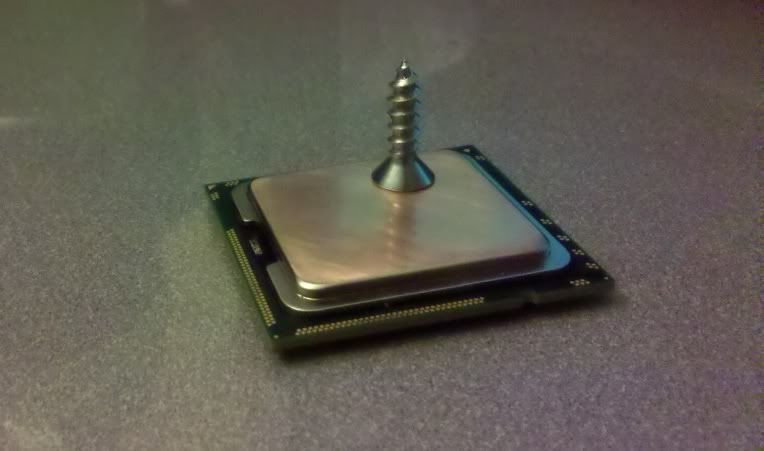
I really don't know or get why people lap their i7 cpu.
AMD I understand
I hope to one day run my chip to through hell and when it burn, if it ever does!
I hope its under warranty.
I know its a lot of I but.........why would you do that to an I7
OK..........I cried enough
Still having trouble with coming out of sleep. Had to uncheck using usb to come out of sleep because it wouldn't go to sleep with the usb enabled to do that. Now I just use the power button to come out of sleep. That works but not if I go any higher than 4.0GHz cpu and like 1333 ram. I can go 2000 on the ram with the cpu at stock speed but as soon as I start bringing the cpu back up I have to bring the ram down.
I can pass prime95, I can run over 20 loops with linx and everything runs just fine at much higher speeds like 4.5GHz with 2000 ram and vcore / vtt voltages in the 1.4 ranges all day long, but as soon as it goes to sleep I can't bring it out of sleep. The fans and everything will run but thats it, I have to turn the power off and reboot.
Any ideas. Do you guys use the sleep mode, or is that normal with higher clock speeds and having ssd's in raid 0?
Last edited by zinsco; 04-30-2011 at 11:02 PM.
Case: Corsair 800D
PSU: Corsair HX1000W
Mobo: Asus Rampage III Extreme
CPU: i7 980x @ 4.81GHz
GPU: 2 x ATI 5970 CrossFire
SSD: 4 x OCZ 128GB Vertex 4 Raid 0
RAM: 6GB Super Talent DDR3-2000 CL 8-8-8-24
Loop 1: GPU -- Feser X-Changer QUAD 480 rad | 2x EK-FC5970 Blocks | MCP355 pump
Loop 2: CPU + MB -- Black Ice GT Xtreme 140 rad | XSPC 120 rad | Black Ice GTX 92 rad | Swiftech Apogee XT Block | EK-FB RE3 Block | MCP 355 pump
Fans: 11 x Scythe GentleTyphoon 120 x 25 - 1850 rpm | 3 x NB-BlackSilentPro PK-3 140 x 25 - 1700 rpm | 1 x Scythe S-FLEX - 92mm - 2500 RPM
Fan Controller: Lamptron 30W - 4 Channel (FC-5) | Res: XSPC Dual Bay
Watercooled, first attempt, pretty happy

DiKKeneK fan !!
@ zinsco, Are you using anything usb 3.0? If not do you have the drivers loaded. as mine did weird things until i removed the usb 3.0 drivers. Check that and see what you get.
To attempt to level out temps across the cores. Cores 2 and 5 consistently show to be nearly and sometimes 10*c and over on temp compared to the other 4 cores which consistently stay within 3*c of each other.
When I started lapping, two narrow and long areas on the plate that were parallel to one another were positioned approximately over where cores 2 and 5 should be. It took alot is sanding to get it all level.
@Zinsco- I would suggest not using sleep/hibernate at all honestly... if you're using that fiction to save power... then simply turn the system completely off. I really don't hear much good things from having sleep/hibernate fictions turned on. Problems ranging from what your having to drives failing and so on. If you're going to be overclocking your system, I wouldn't waste time trying to get those to work.
cranked
980x - 4.710ghz | mem - 12gb 1884 CL9 | vga - HD5970 | mobo - ASUS R3E
[188x25 1.55625v, 2x uncore 3768, QPI 6782 1.375v]
http://www.xtremesystems.org/forums/...postcount=1813
24/7 settings
4.0ghz @ 1.34375v
4.138ghz @ 1.35625v
4.272ghz @ 1.38125v
4.4ghz @ 1.41825v
4.522ghz @ 1.4500v
BATCH - 3013A540 =
Theres nothing wrong with using sleep - whatsoever.......just ensure your ram is good and OC in general.. HDD will NOT fail your OS will NOT become corrupt.. not unless you neglect stability.... !
Whats better than having a task running, knowing your pc will auto sleep when finished.. many hours work saved this way, not to mention electricity.
I'm @ 4.4 24/7 with the 960 utilising sleep.. sure i've had issues with sleep like many others but that was attributed to and confimed throughout other forums to be stability related and nothing more.
edit:
I just tested the support-cds for r3e and black edition. on both there is a folder "AntiVirus" just start "AsusSetup.exe" from there and it will install.
you dont need a serial or key, it will auto activate over the internet and then you have a 365-day licence.
I think its crapware anyway. this version from support-cd is outdated and stoneold. its kav 2010 on r3e and also on r3be support-cd. there is no way to update to the current version kav 2011, so I deinstalled it already a minute later hehe. they call it "software bundle" but since anti virus is only useful in latest version (if any) in my eayes this is just a sort of compulsion to buy a current version.
http://usa.kaspersky.com/products-se...ity/anti-virus
regards ac001
Last edited by ac001; 05-01-2011 at 03:43 AM.
Thank you for your useful report !
As i understand it, nno intrests at all, who needs an heavy out of date AV ?!? in deed...
The issue i am meeting is that when the dvd is set in the computer, automatic start isn't working at all (not desactivated in my OS). Worst, it completely screws my windows explorereven on a friend non-OC computer ?????
im swimming in full uncomprehension with this
Again, thx for your report
DiKKeneK fan !!
I've had this system for about a year running on default settings. During that time it has gone in and out of sleep using the usb with out ever having one issue, until now that I have OC'ed. My concern is that I damaged something, because now, even at default settings it won't work with usb anymore. I will check out the usb 3.0 regardless. Thx
I can confirm that those two cores run hotter that the others. I think that's awesome that you managed to even them out by lapping your cpu.
Would you be willing to share your settings so that I can compare and see if I can get beyond 4.0? I can get to 4.7 with my voltages high but not too high and 4.5 with them below 1.45 running stable but not allowing sleep to work. I have a 980x so of coarse like for like settings won't work but I could play with it.
My real concern though, is that I have damaged something. If I did, do you guys think it would be my board, ram, or cpu.
Last edited by zinsco; 05-01-2011 at 07:13 AM.
Case: Corsair 800D
PSU: Corsair HX1000W
Mobo: Asus Rampage III Extreme
CPU: i7 980x @ 4.81GHz
GPU: 2 x ATI 5970 CrossFire
SSD: 4 x OCZ 128GB Vertex 4 Raid 0
RAM: 6GB Super Talent DDR3-2000 CL 8-8-8-24
Loop 1: GPU -- Feser X-Changer QUAD 480 rad | 2x EK-FC5970 Blocks | MCP355 pump
Loop 2: CPU + MB -- Black Ice GT Xtreme 140 rad | XSPC 120 rad | Black Ice GTX 92 rad | Swiftech Apogee XT Block | EK-FB RE3 Block | MCP 355 pump
Fans: 11 x Scythe GentleTyphoon 120 x 25 - 1850 rpm | 3 x NB-BlackSilentPro PK-3 140 x 25 - 1700 rpm | 1 x Scythe S-FLEX - 92mm - 2500 RPM
Fan Controller: Lamptron 30W - 4 Channel (FC-5) | Res: XSPC Dual Bay
I have no issues going in and out of sleep at 4.2GHz with 2GHz mem using usb. From what I understand some usb devices can cause the sleep mode to hang. Try unplugging all usb stuff except your keyboard and see if it will come up out of sleep.
I very much doubt he had any effect since he has not posted screenshots. It is a known fact released by Intel that the sensors on 32nm parts are just bad and barely reflect the actual temperature of the processor. Intel says it is within specification to see temp differences of up to 15C per core, even if they're all actually the same temperature. Not to mention the sensors are not even in the same location on every core, so they measure different parts of each core.
I went back to 0003 bios yesterday as I restarted a few times and Memory Recheck did NOT find all my ram!!! I went back to 0003 and manually specify tRL and it always works.
Here are my working settings:
Code:Target CPU Frequency 4200MHz Target DRAM Frequency 2005MHz LN2 Mode [Disabled]*** QPI Loadline Calibration [Enabled]*** Sync Mode [] AI Overclock Tuner [Manual] OC From CPU level Up [Auto] 2D Performance Booster [Disabled] CPU Ratio Setting [21.0] CPU Turbo Power Limit [Disabled] >CPU Configuration---------------------------- CPU Ratio Setting [21.0] C1E Support [Enabled] Hardware Prefetcher [Enabled] Adjacent Cache Line Prefetch [Enabled] MPS and ACPI MADT ordering [Modern ordering] Intel(R) Virtualization Tech [Enabled] CPU TM Function [Enabled] Execute Disable Bit [Enabled] Intel(R) HT Technology [Enabled] *Active Processor Cores [All] A20M [Disabled] *Intel(R) SpeedStep(TM) Tech [Disabled] Intel(R) C-STATE Tech [Enabled] C State package limit setting [Auto] C1 Auto Demotion [Auto] C3 Auto Demotion [Auto] ---------------------------------------------- BCLK Frequency [200] PCIE Frequency [100] DRAM Frequency [DDR3-2005MHz] UCLK Frequency [3608MHz] QPI Link Data Rate [7218] Memory Configuration Protect [Disabled] >DRAM Timing Control-------------------------- CAS# Latency [ 7 DRAM Clock] RAS# to CAS# Delay [ 9 DRAM Clock] RAS# PRE Time [ 7 DRAM Clock] RAS# ACT Time [20 DRAM Clock] RAS# to RAS# Delay [3] REF Cycle Time [82] WRITE Recovery Time [9] READ to PRE Time [5] FOUR ACT WIN Time [24] Back-To-BackCAS# Delay [Auto] Timing Mode [1N] Round Trip Latency on CHA [53] Round Trip Latency on CHB [55] Round Trip Latency on CHC [57] tRL CHA [-1] tRL CHB [-1] tRL CHC [-1] WRITE To READ Delay(DD) [Auto] WRITE To READ Delay(DR) [Auto] WRITE To READ Delay(SR) [Auto] READ To WRITE Delay(DD) [Auto] READ To WRITE Delay(DR) [Auto] READ To WRITE Delay(SR) [Auto] READ To READ Delay(DD) [Auto] READ To READ Delay(DR) [Auto] READ To READ Delay(SR) [Auto] WRITE To WRITE Delay(DD) [Auto] WRITE To WRITE Delay(DR) [Auto] WRITE To WRITE Delay(SR) [Auto] ---------------------------------------------- CPU Differential Amplitude [Auto] CPU Clock Skew [Auto] IOH Clock Skew [Auto] ------------ Extreme Engine Digi+ ------------ Digi+ PWR Mode [T-Balanced] PWM Volt. Control [6V] Load-Line Calibration [Full Calibration] CPU Voltage OCP [Enabled] CPU PWM Frequency [500KHz] Extreme OV [Disabled] Extreme OC [Auto] CPU Voltage [1.37500] CPU PLL Voltage [1.25625] QPI/DRAM Core Voltage [1.35000] DRAM Bus Voltage [1.65625] >DRAM REF Voltages---------------------------- DRAM DATA REF Voltage on CHA [Auto] DRAM CTRL REF Voltage on CHA [Auto] DRAM DATA REF Voltage on CHB [Auto] DRAM CTRL REF Voltage on CHB [Auto] DRAM DATA REF Voltage on CHC [Auto] DRAM CTRL REF Voltage on CHC [Auto] ---------------------------------------------- IOH Voltage [1.20525] IOH PCIE Voltage [Auto] ICH Voltage [1.16600] ICH PCIE Voltage [Auto] ---------- Spread Spectrum Control ----------- CPU Spread Spectrum [Disabled] PCIE Spread Spectrum [Disabled] ***on-board jumper dependant
Core i7 990x @ 4665MHz 30x155.5 | ASUS Rampage 3 Extreme 1601 Modded BIOS | 24GB (6x4GB) Mushkin Redline 999057 @ 1866MHz 8-8-8-24-1T
2x MSI N770-2GD5/OC SLI Custom BIOS @ 1228/7464 | Samsung 840 EVO 1TB | 4x 3TB WD Red Raid 5 | Corsair RM1000 | 2x Dell SP2309W 2048x1152
H2O Cooled | EK - Supreme HF Full Gold - FB RE3 | Swiftech - MCP35x2 - MCRes Micro v2 | HWLabs - 2x GTX 120 - GT Stealth 120
7x Gentle Typhoon AP-0A 2150RPM | 1x Enermax Magma UC-MA12 1500RPM | Lian Li PC-A10B | 5GHz Gulftown
Your memory dropping is possibly being caused by running an insufficient tWR for that frequency - the tRL values tie into the tWR table offsets. At DDR3-2000 speeds the tWR should default to between 10~12 clocks.
Last edited by Raja@ASUS; 05-01-2011 at 08:22 AM.
if you want to save electricity... shutting off your system is the ONLY way to legitimately say you're "saving electricity". when on sleep your harddrives are still on and it's been a prooven study that even having solid state harddrives, if you take the average power use of a disc based harddrive and that of a solid state that they both still use just about the same amount of power over time, one just does it in periodic spikes, the other with a constant pull.
if you want to save electricity... shut your system off. simple as that.
i hadn't posted yet because i hadn't gotten the cpu back on the bored yet. there is such thing as having more than 1 computer. i also have 2 980x chips here, both who show such high deviation on the exact same cores and both are a decent gap in batch. i've also compared temps to others who hadn't adjusted their RealTemp programs and i've seem a similarity in just about all of them.
but if you want shots, here's a few i did between stages.
Start: http://i3.photobucket.com/albums/y71...428_001646.jpg
Stage 1: http://i3.photobucket.com/albums/y71...428_011034.jpg
Stage 3: http://i3.photobucket.com/albums/y71...428_030057.jpg
i could probably bet a good chunk of change if i lap my other 980 that it'll do just about the same thing as seen here.
Last edited by skuldarin; 05-01-2011 at 10:32 AM.
cranked
980x - 4.710ghz | mem - 12gb 1884 CL9 | vga - HD5970 | mobo - ASUS R3E
[188x25 1.55625v, 2x uncore 3768, QPI 6782 1.375v]
http://www.xtremesystems.org/forums/...postcount=1813
24/7 settings
4.0ghz @ 1.34375v
4.138ghz @ 1.35625v
4.272ghz @ 1.38125v
4.4ghz @ 1.41825v
4.522ghz @ 1.4500v
BATCH - 3013A540 =
I haven't added or changed any usb devises for a year with this system and it only just started being a problem now that I started OC'ing. I have unchecked the box in the usb properties that says to use usb to wake up out of sleep and I use the power button and that works. It's just that if I clock my cpu over 4GHz with my ram higher than 1333, it won't come out of sleep.
OK, that makes since. I thought that I shouldn't comment on this, because I don't know what I'm talking about and you just proved that. lol
Last edited by zinsco; 05-01-2011 at 01:34 PM.
Case: Corsair 800D
PSU: Corsair HX1000W
Mobo: Asus Rampage III Extreme
CPU: i7 980x @ 4.81GHz
GPU: 2 x ATI 5970 CrossFire
SSD: 4 x OCZ 128GB Vertex 4 Raid 0
RAM: 6GB Super Talent DDR3-2000 CL 8-8-8-24
Loop 1: GPU -- Feser X-Changer QUAD 480 rad | 2x EK-FC5970 Blocks | MCP355 pump
Loop 2: CPU + MB -- Black Ice GT Xtreme 140 rad | XSPC 120 rad | Black Ice GTX 92 rad | Swiftech Apogee XT Block | EK-FB RE3 Block | MCP 355 pump
Fans: 11 x Scythe GentleTyphoon 120 x 25 - 1850 rpm | 3 x NB-BlackSilentPro PK-3 140 x 25 - 1700 rpm | 1 x Scythe S-FLEX - 92mm - 2500 RPM
Fan Controller: Lamptron 30W - 4 Channel (FC-5) | Res: XSPC Dual Bay


 Reply With Quote


Bookmarks