

Most of the chips can do around 4.6 - 4.8 and that's about itIt's just the lucky ones being able to hit 5Ghz or more.



Most of the chips can do around 4.6 - 4.8 and that's about it
Intel Inside
How do you take a cpu back and exchange it?
Bencher/Gamer(1) 4930K - Asus R4E - 2x R9 290x - G.skill Pi 2200c7 or Team 2400LV 4x4GB - EK Supreme HF - SR1-420 - Qnix 2560x1440
Netbox AMD 5600K - Gigabyte mitx - Aten DVI/USB/120Hz KVM
PB 1xTitan=16453(3D11), 1xGTX680=13343(3D11), 1x GTX580=8733(3D11)38000(3D06) 1x7970=12059(3D11)40000(vantage)395k(AM3) Folding for team 24
AUSTRALIAN DRAG RACING http://www.youtube.com/watch?v=OFsbfEIy3Yw
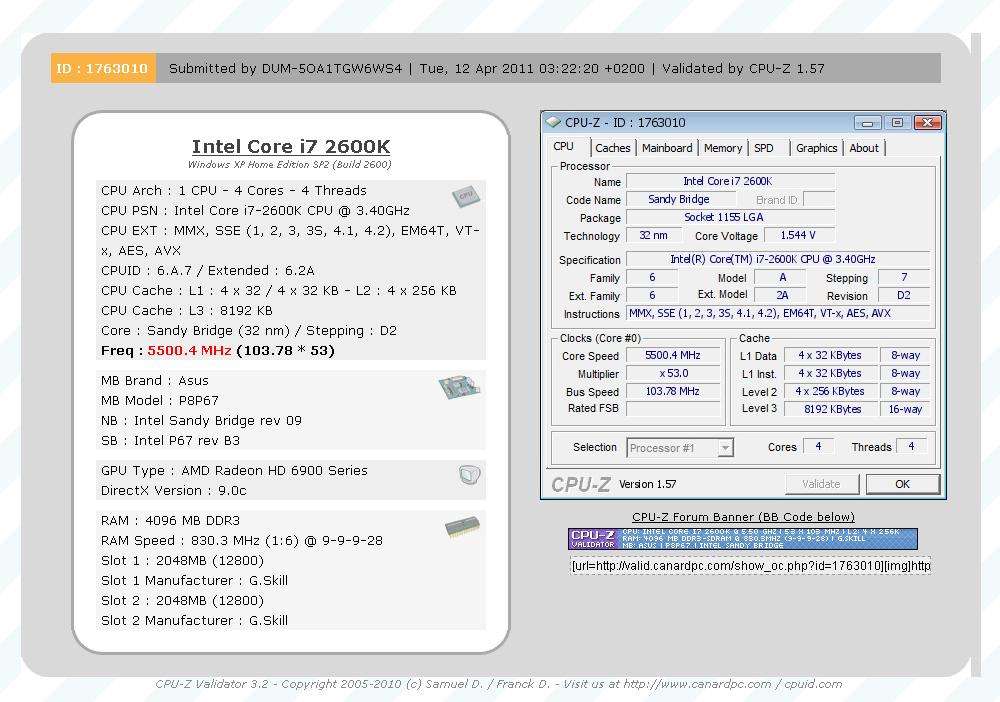
Another 2600K 3101A201...*A1181 max 53X. Still try to find mhz wall on air
Edit: this one is too hot with crappy A50 air
Put under SS...max multi 53X but can go 5.5Ghz with BCLK and lower Vcore (comparo to L0 batch)
Kinda weird cpu
Last edited by Dumo; 04-11-2011 at 05:35 PM.
every one of my chips, even the worst has done 50xOriginally Posted by aoch88


Thats an odd chip for sure, but 55 isnt bad at all.
+1
I havent had a chip yet that wouldnt do at least 50x.
What is your opinion so far on the batches that start with a 3?
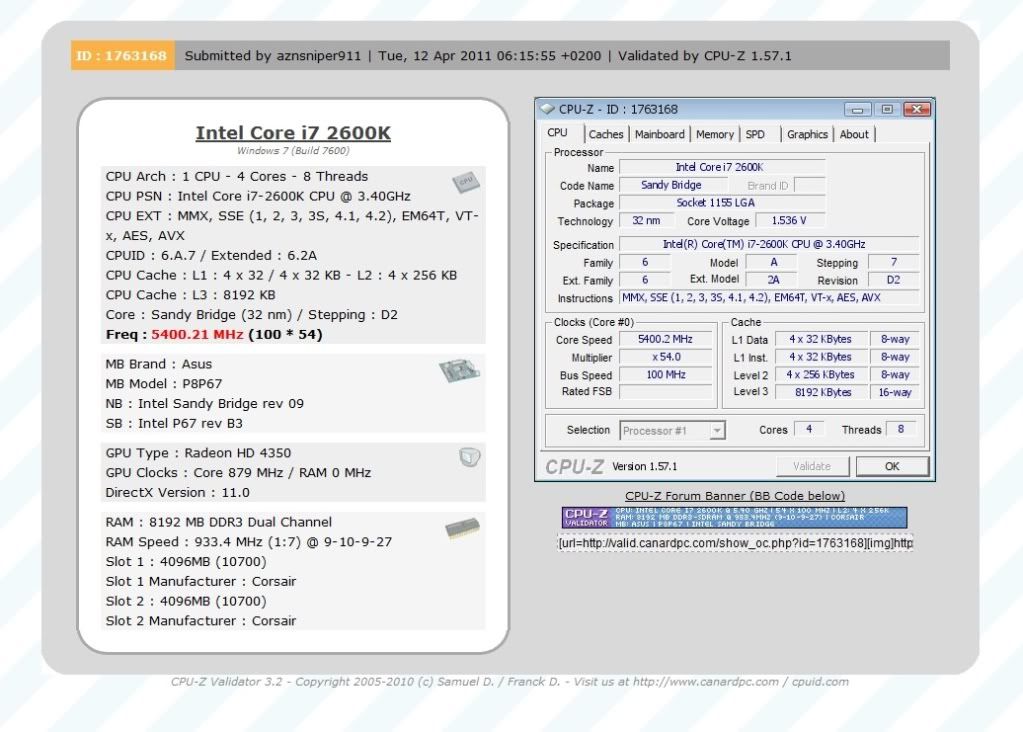
I have a batch 3103B307 that does 56x but gets stuck at the windows logo screen.
At 1.55V
51x= ok
52x= ok
53x= ok
54x= ok
55x= ok (unstable but boots in and can do normal things)
56x= Freeze at windows screen even at 1.6V (worth it to try more to see how far it gets? I'm on air!)
Imo, its not worth it to push it with 1.54+ Vcore on (even) a good air, go H2O and strictly for benching only
On air with >1.54V, stress tests (prime, linx etc) are just ways to shortened the chip's life
With cold probly yours can go >5.5G~5.6ish
Last edited by Dumo; 04-11-2011 at 08:48 PM.

The latest batch of South Korea
Batch : L107A719
MAX : x53 1.45v
And my best 2600k cpu
Batch: L048B284

Last edited by namegt; 04-11-2011 at 09:15 PM.
X53 @ 1.45v? What the hell?
That's gota be a record...
Is HT on or off at X53?
Can be good for low voltage overclocking
But i can not reach higher clock.
HT on
Thank you.
NameGT: Do you know the default VID for that CPU (at 3.4 ghz?), and the default VID (when set to 100x50)?
CPU VID : 1.15v
1.15v? I Think this is not the VID, but the voltage monitoring? No one has had a VID this low on a 2600k (at 3.4 ghz).
The VID is the "target" voltage shown in the BIOS, next to your "Auto" or "manual" voltage selection. This is not the "current voltage reading" actually going into the CPU, but the "target VID." The current actual vcore the CPU is using (power wise) will ALWAYS be lower than the VID, unless you are using loadline calibration (at high levels).
You can also see the VID by starting the computer into windows and using realtemp 3.67 (EIST/speedstep/C3/C6 must be disabled).
For example, in the BIOS, to the left of where you can choose your manual voltage, you will see a VID (might be labeled "Voltage" or just "Target").
1.15v is too low of a VID for 3.4 ghz for a 2600k. There was a survey of VIDs at 3.4 ghz, and the lowest possible one shown was 1.21v. I think the lowest possible VID for 3.4 ghz is 1.20v, and the highest is 1.27v. 2500k's I think may have lower VID than 2600k's.
In case I'm wrong, then this is the first 2600k I've ever seen that has a VID of 1.15v.
If the VID is really 1.15v at 3.4 ghz, then the vcore in health monitoring should be almost 1.13v or lower, and in windows, if you run prime 95, it should be 1.0v or lower.
Last edited by Falkentyne; 04-11-2011 at 11:14 PM.
If you don't turn off EIST, C1, C3 and C6 save settings and reboot then it shows low vid voltages like that, however once you boot back in to the bios you will see the true VID.
Good point.
Try that and check the VID again for me. I know it won't be 1.15v...that's a 2500k VID (for 3.4 ghz)....
Without the many encouragements I've received, I may have stopped awhile back. Too bad the local MC cannot allow CPU purchase (same model) within 14 days. I'm gonna rest awhile until I see a new batch then I may do it all over again.
Asus Rampage II Gene, Xeon W3550 D0 Mushkin PC3-2000 6GB, BFG 9600GT OC 512MB DDR3
Asus A8N32-SLI Deluxe 1.01G, AMD A64 4000+, 2x1GB Ultra PC-3200, EVGA 7600GT 256MB DDR3
Asus MA378-T with AMD Athlon 64 X2 7850
ECS 945GCT-M/1333 v3.0, Intel Celeron E1400, MSI 8500GT 256MB DDR3
BIOStar P4M900-M7 Rev. 7.0, Intel Celeron 440, 1GB Kingston, 6600LE
Gigabyte M61PME-S2P with AMD Athlon 64 LE-1660, EVGA 8500GT 1GB DDR2
jcniest,
I got lucky with my second 2600k, but some people had to go through over 50 of them before they got a decent clocker, and hundreds before getting a X56-X58 !
Even then, my max multi is either x53 or x54 (X49 with PLL disabled; X54 restarted on the XP splash screen, but it didnt freeze...so perhaps it needs more vcore, but I only tried 1.50v with LLC1).
You're not alone, my friend
You want to see bad luck?
I haven't won a SINGLE virtual currency gun in Crossfire, from crates (a FPS game), or from AVA, for ages. I've spent so much in game money on crates...I have much worse luck...and I can't even sell what i lost like you can, to try again...
sounds like your microcenter blows hard, the closest one to me (santa clara) isn't as cool as others I have been to, but I have bought one cpu every time I have gone, and I was never told of this lame policy that your store has. Two of the locations I have been to have even sold me more than one cpu in the same visit
Is it possible to do 50x Prime/LinX stable? What's the required Vcore? I'm not sure but most of us here just have dud chips.
Intel Inside
Depends on the CPU. I'm sure I can do it at 1.455v BIOS without a problem (1.416v-1.428v load). Not sure about LinX though, don't really care about LinX.
I think VID doesn't mean anything
My VID @ 3.4 is 1.25.
But I can run linx @ 1.368v 5Ghz and @ 1.416v 5.1Ghz. It scales great with vcore
Never seen blinking cursor, but I get stuck @ windows logo with 56x , I've run w1024 and spi32Mb @ 5.5 with 1.6v, on wc
I believe Prime is still a better tool to test. Anyway, what are the voltages that has to be increased for 5Ghz? Any specific ones instead of leaving everything at AUTO?
Intel Inside
There was a survey that showed that on the AVERAGE, most lower VID chips had higher multiplier walls than higher VID chips, and I believe there were more dud high vid cpus than low. However there were always exceptions either way.
How hot does your CPU run at load?
Last edited by Falkentyne; 04-12-2011 at 03:14 AM.


5GHZ hot babe
http://img703.imageshack.us/f/stablek.jpg/
[Core i7 4820K Ivy Bridge-E @4,7Ghz Vcore 1.28v][Asus Rampage Iv Extreme bios 4403][16Gb G-skill Ocz 2133mhz DDR3][Lian Li Pc2120 B, black Case][480Gb OCZ SSD main disk+120Gb ssd game disc][EVGA GTX Titan@900mhz Oc luft ][Os Windows 7][Telia 1000/250Mbits fiber ][24,4TB Lagring] upcoming Intel Haswell-E 8 cores/16 Threads next year Q4 2014 ?
 Posting Permissions


 Reply With Quote


Bookmarks