




This is the source of this bug. In your first example, when not overclocking in Windows, the performance counter is showing that it is 99.99% accurate and would likely be even closer to 100.0% accurate if you ran WinTimerTester for a longer period of time.
In the second example, changing the base clock speed has screwed up the accuracy of the performance timer in your computer. During an elapsed time of 90.9 actual seconds, the performance timer claims that only 89.1 seconds have elapsed. The more you over or under clock from the speed you boot up at, the bigger this error becomes. I built some code into RealTemp so it tries to correct for this windows bug but it obviously could use some improvement.
This bug is not just a RealTemp bug. Any software that needs to accurately measure time uses the QueryPerformanceCounter() function. This problem can affect the accuracy of FRAPS as well as other gaming benchmarks and games themselves that internally calculate FPS and adjust the speed of the game based on that. If you've ever overclocked a computer in Windows and couldn't measure any performance benefit from that change, this timer bug might be part of the problem.
104.99 MHz X 0.9812 = 103.02 MHz
The ratio these timers run at lets you figure out the actual base clock speed your CPU is running at. The boot speed times the amount of error in these timers gives you the actual MHz.
This is why CPU-Z wanders around +/- 0.5 MHz. It can not depend on the Windows high performance timer to accurately calculate MHz because of this bug so it has to rely on a less accurate timer. The actual base clock speed is rock solid in most computers and doesn't vary by +/- 0.001 MHz but it's hard to calculate this when you don't have a stopwatch you can depend on.
When I originally wrote RealTemp, I didn't know anything about this bug. Now that I understand it better, I'll see if I can come up with a better fix for this issue.
some_one: Thanks for that tip. Fixing Windows is the best fix of all. Less work for me. I have a computer I'm working on at the moment that I think has this timer issue so I'll play around with that and see if this issue can be fixed that way. Windows XP used to have the /USEPMTIMER option that you could add to your boot file to fix this but I think they got rid of that in Vista and W7 so it is interesting to see that there is a new way to fix this issue.
Here's the old XP way.
http://blogs.technet.com/b/perfguru/...-boot-ini.aspx


 Reply With Quote
 Originally Posted by burebista





 Is it just me, or does Sandy Bridge do the opposite of previous generations and converge at idle? Maybe it's just this CPU. I haven't been following this thread for a while, so maybe this has already been covered.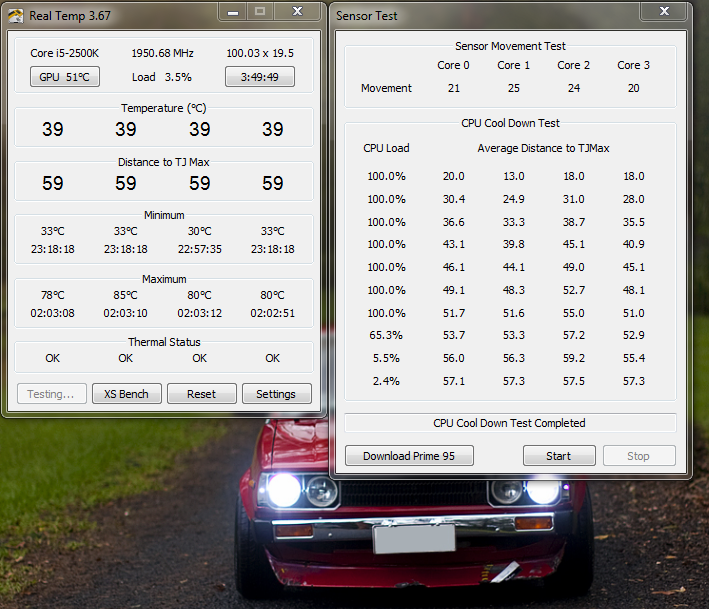


Bookmarks