

I love these chips,they clock so freaking good,Sorry guys I know everyone is getting 5ghz plus but this thing is running it fully closed and set for 24/7 use.



I love these chips,they clock so freaking good,Sorry guys I know everyone is getting 5ghz plus but this thing is running it fully closed and set for 24/7 use.
Specs., cooling and voltages please


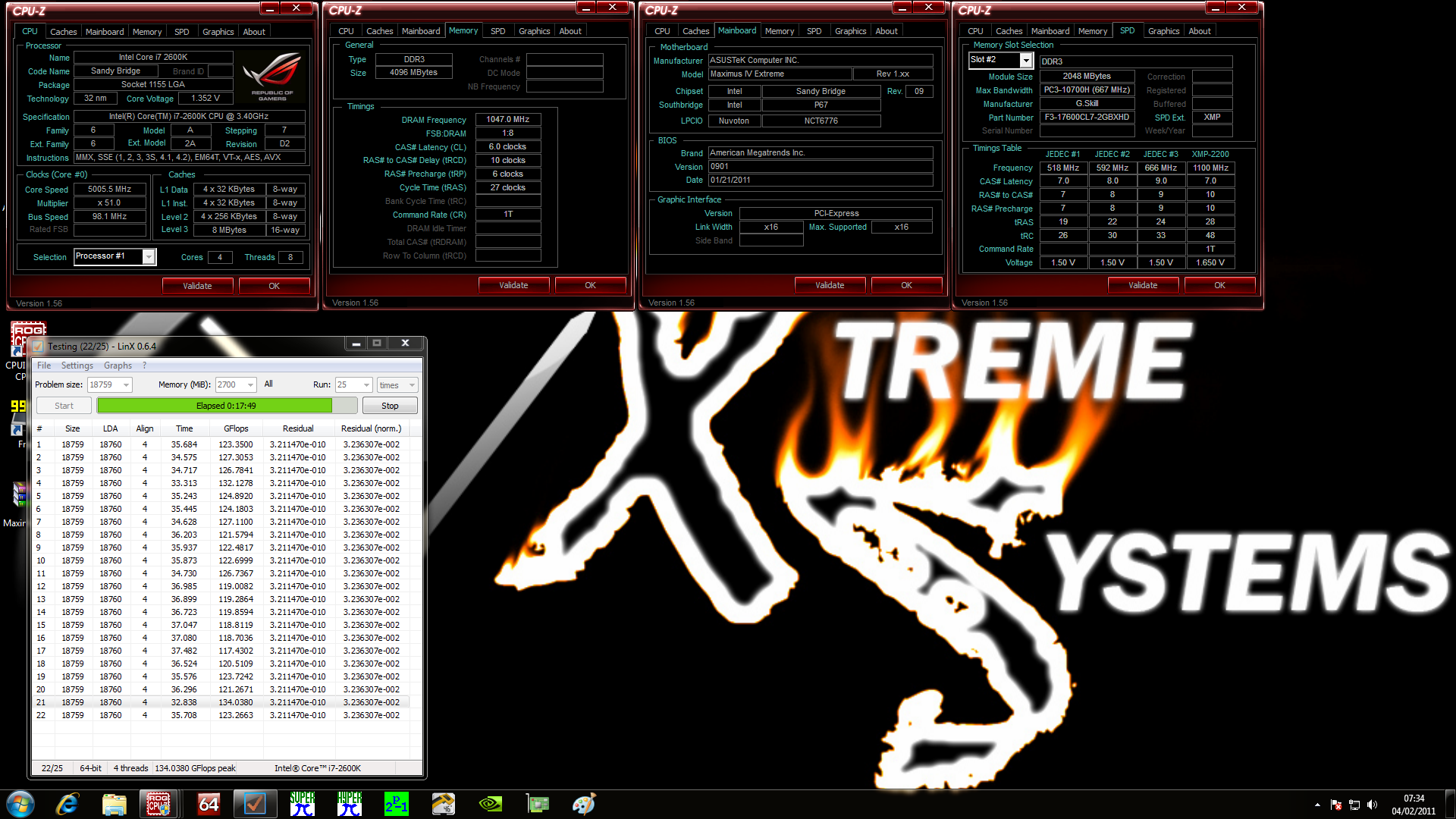
Mine in fully closed case 5Ghz 1.34Vcore on water thou 24/7! What temps on stock cooling and volts!Skratch
Last edited by bro20000; 02-07-2011 at 04:22 AM.
screenshots and piccies or it did never happen :p
Question : Why do some overclockers switch into d*ckmode when money is involved
Remark : They call me Pro AsusSaaya yupp, I agree
Ill post pics I can do everything from 32pi to 5 loops intel burn but I wont do longer stress testing because the cores hits 80-83c
Im getting huge a heat sink,I was going to take my water cooling over from my q6600 but tried to see what she can do stock.
Ill post all specs in a bit,im on my cell now and just woke up.
I played crysis for an hour at that speed too,the funny part is the case is 3 inches away from the floor heat boards under my desk!!!
Last edited by Skratch; 02-07-2011 at 06:34 AM.

83c is getting pretty warm. At least strap a good HSF on such as the Noctua D14, or if you are low on funds a Hyper 212 Plus.
"Prowler"
X570 Tomahawk | R7 3700X | 2x16GB Klevv BoltX @ 3600MHz CL18 | Powercolor 6800XT Red Devil | Xonar DX 7.1 | 2TB Barracuda | 256GB & 512GB Asgard NVMe drives | 2x DVD & Blu-Ray opticals | EVGA Supernova 1000w G2
Cooling:
6x 140mm LED fans, 1x 200mm LED fan | Modified CoolerMaster Masterliquid 240
Asrock Z77 thread! | Asrock Z77 Extreme6 Review | Asrock P67 Extreme4 Review | Asrock P67 Extreme4/6 Pro3 thread | Asrock Z68 Extreme4 thread | Asrock Z68 Extreme4 Review | Asrock Z68 Gen3 Thread | 8GB G-Skill review | TK 2.ZERO homepage | P5Q series mBIOS thread
Modded X570 Aorus UEFIs
Awesome chip. Can you game though?Originally Posted by bro20000

I found my 2500k to be Prime95/LinX/IBT stable at 5.0 @ 1.40v but COD BO will crash within a few mins. Its also prime/linx/ibt stable at 4.8Ghz @ 1.34v but in order to game I need 1.36v. Basically my chip needs a vcore bump to be game stable even though it's CPU stress test stable.
i7-2600k @ 4.8Ghz 1.38v L044A892
ASUS P8P67 LGA
16GB G.Skill Rip Jaws DDR3 1600Mhz Memory
1/2" ID Masterkleer, Swiftech MCP-655, Thermochill PA120.3 Rad, XSPC Rasa, MCW-60
Cooler Master UCP 1100 Watt PSU
GTX 680 1300/7000
Lian Li PC V-2000
Here is a few,I forgot to lower vcore but its set to 1.37 and it boosts to up to almost 1.5 on load.
board is asus p867pro 1204 bios

Last edited by Skratch; 02-07-2011 at 06:59 AM.
i can push 4.9 stock cooler (open case) but stable only for SuperPi 1M
These chips are amazing!!!running almost 5.2 now
It is very cool to see 5GHz 24/7 setups.
-
"Language cuts the grooves in which our thoughts must move" | Frank Herbert, The Santaroga Barrier
2600K | GTX 580 SLI | Asus MIV Gene-Z | 16GB @ 1600 | Silverstone Strider 1200W Gold | Crucial C300 64 | Crucial M4 64 | Intel X25-M 160 G2 | OCZ Vertex 60 | Hitachi 2TB | WD 320
Scratch - I would definitely recommend a better cooling solution IF you're going for those settings as a 24/7 solution. You might establish to much heat over time and witness a broken socket bracket. Those pins in the socket are fragile, and I remember a lot had problem with those 1156 sockets, with fried pins. Read an article on anandtech with the same symptoms for the 1155 socket which is only 1 pin less.
Although, if it's only for testing purposes, rock on!
Corsair Obsidian 800D | 2 x Intel X25-M 80 | 4 x SAMSUNG SpinPoint F3 (HD103SJ) | Asus P8P67 Deluxe | 2600K @ 5Ghz 24/7 | Corsair Dominator GT DDR3 2000MHz
Cooler Master Silent Pro M1000 | Corsair H50 | Zotac GTX 480 @ 920/2100 | Swiftech MCRES reservoir Rev. 2 | EK-CoolStream RAD XT 360 | Scythe S-FLEX
Phobya DC12-260 12V | EK-FC480 GTX Acetal+Nickel | Samsung 2233RZ | Acer GD245HQ | Corepad DESKPAD XXXL | Logitech G19 | Razer Deathadder
Yh i can game at them setting currently been playing crysis and Dead space 2 most of the day! I know my chip does 5.4/5.5 so i would like it abit faster 24/7!
I never thought about the soket problems untill now and Im going to order a massive cooler for it.
Do you think its fine the way it is now?I mean it idles at like 1volt and power boost to 1.44 when you really load it and even in pi it barely ever goes over 1.4.
here is my computer just doing basic internet stuff.

you realize that you are only testing IBT with 1GB of memory and not the max, so in all actuality you are probably not really stable, dl linx with the newest linpack libraries and make sure your problem size is greater than 20,XXX and see if you can run 25 passes.
It changes memory depending on what I have running.I have no doubt that this chip will max out the 55 multy it can prime but I wont do longer than 5 min of risk of burning this chip up.iv hit 86c
Skratch have you got load cal on in bios that could help temp 1.37 in bios to 1.5 on load is a big jump!
Im still learning my board,in bios its 1.43 and when in windows I lower it to 1.37.
I have one thing set to 110% currant or something like that and a few others on extreme.
Hey are you from NH? I work in NH if you are!
Nottinghamshire is in England my friend..
Now I am in NH..
My SB 2600K isn't quite running at your speeds but at a nice 4634MHz at 1.325vcore for 24/7 100% load work.
Crunch with us, the XS WCG team
The XS WCG team needs your support.
A good project with good goals.
Come join us,get that warm fuzzy feeling that you've done something good for mankind.
Yeah am from nottinghamshire england!
Bu8t I knew that.
I could see your British accent in your writing..
Besides, I'm watching Top Gear right now on BBC America..
Crunch with us, the XS WCG team
The XS WCG team needs your support.
A good project with good goals.
Come join us,get that warm fuzzy feeling that you've done something good for mankind.
What are we doing up at 2:23 am lol,yeah I figured it might of been england but ya never know.
Have you tried higher volts yet?I was afraid to up the volts also,but the chip kept on scaling with more volts.I know I havnt really stress tested it hard for over 10 min but I just tried and it hit 90c and I dont want to degrade this chip.I will def do longer tests when I get a better cooler on it.
I was right around 4.6 at that voltage (load voltage 1.35 ish)and had that same speed.
I think the people that blew up chips didnt realise how easy it is for these boards to slam 1.6+ volts into it.
one click up on the currant line will take this from load 1.48 to almost 1.6 volts,so its really easy to give the chip alot of volts without knowing it.
mine has seen over 1.6 when I set it to 1.45 in bios.
Retired pal, I sleep when I want to..
Yea, went to 5088MHz with 1.5vcore but I'm on a Intel Burrage board..
Crunch with us, the XS WCG team
The XS WCG team needs your support.
A good project with good goals.
Come join us,get that warm fuzzy feeling that you've done something good for mankind.
Its 7.30am here! 1.45Vcore in bios to 1.6 in windows is alot of vdroop! Have tryed 1.5Vcore 5.5Ghz but am still waiting for my chiller so i didnt bench incase temp where to high!
Its the digi + vrm load line calibration and the digi cpu currant capability.
I have the first one set to normal and the second to 110% meaning it will give the cpu more power if it senses it needs it.
also depends on how fast the computer boots up at,say at 50x multy it will default 1.42 with those settings and if I drop to 49x and change nothing else it will drop vcore to 1.38 in bios and the 1.32 for say 46x.
The digi cpu currant is to tweak how much extra boost you need when the cpu gets loaded and you need to mess with it to find the right sweet spot for speed and lower temps.
Im sure you know this but your board might be different from mine.
 Posting Permissions


 Reply With Quote


Bookmarks