MMM
Results 1 to 25 of 1036

Thread: ******Gigabyte GA-P67A-UD4 Discussion Thread******

Hybrid View

  1. #1
    Xtreme X.I.P.
    Join Date
    Jun 2002
    Location
    Belgium
    Posts
    4,477
    Guys,

    I'm having serious problems with this board and I need some help.
    I bought the board last week, along with a 2600k.

    Since I installed it on wednesday, my board is acting weird (it's the least I can say).

    The major problem is that it won't hold the VCore.
    The board came with bios F3. After installing everything normally, I checked voltages in both bios and windows (using HWINFO, CPU-Z and ET6).

    My cpu has these VID's at specific speeds :
    3400Mhz : 1.225V
    3500Mhz : 1.245V
    3600Mhz : 1.275V
    3700Mhz : 1.300V
    3800Mhz : 1.325V
    3900Mhz : 1.335V
    4000Mhz : 1.340V
    4100Mhz : 1.340V
    4200Mhz : 1.340V
    4300Mhz : 1.345V
    4400Mhz : 1.355V
    4500Mhz : 1.360V
    4600Mhz : 1.360V

    Now here's the problem.
    After the first start, the bios reads the default VCore at 1.212V, which seems normal.
    After booting into windows, VCore drops at various voltages, I've had 0.972V or 1.140V etc.... (this is to make a long story short).
    Now, after a restart, the bios reads the same VCore as in windows, which seems kinda weird to me.
    So, after, f.e., ET6 or CPU-Z read 0.972V, the bios, after a reboot, would give the same readings.

    I went from bios F3 to F6, then F7b, F7f, then back to F3, now on F2, but the problem won't go away.

    Here's an example with pics and screenshots (taken yesterday):

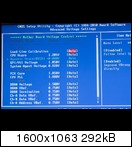
    After reboot, VCore in bios reads correctly 1.224V :


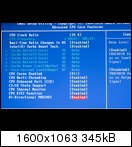
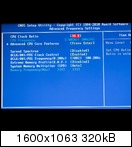
    Other settings in bios :


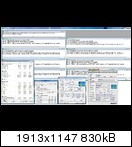
    Then I booted into windows, and VCore drops to 0.972V (idle and load)


    As you can see, VCore doesn't change at all and stays at 0.972V.

    After a reboot, you can see that the bios reads the same voltage as in Windows, 0.972V


    Then, I set Vcore manually at 1.320V :


    But as you can on the pic below, Vcore still stayed at 0.972V :


    I'm getting very frustrated with this board and I'm wondering what's causing this problem.
    I reinstalled the CPU this afternoon, cleared CMOS and others, but the problem won't go away.

    I'm considering returning the board and have it checked, unless the problem might be resolved very soon.
    My first board upgrade in 2 years (coming from S775) and now this crap happens to me.

    Anybody out here who might help me out?
    Rig #1
    Gigabyte P67A-UD4 trying to figure out this POS board
    2600k @ ?????
    2x2Gb GSkill RipJaws-X 1333 (7-7-7-21)
    ATI 5850
    Coba Nitrox 750W
    Watercooled with HK 3.0 CU, Watercool GPU-X³ 5870 Nickel, PA120.3, Laing Ultra with XSPC top


    Rig #2
    DFI UT P35-T2R (0317 bios)
    E8200 @ 4000 (1.216V) / 4100 (1.248V) / 4200 (1.296V) / 4300 (1.344V)
    2x2Gb Chaintech Apogee GT PC2-8500
    Powercolor 4870
    Corsair 520HX
    Watercooled with HK 3.0 CU, EK-FC4870, Feser tripple, Laing Ultra pump


    Quote Originally Posted by Movieman View Post
    I've got Supermicro boards that lasted longer than one of my marriages!

  2. #2
    Xtreme Addict
    Join Date
    May 2009
    Location
    IND
    Posts
    1,038
    Quote Originally Posted by Jupiler View Post
    Then, I set Vcore manually at 1.320V :


    But as you can on the pic below, Vcore still stayed at 0.972V :
    well, must bad board i quess
    rma it m8

    this when i set manually 1.3200, with LLC enable

    Last edited by Gaul; 01-23-2011 at 04:27 PM.

  3. #3
    HARD CRUNCHER!!
    Join Date
    Nov 2006
    Location
    Chicago
    Posts
    1,787
    Quote Originally Posted by Jupiler View Post
    Guys,


    Anybody out here who might help me out?
    Hey big brother! You need to disable the last 5 settings on this bios screen. You have c1e & eist enabled.
    Quote Originally Posted by mike047 View Post
    CRUNCH HARD, it may not help me and you, but it might help the Kids.

  4. #4
    Xtreme X.I.P.
    Join Date
    Jun 2002
    Location
    Belgium
    Posts
    4,477
    Thx buddy,
    but I tried every possible setting on this board since I got it.
    The board simply hasn't worked correctly since day 1.
    Already called the store and informed them about the problem.
    They'll have it checked and I'll probably get a new one (as this is only a couple of days old).
    Rig #1
    Gigabyte P67A-UD4 trying to figure out this POS board
    2600k @ ?????
    2x2Gb GSkill RipJaws-X 1333 (7-7-7-21)
    ATI 5850
    Coba Nitrox 750W
    Watercooled with HK 3.0 CU, Watercool GPU-X³ 5870 Nickel, PA120.3, Laing Ultra with XSPC top


    Rig #2
    DFI UT P35-T2R (0317 bios)
    E8200 @ 4000 (1.216V) / 4100 (1.248V) / 4200 (1.296V) / 4300 (1.344V)
    2x2Gb Chaintech Apogee GT PC2-8500
    Powercolor 4870
    Corsair 520HX
    Watercooled with HK 3.0 CU, EK-FC4870, Feser tripple, Laing Ultra pump


    Quote Originally Posted by Movieman View Post
    I've got Supermicro boards that lasted longer than one of my marriages!

  5. #5
    HARD CRUNCHER!!
    Join Date
    Nov 2006
    Location
    Chicago
    Posts
    1,787
    Quote Originally Posted by Jupiler View Post
    Thx buddy,
    but I tried every possible setting on this board since I got it.
    The board simply hasn't worked correctly since day 1.
    Already called the store and informed them about the problem.
    They'll have it checked and I'll probably get a new one (as this is only a couple of days old).
    Well that sux balls! When you get a new one, let me know if you need any help. I got this board down pat now. She is screaming along @ 47 x 100 with 1.4v in bios, running WCG @ 1.392v. Temps are topping out @ 55c on my h2o system.
    Quote Originally Posted by mike047 View Post
    CRUNCH HARD, it may not help me and you, but it might help the Kids.

  6. #6
    Xtreme X.I.P.
    Join Date
    Jun 2002
    Location
    Belgium
    Posts
    4,477
    Thanks my friend, much appreciated.

    I noticed something weird earlier.

    As I said before, the bios or windows wouldn't hold the VCore and after a reboot, the bios would report the same Vcore voltage as in windows.

    Now, after I changed a setting and saved the settings, the system would sometimes shut down and reboot after a couple of seconds (mostly when changing C1E/EIST settings, or Isochronous "whateveritscalled")
    After the reboot, the bios would give me the correct voltage (vcore set at Normal, DVID at AUTO or Normal).
    Unfortunately, windows wouldn't and still report wrong voltages.

    I had to repeat this, so the bios would read the correct voltage after another reboot.
    Weird, but nothing I'm gonna worry much longer anymore.
    The board is going back on wednesday.

    If they give me a new board, I'm not sure if I would take another UD4. or try something else.
    We'll see.
    Rig #1
    Gigabyte P67A-UD4 trying to figure out this POS board
    2600k @ ?????
    2x2Gb GSkill RipJaws-X 1333 (7-7-7-21)
    ATI 5850
    Coba Nitrox 750W
    Watercooled with HK 3.0 CU, Watercool GPU-X³ 5870 Nickel, PA120.3, Laing Ultra with XSPC top


    Rig #2
    DFI UT P35-T2R (0317 bios)
    E8200 @ 4000 (1.216V) / 4100 (1.248V) / 4200 (1.296V) / 4300 (1.344V)
    2x2Gb Chaintech Apogee GT PC2-8500
    Powercolor 4870
    Corsair 520HX
    Watercooled with HK 3.0 CU, EK-FC4870, Feser tripple, Laing Ultra pump


    Quote Originally Posted by Movieman View Post
    I've got Supermicro boards that lasted longer than one of my marriages!

  7. #7
    Xtreme Legend
    Join Date
    Mar 2005
    Location
    Australia
    Posts
    17,242
    uninstall ET6 in windows and clear cmos and follow these steps and see if it still does it please

    http://www.youtube.com/watch?v=8ngyUrjuQ80

    assuming your ram can run those clocks or drop the ram ratio lower if cant

    Code:
    ### MB Intelligent Tweaker ###
    
    Advanced Frequency Settings:
    
    CPU Clock Ratio .......................................[ 45
    
    > Advanced CPU Core Features
    
    CPU Clock Ratio .......................................[ 45
    Internal CPU PLL Overvoltage...........................[ Disabled
    Real Time Ratio Changes In OS .........................[ Disabled
    Intel(R) Turbo Boost Tech .............................[ Disabled
    Turbo Ratio (Core 1)...................................[ Auto
    Turbo Ratio (Core 2)...................................[ Auto
    Turbo Ratio (Core 3)...................................[ Auto
    Turbo Ratio (Core 4)...................................[ Auto
    Turbo Power Limit (Watts)..............................[ Auto
    Turbo Current Limit (Amps).............................[ Auto
    CPU Cores Enabled ............................ ........[ All
    CPU Multi Threading....................................[ Enabled
    CPU Enhanced Halt (C1E) ...............................[ Disabled
    C3/C6 State Support ...................................[ Disabled
    CPU Thermal Monitor ...................................[ Disabled
    CPU EIST Function .....................................[ Disabled
    Bi-Directional PROCHOT ................................[ Disabled
    
    <
    
    BCLK/DMI/PEG Clock Control ............................[ Enabled
    BCLK/DMI/PEG Frequency Control ........................[ 1003
    System Memory Multiplier (SPD) ........................[ 18.66
    
    Advanced Memory Settings:
    
    System Memory Multiplier (SPD) ........................[ 18.66
    Performance Enhance ...................................[ Turbo
    DRAM Timing Selectable (SPD) ..........................[ Auto
    Channel Interleaving ..................................[ Enabled
    Rank Interleaving .....................................[ Enabled


    Advanced Voltage Control:
    
    CPU
    
    Load Line Calibration .................................[ Level 1
    CPU Vcore .............................................[ 1.35
    QPI/VTT Voltage 1.050v ................................[ 1.1
    System Agent Voltage 0.925v ...........................[ 0.935
    PCH Core 1.050v .......................................[ 1.050
    CPU PLL 1.800v ........................................[ 1.8
    
    DRAM
    
    DRAM Voltage 1.500v ...................................[ 1.66
    DRAM Vref 0.750v ......................................[ Auto
    DRAM Termination 0.750v ...............................[ Auto
    Ch-A Data VRef. 0.750v ................................[ Auto
    Ch-B Data VRef. 0.750v ................................[ Auto
    Ch-A Address VRef. 0.750v .............................[ Auto
    Ch-B Address VRef. 0.750v .............................[ Auto
    
    Miscellaneous Settings
    
    Isochronous Support ...................................[ Disabled
    Virtualization Technology .............................[ Disabled
    Last edited by dinos22; 01-24-2011 at 03:52 PM.
    Team.AU
    Got tube?
    GIGABYTE Australia
    Need a GIGABYTE bios or support?


Tags for this Thread

Bookmarks

Bookmarks

Posting Permissions

  • You may not post new threads
  • You may not post replies
  • You may not post attachments
  • You may not edit your posts
  •