

maybe you need to set something to manual?Originally Posted by kmccann1

I forget but it was not hard to control all voltages. +/- keys iirc on numberpad.



maybe you need to set something to manual?
I forget but it was not hard to control all voltages. +/- keys iirc on numberpad.
heatware chew*
I've got no strings to hold me down.
To make me fret, or make me frown.
I had strings but now I'm free.
There are no strings on me
Ok, so I played around with it a bit more. The bios tells me +/- are the keys to increase/decrease and they do nothing for the first 4 voltage options. The Page Up/Page Down keys DO however change the values. The manual states nothing about this that I can find. Btw I feel I should mention i am running bios v1.6.
Thanks for the prompt reply though!
Ok guys time to give you what you were asking for. Quite a few of you wanted to see stable testing, now that i'm not on a borrowed board i'd be happy to test it for you.
Of course also gonna see how MSI's Twin Frozer II 5850's do on thuban as well( have to get my 3d fix in somehow :P )
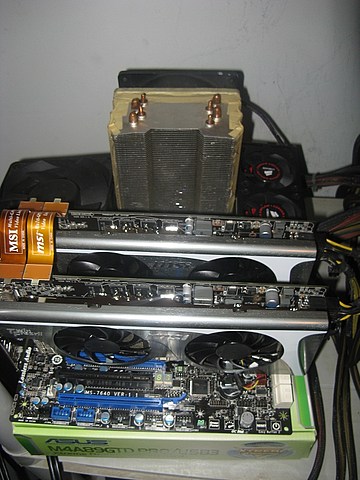
heatware chew*
I've got no strings to hold me down.
To make me fret, or make me frown.
I had strings but now I'm free.
There are no strings on me
Yeah, I'm interested chew*. I'm going to try the latest bios I can find for the 790FX-GD70 tomorrow for some 06 runs. IF this MB still doesn't like the mixed 58XX series cards I'm using then I may be looking at the 890 series you're testing?
yep 890, cards fixed in 1.6 for this board. at least 5970's were.
heatware chew*
I've got no strings to hold me down.
To make me fret, or make me frown.
I had strings but now I'm free.
There are no strings on me
the latest bios in in the gd70 thread, it´s 1.D4. the problem ur having with opening multiple cpu-z windows is known to msi. but they can do nothing about it, at least that´s what the tech support told me. u have to use cpu-z 1.54.1 beta to open more than 2 cpu-z windows without having the system crashing.
other than that there are no weird reboots anylonger when using 5xxx cards in crossfire.
MSI 790FX-GD70 (BIOS 1.D4)//PhenomII 1090T
2x 2GB G.Skill F3-12800CL7D-4GBRH//ASUS EAH5970
OCZ Agility 120GB//2x Hitachi Deskstar (2x500GB) RAID0//ZALMAN ZM850-HP 850W
DFI LanpartyUT RDX200 CF-DR (BIOS 12/23/05)//AMD Opteron 165 CCBBE 0616 XPMW 334x9 1.375Vx112%
2x 1024 MB G.SKILL F1-4000BIU2-2GBHV PC4000//2x Sapphire HD2900PRO(modded bios 845/950) 512mb CrossFire
2x WD Caviar RE2 WD4000YR (400 GB) RAID0//OCZ GameXStream 700W
Motorola Milestone CyanogenMOD 6.1.0 RC0 Android2.2.1
Thanks for the info. Yeah, I flashed the 1.D4 and tested using that bios today. I'm still working through some problems but for the most part the 5XXX series cards in mixed-fireX are working reasonably well.
If someone has a link to that exact version of CPU-z post it for me. I've downloaded quite a few versions that were supposed to be that version but the lockups and crashes still happen.
The problem I've been having may be a little different? My lockups usually happen when I open GPU-z after having two or more CPU-z windows open. If I open GPU-z first I can usually open several CPU-z windows without a problem. This has happened in the recent past using Asus MB's with the 5XXX series GFX cards also.
The CPU-z/GPU-z problem happened today with the MSI-GD70 and the 1.D4. I downloaded the latest CPU-z then I opened five CPU-z windows without a problem but as soon as I opened GPU-z the system locked then rebooted?That was when I was trying to get a SS for this Vantage run.
http://service.futuremark.com/compare?3dmv=2289903
@OT, disabled usb in bios and use ps/2 and CPUZ 1.54.2
Thanks Dumo, I'll give it a try.
I tried it today Dumo. I shutdown the USB in the bios then used a PS2 mouse. Same thing happened with the lockup and reboot after opening two cpuz's and one gpuz window.
In the morning I'm going to pull the 5XXX series GFX cards and install my old 4870x2's then see if the problem is still there?
Last edited by theoldtimer; 06-24-2010 at 06:16 PM. Reason: I didn't want to double post.
Updates?
Sure temps are 100F in RI now so not optimal for ocing....
heatware chew*
I've got no strings to hold me down.
To make me fret, or make me frown.
I had strings but now I'm free.
There are no strings on me
Thats what AC is for
yah thats with AC in my pc room. I would be glad to test your hardware under these conditions, but i won't be testing mine till this heatwave dies down a tad.
4 pc's = heat regardless of an AC
heatware chew*
I've got no strings to hold me down.
To make me fret, or make me frown.
I had strings but now I'm free.
There are no strings on me
Looks like I wont be testing mine either, had to RMA it.
May i ask what was wrong or happened to it?
heatware chew*
I've got no strings to hold me down.
To make me fret, or make me frown.
I had strings but now I'm free.
There are no strings on me
Chew,
CH IV or 890FX-GD70? Which would you choose for a stable OC with air cooling?
-
Whichever layout and features best suits your particular needs.
I like all the boards, but all have strengths and weaknesses and a few quirks still.
Right now i'm just rotating, working on giga on ln2 now, msi is up next.
heatware chew*
I've got no strings to hold me down.
To make me fret, or make me frown.
I had strings but now I'm free.
There are no strings on me
I had a 790FX-GD70 which is a decent mobo. I liked it. Now I have a CH IV but I'm sick of its voltage controll.
Does 890FX-GD70 give stable voltages to CPU? Any drop or overvoltage? What about the memory clocks? Is it capable for mem clocks like CH IV?
-
Hi theoldtimer,were on cpu-z version 1.55 now,can be downloaded from the cpuid website.
ASUS RAMPAGE V EXTREME, I7 5960X, 16Gig GSKILL DDR4 2666, CUSTOM WATERCOOLING[/SIZE]
Thanks moorhen2, I'll give it a try. Funny thing is I've had the hard lock and crash with the GPU-z when testing quite a few systems now. Not only using AMD chips but also Intel, only with the Ati 58(9)## series GFX cards though. I sure hope the new version of CPU-z fixes the problem as I've lost many SS's along with the results after some fair bench scores. I've quit using GPU-z and stated using CCC in my SS's. I don't know if CCC will fly in an hwbot verification SS though?
droopp on msi no clue but i would say yes.....software does not report correct cpu volts...i would have to solder a line in and check via meter.
Ram clocks no.....but board did win maxmem contest with less ram clocks than asus so.....who knows.
heatware chew*
I've got no strings to hold me down.
To make me fret, or make me frown.
I had strings but now I'm free.
There are no strings on me
If you could measure the drop that would be awesome.
-
Not sure, it wouldn't boot, no beeps, no post codes displayed on the integrated LCDs, nothing. only thing that would come on were the individual leds

Chew* have you had a chance to check out real volts applied on the board?
Just wanted to know if HWMonitor is pretty accurate with the voltage. Unfortunately don't own a voltmeter so can't check the points on the board
Seems like at lower volts it's applying the right volts, but when using 1.1v or more seems to be adding more volts than necessary, and then loading the cpu makes the problem even bigger!
When using 1.375 v, seems like HWMonitor is seeing 1.4v and then 1.42v under load.
Are you experiencing same issues?
PII x6 1090T @ 4.03ghz @ 37C Load | MSI 890FXA-GD70 | Asus EAH5870VT | Corsair Dominator GT DDR3 1600C7 | Western Digital Raptor 36gb x2 RAID 0 | Coolermaster HAF-932 | Swiftech MCP650, EK Supreme-HF, MCPRES-4 and 1/2" tubing

Got the replacement board back and the system is now up and running again. Its 95 degrees here though with a heat index of 109. Crazy. But my temps are still fairly stable as the AC is on and I'm running on water (I'm using the anfitech NB/Mosfet waterblock even - will post pics soon). Have some things going on this weekend so I don't know when I'll be able to get any testing done.
 Posting Permissions


 Reply With Quote



Bookmarks