MMM
Results 1 to 22 of 22

Thread: Gigabyte GA-X58A-UD9 Motherboard Review

  1. #1
    Xtreme Cruncher
    Join Date
    May 2007
    Location
    Chicago
    Posts
    701

    Gigabyte GA-X58A-UD9 Motherboard Review

    Gigabyte GA-X58A-UD9 Motherboard Review
    Patrick "Deux" VanValzah


    First off, I'd like to make sure you know what you're going to get from this review. This isn't going to be your run-of-the-mill motherboard review where I ramble about the number of USB and SATA ports and run meaningless tests comparing motherboards and drawing conclusions from the tiny differences between boards. First, I'm going to briefly discuss the features and layout of the board keeping in mind my point of view as an overclocker. Next I'll show some results with the board and discuss how they compare to competing boards with a focus on clock-for-clock efficiency in the benchmarks used by HWBot.org. Additionally, I'll be discussing the overall experience of using the board including a few subzero sessions.

    Gigabyte's X58A UD9 is many things; it's Gigabyte’s flagship X58 based board, it supports Quad-SLI and CrossfireX, and has USB 3.0 and SATA 6. Oh, by the way, it's $700 on Newegg. To be honest, I have trouble imagining a single socket X58 board that could possibly be worth $700 when the next highest priced board is right around $500 and has a similar feature set with the exception of USB 3.0 and SATA 6. Are USB 3.0 and SATA really worth $200? They certainly aren't to me, and I suspect that many others feel similarly.

    Features
    As this is Gigabyte's flagship Intel-based board, it has just about every feature you could imagine for a motherboard. USB 3.0 as well as SATA 6 and a pair of eSATA ports are included to cover all of your current and future storage needs.


    The rear I/O Panel has everything that is expected on a high-end board. Personally, I appreciated the eSATA/USB ports as they allowed greater flexibility. At this point, having a pair of PS2 ports seems a bit over the top and I would prefer to see that reduced down to one that worked for either keyboard or mouse.


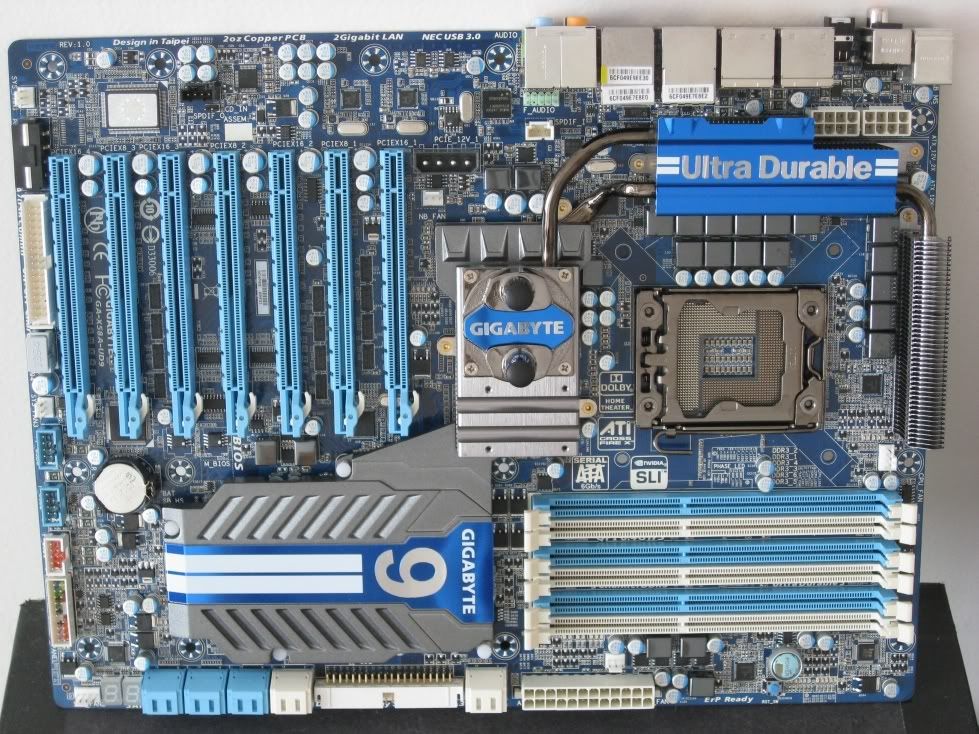
    Additionally, the board includes the Nvidia chips "necessary" to enable Quad SLI. In order to make this as easy as possible the board includes a full 7 PCI-Express 16x slots.


    While very handy for running multiple GPU's, this is annoying for people who would like to use a PCI post card or sound card. Also included on the board is a two-digit POST code display to make diagnosing boot issues easier, which is critical when overclocking.


    If you are someone who cares about all the minor features of the board, then I'll point you over to Gigabyte's product page for the board as it does a solid job of discussing the boards features in more detail.

    Layout
    First the obvious - the UD9 is larger than your typical motherboard; it is both taller and wider. The width really isn't much of an issue, as it will fit comfortably into any case which accepts E-ATX motherboards. The height is more of an issue as it prevents the board from fitting into cases that have only 7 expansion slots. The UD9 also has two 8-pin EPS12V connectors to ensure that the CPU is provided all the power it needs. While I do appreciate this, the placement is less than ideal as it is a bit of a hassle to remove the power supply connectors once they have been connected.


    Right above the PCI-Express slots and at the bottom of the board, a pair of 4-pin drive connectors are included to guarantee that there is enough power for the board when running multi-GPU setups.


    Similar to other high-end boards the UD9 includes both power and reset buttons on the board to make using the board on an open test bench somewhat easier. While I can't really complain about this, it did bug me a bit during testing; the size difference between the power and reset buttons is a bit jarring and does make the reset button a bit hard to hit without looking for it.


    Additionally, Gigabyte includes an extra heatsink that screws on to the top of the northbridge heatsink to provide extra northbridge cooling for those that will be sticking to air cooling for the board. Also included is a waterblock that cools the northbridge and allows anyone who already has a water cooling loop to cool the northbridge easily. All of this extra cooling that is included would be great if it weren’t for one thing. Both the waterblock and the extra heatsink attach to a piece of metal that attaches to fins which attach to another metal base which finally contacts the X58 IOH. Does anyone else see the problem here? There are Fins between the IOH and the waterblock.


    Fins are meant to dissipate heat and not transfer it. As a result, both the extra air heatsink and the waterblock appear to have little effect on northbridge temperatures. After seeing this, I proceeded to do all of my testing with either the waterblock or extra heatsink. Throughout the course of testing the northbridge temperature never exceeded 45 degrees Celsius, which is impressively low especially compared to some of the other high-end X58 based boards. I’m going to sum up the UD9 heatisnk situation with this, if you find that you're having problems with your northbridge running too hot, odds are, you’re doing something wrong.


    The CPU socket area is fairly typical. We see Gigabyte's 24 phase power delivery system and well, everything else is fairly typical of X58 boards. The MOSFET cooling around the socket is a nice height as it did not interfere with any of the cooling methods we tested including the Prolimatech Megahalems and the single stage phase change cooler which can be tough to mount on some boards.

    The one thing I feel is worth mentioning from an overclocking point of view is that the area around the socket is relatively crowded which makes insulating the board for subzero runs a bit of a challenge.

    Finally, the one thing that is missing from the board is a set of voltage measuring points to be able to measure the actual voltage that components are receiving. Measure points have become standard on overclocking-oriented boards and I feel that it is a significant omission. Ironically enough, the lack of measuring points hits especially hard as the voltage set in BIOS and the actual voltage differed significantly most of the time. This left me having to ask around to find measure points which turned out to be fairly inconvenient (behind the CPU socket.)

    Test Setup

    Motherboard: Gigabyte X58A-UD9
    Processor: Intel Core i7 980X Retail
    Cooling: Single stage phase change, Kingpin Cooling F1EE + LN2
    Memory: Corsair Dominator GT 2000C7
    Video Card: Gigabyte GTX 480
    Power Supply: Antec TPQ1200
    Hard Drive: OCZ Vertex and Agility SSDs

    A few notes about the UD9 and its BIOS:
    When I received the board it had the F1 bios. In this state it couldn't clock memory to save its life, multiple kits, multiple CPUs and it still would only run 2000 MHz with 8-9-8-x or looser timings. Thankfully, this issue was fixed in F2 and later BIOSes and is no longer an issue as the UD9 is now nearly identical to other high-end boards in terms of memory performance.

    Results
    (click for full screenshot)

    (click for full screenshot)


    All of the above results were achieved using the single stage phase change cooling unit which runs between -30C and -40C depending on the benchmark. Keeping this in mind, I'm happy with the results as the scores are all right around where they should be for a high-end board. The fact that Gigabyte has manged to keep their efficiency very close to that of boards that do not have NF200s while having two on board is impressive in my mind as most boards with NF200s on board take a slight performance hit in single card tests due to the added latency.


    Now on to my favorite test, low clock SuperPi 32M. If I had to pick an area where the UD9 stood out, this would be it. Throughout testing; I was able to run 32M with my RTL values at least 1-2 settings tighter than on the E760 Classified. As a result, the UD9 enjoyed a slight clock-for-clock advantage over the E760 classified in my testing. This allowed me to achieve a new personal best for lowest frequency needed to reach a sub 7 minute 32M run.


    Click for full screenshot

    This final result required liquid nitrogen cooling to achieve, and while not the greatest score overall, the clock for clock efficiency demonstrates what is possible with a better CPU.


    Overall, the Gigabyte X58A-UD9 proved itself to be a solid, dependable board that never gave us any problems other than the initial memory struggles. A solid feature set, combined with a well thought out layout and better efficiency than other boards make for a very respectable flagship board. Regardless, in good conscience I can't recommend it at the $700 price point it currently occupies. It's a great board but even in my efficiency oriented mind, the slightly better efficiency isn't worth anywhere near the $200 extra it costs. If Gigabyte can get the price under control and bring it back into the realm of "reason", say under $550, the UD9 will prove a very compelling choice for enthusiasts and overclockers alike.
    Last edited by Deux; 12-19-2010 at 03:28 PM.


  2. #2
    Xtreme Enthusiast
    Join Date
    Mar 2006
    Location
    Hastings, England
    Posts
    825
    great review bro
    Quote Originally Posted by jayhall0315 View Post
    If you are really extreme, you never let informed facts or the scientific method hold you back from your journey to the wrong answer


  3. #3
    Xtreme Enthusiast
    Join Date
    Feb 2009
    Location
    Athens - Hellas
    Posts
    739
    Nice review Deux .
    As for the UD9 it seems to be a very strong and competitive mobo but it's overpriced .

    edit : I like that your review follows Jody's style
    Last edited by sofos1990; 06-03-2010 at 10:01 AM.

  4. #4
    Xtreme X.I.P.
    Join Date
    Nov 2002
    Location
    Shipai
    Posts
    31,147
    awesome pics, nicely done
    some bios shots would be nice... can you post pics of the tweaking section of the bios?

    but...
    Throughout the course of testing the northbridge temperature never exceeded 45 degrees Celsius, which is impressively low especially compared to some of the other high-end X58 based boards. I’m going to sum up the UD9 heatisnk situation with this, if you find that your having problems with your northbridge running too hot, odds are, you’re doing something wrong.
    it sounds like you only tested it on ln2 and with compressor cooling... that actually cools the socket area and pwm, so obviously your going to get low chipset temps... on air you will definately see higher chipset temps than on subzero cooling...

  5. #5
    Xtreme Cruncher
    Join Date
    May 2007
    Location
    Chicago
    Posts
    701
    Quote Originally Posted by saaya View Post
    awesome pics, nicely done
    some bios shots would be nice... can you post pics of the tweaking section of the bios?

    but...
    it sounds like you only tested it on ln2 and with compressor cooling... that actually cools the socket area and pwm, so obviously your going to get low chipset temps... on air you will definately see higher chipset temps than on subzero cooling...
    You make an excellent point, I certainly understand how you got that impression. I assure you I tested it thoroughly on air also (Prolimatech megahalems.) I simply didn't feel that any of the air results were really useful, everything other than the slightly tighter RTL runs essentially identically to the classified. Stable settings were withing 10 MHz of each other at the same voltage, in my opinion close enough to call the same.

    I'll take BIOS shots this afternoon and add them, can't believe I forgot that

    Quote Originally Posted by sofos1990 View Post
    Nice review Deux .

    edit : I like that your review follows Jody's style
    It sure does, I always enjoyed reading his reviews partly because of the layout and presentation and partly because of his attitude, and that I definitely can't imitate

    BIOS shots below, I only included the pages that are different from the standard Award BIOS


    Last edited by Deux; 06-03-2010 at 12:06 PM.


  6. #6
    Xtreme Enthusiast
    Join Date
    Feb 2009
    Location
    UK
    Posts
    535
    It's nice to read something written from this perspective. A nice, brief summary of the board's abilities under duress. Shame about the northbridge cooling solution and the lack of a PCI slot. These are the is the only things (other than the price) that disuade me from buying it. It's probably completely overkill for my purposes anyway! Thanks for posting the review

    Gigabyte EX58A-UD3R F6 : i7 920 D0 4.4GHz 1.4v : 4Gb G.Skill ECO 6-8-6-24 1.54v
    Apogee XT & MCW30 : XSPC Dual 750 w/DDC+18W : RX120 & RX240 : Tygon tubing : Corsair HX 850
    2x750Gb 7200.12 RAID0 : 2x500Gb 7200.12 RAID1 : Samsung DVD-RW : LG BD-R
    Antec P182 with 5 x Noctua NF-P12 & 1 x Akasa Apache
    M-Audio Delta 1010 (Rack) : Behringer Truth B2031A
    XFX 5770 + 8600GTS (physx) : 2x Samsung Syncmaster 710n

    Lappy: Asus C90s & E7500 @3.17GHz w/ 4Gb RAM & top scoring 8600m GT DDR2


  7. #7
    Xtreme Member
    Join Date
    Jun 2005
    Location
    The MotherShip
    Posts
    456
    Nice concise review!!!
    "Behold, I am Funkadelic. I am not of your world. But fear me not, I will do you no harm. Loan me your funky mind and I shall play with it. For nothing is good unless you play with it. And all that is good, is nasty!"
    ("What Is Soul," Funkadelic, 1969)


  8. #8
    Xtreme Member
    Join Date
    Jan 2010
    Location
    USA
    Posts
    125
    what size fittings on the watercooling?
    Intel I7 920 @ 4.3 // ASUS Rampage III Extreme// 3x2GB Mushkin// Antec TPQ 1200w // Water Cooled

  9. #9
    Xtreme Cruncher
    Join Date
    May 2007
    Location
    Chicago
    Posts
    701
    Quote Originally Posted by The Duke View Post
    what size fittings on the watercooling?
    3/8'', not sure if retail boards will include adapters or not, sorry.


  10. #10
    Xtreme Member
    Join Date
    Jan 2010
    Location
    USA
    Posts
    125
    @Deux
    Would you happen to know why they went with 3/8 and not 1/2? ... or why they would not include an adapter (if they dont) ...
    Intel I7 920 @ 4.3 // ASUS Rampage III Extreme// 3x2GB Mushkin// Antec TPQ 1200w // Water Cooled

  11. #11
    Xtreme Mentor stasio's Avatar
    Join Date
    Jan 2008
    Location
    Malaysia
    Posts
    3,036
    Your board is retail?
    I saw Rev.0.3;GA-X58A-UDP7.
    Btw,nice review.
    Need a Gigabyte latest BIOS?
    Z370 AORUS Gaming 7,
    GA-Z97X-SOC Force ,Core i7-4790K @ 4.9 GHz
    GA-Z87X-UD3H ,Core i7-4770K @ 4.65 GHz
    G.Skill F3-2933C12D-8GTXDG @ 3100 (12-15-14-35-CR1) @1.66V
    2xSSD Corsair Force GS 128 (RAID 0), WD Caviar Black SATA3 1TB HDD,
    Evga GTS 450 SC, Gigabyte Superb 720W
    XSPC RayStorm D5 EX240 (Liquid Ultra)
    NZXT Phantom 630 Ultra Tower
    Win 7 SP1 x64;Win 10 x64

  12. #12
    I am Xtreme
    Join Date
    Aug 2008
    Posts
    5,586
    i think its es...the molex connector is pointing up..which is not useful with 4gpus...

    can we have close up pics of the cpu capacitors?


  13. #13
    Xtreme Cruncher
    Join Date
    May 2007
    Location
    Chicago
    Posts
    701
    Quote Originally Posted by Hondacity View Post
    i think its es...the molex connector is pointing up..which is not useful with 4gpus...

    can we have close up pics of the cpu capacitors?

    This one is actually next to the NB but has the same markings as the ones around the socket.
    If you need pictures of anything else let me know

    Quote Originally Posted by stasio View Post
    Your board is retail?
    I saw Rev.0.3;GA-X58A-UDP7.
    Btw,nice review.
    It is a pre-retail board as far as I know. I was not made aware of any differences and therefore assumed that retail would be all but identical. If I was wrong in doing so, I apologize and would love to know what the differences are.

    Just curious, how are you related to GB? Just noticed you are often the one to post new BIOS for download


  14. #14
    Turkey Man
    Join Date
    Mar 2005
    Location
    Jakarta (ex-Australia)
    Posts
    2,560
    Dont know if this aids you, but here's some pics of a Rev1 retail.

    CPU caps are E033.
    PCI-E molex is facing down at the base of the board.


    Last edited by T_M; 06-03-2010 at 05:22 PM.

  15. #15
    I am Xtreme
    Join Date
    Aug 2008
    Posts
    5,586
    thanks Deux and T_M

    i think they're ncc super low esr... top 5 in lowest esrs...


  16. #16
    Xtremely Addicted
    Join Date
    Dec 2004
    Location
    NL
    Posts
    2,471
    Good job Deux buddy

  17. #17
    World Champion - IRONMODS
    Join Date
    Sep 2007
    Location
    Northern Japan
    Posts
    2,029
    Nice review Deux
    Last edited by miahallen; 06-06-2010 at 08:21 PM.
    Quote Originally Posted by Massman
    My definition of 'efficient' is 'it does not suck monkeyballs'. Yes, I set bars low.
    [CENTER]The post counter is not an intelligence meter!

    MAX11L - "It's like a console...with the suck turned down and the awesome turned up" -tet5uo
    Heat Team IRONMODS

  18. #18
    I am Xtreme
    Join Date
    Aug 2008
    Posts
    5,586
    is it possible to remove the heatsink of the cpu mosfets? this 1500w claim by one website is worth looking into
    Last edited by Hondacity; 06-05-2010 at 08:14 PM.


  19. #19
    XIP
    Join Date
    Nov 2004
    Location
    NYC
    Posts
    5,524
    Good info there Deux

    Wonder after all these oc options build in on flagship board.......When they're going to make a board that moisture proof?

  20. #20
    Xtreme Cruncher
    Join Date
    May 2007
    Location
    Chicago
    Posts
    701
    Thanks everyone

    Quote Originally Posted by Hondacity View Post
    is it possible to remove the heatsink of the cpu mosfets? this 1500w claim by one website is worth looking into
    It's pretty involved as you have to remove the entire HS all the way down to the SB. Once I finish testing I'll give it a shot, don't trust myself not to kill it trying to put the HS back on


  21. #21
    Admin
    Join Date
    Dec 2003
    Location
    Hillsboro, OR
    Posts
    5,225
    Nice review, Jody Jr.

  22. #22
    Xtreme Cruncher
    Join Date
    Dec 2008
    Location
    Los Angeles/Hong Kong
    Posts
    3,058
    Awesome review. I also really want to see how the 890FX-UD7 is doing. It seems to be similar - lots of PCIx16, XL-ATX...
    Team XS: xs4s.org


Bookmarks

Bookmarks

Posting Permissions

  • You may not post new threads
  • You may not post replies
  • You may not post attachments
  • You may not edit your posts
  •