MMM
Results 1 to 6 of 6

Thread: Ram running slower than rated, DDR3-1066@800..please help?

  1. #1
    Xtreme Member
    Join Date
    Mar 2005
    Posts
    447

    Ram running slower than rated, DDR3-1066@800..please help?

    Just got my 1647 set up and got sent an additional 4gb dimm and popped it in for a total of 8 gigs. i7 620m with 8gigs ddr3-1066 (specs in sig)

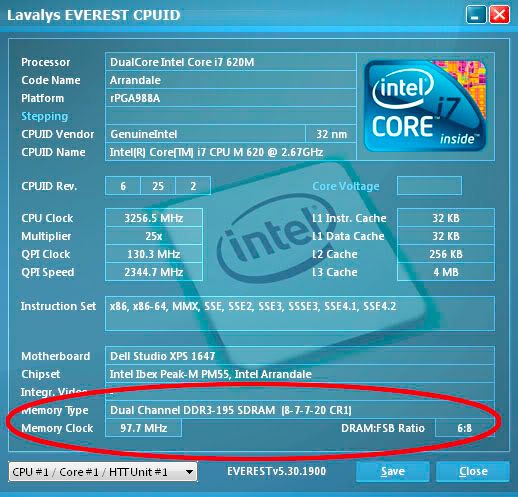
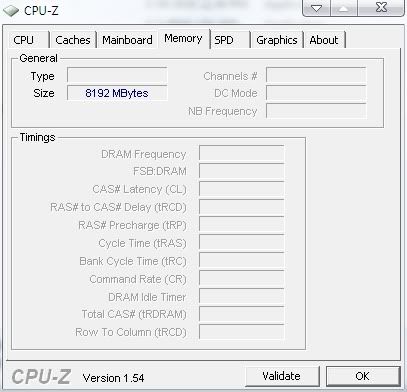
    CPU-Z shows 8 gigs, everything works fine..The Memory tab is blank so it doesn't show what its actually running at or its timings or dual channel mode or not...Which caused me to think it wasn't running in dual channel mode..So I got everest ultimate edition and it indeed showed it was working in dual channel so I was happy..But then I noticed it reported the memory was running at 100mhz and in ddr3 terms that effectively is 800mhz...The ram should be running at a base clock of 133mhz or 1066mhz effectively. All the tabs report it as being rated at 1066 and all that registers fine..Its just the "actual clock" reports it at 100mhz instead of 133..

    I thought back to the 4gb dimm I recieved..It was refurbished which made me think it was the culprit..So I did some tests. I tested each dimm individually by themselves and each time (alone and together) everest reported 100mhz (800mhz)..

    So is everest to be trusted? Are both my dimms bad? Whats causing my dimms to run at 800mhz instead of 1066? There is nothing in bios to tweak so how can I change this? And let me repeat, both dimms, when installed BY THEMSELVES (so 4gb total) still report 100mhz...so it cant be the refurb dimm...one dimm is hynix one is samsung. And again I ran them each by themselves and got the same results:

    CPU-Z screenshot..


    Everest CPUid: (notice ram clock)


    What gives??

    My window index score on memory is 6.8..which is about what it was on my last machine which used the same speed ram..Bios report ram is 1066 (I dunno if thats actual speed or whats its 'rating' is)

    Could everest be wrong? I ask because its a new chip, the memory controller is now integrated into the gpu which is off die and no longer on the same chip..Maybe that causing problems for these apps cause they're new? I dunno?

    Any help would be greatly appreciated..
    Last edited by Tenknics; 04-04-2010 at 10:55 PM.
    Iron Lung 3.0 | Intel Core i7 6800k @ 4ghz | 32gb G.SKILL RIPJAW V DDR4-3200 @16-16-16-36 | ASUS ROG STRIX X99 GAMING + ASUS ROG GeForce GTX 1070 STRIX GAMING | Samsung 960 Pro 512GB + Samsung 840 EVO + 4TB HDD | 55" Samsung KS8000 + 30" Dell u3011 via Displayport - @ 6400x2160

  2. #2
    L-l-look at you, hacker.
    Join Date
    Jun 2007
    Location
    Perth, Western Australia
    Posts
    4,644
    This type of thread does not belong in Xtreme Bandwidth. This forum is for posting world records and great results, not to ask for help - you want the General Memory forum, which, as it tells you, is for "Post questions and information here".

    That being said, I'd say you're looking at a software readout bug. CPU-Z and suchlike are not really designed for use with mobile chipsets.
    Rig specs
    CPU: i7 5960X Mobo: Asus X99 Deluxe RAM: 4x4GB G.Skill DDR4-2400 CAS-15 VGA: 2x eVGA GTX680 Superclock PSU: Corsair AX1200

    Foundational Falsehoods of Creationism


  3. #3
    Xtreme Member
    Join Date
    Mar 2005
    Posts
    447
    Sorry, I scanned through the forums and couldn't figure out where to post it..I must have overlooked that forum, sorry man. Mod can move this or delete if need be?

    Thanks for the heads up soul and I appreciate you weighing in on the problem too. I suspected it was a bug but then to see everest and the actual live clock fluctuate between 97-100mhz made me think it was legit..I will trust my original gut feeling..Hopefully a bug.

    Thanks again soul..

    p.s. noticed the 2408wfp rev a01 in your sig..got one too..One of the best purchases I ever made..getting an a01 was definitely a challenge but well worth it..good stuff man
    Last edited by Tenknics; 04-04-2010 at 11:48 PM.
    Iron Lung 3.0 | Intel Core i7 6800k @ 4ghz | 32gb G.SKILL RIPJAW V DDR4-3200 @16-16-16-36 | ASUS ROG STRIX X99 GAMING + ASUS ROG GeForce GTX 1070 STRIX GAMING | Samsung 960 Pro 512GB + Samsung 840 EVO + 4TB HDD | 55" Samsung KS8000 + 30" Dell u3011 via Displayport - @ 6400x2160

  4. #4
    Corsair Rep
    Join Date
    Apr 2004
    Posts
    1,203
    I'd also suggest ignoring the WEI results. They are worse than worthless.
    Yes, Yellowbeard, a tall rough man with a big yellow beard

  5. #5
    Xtreme Member
    Join Date
    Mar 2005
    Posts
    447
    Quote Originally Posted by Yellowbeard View Post
    I'd also suggest ignoring the WEI results. They are worse than worthless.
    Yes I agree, I was using it for reference because it was an idtentical variable of both systems.
    Iron Lung 3.0 | Intel Core i7 6800k @ 4ghz | 32gb G.SKILL RIPJAW V DDR4-3200 @16-16-16-36 | ASUS ROG STRIX X99 GAMING + ASUS ROG GeForce GTX 1070 STRIX GAMING | Samsung 960 Pro 512GB + Samsung 840 EVO + 4TB HDD | 55" Samsung KS8000 + 30" Dell u3011 via Displayport - @ 6400x2160

  6. #6
    Corsair Rep
    Join Date
    Apr 2004
    Posts
    1,203
    Quote Originally Posted by Tenknics View Post
    Yes I agree, I was using it for reference because it was an idtentical variable of both systems.
    "Identical" is debatable with the WEI. It uses some strange criteria for its ratings so what appears to be indentical may not be. That's why I say it is worse than worthless.
    Yes, Yellowbeard, a tall rough man with a big yellow beard

Bookmarks

Bookmarks

Posting Permissions

  • You may not post new threads
  • You may not post replies
  • You may not post attachments
  • You may not edit your posts
  •