

I've been staring at an Athlon 64 X2 @25C for three years now. I'm not entirely sure how I'm doing, or if my temps are well within reason. 40C idle on a Noctua NH-D14 seems a little high to me. Any input would be appreciated.
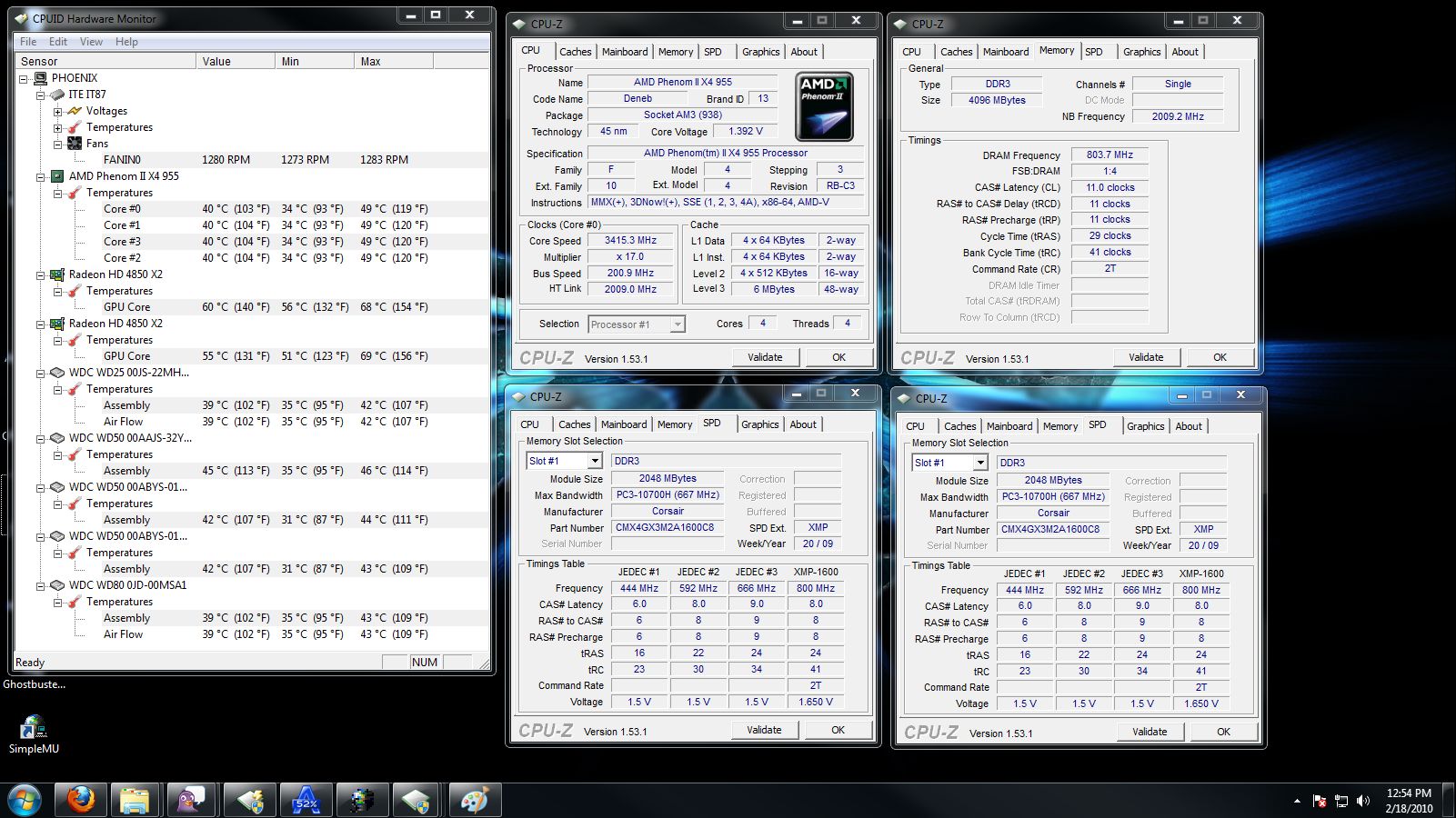



 955BE@3.4 How am I looking?
I've been staring at an Athlon 64 X2 @25C for three years now. I'm not entirely sure how I'm doing, or if my temps are well within reason. 40C idle on a Noctua NH-D14 seems a little high to me. Any input would be appreciated.
==========================================
XClio 1000, Gigabye GA-MA790XT-UD4P
AMD Phenom II 955BE @3.2 GHz, Noctua NH-D14
CORSAIR 950TX 950W, 4GB Corsair XMS3 DDR3 1600
Sapphire 4850x2 CFX
Win7 Ultimate
Originally Posted by stangracin3

That does seem a little high for idle... how are the temps at load?
What's your ambient temperature? Looking at the temp of the hard drives your case isn't doing a good job or your ambient temp is high.
wow! Check your RAM latencies
Main: Windows 10 Core i7 5820K @ 4500Mhz, Corsair H100i, 32GB DDR4-2800, eVGA GTX980 Ti, Kingston SSDNow 240GB, Crucial C300 64GB Cache + WD 1.5TB Green, Asus X99-A/USB3.1
ESXi Server 6.5 Xeon E5 2670, 64GB DDR3-1600, 1TB, Intel DX79SR, 4xIntel 1Gbps
ESXi Server 6.0 Xeon E5 2650L v3, 64GB DDR4-2400, 1TB, Asrock X99 Xtreme4, 4xIntel 1Gbps
FreeNAS 9.10 x64 Xeon X3430 , 32GB DDR3-1600, 3x(3x1TB) WD Blue, Intel S3420GPRX, 4xIntel 1Gbps
Definitely too high. Should be something within 28-35C. Have you tried re-seating it? Make sure to properly apply a proper TIM.
Oh, and hope your case has some ventilation.
Donate to XS forums
yes i think a combination of hot ambients & poor airflow in the case - with 70f room temp my hard drive is at 86f and it is under my dvd drive completely away from the airflow in my case - when it was in hd bays in front of intake fan it was like 75f... his hard drives range from 102f-113f
edit: also interesting that his cpuz shows "Socket AM3 (938)" - w/ same cpuz version mine shows 939 lol and i was looking back at some of my old screenies which all show "Socket AM3 (939)" xcept one shows "Socket AM2+ (940)" & it was w/ my gd-70
edit again: also it looks like your ram isnt running in dual channel - what slots do you have the sticks in?
Last edited by crazydiamond; 02-17-2010 at 12:27 PM.
LEO!!!! amd phenom II x6 1100T | gigabyte 990fxa-ud3 . . 2x2gb g.skill 2133c8 | 128gb g.skill falcon ssd sapphire ati 5850 | x-fi xtrememusic. . . samsung f4 2tb | samsung dvdrw . . corsair tx850w | windows 7 64-bit. ddc3.25 xspc restop | ek ltx | mc-tdx | BIP . . lycosa-g9-z2300 | 26" 1920x1200 lcd .
I'll try to address all of this at once. The ambient in my room flat sucks. It goes from scorching to freezing in something like half an hour. Second, I just reseated the heatsink. I had a suspicion I'd screwed up late last night. So we'll see here pretty soon if there's any change.
As for my case, it's an Xclio 1000, stuffed with too many hard drives. I'm dumping two of them off today and doing some rearranging. Hopefully that will give me some free moving air inside. I'll try and get a pic of the guts so you can see just how stuffed it is inside. At this very moment, my CPU is running at 36C.
Speaking of TIM, AS5 vs Noctua's TIM? Words from the wise? I have no problem tearing this down and reseating with the other if necessary. I'm running it with the AS5.
==========================================
XClio 1000, Gigabye GA-MA790XT-UD4P
AMD Phenom II 955BE @3.2 GHz, Noctua NH-D14
CORSAIR 950TX 950W, 4GB Corsair XMS3 DDR3 1600
Sapphire 4850x2 CFX
Win7 Ultimate

it must not better a good mount.
that's the best cooler out right now O_O now way that thing should even be near 50C with that monster.
also that 1.392 is probably more like 1.4125 under load, you could try a little less voltage most chips can use less at stock.
I've preferred stuff that isn't sticky but not too runny, like TX2 or even Dynex from best buy is good lol
Last edited by demonkevy666; 02-17-2010 at 12:53 PM.
Hmm my CPU @ 1.55v/ 4 Ghz with 2.8 NB runs cooler idle than that lol...
Load is a different story but my cooler should suck compared to that.
MX-3 or TX-2 is the way to go. I've heard bad things about TX-3 IIRC. AS5 is around 2-3c worse than MX-3 on load.
Smile
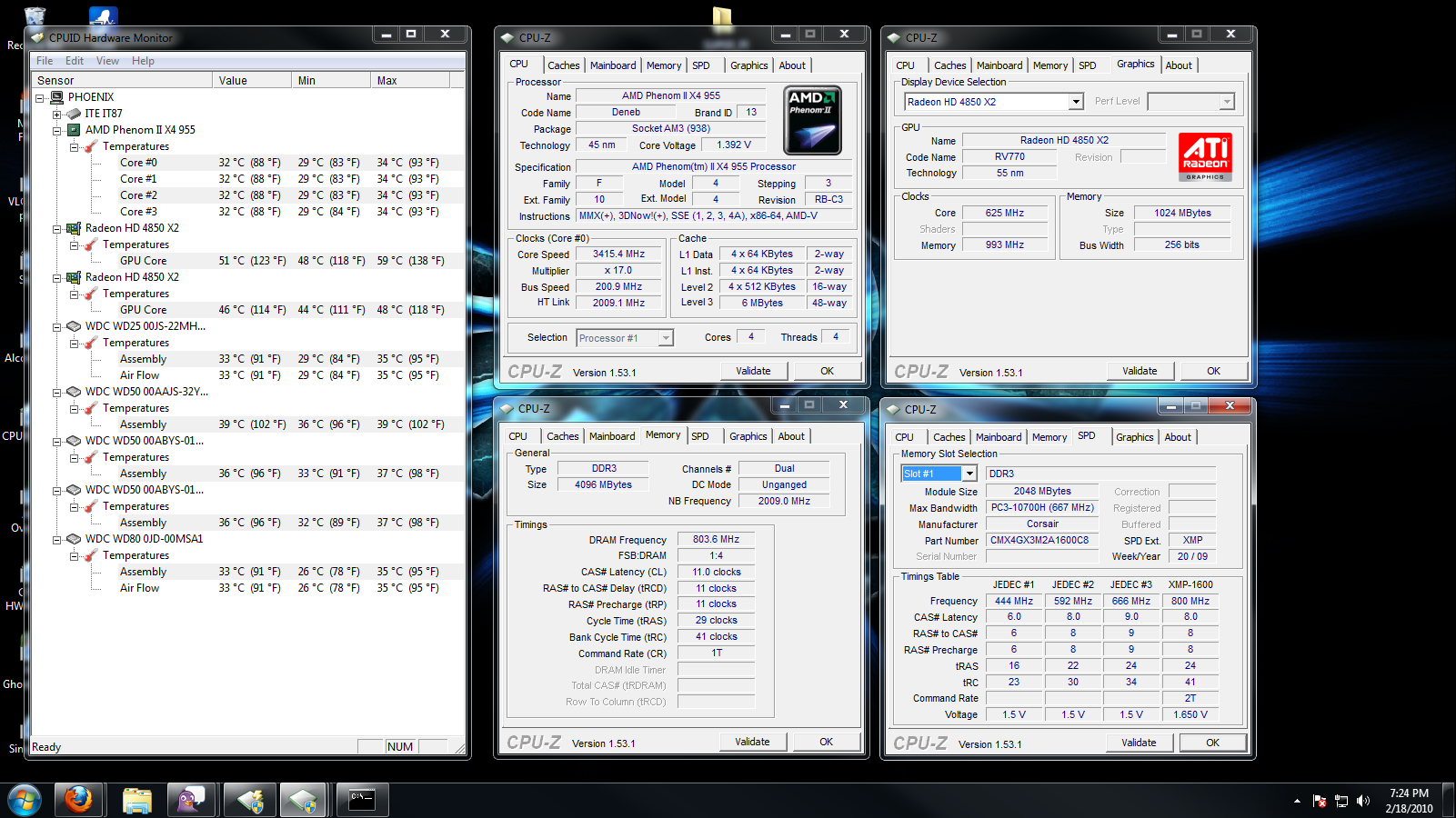
No load temps seem to be better (Between 28 and 35) What you see is a light load with ...pidgin, steam, paint, and of course the CPUZ windows open. As for the ram? ...I'll assault that in a bit. Taking out some of the dead weight HD's and reseating my heatsink certainly helped. A the point of print screen, the system had been up for about 4hours solid while I was running errands.
I'd say I've straightened some of the issues out at the moment.
==========================================
XClio 1000, Gigabye GA-MA790XT-UD4P
AMD Phenom II 955BE @3.2 GHz, Noctua NH-D14
CORSAIR 950TX 950W, 4GB Corsair XMS3 DDR3 1600
Sapphire 4850x2 CFX
Win7 Ultimate
dang man. tighten ur timings up! look at the spd rating in cpuz
mobo: strix b350f
gpu: rx580 1366/2000
cpu: ryzen 1700 @ 3.8ghz
ram: 32 gb gskill 2400 @ 3000
psu: coarsair 1kw
hdd's: samsung 500gb ssd 1tb & 3tb hdd
Well it looks better already,as far as the voltage goes:
1.4v (what you have) should be enough for 3.6ghz and 1.250v for
3250mhz.
Do you have AOD (amd overdrive utility)? -allows to tweak a lot of staff from
windows
World Community Grid's mission is to create the world's largest public computing grid to tackle projects that benefit humanity.
Our success depends upon individuals collectively contributing their unused computer time to change the world for the better.
8-8-8-24 is about as tight as I think I'm going to get it. I don't know much about mem ocing, and 7-7-7-21 caused my machine to puke. I'll poke at that again a little down the road.
I do have AOD. I've only just started poking at it. I generally don't use software to overclock. (Bad experiences with an MSI K9N-Neo mobo)
Overall it does seem to be my erratic ambient temps are causing the most problems.
I'll keep those voltages in mind.
==========================================
XClio 1000, Gigabye GA-MA790XT-UD4P
AMD Phenom II 955BE @3.2 GHz, Noctua NH-D14
CORSAIR 950TX 950W, 4GB Corsair XMS3 DDR3 1600
Sapphire 4850x2 CFX
Win7 Ultimate
Try 7-8-7-24 on the RAM...
AOD is probably the best overclocking software I've ever used...it's like NVIDIA NTune on steroids
Smile
Try the Noctura paste...
Or Xigmatek or MX2..all three will give lowest temps with out having to reapply it down the road.
With Air cooling the AS5 should be replaced every three to 4months..
Why you ask,,
It dries out over time and will need replenishing..
The other paste do not and offer a better thermal propertie with less paste and dosnt require a on off CPU cycle to set it in like AS5..
When it comes to paste Less is more ...
Too much and it will work against you,, acting like a heat insulator instead of a heat transfer between the IHS and Air cooler used.
Also 888/24 timing will be good untill you find the Max CPU clock you want to run at..Also goes for helping the NB ...
You can tighten the Timing once you figure out your Max clocks..
Sometimes,,
Stock or loose timing can get you a higher NB vs tight and low freqency..
.Ive also seen that some Optimal timing for DDR3 is around 1333mhz 5 or 6 and or 1600mhz 7 timing...
Once you play a little,, youll see the diferrences..
Use Everest or SuperPi to see what timings run more efficient..
Faster times are always better along with lower latency..Especially for gaming and system response.
"AMD...Like the perfect Storm,...Everything needs to be just right"
X555x4SuperCore@4450mhz@1.64v..........
RYZEN 7 1800x/ ASUS ROG STRIX VEGA64/ =EK NICKEL WB, Feser THC 2x360 1x480
X470 Gigabyte Aorus7, Patriot 3400mhz 16gb dual2x8
SSD Samsung 970pro,,860EVO
Try adjust your RAM Timing.....CL11 ......
Gaming Rig
CPU : AMD Ryzen 7 3700X (45W ECO mode)
HSF : Noctua C14S
MB : ASRock X470 Taichi Ultimate
RAM : G.Skill F4-3000C14-16GTZR x4 @ DDR4-3000 CL14
VGA : MSI RTX2070
PSU : Antec NeoECO Gold 650W
Case : Corsair 100R ATX
SSD : Samsung PM981a 1TB + Corsair MP510 1.9GB M.2 SSD
Sing it with me: This was a triumph!
==========================================
XClio 1000, Gigabye GA-MA790XT-UD4P
AMD Phenom II 955BE @3.2 GHz, Noctua NH-D14
CORSAIR 950TX 950W, 4GB Corsair XMS3 DDR3 1600
Sapphire 4850x2 CFX
Win7 Ultimate
temps are so much better, nice job
LEO!!!! amd phenom II x6 1100T | gigabyte 990fxa-ud3 . . 2x2gb g.skill 2133c8 | 128gb g.skill falcon ssd sapphire ati 5850 | x-fi xtrememusic. . . samsung f4 2tb | samsung dvdrw . . corsair tx850w | windows 7 64-bit. ddc3.25 xspc restop | ek ltx | mc-tdx | BIP . . lycosa-g9-z2300 | 26" 1920x1200 lcd .
where that chip is supposed to be FTW.... now time for MOAR COOLING AND MOAR MEGUH HERTZ
SYSTEM
i5-3750K @ 4.6ghz - ASRock Z77 Extreme4 - 16GB Samsung DDR3 - Sapphire R7 370 Nitro 4GB
Water Cooling
EK Supremecy - DDC-3.2 w/XSPC Top -Swiftech MCR320-QP - EK Multioption 150
do you have an rear exhaust fan for the xclio?
Rig 1 Asus ROG Strix B550-F WiFi, R7 5800x, 64GB Vengeance LPX 4*16GB, Zotac GTX 1070Ti, X-Fi Titanium, Enermax Revolution D.F. 850w, SSDs 768GB, HDD 3TB, CM 912HAF, NH D-15 Black.cr
Rig 2 Asus Maximus VI Hero, i7 4770K@4000, 32GB Ballistix VLP 4*8GB, Gigabyte GTX 970, eVGA G3 850, SSD 512GB, HDD 2TB, TT Element-T, NH D-14.
is it stable though? where did you buy that chip?
looks good
Mpower Max | 4770k | H100 | 16gb Sammy 30nm 1866 | GTX780 SC | Xonar Essence Stx | BIC DV62si | ATH AD700 | 550d | AX850 | VG24QE | 840pro 256gb | 640black | 2tb | CherryReds | m60 | Func1030 |
HEAT
Two, actually. They're some 120's and aren't the greatest but they definitely improved the airflow in the case. With 6 "180's" ( They're really 160s) blowing in, and 2 blowing out, you can see how there' might be a bottleneck in the exhaust.
==========================================
XClio 1000, Gigabye GA-MA790XT-UD4P
AMD Phenom II 955BE @3.2 GHz, Noctua NH-D14
CORSAIR 950TX 950W, 4GB Corsair XMS3 DDR3 1600
Sapphire 4850x2 CFX
Win7 Ultimate
It's not quite stable. I went to run Cinebench last night and it seized. Stability is my next step. I just wanted to grab a valid and a screen of it up and running.
==========================================
XClio 1000, Gigabye GA-MA790XT-UD4P
AMD Phenom II 955BE @3.2 GHz, Noctua NH-D14
CORSAIR 950TX 950W, 4GB Corsair XMS3 DDR3 1600
Sapphire 4850x2 CFX
Win7 Ultimate
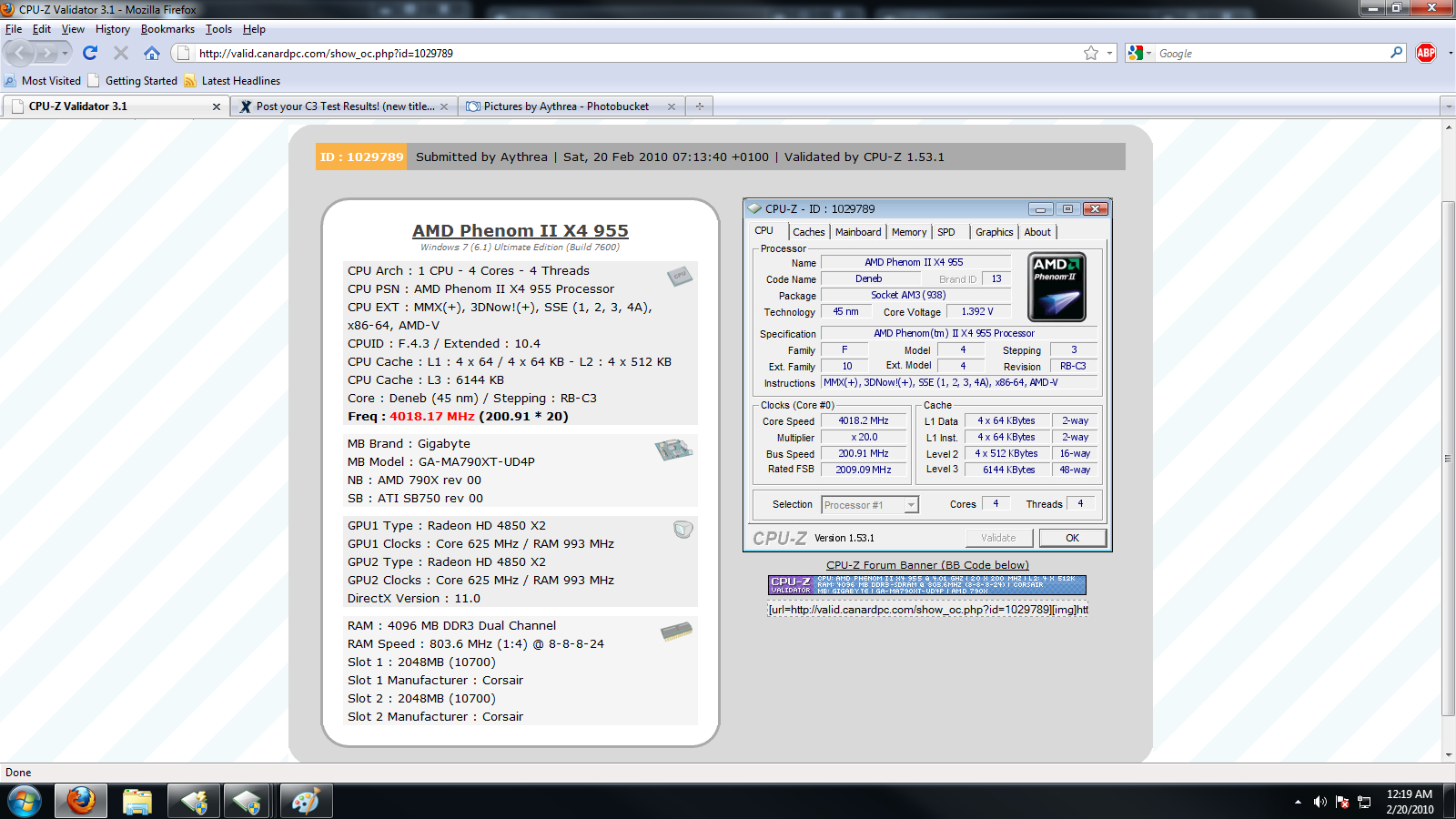
Here's what I've learned!
4Ghz is possible with this chip in a flat out. Don't try to prime95 with it. My success rate is 0.
A 19.5 X 200FSB is stable at 1.475v on the VCore.
20 x 200 is not stable and likely won't be without a more extreme cooling system. The NH-D14 is great at what it does. I'm just not sure I'm ready to jump much higher than 1.5v VCore on air with my erratic ambient temps. Although, Under load, my high is 48c. I might revisit that in the future.
Here are my results:

==========================================
XClio 1000, Gigabye GA-MA790XT-UD4P
AMD Phenom II 955BE @3.2 GHz, Noctua NH-D14
CORSAIR 950TX 950W, 4GB Corsair XMS3 DDR3 1600
Sapphire 4850x2 CFX
Win7 Ultimate
 Posting Permissions




 Reply With Quote






Bookmarks