

Newest version of Sisoft Sandra has just been released with OpenCL and DirectCompute benchmarks.
You can get the free Lite version here - http://www.sisoftware.net/index.html...64&langx=en&a=



Newest version of Sisoft Sandra has just been released with OpenCL and DirectCompute benchmarks.
You can get the free Lite version here - http://www.sisoftware.net/index.html...64&langx=en&a=
Here's my Radeon HD 4770 @ 800MHz:

Adobe is working on Flash Player support for 64-bit platforms as part of our ongoing commitment to the cross-platform compatibility of Flash Player. We expect to provide native support for 64-bit platforms in an upcoming release of Flash Player following the release of Flash Player 10.1.
System was at:
Q6600@ 3.81GHz
(1) 295@ 621/1512/1152
(1) 280@ 657/1512/1188
Sandra OpenCL test on 1/2 of my 295??
OpenCL test on my 280:
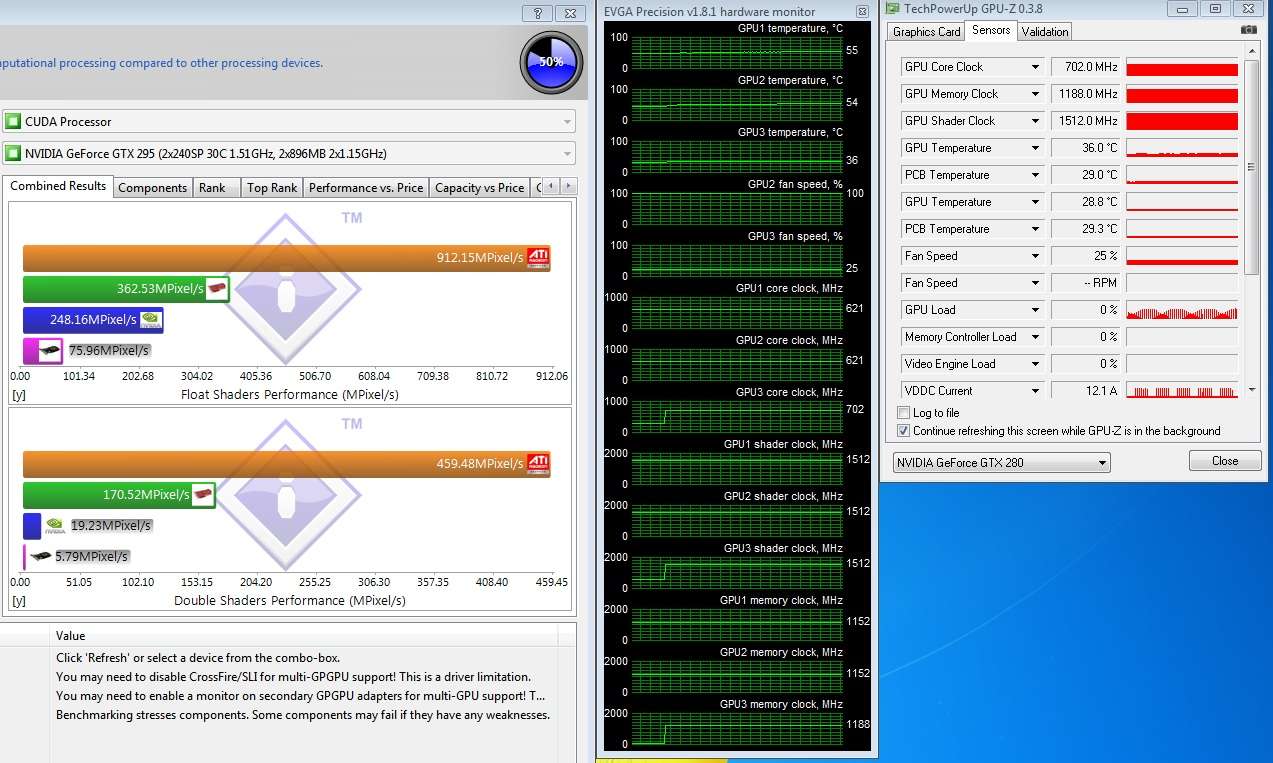
CUDA test appears to use both sides of my 295! Sweet!!
CUDA test on my 280:
I never know the 5870 was such a good CUDA processor... What's up with that?
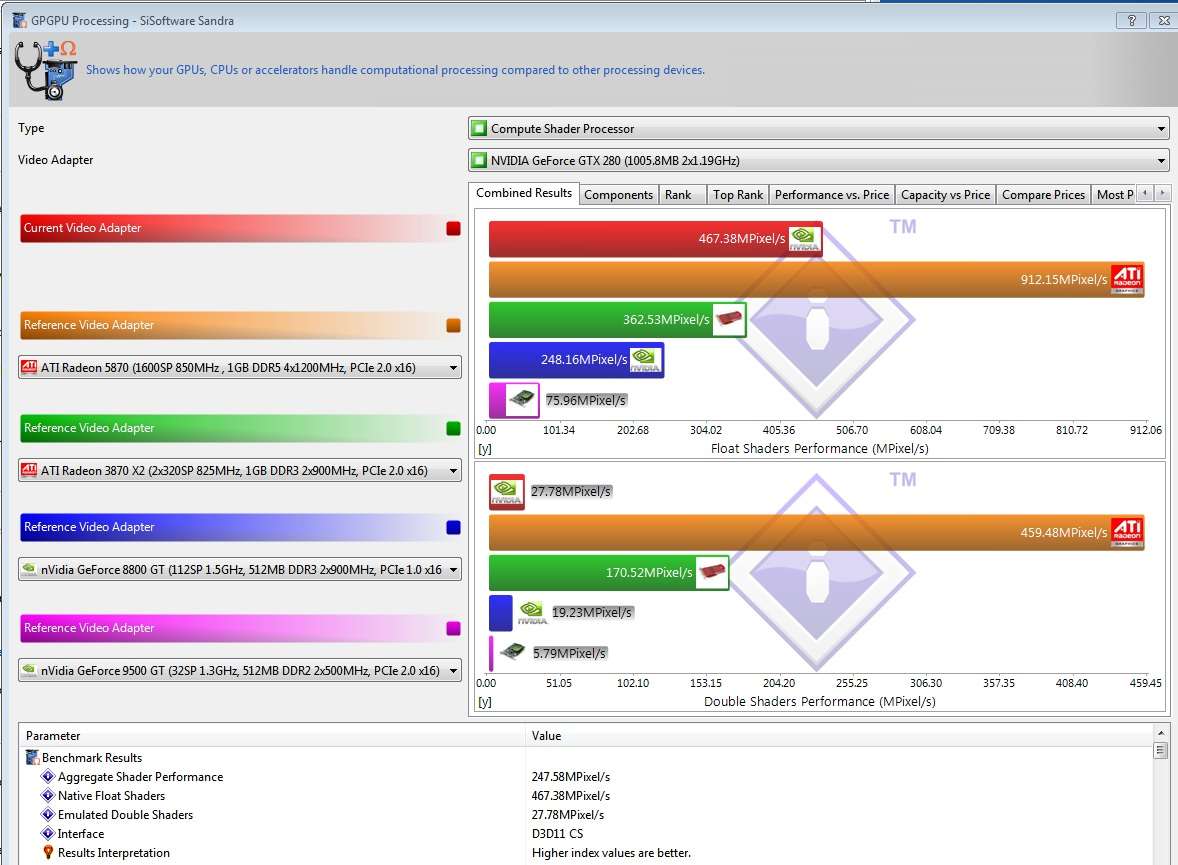
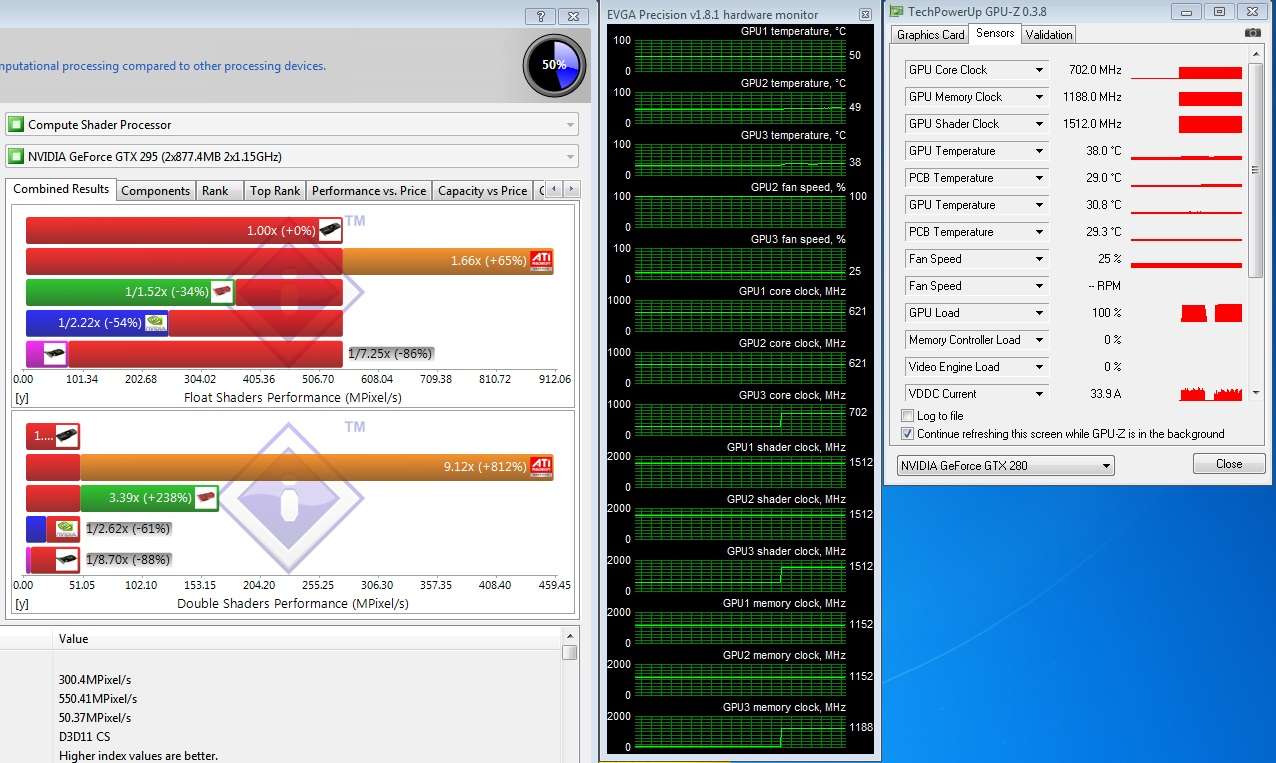
The Compute Shader test on 1/2 of my 295.
Compute Shader test on my 280:
I don't understand why on only the CUDA drop down menu, it appears like I have more than 1 295 in my system?
This benchmark needs the 'Use All GPU's in my System' button bad!
I want the Graphics and PhysX card in on the deal.
Last edited by Talonman; 11-29-2009 at 10:39 PM.


@Talonman: It isn't comparing a CUDA Nvidia GPU to CUDA AMD GPU; it compares a CUDA Nvidia GPU to Stream/OpenCL AMD GPU performance using the same metric (Float and Double Shader MPixels).
Core i7 2600K@4.6Ghz| 16GB G.Skill@2133Mhz 9-11-10-28-38 1.65v| ASUS P8Z77-V PRO | Corsair 750i PSU | ASUS GTX 980 OC | Xonar DSX | Samsung 840 Pro 128GB |A bunch of HDDs and terabytes | Oculus Rift w/ touch | ASUS 24" 144Hz G-sync monitor
Originally Posted by phelan1777

Thanks for the reply.
http://www.tgdaily.com/hardware-feat...encl-benchmark
AMD teams up with SiSoft on OpenCL benchmark
"Chip firm AMD said it is collaborating to develop benchmark testing suites for OpenCL with SiSoftware.
The OpenCL GPGPU benchmark suite forms part of SiSoftware Sandra 2010. AMD believes it is the only company that can provide a complete OpenCL development platform for GPGPUs - essentially a combination of graphics chip and microprocessor.
AMD said that developers, independent software vendors and original equipment manufacturers want to measure OpenCL system performance.
The SiSoftware benchmark suite is the first step in giving the industry a set of tools, said AMD.
But here's the rub. AMD said that while it has optimized the performance of the OpenCL benchmarks for its graphics chips, it said that results using the ATI Radeon HD 5870 graphics card is 2.7 times faster than Nvidia's CUDA running on the GeForce GTX 295 with two graphics chips.
AMD's ATI card only uses one graphics chip."
Not sure how much it helped ATI's performance when they were working with SiSoft on this benchmark...
I do know with the CUDA test, 1/2 of my 295 runs at 99% load, and the other has intermittent processing issues causing GPU-z to not read it's work load correctly.
First 1/2 of my 295 running the CUDA test, with 99% load:
The second 1/2 of my 295 with intermittent processing issues, causing GPU-z to report 0% load:
On the OpenCL Test runs at 58% on 1/2 of my 295, and 19% on the other 1/2.
On the Compute Shader Test, I run at 99% on 1/2 of my 295, and 0% load on the other 1/2.
I am wondering if the intermittent processing issues during the CUDA test, hurts our score?
I find it odd that in both the OpenCL, and the Compute Shader test, 1/2 of my 295 beats my 280...
But in the CUDA test, where supposedly both sides of my 295 are being used, does not beat my 280 by more than 2X the speed.
It is also the only test that appears to have an intermittent processing issue, that causes GPU-z to report a 0% load.
This could be related, or CUDA has some scalling issues calculating this test?
I tend to believe it's that 1/2 of my 295 does not calculate, 100% of the time in this CUDA test.
Last edited by Talonman; 12-05-2009 at 04:30 PM.
Asus Maximus SE X38 / Lapped Q6600 G0 @ 3.8GHz (L726B397 stock VID=1.224) / 7 Ultimate x64 /EVGA GTX 295 C=650 S=1512 M=1188 (Graphics)/ EVGA GTX 280 C=756 S=1512 M=1296 (PhysX)/ G.SKILL 8GB (4 x 2GB) SDRAM DDR2 1000 (PC2 8000) / Gateway FPD2485W (1920 x 1200 res) / Toughpower 1,000-Watt modular PSU / SilverStone TJ-09 BW / (2) 150 GB Raptor's RAID-0 / (1) Western Digital Caviar 750 GB / LG GGC-H20L (CD, DVD, HD-DVD, and BlueRay Drive) / WaterKegIII Xtreme / D-TEK FuZion CPU, EVGA Hydro Copper 16 GPU, and EK NB S-MAX Acetal Waterblocks / Enzotech Forged Copper CNB-S1L (South Bridge heat sink)
Update: Now more confused...
When testing the 295 on the OpenCL Test, my 280 Dedicated PhysX processor reports a 20% load...
When testing my 295 on the CUDA test, my 280 Dedicated PhysX processor reports varied light utilization.
When testing my 295 on the Compute Shader test, my 280 Dedicated PhysX processor reports mostly heavy usage.
In summary, that means on the Sandra benchmark app:
When testing a 295 on OpenCL, utilization will be: 58% on 1/2 of my 295, and 19% on the other 1/2, with 20% load on the 280.
When testing a 295 on CUDA, utilization will be: 1/2 of my 295 runs at 99%, and the other 1/2 has intermittent processing issues causing GPU-z to not report correctly, with varied light utilization on the 280.
When testing a 295 on Compute Shaders, utilization will be: 1/2 of my 295 runs at 99%, and the other 1/2 at 0%, with mostly heavy usage on the 280.
Wow! Unexpected... Something isn't right here!
I did fire up ATI Tool to see what the new version of GPU-z would read with running on my 295 in SLI mode:
One 1/2 of my 295 reads 31%.
The other 1/2 of my 295 reads 94%.
And my 280 reads 0%.
I am surprised it's not closer between the (2) halves of my 295 operating in SLI Mode...
Last edited by Talonman; 12-05-2009 at 01:33 PM.
Asus Maximus SE X38 / Lapped Q6600 G0 @ 3.8GHz (L726B397 stock VID=1.224) / 7 Ultimate x64 /EVGA GTX 295 C=650 S=1512 M=1188 (Graphics)/ EVGA GTX 280 C=756 S=1512 M=1296 (PhysX)/ G.SKILL 8GB (4 x 2GB) SDRAM DDR2 1000 (PC2 8000) / Gateway FPD2485W (1920 x 1200 res) / Toughpower 1,000-Watt modular PSU / SilverStone TJ-09 BW / (2) 150 GB Raptor's RAID-0 / (1) Western Digital Caviar 750 GB / LG GGC-H20L (CD, DVD, HD-DVD, and BlueRay Drive) / WaterKegIII Xtreme / D-TEK FuZion CPU, EVGA Hydro Copper 16 GPU, and EK NB S-MAX Acetal Waterblocks / Enzotech Forged Copper CNB-S1L (South Bridge heat sink)
when comparing GPGPU benchmark, the load in GPU is differ that for rendering my friend
some GPU kernel can be completed in fraction of a second so you won't notice any load
OR
some calculations might not using all shader processor inside GPU because of bad coding/hardware limitations
on the other hand, for some calculations it might use a lot of time
so it is better to perform "sustainable performance" in some amount of time, rather that just one function and go
bad coding is baddd, but what about: "It is sooo hard to code in AMD/ATI GPU"
Thanks for the post...
All I know for sure is I don't trust this benchmark.
What I would like to know is how does an ATI GPU report load during Sandra...
Does it also have an intermittent processing issues causing GPU-z to report 0% load on his second card too during the Stream test?
I would also like to know why my dedicated PhysX GPU is getting some processing action.
Last edited by Talonman; 12-06-2009 at 05:11 AM.
Asus Maximus SE X38 / Lapped Q6600 G0 @ 3.8GHz (L726B397 stock VID=1.224) / 7 Ultimate x64 /EVGA GTX 295 C=650 S=1512 M=1188 (Graphics)/ EVGA GTX 280 C=756 S=1512 M=1296 (PhysX)/ G.SKILL 8GB (4 x 2GB) SDRAM DDR2 1000 (PC2 8000) / Gateway FPD2485W (1920 x 1200 res) / Toughpower 1,000-Watt modular PSU / SilverStone TJ-09 BW / (2) 150 GB Raptor's RAID-0 / (1) Western Digital Caviar 750 GB / LG GGC-H20L (CD, DVD, HD-DVD, and BlueRay Drive) / WaterKegIII Xtreme / D-TEK FuZion CPU, EVGA Hydro Copper 16 GPU, and EK NB S-MAX Acetal Waterblocks / Enzotech Forged Copper CNB-S1L (South Bridge heat sink)
In addition to what XCheater said, could your Nvidia drivers be load balancing the GPGPU workload in some strange way? I have another HD4780 512MB arriving this week so when I enable Crossfire, I will test to see if the loads are uneven across GPUs.
Core i7 2600K@4.6Ghz| 16GB G.Skill@2133Mhz 9-11-10-28-38 1.65v| ASUS P8Z77-V PRO | Corsair 750i PSU | ASUS GTX 980 OC | Xonar DSX | Samsung 840 Pro 128GB |A bunch of HDDs and terabytes | Oculus Rift w/ touch | ASUS 24" 144Hz G-sync monitor
I look forward to your results...
Another member of EVGA's board ran the same tests as me in Sandra, running a single 295 with no dedicated PhysX processor.
http://www.evga.com/forums/tm.aspx?m=56784
Thanks for the post freakysqeeky!
So for you...
OpenCL test: Both sides of you 295 were used with about 50% utilization.
CUDA test: 100% utilization on both sides of your 295.
Compute shadet test: 0% on one 1/2, and 100% utilization on your second.
And I was...
OpenCL test: 58% on 1/2 of my 295, and 19% on the other 1/2, with 20% load on the 280.
CUDA test: 1/2 of my 295 runs at 99%, and the other has intermittent processing issues causing GPU-z to not report it correctly, with varied light utilization on the 280.
Compute Shader test: 1/2 of my 295 runs at 99%, and the other at 0%, with mostly heavy usage on the 280.
Looks like to me...
With OpenCL: We both had one GPU at about 50%, and my other 50% is split between the second 1/2 of my 295, and 280 dedicated PhysX processor. (Your other 50% was all on the second 1/2 of your 295)
Odd...
With CUDA: We both had high utilization on both sides of our 295's, but 1/2 of my 295 had intermittent processing issues causing GPU-z to not report it correctly, and some light work going to my 280. I wonder if the work that wasen't being done on the intermittent processing side of my 295, was being routed to my 280? That might be why I think the second 1/2 of my 295 isn't processing 100% of the time in this test.
On the Compute Shader test: We matched up with our 295's only using 1/2 of the GPU, but I still have some heavy processing going on with my 280.
Final conclusion: Driver issue?
BTW - I got this suggestion in the Nvidia forums:
http://forums.nvidia.com/index.php?s...3&#entry960673
Posted by Profquail
"Talonman, the quickest way to figure out what is going on would be to contact the GPU-Z guys and find out how they're measuring GPU load and memory usage (e.g. what API are they using to get that information). They may be doing something strange/undocumented/unsupported which doesn't play well with nVidia's driver, or reports inaccurate information for either platform.
If Tim says that it's not reliable info, I believe him; I'm just curious to know how they got the load monitoring to work (if it's actually reporting accurate results)".
I sent w1zzard a PM, and asked him the Professor's question...
It was suggested to me on the Nvidia site, that a good way to tell if your GPU's were actually processing a load, was to monitor the temp when the app in question was processing on the system.
I did just that...
This is what my water cooled 280 looks right before running the CUDA test @ 33C:
It did rise a few C when I started the Sandra CUDA test, up to 37C, but then back down to 36C:
The same thing with the Compute Shader test, but up to 38C:
What else I find interesting, is that GPU-z reports my 280 an NOT a valid CUDA, or Compute Shader calculating device.
The odd thing is, the CUDA test, and Compute Shader test are the ones that generate the most processing action on my 280! Go figure...
But it is a valid OpenCL, and PhysX device.
It makes me wonder why OpenCL would have access to my dedicated PhysX processor, but CUDA wouldn't.
I fired up 3 instances of GPU-z for a better graphical representation of my 3 GPU's processing activity.
OpenCL:

CUDA:
Compute Shader:

Last edited by Talonman; 12-06-2009 at 11:17 PM.
Asus Maximus SE X38 / Lapped Q6600 G0 @ 3.8GHz (L726B397 stock VID=1.224) / 7 Ultimate x64 /EVGA GTX 295 C=650 S=1512 M=1188 (Graphics)/ EVGA GTX 280 C=756 S=1512 M=1296 (PhysX)/ G.SKILL 8GB (4 x 2GB) SDRAM DDR2 1000 (PC2 8000) / Gateway FPD2485W (1920 x 1200 res) / Toughpower 1,000-Watt modular PSU / SilverStone TJ-09 BW / (2) 150 GB Raptor's RAID-0 / (1) Western Digital Caviar 750 GB / LG GGC-H20L (CD, DVD, HD-DVD, and BlueRay Drive) / WaterKegIII Xtreme / D-TEK FuZion CPU, EVGA Hydro Copper 16 GPU, and EK NB S-MAX Acetal Waterblocks / Enzotech Forged Copper CNB-S1L (South Bridge heat sink)
Final outcome for Sandra...
http://forums.nvidia.com/index.php?s...c=152342&st=20
It does use all of our GPU's. (Just way low utilization)
Asus Maximus SE X38 / Lapped Q6600 G0 @ 3.8GHz (L726B397 stock VID=1.224) / 7 Ultimate x64 /EVGA GTX 295 C=650 S=1512 M=1188 (Graphics)/ EVGA GTX 280 C=756 S=1512 M=1296 (PhysX)/ G.SKILL 8GB (4 x 2GB) SDRAM DDR2 1000 (PC2 8000) / Gateway FPD2485W (1920 x 1200 res) / Toughpower 1,000-Watt modular PSU / SilverStone TJ-09 BW / (2) 150 GB Raptor's RAID-0 / (1) Western Digital Caviar 750 GB / LG GGC-H20L (CD, DVD, HD-DVD, and BlueRay Drive) / WaterKegIII Xtreme / D-TEK FuZion CPU, EVGA Hydro Copper 16 GPU, and EK NB S-MAX Acetal Waterblocks / Enzotech Forged Copper CNB-S1L (South Bridge heat sink)
SLI is on (the 295) correct?
Maybe that what's causing the discrepancies,it says disable
SLI,enable the monitor for the second card.In the case of
GTX295 "second half".
Here my (2x)5770s
World Community Grid's mission is to create the world's largest public computing grid to tackle projects that benefit humanity.
Our success depends upon individuals collectively contributing their unused computer time to change the world for the better.
Thanks for the post...
Actually it has "You may need to disable CrossFire/SLI for multi-GPGPU adapters for multi-GPU s..."
I also have a display connected to all 3 of my GPU's. (That can help in Nvidia land.)
As I found out, all 3 of my GPU's were accessible to the system, and most times all 3 were used, just with low utilization.
I would like to see what GPU-z has for your GPU's utilization when the app runs.
Last edited by Talonman; 12-10-2009 at 05:44 AM.
Asus Maximus SE X38 / Lapped Q6600 G0 @ 3.8GHz (L726B397 stock VID=1.224) / 7 Ultimate x64 /EVGA GTX 295 C=650 S=1512 M=1188 (Graphics)/ EVGA GTX 280 C=756 S=1512 M=1296 (PhysX)/ G.SKILL 8GB (4 x 2GB) SDRAM DDR2 1000 (PC2 8000) / Gateway FPD2485W (1920 x 1200 res) / Toughpower 1,000-Watt modular PSU / SilverStone TJ-09 BW / (2) 150 GB Raptor's RAID-0 / (1) Western Digital Caviar 750 GB / LG GGC-H20L (CD, DVD, HD-DVD, and BlueRay Drive) / WaterKegIII Xtreme / D-TEK FuZion CPU, EVGA Hydro Copper 16 GPU, and EK NB S-MAX Acetal Waterblocks / Enzotech Forged Copper CNB-S1L (South Bridge heat sink)
Utilization is near 100% for both cards in all tests.
I just ran the same tests,but with Crossfire on this time.
The compute shader does not have an option of using 1 or 2
gpus ( with CF on)
The STREAM test does have the option,but as you can see
the results are much higher without the CF.
A driver limitation perhaps
World Community Grid's mission is to create the world's largest public computing grid to tackle projects that benefit humanity.
Our success depends upon individuals collectively contributing their unused computer time to change the world for the better.
Thanks for the post...
Good to know too that your GPU's run 100% of the time in all tests.
I hope Nvidia's will too soon.
I believe I will be on the BETA testing team for Sandra soon.
I won't be able to speak about it, but will for the first time be able to officially say that I am under NDA!!
(How cool is that?)
Asus Maximus SE X38 / Lapped Q6600 G0 @ 3.8GHz (L726B397 stock VID=1.224) / 7 Ultimate x64 /EVGA GTX 295 C=650 S=1512 M=1188 (Graphics)/ EVGA GTX 280 C=756 S=1512 M=1296 (PhysX)/ G.SKILL 8GB (4 x 2GB) SDRAM DDR2 1000 (PC2 8000) / Gateway FPD2485W (1920 x 1200 res) / Toughpower 1,000-Watt modular PSU / SilverStone TJ-09 BW / (2) 150 GB Raptor's RAID-0 / (1) Western Digital Caviar 750 GB / LG GGC-H20L (CD, DVD, HD-DVD, and BlueRay Drive) / WaterKegIII Xtreme / D-TEK FuZion CPU, EVGA Hydro Copper 16 GPU, and EK NB S-MAX Acetal Waterblocks / Enzotech Forged Copper CNB-S1L (South Bridge heat sink)
I just realized the cards were under clocked to 600mhz
So here we go again,the results are similar however:
Crossfire on=less performance for the C.S. and Stream (CUDA).
edit*
NDA=Nooooooo Doooooon't Aaaahhhhhh
World Community Grid's mission is to create the world's largest public computing grid to tackle projects that benefit humanity.
Our success depends upon individuals collectively contributing their unused computer time to change the world for the better.
FOr some reason with sandra 2010 I don't gt the option to run as OPENCL, just compute shader and STREAM on my 5850.
Perhaps becuase my BIOS is a modified MSi overclocking bios, GPU-Z doens't register my card correctly either.
Also i got 2400 float and 129 for double. This seems really high.
Intel 2600K @ 4.8ghz 1.31v on Water.
ASROCK Z68 Ex4 Gen 3, 16GB G.skill pc1600
MSI GTX 680 1200/6800mhz
2x Vertex LE 60GB Raid 0
Check this post:
http://www.evga.com/forums/tm.aspx?m=85501
Posted by luv2increase
"I can finally run the OpenCL benchmark on SiSandra Lite 2010 with my graphics cards. Before with the 9.11 and stream 2 beta4, it would only test my CPU's OpenCL speed. Now, it does the GPU too
It only recognizes "2" GPUs though. I saw the percentage utilization during the test, and GPU #2 did most of the rendering at ~60% utilization and halfway through the test, GPU #1 started working at ~25%.
Here are my results with GPUs at stock speaks. All three are enabled but like I said, it is only picking up 2."
And...
http://www.evga.com/forums/tm.aspx?m=85257
AMD Releases Production Version of 2nd-Generation ATI Stream Computing SDK
It might fix your issue...
Asus Maximus SE X38 / Lapped Q6600 G0 @ 3.8GHz (L726B397 stock VID=1.224) / 7 Ultimate x64 /EVGA GTX 295 C=650 S=1512 M=1188 (Graphics)/ EVGA GTX 280 C=756 S=1512 M=1296 (PhysX)/ G.SKILL 8GB (4 x 2GB) SDRAM DDR2 1000 (PC2 8000) / Gateway FPD2485W (1920 x 1200 res) / Toughpower 1,000-Watt modular PSU / SilverStone TJ-09 BW / (2) 150 GB Raptor's RAID-0 / (1) Western Digital Caviar 750 GB / LG GGC-H20L (CD, DVD, HD-DVD, and BlueRay Drive) / WaterKegIII Xtreme / D-TEK FuZion CPU, EVGA Hydro Copper 16 GPU, and EK NB S-MAX Acetal Waterblocks / Enzotech Forged Copper CNB-S1L (South Bridge heat sink)
 Posting Permissions


 Reply With Quote






Bookmarks