MMM
Results 1 to 24 of 24

Thread: CAD/3D - i7 920 Vs. i7 860 Vs. i5 750

  1. #1
    Registered User
    Join Date
    Aug 2009
    Posts
    28

    CAD/3D - i7 920 Vs. i7 860 Vs. i5 750

    Would like to get some opinions/guesses/facts regarding the ability of the newer socket 1156 vs. 1366 in 3D/CAD applications, more specifically the cpu's mentioned in the title.

    In a system where gaming is absolutely not going to take place, where do these CPU's stand? What are the "golden standard" benches for 3D/CAD computers/workstations? My intuition and research points me to Cinebench and 3DS Max "renders".

    Power == Faster; Fast == i7 920; Fast =! i5 750; Power =! Cheap(er);

    I've seen some preliminary results that show the i5 750 and i7 920 dang near neck and neck (when they are clock for clock) in Cinebench r10. This is very troublesome for me due to my perceived algorithm above.

    Please correct me where I'm wrong;

    If the system is solely "rendering" with no other applications running; Is there a theoretical difference between the i7 860 and i7 920? Given that they are both clock for clock @ say 4ghz. Now throw in the i5 750 @ the same clock.

    What kind of results are we expecting to see?

    Thanks!

  2. #2
    Xtreme Member
    Join Date
    Nov 2007
    Posts
    120
    Rendering apps are one thing, and CAD programs are another.
    As far as 3DS max goes more of everything is better, more CPU power, more graphics, memory... but if you look at it from a PRO-E or AutoCAD point of view its not that much of a difference. If you put an 8-core or a 12-core CPU on a CAD/CAM rig you won't see much of a difference to a quad core, even a dual core rig.

    And i wouldn't really put 3ds max or cinebench into the CAD group... that's reserved for programs that actually have some practical use, not just making pretty 3d models.

    Basically, wait for the i5 release and then you'll know. I don't see how anyone can tell you which will be faster since one isn't even released yet.

  3. #3
    Xtreme Addict
    Join Date
    Feb 2007
    Posts
    1,674
    for rendering, ht will help you A LOT! stick with a 920 or 860.

  4. #4
    Registered User
    Join Date
    Aug 2009
    Posts
    28
    Is cinebench a good enough yard-stick for a 3D rig CPU comparison? Or is there something better?

  5. #5
    Xtreme Addict
    Join Date
    Feb 2007
    Posts
    1,674
    benchwell.

  6. #6
    Xtreme X.I.P.
    Join Date
    Aug 2004
    Location
    Chile
    Posts
    4,151
    The biggest diference is the memory bandwidth, probably at 4GHz it will be close to somekind of bottleneck (guessing) and if you think of future upgrades 1366 will get 12 cores pretty soon (virtual and 6 physical) which i don't see happening on 1156 due to the memory bandwidth.

  7. #7
    Xtreme Addict
    Join Date
    Nov 2005
    Location
    Where the Cheese Heads Reside
    Posts
    2,173
    HT is god with renderings showing an improvement of 30-40% to HT disabled! As for speed, on start of renders high clock speed is god due to processing of the information and some pre-calculation items to the frame. This can be a bottleneck some times where a nice high speed processor really helps. Core usage on others are basically if not zero.

    While CAD and 3D systems might be totally different, they do have benefits depending on the program. Inventor depending on how you use it can utilize 2-4 cores depending on the task. Typically its only 1 core though.
    -=The Gamer=-
    MSI Z68A-GD65 (G3) | i5 2500k @ 4.5Ghz | 1.3875V | 28C Idle / 65C Load (LinX)
    8Gig G.Skill Ripjaw PC3-12800 9-9-9-24 @ 1600Mhz w/ 1.5V | TR Ultra eXtreme 120 w/ 2 Fans
    Sapphire 7950 VaporX 1150/1500 w/ 1.2V/1.5V | 32C Idle / 64C Load | 2x 128Gig Crucial M4 SSD's
    BitFenix Shinobi Window Case | SilverStone DA750 | Dell 2405FPW 24" Screen
    -=The Server=-
    Synology DS1511+ | Dual Core 1.8Ghz CPU | 30C Idle / 38C Load
    3 Gig PC2-6400 | 3x Samsung F4 2TB Raid5 | 2x Samsung F4 2TB
    Heat

  8. #8
    Xtreme Addict
    Join Date
    Nov 2006
    Location
    Red Maple Leaf
    Posts
    1,556
    Quote Originally Posted by caffeine View Post
    Would like to get some opinions/guesses/facts regarding the ability of the newer socket 1156 vs. 1366 in 3D/CAD applications, more specifically the cpu's mentioned in the title.

    In a system where gaming is absolutely not going to take place, where do these CPU's stand? What are the "golden standard" benches for 3D/CAD computers/workstations? My intuition and research points me to Cinebench and 3DS Max "renders".

    Power == Faster; Fast == i7 920; Fast =! i5 750; Power =! Cheap(er);

    I've seen some preliminary results that show the i5 750 and i7 920 dang near neck and neck (when they are clock for clock) in Cinebench r10. This is very troublesome for me due to my perceived algorithm above.

    Please correct me where I'm wrong;

    If the system is solely "rendering" with no other applications running; Is there a theoretical difference between the i7 860 and i7 920? Given that they are both clock for clock @ say 4ghz. Now throw in the i5 750 @ the same clock.

    What kind of results are we expecting to see?

    Thanks!
    This is what I'm looking for myself. Mostly for rendering with Ingido. Damn unbiased render speed. I looked at the i5 since its cheap but it lacks hyperthreading. This makes a difference when rendering. Your app won't run much faster with an i7 vs an i5 because most CAD applications are single threaded. Seriously.

    Rendering it makes a large difference because the apps are multi threaded. You get a boost of like 10-20% with HT. Look at the multi threaded benchmarks for more info. This is for apps that aren't designed to use HT. Obviously if the program is coded properly the difference will be much larger.

    Now as far as i7 860 vs i7 920, the 860 will be cheaper, have hyperthreading and run as fast as the 920 in most cases. It might be a teeeny bit slower in rendering because it has reduced memory bandwidth due to the P55 chipset. But it runs cooler since the P55 sucks down less power compared to the X58. Great for those long renders.

    The i5 and the i7 8xx series run on the P55. The i7 9xx series run on the X58.


    Hope this helps. If you come across anything please post. I'm looking for the same thing you are. What GPU do you use for CAD?
    Last edited by B.E.E.F.; 08-31-2009 at 06:28 PM.
    E8400 @ 4.0 | ASUS P5Q-E P45 | 4GB Mushkin Redline DDR2-1000 | WD SE16 640GB | HD4870 ASUS Top | Antec 300 | Noctua & Thermalright Cool
    Windows 7 Professional x64


    Vista & Seven Tweaks, Tips, and Tutorials: http://www.vistax64.com/

    Game's running choppy? See: http://www.tweakguides.com/

  9. #9
    Registered User
    Join Date
    Aug 2009
    Posts
    28
    I worked at a machine shop a few years ago (CNC monkey/CAD Drafter) and we ran Solidworks 2006 on a Nvidia Mid-range gaming card (can't remember the type off the top of my head, wasn't into computers at the time). "RealView" didn't work properly, but we didn't need that feature in the slightest. We just need to get the parts drawn so we could get them to CAM, then to the Mori-Seiki's and making money.

    I've moved on and I'm now a full-time firefighter. My probbie stuff is done and I've been asked to work part-time at the shop again. Thing is, I would rather work from home. Plus, if I get a Solidworks seat, I can potentially draw and CAM for other machine shops.

    I'm kind of torn on GPU now, however. Part of me wants to get a low-mid end Quadro or FireGL. Obviously, the other side says a gaming card will be more than "adequate".

    http://forums.cgsociety.org/showthre...?f=23&t=783622

    After reading the above, I think a quadro/fireGL is overkill for 3D parametric CAD. Unless you absolutely need an awesome viewport experience. In fact, I'd say the same holds true for other 3D apps as you can see. However...

    I'm just getting my feet wet with sub-d's and mesh type modeling. I really like how much easier it is than solid modeling... at least for me. Organic shapes are dead simple and sculpting is a wet-dream from a class "a" modeler standpoint. But, I can't speak with any authority on viewport requirements because I've only seen what I've seen. I.e. I've never worked on a tricked out workstation.

    --------- BOT ----------

    I'm still all dorked up on the i7 - 920 vs. i7 - 860. I'm not made of money and I doubt I'll ever spend $500 on a CPU (I'm cheap). I would just as soon take the performance hit and pocket the difference in cash, call it a day (did I mention that I'm cheap?). So it may be a long while before I moved onto the i9.

    That said, I'm really leaning in favor of the 1156 at this point. Bang for buck type argument. I mean, if we are merely talking a few seconds of performance increase/decrease either way... what is a few seconds between friends?

  10. #10
    Xtreme Member
    Join Date
    Feb 2008
    Location
    enteon@jabber.ccc.de
    Posts
    292
    If the automatic overclock function of the cpu will work (does it after oc?) an i5 is faster for single threaded programs, because the auto overclock does in fact overclock more than current(!) i7 models.
    but if your program can use 8 cores an i7 will be faster.

    but for most normal people an i5 is simply the better solution, much cheaper for the same perfpormance, or even more.

  11. #11
    I am Xtreme
    Join Date
    Jan 2006
    Location
    Australia! :)
    Posts
    6,096
    definitely skip the i5
    DNA = Design Not Accident
    DNA = Darwin Not Accurate

    heatware / ebay
    HARDWARE I only own Xeons, Extreme Editions & Lian Li's
    https://prism-break.org/

  12. #12
    Xtreme Addict
    Join Date
    Oct 2003
    Location
    USA /okla
    Posts
    2,103

    I'm still all dorked up on the i7 - 920 vs. i7 - 860. I'm not made of money and I doubt I'll ever spend $500 on a CPU (I'm cheap). I would just as soon take the performance hit and pocket the difference in cash, call it a day (did I mention that I'm cheap?). So it may be a long while before I moved onto the i9.

    That said, I'm really leaning in favor of the 1156 at this point. Bang for buck type argument. I mean, if we are merely talking a few seconds of performance increase/decrease either way... what is a few seconds between friends?

    I just paid 199.00 for an i7 920 that clocks over 4.2ghz

    how much are the 860s selling for??
    i7 6700K @4.8 ghz
    XSPC RayStorm (very nice block)
    Z170 Sabertooh ,, 32GB- Gskill (15-15-15-36 @3600 mhz) 1:1
    XFX-7970 with Swiftech Komodo nickel block
    Water Cooling - MO-RA3 Pro with 4 Silverstone 180mm @ 700 rpm, Twin Vario mcp-655 pumps
    Samsung 850-1TB SSD,, OCZ ZX-1250W (powerfull and silent)
    Crossfire 30" decent monitor for IPS too bad SED tech died

    Docsis2.0 Docsis3.0

    -- People who reject the idea that "government has a responsibility to reduce income inequality" give an average of four times more than people who accept that proposition.

  13. #13
    Registered User
    Join Date
    Aug 2009
    Posts
    28
    Quote Originally Posted by iboomalot View Post
    I just paid 199.00 for an i7 920 that clocks over 4.2ghz

    how much are the 860s selling for??
    I'm in Arizona... no microcenter.

    If you are not being sarcastic, the 860 should be the same or close to the price of the 920.

    If you are being sarcastic, what if the 860 turns out to be a better overclocker? Preliminary results look good, especially considering the early stepping....

  14. #14
    Xtreme Addict
    Join Date
    Oct 2003
    Location
    USA /okla
    Posts
    2,103
    prices are 270ish which is still cheap cheap. Both are nice just the i7 920 at this point is a great deal. Only possible advantage the 860 has is the cheaper p55 mobo

    Monitor $200 , HDD $200 , KB + mouse $50, printer $150 , etc cost the same

    CPU cost the same
    Ram might save couple dollars 2 v 3
    Mobo save $50-100

    System costs 600+300+100+250 = $1,250 vs $1,100

    is saving 100-150 on a lower system thats 1. not proven CPU or Mobo 2. less ram 3. not as future proof as 1366 for upgrades.


    Hell I paid the following in AUG 2006 just 3yrs ago for a highend system.

    1 Western Digital Raptor WD1500ADFDRTL 150GB 10000 RPM SATA 1.5Gb/s 3.5" Hard Drive - Retail $289.99
    1 CORSAIR XMS2 2GB (2 x 1GB) 240-Pin DDR2 SDRAM DDR2 800 (PC2 6400) - Retail $256.00
    1 Intel Core 2 Duo E6700 Conroe 2.66GHz LGA 775 65W Dual-Core Processor Model BX80557E6700 - Retail $599.99

    that didn't include a monitor , mobo , or any other needed items. A 2.66 conroe OCed to 3.6-7 ghz the i7 OCed to 4.3-4 ghz $599 vs $279 Life is good

    if penny pinching is a main concern why are you looking at a $300 CPU in the first place????? might want to look at AMD

    also my P5Q dlx mobo was a POS , buggy as heck ,, sure hope the P55 is better made
    i7 6700K @4.8 ghz
    XSPC RayStorm (very nice block)
    Z170 Sabertooh ,, 32GB- Gskill (15-15-15-36 @3600 mhz) 1:1
    XFX-7970 with Swiftech Komodo nickel block
    Water Cooling - MO-RA3 Pro with 4 Silverstone 180mm @ 700 rpm, Twin Vario mcp-655 pumps
    Samsung 850-1TB SSD,, OCZ ZX-1250W (powerfull and silent)
    Crossfire 30" decent monitor for IPS too bad SED tech died

    Docsis2.0 Docsis3.0

    -- People who reject the idea that "government has a responsibility to reduce income inequality" give an average of four times more than people who accept that proposition.

  15. #15
    Registered User
    Join Date
    Aug 2009
    Posts
    28
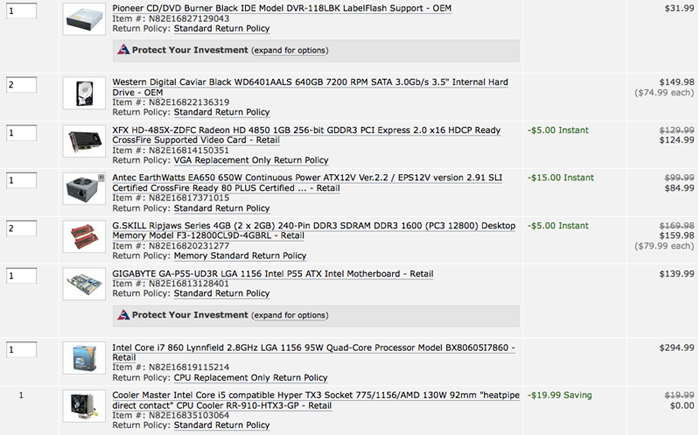
    No Frills build check, Please...


    Total is $997.27 (shipped)

    Stuffing into Antec 300 case w/ cooling TBD...

    Under $1k was a goal for me as I have several other financial priorities right now.

  16. #16
    Xtreme Addict
    Join Date
    Nov 2006
    Location
    Red Maple Leaf
    Posts
    1,556
    Looks good. Will this be overclocked? The memory seems a little overkill.
    Why are you getting an IDE DVD drive? You can get a SATA drive for the same price. At least you don't have to deal with the ribbons.

    Also, since you mentioned that you're using this for solidworks, I would suggest a "cheap" FireGL card like the V5700 if you can get a deal somewhere. It will run better than the HD4850 because of the driver optimizations and it allows you to do rendering like lights and textures realtime in Solidworks. This feature has been disabled on gamer cards.


    What's up with all the discounts BTW?
    E8400 @ 4.0 | ASUS P5Q-E P45 | 4GB Mushkin Redline DDR2-1000 | WD SE16 640GB | HD4870 ASUS Top | Antec 300 | Noctua & Thermalright Cool
    Windows 7 Professional x64


    Vista & Seven Tweaks, Tips, and Tutorials: http://www.vistax64.com/

    Game's running choppy? See: http://www.tweakguides.com/

  17. #17
    Xtreme Addict
    Join Date
    Nov 2005
    Location
    Where the Cheese Heads Reside
    Posts
    2,173
    He can hack the drivers to accept the gamer card.

    The realtime lights and textures was an OK feature IMO when using it. Truely I liked the better performance of the gamer card vs the professional card. In my case it was a laptop with a 1600XT if not mistaken in it (been a few years). Converted taht to a pro card and lost 10-20% performance in view port. Really showed on large models. The features it gave of wasn't worth it.
    -=The Gamer=-
    MSI Z68A-GD65 (G3) | i5 2500k @ 4.5Ghz | 1.3875V | 28C Idle / 65C Load (LinX)
    8Gig G.Skill Ripjaw PC3-12800 9-9-9-24 @ 1600Mhz w/ 1.5V | TR Ultra eXtreme 120 w/ 2 Fans
    Sapphire 7950 VaporX 1150/1500 w/ 1.2V/1.5V | 32C Idle / 64C Load | 2x 128Gig Crucial M4 SSD's
    BitFenix Shinobi Window Case | SilverStone DA750 | Dell 2405FPW 24" Screen
    -=The Server=-
    Synology DS1511+ | Dual Core 1.8Ghz CPU | 30C Idle / 38C Load
    3 Gig PC2-6400 | 3x Samsung F4 2TB Raid5 | 2x Samsung F4 2TB
    Heat

  18. #18
    Registered User
    Join Date
    Aug 2009
    Posts
    28
    Phew... glad I showed you guys. The IDE was an oversight... I will add a SATA optical drive. Yes, I will be O.C.ing this rig. 3.8ghz seems reasonable enough.

    Why is the memory overkill, iyo?

    "realview" in solidworks is actually not very useful, for me. The gamer cards have been quite good in the past and I've heard that ATI and NV have somewhat slowed (drastically?) performance drivers for the "workstation" graphic cards.

    No Idea about the discounts, but I like them. I wish I could buy this locally for the same price.... I would even pay taxes, but I can't get a decent i-5 rig for under $1K here.

    Thanks for looking!

  19. #19
    Xtreme Addict
    Join Date
    Nov 2005
    Location
    Where the Cheese Heads Reside
    Posts
    2,173
    If your not OCing its a overkill on the memory.
    -=The Gamer=-
    MSI Z68A-GD65 (G3) | i5 2500k @ 4.5Ghz | 1.3875V | 28C Idle / 65C Load (LinX)
    8Gig G.Skill Ripjaw PC3-12800 9-9-9-24 @ 1600Mhz w/ 1.5V | TR Ultra eXtreme 120 w/ 2 Fans
    Sapphire 7950 VaporX 1150/1500 w/ 1.2V/1.5V | 32C Idle / 64C Load | 2x 128Gig Crucial M4 SSD's
    BitFenix Shinobi Window Case | SilverStone DA750 | Dell 2405FPW 24" Screen
    -=The Server=-
    Synology DS1511+ | Dual Core 1.8Ghz CPU | 30C Idle / 38C Load
    3 Gig PC2-6400 | 3x Samsung F4 2TB Raid5 | 2x Samsung F4 2TB
    Heat

  20. #20
    Xtreme Addict
    Join Date
    Nov 2006
    Location
    Red Maple Leaf
    Posts
    1,556
    Quote Originally Posted by caffeine View Post
    Phew... glad I showed you guys. The IDE was an oversight... I will add a SATA optical drive. Yes, I will be O.C.ing this rig. 3.8ghz seems reasonable enough.

    Why is the memory overkill, iyo?

    "realview" in solidworks is actually not very useful, for me. The gamer cards have been quite good in the past and I've heard that ATI and NV have somewhat slowed (drastically?) performance drivers for the "workstation" graphic cards.

    No Idea about the discounts, but I like them. I wish I could buy this locally for the same price.... I would even pay taxes, but I can't get a decent i-5 rig for under $1K here.

    Thanks for looking!
    Where is this? Check some local computer shops, you never know. I've got a few places that are cheaper than newegg.ca for me.

    So you're overclocking... I would do some conservative overclocks that way you can still use turbo. Even with OCing, turbo will increase CPU speed by something like 20-25% depending on how many threads the app has. Also, will you be doing rendering? Or video conversion?
    Last edited by B.E.E.F.; 09-17-2009 at 11:24 AM.
    E8400 @ 4.0 | ASUS P5Q-E P45 | 4GB Mushkin Redline DDR2-1000 | WD SE16 640GB | HD4870 ASUS Top | Antec 300 | Noctua & Thermalright Cool
    Windows 7 Professional x64


    Vista & Seven Tweaks, Tips, and Tutorials: http://www.vistax64.com/

    Game's running choppy? See: http://www.tweakguides.com/

  21. #21
    Registered User
    Join Date
    Aug 2009
    Posts
    28
    I'm in Tucson, AZ

    Modeling then rendering... vid conversion for animations.

  22. #22
    Xtreme Addict
    Join Date
    Nov 2006
    Location
    Red Maple Leaf
    Posts
    1,556
    Here's what I mean by conservative overclocking: http://www.anandtech.com/cpuchipsets...px?i=3634&p=18
    Look at the i7 870. They overclock the thing to only 3.39GHz to leave turbo on. With turbo the chip can push itself to 4.16GHz single and 3.7Ghz for 3&4 threads which is way above stock.

    Now as far as cooling. I would suggest looking into Thermalright for CPu and GPU if you want to replace the stock. http://www.thermalright.com/index.html

    The HR-01 is a great heatsink matched together with a good fan its dead silent. For more performance but a little extra noise the TRUE is better. Now as far as case cooling, Mad Shrimps had a nice fan roundup. Either that or check SPCR, Silent PC Review for fan reviews.
    Last edited by B.E.E.F.; 09-17-2009 at 02:05 PM.
    E8400 @ 4.0 | ASUS P5Q-E P45 | 4GB Mushkin Redline DDR2-1000 | WD SE16 640GB | HD4870 ASUS Top | Antec 300 | Noctua & Thermalright Cool
    Windows 7 Professional x64


    Vista & Seven Tweaks, Tips, and Tutorials: http://www.vistax64.com/

    Game's running choppy? See: http://www.tweakguides.com/

  23. #23
    Registered User
    Join Date
    Aug 2009
    Posts
    28
    I did it... Ordered today. Only change was a the DVD/CD from IDE to SATA.

    OT: We also put in an offer for a house... say a prayer for us (Bank needs to approve the short sale).

  24. #24
    Registered User
    Join Date
    Jul 2009
    Posts
    43
    somebody Knows if iŽll be able to use a DFI LANPARTY DARK X58 with Xeon 3520? i know ive seen it running on UT but I have a DK ... I do intend tu run it with the stock bios and then make the bios upgrade if necessary ... someone told me that maybe ill need a normal 920 or similar before I flash bios to get "maybe" the 3520 to work with the board, since I do not own any other cpu... what should I do? any experiences with 3520 and DK?

Bookmarks

Bookmarks

Posting Permissions

  • You may not post new threads
  • You may not post replies
  • You may not post attachments
  • You may not edit your posts
  •