

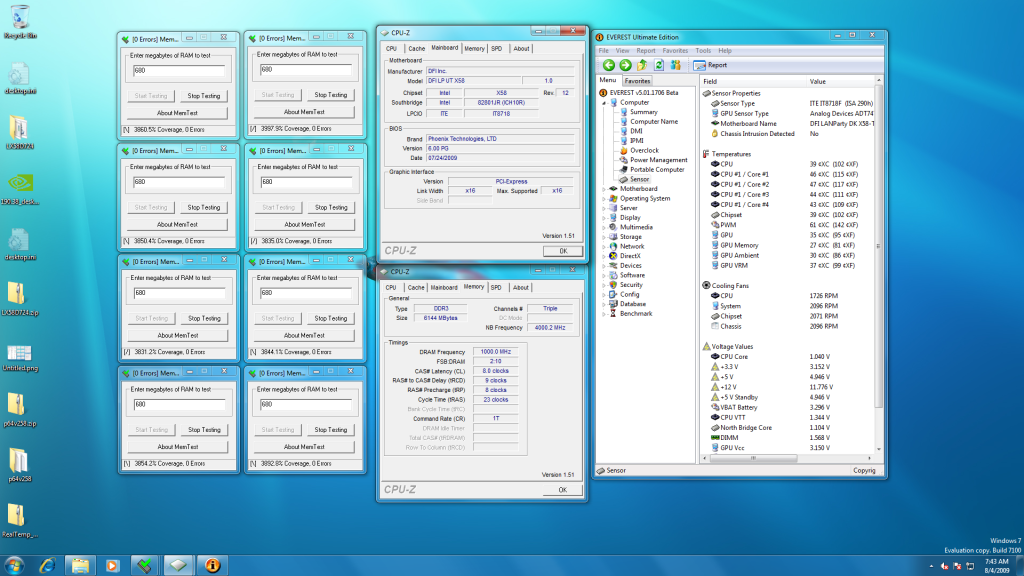
Corsair XMS3 DDR3 1600MHz 6GB CL7 in the house. I have to test more, but the first stability tests looks promising.
BCLK 211
Core/Multi X19
QPI/Unccore 1:1 x18
RAM x8
@1688MHZ 7-8-7-20 1.65v HyperPi 32M:




Corsair XMS3 DDR3 1600MHz 6GB CL7 in the house. I have to test more, but the first stability tests looks promising.
BCLK 211
Core/Multi X19
QPI/Unccore 1:1 x18
RAM x8
@1688MHZ 7-8-7-20 1.65v HyperPi 32M:
► ASUS P8P67 Deluxe (BIOS 1305)
► 2600K @4.5GHz 1.27v , 1 hour Prime
► Silver Arrow , push/pull
► 2x2GB Crucial 1066MHz CL7 ECC @1600MHz CL9 1.51v
► GTX560 GB OC @910/2400 0.987v
► Crucial C300 v006 64GB OS-disk + F3 1TB + 400MB RAMDisk
► CM Storm Scout + Corsair HX 1000W
+
► EVGA SR-2 , A50
► 2 x Xeon X5650 @3.86GHz(203x19) 1.20v
► Megahalem + Silver Arrow , push/pull
► 3x2GB Corsair XMS3 1600 CL7 + 3x4GB G.SKILL Trident 1600 CL7 = 18GB @1624 7-8-7-20 1.65v
► XFX GTX 295 @650/1200/1402
► Crucial C300 v006 64GB OS-disk + F3 1TB + 2GB RAMDisk
► SilverStone Fortress FT01 + Corsair AX 1200W
Strange.. with my T3eH8, I can enjoy 1600MHz memory @ 7-7-7-24 timings, with 1.65v. CPU VTT only needs to be increased to 1.24v and Vcore at 1.28v. I just leave all other voltages @ stock, including IOH @ 1.10v.
Been folding @ 4GHz ever since... stable in everything. It was a breeze overclocking the DFI board.
--two awesome rigs, wildly customized with
5.1 Sony speakers, Stereo 3D, UV Tourmaline Confexia, Flame Bl00dr4g3 Fatal1ty
--SONY GDM-FW900 24" widescreen CRT, overclocked to:
2560x1600 resolution at 68Hz!(from 2304x1440@80Hz)
Updated List of Video Card GPU Voodoopower Ratings!!!!!
What's the strange thing?Originally Posted by Bo_Fox

PS: one thing, any advice to easily find the correct vtt?
Ya but if you have any ram it doesn't like or a Xeon or try to max it out, it starts getting pissy

I know it is kind of hard to believe but...
Intel XEON X5650 B1 Retail x2 3012A692
EVGA Classified SR-2 BIOS A50
Crucial Ballistix PC3-1333 CL6 D9GTR 2G Kit (Active)
Crucial Ballistix PC3-2000 CL9 D9GTS 2G Kit (Active)
Thermaltake V1R (in use, without heatpipe)
Cooler Master Silent Pro M 1000W PSU
Galaxy GTX 275 (Digital PWM)
WD 10EALX
Overclock:
Currently running @ Default.
Intel i7-2600K (L041C107, L048B284, L050A853)
Asus P8P67 Pro BIOS 1305
WC setup EK Supreme HF GOLD Edition powered by BlackICE GTX 480
G.Skill 12800CL7D-4GBECO x2 packs
WD 10EALX
Intel X25-M 120GB
MSI NGTX560Ti Twin Frozer SLI
Overclock:
40x100 4Ghz 1.15v [Currently testing L048B284]
Well I really dont know if its the CPU or me.
Im trying to get 4.2 stable for 24/7, I was able to reach 4ghz very easily but now 4.2 seems to be impossible with a safe vcore (safe= less or equal to 1.3652, I think that was the last option called safe by intel).
Now Im trying with 1.31VTT, 1.3652 Vcore, 1.65Vdimm, everything else is stock or auto.
And the rest of the options are BCLK 200x21 (TURBO Enabled with EIST also Enabled in order to get 21 multiplier), the Ram is 200x8= 1600mhz, UNCORE 200x18= 3600mhz, HT Enabled.
The batch of cpu is 3911A, I read that 39 are not that great as the 38 ones.
i7 2600k / G1. Sniper 2 / 8Gb Sniper 1600 / GTX 580 / 3.4Tb / AX1200 *Mod. / v2120 / Rheobus Extreme *Mod.
HF 14 Livingstone / Thermochill Pa 120.3 / Bitspower Water Tank Z-Multi 250ml / MCP 355 + XSPC Laing DDC Acetal Top / Bitspower Matt Black Fittings Army / NoiseBlocker Blacksilent Fans
Maybe you need more CPU VTT...have you got BSODed?
Intel XEON X5650 B1 Retail x2 3012A692
EVGA Classified SR-2 BIOS A50
Crucial Ballistix PC3-1333 CL6 D9GTR 2G Kit (Active)
Crucial Ballistix PC3-2000 CL9 D9GTS 2G Kit (Active)
Thermaltake V1R (in use, without heatpipe)
Cooler Master Silent Pro M 1000W PSU
Galaxy GTX 275 (Digital PWM)
WD 10EALX
Overclock:
Currently running @ Default.
Intel i7-2600K (L041C107, L048B284, L050A853)
Asus P8P67 Pro BIOS 1305
WC setup EK Supreme HF GOLD Edition powered by BlackICE GTX 480
G.Skill 12800CL7D-4GBECO x2 packs
WD 10EALX
Intel X25-M 120GB
MSI NGTX560Ti Twin Frozer SLI
Overclock:
40x100 4Ghz 1.15v [Currently testing L048B284]
Yes it gave me BSOD.
But 1.31VTT isnt enough for a 24/7?
i7 2600k / G1. Sniper 2 / 8Gb Sniper 1600 / GTX 580 / 3.4Tb / AX1200 *Mod. / v2120 / Rheobus Extreme *Mod.
HF 14 Livingstone / Thermochill Pa 120.3 / Bitspower Water Tank Z-Multi 250ml / MCP 355 + XSPC Laing DDC Acetal Top / Bitspower Matt Black Fittings Army / NoiseBlocker Blacksilent Fans


I have had zero problems so far running my 920 @ 1.4125v for 4ghz 201x20 (its been above 1.4v for about 6 months now and I have yet to see any need to increase voltage or a loss of stability from degradation).... Its a C0 and water cooled, if your temperatures are fine, there is no reason that extra voltage up to 1.44v (beyond 1.44v I believe was stated as a mileage may vary zone for life expectancy).
But I would imagine same holds true with as long as your voltages for VTT/VDIMM are kept within .05v of eachother, that if your temperatures are fine, then most vcore wont kill the processor.
Im having some success with this new BIOS and retesting all the settings.
The problem is you're running 3600Mhz uncore and if you don't get a good IMC embeded CPU you will need more VTT juice
Intel XEON X5650 B1 Retail x2 3012A692
EVGA Classified SR-2 BIOS A50
Crucial Ballistix PC3-1333 CL6 D9GTR 2G Kit (Active)
Crucial Ballistix PC3-2000 CL9 D9GTS 2G Kit (Active)
Thermaltake V1R (in use, without heatpipe)
Cooler Master Silent Pro M 1000W PSU
Galaxy GTX 275 (Digital PWM)
WD 10EALX
Overclock:
Currently running @ Default.
Intel i7-2600K (L041C107, L048B284, L050A853)
Asus P8P67 Pro BIOS 1305
WC setup EK Supreme HF GOLD Edition powered by BlackICE GTX 480
G.Skill 12800CL7D-4GBECO x2 packs
WD 10EALX
Intel X25-M 120GB
MSI NGTX560Ti Twin Frozer SLI
Overclock:
40x100 4Ghz 1.15v [Currently testing L048B284]
Updated 1st post in this thread for Initial notes, findings and tips DFI UT X58-T3EH8 thread as i moved it to it's own dedicated thread for easier access. I see alot of the issues asked in this thread still can be answered by info in all the links in first post http://www.xtremesystems.org/forums/...69&postcount=1
---
Looks good. Are you changing subtimings (or other RAM/IMC settings too)? In case do tell, I want to try them too.
I'm experimenting with some "high-BCLK, low-Volt"-actionsand getting some very proposing results by letting the RAM on "relax" timings for now. I couldn't get it stable at over BCLK212 on my previews setup (with 1333MHZ CL7 RAM), but it seams to be running stable at BCLK216 now (and I have seen indications for even higher). @4.1GHZ(216x19) seams to be stable for 24/7 use
.
4.1GHZ(216x19), 1.18v
HyperPi 32M:

45 min OCCT:
I have to test more, but it seams to be running stable at higher BCLK with the new RAM
► ASUS P8P67 Deluxe (BIOS 1305)
► 2600K @4.5GHz 1.27v , 1 hour Prime
► Silver Arrow , push/pull
► 2x2GB Crucial 1066MHz CL7 ECC @1600MHz CL9 1.51v
► GTX560 GB OC @910/2400 0.987v
► Crucial C300 v006 64GB OS-disk + F3 1TB + 400MB RAMDisk
► CM Storm Scout + Corsair HX 1000W
+
► EVGA SR-2 , A50
► 2 x Xeon X5650 @3.86GHz(203x19) 1.20v
► Megahalem + Silver Arrow , push/pull
► 3x2GB Corsair XMS3 1600 CL7 + 3x4GB G.SKILL Trident 1600 CL7 = 18GB @1624 7-8-7-20 1.65v
► XFX GTX 295 @650/1200/1402
► Crucial C300 v006 64GB OS-disk + F3 1TB + 2GB RAMDisk
► SilverStone Fortress FT01 + Corsair AX 1200W
It's good to hear you got good results with these babies
From my own experiance, CPU VTT is also important when going for higher bclk overclocking. Also if you have time you can play with IOH / IOH Analog voltage as well as they seems have effect when getting to ultra high base clocks. If you hit a wall, try up the PCI-E to 105+~
Intel XEON X5650 B1 Retail x2 3012A692
EVGA Classified SR-2 BIOS A50
Crucial Ballistix PC3-1333 CL6 D9GTR 2G Kit (Active)
Crucial Ballistix PC3-2000 CL9 D9GTS 2G Kit (Active)
Thermaltake V1R (in use, without heatpipe)
Cooler Master Silent Pro M 1000W PSU
Galaxy GTX 275 (Digital PWM)
WD 10EALX
Overclock:
Currently running @ Default.
Intel i7-2600K (L041C107, L048B284, L050A853)
Asus P8P67 Pro BIOS 1305
WC setup EK Supreme HF GOLD Edition powered by BlackICE GTX 480
G.Skill 12800CL7D-4GBECO x2 packs
WD 10EALX
Intel X25-M 120GB
MSI NGTX560Ti Twin Frozer SLI
Overclock:
40x100 4Ghz 1.15v [Currently testing L048B284]
Yes I'm having some fun and good results with these sticks
VVT-volt seams to be very CPU-pendent. So far, my w3520 hasn't care much about VVT, and I can't see it having any effect on stability, yet. So far (up to 216x19) it is running stable with anything from 1.21v to 1.28v VVT. But it doesn't like high VVT-volts at all, and it can't even get into windows with VVT>1.32v.
On the other hand, my i7 920 C0 wouldn't run stable at it's highest 24/7 OC, @4GHZ(211x19) 1.34v with anything else than VVT=1.34v. But it didn't care much about VVT at lower speeds and would run stable with almost anything at < @3.8GHZ.
I have to test more to make sure, but so far, the new RAM haven't had any affect on VVT, either.
I belive VVT is very CPU-batch dependent and seams to get important when you get closer to your max-stable 24/7 OC, but not before that.
Anyways, does this mean that you haven't changed subtimings or other RAM/IMC settings
► ASUS P8P67 Deluxe (BIOS 1305)
► 2600K @4.5GHz 1.27v , 1 hour Prime
► Silver Arrow , push/pull
► 2x2GB Crucial 1066MHz CL7 ECC @1600MHz CL9 1.51v
► GTX560 GB OC @910/2400 0.987v
► Crucial C300 v006 64GB OS-disk + F3 1TB + 400MB RAMDisk
► CM Storm Scout + Corsair HX 1000W
+
► EVGA SR-2 , A50
► 2 x Xeon X5650 @3.86GHz(203x19) 1.20v
► Megahalem + Silver Arrow , push/pull
► 3x2GB Corsair XMS3 1600 CL7 + 3x4GB G.SKILL Trident 1600 CL7 = 18GB @1624 7-8-7-20 1.65v
► XFX GTX 295 @650/1200/1402
► Crucial C300 v006 64GB OS-disk + F3 1TB + 2GB RAMDisk
► SilverStone Fortress FT01 + Corsair AX 1200W
Subtimings = no.
Some BIOS settings = yes, PWM frequency Reduce 15%, all data vref -0.5%
VTT is very useful when overclocking uncore frequency. Try it out!~
Intel XEON X5650 B1 Retail x2 3012A692
EVGA Classified SR-2 BIOS A50
Crucial Ballistix PC3-1333 CL6 D9GTR 2G Kit (Active)
Crucial Ballistix PC3-2000 CL9 D9GTS 2G Kit (Active)
Thermaltake V1R (in use, without heatpipe)
Cooler Master Silent Pro M 1000W PSU
Galaxy GTX 275 (Digital PWM)
WD 10EALX
Overclock:
Currently running @ Default.
Intel i7-2600K (L041C107, L048B284, L050A853)
Asus P8P67 Pro BIOS 1305
WC setup EK Supreme HF GOLD Edition powered by BlackICE GTX 480
G.Skill 12800CL7D-4GBECO x2 packs
WD 10EALX
Intel X25-M 120GB
MSI NGTX560Ti Twin Frozer SLI
Overclock:
40x100 4Ghz 1.15v [Currently testing L048B284]
Well I still having problems to get 4.2ghz also with 1.34VTT.
But I will leave this cpu and I will try with one with a better batch to see if here the problem is the cpu or me :p
Secondly, I would like to hear from people with this board and Windows 7, how can I do to make a RAID if I cant installa ICH10R drivers, I downladed the ones on the Intel site properly for Windows 7, but when I try to install them a notification shows up explaning that the system doenst meet the minimun requirements.
So, what can I do?
Thanks as always
i7 2600k / G1. Sniper 2 / 8Gb Sniper 1600 / GTX 580 / 3.4Tb / AX1200 *Mod. / v2120 / Rheobus Extreme *Mod.
HF 14 Livingstone / Thermochill Pa 120.3 / Bitspower Water Tank Z-Multi 250ml / MCP 355 + XSPC Laing DDC Acetal Top / Bitspower Matt Black Fittings Army / NoiseBlocker Blacksilent Fans
Windows 7 comes with ALL the ICH10R drivers, and installs them during setup. This includes the Raid drivers.
So just set your Raid array in the bios, and let Windows do the rest.
4.2GHZ would depend on your CPU-batch, but sometimes you need to find the right/sweet spot for your setup, so don't give up too fast.
I installed w7 on my OCZ Vertex 30GB (single disk RAID-mode), without loading/installing any raid-driver and it worked just fine. I got some error when i tried to load the driver too, but it wasn't requited anyways. Did you try just to installing w7 on it?.
I installed Intel Matrix Storage Manager on w7 later.
BCLK216 is not final yet), but the Core sames to be stable too.
w3520 @4.1GHZ(19x216) 1.18v

► ASUS P8P67 Deluxe (BIOS 1305)
► 2600K @4.5GHz 1.27v , 1 hour Prime
► Silver Arrow , push/pull
► 2x2GB Crucial 1066MHz CL7 ECC @1600MHz CL9 1.51v
► GTX560 GB OC @910/2400 0.987v
► Crucial C300 v006 64GB OS-disk + F3 1TB + 400MB RAMDisk
► CM Storm Scout + Corsair HX 1000W
+
► EVGA SR-2 , A50
► 2 x Xeon X5650 @3.86GHz(203x19) 1.20v
► Megahalem + Silver Arrow , push/pull
► 3x2GB Corsair XMS3 1600 CL7 + 3x4GB G.SKILL Trident 1600 CL7 = 18GB @1624 7-8-7-20 1.65v
► XFX GTX 295 @650/1200/1402
► Crucial C300 v006 64GB OS-disk + F3 1TB + 2GB RAMDisk
► SilverStone Fortress FT01 + Corsair AX 1200W
Thanks for the support, but maybe tomorrow Ill get a new 920 D0 with a good batch seems they are hand picked, so I will try them.
I also thought about the sweet spot, maybe 200BCLK wasnt a nice spot, but I tried higher and nothing happens, and to be honest, trying less is not the idea.
And If I try high BCLK with a lowe multiplier on cpu, ram will be affected by the high bclk and I will have to lower the multiplier. I dont think is the best idea.
Yes I tried to install this on W7: http://downloadcenter.intel.com/Deta...-bit*&lang=eng
But it makes appear a warning like I told you.
Also I didnt have RAID to do now, but I was thining in an upgrade and I wanted to know how was the stuff with W7.
Now I will try to install the one on your link.
Thanks for your answers
i7 2600k / G1. Sniper 2 / 8Gb Sniper 1600 / GTX 580 / 3.4Tb / AX1200 *Mod. / v2120 / Rheobus Extreme *Mod.
HF 14 Livingstone / Thermochill Pa 120.3 / Bitspower Water Tank Z-Multi 250ml / MCP 355 + XSPC Laing DDC Acetal Top / Bitspower Matt Black Fittings Army / NoiseBlocker Blacksilent Fans
I personally don't mind loosing RAM-performance, because X58 has introduced such a huge RAM-performance that it is an overkill for most 24/7 scenarios anyways, unless you are using very rare RAM-demanding applications.
If I have to choose, i would rather choose high BCLK, than good RAM-timings/performance. High BCLK will give more options for CPU-OC (and in some cases better performance too). Right now I'm running with loose timing (for these sticks) and it seams to be making it easier to run stable at BLCK216.
Right now I'm trying to get @4.1GHZ(19x216) stable, and if I can find right voltages/parameters to run RAM, IMC, Uncore, QPI ,.. "really stable" at BCLK216, then @4.3GHZ(20x215) would just be the matter of proper cooling.
Last edited by Sam_oslo; 08-04-2009 at 10:42 AM.
► ASUS P8P67 Deluxe (BIOS 1305)
► 2600K @4.5GHz 1.27v , 1 hour Prime
► Silver Arrow , push/pull
► 2x2GB Crucial 1066MHz CL7 ECC @1600MHz CL9 1.51v
► GTX560 GB OC @910/2400 0.987v
► Crucial C300 v006 64GB OS-disk + F3 1TB + 400MB RAMDisk
► CM Storm Scout + Corsair HX 1000W
+
► EVGA SR-2 , A50
► 2 x Xeon X5650 @3.86GHz(203x19) 1.20v
► Megahalem + Silver Arrow , push/pull
► 3x2GB Corsair XMS3 1600 CL7 + 3x4GB G.SKILL Trident 1600 CL7 = 18GB @1624 7-8-7-20 1.65v
► XFX GTX 295 @650/1200/1402
► Crucial C300 v006 64GB OS-disk + F3 1TB + 2GB RAMDisk
► SilverStone Fortress FT01 + Corsair AX 1200W
Did you could install that one?
Because I also tried it and It didnt work
i7 2600k / G1. Sniper 2 / 8Gb Sniper 1600 / GTX 580 / 3.4Tb / AX1200 *Mod. / v2120 / Rheobus Extreme *Mod.
HF 14 Livingstone / Thermochill Pa 120.3 / Bitspower Water Tank Z-Multi 250ml / MCP 355 + XSPC Laing DDC Acetal Top / Bitspower Matt Black Fittings Army / NoiseBlocker Blacksilent Fans
Hi Osterman, I need 1.375V on my W3520 for 4.2ghz (8 hrs prime stable). But I do have a double and tripple radiator keeping CPU my temps down. I don't think going over 1.35V is that bad, so long as you keep the temps in check.
I have installed Intel Matrix Storage Manager 8.9.0.1023 on w7 RC1 64bit.
Moving up to @4.2GHZ(210x20) 1.248v, SuperPI 32M went like a dream with VVT=1.25v
Both Vcore and VVT is dependent on the CPU-batch, but my CPU is showing the VVT=Vcore trend gets more visible at higher speeds.
BCLK 210
Core/Multi x20
Unccore x16
QPI x18
RAM x8
@1680MHZ 7-8-7-20 1.65v HyperPi 32M:

► ASUS P8P67 Deluxe (BIOS 1305)
► 2600K @4.5GHz 1.27v , 1 hour Prime
► Silver Arrow , push/pull
► 2x2GB Crucial 1066MHz CL7 ECC @1600MHz CL9 1.51v
► GTX560 GB OC @910/2400 0.987v
► Crucial C300 v006 64GB OS-disk + F3 1TB + 400MB RAMDisk
► CM Storm Scout + Corsair HX 1000W
+
► EVGA SR-2 , A50
► 2 x Xeon X5650 @3.86GHz(203x19) 1.20v
► Megahalem + Silver Arrow , push/pull
► 3x2GB Corsair XMS3 1600 CL7 + 3x4GB G.SKILL Trident 1600 CL7 = 18GB @1624 7-8-7-20 1.65v
► XFX GTX 295 @650/1200/1402
► Crucial C300 v006 64GB OS-disk + F3 1TB + 2GB RAMDisk
► SilverStone Fortress FT01 + Corsair AX 1200W
May be I cant install it because I didnt register my w7.
Like also I cant validate with cpuz.
i7 2600k / G1. Sniper 2 / 8Gb Sniper 1600 / GTX 580 / 3.4Tb / AX1200 *Mod. / v2120 / Rheobus Extreme *Mod.
HF 14 Livingstone / Thermochill Pa 120.3 / Bitspower Water Tank Z-Multi 250ml / MCP 355 + XSPC Laing DDC Acetal Top / Bitspower Matt Black Fittings Army / NoiseBlocker Blacksilent Fans
i just got a replacement board (one lan port not working on the old board). after a quick few tests of new board with all the old hardware i noticed that the chipset on the motherboard can affect quite a bit for VTT and IOH, my new board requires quite less VTT and IOH than the old one.
anyone experience this?
CPU VTT 1.21 (bios),
on the old board i needed to use at least 1.34-1.36 for 12GB RAM, uncore 18x and 1T...
IOH 1.13,
i would need to use 1.25+ for the old board or it would cause hang up at bios...

Last edited by pangingIII; 08-07-2009 at 08:43 AM.


 Reply With Quote


Bookmarks