MMM
Results 1 to 25 of 1533

Thread: DFI UT X58-T3EH8 continued - Part 2

Hybrid View

  1. #1
    Xtreme Member
    Join Date
    Jul 2007
    Location
    Inside a floppy drive
    Posts
    366
    Now that i have more time, im trying to get 4ghzs from my 920, but without success
    Itīs strange. No problem with 3,8 HT ON at 1,248v(1,26v in bios), but when i tried 200x20 or 211x19, even without HT, prime freezes in a 10-15seg. No matter what i try. I can reach windows with the same config for 3,8(1,26 vcore/1,24vtt), but even with 1,37v vcore/vtt, prime always freezes at the same time.
    Any idea/advice/tip?
    Last edited by Dami3n; 06-02-2009 at 05:31 AM.

  2. #2
    Memory Addict
    Join Date
    Aug 2002
    Location
    Brisbane, Australia
    Posts
    11,651
    Quote Originally Posted by johnp1983 View Post
    Why a new thread??

    BTW,

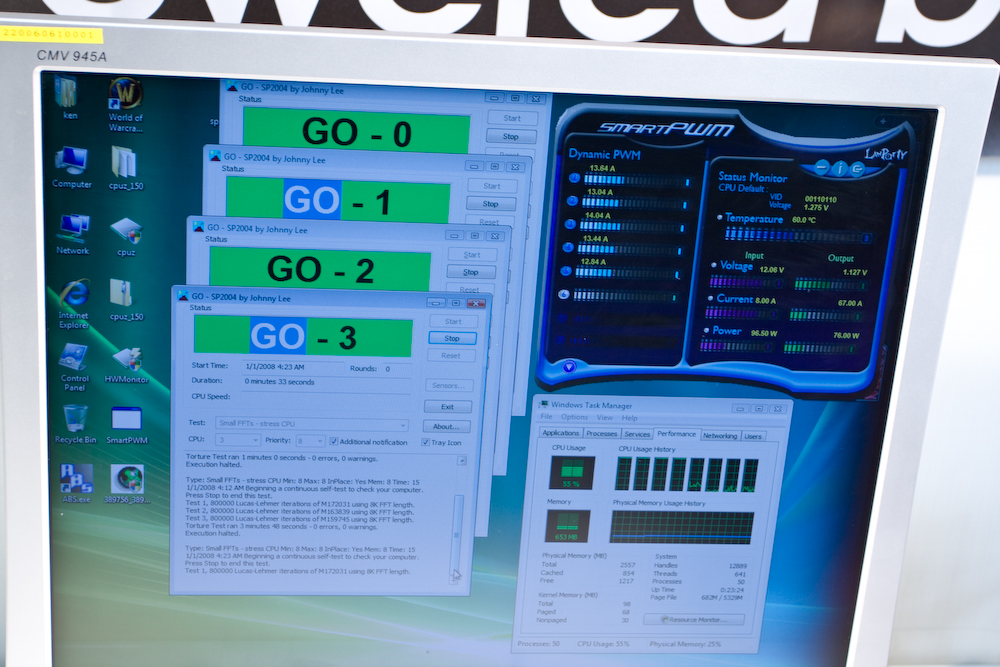
    founded this:

    http://farm4.static.flickr.com/3631/...d3d0422d_o.jpg

    It shows how DK (but I think also UT and JR can handle) manage voltage regulation system.
    Sort of advanced Smart Guardian...

    but I can't found...

    U guys know something about that??
    wow first time seeing such an app.. apparently it's something reserved for new DFI boards and ABS2 function - but not sure. Will ask DFI.

    Quote Originally Posted by Sam_oslo View Post
    I see you guys are talking about GPU, and I've been trying to get the PCIe-frequency over 100 with a GTX 295.

    I could never boot with PCIe>100 with my good old CO, but now (with w3520) i can get into W7 with PCIe=105. This requires almost no tweaks and my desktop-applications seams to be running fine with no problems, but my display freezes (and sound loops) a few minutes into Crysis (even with GPU down clocked to stock). I have tried to give a bit more juice to SB by raising the following Voltage:

    IOH/ICH 1.1V Voltage: 1.21v
    IOH Analog Voltage: 1.20v
    ICH 1.5 Voltage: 1.7v

    but the problem remains. I hear that this can be a GTX 295/SLI-issue. Any advise what else could help to stabilize high PCIe-frequencies on a multi-GPU/SLI-setup?
    never used GTX 280/285/295 so not sure. With my HD4870x2 x2 CF can can bench up to 110-115mhz PCI-E without problems but it varied between cpu to cpu for my 4x i7 920 c0/d0 and w3520. Maybe look at your lowgap value ? for 2x GTX 295 SLI need at least 2048. If you have other PCI-E/PCI devices i.e. sound card might need lowgap between 2560 and 3072

    Quote Originally Posted by Paradoxxx View Post
    Can't seem to get over 200BCLK stable, I have bolded all items I have changed. I noticed you have been using AUTO for your CPU Vcore and using special add to increase the voltages. Are there any advantages to doing this over just increasing the VCore manually?
    no advantage i know of, only used it as my w3520 cpu has a turbo 21x multi issue when using windows 7 OS only. WinXP/Vista doesn't have this issue which forces 12x multi for cpu in turbo mode on win7 (see last link in first post in this thread). This auto vid etc is work around for this until DFI releases a new bios (which they're working on).

    bclk will vary from cpu to cpu as to what voltages are needed - mainly for me it comes down to and centered around cpu vtt voltage. Get cpu vtt voltage right and subsequent vdimm balance within 0.5v of cpu vtt, and rest usually fall in place. Although, higher your push memory with bclk, more likely need ioh/ich voltage to help too. (again mentioned in 3rd link in first post in this thread http://i4memory.com/f80/i7-920-d0-df...ability-16617/ (everything you ever you need are in first post's links )

    Quote Originally Posted by Paradoxxx View Post
    Again, I am using the latest beta bios from DFI 0508

    I have an i7 920 D0 (SLBEJ) cooled using the Noctua. I am using 1 x 2gb stick of OCZ animal placed at dimm slot 2. I should receive my own 6gb kit 3x2gb on Tuesday.

    RAM - OCZ3P1333LVA6GK
    Cooler - Noctua NH-U12p
    for non-elpida modules such as micron based OCZ animal try 2/17 or 2/27 bios instead

    Quote Originally Posted by drnip View Post
    wow nicely done

    Quote Originally Posted by PRJ View Post
    Maybe i found the reason for burning my motherboard, the Mips cooler on south bridge do not cool the circled area.

    http://img195.imageshack.us/img195/5...clusive01h.jpg

    Does anybody know what this area is?

    Since I found the reason for my dead card, I'll stay with DFI and buy another, this time just adding a licquid cooler to the original DFI heatpipe assembly.

    (Upload of picktures does'nt seem to work for me..?)
    ah forgot you're using pre-retail sample DFI UT X58 from that photo it doesn't have the DMM read points etc. New retail board probably better

    Quote Originally Posted by Adam217 View Post
    Anybody been able to make Quad SLI 2x295 and 12gb of memory work on this board?
    first link in first post - tip #20 http://i4memory.com/102537-post3.html make sure lowgap value is set correctly and then I'd test with 6GB first to figure out your system config's optimal voltages for stability, then test 12GB (2nd link in first post http://i4memory.com/f55/intel-core-i...ide-x58-13051/ - testing memory behaviour and performance and finding optimal cpu vtt/vdimm voltages first will allow everything else to fall in place smoothly ) .

    Quote Originally Posted by Aivas47a View Post
    Thanks for all your great work here and at i4memory eva. It's great to have the benefit of your knowledge and experience.
    You're welcome

    Quote Originally Posted by Dami3n View Post
    Now that i have more time, im trying to get 4ghzs for my 920, but without success
    Itīs strange. No problem with 3,8 HT ON at 1,248v(1,26v in bios), but when i tried 200x20 or 211x19, even without HT, prime freezes in a 10-15seg. No matter what i try. I can reach windows with the same config for 3,8(1,26 vcore/124vtt), but even with 1,37v vcore/vtt, prime always freezes at the same time.
    Any idea/advice/tip?
    As i mentioned every cpu is different (1st link in first post - tip #2 and #3 http://i4memory.com/102537-post3.html), each cpu will have optimal cpu vtt requirements for bclk scaling and remember as you increase cpu multiplier the same bclk which was stable on lower cpu multiplier, might need more cpu vtt on higher cpu multiplier.

    i.e. 19x200bclk might be fine with 1.37v cpu vtt, but 20x200 bclk might need 1.39-1.47v cpu vtt, 21x200bclk might need 1.39-1.55v cpu vtt. All depends on your individual cpu. Also cpu vtt voltage needed will also depend on your uncore frequency. The higher QPI frequency the more cpu vtt volts is needed. The higher the uncore frequency more vdimm is needed. (2nd link first post, in post #3 http://i4memory.com/f55/intel-core-i...ide-x58-13051/)

    For prime95, linx, hyperpi stability again mentioned in 3rd link in first post in this thread http://i4memory.com/f80/i7-920-d0-df...ability-16617/ (everything you ever you need are in first post's links
    ---

  3. #3
    Xtreme Member
    Join Date
    Jul 2005
    Posts
    159
    I was able to cross 200MHz BCLK, I set my core voltage to auto and adjusted using special add as I saw thats what eva did. I am impressed it seems that at idle my voltages go as low as 1.04v and on load as high as 1.42v.

    Am I correct in saying that special add will increase the core voltage as it becomes necessary?

  4. #4
    Xtreme Cruncher
    Join Date
    Oct 2006
    Location
    Boston, Massachusetts
    Posts
    2,224
    Got the new board, its up and running.... now for stability testing.

  5. #5
    Xtreme Member
    Join Date
    Jul 2007
    Location
    Inside a floppy drive
    Posts
    366
    Quote Originally Posted by eva2000 View Post

    As i mentioned every cpu is different (1st link in first post - tip #2 and #3 http://i4memory.com/102537-post3.html), each cpu will have optimal cpu vtt requirements for bclk scaling and remember as you increase cpu multiplier the same bclk which was stable on lower cpu multiplier, might need more cpu vtt on higher cpu multiplier.

    i.e. 19x200bclk might be fine with 1.37v cpu vtt, but 20x200 bclk might need 1.39-1.47v cpu vtt, 21x200bclk might need 1.39-1.55v cpu vtt. All depends on your individual cpu. Also cpu vtt voltage needed will also depend on your uncore frequency. The higher QPI frequency the more cpu vtt volts is needed. The higher the uncore frequency more vdimm is needed. (2nd link first post, in post #3 http://i4memory.com/f55/intel-core-i...ide-x58-13051/)

    For prime95, linx, hyperpi stability again mentioned in 3rd link in first post in this thread http://i4memory.com/f80/i7-920-d0-df...ability-16617/ (everything you ever you need are in first post's links
    Nothing, im stuck in 3,8. I try almost every vtt/vcpu combination, even with ram at x6 instead x8, with more voltage in nb, but my cpu donīt like 4ghzs. Im limited by my cpu temps, that are insanely high for my cooling, reaching >84š easily in linx

    Maybe its time to try a 920 D0 or one of those great w3520

    Quote Originally Posted by ChrisB17 View Post
    Wow very nice ram. What would you recommend sub $100.00 range? If thats even possible.
    You can try gskill trident 1866 cl9 or pi white 1600 cl8.
    Last edited by Dami3n; 06-02-2009 at 02:56 PM.

Tags for this Thread

Bookmarks

Bookmarks

Posting Permissions

  • You may not post new threads
  • You may not post replies
  • You may not post attachments
  • You may not edit your posts
  •