

Thank you. I'm thinking an E8500 is a very nice upgrade from my E6420 for the time being until I do a completely new build to upgrade to i7.Originally Posted by Dom7184


Thank you. I'm thinking an E8500 is a very nice upgrade from my E6420 for the time being until I do a completely new build to upgrade to i7.
ASUS P6X58D Deluxe
Intel core i7 930
6GB Corsair Dominator TR3X6G1600C7D
EVGA GTX 480
INTEL X-25 80GB SSD
For anyone thinking of doing so, Win 7RC x64 does install everything nice and clean on the P5B Premium only missing the Asus ATK0110 driver which is auto-installed once online.
PS: otoh, the P5B Premium is such a RAM fussy mobo needing much TLC esp. with low vDIMM easily causing no POST black screens with no error beeps at all or 3 beeps before doing a successful double POST. Latest BIOS used, oh well at least S3 sleep/resume works great. Putting the PCI-e bus at 101 also helps with eliminating the POST beeps woth my 3870x2 card and Win 7RC no longer reports bus connect problems Error ID: 18 in its Event Log as well.
Last edited by MacClipper; 07-03-2009 at 11:51 AM.
'He is no fool who gives what he cannot keep to gain what he cannot lose' - Jim Elliot
Click on the pic to download a free pdf sample of the bestselling book!
I installed Windows 7 x64 beta and there are drivers available for everything including the RealTek 8187 wireless card. There's a few Core i7 owners that probably wish that S3 suspend to RAM worked as well as it does on this board. It took Asus a while to work the bugs out but everything is finally working good. I'm afraid to update because I don't want to waste a year or two debugging a new board.
The OCZ Reapers cured all my memory issues. The only issue I've had recently is the PCIE bus dropping down to x1 instead of x16 which kills 3D performance.
That issue has been around for a long time and seems worse with my new Nvidia card compared to my previous ATI x1950XT but I just bumped the PCIE bus up to 110 and everything has been good lately.
I tried bios 12.38 but went back to 12.37. I'm finally happy.
what OCZ Reapers you using ?
For mine, I am o'cing my E2160 to just 9 x 333FSB and for this middling o'c, I had to set vNB to 1.45v, vDIMM to 2.15v (running 2 x 1GB KVR667 D9DCL@stock SPD) else risk getting no POST which necessitates stripping down to 1 RAM stick, clearing CMOS repeatedly till I can get the mobo to POST again cos it plays dead very well with totally no error beeps. It hates KVR Hynix C DDR667 RAM, just refuses to POST at all in dual channel.
Also had to set vSB at 1.6v to eliminate controller error in Event Viewer when using the onboard Asus ASAP 512MB flash memory as ReadyBoost. All in, this P5B Premium is one of the fussiest mobo I have ever tried o'cing.
'He is no fool who gives what he cannot keep to gain what he cannot lose' - Jim Elliot
Click on the pic to download a free pdf sample of the bestselling book!
Is anyone having problems flashing the BIOS on this POS to the latest (1238)?
For the life of me I cannot get my BIOS to update. I d/l'ed the 1238 version and saved it to a floppy disc. I entered EZ Flash 2, I pointed it to the 1238.ROM that I downloaded, I hit enter and it received a waring that read, "Are you sure you want to update the BIOS?" I said "yes" and allowed the update to get applied. When it was finished, a message popped-up informing me that the system will reboot in 5 sec which it did. I entered the BIOS and went to Main>System Info but was shocked to see that my BIOS revision was still 1226! I also tried booting using a boot disc and using AFUDOS.EXE like this:
a:\>AFUDOS /i1238.ROM
Again, I agreed to the warning, the software shows that it was verifying the image, reading and writing to the ROM, etc. etc. The progress bar went from 0 to 100 %. This time, it tod me the flash has completed successfully and dropped me back to the a:> prompt. I powered off waiting a good 2 min, then powered on but still, 1226 is the version of the BIOS that is loaded!
erm, did you double check that the 1238 BIOS is not wrongly labelled? imo, it looks like you may have dl-ed a 1226 mislabeled as the latest.
'He is no fool who gives what he cannot keep to gain what he cannot lose' - Jim Elliot
Click on the pic to download a free pdf sample of the bestselling book!
I'm using 2x1GB OCZ memory modules on my P5B Deluxe:
http://www.ocztechnology.com/product...er_hpc_edition
Some memory I've tried I've had to reboot 101 times and move them randomly to different slots and pray a lot. The Reapers have been trouble free on this board.
B2K24 purchased a set of 2x2GB OCZ Reapers and his computer booted right up and his memory problems on this board also went away.
graysky: I updated to 12.38 using EZ Flash 2 and I had the bios file on a memory stick. It updated without any problems and showed 12.38 on the boot screen when I was done.
Update: This download contains bios 12.37 and 12.38 for the P5B-Deluxe. My board has the wifi option.
http://www.fileden.com/files/2008/3/...eluxe-Bios.zip
Thanks to Leeghoofd for posting 12.37 a while ago.
I updated to 12.38, went into Windows a couple of times for a screen shot and was able to flash back to 12.37 using EZ Flash 2 when I was finished testing.
At a default PCI-E setting of 100, SetFSB reports 104 MHz for both of these bios versions and with either bios I sometimes get the x1 PCI-Express Link Width bug. This board has had this bug since day 1. The Q6600 is at default MHz in all of these pics so that's not the problem.
The only fix that works for me is if I manually set the PCI-E bus speed to 111 MHz. If you're running a 3D app / game and it looks really slow and choppy then the best thing to do is to start up CPU-Z or GPU-Z and check to make sure that all 16 lanes are open on your PCI-E bus to your graphics card.
Bios 12.38 doesn't fix this issue so I'm sticking with 12.37
Last edited by unclewebb; 05-13-2009 at 07:39 PM.
This is an interesting thought. I checked the md5sum of the ROM file from the asus website:
Now against the one in unclewebb's zip:Code:$ md5sum P5B-ASUS-Deluxe-1238.ROM e05a099cb30173b670f115902ea6f99a P5B-ASUS-Deluxe-1238.ROM
They are identical. WTF is going on?Code:$ md5sum P5B-ASUS-Deluxe-1238.ROM e05a099cb30173b670f115902ea6f99a P5B-ASUS-Deluxe-1238.ROM
I downloaded 12.38 from the Asus site this morning.
I started here:
http://support.asus.com/download/dow...Language=en-us
In the download box where it says, "Input Model to Search", I typed in P5B, clicked on P5B Deluxe/WiF-AP and then downloaded 12.38 from the Global site.
Yeah, the ROM file in the zip file you got matches the one I got, but it after the flash, when I reboot, it still reads as version 1226. I'm at a loss as to wtf is going wrong!
Man, I just tried putting 2 x 2 Gb Crucial Ballistix (BL25664AA80A) on this board and it won't POST unless I'm running on auto memory mode which is 5-5-5-18 (2:3) @ 800 MHz. The real kick in the balls is that the Q6600 has to run @ stock (9x266)to use these DIMMs! WTF!
I had endless issues with Crucial Ballistix 2x1GB on this board as well as Team Xtreem.
I think the Reapers are using more or less the same Micron D9 chips but for some reason they don't have the same issues that other memory seems to have.
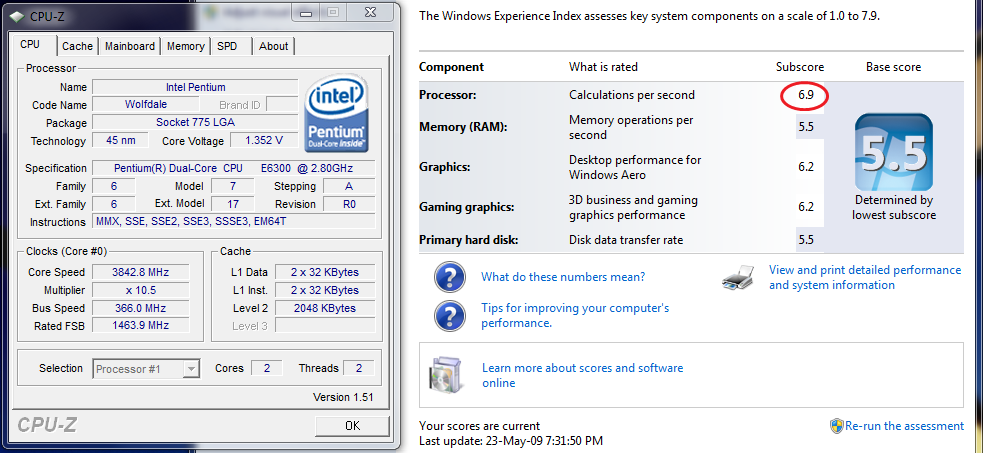
Wasn't looking to spending too much on an upgrade so I am glad to report that the new budget PDC E6300 works great on my P5B Premium VE mobo with the latest BIOS (still sl. buggy) from 7/08, even S3 sleep and resume functions work well. Win 7RC seems to rate it nicely when overclocked.
'He is no fool who gives what he cannot keep to gain what he cannot lose' - Jim Elliot
Click on the pic to download a free pdf sample of the bestselling book!
After a few days of PDC E6300 clocking, found Asus has been slacking in fixing their BIOS.
P5B BIOS bugs with Wolfdales (latest 1102 dated 7/08 for P5B Premium mobos)
1. Vcore tends to switch to Auto on its own and the Auto setting auto-scales way too high when FSB is increased, it's a must set manual Vcore when o'cing.
2. Vcore stuck at Auto in BIOS, needs to do another POST to allow manual settings. Workaround - save the CMOS setting when manual Vcore is allowed and reload this whenever settings need to be tweaked. Tedious but workable, think someone posted this earlier in this thread - thanks!
3. Multiplier settings are not saved and tend to revert to stock (10.5x in E6300) so gotta recheck when pushing FSB
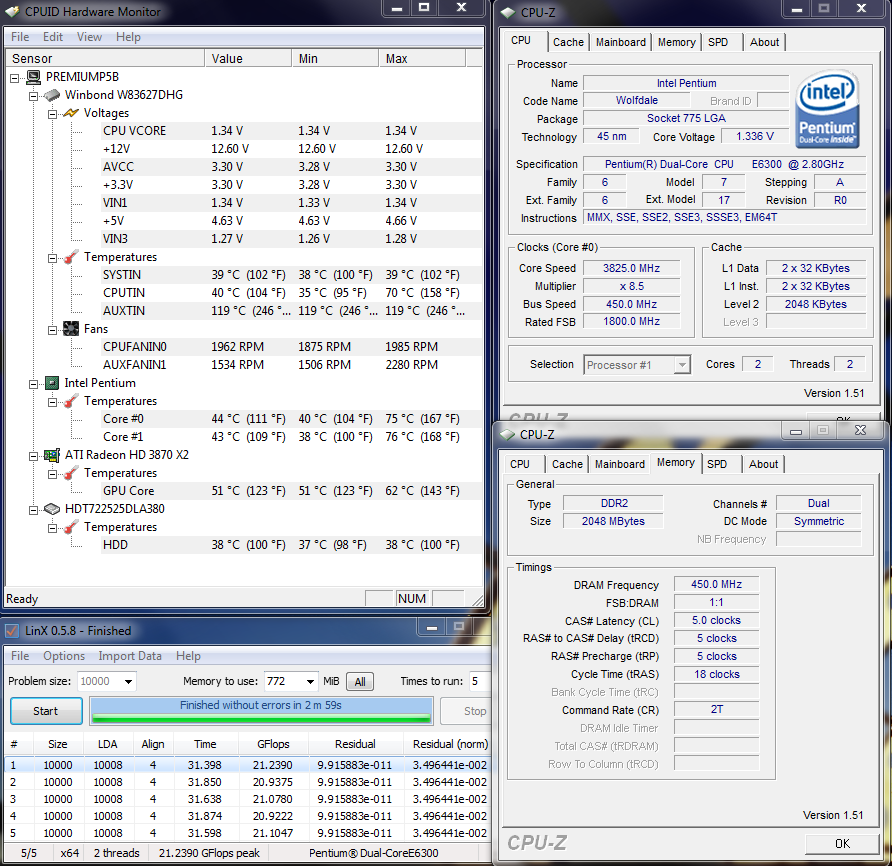
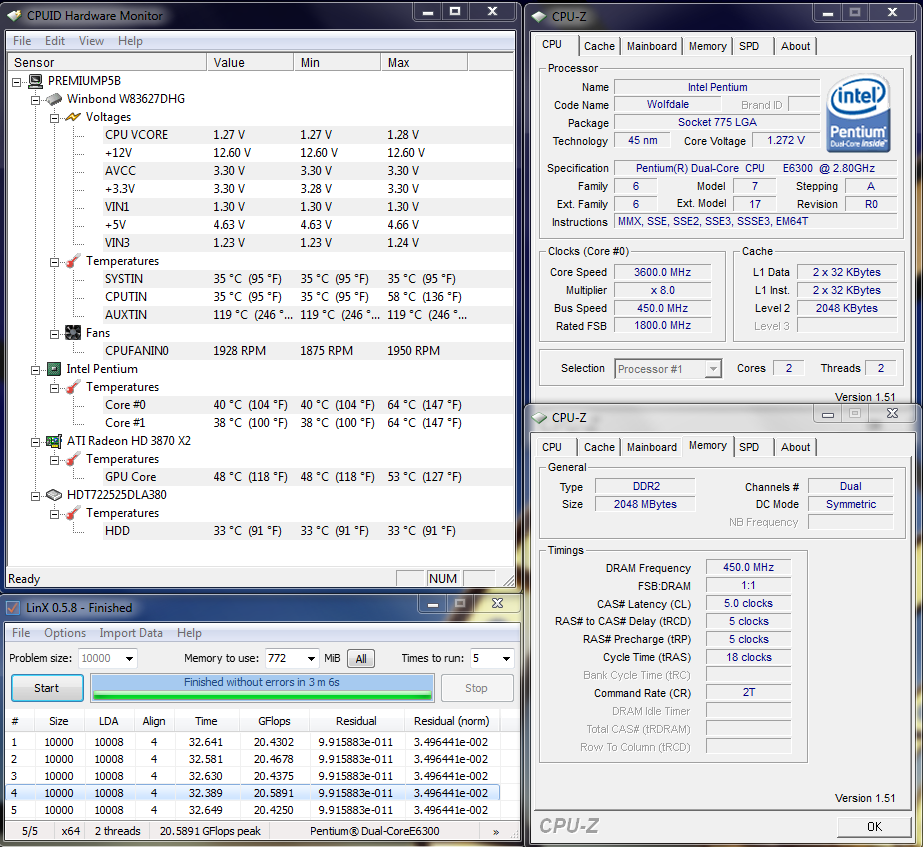
At around VID 1.275, thankfully no low FSB for this chip.
Needs quite a bit more Vcore going higher,
'He is no fool who gives what he cannot keep to gain what he cannot lose' - Jim Elliot
Click on the pic to download a free pdf sample of the bestselling book!
MacClipper, I just installed an E7200 into my second rig. Updated the bios to the latest. The CPU vcore was initially changeable but I left it at auto to see what the default is (1.05V). After that it's been stuck. Any idea how to make it modifiable again? I've tried loading defaults, it didnt' help.
i5 750 4.20GHz @ NH-D14 | 8GB | P7P55DLE | 8800U | Indilinx SSD + Samsung F3 | HAF922 + CM750W
Past: Q6600 @ 3.60 E6400 @ 3.60 | E6300 @ 3.40 | O165 @ 2.90 | X2 4400+ @ 2.80 | X2 3800+ @ 2.70 | VE 3200+ @ 2.80 | WI 3200+ @ 2.75 | WI 3000+ no IHS @ 2.72 | TBB 1700+ @ 2.60 | XP-M 2500+ @ 2.63 | NC 2800+ @ 2.40 | AB 1.60GHz @ 2.60
hi Ivan, there is actually a workable method to this buggy Asus BIOS madness but to do manual Vcore needs a little workaround and experimenting.
In the BIOS, reload defaults and set VDimm as required per your RAM (avoiding the other P5B bugbear, too low VDimm causing no POST). Check the Vcore setting to see if it allows manual settings, if not leave it at Auto for now and save settings to do a warm (re)POST. Enter BIOS again, this time the Vcore should now be adjustable so enter your desired Vcore and other settings but do not reboot yet. You will need to save your settings to 1 of the 2 User CMOS Save Settings Banks while the Vcore is adjustable. This will maintain the Vcore settings at non-Auto but note that it does NOT save the multiplier setting at all so each time you reload the CMOS setting, remember to check on the multiplier as well. From henceforth, each time you need to adjust and save any BIOS settings, reload the saved bank settings 1st and adjust from there so the Vcore is always adjustable.
Note that altho the Vcore is now adjusted to your desire and can be confirmed via the HW Monitoring section of the BIOS, the BIOS Vcore screen itself does not reflect this and will again misreport it as Auto only. Not only is it mis-reported, you also can't adjust any setting in the BIOS when this happens cos again the BIOS will revert to Auto, auto-scale too high. Thus, always adjust settings only after reloading from your saved CMOS bank.
Quite a mouthful there but do experiment around the BIOS and you should be able to work around Asus BIOS bugs till they get around to fixiing it, if ever.
HTH.
'He is no fool who gives what he cannot keep to gain what he cannot lose' - Jim Elliot
Click on the pic to download a free pdf sample of the bestselling book!
Only Auto at this point.In the BIOS, reload defaults and set VDimm as required per your RAM (avoiding the other P5B bugbear, too low VDimm causing no POST). Check the Vcore setting to see if it allows manual settings, if not leave it at Auto for now and save settings to do a warm (re)POST
Still Auto.Enter BIOS again, this time the Vcore should now be adjustable so enter your desired Vcore and other settings but do not reboot yet.
This on bios 1238 (2009/02/11 update). This idiocy is limiting my overclock to 3.46 GHz, whereas I am pretty sure I could do a nice 3.80 GHz at 400 FSB otherwise.
i5 750 4.20GHz @ NH-D14 | 8GB | P7P55DLE | 8800U | Indilinx SSD + Samsung F3 | HAF922 + CM750W
Past: Q6600 @ 3.60 E6400 @ 3.60 | E6300 @ 3.40 | O165 @ 2.90 | X2 4400+ @ 2.80 | X2 3800+ @ 2.70 | VE 3200+ @ 2.80 | WI 3200+ @ 2.75 | WI 3000+ no IHS @ 2.72 | TBB 1700+ @ 2.60 | XP-M 2500+ @ 2.63 | NC 2800+ @ 2.40 | AB 1.60GHz @ 2.60
Hmm, have you tried a longer CMOS clear? Remove the CMOS battery for 15 mins and try again.
Do note that I am on the P5B Premium though.
'He is no fool who gives what he cannot keep to gain what he cannot lose' - Jim Elliot
Click on the pic to download a free pdf sample of the bestselling book!
I haven't tried clearing CMOS. Was I supposed to? I only tried loading defaults.
i5 750 4.20GHz @ NH-D14 | 8GB | P7P55DLE | 8800U | Indilinx SSD + Samsung F3 | HAF922 + CM750W
Past: Q6600 @ 3.60 E6400 @ 3.60 | E6300 @ 3.40 | O165 @ 2.90 | X2 4400+ @ 2.80 | X2 3800+ @ 2.70 | VE 3200+ @ 2.80 | WI 3200+ @ 2.75 | WI 3000+ no IHS @ 2.72 | TBB 1700+ @ 2.60 | XP-M 2500+ @ 2.63 | NC 2800+ @ 2.40 | AB 1.60GHz @ 2.60
Hello guys,
I I'm trying to reach the 4000MHz with my E7400 on Asus P5B deluxe Wifi AP
For the moment i'm at :
10.5*370
vcore @ 1.275v
vnb @ 1.25v and all others at the lower value
(stable on Prime and OCCT)
Do you know if it would be possible to reach 10.5*380 without increasing the vnb to 1.45v?
Thank you very much for any help
Have a good day
volt mod so you dont have to jump that high
but its not 1.45v its using its less but its been so long i forgot what mine was reading
is there a reason you dont wanna use 1.45v setting ?
Hello,
Thank you for your help.
I have already done a Pencil Mod to maintain the vcore
For the vnb I would like to avoid to reach 1.45v because in the bios it is writen in red to show that it is probable too high no?
Thank you
I've had my P5B Deluxe wifi set to 1.65 volts for the last year. I pulled my northbridge heatsink and squared it up by bending the heatpipe. This cooler works good when it's actually sitting square on the chipset. 1.45 volts on the northbridge won't hurt anything if the cooler is doing its job.
You might want to try dropping your multiplier and using more FSB MHz. Something like 445x9 is a good combination on this board and easier to get stable compared to running the FSB in the high 300 range.

it goes way loose from 400 to 401. 400 is specially tweaked. if anything, aim for 400fsb or go for broke with 500+
E8400 8x500=4000 | ABIT IP35-E
2x2GB Tracer PC2-6400 1:1 500MHz 5-5-5-15 2.0V
Galaxy 8800GT 800/2000/1100 1.3V | 80GB X25-M G2 + 1.5TB 7200.11 | XFiXG
Fuzion | MCW60 | DDC2+Petra | Coolrad22T+BIP1
Merom 13x133=1733 1MB L2 0.950V
 Posting Permissions


 Reply With Quote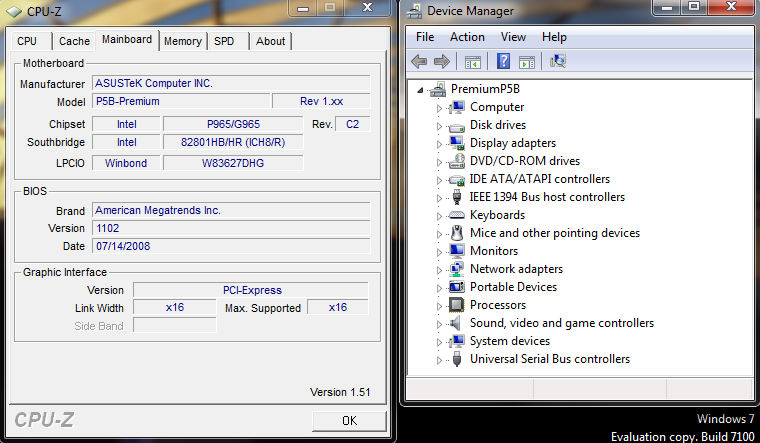







Bookmarks