MMM
Results 1 to 11 of 11

Thread: Connecting X-FI to Onkyo Reciever

  1. #1
    Xtreme Member
    Join Date
    May 2006
    Posts
    271

    Connecting X-FI to Onkyo Reciever

    Hi. This is a diagram of my receiver, HT-R530, and I will try to be as specific and quick as possible in this thread.


    I want to play all my my PC Audio through this receiver, and out the speakers.

    If I can't have 7.1 audio, thats fine, I will settle with 5.1. Will that work?


    I just need to know which cable I need to buy. I have an X-FI XtremeMusic soundcard.

    Is it just as simple as one cable? Do I need anything else?

    Thanks.
    i5-750 Quad Core
    HD 6950 1GB
    MSI P55 GD65
    4GB G.SKILL Trident DDR3
    OCZ GSX 700 PSU
    2* 80GB SATA
    1* 250GB SATA
    HTC Omega Claro+
    Lian Li V2000B

  2. #2
    Xtreme X.I.P. Soulburner's Avatar
    Join Date
    Oct 2003
    Location
    Lincoln, NE
    Posts
    8,868
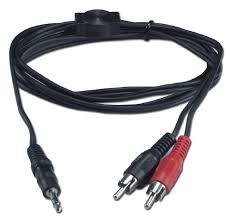
    Analog means seperate cables for each channel. You will have one for front, one for the center+sub, and one for the rear in a 5.1 setup. I don't remember where I got mine, it may have been monoprice. At least that's where I got my 14-gauge speaker wire. They are simply stereo 3.5" cables, split at one end in a Y fashion to dual RCA. The sound card end will have 1 plug, and the receiver end will have 2.

    You want to connect them to the DVD ports (Front/Surround/Center/Sub) and use DVD mode on the receiver. This is how mine is setup on my Onkyo SR-304.

    Digital would simply be a coax or optical out (one cable) to the receiver. You may want to experiment with this if you already have a cable laying around to see what sounds better, but I don't think you will get EAX if you do it this way. Someone else will have to clarify this.
    Last edited by Soulburner; 03-07-2009 at 02:23 PM.
    System
    ASUS Z170-Pro
    Skylake i7-6700K @ 4600 Mhz
    MSI GTX 1070 Armor OC
    32 GB G.Skill Ripjaws V
    Samsung 850 EVO (2)
    EVGA SuperNOVA 650 G2
    Corsair Hydro H90
    NZXT S340

  3. #3
    Xtreme Mentor
    Join Date
    Sep 2006
    Posts
    2,834
    If you want to use the DAC on your soundcard, then use your analog outs in the configuration Soulburner suggested. You'll need three mini-to-rca cables like this:

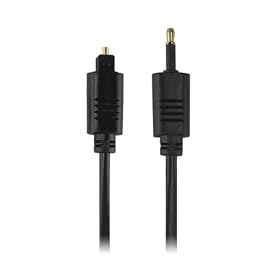
    If you want to use the DAC on your receiver and only use one cable, then you'll need either a mini-to-rca cable (single ended RCA), or the the Sound Blaster Digital I/O Module with regular digital RCA/Toslink cable. Then, depending on your choice of cable when using the module, you'll use the either the coaxial or optical inputs on your receiver. I found a picture of the the Sound Blaster Digital I/O Module and Toslink-to-Mini-Toslink cable:


    Even though the DAC might be better in the X-Fi, I'd still prefer the digital cable route, as this allows you to have line level-out (no amplification) from the soundcard. If you use analog outs on the soundcard, you'll have amplification in more than one place along the chain, which isn't favorable to sound quality.
    Last edited by YukonTrooper; 03-21-2009 at 10:22 AM.

    For my part I know nothing with any certainty, but the sight of the stars makes me dream.

    ..

  4. #4
    Xtreme Member
    Join Date
    May 2006
    Posts
    271
    Excellent, thank you both for the help
    i5-750 Quad Core
    HD 6950 1GB
    MSI P55 GD65
    4GB G.SKILL Trident DDR3
    OCZ GSX 700 PSU
    2* 80GB SATA
    1* 250GB SATA
    HTC Omega Claro+
    Lian Li V2000B

  5. #5
    Xtreme Mentor
    Join Date
    Sep 2006
    Posts
    2,834
    I just remembered: The XtremeMusic doesn't have optical support, so the Toslink-to-Mini-Toslink cable won't work. Optical support was added with later cards such as the XtremeGamer. You'll have to either get the I/O device from Creative (you can still use a regular Toslink cable from this to your receiver), or go with the mini-to-mono-RCA cable.

    Two links for mini-to-mono-RCA cables:

    http://www.markertek.com/Product.asp...&search=0&off=
    http://www.cables4computer.com/Audio...5mm_Cable.html

    For my part I know nothing with any certainty, but the sight of the stars makes me dream.

    ..

  6. #6
    Xtreme Member
    Join Date
    May 2006
    Posts
    271
    BUMP

    Question

    [audio noob ]
    The mono-to-RCA cable worked perfectly, sounded great! I bought one that does a Y basically, from my soundcard to the receiver, so naturally I only hooked up 2 speakers and the bass.

    Say I want to try 5.1, Would I by the same cable only instead of a Y with 2 outputs, find one with 5 outputs?

    Is it that simple?
    [/audio noob]

    Thanks !
    i5-750 Quad Core
    HD 6950 1GB
    MSI P55 GD65
    4GB G.SKILL Trident DDR3
    OCZ GSX 700 PSU
    2* 80GB SATA
    1* 250GB SATA
    HTC Omega Claro+
    Lian Li V2000B

  7. #7
    Xtreme X.I.P. Soulburner's Avatar
    Join Date
    Oct 2003
    Location
    Lincoln, NE
    Posts
    8,868
    No, like we said you need 3 cables. One is for front L/R, one is for rear L/R, and the third is for the Center/Sub.
    System
    ASUS Z170-Pro
    Skylake i7-6700K @ 4600 Mhz
    MSI GTX 1070 Armor OC
    32 GB G.Skill Ripjaws V
    Samsung 850 EVO (2)
    EVGA SuperNOVA 650 G2
    Corsair Hydro H90
    NZXT S340

  8. #8
    Xtreme Member
    Join Date
    May 2006
    Posts
    271
    Quote Originally Posted by Soulburner View Post
    No, like we said you need 3 cables. One is for front L/R, one is for rear L/R, and the third is for the Center/Sub.
    Ah I see, use the other outputs on the soundcard.

    So just buy three more of the same cable? :3
    i5-750 Quad Core
    HD 6950 1GB
    MSI P55 GD65
    4GB G.SKILL Trident DDR3
    OCZ GSX 700 PSU
    2* 80GB SATA
    1* 250GB SATA
    HTC Omega Claro+
    Lian Li V2000B

  9. #9
    Xtreme Mentor
    Join Date
    Sep 2006
    Posts
    2,834
    You have three options. You can use a single mini-to-mono-RCA cable (single ended both sides) and have your receiver do the digital conversion, you can buy the Sound Blaster Digital I/O Module + regular Toslink/RCA cable and have your receiver do the digital conversion, or you can buy two more, for three total, mini-to-rca cables and have your sound-card do the digital conversion and send the analogue signal to the receiver.

    It's all there in a post with pictures.

    For my part I know nothing with any certainty, but the sight of the stars makes me dream.

    ..

  10. #10
    One-Eyed Killing Machine
    Join Date
    Sep 2006
    Location
    Inside a pot
    Posts
    6,340
    Quote Originally Posted by Soulburner View Post
    Digital would simply be a coax or optical out (one cable) to the receiver. You may want to experiment with this if you already have a cable laying around to see what sounds better, but I don't think you will get EAX if you do it this way. Someone else will have to clarify this.
    That is correct.
    Coding 24/7... Limited forums/PMs time.

    -Justice isn't blind, Justice is ashamed.

    Many thanks to: Sue Wu, Yiwen Lin, Steven Kuo, Crystal Chen, Vivian Lien, Joe Chan, Sascha Krohn, Joe James, Dan Snyder, Amy Deng, Jack Peterson, Hank Peng, Mafalda Cogliani, Olivia Lee, Marta Piccoli, Mike Clements, Alex Ruedinger, Oliver Baltuch, Korinna Dieck, Steffen Eisentein, Francois Piednoel, Tanja Markovic, Cyril Pelupessy (R.I.P. ), Juan J. Guerrero

  11. #11
    Xtreme X.I.P. Soulburner's Avatar
    Join Date
    Oct 2003
    Location
    Lincoln, NE
    Posts
    8,868
    Quote Originally Posted by BenchZowner View Post
    That is correct.
    Thanks, that is what I remembered from when I set mine up, and why I set it up in analog mode even if the 3 big cables aren't ideal. I wanted EAX 5 which is why I bought the Prelude instead of something else

    Not to mention the fact that the Prelude should sound superior to my receiver.
    System
    ASUS Z170-Pro
    Skylake i7-6700K @ 4600 Mhz
    MSI GTX 1070 Armor OC
    32 GB G.Skill Ripjaws V
    Samsung 850 EVO (2)
    EVGA SuperNOVA 650 G2
    Corsair Hydro H90
    NZXT S340

Tags for this Thread

Bookmarks

Bookmarks

Posting Permissions

  • You may not post new threads
  • You may not post replies
  • You may not post attachments
  • You may not edit your posts
  •