MMM
Page 2 of 3 FirstFirst 123 LastLast
Results 26 to 50 of 54

Thread: Advanced AM2+ AMD Chipset Configuration Options and What They Mean.

  1. #26
    Xtreme Addict
    Join Date
    Oct 2005
    Location
    EvE-Online, Tranquility
    Posts
    1,978
    Gotvoltage, so you basicly say that the PCI-e slot your GPU is in should have a higher Watt allowance then default? Ive a 4870X2 and I can set specific Watts for each slot, but I was kind of afraid I would fry it (like I thought it would throw a full 200W right on the PCI-e slot).
    Synaptic Overflow

    CPU:
    -Intel Core i7 920 3841A522
    --CPU: 4200Mhz| Vcore: +120mV| Uncore: 3200Mhz| VTT: +100mV| Turbo: On| HT: Off
    ---CPU block: EK Supreme Acetal| Radiator: TCF X-Changer 480mm
    Motherboard:
    -Foxconn Bloodrage P06
    --Blck: 200Mhz| QPI: 3600Mhz
    Graphics:
    -Sapphire Radeon HD 4870X2
    --GPU: 750Mhz| GDDR: 900Mhz
    RAM:
    -3x 2GB Mushkin XP3-12800
    --Mhz: 800Mhz| Vdimm: 1.65V| Timings: 7-8-7-20-1T
    Storage:
    -3Ware 9650SE-2LP RAID controller
    --2x Western Digital 74GB Raptor RAID 0
    PSU:
    -Enermax Revolution 85+ 1250W
    OS:
    -Windows Vista Business x64


    ORDERED: Sapphire HD 5970 OC
    LOOKING FOR: 2x G.Skill Falcon II 128GB SSD, Windows 7

  2. #27
    Xtreme Addict
    Join Date
    Jan 2008
    Location
    Lubbock, Texas
    Posts
    2,133
    so what exactly does vdd do? it allows for higher overclocks and less vdrop but where is this voltage being applied?

  3. #28
    Xtreme Addict
    Join Date
    Jan 2008
    Location
    Lubbock, Texas
    Posts
    2,133
    Quote Originally Posted by Rammsteiner View Post
    Gotvoltage, so you basicly say that the PCI-e slot your GPU is in should have a higher Watt allowance then default? Ive a 4870X2 and I can set specific Watts for each slot, but I was kind of afraid I would fry it (like I thought it would throw a full 200W right on the PCI-e slot).
    pcie 1.1 says it can allow 75W. pcie 2.0 says it can allow 150W. because im not having an issue with overclocking or needing more power i just leave it at 75W to take the burden off the board.

  4. #29
    Xtreme Mentor
    Join Date
    May 2008
    Location
    cleveland ohio
    Posts
    2,879
    Quote Originally Posted by roofsniper View Post
    so what exactly does vdd do? it allows for higher overclocks and less vdrop but where is this voltage being applied?
    a PLL part, SB maybe.
    HAVE NO FEAR!
    "AMD fallen angel"
    Quote Originally Posted by Gamekiller View Post
    You didn't get the memo? 1 hour 'Fugger time' is equal to 12 hours of regular time.

  5. #30
    Xtreme Addict
    Join Date
    Jul 2007
    Posts
    2,103
    Quote Originally Posted by Rammsteiner View Post
    Gotvoltage, so you basicly say that the PCI-e slot your GPU is in should have a higher Watt allowance then default? Ive a 4870X2 and I can set specific Watts for each slot, but I was kind of afraid I would fry it (like I thought it would throw a full 200W right on the PCI-e slot).
    Setting it to above 150watts wont hurt the mobo. Ive tested with 9800+/3870x2/4850/4870/260 all using 200+watts one each 16x slot. It allowed all the Cards to oc better on this mobo. Even my Old TA770 used the same feature with the Same result.

    What happens is that it allows to Vidcard/cards to draw mor efrom the slot if needed. It does not use 200+watts all the time. In sense it mearely stabilizes the slot/slots under heavy load and will use a lower limit when not under heavy load. It just allows the card to use what it needs if it has too.

    Quote Originally Posted by roofsniper View Post
    so what exactly does vdd do? it allows for higher overclocks and less vdrop but where is this voltage being applied?
    mostlikely its applied to NB/SB chipsets . It mearly stabilizes the Mobo not the CPU from what i understand and have seen. Ive tested this @ 2.8vdd and 1.74+v cpu for over 5months straight now. If it was a apparent problem i woulda cooked this long ago using 2.8vdd. My Mobo uses stock heatpipe cooler , That s all it uses.


    Quote Originally Posted by demonkevy666 View Post
    a PLL part, SB maybe.
    From what ive gathered yes for SB/ NB and devices such as Sata ports benifit as well as IDE. I have yet to see aproblem using 2.8VDD. In fact you should be able to use less Vcore when doing so if you have your sytem dialed in on a Heavy Oc vs using 2.5vdd.

    I can only speak from using 2.8vdd.. if something is gonna be buggy or not work ,, i wont tell a person to try it.

    2.8vdd has been helpfull on this Mobo. Once i can get my hands on a 940+ cpu i will keep testing it. Mostlikely End of Feb i should be able to start tweaking a new Torture CPU.
    "AMD...Like the perfect Storm,...Everything needs to be just right"
    X555x4SuperCore@4450mhz@1.64v..........

    RYZEN 7 1800x/ ASUS ROG STRIX VEGA64/ =EK NICKEL WB, Feser THC 2x360 1x480
    X470 Gigabyte Aorus7, Patriot 3400mhz 16gb dual2x8
    SSD Samsung 970pro,,860EVO

  6. #31
    Registered User
    Join Date
    Oct 2008
    Posts
    23
    bumped from the depths. this is important stuff.

  7. #32
    Xtreme Mentor
    Join Date
    May 2008
    Location
    cleveland ohio
    Posts
    2,879
    anyone try the clock skew on the bottom with phenom ??? on asus M3A79-t deluxe ?
    HAVE NO FEAR!
    "AMD fallen angel"
    Quote Originally Posted by Gamekiller View Post
    You didn't get the memo? 1 hour 'Fugger time' is equal to 12 hours of regular time.

  8. #33
    Xtreme Addict
    Join Date
    Apr 2008
    Location
    Texas
    Posts
    1,663
    I actually found this Phenom Overclocking Guide at Guru3D that answered ALL my questions: http://forums.guru3d.com/showthread.php?t=267708

    It is pretty dang comprehensive.
    Core i7 2600K@4.6Ghz| 16GB G.Skill@2133Mhz 9-11-10-28-38 1.65v| ASUS P8Z77-V PRO | Corsair 750i PSU | ASUS GTX 980 OC | Xonar DSX | Samsung 840 Pro 128GB |A bunch of HDDs and terabytes | Oculus Rift w/ touch | ASUS 24" 144Hz G-sync monitor

    Quote Originally Posted by phelan1777 View Post
    Hail fellow warrior albeit a surat Mercenary. I Hail to you from the Clans, Ghost Bear that is (Yes freebirth we still do and shall always view mercenaries with great disdain!) I have long been an honorable warrior of the mighty Warden Clan Ghost Bear the honorable Bekker surname. I salute your tenacity to show your freebirth sibkin their ignorance!

  9. #34
    D.F.I Pimp Daddy
    Join Date
    Jan 2007
    Location
    Still Lost At The Dead Show Parking Lot
    Posts
    5,182
    Quote Originally Posted by Rammsteiner View Post
    Gotvoltage, so you basicly say that the PCI-e slot your GPU is in should have a higher Watt allowance then default? Ive a 4870X2 and I can set specific Watts for each slot, but I was kind of afraid I would fry it (like I thought it would throw a full 200W right on the PCI-e slot).
    Just leave that on AUTO RAMM
    SuperMicro X8SAX
    Xeon 5620
    12GB - Crucial ECC DDR3 1333
    Intel 520 180GB Cherryville
    Areca 1231ML ~ 2~ 250GB Seagate ES.2 ~ Raid 0 ~ 4~ Hitachi 5K3000 2TB ~ Raid 6 ~

  10. #35
    Xtreme Mentor
    Join Date
    Dec 2007
    Location
    State of Confusion, USA
    Posts
    2,513
    <RESURRECTION> (way beyond a bump, I had to dig a little for this one! )

    I have my machine pretty well dialed in and started wondering about some of the obscure bios settings to tweak things a little further....

    Then I remembered this thread, Hopefully other folks may find it useful...
    AMD FX-8350 (1237 PGN) | Asus Crosshair V Formula (bios 1703) | G.Skill 2133 CL9 @ 2230 9-11-10 | Sapphire HD 6870 | Samsung 830 128Gb SSD / 2 WD 1Tb Black SATA3 storage | Corsair TX750 PSU
    Watercooled ST 120.3 & TC 120.1 / MCP35X XSPC Top / Apogee HD Block | WIN7 64 Bit HP | Corsair 800D Obsidian Case


    First Computer: Commodore Vic 20 (circa 1981).

  11. #36
    Xtreme Member
    Join Date
    Sep 2005
    Location
    UK
    Posts
    113
    im bus researching some of the ddr3 specific options. they may affect how we derive our memory timings. but its been a long time since i looked at timing diagrams and databooks - so im a bit slow.

  12. #37
    Xtreme Member
    Join Date
    Sep 2008
    Posts
    116
    Wow thanks! I thought this got deleted during the time this forum was down. I gave up finding this.

  13. #38
    Xtreme Addict
    Join Date
    Jul 2007
    Posts
    2,103
    As for whats Not,, in any Bios

    (Ram Drive strenght) for DTC0 and DTC1.

    Being able to tweak those should yield 1250+ of ddr2 goodness. OcZ Blades would be insane on this Mobo.

    My Vipers have only seen 1220mhz with out being able to tweak drive strengths. Thats this Mobos real lacking OPTION ATM.

    Hint ASUS,,
    my TA770 even has it in the BIOS and its SB600. Hmmm and OLD ACC Firmware too so i can tweak me 720 with out a Mod Bios.

    Wishfull thinking for the 903 or even 904 or whatever Bios
    Last edited by gOtVoltage; 05-17-2009 at 05:06 PM.
    "AMD...Like the perfect Storm,...Everything needs to be just right"
    X555x4SuperCore@4450mhz@1.64v..........

    RYZEN 7 1800x/ ASUS ROG STRIX VEGA64/ =EK NICKEL WB, Feser THC 2x360 1x480
    X470 Gigabyte Aorus7, Patriot 3400mhz 16gb dual2x8
    SSD Samsung 970pro,,860EVO

  14. #39
    Xtreme Member
    Join Date
    Mar 2008
    Location
    Houston TX
    Posts
    349
    Quote Originally Posted by Mechromancer View Post

    > C1E Support:http://lwn.net/Articles/286432/
    This is a power feature that is called the same thing on both Intel and AMD platforms that apparently adds a little more power savings. How you ask? I still do not fully know, but it compliments Cool 'n Quiet it seems.
    Power state C1 is the low power state you go into in 'sleep' mode. It has been available since the 486. It reduces or stops various CPU clocks to reduce power.

    Intel's version of C1E ('Enhanced C1') is different than AMD's and both change with different CPU implementations. Intel's version reduces voltage to further save power. AMD's version puts all cores into sleep state if all cores are at Halt, and does not require an OS command if C1E is enabled in Bios.

    This is probably not something you want to mess with unless you have a multicore laptop, and probably not even then.

  15. #40
    Xtreme Member
    Join Date
    Oct 2008
    Location
    New Hampshire
    Posts
    242
    Glad to see this came back. I found a lot of good stuff here months ago while trying to figure out to get anything out of my gimp 9600BE. Needless to say it's helped me get a good amount of power out of my new shiny 940BE

  16. #41
    Xtreme Addict
    Join Date
    Jan 2008
    Location
    Lubbock, Texas
    Posts
    2,133
    so you are saying that C1E is only used in sleep mode? i never saw temp drops or anything when turning it on when my cpu was idling but people claimed it uses less power.

  17. #42
    Xtreme Member
    Join Date
    Mar 2008
    Location
    Houston TX
    Posts
    349
    Quote Originally Posted by roofsniper View Post
    so you are saying that C1E is only used in sleep mode? i never saw temp drops or anything when turning it on when my cpu was idling but people claimed it uses less power.
    Correct - You won't see any difference in power - it only matters when all cores are halted. You'd have to measure 'sleep power' at the wall since nothing will be running at that point.

    This is different than "Cool'n'quiet", which lowers both frequency and voltage in discrete steps, and that does have a big effect on 'average' power, and heat. I always turn it on unless I'm doing specific heat testing.

  18. #43
    Xtreme Enthusiast
    Join Date
    May 2009
    Posts
    952
    Wow this is a great thread for am2+ info. I am going to keep an eye on this. Thanks to all you guys.

    BTW I have a Biostar mobo and there are a few questions I have too. Maybe they would be similar to the bios options found in Asus. Will post once I am home. Thanks.

  19. #44
    Xtreme Addict
    Join Date
    Jul 2007
    Posts
    2,103
    Quote Originally Posted by mav2000 View Post
    Wow this is a great thread for am2+ info. I am going to keep an eye on this. Thanks to all you guys.

    BTW I have a Biostar mobo and there are a few questions I have too. Maybe they would be similar to the bios options found in Asus. Will post once I am home. Thanks.
    I just Installed mY 9950 back into the Original BiostarTA770 A2+.

    I was checking temps on the factoy Heatsink after all the HIGHVOLTAGE i GAVE it over a Year and Noticed a New Setting in the Newest Bios for the TA770A2+ and SE..

    This is SB600...Bios A78XAC25ZZZ mod Bios @ rebelshaven( 1-2009) Now Has a option for -15% -30% +15% +30% . CPU Freqency Adjust (Performs Like ACC ?)

    I have not checked the stock A78XAC25 Official for this same option , im shure its there because if its not Polygon cant unlock the feature in the MOD Bioses. It already has to be present.


    This New Bios is made to support everthing past B3 such as 720/810/910/920/940/945 updated cpu code. I find it interesting , could it be a gimped type of ACC. ?

    SO ,, I set the CPU @ 1.25vid for CPU and NB then Set the Vcore to 1.37v.. This way I could run @ 3.0ghz(140watt) It was unstable and would get erros in Os..

    I did the nest best thing and added 15% cpu freqency adjust. I though it would maybe OC the CHIP. Instead it worked just like ACC and Stabilized the System. So i decided to set 30% Freqency and its still going with no erros or BSOD's @3.0ghz and 1.37vcore..

    CPU wise this 9950 always needed 1.42volts to run @ 3.0ghz with stock volts on my M3A79-T. Its now using 1.37v and 30% freqency adjust. on SB600. I cant find any info on this NEW setting for SB600 .

    I Think it may be a add in by Polygon ,,when he tweaked the Offical C26Bios . Im gonna PM to see if he knows more. I cant find any info on it.

    I thought SB600 couldnt do this kinda stuff

    P.S i dont want to push with STOCK cooler too much...This CPU is GOLDEN I just stumbled on this Option and well it Actually works for SB600

    Does anyone else have Info on this new Option for Freqency adjust and SB600/700 chipsets.?

    Ive never seen anything like it. It does not Raise the VCORE or VID visually or Raise any CPU Clocks,, it just simply worked like ACC and stabilized the CPU. I thought the M3A79T bios was full of surprizes
    Last edited by gOtVoltage; 05-18-2009 at 01:01 AM.
    "AMD...Like the perfect Storm,...Everything needs to be just right"
    X555x4SuperCore@4450mhz@1.64v..........

    RYZEN 7 1800x/ ASUS ROG STRIX VEGA64/ =EK NICKEL WB, Feser THC 2x360 1x480
    X470 Gigabyte Aorus7, Patriot 3400mhz 16gb dual2x8
    SSD Samsung 970pro,,860EVO

  20. #45
    Xtreme Enthusiast
    Join Date
    May 2009
    Posts
    952
    Nice...since you are here do you have any idea on cpu configerations in the OC menu. Its like configuration 1 - 6 or 7 I think and no one has any idea what it does and which one to use.

    Also my 720BE is unlocked using ACC. I can post at 3.9 Ghz on 3 cores, with ACC off, as if I put it on or auto, then all four cores will show. Would ACC make the disabled 4th core more stable? I have run benchmarking like 3dmark 06 and vantage at 3.6 Ghz 4 cores, but its not prime stable. Its core no. 3 which s out each time. Any idea how to do this?

  21. #46
    Xtreme Addict
    Join Date
    Jul 2007
    Posts
    2,103
    Quote Originally Posted by mav2000 View Post
    Nice...since you are here do you have any idea on cpu configerations in the OC menu. Its like configuration 1 - 6 or 7 I think and no one has any idea what it does and which one to use.

    Also my 720BE is unlocked using ACC. I can post at 3.9 Ghz on 3 cores, with ACC off, as if I put it on or auto, then all four cores will show. Would ACC make the disabled 4th core more stable? I have run benchmarking like 3dmark 06 and vantage at 3.6 Ghz 4 cores, but its not prime stable. Its core no. 3 which s out each time. Any idea how to do this?
    Ill look into configuration 1-7 ,, I dont have my GX anymore..As for ACC and the Fouth Core ,, Up the volts a hair and or ACC.

    Check your temps .

    Also youll notice a little more volts for X4cores vs 3cores sometimes. Depends on how hot your running too.

    NORTHBRIDGE on cpu may need a little bump and retry stability. The Fourth cores sometimes like less NB and slightly more volts to keep stable when enabled. Ive also seen some of them go way past 3.8ghz stable.

    past@ 3.6 on four cores it can take a lot more tweaking for stability . My 720 is good @ 4x 3.78mhz Max @2400nb. 3.6ghz x4cores even with 2000nb is not bad. 4.0ghz is my max so far on 3xcores.

    Note:
    +2 or +4 Allcores and see if that helps. Mine Likes +4 for 3.8@2000nb. ACC @Allcores should still unlock on that Mobo with out crashing , seeing it unlocks in Auto.


    UPDATE ***790GXB CPU ***CONFIGURATION***


    T-Series Settings
    WARNING: Setting wrong values in below sections
    may cause system to malfunction.
    =========== Automate OverClock System ===========
    ============ Manual OverClock System ============
    OverClock Navigator [Manual OverClock]
    Auto OverClock System [V6-Tech Engine]
    CPU/HT Reference Clock(MHz) [200]


    ***CPU Configuration [Auto]*** You want to leave this at AUTo (default) its a power performance state just like the PO/P1 feature like other MotherBoards. TA770 has the PO/P1 CPU configuration.. Sometimes this can be labeled as ADVANCED CPU set up in other Bioses.
    Simply allows one to use Lower Pstates. It can crash a sytem by simply changing it from Auto . usually after a reboot.

    ATIG Reference Clock(MHz) [100]
    SB Reference Clock(MHz) [100]
    Spread Spectrum [Disabled]
    > CPU FID/VID Control
    > Voltage Configuration
    > DRAM Timing Configuration
    > Hyper Transport Configuration
    > Memory Configuration

    I wish i had me old GX id give it the run down.
    Last edited by gOtVoltage; 05-18-2009 at 12:35 AM.
    "AMD...Like the perfect Storm,...Everything needs to be just right"
    X555x4SuperCore@4450mhz@1.64v..........

    RYZEN 7 1800x/ ASUS ROG STRIX VEGA64/ =EK NICKEL WB, Feser THC 2x360 1x480
    X470 Gigabyte Aorus7, Patriot 3400mhz 16gb dual2x8
    SSD Samsung 970pro,,860EVO

  22. #47
    Xtreme Addict
    Join Date
    Apr 2008
    Location
    Texas
    Posts
    1,663
    I'm going to get around to cleaning up and finishing this post. I still have a dump load of testing to do on my end to explain performance results of some of these features.

    In the meantime, lets put our brains together and figure out just what the heck BANK SWIZZLE MODE is in the memory settings. I'm looking at it in my AMD OverDrive memory settings tab. In fact, I want to define ALL of those different "drive strength", "Processor On-Die Term" and "DQS RecEnDelay" settings.

    We test and tweak not knowing what more than half of these Memory/IMC and Hyper Transport features and settings are for. I feel we may be leaving performance on the table by not knowing. Point me in the right direction if you have answers and I will add them to the first page (Or PM me the phone # to an AMD chipset engineer LOL).
    Core i7 2600K@4.6Ghz| 16GB G.Skill@2133Mhz 9-11-10-28-38 1.65v| ASUS P8Z77-V PRO | Corsair 750i PSU | ASUS GTX 980 OC | Xonar DSX | Samsung 840 Pro 128GB |A bunch of HDDs and terabytes | Oculus Rift w/ touch | ASUS 24" 144Hz G-sync monitor

    Quote Originally Posted by phelan1777 View Post
    Hail fellow warrior albeit a surat Mercenary. I Hail to you from the Clans, Ghost Bear that is (Yes freebirth we still do and shall always view mercenaries with great disdain!) I have long been an honorable warrior of the mighty Warden Clan Ghost Bear the honorable Bekker surname. I salute your tenacity to show your freebirth sibkin their ignorance!

  23. #48
    Xtreme Addict
    Join Date
    Jul 2007
    Posts
    2,103
    SPeaking about Bank Swizzle Mode.

    Im NOT 100% shure ,but i believe it allows all Ram/dimms to have all Banks comunicate together on the ram. Thus it should slightly speed things up when on.


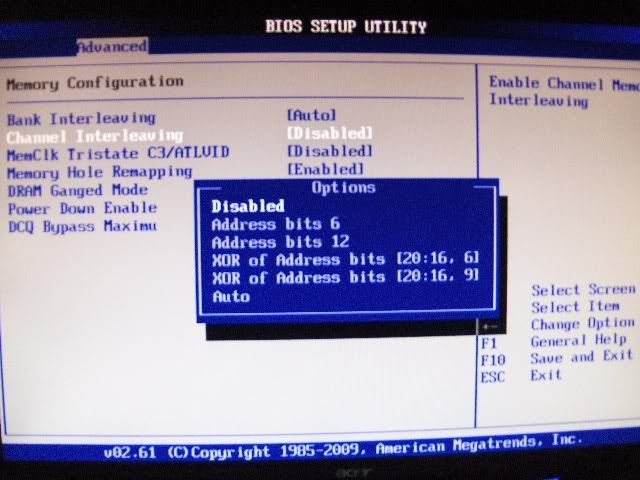
    Ive also found that the CHANNEL MODE when you press F4 Opens up a whole new can worms too.

    Disabling it allows some ram to clock more stable. When only two dimms are installed ( same Channel A1 A2 or B1 B2) you should keep this disabled or it will try to access channels that are not populated with ram.

    When all slots are filled set to auto or one of the other channel settings listed in Menu to enhance ram searching or access.

    M3A79-T.

    Im Only using 2gigs of 2x1gig Viper ATM...So i keep this Disabled.
    Remeber if your only using two Dimms/sticks No matter the Sive set this option to disabled.

    If Using All slots BOth A1 A2 and B1 B2 for four sticks you can play with the settings . I would just leave this on Auto when using Four sticks if you do not have any Problems.


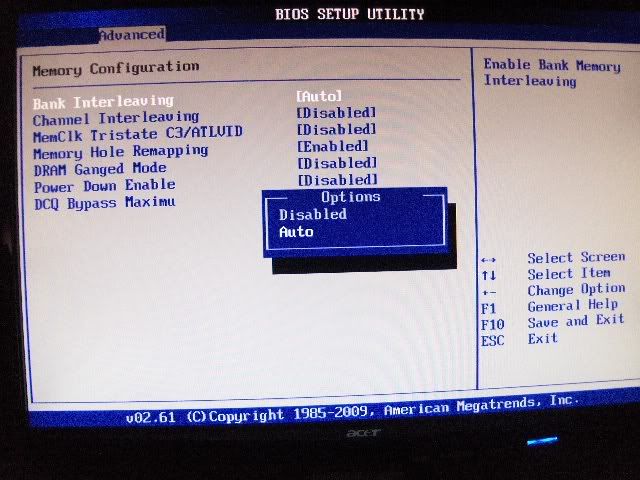
    BANK INTERLEAVING,,This is the Same as Bank Swizzle mode i believe. I set to auto for beter access.

    Last edited by gOtVoltage; 05-20-2009 at 08:53 PM.
    "AMD...Like the perfect Storm,...Everything needs to be just right"
    X555x4SuperCore@4450mhz@1.64v..........

    RYZEN 7 1800x/ ASUS ROG STRIX VEGA64/ =EK NICKEL WB, Feser THC 2x360 1x480
    X470 Gigabyte Aorus7, Patriot 3400mhz 16gb dual2x8
    SSD Samsung 970pro,,860EVO

  24. #49
    Xtreme Enthusiast
    Join Date
    May 2009
    Posts
    952
    Thanks gotvoltage, will try with +4 on all cores to see what it does. I have upped the NB and HTT voltages but that did not really help. I am able to run them at stock even with the NB up at 2.6 Ghz or so. This is mainly due to FSB tweaking. Will try it after I get home.

  25. #50
    Xtreme Addict
    Join Date
    Apr 2008
    Location
    Texas
    Posts
    1,663
    I appreciate tha gOtVoltage! I can test with both two and four sticks of ram, but each pair is a different manufacturer (as in my sig). I'll let yall know if I find any interesting behavior.
    Core i7 2600K@4.6Ghz| 16GB G.Skill@2133Mhz 9-11-10-28-38 1.65v| ASUS P8Z77-V PRO | Corsair 750i PSU | ASUS GTX 980 OC | Xonar DSX | Samsung 840 Pro 128GB |A bunch of HDDs and terabytes | Oculus Rift w/ touch | ASUS 24" 144Hz G-sync monitor

    Quote Originally Posted by phelan1777 View Post
    Hail fellow warrior albeit a surat Mercenary. I Hail to you from the Clans, Ghost Bear that is (Yes freebirth we still do and shall always view mercenaries with great disdain!) I have long been an honorable warrior of the mighty Warden Clan Ghost Bear the honorable Bekker surname. I salute your tenacity to show your freebirth sibkin their ignorance!

Page 2 of 3 FirstFirst 123 LastLast

Bookmarks

Bookmarks

Posting Permissions

  • You may not post new threads
  • You may not post replies
  • You may not post attachments
  • You may not edit your posts
  •