

no cooling at,NB/SB .....fan on mem



no cooling at,NB/SB .....
Ive benched on 1.48vNB it doesn't exceed 47*C. Stock cooling on these boards is pretty good.
Ci7 990X::Rampage III Extreme::12GB Corsair Dominator 1866C7GT::2 x EVGA SC Titans in SLI::Corsair AX1200::TJ07::Watercooled
Ci7 920 3849B018::Rampage II Extreme::6GB GSKILL Trident 2000C9 BBSE::EVGA GTX580::Antec Signature SG850::TJ09::Aircooled w/TRUE 120X
Am i right, does -E and Deluxe have same NB cooling ? Atleast it looks like perfectly sameOriginally Posted by CryptiK


Asus P5Q-E @ 1306 Ket's handwork
Intel® Core™2 Quad 9550 3600Mhz -1.28v load- FPO: 816xxxxx
Xigmatek HD1283 -> 30-33 IDLE / GAMING 45*C
Sapphire 4870 512MB If you want feel like in aeroplane, turn fan to 100% that is what i call xtreme
A-Data 2X2GB 850mhz 1:1damn budget
Corsair HX520WSmall but powerfull
Antec 300
Noctuas casefans <3 Silence
WD 640GB
Eizo Flexscan S2201W 22''
3DMARK 06 (+17000)
Vantage (+10000)
Best SuperPI time @ 3.6Ghz
475 FSB, 333 strap, 5:6, 8GB RAM at DDR2-1140, tRD 8 / vMCH 1.40, vDimm 2.0v
448 FSB, 266 strap, 4:5, 8GB RAM at DDR2-1120, tRD 7 / vMCH 1.44, vDimm 2.0v
from past experience with this board, in order for me to set tRD 7 when system overcloked above 400fsb, this used to be possible only to use 400 strap (e.g. 400fsb / DDR1066, 450fsb / DDR1200).
also, my gskill 8GB kits (2 kits of 2x2GB) have never overclocked well on this board, the ram kits are not a very good overclocking ram by themself, however, the ram kits can now be overclocked to DDR2-1140 (and not on a low fsb), this used to be max stable at around DDR2-1128 for 8GB.
[QUOTE=CryptiK;3513244]Not too bad. Have you tried settings CPU GTL Refs to 0.67x or higher? There's a possibility that you could go a little higher or lower your cvore at the current speed with some GTL tweaking.
I'm just happy to be stable; the system is far more powerful than my needs anyway. Fast, quiet and able to game with insane FPS when needed. I enjoyed the learning process but I'd be quite happy never to sit doing prime95 runs againCan see this system lasting a few years for me.
P5QDeluxe Q9450 @3.6 8GB Corsair Dominator 8500
Current AI settings: http://www.xtremesystems.org/forums/...postcount=2459
From pics it looks to be the same, except the P5Q-E has no heatpipe from NB to SB, and I've read that it has no backplates on the Mosfet sinks as it has 8 phase PWM and no fets on the backside of the board.
That's really nice to see that FSB with a quad and 8GB of ram at that speed stable. What is Ai Clock Twister set to and are you running static read control and dram read training enabled? They gave me a nice boost in performance, as did running clock twister on stronger. Not sure if you could manage that with a quad + 8GB at those speeds though.
Good to see a wholly satisfied person, your setup is nice.
Last edited by CryptiK; 12-20-2008 at 07:48 PM.
Ci7 990X::Rampage III Extreme::12GB Corsair Dominator 1866C7GT::2 x EVGA SC Titans in SLI::Corsair AX1200::TJ07::Watercooled
Ci7 920 3849B018::Rampage II Extreme::6GB GSKILL Trident 2000C9 BBSE::EVGA GTX580::Antec Signature SG850::TJ09::Aircooled w/TRUE 120X
opp sorry i haven't answered any of the questions...
static read control - enabled (in some of the previous bios versions i set this option on auto. but as far as i remember i never disabled this option completely)
dram read training - enabled
Ai clock twister - for my hardwares even before i use this ram kits, this setting is always set on moderated. however, i believe depending on hardwares quite a bit, i can't set Stronger when using this 8GB ram and before, and maybe include the voltage setting that also have effect on the setting. i also used to find some cool booting problems with Strong mode
the CPU batch that i got is a very hot CPU on full load, it's the very first retail q9300's that were available in retail store before q9x50, it was some time back in around Mar-April.
my max daily use for this particular CPU have been 467 at its default multi 7.5 and DDR1120, this is for me to keep a low voltage use in system, include RAM,
but 480FSB still can be stable on this p5q-d board. i might rebuild the cooling system if i'm not too lazy and start to use 475FSB for daily setting.

Last edited by pangingIII; 12-20-2008 at 11:37 PM.
Nice work pangingIII, 480 FSB / DDR2-1152MHz PL8 is very nice
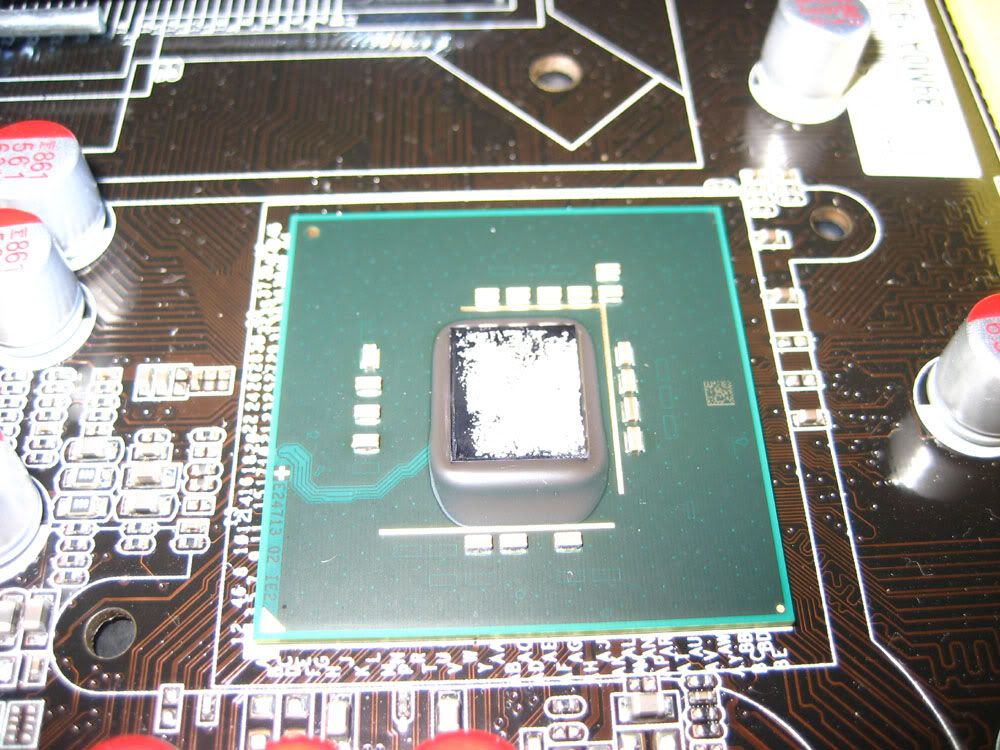
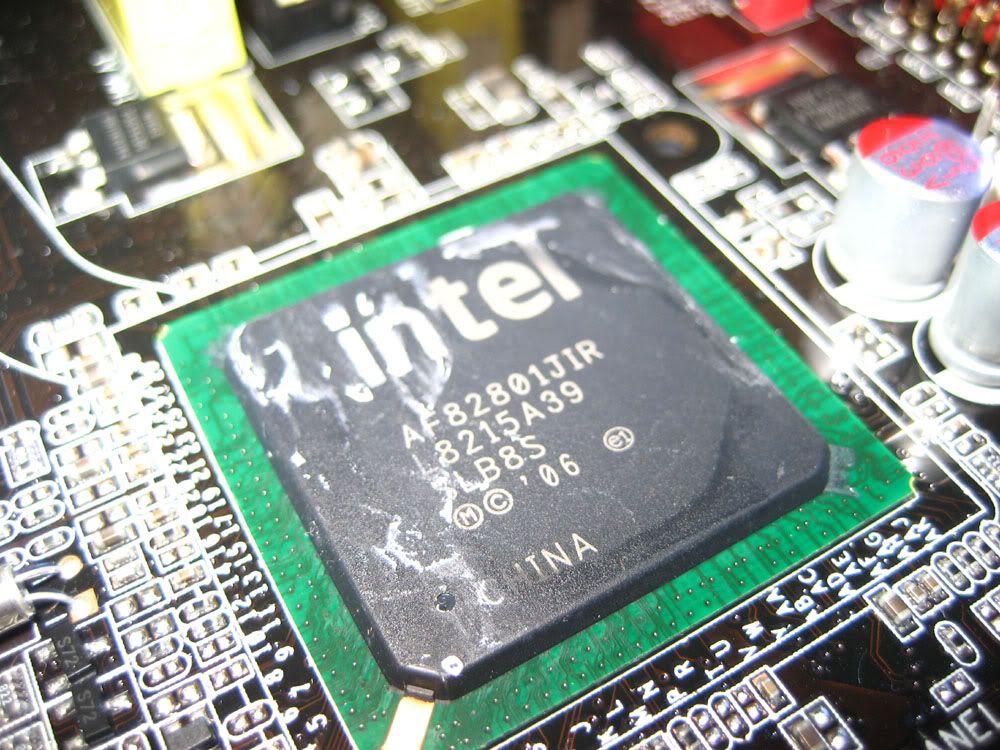
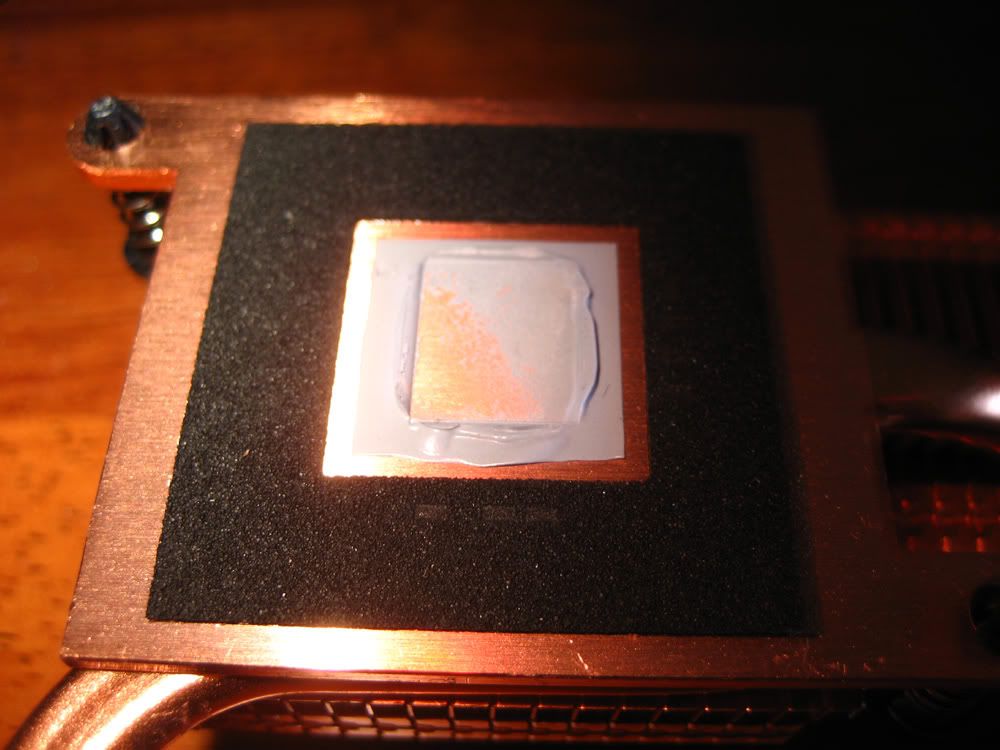
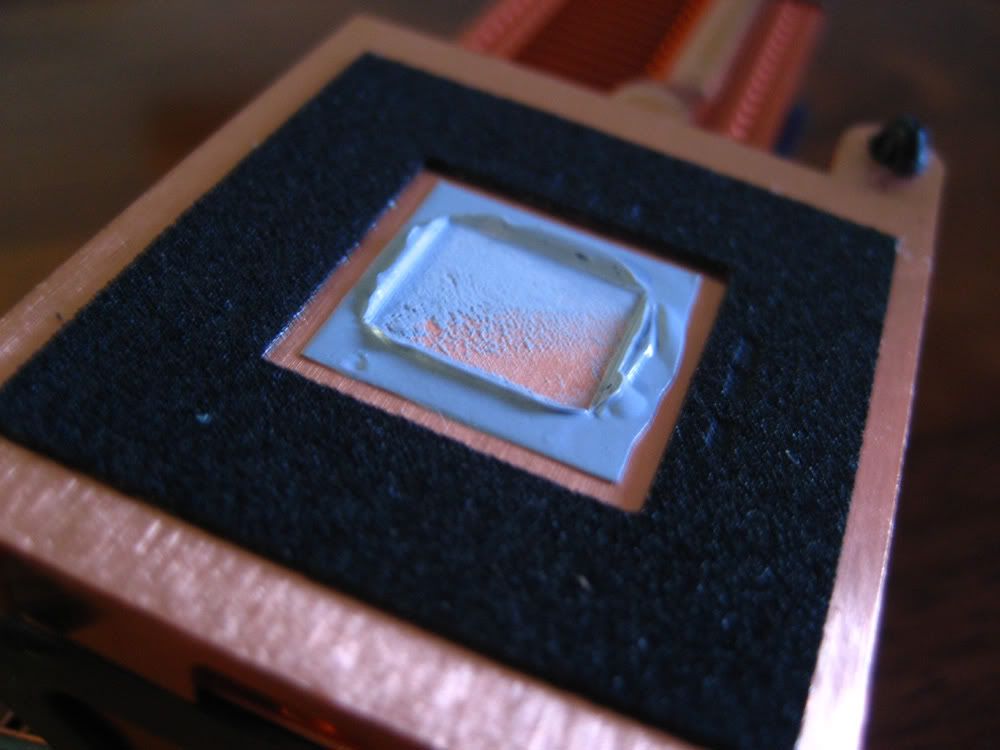
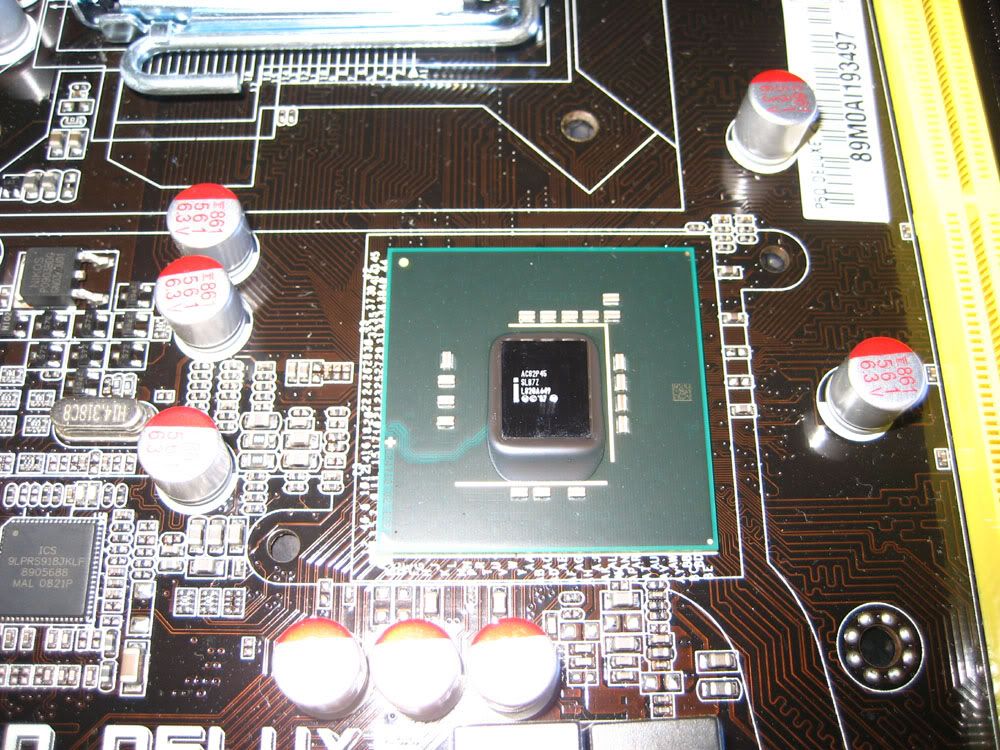
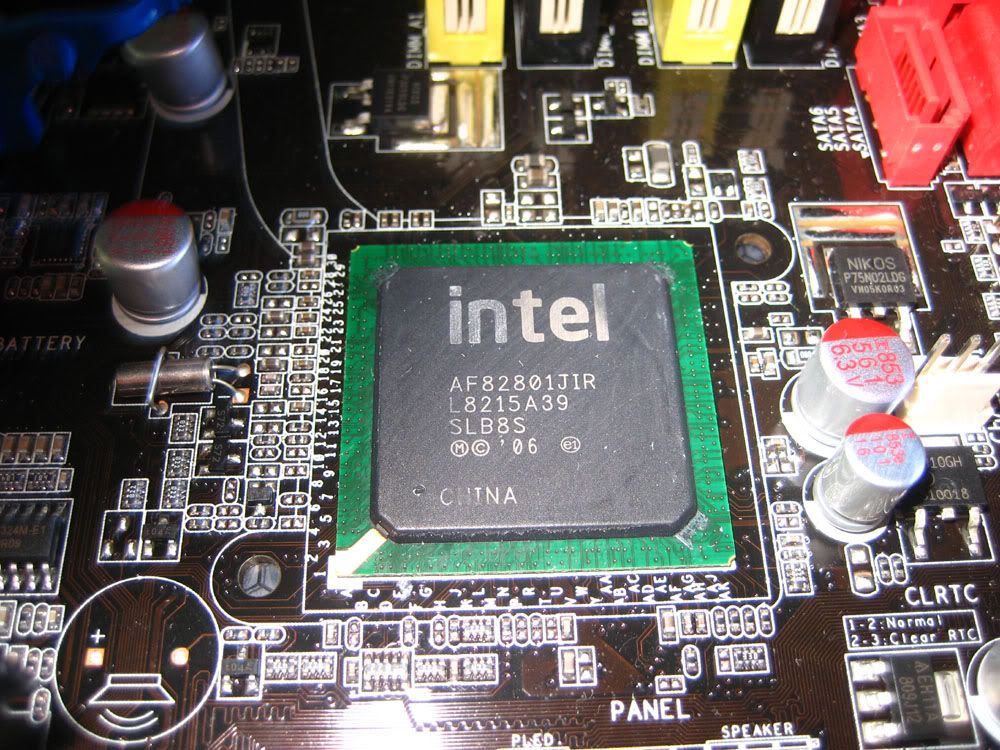
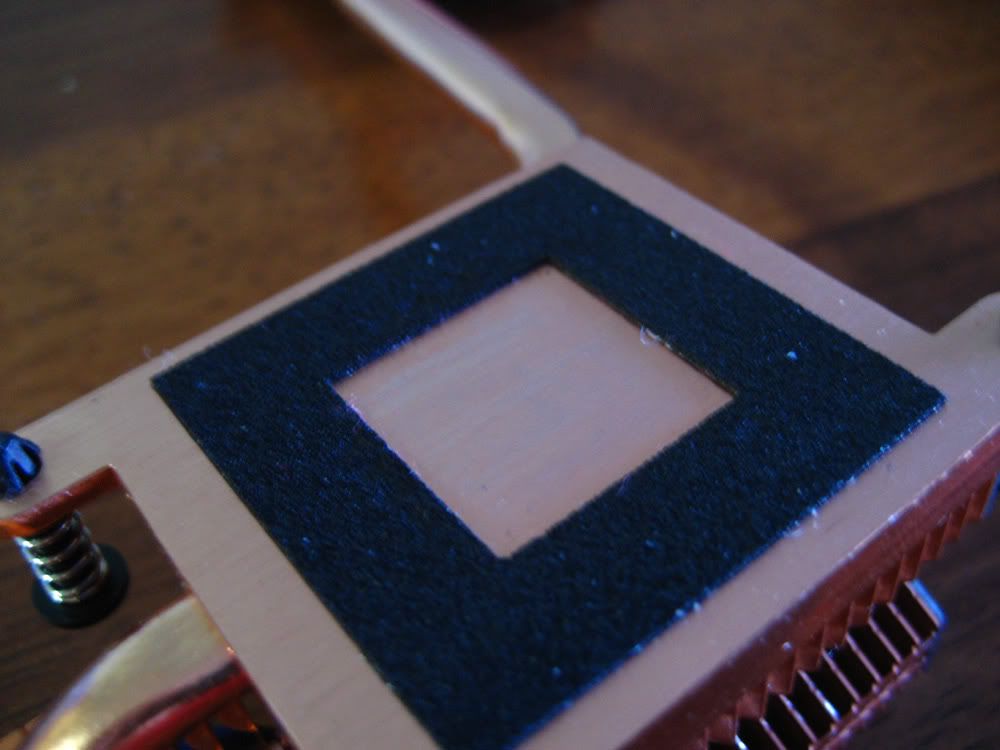
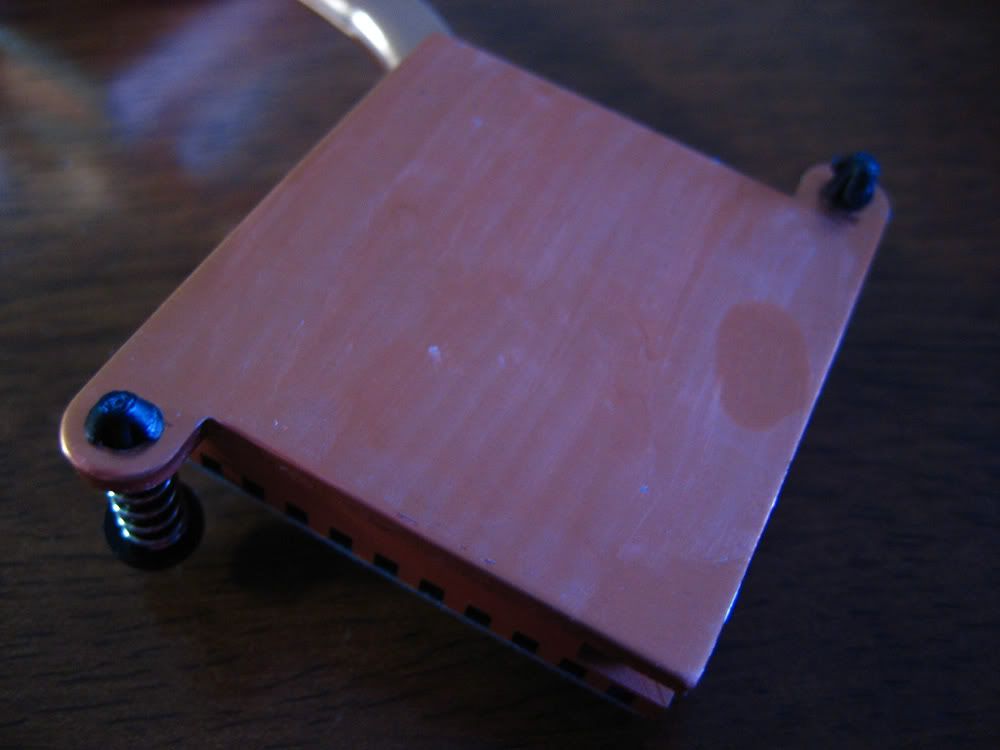
I decided to re-do the TIM (thermal interface material) under the NB & SB heatsinks of my board. It was very easy to remove and replace; after undoing the 2 bolts on the rearmost mosfet heatsink and popping out the pushpins from the NB & SB sinks, I simply gently lifted the SB heatsink, the heatsink seperated from the SB chip and the whole heatpipe assembly subsequently lifted off easily. The stock TIM is a sticky gum substance, and is quite thick, and most likely would not have optimal thermal transfer properties. After removal, I initially cleaned the stock TIM off the NB, SB and associated heatsinks with my fingernail (it just peels off easily), and finished the cleaning process with isopropyl alcohol. I re-did the TIM using arctic ceramique. I also had to slightly twist the SB heatsink so it was perfectly flat on the SB when mounted, as the bottom side of it was inititally sitting slightly higher than the rest.
Pics:
NB chip as it looked after I removed the heatpipe assembly
SB as it looked when I had removed the stock TIM with my finger nail
NB Heatsink as it looked after I removed the heatpipe assembly 1
NB Heatsink as it looked after I removed the heatpipe assembly 2 - you can really see how thick and sticky the stock TIM looks
NB chip cleaned
SB chip cleaned
NB heatsink cleaned
SB heatsink cleaned
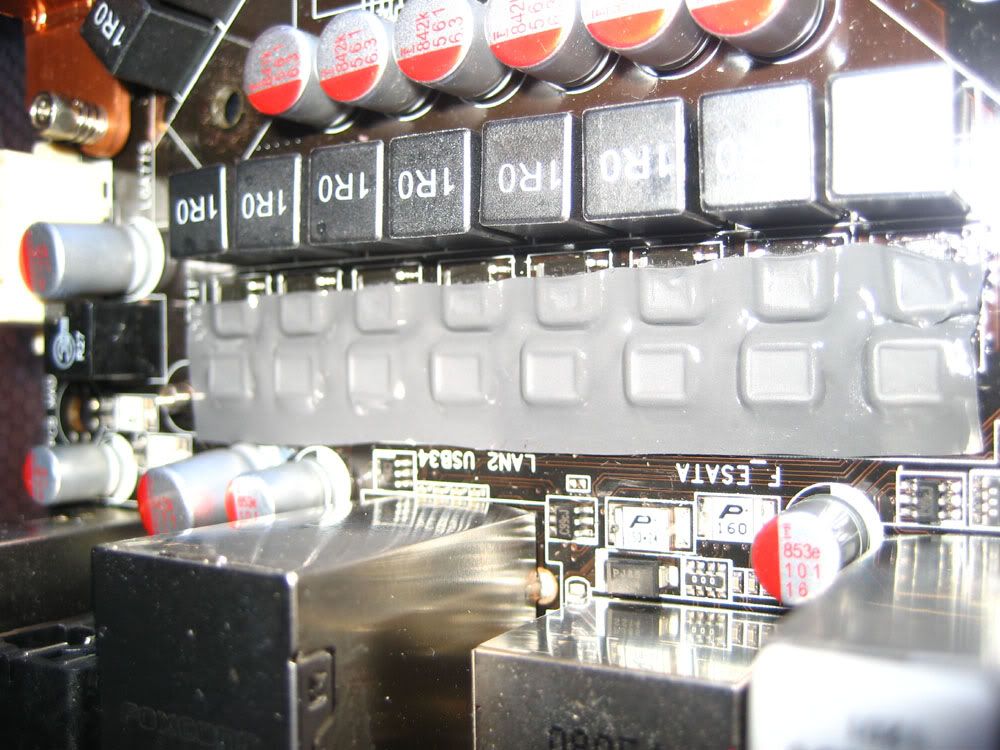
Mosfet heatsink & thermal pad - notice the excellent contact between all mosfets and the heatsink. This is due to the use of the backing plate under the board, which prevents the board from bowing. My M2F does not have a backing plate, and the centre mosfets don't have as good a contact as those on the ends.
Last edited by CryptiK; 12-21-2008 at 12:44 AM.
Ci7 990X::Rampage III Extreme::12GB Corsair Dominator 1866C7GT::2 x EVGA SC Titans in SLI::Corsair AX1200::TJ07::Watercooled
Ci7 920 3849B018::Rampage II Extreme::6GB GSKILL Trident 2000C9 BBSE::EVGA GTX580::Antec Signature SG850::TJ09::Aircooled w/TRUE 120X
Can anyone give me advice for CPU and NB GTL settings?
I'm using 1.6v VTT on my Q6600 @4Ghz.
Thanks.
Cryptik, thanks for photos and responses!
Intel Q9550 E0
Prolimatech Megahalems + Xigmatek XLF-1253
Asus HD4870 512MB 810/1000mhz
A-data 2x2GB OverClock Extreme Edition 1066+
ASUS P5Q Deluxe 2301
CHIEFTEC 560W (CFT-560-A12S)
Maxtor DaimondMax STM3500320AS
CM HAF 922
Samsung T220 1680x1050
Vista x86 SP2
Q6600's seem to like ~0.65x, but GTL Ref settings are trial and error and must be worked out by each person Try between 0.60x and 0.70x (0.70x is almost the absolute max and gives you a Vref of ~1.12v due to your Vtt of 1.6v) for both GTL Refs. Set a clock that you know is unstable, run Orthos small FFT and note the fail time. Then adjust the CPU GTL Refs and see if you can increase the fail time. The point at which it takes the longest to fail, is teh sweet spot.
NB GTL Ref seems fine at auto up to 550 - 560 FSB for me, but for your board it may be different as each board's MCH has slightly different behaviour, as CPU's do. Drop the NB to a level that makes the chipset produce errors (I like to use HCI Memtest in windows for this but before you do you must be certain your ram is stable or it will produce errors too) and tweak the NB GTL Ref. Again, the setting the decreases the errors generated or decreases the time before the first error is generated is the sweet spot.
No problem at all.
Last edited by CryptiK; 12-21-2008 at 04:03 AM.
Ci7 990X::Rampage III Extreme::12GB Corsair Dominator 1866C7GT::2 x EVGA SC Titans in SLI::Corsair AX1200::TJ07::Watercooled
Ci7 920 3849B018::Rampage II Extreme::6GB GSKILL Trident 2000C9 BBSE::EVGA GTX580::Antec Signature SG850::TJ09::Aircooled w/TRUE 120X
Thanks Cryptic. Also, what's the max NB volts you recommend? I'm using 1.4v right now. North bridge is watercooled as well, so temps aren't an issue.
For 24/7 use I'd have no problem running 1.4v on air keeping max temps under 50*C, even on water I'd say around 1.45v is around max for 24/7, 1.5v would worry me a little. Remember the P45 chipset is 65nm, and 1.5v is pretty much max for 65nm cpu's 24/7, and intel rate the P45 at ~1.2v absolute max, so even at 1.4v it's already over that by a bit- this is why it's hard to advise anyone on a safe voltage as most of us are already over the rated absolute max. Just depends on how hard you want to push it really.
Ci7 990X::Rampage III Extreme::12GB Corsair Dominator 1866C7GT::2 x EVGA SC Titans in SLI::Corsair AX1200::TJ07::Watercooled
Ci7 920 3849B018::Rampage II Extreme::6GB GSKILL Trident 2000C9 BBSE::EVGA GTX580::Antec Signature SG850::TJ09::Aircooled w/TRUE 120X
what NB volts u are using with 4005mhz 1.336v? I now using 1.20 at 4005mhz 1.256v.
Intel Q9550 E0
Prolimatech Megahalems + Xigmatek XLF-1253
Asus HD4870 512MB 810/1000mhz
A-data 2x2GB OverClock Extreme Edition 1066+
ASUS P5Q Deluxe 2301
CHIEFTEC 560W (CFT-560-A12S)
Maxtor DaimondMax STM3500320AS
CM HAF 922
Samsung T220 1680x1050
Vista x86 SP2
Lately I've been getting bluescreens caused by the AHCI-driver, iaStor.sys, and I can't figure out why I'm getting them.
It usually happens while I play Warcraft 3, I've never had it happen while just using Firefox etc. I don't know if it has something to do with the latest AHCI-drivers (8.6.0.1007) or if it's caused by something else, like a failing harddrive.
Although it seems like I'm getting them pretty random, sometimes I can play for hours, and sometimes I get them just within like an hour or so of playing.
I usually have uTorrent, Firefox, mIRC, Live Messenger and Nod32 running in the background.
I'm running the system in my sig at stock settings, but with set voltages because of the overvolting on this board.
Last edited by RAdoxx; 12-22-2008 at 01:53 AM.
Asus P5Q Deluxe, Intel C2Q Q9550 (TRUE/Scythe SFF21F), Corsair Dominator 2x2GB PC8500, Asus Radeon HD4870 512MB
2xSamsung HD501LJ 500GB, 1xWestern Digital VelociRaptor 300GB
Corsair HX620W, Lian-Li PC-A05B (4xNoctua NF-S12-1200), Sound Blaster X-FI Xtrememusic (Sennheiser HD555), BenQ FP241W
Anything I should think of when using SATA ports? I have 2 SATA HD and one IDE DVD burner. I don't use RAID. I just plugged SATA drives into 2 top slots. Now I'm experiencing some really strange freezes. They are really random, last exact 5 minutes and I mean EXACT. I can move the mouse but not much else. Sometimes I can minimize current window. Afterwards there is nothing strange in Event Viewer, but under Windows-Diskcheck-performance (or something similar can't remember now am at work) I can see that some service have been using a lot of HD and thus lowered performance. I've checked most of my freezes and it can be anything that causes disk trashing. From Firefox, Warcraft, Explorer to some ntfskrnl or something.
I've tried a lot of stuff... PC is rock stable no matter the stresstest. Prime, Orthos, Pi, Memtest. It can run them all for at least 24 hours. But I still get these weird freezes. After 5 minutes everything is just fine and dandy...
Any ideas?
same problem with my seagate 640 gb, made the problem worse when switched to ahci native sata mode
Intel Core 2 Quad Q9550
Asus P5Q Deluxe
Sapphire HD4870X2
Seagate 640 GB 7200.11
Seagate 1 TB 7200.11 /windows 7 x64
Antec 1200
OCZ Vendetta 2
Corsair Dominator 8 GB (4x2)
PC Power & Cooling 750W silencer
Philips 47" pfl9603 lcd tv/monitor
Did you install some IDE controller driver? I remember back when I had my P5B Deluxe, the system would go crazy if I had the IDE driver from the CD installed. Jmicron something IIRC.
Asus P5Q Deluxe, Intel C2Q Q9550 (TRUE/Scythe SFF21F), Corsair Dominator 2x2GB PC8500, Asus Radeon HD4870 512MB
2xSamsung HD501LJ 500GB, 1xWestern Digital VelociRaptor 300GB
Corsair HX620W, Lian-Li PC-A05B (4xNoctua NF-S12-1200), Sound Blaster X-FI Xtrememusic (Sennheiser HD555), BenQ FP241W
I run PL8, static read control and dram read training enabled, and Ai Clock twister = stronger, and it takes ~1.30v for stability using my Max 2 Formula. I think my deluxe doesn't need quite that much due to the fact it appears to have slightly looser chipset timings clock for clock at the same settings compared to the M2F, but I have just been benching on it recently not using it 24/7.
Last edited by CryptiK; 12-22-2008 at 08:58 AM.
Ci7 990X::Rampage III Extreme::12GB Corsair Dominator 1866C7GT::2 x EVGA SC Titans in SLI::Corsair AX1200::TJ07::Watercooled
Ci7 920 3849B018::Rampage II Extreme::6GB GSKILL Trident 2000C9 BBSE::EVGA GTX580::Antec Signature SG850::TJ09::Aircooled w/TRUE 120X
yeah i think it was installed when i made the switch, the hdd would just freeze multiple times each day, it still freezes but rarely
Intel Core 2 Quad Q9550
Asus P5Q Deluxe
Sapphire HD4870X2
Seagate 640 GB 7200.11
Seagate 1 TB 7200.11 /windows 7 x64
Antec 1200
OCZ Vendetta 2
Corsair Dominator 8 GB (4x2)
PC Power & Cooling 750W silencer
Philips 47" pfl9603 lcd tv/monitor
Oh so I'm not alone... Do you use Vista to? My drive is Seagate as well... It is driving me crazy. I disabled SMART in BIOS closed unused SATA ports and set SATA to Compatible it is "acting" as IDE. Any harm in disableing SMART? Also is there some kind of seagate health check software?
I too get lockups randomly after passing all stress tests. I just readjusted my overclock (bumped vcore) and no issues since (only been a week or so)
What errors does it give to make you think it is AHCI?
-=Mark=-
Rig #1: DD Torture Rack * EVGA X58 SLI LE * i7 920@4.2GHz * Powercolor 5870 LCS * HT Omega Claro Plus+ * Corsair CMPSU-850TX * 6GB Corsair TR3X6G1600C8D * 160GB X25-M & 500GB Seagate *
Rig #2: GigaByte H55N-USB3 * Intel i5 655K@4.5GHz * Colorpower 5670 Go Green * Antec TPQ-850 850 watt * 4GB G. Skill ECO F3-12800CL7D-4GBECO *
yeah i use vista ultimate 64, i installed vista in emulated ide mode but switched to ahci with this procedure:
1. Exit all Windows-based programs.
2. Click Start, type regedit in the Start Search box, and then press ENTER.
3. If you receive the User Account Control dialog box, click Continue.
4. Locate and then click the following registry subkey:
HKEY_LOCAL_MACHINE\System\CurrentControlSet\Servic es\Msahci
5. In the right pane, right-click Start in the Name column, and then click Modify.
6. In the Value data box, type 0, and then click OK.
7. On the File menu, click Exit to close Registry Editor.
go to bios, change to sata ahci mode and restart
im not sure is it better to leave smart disabled but there r seatools on seagate site for download
it doesnt give any errors, it just freezes the entire desktop, u can move the mouse but u cant click on anything, and the browser is kinda whitish, like its been hit with a glass of milk
Intel Core 2 Quad Q9550
Asus P5Q Deluxe
Sapphire HD4870X2
Seagate 640 GB 7200.11
Seagate 1 TB 7200.11 /windows 7 x64
Antec 1200
OCZ Vendetta 2
Corsair Dominator 8 GB (4x2)
PC Power & Cooling 750W silencer
Philips 47" pfl9603 lcd tv/monitor
Is AHCI better than IDE mode? should I be using that instead?
im not sure, i never noticed any difference
Intel Core 2 Quad Q9550
Asus P5Q Deluxe
Sapphire HD4870X2
Seagate 640 GB 7200.11
Seagate 1 TB 7200.11 /windows 7 x64
Antec 1200
OCZ Vendetta 2
Corsair Dominator 8 GB (4x2)
PC Power & Cooling 750W silencer
Philips 47" pfl9603 lcd tv/monitor


 Reply With Quote




Bookmarks