

I dont have that problem though.Originally Posted by Oliverda




I dont have that problem though.
AMD Ryzen 7 7800X3D // ASUS ROG Crosshair X670E Hero // ARCTIC Liquid Freezer III 360 A-RGB // G.SKILL Trident Z5 Neo RGB Series (AMD Expo) DDR5 RAM 32GB (2x16GB) 6000MT/s CL30 // ZOTAC Gaming GeForce RTX 4090 AMP Extreme AIRO // Samsung Pro 980 2TB NVMe (OS and Games) // WD Black 10TB HDD (Storage)
Is anyone else getting higher then normal thermal reading with this board...? with out CPU tweak on? I use the same chip, same water cooling, swap the board and 8*c cooler. Swap board back to the ASUS, and 8*C higher... Is it just me or what.. By the way, setting are the exact same on both boards.
~1~
AMD Ryzen 9 3900X
GigaByte X570 AORUS LITE
Trident-Z 3200 CL14 16GB
AMD Radeon VII
~2~
AMD Ryzen ThreadRipper 2950x
Asus Prime X399-A
GSkill Flare-X 3200mhz, CAS14, 64GB
AMD RX 5700 XT
what are you using to read the temps? The M3A79-T has buggy sensors.
I use Core Temp and I get temps about 10ºc lower than in the bios and pc probe.
Also AOD, HW monitor and every other programs registers the same as core temp. But PC Probe and the BIOS report way higher temps.
AMD Ryzen 7 7800X3D // ASUS ROG Crosshair X670E Hero // ARCTIC Liquid Freezer III 360 A-RGB // G.SKILL Trident Z5 Neo RGB Series (AMD Expo) DDR5 RAM 32GB (2x16GB) 6000MT/s CL30 // ZOTAC Gaming GeForce RTX 4090 AMP Extreme AIRO // Samsung Pro 980 2TB NVMe (OS and Games) // WD Black 10TB HDD (Storage)
Yup,, it reads the Temps higher than normal or any other Mobo ive used so far 770/790gx/790fxsb600/790FX750..It seems ASUS 79-T reads about 8-10c higher across the Board in Bios and in Windows.
Note:@ 22c room abiant temp
All other Mobos @ 1.55vid with 1.65volts for both NB and CPU ive always been @ 26c Idle..
The ASUS 79-T puts me @32c Idle @ 1.55vid and 1.65volts for both NB/CPU.
Same Watercooling was used for all of my Mobos. Ive even tried my 6000+ which also reads about 8c higher..So its a Mobo Bios issue indeed
Sometimes with ACC on +4 or +2 it would lower the temp some but never below 30c idle on my 9950(140watt)@3.5ghz
"AMD...Like the perfect Storm,...Everything needs to be just right"
X555x4SuperCore@4450mhz@1.64v..........
RYZEN 7 1800x/ ASUS ROG STRIX VEGA64/ =EK NICKEL WB, Feser THC 2x360 1x480
X470 Gigabyte Aorus7, Patriot 3400mhz 16gb dual2x8
SSD Samsung 970pro,,860EVO
here are my bios screens:
i ran prime as i typed this... at 1.4875v this time.. and it happened again.
22:01:54 12/05/08,CPU#0 (Core#0),46,34,46,100,3302.11
22:02:04 12/05/08,CPU#0 (Core#0),46,34,47,100,3302.11
22:02:14 12/05/08,CPU#0 (Core#0),31,31,47,100,1651.06
22:02:24 12/05/08,CPU#0 (Core#0),30,30,47,100,1651.06
22:02:34 12/05/08,CPU#0 (Core#0),46,30,47,100,3302.11
22:02:45 12/05/08,CPU#0 (Core#0),46,30,47,100,3302.11
also, why can i only choose 1.6GHz as max HT link?
Last edited by MadDias; 12-05-2008 at 01:11 PM.
MSI 790FX-GD70 (BIOS 1.D4)//PhenomII 1090T
2x 2GB G.Skill F3-12800CL7D-4GBRH//ASUS EAH5970
OCZ Agility 120GB//2x Hitachi Deskstar (2x500GB) RAID0//ZALMAN ZM850-HP 850W
DFI LanpartyUT RDX200 CF-DR (BIOS 12/23/05)//AMD Opteron 165 CCBBE 0616 XPMW 334x9 1.375Vx112%
2x 1024 MB G.SKILL F1-4000BIU2-2GBHV PC4000//2x Sapphire HD2900PRO(modded bios 845/950) 512mb CrossFire
2x WD Caviar RE2 WD4000YR (400 GB) RAID0//OCZ GameXStream 700W
Motorola Milestone CyanogenMOD 6.1.0 RC0 Android2.2.1
Thanks for the screenshots.
As far as 1.6 GHz for the HT is because your NB multiplier is at x8. The ht should never be higher than your NB so its setup like that to prevent that from happening.
If you lower your FSB and higher your multiplier you can set your NB at 10x and set your HT at 2.0
Take CPU tweak off by the way, that gives you wayyyy higher temps. You can also try disabling CPU prefetching and see if that has anything to do with it.
AMD Ryzen 7 7800X3D // ASUS ROG Crosshair X670E Hero // ARCTIC Liquid Freezer III 360 A-RGB // G.SKILL Trident Z5 Neo RGB Series (AMD Expo) DDR5 RAM 32GB (2x16GB) 6000MT/s CL30 // ZOTAC Gaming GeForce RTX 4090 AMP Extreme AIRO // Samsung Pro 980 2TB NVMe (OS and Games) // WD Black 10TB HDD (Storage)

what's with the clock skew thing mine says 300 on both what bout everyone else ?
that skew thing is one strange thing...
at default (auto) with htt at 200mhz it´s like in the screenshot. but when i raise the htt it defaults to delay 300ps for both banks. when i leave it on auto i get no post. i have to manually set it to 300/150
@chickenpatty: oh.. damn.. i forgot about the nb/ht relation
MSI 790FX-GD70 (BIOS 1.D4)//PhenomII 1090T
2x 2GB G.Skill F3-12800CL7D-4GBRH//ASUS EAH5970
OCZ Agility 120GB//2x Hitachi Deskstar (2x500GB) RAID0//ZALMAN ZM850-HP 850W
DFI LanpartyUT RDX200 CF-DR (BIOS 12/23/05)//AMD Opteron 165 CCBBE 0616 XPMW 334x9 1.375Vx112%
2x 1024 MB G.SKILL F1-4000BIU2-2GBHV PC4000//2x Sapphire HD2900PRO(modded bios 845/950) 512mb CrossFire
2x WD Caviar RE2 WD4000YR (400 GB) RAID0//OCZ GameXStream 700W
Motorola Milestone CyanogenMOD 6.1.0 RC0 Android2.2.1
I use HWMonitor and AOD. The Bios says the same as those 2. I run 3.3ghz 1.4v and have 35*c idle right now. I am under 30 on the MA790GP-DS4H.
So you are seeing the same thing I am then...?
~1~
AMD Ryzen 9 3900X
GigaByte X570 AORUS LITE
Trident-Z 3200 CL14 16GB
AMD Radeon VII
~2~
AMD Ryzen ThreadRipper 2950x
Asus Prime X399-A
GSkill Flare-X 3200mhz, CAS14, 64GB
AMD RX 5700 XT
Interesting, took that off and the temps really falled down in idle like 5C, now idling at 39CLoad seems to have 3-4C lower temps too.
What does this do? Some pages says its like tbl fix on and other pages says it lowers some internal bus latencies? Any difference to real life perfomance like 3D ?
Maybe it OC´s better now
Nothing interesting here.
Its a Phenom Bios tweak other than TLB fix..its for Optimizing Phenom.
I cant remeber names(items it enables) but has to do with optimization and Power on Phenom..It is not related to the TLB fix...
When i had my TA770 and 9950 @3.45ghz Polygon @ Rebelshaven gave me a Bios with all the (Phenom Options enabled)with a seperate TLB disable tweak . The added Optimizations which are NON TLB Bios tweaks inhanced the performance.
Infact it made the Icon in AOD go from yellow(TLBdisabled) to Red(TLBdisabled +Performance tweaks enabled ,,
It also raised the temp a little and performance was increased on the 9950.
P.S Charged,,
Asus79-T gives me higher idle load temps..They are in fact lower when i disable the CPU tweak but still not what My other Mobo's registerd .Ill dig some more on it and post a Before and After with AOD.
Use Coretemp for VID and Everest.
Use CPU-Z and HWmonitor for vcore and PSU and Mobo volts along with AOD.
CPUTweak On or Off,, Seems when its Off its just as good as when its On for B3's..TLB fix dosnt apply to B3 only optimization tweaks do .Thus CPUtweak is Optimal but with only more Heat involved it seems.,,
The CPU tweak Disabled should ENABLE TLBfix with B2 but Not B3..
B3 will run In a normal powerstate but with performance tweaks disabled when CPU tweak is OFF..It will also not be affected by TLBfix using this Mobo..
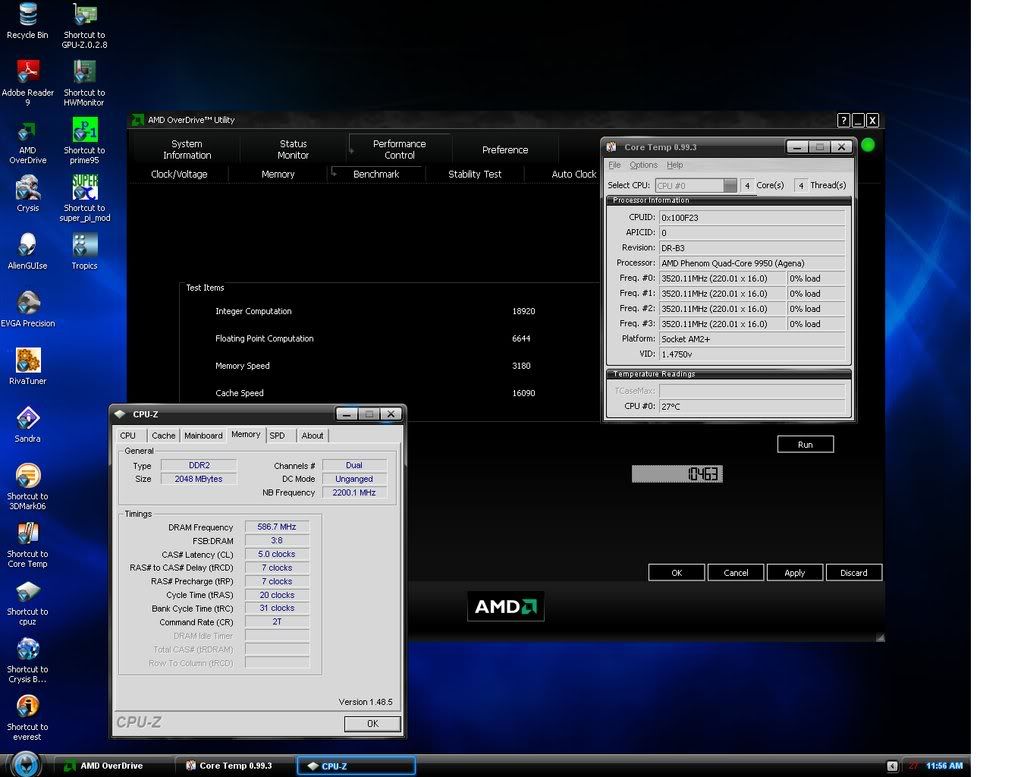
Comparison ,,
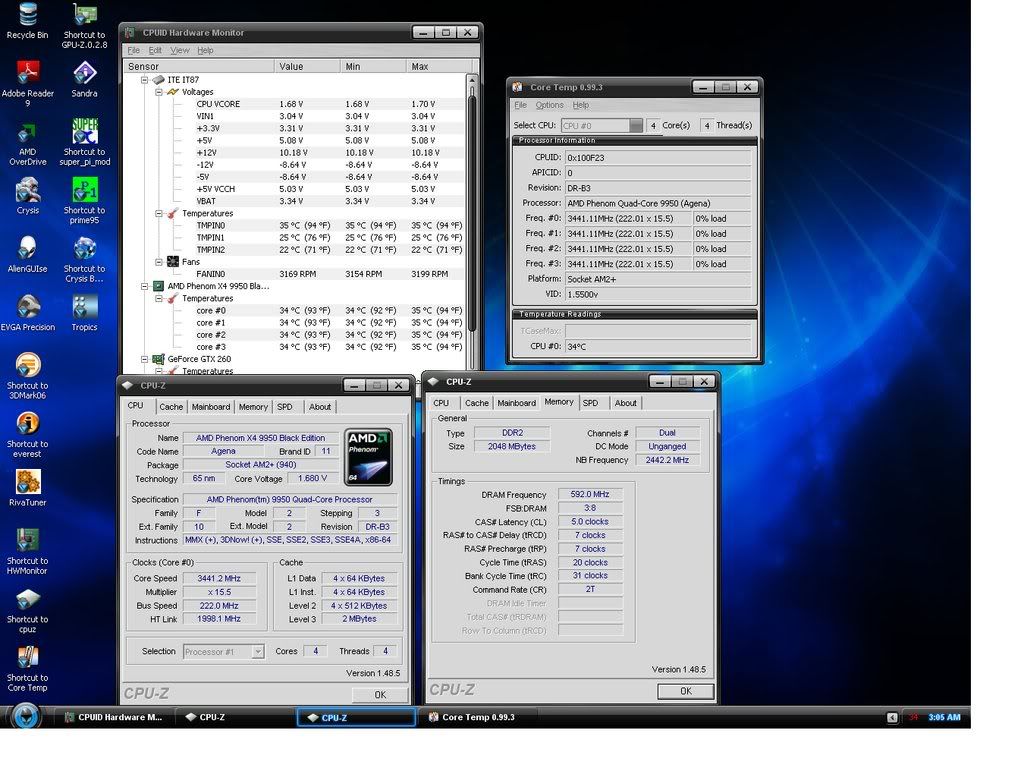
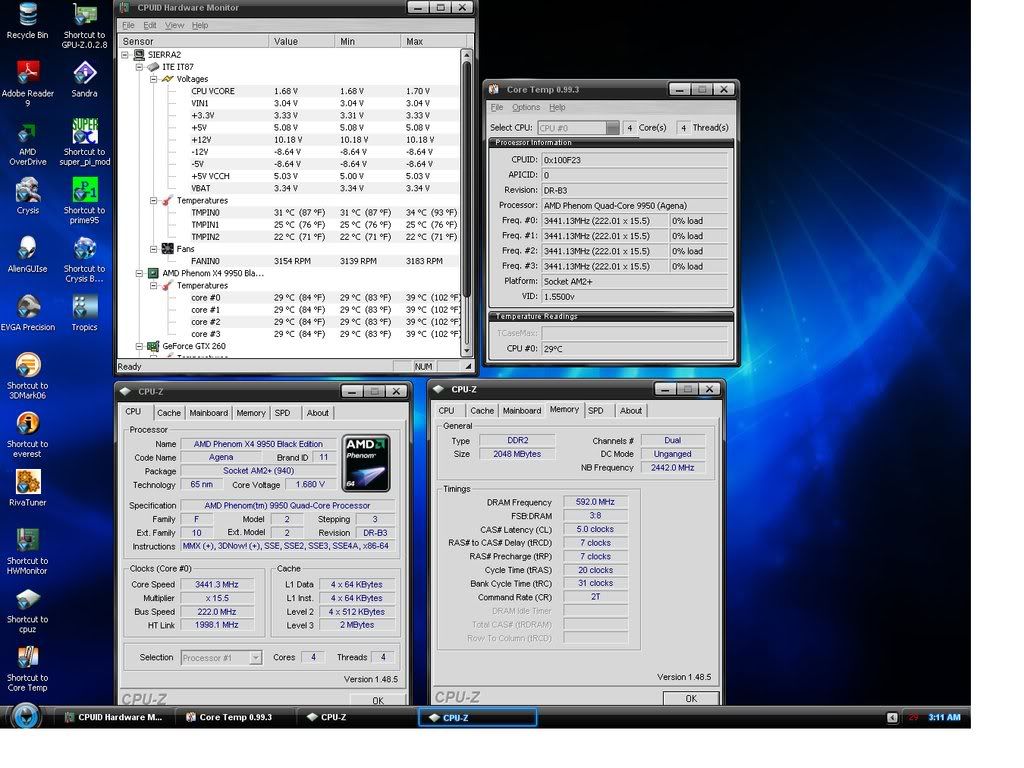
HWmonitor,, CPU-Z and Coretemp .
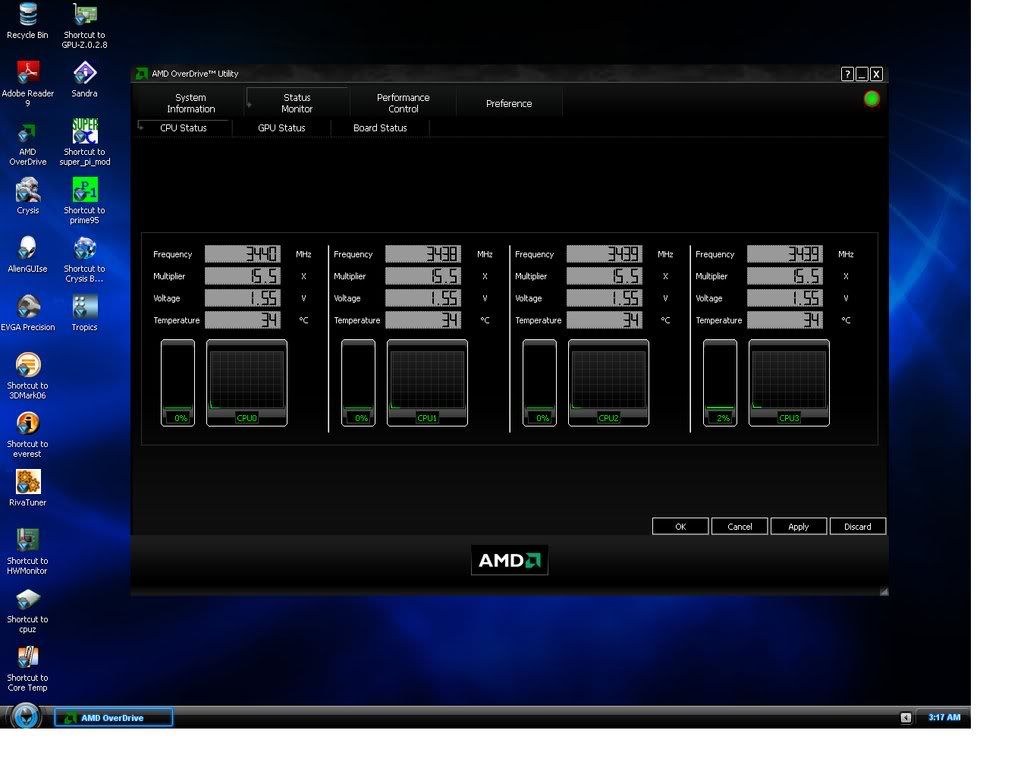
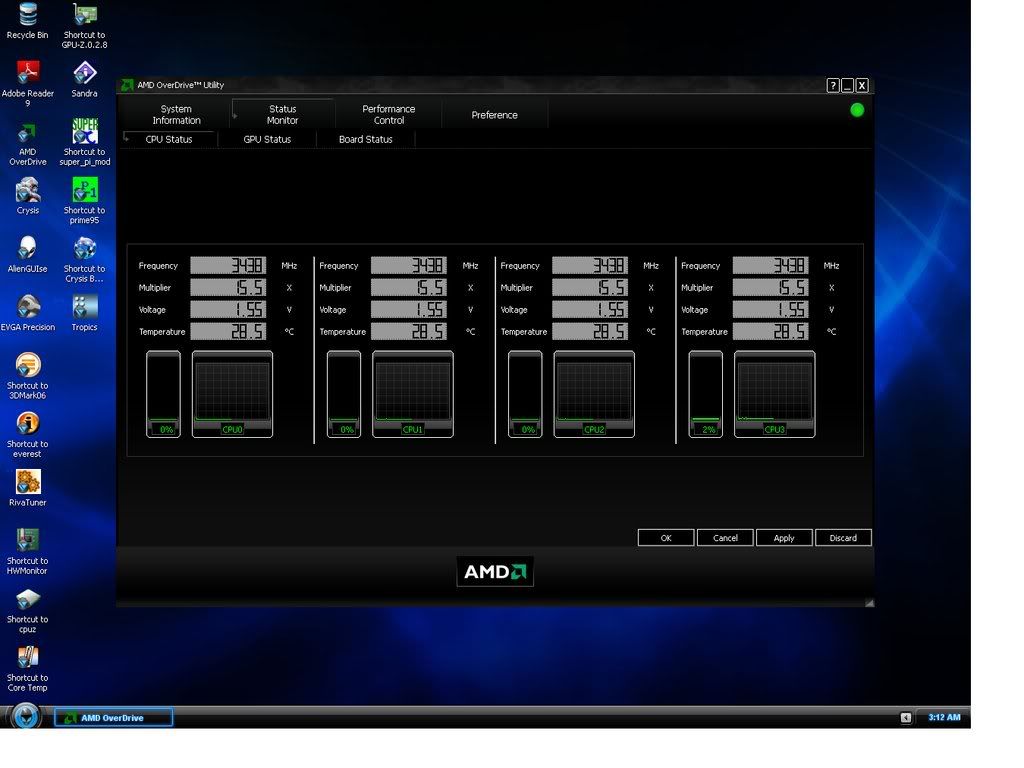
Even AODshows a Temp differance Going Red to Green Circle.
CPU TWEAK ON
CPU TWEAK OFF
CPU TWEAK ON AOD monitor Red Circle.
CPU TWEAK OFF AOD monitor GREEN Circle.
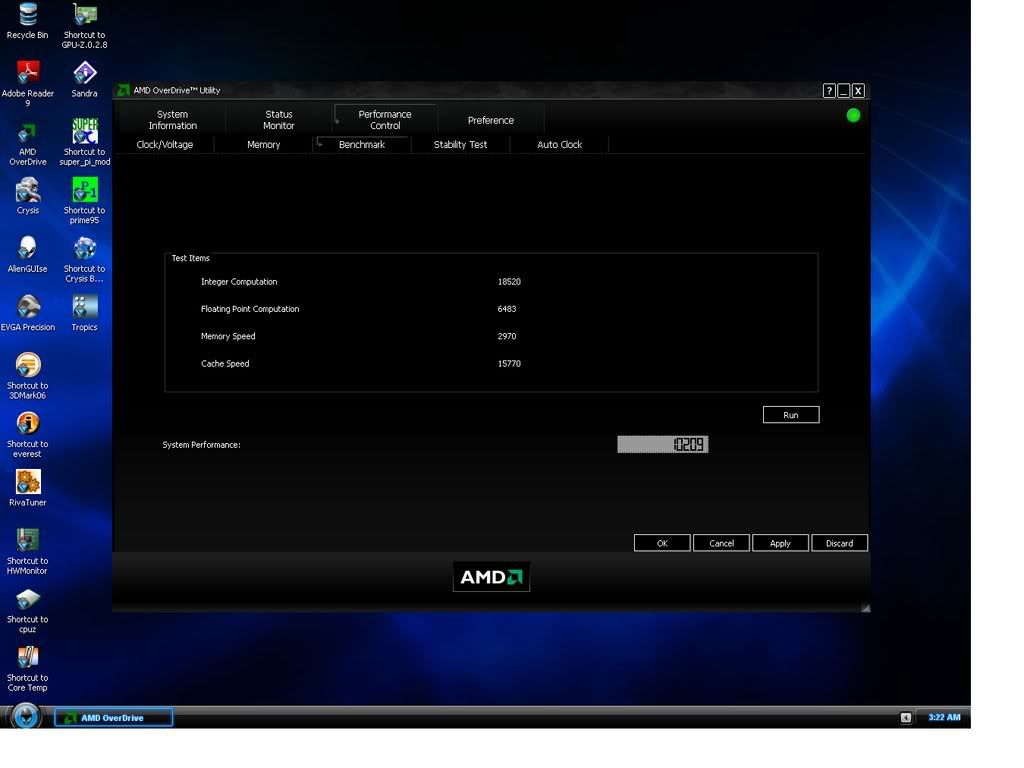
CPU TWEAK ON AOD Benchmark. Red
CPU TWEAK OFF AOD Benchmark. GREEN
Im not one to use AOD ,,but i had to see if i was right about the TLBfix being apart of CPUTweak.. For now it seems TLBfix is 100% disabled with it ON/OFF. For B2's you should see a decrease in Performance with AOD Benchmark tool .. It will be a big reduction like 10% if TLB is enabled vs Disabled.
As you can see (CPUtweak) is performance tweaking the CPU and not using TLBfix(disabled for B3 in OFF or ON mode)..
I would run Everest and other programs but wanted to keep this as short as possiable..
In the End CPUtweak OFF will lower the Temps with out a big impact on performance..Matter of fact some may be able to Overclock Higher with it Disabled..
This is the First time ive ever Turned CPUtweak off and with it on i still achieved 3.5ghz..
So Now i guess ill have to see what i can do with it off
Note: OFF vs ON didnt Impact my Voltages r.. if anything im shure it changes how much Power the CPU uses @idle and Under load .
Hope this helps some of ya get higher clocks with out worring about a performance hit from TLBfix,,B3's will be just fine,,
gOtVolTage
Last edited by gOtVoltage; 12-05-2008 at 04:10 PM.
"AMD...Like the perfect Storm,...Everything needs to be just right"
X555x4SuperCore@4450mhz@1.64v
RYZEN 7 1800x/ ASUS ROG STRIX VEGA64/ =EK NICKEL WB, Feser THC 2x360 1x480
X470 Gigabyte Aorus7, Patriot 3400mhz 16gb dual2x8
SSD Samsung 970pro,,860EVO
Yeah the AOD color thingy changes when the tweak is on or off.
Just tested with 3Dmark06, without the tweak(i pushed the circle in AOD, I think its the same?) it gave 12900 and CPU 4480, with tweak its 13100 and 4580, so little raise yes. And maybe the temps arent really so high even though what the board gauges tells. Leaving it on.
Nothing interesting here.
Well your @ 2000HT and the NB is @ 2000mhz
HT can not be higher than NB.
254x8 = 2000ht
1.6 = 8
1.8 = 9
2.0 = 10
Crashing sounds like the CPU or NB needs more Volts to stay stable..
Is it crashing after the CPU is Loaded and HOT?..
I dont know what your temp is ?
Low volts can crash after using prime ,, as heat builds up CPU will need more volts to keep stable..
Also TOO much Volts it will CRASH SOONER.
If your temps are good try raising the NB only..If it crashes right away its a good indication that you may not be running enuff volts or are too hot.
KEEP the HT @ 1.6 and only change NB from 8 to 9. Make shure your HT is @1.6 and not 1.8 when you change NB,, Run Prime ..If your low on Volts or its heat.. Youll crash quik once the Nb is raised.
If you can prime @ 2280nb then You may need to Raise the CPU volts a little to stabilize the System.
1.45-1.5v NB is good for 2400mhzNB even on stock cooler. I suspect your CPU need volts if anything.
Try the NB @ x9 = 2286mhz ,,
254 x 9 = 2286nb
Make shure HT is 1.6 when you change NB to x9
Try that then post results with TEmps..
Also Use the 602bios the 504 crashes alot ,especially with ACC,, trust me.
"AMD...Like the perfect Storm,...Everything needs to be just right"
X555x4SuperCore@4450mhz@1.64v
RYZEN 7 1800x/ ASUS ROG STRIX VEGA64/ =EK NICKEL WB, Feser THC 2x360 1x480
X470 Gigabyte Aorus7, Patriot 3400mhz 16gb dual2x8
SSD Samsung 970pro,,860EVO
^^^^^
dammit dude, you just answered everything, give us soms time heheheheh, just kidding, great, you're the best dude!!!
AMD Ryzen 7 7800X3D // ASUS ROG Crosshair X670E Hero // ARCTIC Liquid Freezer III 360 A-RGB // G.SKILL Trident Z5 Neo RGB Series (AMD Expo) DDR5 RAM 32GB (2x16GB) 6000MT/s CL30 // ZOTAC Gaming GeForce RTX 4090 AMP Extreme AIRO // Samsung Pro 980 2TB NVMe (OS and Games) // WD Black 10TB HDD (Storage)
I was on a Rollwhile chillin to some tunes...No biggie

"AMD...Like the perfect Storm,...Everything needs to be just right"
X555x4SuperCore@4450mhz@1.64v
RYZEN 7 1800x/ ASUS ROG STRIX VEGA64/ =EK NICKEL WB, Feser THC 2x360 1x480
X470 Gigabyte Aorus7, Patriot 3400mhz 16gb dual2x8
SSD Samsung 970pro,,860EVO
did anyone have a problem putting RAID0 on this board?
Or any other RAID
Case: Cooler Master 1000
MB: Gigabytes GA-990FXA-UD3
CPU: AMD FX-6300 3.5Ghz Stock
RAM: Ocz 4GB(2x2GB) DDR3
GPU: Nvidia EVGA GeForce GTX 560 Ti FPB
PSU: Corsair RM1000
CPU: Stock for now
My Heat
hahha, awesome, thats why I always say your name when I need to around here, I'll say it again, you're the man!!!
AMD Ryzen 7 7800X3D // ASUS ROG Crosshair X670E Hero // ARCTIC Liquid Freezer III 360 A-RGB // G.SKILL Trident Z5 Neo RGB Series (AMD Expo) DDR5 RAM 32GB (2x16GB) 6000MT/s CL30 // ZOTAC Gaming GeForce RTX 4090 AMP Extreme AIRO // Samsung Pro 980 2TB NVMe (OS and Games) // WD Black 10TB HDD (Storage)
From what i know the Driver that comes on the CD dosnt work too good for Raid ,,
Download the newest from ASUS..
i dont have raid but thats what ive read.
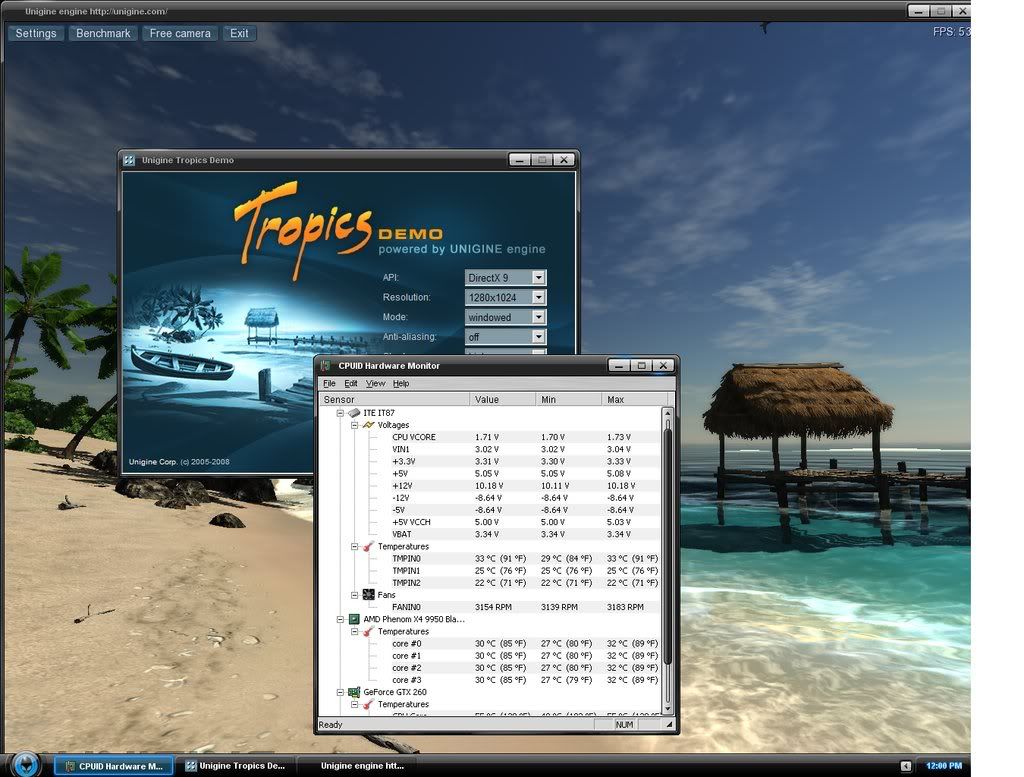
Using NO CPU TWEAK(OFF) update Amazing and performs nice too
After about two hours of fooling around with Crysis ,, Tropical and playing everything else such as DVD's to mp3's to just Surfing ,Ive noticed no impact on performance by not USING CPU tweak..My Temps are Night and day.Compared to my 3.45ghz post above. Im even using 1.70volts to heat things up,AMAZING i must say just AMAZING.
My Temps are The Lowest ive ever run @ 3.52ghz with No ACC an NO CPU TWEAK.
With Tropical running my GTX260 was butter .Almost No load on CPU ..Even though its a GPU test ,,
i xspected my temps to be way higher running this bench in 1280x1024 windowed with HWmonitor running.
Im really liking this 9950 and Most off all this MOBO..Once you get to know the Bios and such the ASUS 79-T really comes alive
Hahaa talk about timing,,Ya keep posting Right when i find out some fun stuff
"AMD...Like the perfect Storm,...Everything needs to be just right"
X555x4SuperCore@4450mhz@1.64v
RYZEN 7 1800x/ ASUS ROG STRIX VEGA64/ =EK NICKEL WB, Feser THC 2x360 1x480
X470 Gigabyte Aorus7, Patriot 3400mhz 16gb dual2x8
SSD Samsung 970pro,,860EVO
^^^ do you have a 125W or 140W 9950???
AMD Ryzen 7 7800X3D // ASUS ROG Crosshair X670E Hero // ARCTIC Liquid Freezer III 360 A-RGB // G.SKILL Trident Z5 Neo RGB Series (AMD Expo) DDR5 RAM 32GB (2x16GB) 6000MT/s CL30 // ZOTAC Gaming GeForce RTX 4090 AMP Extreme AIRO // Samsung Pro 980 2TB NVMe (OS and Games) // WD Black 10TB HDD (Storage)
0820 xxxx 140watt
Matter of fact , I have Modular ToughPower 650watt running 8x120 and 655 and few drives along with GTX260/216 for optimal load..
Last edited by gOtVoltage; 12-06-2008 at 12:46 AM.
"AMD...Like the perfect Storm,...Everything needs to be just right"
X555x4SuperCore@4450mhz@1.64v
RYZEN 7 1800x/ ASUS ROG STRIX VEGA64/ =EK NICKEL WB, Feser THC 2x360 1x480
X470 Gigabyte Aorus7, Patriot 3400mhz 16gb dual2x8
SSD Samsung 970pro,,860EVO
damn why you need sooo much less voltage than me hehehehe, could I have gotten a voltage loving chip, dammit hehe.
Ahh, screw these steppings, got any steppings for the Phenom II
AMD Ryzen 7 7800X3D // ASUS ROG Crosshair X670E Hero // ARCTIC Liquid Freezer III 360 A-RGB // G.SKILL Trident Z5 Neo RGB Series (AMD Expo) DDR5 RAM 32GB (2x16GB) 6000MT/s CL30 // ZOTAC Gaming GeForce RTX 4090 AMP Extreme AIRO // Samsung Pro 980 2TB NVMe (OS and Games) // WD Black 10TB HDD (Storage)
XP64bit could be that factor..
I also am using 1.67v CPU and 1.5vnb ATM for those screens..my NB is only @2200mhz ..Although ive run it @ 2675mhz @ 3.5
Hmm maybe you can try Manual Oc in Bios instead of AOD?
I can give you plenty of settings to try that will work decent.. i just need to Know What the Current Load and idle is @ your Current CPU/Nb volts..
Your using water and ill keep it conservative for ya
Note: keep Ram @ 1066 and find multi that works for highest CPU clock before raising the NBmulti.. Example try 200x15 ,, 16 or 17 until it works. CPU would be 3.3-3.4ghz Should be 1.55v -1.6volts or less with no ACC and No CPU tweak with stock NB @ 1.35v and VDD @ 2.8v
If you try 1.6 or higher disable CPU Voltage monitoring and check temps and slowly Raise CPU only, Once it dosnt boot it will probally be 3.4 or more.If you need to view volts in Bios you still can by selecting or highlighting disable option it will show current volts in Power.
Your CPU i believe can do 3.46ghz with 203 x 17 @ 1.6v- 1.65v and Stock NB
Send me some Screens.
"AMD...Like the perfect Storm,...Everything needs to be just right"
X555x4SuperCore@4450mhz@1.64v
RYZEN 7 1800x/ ASUS ROG STRIX VEGA64/ =EK NICKEL WB, Feser THC 2x360 1x480
X470 Gigabyte Aorus7, Patriot 3400mhz 16gb dual2x8
SSD Samsung 970pro,,860EVO
NB@2580
http://img224.imageshack.us/img224/5514/sandraeb1.jpg, http://img228.imageshack.us/img228/9131/sandra2zo6.jpg, http://img228.imageshack.us/img228/7101/sandra3ov4.jpg
-
Yup those runs are Spot on.
Latency is nice too.
3.44ghz and 2500+nb is smooth// fast dont ya think
Note;
Ive noticed better stability with Medium NB 2400-2500mhz and High Freqency ram Vs Low freqency ram and High NB2600mhz+..
Thus ,,Builds less heat.
"AMD...Like the perfect Storm,...Everything needs to be just right"
X555x4SuperCore@4450mhz@1.64v
RYZEN 7 1800x/ ASUS ROG STRIX VEGA64/ =EK NICKEL WB, Feser THC 2x360 1x480
X470 Gigabyte Aorus7, Patriot 3400mhz 16gb dual2x8
SSD Samsung 970pro,,860EVO
Great thank you, also not really stable with ~2.6GHz NB over there I assume.
The bandwidth seems to limit the max stable NB speed. When I go higher with the ref HT I have to go down with NB multi to keep the bandwidth lower. The closer I get to the bandwidth limit the higher the voltage requirements for the NB are.
I tested the max ref HT for 4-4-4-12-17 2T in 800 mode. I started to hit a limit at around 225MHz refHT. To reach 227MHz I eighter have to use an lower NB multi (9x) or I must increase the NB voltage to ~1.55V with an 10x multi => 2270MHz.(normaly I need ~1.3V for 2.2GHz stable).
 Posting Permissions


 Reply With Quote











Bookmarks