

For me the PSU test still fails. Linpack CPU test (64 bit) works fine for me, but when using the PSU test I get no CPU load.
Edit: When unchecking the 64-bit mode, I get around 95% CPU Load. However, Linpack 64 bit works when only stressing the CPU.




For me the PSU test still fails. Linpack CPU test (64 bit) works fine for me, but when using the PSU test I get no CPU load.
Edit: When unchecking the 64-bit mode, I get around 95% CPU Load. However, Linpack 64 bit works when only stressing the CPU.
Last edited by MKroenke; 11-24-2008 at 11:01 AM.

Direct linkyour server is cutting off the downloads before they are complete.
Need a Gigabyte latest BIOS?
Z370 AORUS Gaming 7,
GA-Z97X-SOC Force ,Core i7-4790K @ 4.9 GHz
GA-Z87X-UD3H ,Core i7-4770K @ 4.65 GHz
G.Skill F3-2933C12D-8GTXDG @ 3100 (12-15-14-35-CR1) @1.66V
2xSSD Corsair Force GS 128 (RAID 0), WD Caviar Black SATA3 1TB HDD,
Evga GTS 450 SC, Gigabyte Superb 720W
XSPC RayStorm D5 EX240 (Liquid Ultra)
NZXT Phantom 630 Ultra Tower
Win 7 SP1 x64;Win 10 x64
Weird ... it shouldn't. I'll see what i can do.Originally Posted by ThugsRook

I'll change my server soon as well - going to a dedicated one.


Tetedeiench, I have a idea for a UI. Do you mind if a Post it?
My Rig can do EpicFLOPs, Can yours?
Once this baby hits 88 TeraFLOPs, You're going to see some serious $@#%....
Build XT7 is currently active.
Current OS Systems: Windows 10 64bit
Fixed !
OCCT PT 3.0.0.b07 OUT !
Changelog :
- The power supply test now works with Vista64
Enjoy !
http://www.ocbase.com/download.php?fileext=beta
http://www.ocbase.com/OpenBeta/OCCTPT3.0.0.b07.zip
Last edited by Tetedeiench; 11-24-2008 at 12:09 PM.
Well, i double-checked, i didn't receive anything yet
be sure to write to iench 'at' ocbase dotttt com.
Absolutly not. Feel free to post ideas and such here, i'll give you my opinion.
just don't be angry at me if i don't agree with you
I'm using the HWmonitor engine - the bug is probably with the engine (i don't modify the values, i just read them).
HWmonitor should report the same values as OCCT, and thus you should check with the HWmonitor guy to see if he can do something.
Anyway : www.cpuid.com
Last edited by Tetedeiench; 11-24-2008 at 12:09 PM.
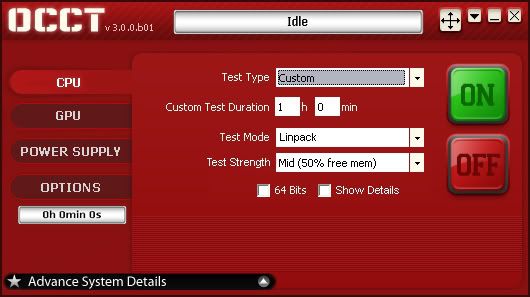
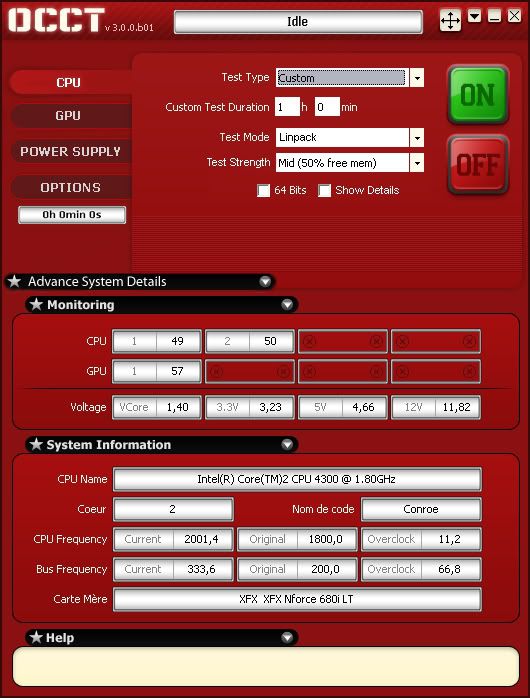
My concept, Rough Draft.
The base image used came from LOE.
My Rig can do EpicFLOPs, Can yours?
Once this baby hits 88 TeraFLOPs, You're going to see some serious $@#%....
Build XT7 is currently active.
Current OS Systems: Windows 10 64bit
just download occt v3.0.0.b07 and when i do the powersupply test my pc goes black and restarts??? im hoping it a bug, how do it test the psu?? and when i say black i mean like pulling the power cord
OCCT launches the GPU test and the CPU test. Also it may be buggy, a bug in OCCT will never impact windows or your computer.
What does that mean ?
If you have a reboot, a BSOD, or a power off : your computer is unstable. It does not come from OCCT. And in the power supply test, which is, again, VERY aggressive, that means your PSU cannot give enough power to your other components.
The PSU test IS hard on your computer, again, beware.
Also we may have bugs in OCCT such as "the test isn't starting" "it's ignoring some parameters", if you have a BSOD, a poweroff, a reboot, or such : you've got a hardware problem.
My advice : do not play too much with this test on your computer. A poweroff usually means "the power supply went on protection mode" to avoid killing itself or other components... More : change your power supply if you want to be sure everything will be fine afterwards.
thanks time to upgrade
Especially since the values i give you (360W crysis, 400W OCCT PSU) are for a dual-core, and you do have a quad-core.
On the values, i expect that OCCT should demand 440W if i had a quad-core... maybe more, i've got no way to deterine exactly without testing.
Sorry that I didn't read previous pages but I think I found sth interesting,
With 8Gb of Ram when on Linpack test I check 64bit and 95% of free memory, OCCT takes maximum 4Gb of ram (Which could take up to 7Gb!)
For me to understand what's goign on, could you do the following :
- Start OCCT
- Launch the 64 bits, 95% free mem Linpack test
- Cancel it
- Navigate in OCCT's folder, and open the file "linOCCT" located in <OCCT>\bin\linpack
- Copy/paste the contents here (open the file with notepad, it's just a plain text file).
With that, i should be able to understand what's going on
Many thanks
After asking around me, i have to say i won't go for it :/
We gain one line of space, but split up the status and time remaining. The place where it is isn't natural at all, and i don't find it consistent either.
Sorry, and thanks for your help
These are the file contents
Code:LinPack Custom Test File (OCCT) Intel(R) LINPACK data 1 21977 21977 65536 4
and 1.76v on the quad
i really like OCCT, way better than prime
Nice work! I'm really liking the GPU test, is stresses my video card to the max, now I know I got a cooling problem with it and will RMA it for sure. I can finally supply some screen shots to EVGA customer support
- ASUS P5E (BIOS 1201+Microcode Update) 400 FSB - Intel E8500@3.8GHZ (1.28750 VCORE) - Thermalright HR120 Extreme - 8GB Corsair PC28500CS (1066 3:4) - 2*2TB Samsung -
- EVGA GTX580 3GB - PCP&C 750W - Antec P-182SE - Plextor PX-760A - Plextor PX-W5224A - Samsung 245T - Razer Mamba - Razer Black Widow Ultimate - Razer Megalodon -
Just tried 3.0.0.b07 GPU test. Ati tray tools showed that only one gpu was utilized (HD3870X2, crossfire enabled under server 2003). Both windowed and full-screen mode were tested.
i5 3570K@ 4.8GHz 1.32v, 32GB Gskill 1866, Gigabyte g1 sniper m3
HD7970@1125/1575 stock voltage
1TB F1+2*128GB Crucial M4
Silverstone 450w, no case
2560*1440@120Hz overclocked catleap
Steelseries G6v2+5600dpi modded logitech trackball
The PSU test is stressing the CPU now, but OCCT now only sees 3 of my 4 cores (1, 2, and 4).
OK, the problem is with OCCT, it only detects 3.6GB of memory. I'll check as soon as possible what's going on... i wonder though.
Windows Server 2003 32 or 64-Bits ?
Did you try making a profile under the ATI driver ? I know you need one to get the SLI working for Nvidia, i don't know about ATI though.
I really have to look at those profiles, i wonder if i can temper with them programmatically without screwing everything.
Too bad i don't have an ATI SLI configuration :/
I hope you mean ATI CrossFire. LOL
And thanks for your response on my previous post. I tested with nVidia 8600GT and it worked flawlessly. Need a 'CUDA enabled driver' from nVidia.
Thanks again. You make me love OCCT more and more...
Any reason why b05 monitors the temp of my 3rd core, but b07 doesn't?


 Reply With Quote


Bookmarks