MMM
Results 1 to 25 of 147

Thread: **OFFICIAL Gigabyte UD3 P45 Yorkfield (45nm Quads) OC and Discussion Thread**

Hybrid View

  1. #1
    Xtreme Member
    Join Date
    Oct 2008
    Posts
    143
    Hi,

    My random q9550 e0 is coming to me by mail - I would be happy to reach 4ghz 24/7 with it.

    Nugzo as you had few M2F and others boards which would you suggest for my target GHz and also easiness of achieving it.

    Ofc all other members opinions are more then welcome.

    Thanks
    q9550 e0 (lapped) - 3.98@1.326v - True Black (lapped + washer mod) + 2x NF-P12
    MF2 - 1802 (washer mod), 2x2 8500 Dominator @1115, Corsair HX 850w
    BFG 216 OCX 710/1480/1240 Acer 2216w, Samsung 40" 1080p,
    Antec P180 + 3x NF-P12, 1TB WD Black + 3x 500GB WD AAKS
    ASUS Xonar D2

  2. #2
    Registered User
    Join Date
    Oct 2008
    Posts
    82
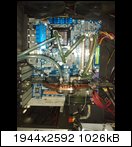
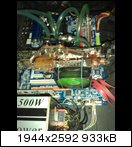
    heres some watercooling Pics from me and my current system settings. FSB 505 along with DDR2-1263 with relaxed timings works fine here. I found Bios F4 to be the most stable and clockable with Quad and this Board. F5A caused BSOD for me. The CPU i have was pretested in a shop with FSB 471 @ 4G on air and i pumped it a little more. I also chatted a long while with the shop owner there and he said he also tested the F4, f4PI and the F5A Bios and the most reliable for Quads is the F4. I will later make a SS with ET6. And i don't know how extend you guys test, i do Prime for like 6h OCCT for 3h as well as 20 runs of the INTELBURNTEST and then i run all synthetic benchmarks i have (3dmark and pcmark stuff, superpi, everest, sandra and some more). After all that is passed i just use the system (surfing gaming benching a lil)and when i dont get a blue screen for some weeks i refeer to this as stable. I just say this cause i know some of you do Prime for days.




    ******Gigabyte EP45 UD3 Template*******

    Q9550 505*8 4050Mhz


    Robust Graphics Booster [Auto]
    CPU Clock Ratio [8]
    Fine CPU Clock Ratio [0]

    **********Clock Chip Control***************

    CPU Host Clock Control [Enabled]
    CPU Host Frequency (Mhz) [500]
    PCI Express Frequency (Mhz) [100]
    C.I.A 2 [Disabled]

    *********Advanced Clock Control**********

    CPU Clock Drive [900mv]
    PCI Express Clock Drive [800mv]
    CPU Clock Skew [0ps]
    MCH Clock Skew [0ps]

    *******DRAM Performance Control********

    Performance Enhance [Turbo]
    Extreme Memory Profile (XMP) [Disabled]
    (G) MCH Frequency Latch [Auto]
    System Memory Multipler [2.00D]
    Memory Frequency [1263]
    DRAM Timing Selectable [Manual]

    CAS Latency Time [6]
    tRCD [6]
    tRP [6]
    tRAS [18]

    *******Advanced Timing Control***********

    tRRD [4]
    tWTR [4]
    tWR [8]
    tRFC [65]
    tRTP [4]
    Command Rate (cmd) [2]


    ***********Motherboard Voltage Control*******

    Load-Line Calibration [Disabled]
    CPU Vcore [1.4000] (1.36 Windows idle, 1,34 Windows load)
    CPU Termination [1.34]
    CPU PLL [1.59]
    CPU Reference [0,83]

    MCH Core [1.4]
    MCH Reference [0,88]
    MCH/DRAM Refernce [0,94]
    ICH I/O [1.55]
    ICH Core [1.05]

    DRAM Voltage [2.3]
    DRAM Termination [0,94]
    Channel A Ref [0,94]
    Channel B Ref [0,94]

    Channel Timing Settings

    Static tRead Value [10]
    tRD Phase0 Adjustment [0]
    tRD Phase1 Adjustment [0]
    tRD Phase2 Adjustment [0]
    tRD Phase3 Adjustment [0]

    tRD 2rd (Differnt Rank) [9]
    tWR 2wr (Differnt Rank) [9]
    tWR 2rd (Differnt Rank) [8]
    tRD 2wr (Same/Difft Rank) [10]

    Dimm 1 Clock Skew Control [Standard]
    Dimm 2 Clock Skew Control [Standard]
    DDR Write Training [Disabled]

    Channel Driving Settings

    Drive Strength Profile [0C-1200]
    Data Driving Pull Up Level [Auto]
    cmd Driving Pull Up Level [Auto]
    ctrl Driving Pull Up Level [Auto]
    clk Driving Pull Up Level [Auto]

    Data Driving Pull Down Level [Auto]
    cmd Driving Pull Down Level [Auto]
    ctrl Driving Pull Down Level [Auto]
    clk Driving Pull Down Level [Auto]

    *****************Advanced BIOS Features*********

    CPU Multithreading [Disabled]
    Limit CPUID Max to 3 [Disabled]
    No-Execute memory Protect [Disabled]
    CPU Enhance Halt (CIE) [Enabled]
    C2/C2E State Support [Disabled]
    C4/C4E State Support [Disabled]
    CPU Thermal Monitor [Disabled]
    CPU EIST Function [Disabled]
    Virtualization Technology [Disabled]
    Last edited by Elektrosadist; 11-01-2008 at 05:45 PM.


    more bandwidth ...

  3. #3
    Xtreme Addict
    Join Date
    May 2005
    Location
    Fayetteville, North Carolina.
    Posts
    1,476
    Quote Originally Posted by Elektrosadist View Post
    heres some watercooling Pics from me and my current system settings. FSB 505 along with DDR2-1263 with relaxed timings works fine here. I found Bios F4 to be the most stable and clockable with Quad and this Board. F5A caused BSOD for me. The CPU i have was pretested in a shop with FSB 471 @ 4G on air and i pumped it a little more. I also chatted a long while with the shop owner there and he said he also tested the F4, f4PI and the F5A Bios and the most reliable for Quads is the F4. I will later make a SS with ET6. And i don't know how extend you guys test, i do Prime for like 6h OCCT for 3h as well as 20 runs of the INTELBURNTEST and then i run all synthetic benchmarks i have (3dmark and pcmark stuff, superpi, everest, sandra and some more). After all that is passed i just use the system (surfing gaming benching a lil)and when i dont get a blue screen for some weeks i refeer to this as stable. I just say this cause i know some of you do Prime for days.


    ******Gigabyte EP45 UD3 Template*******

    Q9550 505*8 4050Mhz


    Robust Graphics Booster [Auto]
    CPU Clock Ratio [8]
    Fine CPU Clock Ratio [0]

    **********Clock Chip Control***************

    CPU Host Clock Control [Enabled]
    CPU Host Frequency (Mhz) [500]
    PCI Express Frequency (Mhz) [100]
    C.I.A 2 [Disabled]

    *********Advanced Clock Control**********

    CPU Clock Drive [900mv]
    PCI Express Clock Drive [800mv]
    CPU Clock Skew [0ps]
    MCH Clock Skew [0ps]

    *******DRAM Performance Control********

    Performance Enhance [Turbo]
    Extreme Memory Profile (XMP) [Disabled]
    (G) MCH Frequency Latch [Auto]
    System Memory Multipler [2.00D]
    Memory Frequency [1263]
    DRAM Timing Selectable [Manual]

    CAS Latency Time [6]
    tRCD [6]
    tRP [6]
    tRAS [18]

    *******Advanced Timing Control***********

    tRRD [4]
    tWTR [4]
    tWR [8]
    tRFC [65]
    tRTP [4]
    Command Rate (cmd) [2]


    ***********Motherboard Voltage Control*******

    Load-Line Calibration [Disabled]
    CPU Vcore [1.4000] (1.36 Windows idle, 1,34 Windows load)
    CPU Termination [1.34]
    CPU PLL [1.59]
    CPU Reference [0,83]

    MCH Core [1.4]
    MCH Reference [0,88]
    MCH/DRAM Refernce [0,94]
    ICH I/O [1.55]
    ICH Core [1.05]

    DRAM Voltage [2.3]
    DRAM Termination [0,94]
    Channel A Ref [0,94]
    Channel B Ref [0,94]

    Channel Timing Settings

    Static tRead Value [10]
    tRD Phase0 Adjustment [0]
    tRD Phase1 Adjustment [0]
    tRD Phase2 Adjustment [0]
    tRD Phase3 Adjustment [0]

    tRD 2rd (Differnt Rank) [9]
    tWR 2wr (Differnt Rank) [9]
    tWR 2rd (Differnt Rank) [8]
    tRD 2wr (Same/Difft Rank) [10]

    Dimm 1 Clock Skew Control [Standard]
    Dimm 2 Clock Skew Control [Standard]
    DDR Write Training [Disabled]

    Channel Driving Settings

    Drive Strength Profile [0C-1200]
    Data Driving Pull Up Level [Auto]
    cmd Driving Pull Up Level [Auto]
    ctrl Driving Pull Up Level [Auto]
    clk Driving Pull Up Level [Auto]

    Data Driving Pull Down Level [Auto]
    cmd Driving Pull Down Level [Auto]
    ctrl Driving Pull Down Level [Auto]
    clk Driving Pull Down Level [Auto]

    *****************Advanced BIOS Features*********

    CPU Multithreading [Disabled]
    Limit CPUID Max to 3 [Disabled]
    No-Execute memory Protect [Disabled]
    CPU Enhance Halt (CIE) [Enabled]
    C2/C2E State Support [Disabled]
    C4/C4E State Support [Disabled]
    CPU Thermal Monitor [Disabled]
    CPU EIST Function [Disabled]
    Virtualization Technology [Disabled]
    Thanks for the detailed info. I will try your settings now. Did you set the CPU reference in the bios or with easytune?
    Last edited by nugzo; 11-01-2008 at 07:22 PM.
    Gigabyte Z68X UD7
    Intel Core i7 2600K (testing)
    16GB Mushkin Redline 17000 2133 1.65v
    EK, 3x120 Rad 2xMCP655
    Acer 1200w PSU
    2-128GB Samsung SSD RAID 0
    2-1TB Seagete 32mb RAID 0
    1-1TB Western Digital
    1- Plextor PX-B320SA Blue Ray
    1- Plextor PX-880SA 24x DVD/RW
    2- EVGA Nvidia GTX-480 SLI
    LG 30", Hanns G 28"

  4. #4
    Xtreme Addict
    Join Date
    May 2005
    Location
    Fayetteville, North Carolina.
    Posts
    1,476
    Quote Originally Posted by seban View Post
    Hi,

    My random q9550 e0 is coming to me by mail - I would be happy to reach 4ghz 24/7 with it.

    Nugzo as you had few M2F and others boards which would you suggest for my target GHz and also easiness of achieving it.

    Ofc all other members opinions are more then welcome.

    Thanks
    Try Elektrosadists Template. Looks to be exactly what u need.
    Gigabyte Z68X UD7
    Intel Core i7 2600K (testing)
    16GB Mushkin Redline 17000 2133 1.65v
    EK, 3x120 Rad 2xMCP655
    Acer 1200w PSU
    2-128GB Samsung SSD RAID 0
    2-1TB Seagete 32mb RAID 0
    1-1TB Western Digital
    1- Plextor PX-B320SA Blue Ray
    1- Plextor PX-880SA 24x DVD/RW
    2- EVGA Nvidia GTX-480 SLI
    LG 30", Hanns G 28"

  5. #5
    Registered User
    Join Date
    Oct 2008
    Posts
    82
    Quote Originally Posted by nugzo View Post
    Try Elektrosadists Template. Looks to be exactly what u need.
    i do all things in bios. I just installed easy tune 6 and now imma confused. Which would be the correct voltages the one in the bios or in easytune. f.e my dram term and ref is at 0,94v but when i open easy tune it says 0,76v. Can anyone confirm this that the board also undervolts the DRAM Ref an DRAM Term v (besides the CPU & RAM v drops)?


    more bandwidth ...

  6. #6
    Xtreme Addict
    Join Date
    May 2005
    Location
    Fayetteville, North Carolina.
    Posts
    1,476
    Quote Originally Posted by Elektrosadist View Post
    i do all things in bios. I just installed easy tune 6 and now imma confused. Which would be the correct voltages the one in the bios or in easytune. f.e my dram term and ref is at 0,94v but when i open easy tune it says 0,76v. Can anyone confirm this that the board also undervolts the DRAM Ref an DRAM Term v (besides the CPU & RAM v drops)?
    i tried to set my dram term and ref in bios as well as cpu&mch ref. wont post for me
    Gigabyte Z68X UD7
    Intel Core i7 2600K (testing)
    16GB Mushkin Redline 17000 2133 1.65v
    EK, 3x120 Rad 2xMCP655
    Acer 1200w PSU
    2-128GB Samsung SSD RAID 0
    2-1TB Seagete 32mb RAID 0
    1-1TB Western Digital
    1- Plextor PX-B320SA Blue Ray
    1- Plextor PX-880SA 24x DVD/RW
    2- EVGA Nvidia GTX-480 SLI
    LG 30", Hanns G 28"

  7. #7
    Registered User
    Join Date
    Oct 2008
    Posts
    82
    ,-(
    well works for me, thats what counts. lol.

    then again my system is slightly different and the cpu differs also in there quality.


    more bandwidth ...

Bookmarks

Bookmarks

Posting Permissions

  • You may not post new threads
  • You may not post replies
  • You may not post attachments
  • You may not edit your posts
  •


