MMM
Results 1 to 23 of 23

Thread: Asus P5QL-EM Overclocking and Memory issue

  1. #1
    Xtreme Enthusiast
    Join Date
    Sep 2007
    Posts
    746

    Asus P5QL-EM Overclocking and Memory issue

    I just switched from a DFI JR P45 T2RS to a Asus P5QL-EM, basically they have the same chipset, P45 variants. I've got 4x1gb DDR2-800 Ballistix, all double sided, all in perfectly good condition. While I was waiting for the Asus, I was using all 4 sticks in an AMD board, an AN-M2. In that system, I can run the memory at DDR2-1000 with 5-5-5-18 timings, 2.14v, or DDR2-800 4-4-4-12 at 2.14v.

    Now, in this new board, the default ram speed is DDR2-800 with 5-5-5-18 timings, I've set the vdimm to 2.15v. If I have 4 sticks installed, the system doesn't POST, instead I hear a beep code, 1 long beep, 2 short. Here is what I have tried:

    Each stick, by itself in each dimm slot - system will POST
    One matched pair installed in either channel(both pairs tested on their own) - system will POST
    All 4 sticks - No POST, beep code.

    So, basically I've confirmed all of the RAM works, but the system refuses to boot if all 4 are installed.
    Last edited by ryboto; 09-27-2008 at 05:19 PM.

  2. #2
    I am Xtreme
    Join Date
    Sep 2006
    Posts
    10,374
    did you up the Nb voltage ? tried relaxed timings for trfc ? newer bios ?
    Question : Why do some overclockers switch into d*ckmode when money is involved

    Remark : They call me Pro Asus Saaya yupp, I agree

  3. #3
    Xtreme Enthusiast
    Join Date
    Sep 2007
    Posts
    746
    Quote Originally Posted by Leeghoofd View Post
    did you up the Nb voltage ? tried relaxed timings for trfc ? newer bios ?
    The default timings are relaxed, they're 5-5-5-18. The bios might not be the newest, there's only one update, but the notes say all they fixed was express gate issues, which I haven't even set up. I'll try upping the Nb voltage and report back.

  4. #4
    Xtreme Enthusiast
    Join Date
    Sep 2007
    Posts
    746
    I upped the vNB to 1.3 up from the "auto", the only other option above that is 1.38v. It still would not boot or POST with 4x1gb installed.

  5. #5
    Xtreme Enthusiast
    Join Date
    Sep 2007
    Posts
    746
    So I tried one more thing. By default Memory remapping is enabled, so I tried disabling it and using 4gb, still, system just beeps. The system works fine with remapping disabled and 2x1gb.

  6. #6
    I am Xtreme
    Join Date
    Sep 2006
    Posts
    10,374
    You memtested each stick seperately ? did you flash the newer bios ?
    Question : Why do some overclockers switch into d*ckmode when money is involved

    Remark : They call me Pro Asus Saaya yupp, I agree

  7. #7
    Xtreme Enthusiast
    Join Date
    Sep 2007
    Posts
    746
    Quote Originally Posted by Leeghoofd View Post
    You memtested each stick seperately ? did you flash the newer bios ?
    As I've stated, all 4 gigabytes of ram were previously working in a different motherboard at DDR2-1000, 5-5-5-18 timings and 2.14v. The system was tested with HCI memtest beyond 6000%, and it was folding with the GPU+CPU 24/7.

    I have flashed the system to the latest BIOS, and I went through all of the same combinations of tests with the RAM, and still, 4x1gb will not boot.

  8. #8
    I am Xtreme
    Join Date
    Sep 2006
    Posts
    10,374
    Because it worked on the other board doesn't mean one stick could have gone bad...just because it posts doesn't mean zilch... I suspect it's an inmature bios but if you don't want to test them one at a time you will never will find out if it's a stick or the mobo... as no newer bios is there (yet)
    Question : Why do some overclockers switch into d*ckmode when money is involved

    Remark : They call me Pro Asus Saaya yupp, I agree

  9. #9
    Xtreme Enthusiast
    Join Date
    Sep 2007
    Posts
    746
    Quote Originally Posted by Leeghoofd View Post
    Because it worked on the other board doesn't mean one stick could have gone bad...just because it posts doesn't mean zilch... I suspect it's an inmature bios but if you don't want to test them one at a time you will never will find out if it's a stick or the mobo... as no newer bios is there (yet)
    All of the sticks were tested as pairs just recently, again, beyond 6000% in HCI's memtest after booting to windows with no programs running. The RAM is perfectly fine. Like I've said, I can use either pair to boot the system, and I can stress either pair with a game, folding, P95, HCI, and the system is stable. Once I put the second pair in, the system doesn't POST. It's not that it boots and shows errors, it wont even POST.

  10. #10
    Xtreme Enthusiast
    Join Date
    Sep 2007
    Posts
    746
    So, in addition to the 4gb issue, I'm curious about overclocking with this board. Here's what I've tried so far,

    I changed the CPU vcore and NB voltage to 1.25 and 1.3v, respectively. I kept the vdimm at 2.15v, and changed the ram divider to 1:1. The ram timings are at 5-5-5-18 and 2T(I've tried all of these settings with 2x1gb and just 1gb installed). These are the only options I have in the BIOS. First I tried for 3.0ghz, so I set the FSB to 375mhz. The system restarts and says "overclock or overvoltage settings failed" or something to that effect. So, I upped the NB vcore to the next higher setting, 1.38, and restarted, but still, the "failed" message is displayed instead of booting to Windows. I tried a lower NB voltage, same result.

    So, I tried for 350mhz FSB. Again, trying all of the same NB voltage settings, the motherboard tells me the OC has failed. So far, I've only been able to go as high as 340FSB, system boots, but Explorer crashed when I got to windows, once it restarted, all of my programs worked, but I didn't stress test anything.

    Now, as I've stated, I know the RAM works, and just today I tested 2 of the sticks with HCI Memtest. They're set at DDR2-1000 with 5-5-5-18 timings and 2.15v. They passed 350% HCI memtest before I stopped the test. They're working at that speed as I type this. I just thought I'd state that to crush any doubts about the RAM. At the overclock settings, the highest speed the RAM would run at is 750mhz.

    My CPU, a Q9400 is listed as compatible with this specific board. Is there anything I can do to improve the overclock?

  11. #11
    Registered User
    Join Date
    Oct 2007
    Posts
    9
    I recently built a PC for my brother and used the ASUS P5QL-EM to take advantage of the built in graphics with DVI output... he is not a gamer. I can confirm that putting 4 chips (double sided) will result in a beeping sound and no POST. I had to go back to the store to return the 4 x 1GB DDR 800 chips and get 2 x 2GB DDR 800 chips since my brother wants a 4 gig machine to run Vista and other softwares. After that I read the manual (or maybe in ASUS' website) and it says something about using single sided chips if you want to use all 4 RAM slots. I can't be sure as this was a couple of weeks ago.

  12. #12
    Xtreme Enthusiast
    Join Date
    Sep 2007
    Posts
    746
    Quote Originally Posted by cyclo View Post
    I recently built a PC for my brother and used the ASUS P5QL-EM to take advantage of the built in graphics with DVI output... he is not a gamer. I can confirm that putting 4 chips (double sided) will result in a beeping sound and no POST. I had to go back to the store to return the 4 x 1GB DDR 800 chips and get 2 x 2GB DDR 800 chips since my brother wants a 4 gig machine to run Vista and other softwares. After that I read the manual (or maybe in ASUS' website) and it says something about using single sided chips if you want to use all 4 RAM slots. I can't be sure as this was a couple of weeks ago.
    What kind of CPU did you put in the board? Did you try to OC at all? RAM issues aside, I really just want this thing to OC, if I have to I can sell these sticks and buy 2x2gb. As I posted, this board will do 340mhz on the FSB, but once I try 350mhz, it just gives me an error that the overclock failed instead of booting to windows.

  13. #13
    Registered User
    Join Date
    Oct 2007
    Posts
    9
    I used a 2.53 Ghz C2Duo with 3 MB Cache. No I did not overclock at all as this was just going to be for my brother who is not into gaming at all.

  14. #14
    Xtreme Enthusiast
    Join Date
    Sep 2007
    Posts
    746
    Quote Originally Posted by cyclo View Post
    I used a 2.53 Ghz C2Duo with 3 MB Cache. No I did not overclock at all as this was just going to be for my brother who is not into gaming at all.
    Hmm, well, I guess I'll probably RMA the board if no one has any ideas.

  15. #15
    I am Xtreme
    Join Date
    Sep 2006
    Posts
    10,374
    Think it's bios related, either you hold on to the board and await a fix or swap it for another type...
    Question : Why do some overclockers switch into d*ckmode when money is involved

    Remark : They call me Pro Asus Saaya yupp, I agree

  16. #16
    Xtreme Enthusiast
    Join Date
    Sep 2007
    Posts
    746
    So, I tried a few things. I set the PCIE clock to 100, just to make sure it wasn't being overclocked. I set the NB voltage to both Auto and 1.388v, CPU voltage to 1.25, and upped the FSB to 350mhz. I also dropped the CPU multiplier to 6x, and memory divider to 1:1. System would not boot at either of the NB voltage settings. Does this imply a CPU or motherboard problem?

    I think you're right, it's probably a BIOS issue, just not sure if I can wait for a fix.

  17. #17
    Xtreme Enthusiast
    Join Date
    Sep 2007
    Posts
    746
    I called Asus, they told me two things, that it's a limitation of the chipset that causes the reduced compatibility with 4 sticks of double sided RAM installed. If I want 4 sticks installed, they have to be single sided. For 8gb that implies I need 2gb single sided sticks. Strange, since their QVL list specifies a few sticks of RAM, made by Apacer, Geil, and G.Skill that are Double sided and supposedly, based on the list, can be used in a 4x2gb configuration. So, it's compatible with specific brands of double sided RAM???

    Second, he said it's a chipset limitation, well, that's a bunch of crap. The P45 isn't limited by this issue, and the G43 is basically a P45 with an integrated video processor(CPU-Z) even identifies it as a P45. So, Asus minimized the compatibility with this board intentionally? I don't get it.

    edit: also, they said that the 1 long 2 short is a memory related beep code, even though it's documented that for an AMI bios, that code means "Failure in video system", but Asus reps were very specific saying "it's an Asus BIOS"...so, I guess I'm just reading wrong when my PC boots up and it says "American Megatrends"...
    Last edited by ryboto; 09-30-2008 at 11:56 AM.

  18. #18
    Xtreme Enthusiast
    Join Date
    Sep 2007
    Posts
    746
    well, I set up an RMA, does anyone have any ideas regarding the overclock, or should I just send it back?

  19. #19
    Xtreme Member
    Join Date
    Sep 2005
    Location
    Blackhole
    Posts
    127
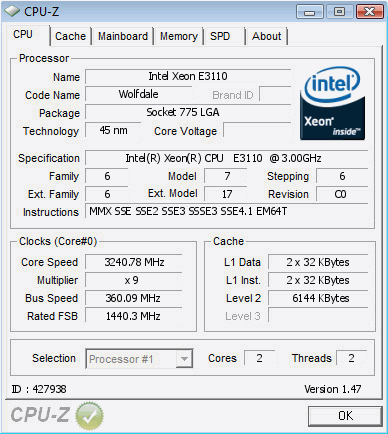
    here is the highest OC ive made so far..


    http://valid.x86-secret.com/show_oc.php?id=427938

    crappy BIOS I would say coz I still believe this board can do more...

    I think this board can run mem at 1200Mhz... ^_^

  20. #20
    I am Xtreme
    Join Date
    Feb 2005
    Location
    SiliCORN Valley
    Posts
    5,543
    ho wmany times are you gunna keep making threads about those 4 fvckin sticks of ram dude, THEY ARENT GUNNA WORK IN THE BOARDS YOUR USING!!!
    sell the damn things and just buy a good set of 2x 2gb for the love of freakin pete.
    "These are the rules. Everybody fights, nobody quits. If you don't do your job I'll kill you myself.
    Welcome to the Roughnecks"

    "Anytime you think I'm being too rough, anytime you think I'm being too tough, anytime you miss-your-mommy, QUIT!
    You sign your 1248, you get your gear, and you take a stroll down washout lane. Do you get me?"

    Heat Ebay Feedback

  21. #21
    Xtreme Enthusiast
    Join Date
    Oct 2004
    Posts
    587
    Depends on the board/bios/ram, 4x1GB and 4x4GB modules have always worked for me on various 650i/680i, P965/P35/P45 boards...

  22. #22
    I am Xtreme
    Join Date
    Sep 2006
    Posts
    10,374
    Hehe Lestat, well if the sticks didn't work in his previous boards (looked through some of the op's earlier posts) it indeed might be a better idea to ditch the ram via Ebay or live with 2Gb...
    Question : Why do some overclockers switch into d*ckmode when money is involved

    Remark : They call me Pro Asus Saaya yupp, I agree

  23. #23
    Registered User
    Join Date
    Dec 2006
    Posts
    19
    A little late

    but I have the same issue regarding overclocking - this board really sucks. With NB at MAX 1,38V and CPU at a 1,35V, the board will not do any further than 345 MHz FSB... on my E6750 with an 8x multiplier, that gives me 12x8=96MHz on top of the 2,666GHz = 2,762GHz - not worth the possible instabilities. I'm using an Arctic Cooling Freezer Extreme, idling at around 35 degrees C and I've got a fan blowing over my mem aswell as the chipset.

    Since the chipset is idling at around the same 35 degrees, the failing or MISSING overclock has nothing to do with the chipset not being fed enough juice or that it gets too hot. The board is plain and simply... I'm thinking... missing NB straps. It could be fixed with a new BIOS, but I doubt ASUS would care too much for that.

    Another issue, the maximum of 2,2425V for the memory... yuck, how could they?!

    Ditch the board and go Phenom II That way you can still use your 1200MHz DDR2 sticks

    If people are having problems relating to overclocking and memory problems, don't let ASUS pin it on you. Instead, when RMA'ing or complaining, just say you're using a set of sticks like G.Skill F2-8500CL5D-2GBPK, as listed in the QVL in the manual page 1-20.

    You're not going to ship ur MEM along with your board for an RMA are you? Sorry ASUS, but that's the way it has to be.

Bookmarks

Bookmarks

Posting Permissions

  • You may not post new threads
  • You may not post replies
  • You may not post attachments
  • You may not edit your posts
  •