MMM
Results 1 to 22 of 22

Thread: Cooler Master Cosmos S Review

  1. #1
    The Doctor Warboy's Avatar
    Join Date
    Oct 2006
    Location
    Kansas City, MO
    Posts
    2,597

    Cooler Master Cosmos S Review

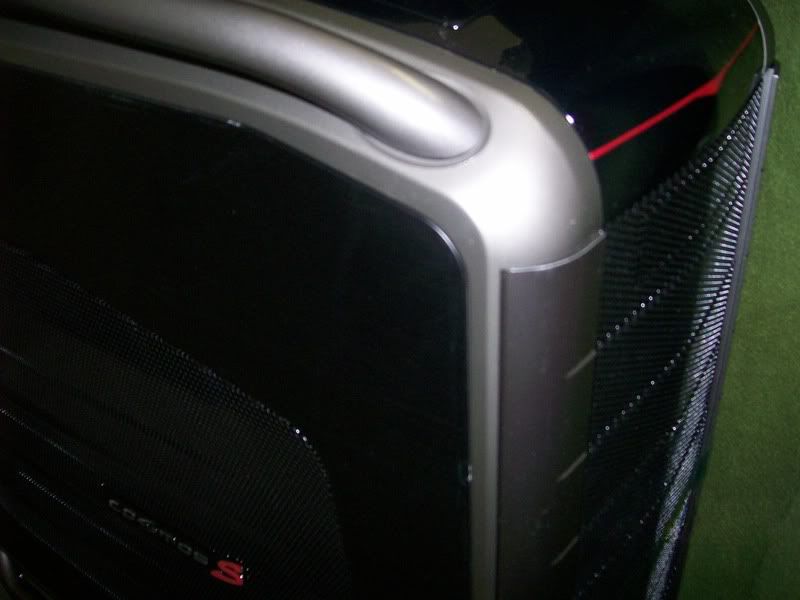
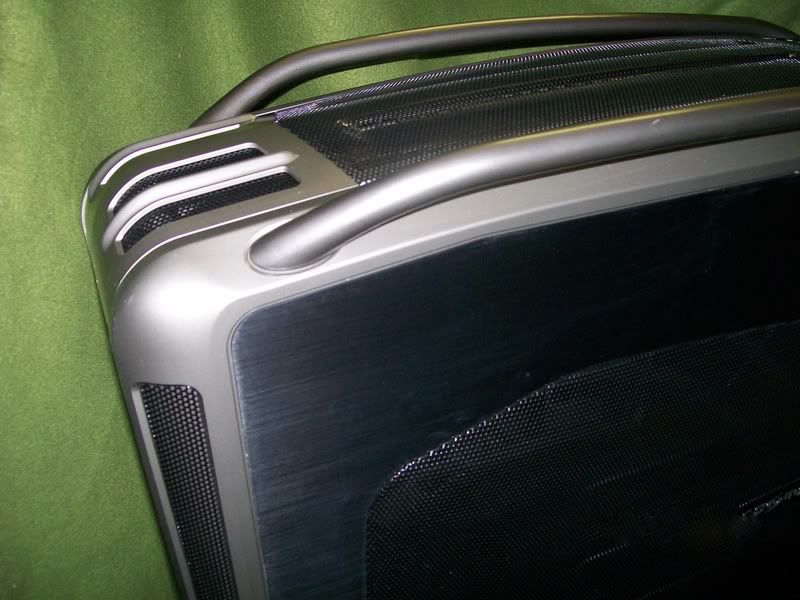
    Cooler Master Cosmos S is a chassis I would believe to be heavily geared towards expert gamers and enthusiast gamers alike. As you will see in this review, there is a lot of potential for this case. From outside the case, it has a semi-carbon fiber look. Mesh style pattern on top, left panel and front bays. The chassis is made out of aluminum, but I would say the case feels more like steel. The handles at the top and bottom of the case are extremely useful, especially when moving the case. The case weighed in at 38lbs when it was shipped. When I got everything installed, the case easily weighed around 55lbs. So these handles at the top made it very easy to lift the case into small spaces.


    As you can see, the Cooler Master Cosmos S has a nice overall look to it. But that cannot be all for this review, as they say. You cannot judge a book by its cover.


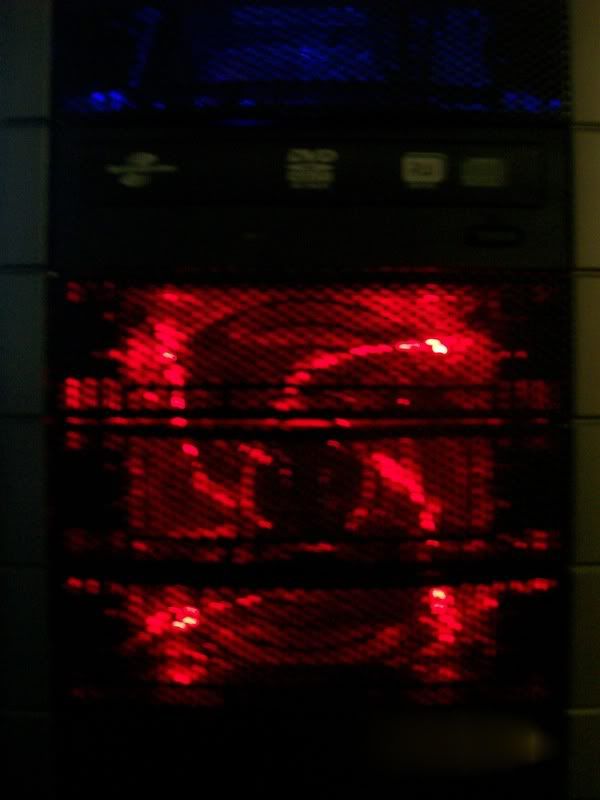
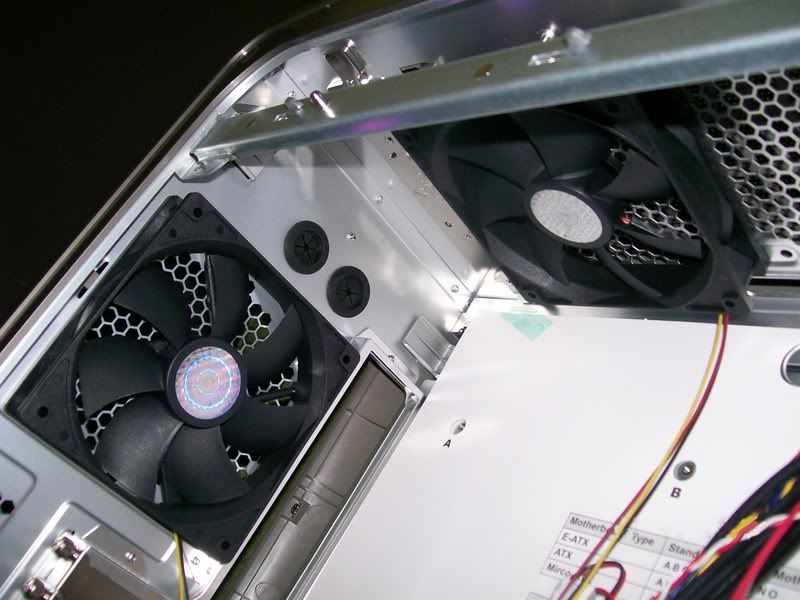
    The inside of the case is the next aspect that I wish to cover in this review. The first thing I have to point out is how much room there is inside when nothing is installed. The first time I opened the case was quiet easy. To open the case I simply pushed a lever up which is located on the back of the case. But anyway, when I started installing hardware into the case, I noticed the general inside features in the case such as the 250mm fan and the three fans that came with it. Two of the fans are plain black fans. The other fan sits in the front-bottom, which you can see from looking at the drive bay area. That fan is clear, when turned on its glows neon red. This is rare because it is hard to find a good red neon fan.


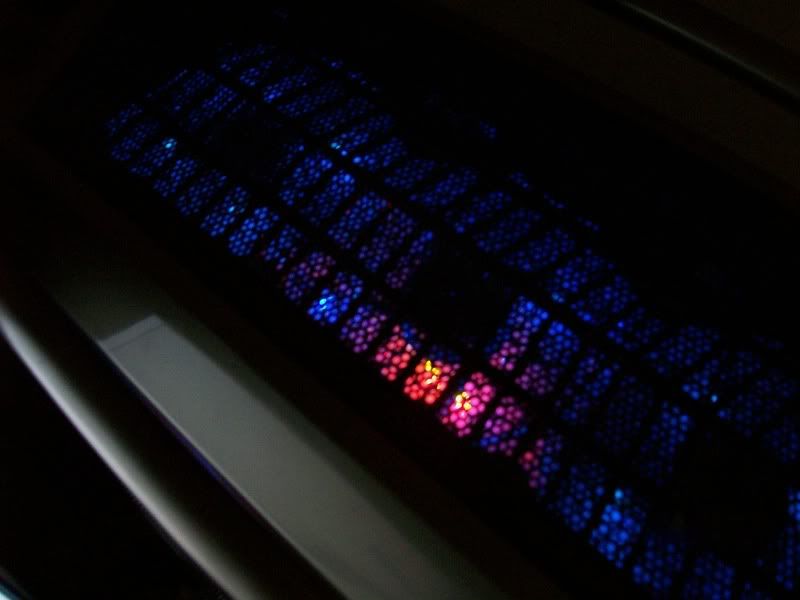
    They say the 250mm fan pushes 150CFM, but it only feels like it’s pushing 60 CFM. The 250mm fan spins at around 940 RPMs. It's not bad, but the other three fans in the case spin at 1200 RPMs from my readings. 1200 RPMs for a 120mm is not adequate for me so I installed my three blue LED fans. Each of those fans runs at 2400 RPMs generating 80 CFM. Since I installed three of my blue LED fans on the top, I moved the plain black fan that was located on the top to the bottom 120mm fan slot at the bottom of the case.


    Next up is I want to show you the inside which I am sort of getting off-topic about.


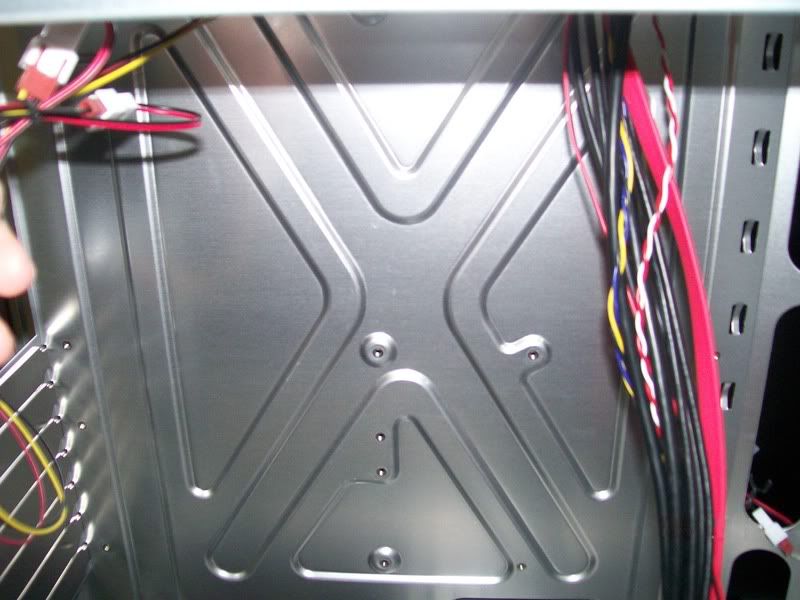
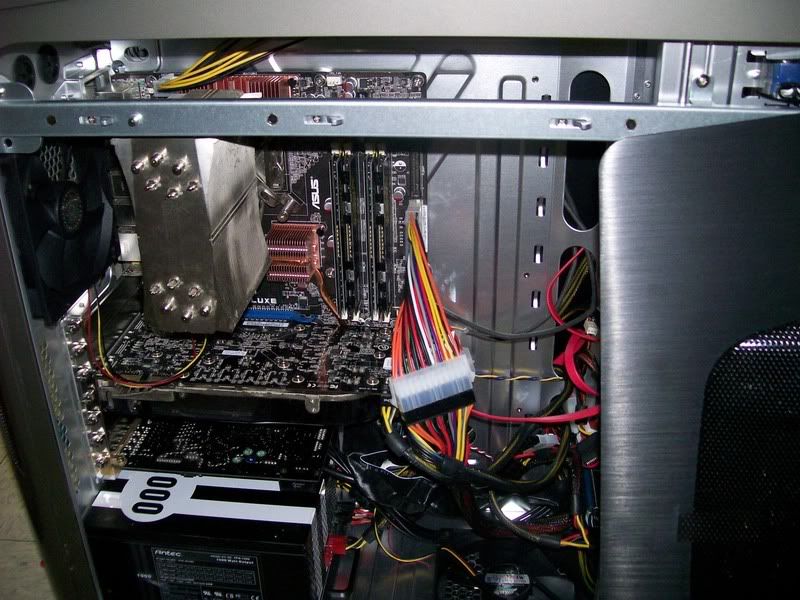
    Motherboard Tray Area.


    Top and rear fans area. Note the water cooling inputs. You won't have to drill new holes if you have an external water cooling system.


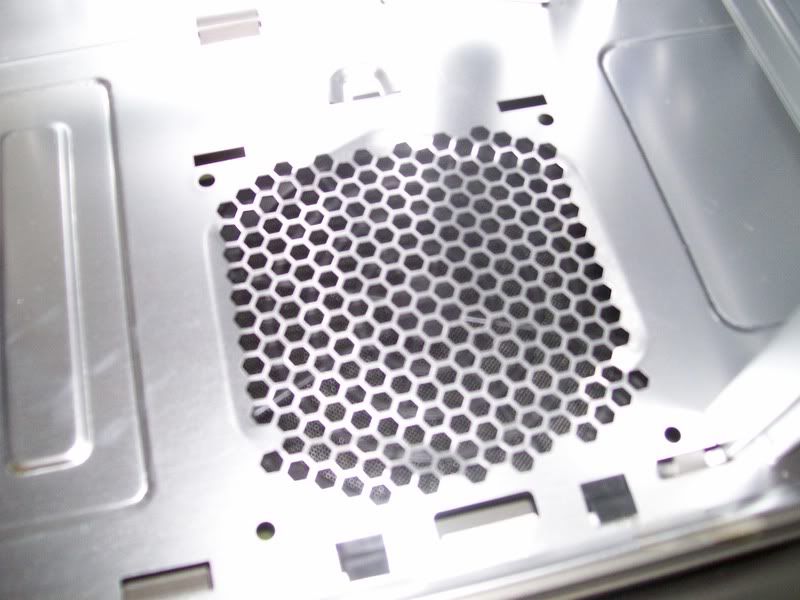
    Far Bottom Fan Area.

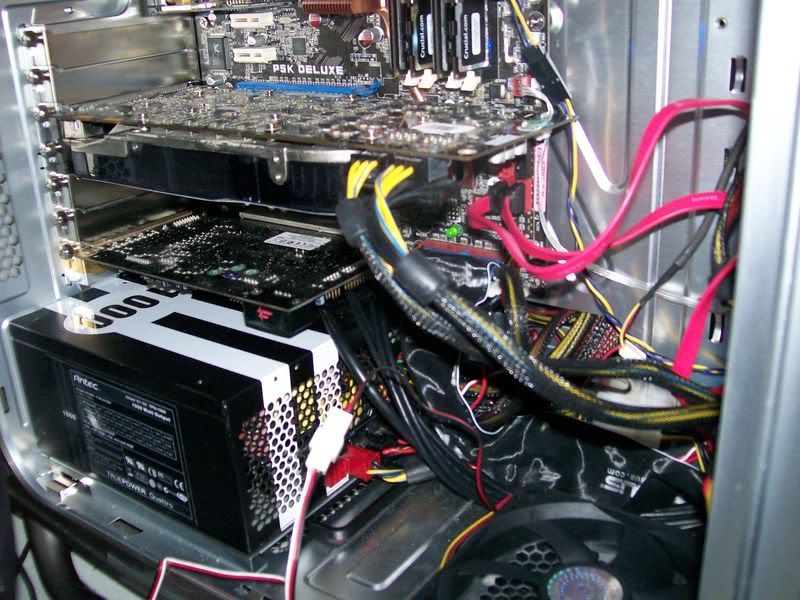
    Now we can move along. From looking at my previous pictures, one can see the cable management. It took me about three hours to put my system together the way I wanted it, while taking adequate pictures and notes. Even after I finished cabling for three hours, I was not satisfied personally with the job I did. Here is how it turned out before.


    No adequate wiring, So I re-tried


    I cleaned it up a little bit, the 24pin connector is no longer hanging down.

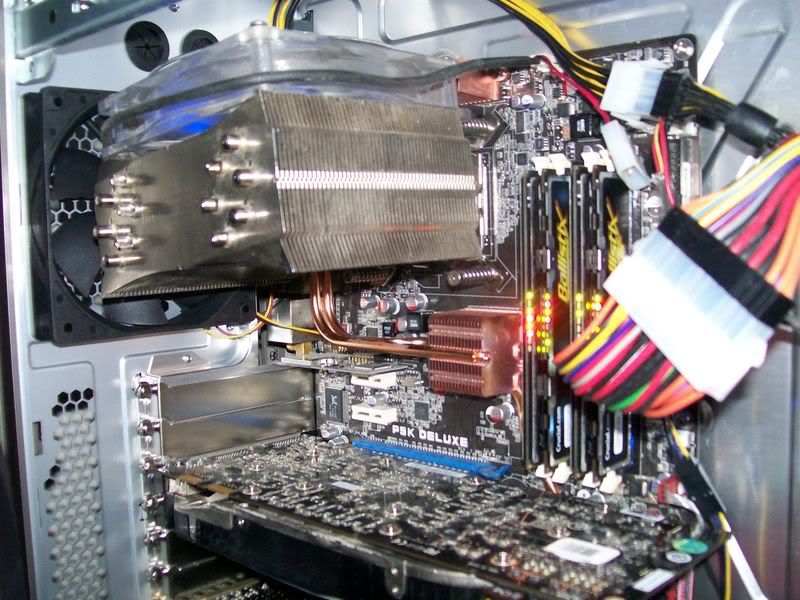
    For such a roomy case, I feel that there can be better cable management techniques executed. I think about a ¼ inch in the right hand side of the case (behind the motherboard tray) would be a lot better. This increase in room would allow for more wires to be tucked away. Also, I had to tweak my Thermalright 120 Extreme to allow the side panel to pop back on easily. So it ended like this.


    If you look at the picture above once, you can see the fan blowing warm air from the CPU back into the case, onto the video card. This might be considered a flaw in the case manufacturing. Air has to be pushed into the case by any means. Let me tell you the hardware listing so you know what we are testing it on.

    CPU: Intel Core 2 Quad Q6600
    Motherboard: ASUS P5K Deluxe WiFi ***
    Memory: Crucial Ballistix Tracers PC2-6400 2GB (Rev1) / PC2-8500 2GB (Rev2)
    Video Card: Nvidia BFG Geforce 8800GTX OC2 (626mhz Core Clock / 1000mhz Memory Clock)
    Sound Card: Creative X-Fi XtremeGamer Professional Fatal1ty Series
    Power Supply: Antec TruePower Quattro 1000W
    Hard Drives: Western Digital 16MB Cache 250GB SATAII , Western digital 200GB IDE
    Reader/Writer: Lite-On LightScribe DVD Burner
    Keyboard: Logitech G15 Gaming Keyboard
    Monitor: Philips Amblight 42” 1080p HDTV
    ***The ASUS Maximus Formula SE could not be used in this review due to Poor Customer Service.

    Now that we have covered the hardware, let’s see how the tests do.


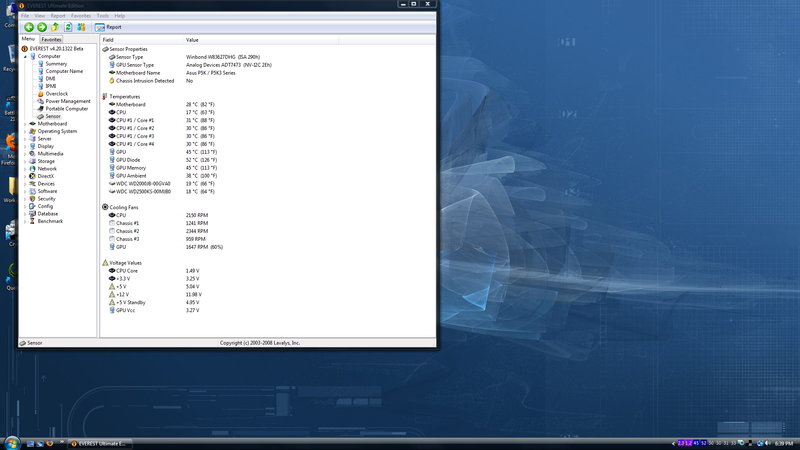
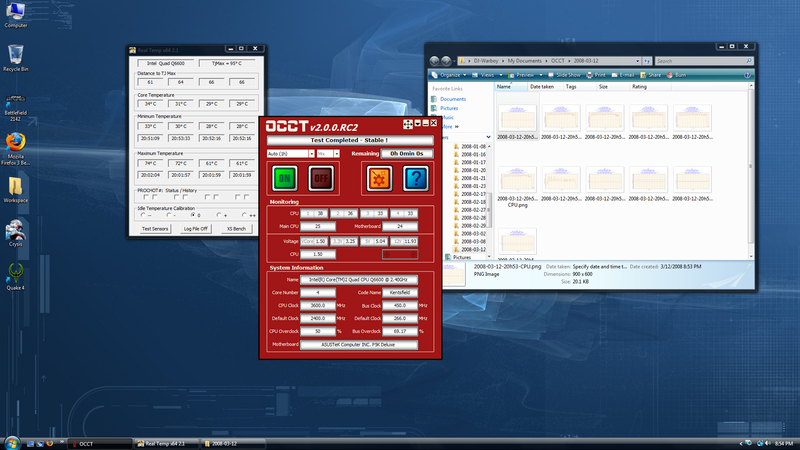
    Fan #1 and Fan #3 are two of the fans in the system, Fan #1 is the rear fan in the case. Fan #3 is the 250mm Fan on the side of the case. The only problem with this is the 120mm is only 1100 rpms here and the 250mm is running at 960 RPMs. As you can also see, my CPU is Idling at 30C when overclocked to 3.6 GHz on 1.5 volts. That is not bad at all. My Previous case was idling at 38C, so an 8C drop when switching to this case. That is not bad for air cooling.


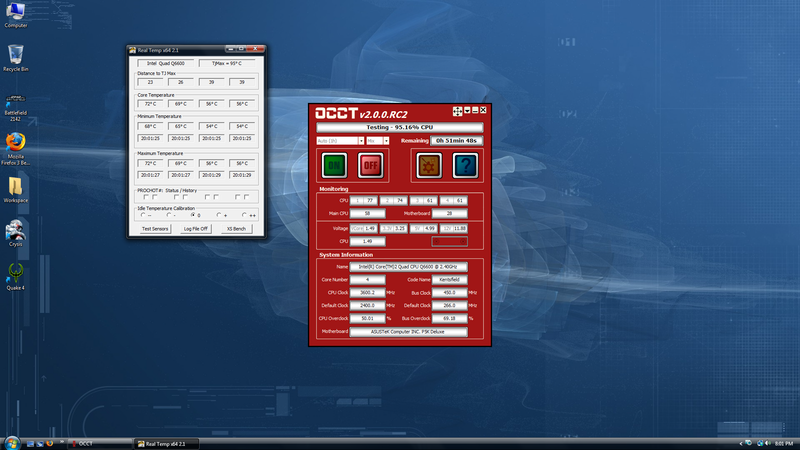
    At the beginning of the stress test, it is staying cool. 70-75C during max load.


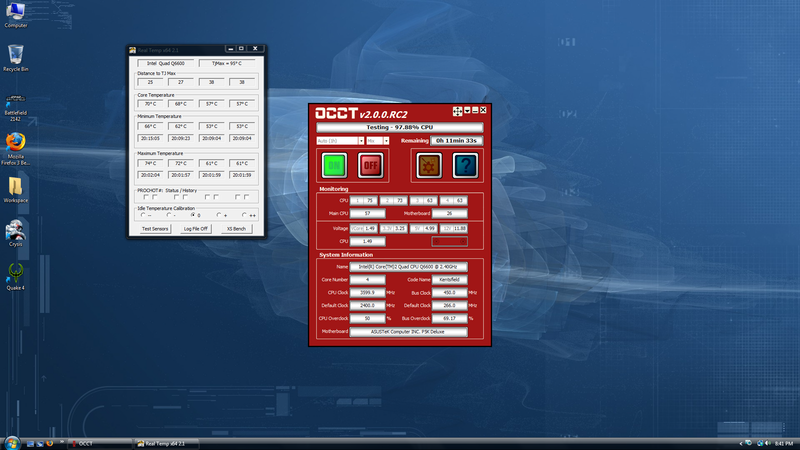
    Near the end of the stress test, Temps are pretty solid.


    Test is in cool down state, and the CPU instantly cooled down to 33-35C. That is pretty good. The cool down rate is excellent. Remember, this is a 64-bit OCCT test in Windows Vista. I am pretty sure it will run a lot cooler in Windows XP under 32-bit. So If it's doing this well with a Quad-Core on Air. It's using 100% of the CPU and maxing out at 70-75C at 1.5125v. Most Games currently that are Multi-threaded only use about 30%-40% of my Quad-Core. So this is excellent case so far for gaming.

    There is one more thing I need to bring up, the top panel on the top of the case. With The Touch Sensitive Power button and the Top Panel door. This thing is packing four USB up front, one eSATA, one Fireware and the headphone and microphone jack. The power button got some getting use to, since I am use to a restart button and a power button that goes *click*. So playing with this Touch Sensitive button was very interesting to say the least. But I still feel the need that there should be a small restart button of some sort. Anyway, that ends the detail part of my review. Now for Grading and scores.


    •Design – 9 out of 10 - Well the design is very good, There is still room for Improvement.
    •Wire Management – 7 out of 10 – Like I said in the Review, I think there should be at least ¼ of an inch more behind the motherboard tray.
    •Cooling – 8 out of 10 – Having a 250mm fan is good, But the Stock 120mm fans only run at 1200 RPMs but they do have a low dB level.
    •Performance – 9 out of 10 – As I stated near the end of the review, it cools very fast and keeps general temps low while under max load, even while overclocked. So you can get maximum gaming performance. no matter what type of cooling you are using.
    •Easy Usage – 7 out of 10 – The wires like I said took me awhile and 2 tries to get even near where I wanted them, the 5 ¼ bays are very easy to remove the covers, but the locking system is totally useless. I tried everything. But I lock them and I can still easily remove the DVD-Burner of mine without trying. Other than that, it’s pretty good. Easy water-cooling design. Easy air cooling design.


    Anyway, that ends my review for now. I made sure I covered everything. I would highly recommend this case for gamers. It has a very sleek design, a very good cooling system and excellent performance. Two weeks from now, I am going to do a follow-up on the case, and see how it does during the test of time.

    Overall Rating – 8 frags out of 10

    Which earns Clan Team Xtreme Approved.


    - By [cTx]Warboy
    Last edited by [cTx]SGT.Viper; 10-08-2008 at 01:30 PM.

  2. #2
    Xtreme Member
    Join Date
    Nov 2007
    Location
    Australia
    Posts
    141
    It is a great looking case and clearly has awesome watercooling potential
    Bit pricey is all..
    Antec 900 case
    Q6600 B3 2.40GHz
    ASUSTek P5K-E/WiFi-AP
    4GB Team Xtreem Dark DDR2 800MHz
    MSI OC Edition NX8800GTX
    Seagate Barracuda 320GB SATAII
    Enermax Infiniti 720W


    Logitech G15 v1
    Razer Copperhead Tempest Blue gaming mouse
    Logitech Z-5500D speakers
    DellE228WFP 22" widescreen LCD


    Swiftech Apogee GTZ
    XSPC RS240 radiator
    Laing D5 Vario

  3. #3
    Xtreme Cruncher
    Join Date
    Jan 2008
    Location
    Canada
    Posts
    360
    nice review i like the look of this case.. except the 250mm on the sidepanel makes it ugly.

    something i didn't understand, could you not mount the true vertically? also, pics of the drive bays and far away shots showing the entire case on all sides would be nice so we can get an overall look at the case.

    nice review and great case, if i didn't just paint my case i would possibly look at picking this up. thanks

  4. #4
    Xtreme Member
    Join Date
    Oct 2006
    Location
    BELGIUM
    Posts
    161
    why would you want to mount the true vertical if you have 3 fans on top ?
    .:: Core i7 920D0 4Ghz :: Gigabyte GA-EX58-UD5 :: OCZ Platinum 3x2GB DDRIII :: Thermalright Ultra-120 eXtreme+Zalman ZM-F3 BL Push/Pull ::.
    .:: Powercolor HD5870 :: LG L226WTQ-SF 22" :: Corsair HX850W :: WD Velociraptor 300GB / Areca Arc-1210 4TB [RAID5] ::.

  5. #5
    Registered User
    Join Date
    Aug 2006
    Location
    Ohio
    Posts
    418
    Thanks for feedback guys.
    We Are Xtreme! Are You?

    Free private ventrilo channels at vent6.gameservers.com port 4672.

  6. #6
    Xtreme Cruncher
    Join Date
    Jan 2008
    Location
    Canada
    Posts
    360
    Quote Originally Posted by DoomSayer View Post
    why would you want to mount the true vertical if you have 3 fans on top ?
    i was referring to when:

    Quote Originally Posted by [cTx]Warboy View Post
    If you look at the picture above once, you can see the fan blowing warm air from the CPU back into the case, onto the video card. This might be considered a flaw in the case manufacturing.
    when mounted horizontally with a fan(s) set to push air downwards, and the top exhaust fans set to either intake or exhaust, the air would heat up all of the components inside of the case. in this configuration the rear exhaust fan would pull a little of the hot air out but the hot cpu air would still largely get recycled back into the case, raising case temp. this is the least optimal setup choice.

    the best choice, imo, would be either of these to:

    - mounted horizontally pushing air towards the top of the case with all 3 top case fans set to exhaust hot air out of the top of the case

    - mounted vertically with the cpu heatsinks fans set to push air towards the rear fan and the rear fan set to exhaust air out the back of the case.

    i personally like the latter because i like the look of a true mounted vertically and i like the shortest possible distance for the hot air to travel to be exhausted out of the case.

    on another note, it looks like it would be hard to mount a dual slotted gfx card on a bottom pcie slot with space for the psu
    Last edited by Gen; 03-18-2008 at 06:02 PM.

  7. #7
    Registered User
    Join Date
    Aug 2006
    Location
    Ohio
    Posts
    418
    Bump
    Last edited by [cTx]SGT.Viper; 04-24-2008 at 11:30 AM.
    We Are Xtreme! Are You?

    Free private ventrilo channels at vent6.gameservers.com port 4672.

  8. #8
    Registered User
    Join Date
    Jan 2008
    Location
    Philadelphia
    Posts
    81
    I am probably going to pick up this very case when I build my PC. Assuming all fan slots are occupied (3 top, 1 rear, 1 bottom, 1 side, 1 front) how should I have the airflow going? Side fan is intake I assume, but not sure the best way to configure the rest.

    Perhaps bottom, front, side as intake; Rear, top x 3 as exhaust?

    Very nice review btw. I had been wondering if the bottom grate had holes to mount a fan, or if it was just a vent. No other site has a good pic of the inside bottom.
    Intel Q9450 @ 8 x 375MHz - Asus P5Q Deluxe bios: 0803
    ASUS HD 4850 - Corsair 4GB DDR2 - WD Caviar 16 640 GB
    Corsair 1000W PSU - Vista Ultimate x64


  9. #9
    The Doctor Warboy's Avatar
    Join Date
    Oct 2006
    Location
    Kansas City, MO
    Posts
    2,597
    I have went though many configs of this case. I swapped out mainly all the stock fans and added replaced high RPM/high CFM fans. Mainly The all the top fans are intake, Rear one is outtake. Bottom is outtake, front is intake, removed the side panel one because it got in the way of my thermalright 120 extreme. I use a outside the case fan, thats 250mm, and about 6000 RPMs and it pushes a lot of high in case my A/C fails.
    My Rig can do EpicFLOPs, Can yours?
    Once this baby hits 88 TeraFLOPs, You're going to see some serious $@#%....

    Build XT7 is currently active.
    Current OS Systems: Windows 10 64bit

  10. #10
    Xtreme Member
    Join Date
    Dec 2007
    Posts
    161
    Was really hung up this case for a long time while deciding on a new build but the more I read about it and other peoples experiences I'm not that impressed.

    My CM690 has better cable management than that, and it doesn't cost CLOSE to what the Cosmos goes for. I love CM but at that price I'd be looking at a 1200 from Antec.

    Nice review thought!

    JM
    Intel Core2 Quad Q9550 @3.3GHz || DFI x48 T3RS DDR3 || Custom Silverstone Black Temjin TJ-07
    Coolermaster Gemini2 (2 120x120x38 Sunon's) Idle-32 Load-46 || 4Gig Patriot Viper DDR3 1333
    Crossfired 4850's || Gigabyte Odin 800W PSU || 500gig SATA || Logitech G9 || Samsung 2232GW

    Initiate Heat Blasters!

    "If I'm lacking in boats, it's cause I'm fearful of the Kraken" -MC Frontalot

  11. #11
    Registered User
    Join Date
    Jul 2008
    Posts
    2
    I couldnt tell what was the position of the front fan (if there was one). It looks like the back fan is blowing out.. the bottom fan is blowing down and the top fan is blowing up.... that seems like the air flow would be counter productive, did you try any variations at all with the fan air flow?

  12. #12
    The Doctor Warboy's Avatar
    Join Date
    Oct 2006
    Location
    Kansas City, MO
    Posts
    2,597
    Quote Originally Posted by [cTxP]Neutralit View Post
    I couldnt tell what was the position of the front fan (if there was one). It looks like the back fan is blowing out.. the bottom fan is blowing down and the top fan is blowing up.... that seems like the air flow would be counter productive, did you try any variations at all with the fan air flow?
    The pictures of the black fans did not stay like that. The blue fans on top are pulling air in, I've recently changed the front fan to Blue and high performance too.

    The back black fan is pulling out, and so is the bottom black fan. Here is the current picture of the case in use.

    http://i31.photobucket.com/albums/c3...y/100_1157.jpg
    http://i31.photobucket.com/albums/c3...y/100_1155.jpg
    My Rig can do EpicFLOPs, Can yours?
    Once this baby hits 88 TeraFLOPs, You're going to see some serious $@#%....

    Build XT7 is currently active.
    Current OS Systems: Windows 10 64bit

  13. #13
    Registered User
    Join Date
    Feb 2008
    Posts
    8
    how you fit the Thermalright 120 Extreme?What have you done?Because i wanted to buy Cosmos S but told me that the Thermalright can't fit in.

  14. #14
    Xtreme Member
    Join Date
    Apr 2008
    Location
    Portugal
    Posts
    119
    This case should soon have a revised side panel that will allow the use of taller coolers like yours or tuniq tower.
    CPU - QX9650 450FSBX8.5@3825 Mhz
    MOBO - Asus Striker II Extreme BIOS 901
    MEMORY - 4GB DDR3 CSX DIABLO 8-8-8-19 2T 1.86V
    GPU - Sapphire HD6950 2GB Dirt 3 *UNLOCKED*
    SOUND - X-FI Extreme gamer
    HDD - 2 x 150GB Raptor´s RAID0 + WD Black 2TB WD2002FAEX[/I]
    CASE - Coolermaster Cosmos S
    PSU - Enermax GALAXY DXX 850W
    OS- Windows 7 64Bit

  15. #15
    The Doctor Warboy's Avatar
    Join Date
    Oct 2006
    Location
    Kansas City, MO
    Posts
    2,597
    I removed the Sidefan.
    My Rig can do EpicFLOPs, Can yours?
    Once this baby hits 88 TeraFLOPs, You're going to see some serious $@#%....

    Build XT7 is currently active.
    Current OS Systems: Windows 10 64bit

  16. #16
    Xtreme Member
    Join Date
    Feb 2008
    Location
    Jakarta, Indonesia
    Posts
    244
    sory for bringing up this thread.

    I just got my cosmos s yesterday, as I finished setup my rig on it, I noticed one thing didn't works correctly. The red light stripe on the very top of the case is supposed to light on right? but mine is not, did I make mistake by wrongly plug the power connector on the mainboard? The case comes with 3 power connector if I not mistake, the 1st one is connected to the 24pin power extended cable, 2nd is HD LED, which I've connected it correctly, and the last one is power switch, which I supposed to connected it to the pwr SW pin on the mainboard right?

  17. #17
    The Doctor Warboy's Avatar
    Join Date
    Oct 2006
    Location
    Kansas City, MO
    Posts
    2,597
    The light strip? the only thing that should like up on it are the LEDs near the USBs on the top, not the red strip. But You can easily mod it to light up.
    My Rig can do EpicFLOPs, Can yours?
    Once this baby hits 88 TeraFLOPs, You're going to see some serious $@#%....

    Build XT7 is currently active.
    Current OS Systems: Windows 10 64bit

  18. #18
    Xtreme Member
    Join Date
    Feb 2008
    Location
    Jakarta, Indonesia
    Posts
    244
    Oh well, i just thought it'll be light on, just like knight rider

  19. #19
    The Doctor Warboy's Avatar
    Join Date
    Oct 2006
    Location
    Kansas City, MO
    Posts
    2,597
    lol

    I'm thinking about modding the side panel and putting a LCD 17" in it.
    My Rig can do EpicFLOPs, Can yours?
    Once this baby hits 88 TeraFLOPs, You're going to see some serious $@#%....

    Build XT7 is currently active.
    Current OS Systems: Windows 10 64bit

  20. #20
    [XG] Xtreme Gamer
    Join Date
    May 2008
    Location
    Upper Peninsula
    Posts
    515
    Quote Originally Posted by Warboy View Post
    lol

    I'm thinking about modding the side panel and putting a LCD 17" in it.
    That would be the Ultimate All in One PC!
    I am Xtreme

  21. #21
    Registered User
    Join Date
    Aug 2007
    Location
    Indonesia
    Posts
    67
    nice review..

    consider to buy to replace my old case..

  22. #22
    The Doctor Warboy's Avatar
    Join Date
    Oct 2006
    Location
    Kansas City, MO
    Posts
    2,597
    Quote Originally Posted by Riggs View Post
    That would be the Ultimate All in One PC!
    yea, it's a good screen. It does 1280x1024 at 75hz, Got it for 30 bucks too.

    But once I get a nice piece of black plastic, plasicy glass and some mounting gear. I can set it up, It will have the Monitor cord popping out one of the PCI/PCIe Slots. and I'm hoping I can pop the power cable out the same way.
    My Rig can do EpicFLOPs, Can yours?
    Once this baby hits 88 TeraFLOPs, You're going to see some serious $@#%....

    Build XT7 is currently active.
    Current OS Systems: Windows 10 64bit

Bookmarks

Bookmarks

Posting Permissions

  • You may not post new threads
  • You may not post replies
  • You may not post attachments
  • You may not edit your posts
  •