MMM
Page 2 of 2 FirstFirst 12
Results 26 to 49 of 49

Thread: Asus P5Q - cheap and good clocker

  1. #26
    Registered User
    Join Date
    Oct 2004
    Posts
    42
    I found a problem that might be the solution to my FSB problems: even at 1.16vNB my NB is so hot that the heatsink on it burns my fingers.
    Added a 120mm (the bigger the better, hahaa) fan and testing if it helps, atleast the heatsink on it feels alot cooler now. Crossing my fingers, running orthos and waiting for my paycheck so that I can buy some proper cooling on that bastard.
    ASUS P5Q, E8400@3995Mhz, Radeon 5870, 2x2gb G-skill 6400 4-4-4-15

  2. #27
    Xtreme Enthusiast
    Join Date
    Mar 2008
    Posts
    750
    Hmm... clocking a E7200 with this is a whole lot of trouble for me. Just can't get more than 475MHz FSB no matter what (maxed out voltage? Not even at x6 multiplier), and Grub wasn't compatible with the BIOS or something... so... a full reinstall had to be done for Windows.

    Worse yet... not even a BIOS flash fixed anything.

    Dual-channel memory works, but not sure how well. May do a benchmark later.

    And before you say it's a RAM issue, the RAM sticks can be clocked to 590MHz just fine. Just not with 1:1 ratio, and not with this E7200. Will throw in a Q9450 next to see if it's a board issue, or a CPU issue. Leaning towards board, since the E7200 could be clocked to 4.5GHz on an ASUS P5E-VM HDMI board.
    Motherboard: ASUS P5Q
    CPU: Intel Core 2 Quad Q9450 @ 3.20GHz (1.07v vCore! )
    RAM: 2GB Kingston HyperX 800MHz
    GPU: MSI Radeon HD 4870 @ 780/1000 (default)

  3. #28
    Registered User
    Join Date
    Oct 2004
    Posts
    42
    Do you get unexplainable lockups at higher FSB settings? Or just errors in Orthos?
    ASUS P5Q, E8400@3995Mhz, Radeon 5870, 2x2gb G-skill 6400 4-4-4-15

  4. #29
    Xtreme Enthusiast
    Join Date
    May 2007
    Location
    There's no place like 127.0.0.1, Brazil
    Posts
    888
    Has anyone tried the new 1004 bios for this mobo?

  5. #30
    Xtreme Enthusiast
    Join Date
    Mar 2008
    Posts
    750
    Quote Originally Posted by janolle View Post
    Do you get unexplainable lockups at higher FSB settings? Or just errors in Orthos?
    Not even booting at past 450.
    Motherboard: ASUS P5Q
    CPU: Intel Core 2 Quad Q9450 @ 3.20GHz (1.07v vCore! )
    RAM: 2GB Kingston HyperX 800MHz
    GPU: MSI Radeon HD 4870 @ 780/1000 (default)

  6. #31
    Xtreme Member
    Join Date
    Jul 2008
    Posts
    435
    Quote Originally Posted by Morais View Post
    Has anyone tried the new 1004 bios for this mobo?
    yea i use v1004, its the best one so far IMO.

  7. #32
    Xtreme Member
    Join Date
    Mar 2008
    Posts
    149
    I flashed to 1004 with one problem
    my q6600 cpu temp. show in bios and with real temp in windows lower than the last bios version 703 with 10 degree
    this wrong reading in temp with this bios version and Q6600 processor why?
    so I reflashing back to 703
    2500K 4.5GHz 1.28v Batch L104A540 / CM hyper 212 Plus / ASRock Z68 Pro3 (1.3 UEFI) / Geil EVO Two 2x2 1600C8@1866c9 1.6v / COUGAR CM 700W+ Haf 932

  8. #33
    Xtreme Member
    Join Date
    Jul 2008
    Posts
    435
    Quote Originally Posted by hema View Post
    I flashed to 1004 with one problem
    my q6600 cpu temp. show in bios and with real temp in windows lower than the last bios version 703 with 10 degree
    this wrong reading in temp with this bios version and Q6600 processor why?
    so I reflashing back to 703
    please explain to me how you know which one is wrong?
    or if any of them is right?

  9. #34
    Registered User
    Join Date
    Oct 2004
    Posts
    42
    This board is wierd: I have to run at PL8 for stability on over 400mhz fsb.Anything higher will hard crash eventually and anything lower just won't boot. This happens with bios version 1102, is the 1004 a later version?
    ASUS P5Q, E8400@3995Mhz, Radeon 5870, 2x2gb G-skill 6400 4-4-4-15

  10. #35
    Xtreme Member
    Join Date
    Aug 2006
    Posts
    169
    Avoid 1004 at all costs. With the new bios I can not get back to 4.0 on my E8400 no matter what I try. On 703 I could easily do 4.3 on air. My 24/7 was 4.0 at 1.33 volts. Now 4.0 is a no go. I am tired so i will flash back tomorrow.

  11. #36
    Banned
    Join Date
    May 2008
    Location
    vermont, yes i like women
    Posts
    1,319
    so glad I changed my mind about sticking to asus with my P45 board. gonna either get biostar or gigabyte, leaning towards gigabyte.

  12. #37
    Xtreme Member
    Join Date
    Jul 2008
    Posts
    435
    Quote Originally Posted by ProStreetCamaro View Post
    Avoid 1004 at all costs. With the new bios I can not get back to 4.0 on my E8400 no matter what I try. On 703 I could easily do 4.3 on air. My 24/7 was 4.0 at 1.33 volts. Now 4.0 is a no go. I am tired so i will flash back tomorrow.
    dont give up so fast. 1004 is very different from 703 and may require slightly different settings and voltages.

    if using nbs400 before try nbs333 now, or vise verse.
    cpu management: optimum ...seems to get me the highest fsb

    etc

    HTH

  13. #38
    Xtreme Member
    Join Date
    Aug 2006
    Posts
    169
    Quote Originally Posted by ThugsRook View Post
    dont give up so fast. 1004 is very different from 703 and may require slightly different settings and voltages.

    if using nbs400 before try nbs333 now, or vise verse.
    cpu management: optimum ...seems to get me the highest fsb

    etc

    HTH


    Thanks for the tips I will give it a shot when i get home from work.

  14. #39
    Xtreme Enthusiast
    Join Date
    Mar 2008
    Posts
    750
    Okay... never mind. Threw a Q9450 in, and booted right into 495MHz (495 x 8. Approx. 3.80GHz or so). Guess the BIOS just couldn't handle E7200.

    By the way, BIOS is 0506.

    Update: Q9450 3.20GHz (400 x 8) at 1.12v stable...
    Last edited by RunawayPrisoner; 08-04-2008 at 10:57 PM.
    Motherboard: ASUS P5Q
    CPU: Intel Core 2 Quad Q9450 @ 3.20GHz (1.07v vCore! )
    RAM: 2GB Kingston HyperX 800MHz
    GPU: MSI Radeon HD 4870 @ 780/1000 (default)

  15. #40
    I am Xtreme
    Join Date
    Sep 2006
    Posts
    10,374
    Quote Originally Posted by philbrown23 View Post
    so glad I changed my mind about sticking to asus with my P45 board. gonna either get biostar or gigabyte, leaning towards gigabyte.
    How can you compare a budget board like the P5Q with the P45 DQ6 you are getting... total different ballpark here... will be interesting to see ya test on that board and compare it with the E or Dlx version...

    Total useless post to me....
    Question : Why do some overclockers switch into d*ckmode when money is involved

    Remark : They call me Pro Asus Saaya yupp, I agree

  16. #41
    Xtreme Member
    Join Date
    Jul 2008
    Posts
    435
    im not seeing the plain P5Q doing any better or worse than any of the other P45 boards. for a so called "budget board" it holds its own quite well. the only thing budget about the P5Q is the 1x PCI-E.

    yes the bios is a complete PITA, but it does run.

  17. #42
    Xtreme Member
    Join Date
    Aug 2006
    Posts
    169
    Quote Originally Posted by Leeghoofd View Post
    How can you compare a budget board like the P5Q with the P45 DQ6 you are getting... total different ballpark here... will be interesting to see ya test on that board and compare it with the E or Dlx version...

    Total useless post to me....

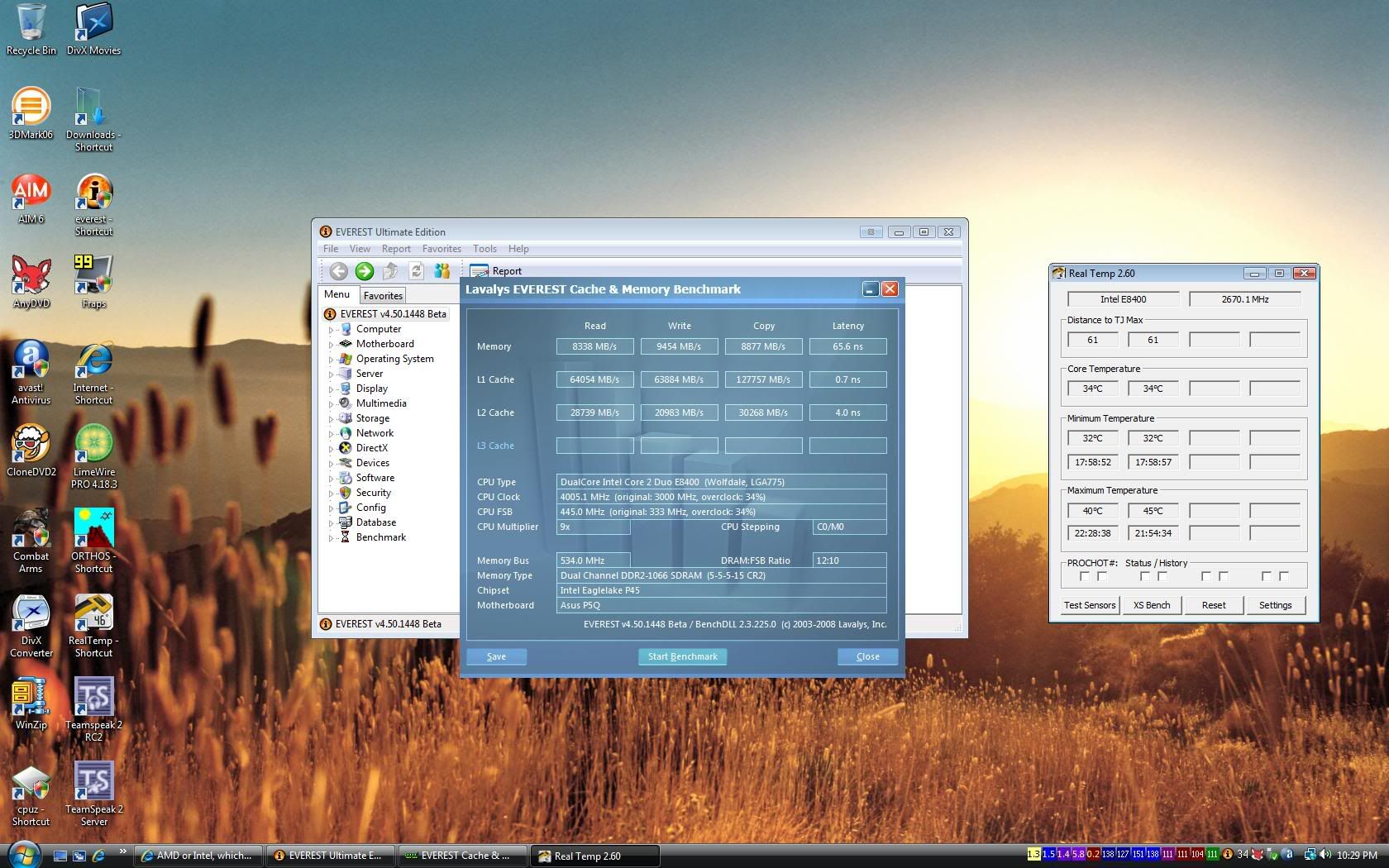
    I agree. The P5Q is simply a great board for the price. My system runs my E8400 at 4.3 stable with a little more vcore. I dont see it doing any better on any other board.

    Here is 4.0 on the P5Q. This litteraly took nothing to acheive. 3rd boot ever on this chip and board get me 4.0.


  18. #43
    Xtreme Enthusiast
    Join Date
    May 2007
    Location
    There's no place like 127.0.0.1, Brazil
    Posts
    888
    New Asus P5Q BIOS: 1104

  19. #44
    Registered User
    Join Date
    Nov 2007
    Location
    Slovakia
    Posts
    39
    One thing i cannt find out clearly... Does this board obtain Raid support ? what SB IHC10R ?
    Foto: Canon 40D+BG2N | Canon 17-55 F2.8 | Canon 100

    PC1: CPU: Intel™ Dual-Core E5200@ 3.6GHz, 1.368V cooled by: Noctua NH-U12P || MOBO: Asus P5Q Pro cooled by: Noctua NC-U6|| GFX: Gigabyte 8800GT Special Edition GPU:700/1650/950 cooled by: AC Accelero S1 rev. 2 + 2x AC fan || RAM: 2x 1GB A-Data EE 800+ HDD: WD 640GB AAKS || SS: Creative X-Fi Audio & Genius 5+1 || PSU: Corsair VX 450 || CONTROLLER: Evercool SCP-A || OS: Windows XP SP2 || CASE: Thermaltake Soprano RS 101

    PC2: homePC: CPU: Intel™ Dual-Core E2160@3GHz @ 3GHz, 1.344V || MOBO: Gigabyte P35-DS3, rev.2 @ 334FSB/1336MHz || GFX: MSI 8800GT OC Edition GPU:660 SHD:1650 RAM:950 cooled by: AC Accelero S1 rev. 2 + 2x AC fan || RAM: GooDRam 2x 1GB DDR2 800MHz 5-5-5-18 -> najhorsie ramky na svete. HDD: Maxtor 300GB SATAII HDD by AC fan || PSU: Forton 400W 12v-18A, active PFC || OS: Windows XP SP2 || Case from 1999

  20. #45
    I am Xtreme Ket's Avatar
    Join Date
    Apr 2004
    Location
    United Kingdom
    Posts
    6,822
    +1 for a fantastic board from Asus. Can't say I like the plain P5Q much, but from the Pro onwards look up and the sky is the limit

    "Prowler"
    X570 Tomahawk | R7 3700X | 2x16GB Klevv BoltX @ 3600MHz CL18 | Powercolor 6800XT Red Devil | Xonar DX 7.1 | 2TB Barracuda | 256GB & 512GB Asgard NVMe drives | 2x DVD & Blu-Ray opticals | EVGA Supernova 1000w G2

    Cooling:

    6x 140mm LED fans, 1x 200mm LED fan | Modified CoolerMaster Masterliquid 240

    Asrock Z77 thread! | Asrock Z77 Extreme6 Review | Asrock P67 Extreme4 Review | Asrock P67 Extreme4/6 Pro3 thread | Asrock Z68 Extreme4 thread | Asrock Z68 Extreme4 Review | Asrock Z68 Gen3 Thread | 8GB G-Skill review | TK 2.ZERO homepage | P5Q series mBIOS thread
    Modded X570 Aorus UEFIs

  21. #46
    Xtreme Member
    Join Date
    Apr 2005
    Location
    www.vmodtech.com,Thailand
    Posts
    165
    Please tell me It has OV_nb jumper or not?

  22. #47
    Xtreme Member
    Join Date
    Jul 2008
    Posts
    435
    Quote Originally Posted by Venom-Crusher View Post
    Please tell me It has OV_nb jumper or not?
    yes, OV_NB and OV_CPU jumpers are on the board.

  23. #48
    Registered User
    Join Date
    Apr 2008
    Location
    Estonia
    Posts
    41
    can someone tell where P5Q vcore measure point?

    E: soon will buy E8500 and will see what max fsb on this board
    Last edited by Mask; 10-06-2008 at 05:31 AM.

  24. #49
    Xtreme Member
    Join Date
    Mar 2008
    Posts
    149
    any one try 1406 bios version
    any feedback
    2500K 4.5GHz 1.28v Batch L104A540 / CM hyper 212 Plus / ASRock Z68 Pro3 (1.3 UEFI) / Geil EVO Two 2x2 1600C8@1866c9 1.6v / COUGAR CM 700W+ Haf 932

Page 2 of 2 FirstFirst 12

Bookmarks

Bookmarks

Posting Permissions

  • You may not post new threads
  • You may not post replies
  • You may not post attachments
  • You may not edit your posts
  •