MMM
Results 1 to 18 of 18

Thread: Asus EAH4870X2 & Rampage Extreme AIR

  1. #1
    Xtremely Addicted
    Join Date
    Dec 2004
    Location
    NL
    Posts
    2,471

    Asus EAH4870X2 & Rampage Extreme AIR

    Got me new card today Asus EAH4870X2 750/900 stock.


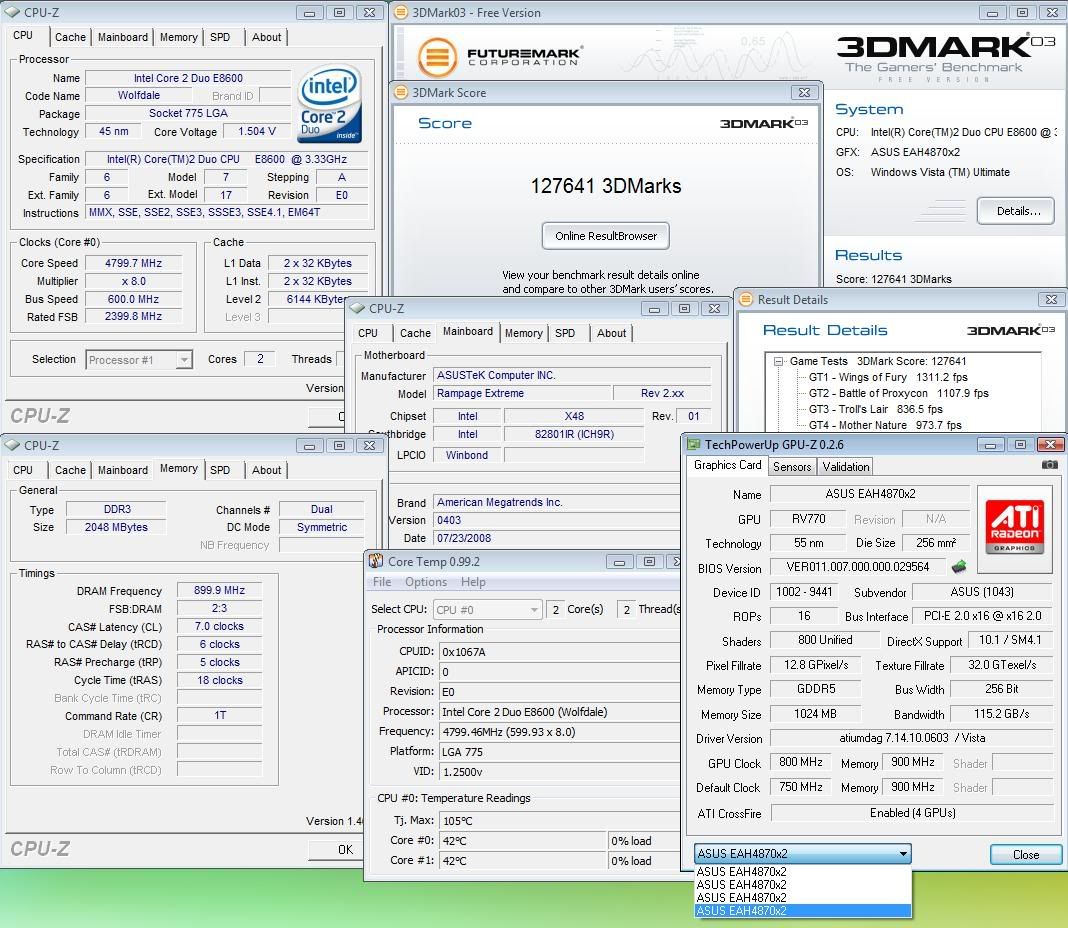
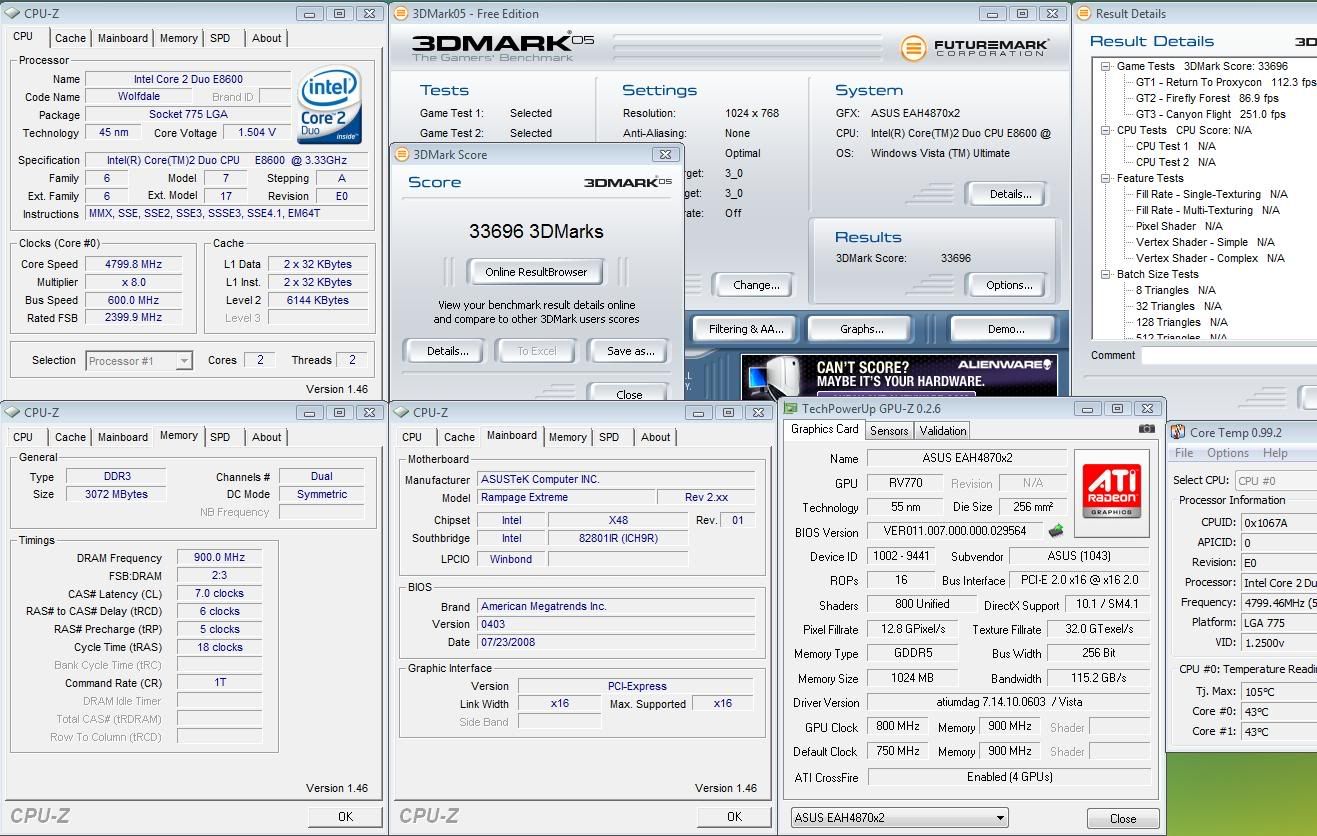
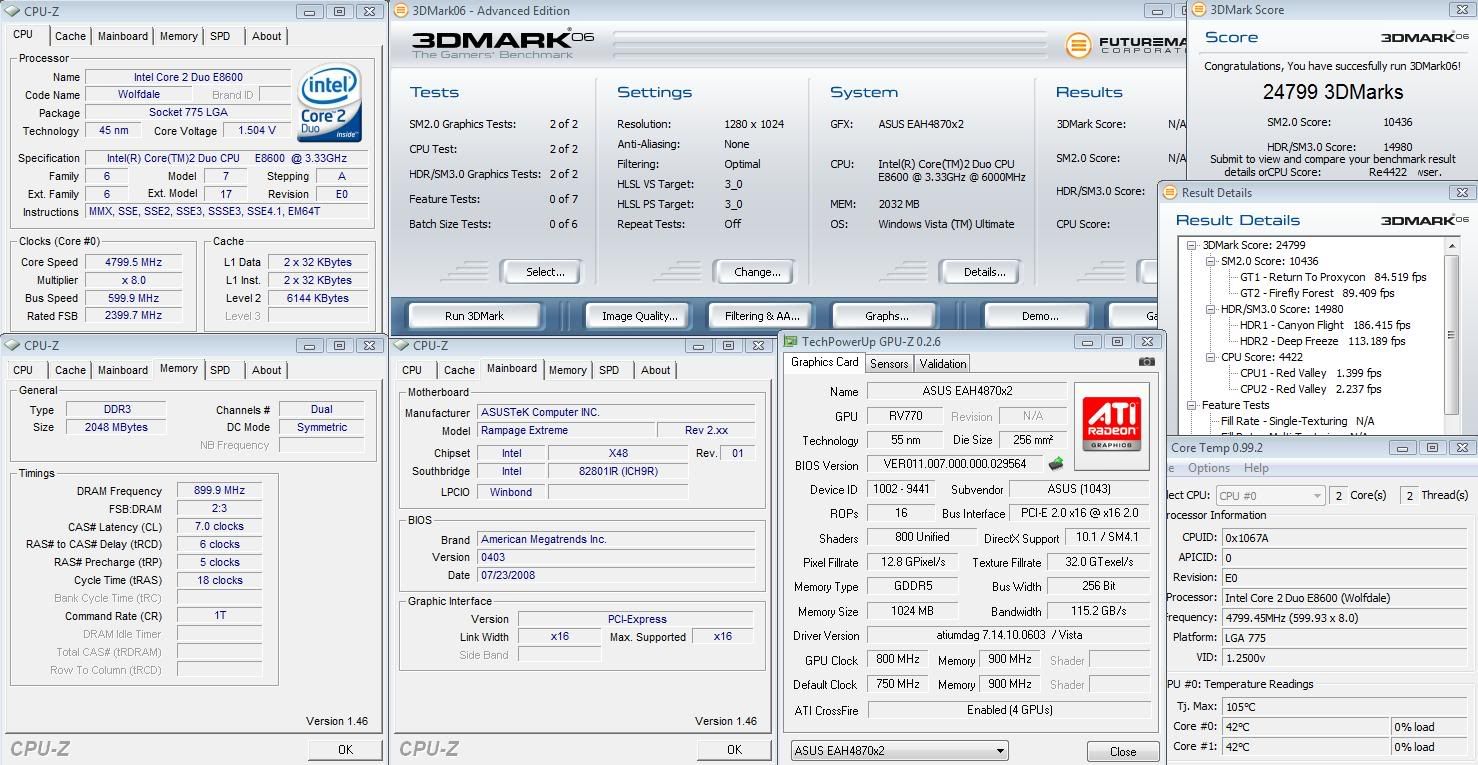
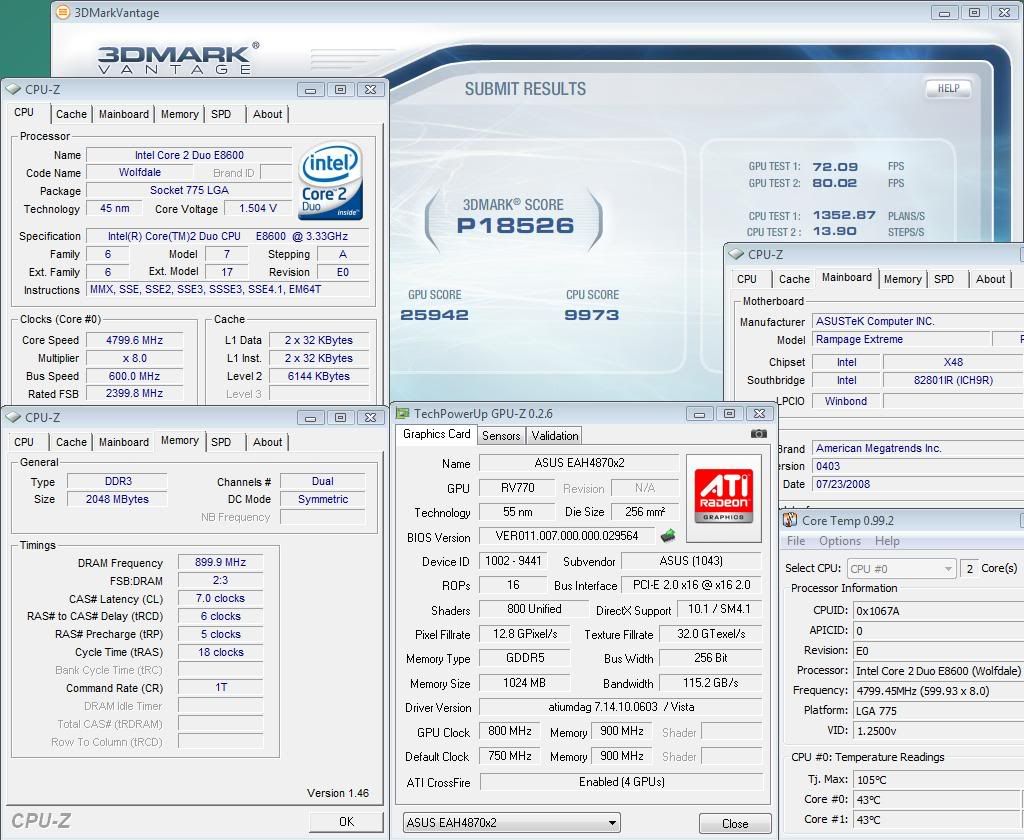
    With stock bios max in CCC overdrive is 800/1000. AMD GPU Tool (0.9.8) wil go higher. Vista Ultimate 32b no worries, just open AMD GPU tool, set clocks for core 1&2 and all is fine. XP not so easy though (although it could be me ) With XP on second core i keep getting error when save new clocks. Till now i can only use GPU tool in XP if i set 800/xxx from CCC first, run a 3D test (CL or Nature or whatever) then open GPU tool and set clocks over 800.... Some RPM for fan would be nice

    Max CCC default:


    AMD GPU tool 810/900:


    3Dmarks 800/900 44& 4500mhz CPU:


    Last edited by Viss; 08-13-2008 at 02:32 PM.

  2. #2
    Xtreme Member
    Join Date
    Jun 2008
    Location
    Walnut, CA
    Posts
    125
    WHERE did you buy the ASUS version?!?!?!
    - It took God 7 days to create earth because he was rendering with Radiosity, Raytraced Shadows and Caustics.

  3. #3
    ODOC
    Join Date
    Aug 2006
    Location
    Copenhagen - Denmark
    Posts
    2,189
    Thanks for posting

  4. #4
    Xtreme Enthusiast
    Join Date
    May 2006
    Location
    UK
    Posts
    706
    thanks loco always good interesting posts from you


  5. #5
    Registered User
    Join Date
    Apr 2006
    Posts
    83

    nb cooler?

    Since you are running air (good choice on the CPU cooler, the Thermalright Ultra 120 Ultra is still the best air cooler and the 120 is just behind it) what did you use for the NB heatsink since the board was designed for water?

    I'm considering one of these boards myself.

    Also, does the Ultra 120 fit blowing out the case?
    Last edited by fps_dean; 08-18-2008 at 07:54 AM.

  6. #6
    ODOC
    Join Date
    Aug 2006
    Location
    Copenhagen - Denmark
    Posts
    2,189
    He use the non water option, which is dorable also, have a look at the hs at nb one time more

  7. #7
    Registered User
    Join Date
    Apr 2006
    Posts
    83
    Quote Originally Posted by Oliver View Post

    He use the non water option, which is dorable also, have a look at the hs at nb one time more
    Oh it ships with an NB cooler for air?

    The review I just read did not mention it...

    Is this worth the $30 over the P5E3 Premium would you say? (P5E3 Premium is also a tested motherboard)... considering this, is either going to be a 790i and crash every 30 seconds?

  8. #8
    Turkey Man
    Join Date
    Mar 2005
    Location
    Jakarta (ex-Australia)
    Posts
    2,560
    3D section, please go elsewhere with your motherboard questions Try the intel section.

    Nice loc.o - looking forward to more helpful tips on clocking it.

  9. #9
    Xtremely Addicted
    Join Date
    Dec 2004
    Location
    NL
    Posts
    2,471
    Quote Originally Posted by fps_dean View Post
    Oh it ships with an NB cooler for air?

    The review I just read did not mention it...

    Is this worth the $30 over the P5E3 Premium would you say? (P5E3 Premium is also a tested motherboard)... considering this, is either going to be a 790i and crash every 30 seconds?
    Dont really get the 790i part. You can use the block without water to cool NB easy obviously. I have not played with P5E3 unfortunately however i hear nothing but good things about it so if its worth $30 i really cannot tell...

    Thanks T_M, just got back home and brought the card a little sister Hope to be able to run 3D again tonight.

  10. #10
    Registered User
    Join Date
    Apr 2006
    Posts
    83
    Quote Originally Posted by loc.o View Post
    Dont really get the 790i part. You can use the block without water to cool NB easy obviously. I have not played with P5E3 unfortunately however i hear nothing but good things about it so if its worth $30 i really cannot tell...

    Thanks T_M, just got back home and brought the card a little sister Hope to be able to run 3D again tonight.
    Thanks. I think I'm going with this board instead, unless I get a really good deal on a P5E3 Premium.

    What I meant by the 790i is that most of the people to purchase a 790i motherboard have constant freezing problems due to major design flaw in the chipset.

    How's the 4870x2 treating you?

    I was thinking of Crossfiring 2 4870s (ultimately the same thing), but the only reason I haven't done it yet is because I am waiting for the Iceq models, but if they don't come out soon then I'll go with something else.

  11. #11
    Xtremely Addicted
    Join Date
    Dec 2004
    Location
    NL
    Posts
    2,471
    Crossfire 800/900 air. Need a tool to adjust fanspeed on both cards. Smartdoctor only sets rpm on 1 of them. cannot do wire mod, 100% all the time is too loud Me game OS with 0 tweaks:

    Asus Rampage Extreme 0403
    E8600 Q820A597 with TRUE
    EAH 4870X2 CFX stock air
    OCZ 12800
    PC P&C 1200


    F1 EE arrived today, wil be on holiday next week but after that i will try to join the illustrious 6ghz 3D club
    Last edited by Viss; 08-20-2008 at 12:41 PM.

  12. #12
    Xtreme Member
    Join Date
    Dec 2007
    Location
    France
    Posts
    161
    loc.o if you unplug the blue wire of each fan, fans will work @100%

  13. #13
    Xtreme Addict
    Join Date
    Jan 2008
    Posts
    1,463


    http://img.photobucket.com/albums/v2...-900127641.jpg

    Loco, you have my dream PC

    E8600 4.8Ghz [I dreamed 4.7G]

    R700 CFX 800/3600 [my dream rig is 800/4400]

    X48

    Nice SETUP AND AWESOME PICS!!!!!!! Please tell me you're about to do some 8XAA 30" gaming now?

    Edit: Rv770 w/gddr5 performs higher with oc'd memory vs. oc'd core.
    Bring... bring the amber lamps.
    [SIGPIC][/SIGPIC]

  14. #14
    Xtremely Addicted
    Join Date
    Dec 2004
    Location
    NL
    Posts
    2,471
    Quote Originally Posted by marmott View Post
    loc.o if you unplug the blue wire of each fan, fans will work @100%
    Thanks buddy i know however 100% al the time as a bit too loud. Ok for 3DMark but when gaming or browsing id prefer a bit less Rather sure ive read something about a prog that can adjust both fans but cant find it at the moment.

    Quote Originally Posted by jaredpace View Post


    Loco, you have my dream PC. E8600 4.8Ghz [I dreamed 4.7G]. R700 CFX 800/3600 [my dream rig is 800/4400]

    X48

    Nice SETUP AND AWESOME PICS!!!!!!! Please tell me you're about to do some 8XAA 30" gaming now?

    Edit: Rv770 w/gddr5 performs higher with oc'd memory vs. oc'd core.
    Thanks but im afraid 1 card has to be back at Asus soon so its not really mine These hynix gddr5 wil only do 1100 in dreams, it doesnt OC very wel. I dont game that often, when i have time i play COD4 on a 22" screen
    Last edited by Viss; 08-20-2008 at 01:36 PM.

  15. #15
    Memory Addict
    Join Date
    Aug 2002
    Location
    Brisbane, Australia
    Posts
    11,651
    sweet clocks there mate.. shame you have to send the card back heh
    ---

  16. #16
    OCTeamHungary™
    Join Date
    Sep 2006
    Location
    Hungary
    Posts
    509
    nice clocks m8, really great job with great stuffs!

    as i see you didn't take too much rest from you arrival back to home

  17. #17
    Xtreme Enthusiast
    Join Date
    Feb 2004
    Location
    Thousand Oaks, CA
    Posts
    574
    Quote Originally Posted by loc.o View Post
    Crossfire 800/900 air. Need a tool to adjust fanspeed on both cards. Smartdoctor only sets rpm on 1 of them. cannot do wire mod, 100% all the time is too loud Me game OS with 0 tweaks:

    Asus Rampage Extreme 0403
    E8600 Q820A597 with TRUE
    EAH 4870X2 CFX stock air
    OCZ 12800
    PC P&C 1200


    Very nice clocks! This chip should get you to 6G's under the cold stuff.

    I just picked up the same CPU yesterday. Playing with it now. I found your thread after searching for the cpu stepping. I am redoing my loop so I will be on air for a while.

    What were your settings on air for the results above? Really interested in your pll, fsb and vnb volts.
    Intel Xeon 3520 | eVGA Classified E759, GTX-285 SSC Tri-SLI | Corsair Dominator GT 2000Mhz 7-8-7-20 | Auzentech X-Fi Prelude | Intel 160GB X25-MG2 x 2, WDC 1TB Green Storage | Watercool HK 3.0, GPU-X² GTX285, MO-RA 2 Pro | Mips Chipset Kühler | Dual Laing 18w DDC+ | Corsair HX1000 | murderMod TJ07 #007 | Dell 3008WFP | Windows 7 Ultimate x64 |

  18. #18
    Registered User
    Join Date
    Apr 2006
    Posts
    83
    Quote Originally Posted by loc.o View Post
    Thanks buddy i know however 100% al the time as a bit too loud.
    Agreed. I saw a video on youtube that lists 30% as acceptable, 40% as loud, 50% as wind tunnel and 100% as jet engine lol... but 50% seems to be acceptable.

Bookmarks

Bookmarks

Posting Permissions

  • You may not post new threads
  • You may not post replies
  • You may not post attachments
  • You may not edit your posts
  •