

Ok well I have a verdict it came down to the processor......I swapped to my old q6600 and the install went smooth. I'm thinking of getting a dual core..



Ok well I have a verdict it came down to the processor......
_____________________________________________
Rig = GA-P67A-UD3P Rev 1.0 - 2600K @ 5.2~GHz 1.5v~, 1.489~v Under Load - Swiftech Water Cooling - 2 X 4GB Corsair DDR3 2000Mhz @ 1868MHz~ 9,10,9,27 @ 1.65v~ - Asus 6970 @ 950MHz / 1450MHz - 3x Western Digital RE3 320Gb 16Mb Cache SataII Drives in Raid0 - Corsair HX 850w Power Supply - Antec 1200 Case - 3DMark 11 Score = P6234 - 3DVantage Score = P26237

miguelca => My 24/7 settings
My System
» ASUS P6T Deluxe V2 (CF w/0006 bios) | Core i7 930 3002A879 @ 4.20GHz (21x200) | Corsair Dominator DDR3 6GB TR3X6G1600C8D @ 1603MHz 8-8-8-21-1N
» ASUS ENGTX460 TOP 1GB @ 900/4000MHz | SB X-Fi Titanium PCI-E | C:\Intel SSD X25-M G2 80GB | D:\Samsung F3 HD103SJ 1TB | E:\Plextor PX-716SA
» Corsair HX620W Modular | CoolerMaster Stacker custom "All Black" | Samsung LED XL2370 23" Full HD
» WC 3/8": Apogee GTZ + BI GT Xtreme 240 + Koolance Nozzles + Station 600 + Silver KillCoil

It is normally to bent without a backplate... Thats the reason i dont use coolers without backplate...Originally Posted by wongnog

24/7
GigaByte X58A-UD3R Ver.2 @ 200x21 Bios: Ff10 | i7 EE 980x@4200 1.42v. | Megahalems rev.B + Noiseblocker XLP (pull) | Corsair 2000c9 3x2GB @ 2000 9-9-9-24 1,62v. | Sapphire HD5850 | SB X-Fi Titanium Fatal1ty Pro | 2x 1000GB Samsung F3, 4x 1500GB Seagate 7200.11 | DVD - LG GH20NS SATA | Corsair HX850W| Chieftec Case
Muito obrigado / Thanks a lot, jVIDIA!
More suggestions are welcome.
Cooler Master CM690 / Gigabyte ODIN GT 800W
Asus Rampage Extreme (BIOS 0801) / Intel Core 2 Extreme QX9650
G.Skill DDR3-1600 PC12800 HZ 4GB Kit (2x 2GB)
1x Hitachi 500GB SATA-II 16MB Cache
2x Seagate 500GB 7200.11 SATA-II 32MB Cache (RAID0)
Asus BC-1205 PT / Asus DRW-1814BLT
2x Powercolor ATI HD 4850 512MB GDDR3 PCI-E Crossfire-X
Watercooled by:
Alphacool Eheim Station 600 230V Rev.2
EK-Supreme / Black Ice GTX 120 + Black Ice GTS 240 + SilenX Fans
Agggh I need help people! All I did was change Performance Level from 08 to 05, but now my board won't post! After calling ASUS tech support, I tried the following procedures: 1) Unplug PSU. 2) Remove CMOS battery. 3) Switch clear CMOS jumper from pins 1+2 to 2+3 for 20 seconds. 4) Replace CMOS battery. 5) Switch clear CMOS jumper back to pins 1+2. 6) Plug power back in and turn on computer. Result is no post, no beeps, no display. I was then asked to remove memory dimms and try to power up and see if system would beep in error, but board still won't post. They said sorry you have to send the board in for repair or RMA.I'm so upset that changing one itty bitty bios setting would completely brick my board! Can anyone here help me please?

I had similar issues, which prompted me to swap to the back-up bios chip, by swapping the sockets they are in. Give that a try..if it doesn't work, then try overnight CMOS clear, and if THAT doesn't work, then RMA the bugger.
I don't think that's in the motherboard manual...Do you have some instructions you could provide me? Pictures if possible? And does this involve anything "scary" like soldering?
Oh mother fracker. I think my P5Q-E is fried! I took it out to see about swapping the bios chips, but then noticed the EATX12V connector was burnt BLACK in places. I have an OCZ GameXstream 600W, they come with a 1 x 4+4-pin CPU connector, but I had only plugged 1 of the 4 pins in (I left the black caps on one half of the EATX12V connector). I really don't know if that was a mistake but honestly I was confused by the motherboard and my psu manual in this regard. Here is a picture of the damage:


OMG, bet your pissed, when you get a replacement board do not plug that PSU back into it, this is the 3rd time I have seen one of those OCZ modular PSU's do this to equiptment, the other two being me, where once one of my hard drives died, as you do I thought it a faulty hard drive, so I RMA'd it, it was a Seagate 7200.10, got my replacement back from seagate, installed and set windows up on it, 2 days later, both hard drives died at exactly the same time, they were not the only things that came out of my machine and got chucked across the room, I now have a coolermaster real power 850w PSU and never had any problems.
The culprit was my OCZ ModXtreme 850w PSU, it was only a few months old before it started killing things in my machine, this was about 6 months ago.
Intel Core i7 920 2.66ghz @ 4.3ghz HT Enabled, core @ 1.34v, VTT @ 1.28v, NB @ 1.30v (212 x 21) Batch No: 3910A369
6gb (3x2gb) G.Skill RipJawsX DDR3 17000C9 2133MHz @ 1640mhz 8-8-8-24-1T
Gigabyte G1.Sniper Rev 1.0 @ 205fsb Beta Bios
1 x OCZ Agility 3 120gb SSD, AHCI
1 x Western Digital 500gb SATAIII 16mb Cache HDD, AHCI
Sony DVD +/- R/RW/RAM x22 Dual Layer, AHCI
2 x Saphire ATI Radeon R9 270 2gb (Crossfire)
Gigabyte Odin 850w Modular PSU (Software Controlled)
EK Supreme HF Copper LGA1366, Laing D5 Pump, 2 x 240mm Radiator & 120mm Radiator
Cooler Master HAF XB LAN Box
Windows Se7en Pro x64 bit.
dang thanks for the info bro now im never going to buy a ocz powersupply lol but anyways what do you guys think about this?
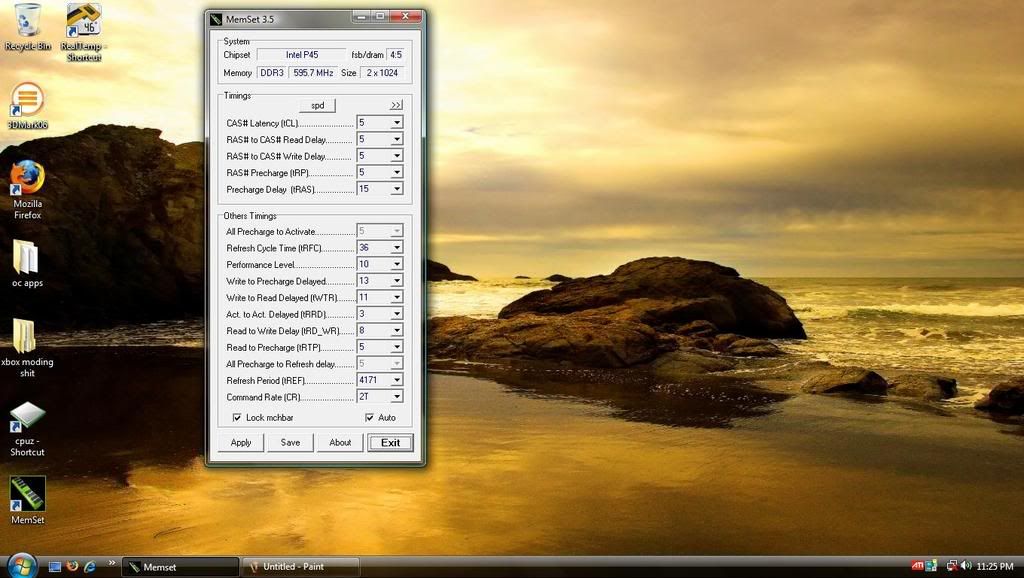
i have ocz ddr2 1200 ram flexII and when i open up memset i get this (notice the memory info at the top)
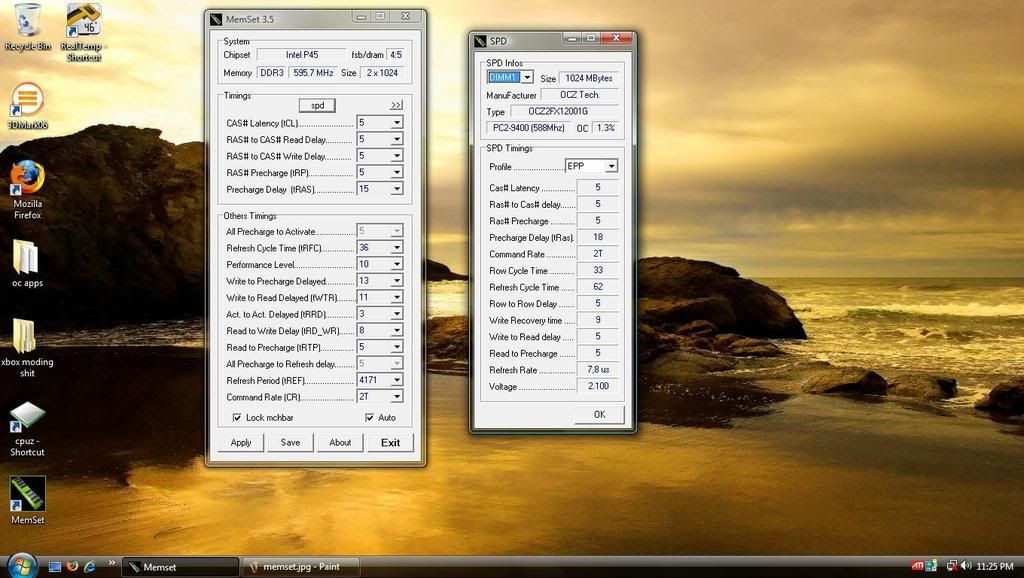
and when i click on the spd it gives me the correct info on my ram
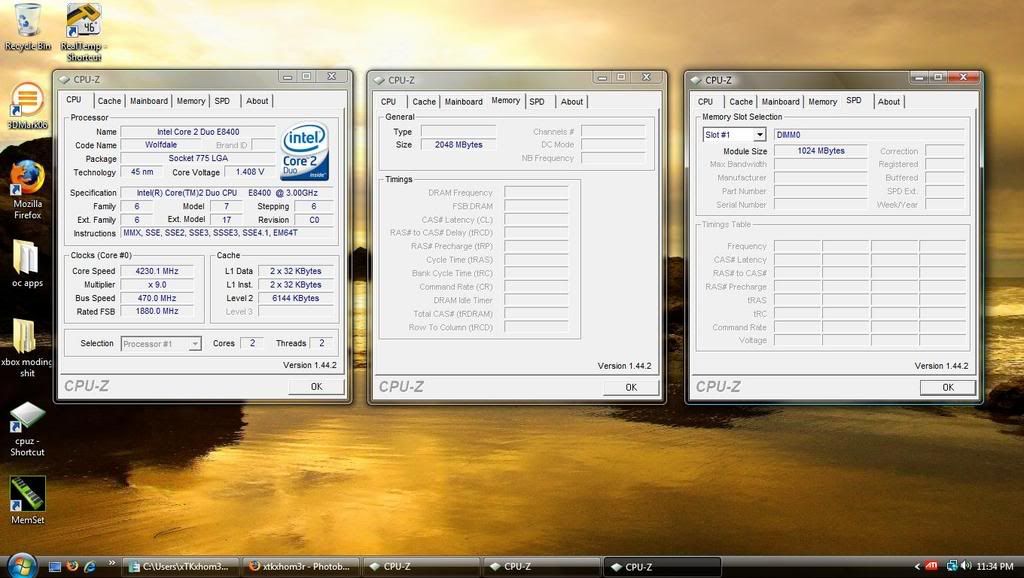
but on cpu-z it doesnt give me anything
what could be the problem? is my memory taking aor is it just not compatible with my board?
Last edited by xTKxhom3r; 08-05-2008 at 08:38 PM.
Oh greeaaaat good to hear.
You just need the more recent version of those programs, they are not reading the P45 chipset correctly. I`m using CPU-Z 1.46 right now and it is displaying the correct SPD info. I don`t use memset so can`t help you there.
ah ic i updated cpu-z and it shows the info now thanks! the memset i have is the most recent though dont know why it would show that weird stuff but oh well....anyone have the same memory i do? any stability issues? i seem to have alot with this memory
dang i knew i had problems with my ram but i didnt think they were this bad...i was at 1.3% and i already had 4 errors....
RMA. I tested mine last night and they passed up to 60% and I stopped it because there obviously wasn't an issue with my memory. I did however fry my Q9450
_____________________________________________
Rig = GA-P67A-UD3P Rev 1.0 - 2600K @ 5.2~GHz 1.5v~, 1.489~v Under Load - Swiftech Water Cooling - 2 X 4GB Corsair DDR3 2000Mhz @ 1868MHz~ 9,10,9,27 @ 1.65v~ - Asus 6970 @ 950MHz / 1450MHz - 3x Western Digital RE3 320Gb 16Mb Cache SataII Drives in Raid0 - Corsair HX 850w Power Supply - Antec 1200 Case - 3DMark 11 Score = P6234 - 3DVantage Score = P26237
What?
Do you mean that the fried mobo is still working using the other 4pin that was covered?
My thoughts exactly! These things must me tough motherfers
BTW, guys I need to know which setting helps more with RAM, the PL or the Twister...for example. I have had my ram at PL8/Strong and would like to know which setting would boost performance more PL7/Light, Lightest or PL8/Strongest?
Q9650@4.25ghz 500x8.5 1.37v
Gigabyte GA-EP45-UD3P - F9B
Gskill PI PC2-8800 4gb 1000mhz 55ns 1.92v
WD Caviar Black 640gb/Kingston HyperX 8gb 0.7ms Access Storage
Patriot XporterXt 32gb 0.8ms Access Storage
Sapphire HD 3870 512mb
Zalman 750watt PSU
NZXT Tempest with 5x120mm+2x140mm
Sunbeam "Core Contact"/Scythe "Slipstream" 110cfm/
IC Diamond
I guess it depends on the rest of the system, it's a good test to do
Best setting stable for 425fsb I could find for my system is PL7/Light/Pull-ins disabled with 1066 RAM.
That is where I think I am at on my 1100 ram(1133mhz) but I am also running it with SRC enabled and MemOC Charger eabled, although I have not tested PL7/light yet. PL7/moderate almost passed a 2 hour OCCT ram test. I was going to either test PL8/Strongest or PL7/light next, I still have a bit of juice left to spare on my kit so if I needed to jack up the voltage a bit to get stable I could. I have no software to test how well my RAM is performing so I have no idea how much better my system is running everytime I lower the PL or increase the twister, would be nice if one of you expert guys could go into detail on what exactly each setting is doing and how they work with each other.
Q9650@4.25ghz 500x8.5 1.37v
Gigabyte GA-EP45-UD3P - F9B
Gskill PI PC2-8800 4gb 1000mhz 55ns 1.92v
WD Caviar Black 640gb/Kingston HyperX 8gb 0.7ms Access Storage
Patriot XporterXt 32gb 0.8ms Access Storage
Sapphire HD 3870 512mb
Zalman 750watt PSU
NZXT Tempest with 5x120mm+2x140mm
Sunbeam "Core Contact"/Scythe "Slipstream" 110cfm/
IC Diamond
My thoughts too, I didnt think it worked using just the 4 pins that are covered, I thought you could only use the 4 open pins or 8 pin, but thats my next query, if you had the 8 pins available then why did you only use the 4 pin power connector to start with instead of all 8 ?
Intel Core i7 920 2.66ghz @ 4.3ghz HT Enabled, core @ 1.34v, VTT @ 1.28v, NB @ 1.30v (212 x 21) Batch No: 3910A369
6gb (3x2gb) G.Skill RipJawsX DDR3 17000C9 2133MHz @ 1640mhz 8-8-8-24-1T
Gigabyte G1.Sniper Rev 1.0 @ 205fsb Beta Bios
1 x OCZ Agility 3 120gb SSD, AHCI
1 x Western Digital 500gb SATAIII 16mb Cache HDD, AHCI
Sony DVD +/- R/RW/RAM x22 Dual Layer, AHCI
2 x Saphire ATI Radeon R9 270 2gb (Crossfire)
Gigabyte Odin 850w Modular PSU (Software Controlled)
EK Supreme HF Copper LGA1366, Laing D5 Pump, 2 x 240mm Radiator & 120mm Radiator
Cooler Master HAF XB LAN Box
Windows Se7en Pro x64 bit.
I am new to Asus boards. The BIOS has many features I am unfamiliar with. The CPU PLL voltage is one such setting. I think it is called the "phase lock loop" voltage. I have been experimenting with it and can conclude it has a major effect on stability at high cpu load. Can someone explain what this does.... and what is going to fry if I set it too high? What is my safe limit with a QX9650? Thanks in advance.
QX9650 @ 5103 MHz
Vapoli custom SS
2 X HD4870s in crossfire
Asus P5Q Deluxe
PCP&C 1200w
2 X 36 Gb Raptors in RAID 0
yes to my exact surprise that is what is happening! I have a picture of the CPU1 4 pin connector from my PSU, you can clearly see where it's fried the mobo. So I used the other CPU2 4 pin connector and plugged it in to the 4 pin part of the mobo that was covered. Needless to say once I get my new psu and mobo I will plug BOTH 4 pin connectors in!!!
I honestly didn't know that's what I was supposed to do, because my old board only had a 4 pin cpu connector on it. I thought that 4 of the 8 pins were closed for a reason, and I thought my PSU's 2x4-pin CPU plugs were meant for 2 physical CPUs. I should have known better since I have a quad core but I guess I didn't do enough research/reading before building my new system.
Last edited by wongnog; 08-06-2008 at 07:45 AM.
Never mind mate, now you know, glad your board is still working, hopefully with a bit of luck all you have blown is the rail on the PSU and not damaged the board, do you have another PSU you can try on it to see if that burnt 4 pin plug on the board is still working ?, im a bit worried for you that whoever you brought it from wont RMA it for you, the 2 reasons behing this is: 1 dont you have a beta bios on it, beats void the warranty and 2: the board damage wasnt caused by the board itself, it was caused by a 3rd party device, and this is clearly visible from the burn marks, but you can but ask.
I think 600w PSU maybe a little bit to low also for your system, especially with this board and a Quad, along with your memory etc dont forget that the Q6600 draws 95w from you PSU, before any overclocking, and with overclocking can draw as much as 175w alone, plus what the board, board features like onboard sound, RAID etc, Mem, Harddrives, GFX card, CD/DVD drives etc are pulling out of it, if you are constantly exceeding this 600w that your PSU supplies this could lead to the death of the PSU and as it dies it gives one last massive surge of power, KBOOM, burn marks appear.
There is a PSU calculator here, which will give you a rough idea of the wattage of PSU you should look into getting, to be safe I would recommend getting something slightly higher than what it recommends, just to compensate as it a little out of date, especially with higher drawing GFX cards now-a-days:
http://www.thermaltake.outervision.com/
you have suprised alot of guys in this forum, by showing us that you can just use the covered 4 pins on there own, I dont think any of us was aware of this, I know I wasnt, and probably wouldnt of tried or tested it either.
Intel Core i7 920 2.66ghz @ 4.3ghz HT Enabled, core @ 1.34v, VTT @ 1.28v, NB @ 1.30v (212 x 21) Batch No: 3910A369
6gb (3x2gb) G.Skill RipJawsX DDR3 17000C9 2133MHz @ 1640mhz 8-8-8-24-1T
Gigabyte G1.Sniper Rev 1.0 @ 205fsb Beta Bios
1 x OCZ Agility 3 120gb SSD, AHCI
1 x Western Digital 500gb SATAIII 16mb Cache HDD, AHCI
Sony DVD +/- R/RW/RAM x22 Dual Layer, AHCI
2 x Saphire ATI Radeon R9 270 2gb (Crossfire)
Gigabyte Odin 850w Modular PSU (Software Controlled)
EK Supreme HF Copper LGA1366, Laing D5 Pump, 2 x 240mm Radiator & 120mm Radiator
Cooler Master HAF XB LAN Box
Windows Se7en Pro x64 bit.
Thanks for the link, I filled it out and even overestimated some items. It reported a recommend psu of 434 w (that's for 20% capacitor aging). So hopefully a replacement 600 w GameXStream should be okay?
Lucky for me I am picking up a new PSU from OCZ today, and NCIX is shipping me a new P5Q-E for free. Ground shipping though so it'll take a few days to get here... but in the mean time I could try plugging in the new psu into the burnt out 4-pin cpu plug and see if it posts or not. But it sounds like a bit of a risky experiment don't you think? I just picture those pins being fried and trying to plug power into it causing smoke and fire!
FIRE YAH YAH FIRE FIRE
_____________________________________________
Rig = GA-P67A-UD3P Rev 1.0 - 2600K @ 5.2~GHz 1.5v~, 1.489~v Under Load - Swiftech Water Cooling - 2 X 4GB Corsair DDR3 2000Mhz @ 1868MHz~ 9,10,9,27 @ 1.65v~ - Asus 6970 @ 950MHz / 1450MHz - 3x Western Digital RE3 320Gb 16Mb Cache SataII Drives in Raid0 - Corsair HX 850w Power Supply - Antec 1200 Case - 3DMark 11 Score = P6234 - 3DVantage Score = P26237


 Reply With Quote




Bookmarks