

Great job Serra, well detailed while not taking 10 years to read
Like it a lot.



Great job Serra, well detailed while not taking 10 years to read
Like it a lot.
Hope Serra doesn't mind, figured that this may be the best place to stick a copy of a raid worksheet that I've been playing with opposed to starting a new thread or (like now) having posted older versions to other threads. Mainly for calculating out the various reliabilities of the assorted raid levels (0/1/10/100/3/30/31/4/40/41/5/50/51/6/60/61) et al. I haven't really done much in the line of performance metrics with them yet as there are a lot of variables which are system dependent.
Last edited by stevecs; 10-04-2009 at 10:04 AM.
|.Server/Storage System.............|.Gaming/Work System..............................|.Sundry...... ............|
|.Supermico X8DTH-6f................|.Asus Z9PE-D8 WS.................................|.HP LP3065 30"LCD Monitor.|
|.(2) Xeon X5690....................|.2xE5-2643 v2....................................|.Mino lta magicolor 7450..|
|.(192GB) Samsung PC10600 ECC.......|.2xEVGA nVidia GTX670 4GB........................|.Nikon coolscan 9000......|
|.800W Redundant PSU................|.(8x8GB) Kingston DDR3-1600 ECC..................|.Quantum LTO-4HH..........|
|.NEC Slimline DVD RW DL............|.Corsair AX1200..................................|........ .................|
|.(..6) LSI 9200-8e HBAs............|.Lite-On iHBS112.................................|.Dell D820 Laptop.........|
|.(..8) ST9300653SS (300GB) (RAID0).|.PA120.3, Apogee, MCW N&S bridge.................|...2.33Ghz; 8GB Ram;......|
|.(112) ST2000DL003 (2TB) (RAIDZ2)..|.(1) Areca ARC1880ix-8 512MiB Cache..............|...DVDRW; 128GB SSD.......|
|.(..2) ST9146803SS (146GB) (RAID-1)|.(8) Intel SSD 520 240GB (RAID6).................|...Ubuntu 12.04 64bit.....|
|.Ubuntu 12.04 64bit Server.........|.Windows 7 x64 Pro...............................|............... ..........|
Subs
ʇɐɥʇ ǝʞıl pɐǝɥ ɹnoʎ ƃuıuɹnʇ ǝq ʇ,uop
Ok, Kind of tied into the previous post concerning raid's (and I'll probably merge them) but ran into a problem late last night/early this morning at work and needed to come up with a fast workload analysis for some windows boxes. Threw this together which uses the output of microsoft's diskmon utility (used to be sysinternals) at: (works /w nt4, 2000, 2003, xp, 32 & 64bit (haven't tried vista but may work with that as well).
http://technet.microsoft.com/en-us/s.../bb896646.aspx
spread sheet takes the output from this utility and does the math to display what your workload is. (random/sequential/average request size & response times et al). Anyway, can be used to get an idea as to what you want to do for your storage and for raids. (ie, if have more of a random workload and a majority of writes, parity raid 3/4/5/6 shouldn't be used, look toward non parity raids et al. You can use the above spreadsheet in #post 52 to determine what raids work best with your workload).
Figured no sense in wasting it and someone may find it useful here as well.
Last edited by stevecs; 09-16-2009 at 02:23 AM. Reason: clarity
|.Server/Storage System.............|.Gaming/Work System..............................|.Sundry...... ............|
|.Supermico X8DTH-6f................|.Asus Z9PE-D8 WS.................................|.HP LP3065 30"LCD Monitor.|
|.(2) Xeon X5690....................|.2xE5-2643 v2....................................|.Mino lta magicolor 7450..|
|.(192GB) Samsung PC10600 ECC.......|.2xEVGA nVidia GTX670 4GB........................|.Nikon coolscan 9000......|
|.800W Redundant PSU................|.(8x8GB) Kingston DDR3-1600 ECC..................|.Quantum LTO-4HH..........|
|.NEC Slimline DVD RW DL............|.Corsair AX1200..................................|........ .................|
|.(..6) LSI 9200-8e HBAs............|.Lite-On iHBS112.................................|.Dell D820 Laptop.........|
|.(..8) ST9300653SS (300GB) (RAID0).|.PA120.3, Apogee, MCW N&S bridge.................|...2.33Ghz; 8GB Ram;......|
|.(112) ST2000DL003 (2TB) (RAIDZ2)..|.(1) Areca ARC1880ix-8 512MiB Cache..............|...DVDRW; 128GB SSD.......|
|.(..2) ST9146803SS (146GB) (RAID-1)|.(8) Intel SSD 520 240GB (RAID6).................|...Ubuntu 12.04 64bit.....|
|.Ubuntu 12.04 64bit Server.........|.Windows 7 x64 Pro...............................|............... ..........|


Amazing OP, now here is my buttload of questions!
1.) But doesnt a second partition start closer to the middle of the drive?Originally Posted by Microsoft
Meaning that any second partition should be slower than any first, more "outer" partition?
2.) So which of the following would be optimal configuration on one physical drive with 3 partitions C:\ D:\ E:\ (partioned in that order) ?
C:\ for system D:\ for paging E:\ for games? or D:\ for games E:\ for paging?
3.) Small file means seek time > read time?
4.) Is seek/read time on a HD's spec, the average time, or the best (most outward on platter) time?
5.) So partitioning a RAID 0 setup improves the performance?
5b.) In RAID 0, can one partition to be made into RAID while others seen as single drives?
For example:
Drive1 Partition in RAID C: , Stand-alone partition D:
Drive2 Partition in RAID C: , Stand-alone partition E:
6.) If main OS is on RAID 0, should a 2GB page-file be set to another single drive for greater performance?
7.) I have 2x Seagate 320s (ST3320620AS3) I wanna raid 0, but one is 3 AAK, and the other is 3 AAE.
Does anyone know if the firmware difference will make an impact?
8.) Portability!
My post important question is: Can a Raid setup be transplanted into a new motherboard/raid card?
For example, if I make a hardwar raid 0 with my s939 nf4 Ultra-D, and later upgrade to a P35 MSI or whatever, can I take my 2 drives in raid from current, to another raid controller?
PS: WTF happened to Hybrid Drives? a 16gb flashdrive can be gotten for ~$50, why the hell am I not seeing at least 8GB flash +320GB platter drives??!
Last edited by KoHaN69; 02-27-2008 at 11:13 PM.
It's BS to put the page file on the same drive as the OS.
I think they are presuming the seek times within the page file territory would be better this way (middle vs. start for PF, and OS in the middle), but, don't count on it, as stated in several places.
IMO, and I prefer it this way, get enough RAM, and ditch the PF. I still saw no proof of any problems from all the gossip flowers here/there
Multiple small fileS. Yep.3.) Small file means seek time > read time?
Anandtech's HD reviews have a great explanation of what this is and how to put it into Avg. seek times as reported by say HD Tach.4.) Is seek/read time on a HD's spec, the average time, or the best (most outward on platter) time?
I could paraphrase it, but it's better (for youto read any recent HD review on AT.
Superficial. Not real.5.) So partitioning a RAID 0 setup improves the performance?
For some purposes, yes, it can improve performance, but whether you use 1 or 3 partitions on a drive/RAID array, to keep the OS/apps/PF - same s***, more places to worry about!
I have to add however, that putting the NTFS's MFT in the middle seems to improve open times. (most defrag utils will place it there, instead of ~10% from the start).
So, having the above in mind, forcing the PF around the middle of the drive may also be good for some situations, and I could be wrong in my assumption that it's BS.
I think you mean something like Intel Matrix stuff?5b.) In RAID 0, can one partition to be made into RAID while others seen as single drives?
Ye. Try not to put it on a mirror, though.6.) If main OS is on RAID 0, should a 2GB page-file be set to another single drive for greater performance?
Not on onboard RAID. If one drive is actually faster, of course changing the other would prolly give you a boost, but nothing to worry about.7.) I have 2x Seagate 320s (ST3320620AS3) I wanna raid 0, but one is 3 AAK, and the other is 3 AAE.
Does anyone know if the firmware difference will make an impact?
Onboard RAID is not hardware, not that it matters much for RAID0 on a desktop.8.) Portability!
My post important question is: Can a Raid setup be transplanted into a new motherboard/raid card?
Back to your question:
Intel ICHxR controllers have compatible on-disk structure, and you can swap the RAID arrays between Intel controllers (not JMicron on Intel boards!)
Intel ICHxR is not compatible with any controller I have tested (quite a few brands).
nVidia is not fully compatible between boards, IIRC, and is definitely not compatible with Intel RAID. It is compatible with some hardware RAID controllers.
Don't ever think of moving an Areca volume - you will loose the volume guaranteed.
I think they found the use is... none.PS: WTF happened to Hybrid Drives? a 16gb flashdrive can be gotten for ~$50, why the hell am I not seeing at least 8GB flash +320GB platter drives??!
There was one Seagate hybrid drive for notebooks - turned out to be nothing good even with Vista on top.
P5E64_Evo/QX9650, 4x X25-E SSD - gimme speed..
Thanks for the input, alfaunits
What do you mean by "Ye. Try not to put it on a mirror, though." ?
Also, I disagree to killing the page file. I've had problems in Source games while doing that.
I've done some more research and seems RAID 0 is quite overrated, especially for gaming.
9.) If I have 3 drives, instead of putting 2 in raid I can make
Drive1 Partition1- System Partition2 - Storage
Drive2 Games
Drive3 Storage/Page file
and would not notice any realistic disadvantages to RAID 0
right?
Last edited by KoHaN69; 02-28-2008 at 04:06 PM.
PF on a mirror won't boost performance; on the contrary, the writes suffer a minor overhead. I doubt anyone would consider a mirror (RAID1) volume for the PF, so I was just adding that comment.
I had problems if I had insufficient RAM (read: laptops).Also, I disagree to killing the page file. I've had problems in Source games while doing that.
BioShock?
It's not something you require for gaming, but it has no drawbacks vs. a single drive for gaming. Safety aside!I've done some more research and seems RAID 0 is quite overrated, especially for gaming.
Essentially, what you said is correct.9.) If I have 3 drives, instead of putting 2 in raid I can make
I myself can't imagine a single drive volume, because I move a lot of data often
P5E64_Evo/QX9650, 4x X25-E SSD - gimme speed..
I'm generally in agreement with Alfaunits suggestions, but I do have a couple of disagreements and/or elaborations to make...
1. Pagefiles on the same drive as the OS is "bunk"
I disagree. Lets say you follow what I consider to be "best practices" with hard drives - using a separate one for every "major" app (an application that itself uses enough hard drive resources to require its own) - which generally means just 1-2 other drives for desktops - then your OS disc isn't really don't a lot more than finding out where links point for you. There will be a few things, like it's probably where windows media player resides, but realistically it's heavily underutilized. The result of this is that it becomes advisable to put the page file on the same drive.
2. Pagefiles should be towards the middle of a drive...
Taking a slice out of the middle area of a drive for a pagefile (because they should have their own partitions) creates more issues than it solves on a desktop IMO. For one, it forces you to have at least 3 partitions on the drive instead of 2. It's just generally easier to put your page file at the start (physical outer edge) of the drive where it can have the best benefit in response time and be happy. The real fact of the matter is that at worst you're maybe looking at an 8GB pagefile, and 8GB on current drives is nothing in terms of loss of cylinders causing slower response to the next portion of drive.
3. In response to your question 5b, I think the answer we're looking for is "yes"... insofar as your OS will not see 2 hard drives in RAID, the OS will only see a single hard drive with a size equal to twice that of the constituent drives.
and yeah... I wish that hybrid drives were out this year too. It's stupid that we can't have even 1GB of flash memory on newer drives and instead have to wait until the drives are fully SSD.
Dual CCIE (Route\Switch and Security) at your disposal. Have a Cisco-related or other network question? My PM box is always open.
Xtreme Network:
- Cisco 3560X-24P PoE Switch
- Cisco ASA 5505 Firewall
- Cisco 4402 Wireless LAN Controller
- Cisco 3502i Access Point
And props to Stevecs - anyone who hasn't read his posts in here really should. He forwarded me this stuff earlier and I've been just terrible in terms of lack of response, but it really does need to be here. Every time I look at the e-mails he's sent me I start looking for a hosting solution for some of the documents, and eventually get derailed and forget about it. But I swear, someday I'll get to it.
Dual CCIE (Route\Switch and Security) at your disposal. Have a Cisco-related or other network question? My PM box is always open.
Xtreme Network:
- Cisco 3560X-24P PoE Switch
- Cisco ASA 5505 Firewall
- Cisco 4402 Wireless LAN Controller
- Cisco 3502i Access Point
Speed-wise it's bunk, on the same physical drive.
My suggestion was and still is: ditch the b***h and I won't snitch
I think (hope) MS had speed in mind here, similar to NTFS's MFT zone placement, although, I still don't see how it would benefit a PF on a separate partition (mid-place on a single partition ye, but separate one..)2. Pagefiles should be towards the middle of a drive...
P5E64_Evo/QX9650, 4x X25-E SSD - gimme speed..
Very patient guy who really knows his stuff. Emphasis on really. Great asset to the forums.
Walked me through using a RAID benchmarking program called IOZone. Im sure I stretched his patience to the limit with the stupid questions... after I got the answer, I always thought to myself, "Duh." In any event, HDTach and HDTune cant hold a candle to what IOZone can tell you about a RAID array. The only thing that IOZone doesnt tell you is access times and averages. Who needs em when IOZone outputs such comprehensive information? No one.
Ive told myself I would write a walk-through for IOZone, but college consumes all my time and I never get around to it.

One question: Why?
Again, assuming that your OS drive holds your OS and perhaps a few small programs that don't require disc access because you've followed best practices and put disc-intensive applications on their own discs (or on discs which hold programs which will not be in action at the same time), one of the only things your OS disc will do is point to shortcuts and start Windows. After that, it's just a sitting waste of cash. I can't think of a reason for the vast majority of people not to use it for this task, which will save you from having to buy another separate disc and absolutely will speed up some programs.
I think the MFT zone placement was the result of an engineering decision to allow the OS access to the outer portions of the disc to provide fastest boot-up and program access times (which would also be assuming that best disc practices were followed, naturally). It's generally placed just far enough outside that the core OS and a few programs can fit in front of it, and I'm not sure MS has really given it a second thought since its original implementation. I could be wrong about all that, but it's my strong theory.I think (hope) MS had speed in mind here, similar to NTFS's MFT zone placement, although, I still don't see how it would benefit a PF on a separate partition (mid-place on a single partition ye, but separate one..)
The benefit to a PF on a separate partition is that your PF will only fragment on your system partition. Use a second partition (or drive) for your PF and you'll see it will never fragment. One does have to be careful when partitioning though to ensure that aside from, say, bootup one will not make extensive use of their system partition at the same time the PF partition would be necessary (if that were the case, it does belong elsewhere).
Dual CCIE (Route\Switch and Security) at your disposal. Have a Cisco-related or other network question? My PM box is always open.
Xtreme Network:
- Cisco 3560X-24P PoE Switch
- Cisco ASA 5505 Firewall
- Cisco 4402 Wireless LAN Controller
- Cisco 3502i Access Point
I still strongly feel that a small separate partition at the start (fastest) of a separate drive purely for temp storage (change your TMP and TEMP system environment variables to point to there and all apps will use it), Internet cache and pagefile too is better, as this removes all disk contention from the OS and apps which may be being accessed at the time. Not to mention better organisation for easier management, like deleting redundant temp files which many apps leave which you don't want clogging up your fast OS drive. I recommended an ideal drive layout here. It is the Xtreme option if you have a spare drive, but will give fastest system response. You only need a couple of gigs for temp space and pagefile combined, maybe 5 or 6 max if you insist on a large pagefile.
As for the pagefile fragmenting, it will NEVER do that if you set the min/max values for the size on a single drive to be the same, as then the size is set and it never shrinks or grows. Then use PageDefrag (originally from SysInternals) to defrag that pagefile once for good, after fully defragging the partition you have set it on.
You presume Windows doesn't touch the Windows drive at all, or ridicolous little - it does. Will you notice it DURING a game? Prolly not. Will you notice during game load? Very likely yes.
You will notice it during loading of programs that use shares DLLs on the OS drive - Office, etc.
MS has made this decision in Windows XP I believe, and has given the reasons I mentioned: better overall MFT performance, i.e. file access times.I think the MFT zone placement was the result of an engineering decision to allow the OS access to the outer portions of the disc to provide fastest boot-up and program access times (which would also be assuming that best disc practices were followed, naturally). It's generally placed just far enough outside that the core OS and a few programs can fit in front of it, and I'm not sure MS has really given it a second thought since its original implementation. I could be wrong about all that, but it's my strong theory.
Eeeh, not setting a fixed size for the PF is, IMO, not best practice. And if you set a fixed size - there won't be any fragments. If there are, set it to NONE, reboot, delete the pagefile.sys and recreate it (possibly defragment the drive).The benefit to a PF on a separate partition is that your PF will only fragment on your system partition. Use a second partition (or drive) for your PF and you'll see it will never fragment. One does have to be careful when partitioning though to ensure that aside from, say, bootup one will not make extensive use of their system partition at the same time the PF partition would be necessary (if that were the case, it does belong elsewhere).
P5E64_Evo/QX9650, 4x X25-E SSD - gimme speed..
I think you and I will have to agree to... well, not disagree... but strongly suggest people look at their usage habits evaluate for themselves, Alfaunits. With disc partitioning, that all I can ever say. I strongly affirm that the majority of users are just fine with the PF on the same disc as the OS - assuming they'll use a separate disc for primary programs. The purchase of a separate hard drive is very hard to justify for the minuscule difference that well over 90% of the population would see (IMO).
As far as setting PF min/max - as stated in the post, I do personally suggest giving it a fixed size (and, you'll notice, I also state that if you do have a spare disc or disc that won't see conflicting use with it, to put it there... but again, I wouldn't go so far as to tell people to buy a separate HDD *just* for it). It won't fragment over the hard drive, but as to internal file fragmentation within the size zone - that's another matter. The Microsoft best practice is to put it on its own partition, and so I've got to mirror that sentiment.
Dual CCIE (Route\Switch and Security) at your disposal. Have a Cisco-related or other network question? My PM box is always open.
Xtreme Network:
- Cisco 3560X-24P PoE Switch
- Cisco ASA 5505 Firewall
- Cisco 4402 Wireless LAN Controller
- Cisco 3502i Access Point
Oh, I wouldn't suggest for Average Joe Surfer to buy separate HDs. I was talking about gamers, and most ppl on this forum - who already have more HDs, some of which are simple storage... to use that. Heck, for <100USD/500GB today.... seriously!
Heck, Average Joeup is more likely to have problems separating things than keeping it all together

P5E64_Evo/QX9650, 4x X25-E SSD - gimme speed..
Hi!
I created an raid-0 array using 2x WD 250KS disks
I chose stripe size 32k and allocation unit while formating 64k
It's only a 5Gb partition at the beginning of the disk with 130mb/sec average read and 8.3ms average access
I am going to use it ONLY for my windows XP/Vista pagefile.
Do you think I chose the right stripe size?
I have read that 64k is the recommended allocation unit for pagefile, but I didn't find anything about the strip size. I thought, that using 32K i will cause its cluster to separate to both disks
Asking a question like that is like asking a room full of guys what their definition of a hot girl is - the answer will vary from person to person by usage pattern.
There are some generalizations that can be made, such as smaller numbers for smaller files... but there's no cut-and-dry "right" answer. In most cases, I generally suggest trying it both ways and then think to myself "Not that it matters, it's going to end up being a completely subjective/biased answer whatever they come up with because the difference isn't generally noticeable".
IMO: Stick with defaults and be happy, unless you're setting it up for benching or some special application - if so, then you can tweak for that application.
Dual CCIE (Route\Switch and Security) at your disposal. Have a Cisco-related or other network question? My PM box is always open.
Xtreme Network:
- Cisco 3560X-24P PoE Switch
- Cisco ASA 5505 Firewall
- Cisco 4402 Wireless LAN Controller
- Cisco 3502i Access Point
Serra, I have a question about my Intel Matrix Array. I would like to apologize if the question does pertain to the reason for creating this great thread.
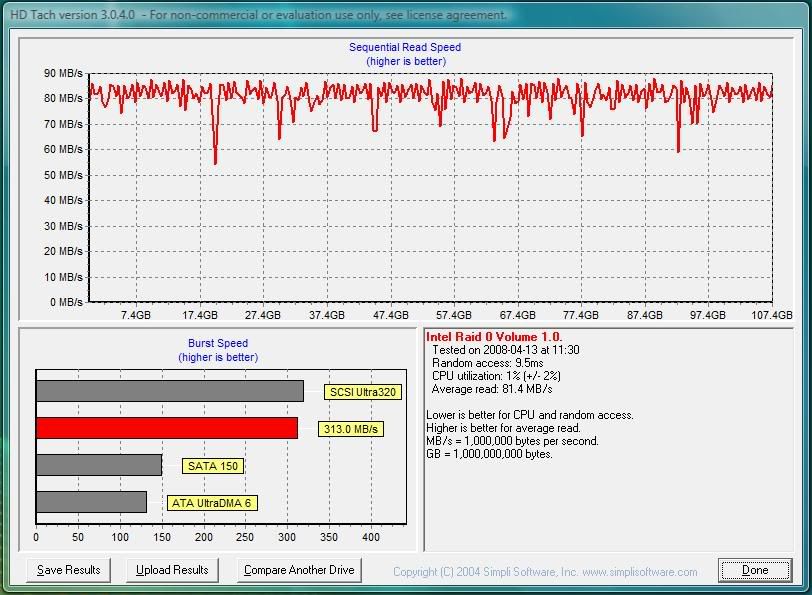
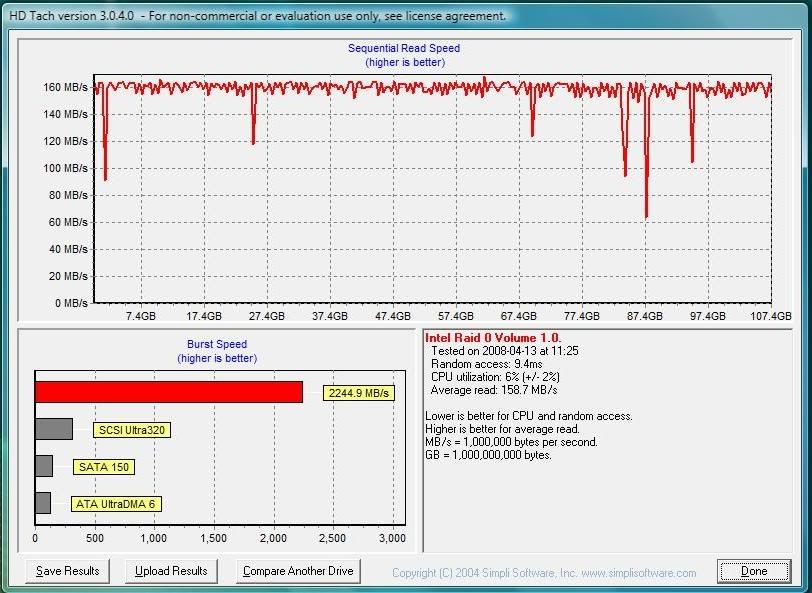
I created two volumes by using two 320GB 7200.10 drives. Both volumes are set in Raid 0 through the Matrix control panel during boot. I am using the ICH9R south bridge.
Volume 1 - 107GB OS and Applications
Volume 2 - 496GB Storage
I believe that my volumes are limited due to the results from HD Tach (Not the best, I know
The one below is with VWBC enabled. It has a significant increase, but seems to be caped. Others with a similar setup are running the test on the whole 640GB and getting a read speed of 180-200.
The volume is clean of errors and I followed Seagate's instructions on enabling SATA2 (Jumper setting). The Intel Raid Manager (v7.8) reports a healthy array. I haven't had any errors or corruption of the OS with the array like this, but I would just like to know a little about what might be the problem, or if this is normal.
░░░░░░░░░░░░░░░░░░░░░░░░░░░░░░░░░ Intel i7 3770k
░░░░░░▄▄▄▄▀▀▀▀▀▀▀▀▄▄▄▄▄▄░░░░░░░░░ ASUS GTX680
░░░░░░█░░░░▒▒▒▒▒▒▒▒▒▒▒▒░░▀▀▄░░░░░ ASUS Maximun V Gene
░░░░░█░░░▒▒▒▒▒▒░░░░░░░░▒▒▒░░█░░░░ Mushkin 8GB Blackline
░░░░█░░░░░░▄██▀▄▄░░░░░▄▄▄░░░█░░░░ Crucial M4 256GB
░░░▀▒▄▄▄▒░█▀▀▀▀▄▄█░░░██▄▄█░░░█░░░ Hitachi Deskstar 2TB x2
░░█▒█▒▄░▀▄▄▄▀░░░░░░░░█░░░▒▒▒▒▒█░░ FSP 750W Gold
░░░░░░░░░░░░░░░░░░░░░░░░░░░░░░░░░ Fractal Arc Mini
That's a good advertisement for enabling WBC.
I seem to recall that Seagate 7200.10 drives usually get ~80MB/s max out of the first portion of the drive, so if you're seeing ~160MB/s with two drives, I'd probably be pretty happy. Still, if you can provide links to other people doing noticeably better we can take a look at them and try to determine what may cause the differences.
Dual CCIE (Route\Switch and Security) at your disposal. Have a Cisco-related or other network question? My PM box is always open.
Xtreme Network:
- Cisco 3560X-24P PoE Switch
- Cisco ASA 5505 Firewall
- Cisco 4402 Wireless LAN Controller
- Cisco 3502i Access Point
I guess that my results are typical then. I just took a look in the Hard Drive Benchmark thread to find the picture that I was interested in posting. I however found this:
http://www.xtremesystems.org/forums/...&postcount=187
I believe that if I were to use three drives then it would scale in similar manner.
EDIT:
It could also be due to the firmware being bad. Some 7200.10's have the 3.AAK firmware. Most of those drives perform less than the other similar drives with a different firmware.
http://forums.vr-zone.com/showthread.php?t=213448
http://www.tomshardware.com/forum/24...agate-firmware
My luck gave me two 3.AAK drives.
Last edited by Knight; 04-13-2008 at 03:04 PM.
░░░░░░░░░░░░░░░░░░░░░░░░░░░░░░░░░ Intel i7 3770k
░░░░░░▄▄▄▄▀▀▀▀▀▀▀▀▄▄▄▄▄▄░░░░░░░░░ ASUS GTX680
░░░░░░█░░░░▒▒▒▒▒▒▒▒▒▒▒▒░░▀▀▄░░░░░ ASUS Maximun V Gene
░░░░░█░░░▒▒▒▒▒▒░░░░░░░░▒▒▒░░█░░░░ Mushkin 8GB Blackline
░░░░█░░░░░░▄██▀▄▄░░░░░▄▄▄░░░█░░░░ Crucial M4 256GB
░░░▀▒▄▄▄▒░█▀▀▀▀▄▄█░░░██▄▄█░░░█░░░ Hitachi Deskstar 2TB x2
░░█▒█▒▄░▀▄▄▄▀░░░░░░░░█░░░▒▒▒▒▒█░░ FSP 750W Gold
░░░░░░░░░░░░░░░░░░░░░░░░░░░░░░░░░ Fractal Arc Mini
i use 8gb's of ram so I just ditched the pagefile period.
some guys may want 2mb allocated for a dump file but &*(^%$ I don't bother
pagefile and prefetch gone way of dodo bird...........
Sorry to bring this back from a 2 month hibernation but it's such a awesome thread that I don't think most will mind. I'm in the middle of a new build, see specs below, and I purchased two wd6400aaks 640gb drives with the intention of putting them in a RAID 0 config. This build will be mainly used for gaming, surfing and normal family use.
1) After reading the info in this thread am I correct in coming to the conclusion that RAID 0 would not be much of a benefit for this system?
2) Would I be better off using RAID 1 and enabling elevator seek since it was stated, "Use RAID-1 when: You have a game or application that would greatly benefit from a reduction in seek time (lots of small file reading going on)"
2a) Total rookie question regarding drives but if the answer to #2 is yes then how does one enable elevator seek.
3) I also have a 160GB SATA drive laying around not being used so would I be better off ditching any type of RAID and having both my WD 640's as separate drives and doing something like this:
WD 640 #1: 15GB-20GB partition for OS / rest of drive for storage, backup
WD 640 #2: Partition w/ Games & Apps / partition with Documents (photos & music)
160GB: 6GB partition for page file / rest for whatever
Any help would be greatly appreciated. I really thought gaming performance would be increased using RAID 0, glad I stumbled upon this thread.
Last edited by MediumRare; 07-23-2008 at 11:02 AM.
E8500 @ 4.10 / P5Q Deluxe / 8GB Mushkin Ascent XP2-8500 1066MHz / Thermalright Ultima-90 / PC Power & Cooling 750w / LIAN LI PC-K62 / GTX 470 / 2x WD6400AAKS 640GB HDD's / X-Fi XtremeGamer Audio / Klipsch 4.1 400w Speakers / LG L227WTG 22" 2ms LCD / Win 7 64-bit & XP Pro (dual boot)
You can't "enable" elevator seek. It's an algorithm that's either used by your RAID controller to manage RAID1 volumes or it's not, it's a function of the controller firmware.
FWIW, I'd RAID1 the 640Gb drives and use the 160Gb spare as your pagefile/temp drive (small first partition) with the rest for less critical data storage. Make a small OS/apps partition on the RAID1 then put documents etc. you'd consider critical and worth backing up in the rest of the space, so you have the RAID redundancy for that. To use the spare drive for temp files, set the environment variables TEMP and TMP to point to the drive (right-click My Computer, Properties/Advanced/Environment Variables, set for all users and the separate system ones too). Putting your Internet cache there and away from your OS wouldn't be a bad idea either. That way you have spare spindles always available for writing temp files etc. and the RAID set interface doesn't become a bottleneck.
Other people will have other ideas I'm sure. There's probably no wrong way to use the two drives, but RAID1 will give you more security over outright speed, and with those drives you already have great baseline speed anyway. It doesn't matter if the 160Gb drive isn't a screamer, you don't really need the speed for temp stuff, just the ability to access in parallel with other file I/O should help improve system responsiveness.
Last edited by IanB; 07-23-2008 at 10:30 AM.
 Posting Permissions


 Reply With Quote
Bookmarks