
MMM
Page 2 of 3 FirstFirst 123 LastLast
Results 26 to 50 of 75

Thread: the 4870 LEDS

  1. #26
    Xtreme Enthusiast
    Join Date
    Mar 2008
    Posts
    750
    If you got the second red led, which means power supply is cut, then it's your voltage regulators that just overheated past 105C and died. (When voltage regulators die, power supply is cut, and the card would then complain about power supply... naturally)

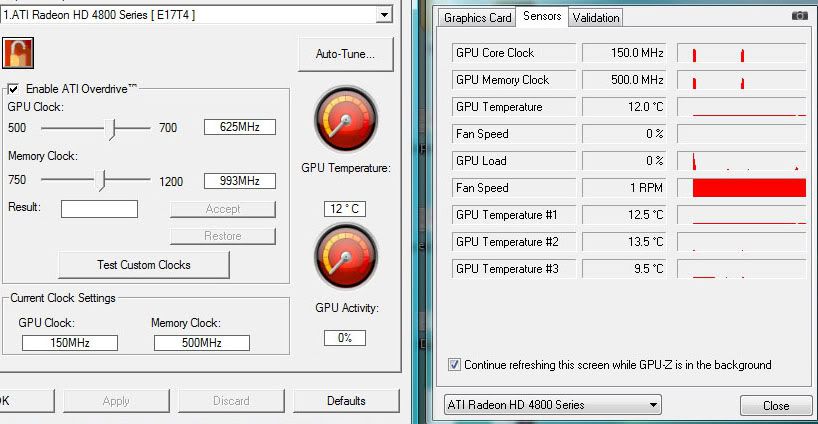
    Sensors on the HD4800 series are only correct if heat is distributed equally among the components. When heat is not so equally distributed, then they will be whack beyond imagination. So anyway... definitely have a LOT, and I mean... a whole... friggin... LOT of cooling on the voltage regulators. Actually, DO think about putting ALL of your cooling supplies on them. The core and mem are not that hot at all. It was the heat from the voltage regulator that heated everything up close to the 100C range when you were using the stock cooler.

    P.S.: Same thing happens on HD 4850, too, and especially when excessive voltage mods are applied. I'll do a full report with proofs (pictures, benches, temperatures) and some other things later. But for now, my advice for you is to keep that area cooled above all else.

    Just to demonstrate how whack the temp sensors are, here's idle temps from a HD4850 with AS1 and a 120mm fan coupled with a 80mm fan in a 22C room:
    Last edited by RunawayPrisoner; 07-18-2008 at 09:42 PM.
    Motherboard: ASUS P5Q
    CPU: Intel Core 2 Quad Q9450 @ 3.20GHz (1.07v vCore! )
    RAM: 2GB Kingston HyperX 800MHz
    GPU: MSI Radeon HD 4870 @ 780/1000 (default)

  2. #27
    Registered User
    Join Date
    May 2008
    Posts
    23
    Noob question.
    Anyone can show a picture with the voltage regulators on that need the heavy cooling. Getting 4870 on monday and putting on a S1 shortly after, also bought some extra ramsinks to be sure to cover everything possible.

  3. #28
    Registered User
    Join Date
    Jul 2006
    Location
    upstate NY
    Posts
    31
    Quote Originally Posted by SPQQKY View Post
    Exactly what I was thinking.
    Room temp is 77F and case is closed .I have 5 S-flex SFF21F fans and I put Chill Factor 2 on the chip.
    System:
    Antec P182
    Asus Maximus Formula X38
    E8400 W/ Thermalright Black 128 Extreme
    Vision Tek 4870 W/ Arctic Cooling Accelero S1 Rev. 2 Passive
    CORSAIR DOMINATOR TWIN2X4096-8500C5DF 4GB PC2-8500 (DDR2-1066)
    Corsair HX620
    Western Digital 640gb HD
    Samsung 226 BW

  4. #29
    Xtreme Member
    Join Date
    Jun 2007
    Posts
    287
    Quote Originally Posted by Shadout View Post
    Noob question.
    Anyone can show a picture with the voltage regulators on that need the heavy cooling. Getting 4870 on monday and putting on a S1 shortly after, also bought some extra ramsinks to be sure to cover everything possible.
    you do not want to use a S1 with the HD4870, it does not cool the voltage regulators and passive cooling will not be powerful enough to cool it
    CPU:X3210 G0@3.6 (8x450 1.48v)
    MOBO: Asus P5K Premium, bios 402
    RAM: 4x 1GB DDR2-1066 @ 1080 5-5-5-15 2.3v
    CASE: antec 900
    GPU: XFX GeForce 7900gt @600/1900
    PSU: silverstone OP1000
    Cooling: MCP655, Apogee GT, MCR320-QP-K

  5. #30
    Registered User
    Join Date
    May 2008
    Posts
    23
    Oh, I surely wont cool the card passively.
    Shouldnt S1 be more than enough, just the voltage regulators which is an issue?
    Last edited by Shadout; 07-19-2008 at 03:27 PM.

  6. #31
    Xtreme Addict
    Join Date
    Sep 2006
    Location
    California
    Posts
    1,917
    the S1 is plenty to cool the GPU, but make sure you have heatsinks and airflow over those VRM's.
    My Videos
    GRID Demolition Derby * GRID Camaro vs. Mustang * Audiosurf - Speed Racer
    I Shot the Hosties * Slightly Stupid * Dump Truck


    Intel Haswell 4770K * 2x8GB Mushkin Redline DDR3 1866 CL9 * Asus Maximus VI Gene * Sapphire 7870 GHz Edition
    500GB Samsung 840 Series SSD + 2TB WD Raid Edition 3 magnetic * SilverStone Temjin case * Corsair TX750 PSU * Corsair H60 water cooler * Win7 Pro x64

  7. #32
    Registered User
    Join Date
    Jul 2008
    Posts
    5
    Quote Originally Posted by erocker View Post
    Check your VRM temperatures! They are circled in the GPU-Z pic:

    Those temps are different diodes at the GPU and DO NOT show the VRM temp. If you really wanna see the VRM temp download Everest from Lavasys (latest build is 4.50.1448 BETA).

    Quote Originally Posted by RejZoR View Post
    Well FurMark really stresses the shader engine hard resulting in quiet higher temperature and GPU load. If you are looking for 100% stability, FurMark is ideal tool for testing.
    Otherwise use RTHDRIBL tool and crank up some FSAA to increase GPU load in a linear way (1x - 16x FSAA).
    Exactly, Furmark will stress the card like no other program. Try Furmark and Everest and don't be surprised if your GPU VRM temp is more then 100° C. This and this only causes your card to crash. I am sure everyone crashing while using Furmark have VRM temps way beyond 100°C

  8. #33
    Xtreme Member
    Join Date
    Nov 2004
    Location
    Boston, MA
    Posts
    488
    It is infact furmark that is causing the LED problem with my card. My GPU VRM temp is never over 50C and furmark crashes almost instantly so its not a heat issue. This is with and without overclocking.
    Last edited by babalouj; 07-22-2008 at 04:38 AM.
    **Georgia Tech Grad, I am an Electrical Engineer with a specialization in RF IC design and Analog circuits.**

    Intel I7 3770K Delidded
    Gigabyte Z77X-UD5H
    2x4gb Gskill 7-8-7-16
    EVGA GTX680 Signature OC
    Crucial M4 256gb
    Seasonic X-750
    Watercooling Loop: Raystorm Acetal, EK GTX580 Full Cover, MCR420, MCR320, MCP35X2 & 7 x AP-15 Gentle Typhoons

    Heatware: gte460z

  9. #34
    Xtreme Member
    Join Date
    Aug 2007
    Posts
    175
    Quote Originally Posted by babalouj View Post
    It is infact furmark that is causing the LED problem with my card. My GPU VRM temp is never over 50C and furmark crashes almost instantly so its not a heat issue. This is with and without overclocking.
    What version of everest/tool are you using to measure the VRM temp? Is it possible you're getting bad readings?

    I have the same issue with Furmark also, however, in my experience it has been partially related to PCIe bus speed. If I run Furmark 1.4 @ 102 (stock mobo settings) I hang between 50-70% @ 1280x1024 (All test done at 4X AA). If I bump it up to 105, i can complete Furmark @ 1280x1024, but hangs at about 50-70% @ 1920x1200(on occassion loses video completely). Based on above it sounds like the VRM is getting out of control, losing power with the psu, causing the video to no longer display.

    Must check this VRM value when I get home, thx for the info guys!
    "The only solid piece of scientific truth about which I feel totally confident is that we are profoundly ignorant about nature...It is this sudden confrontation with the depth and scope of ignorance that represents the most significant contribution of 20th century science to the human intellect."
    -Lewis Thomas, The Medusa and the Snail

    "The best definition we have found for civilization is that civilized man does what is best for all, the savage does what is best for himself."
    -Edwin Hubble

    H.E.A.T
    MarioKart FID-0774-5798-8330

  10. #35
    Xtreme Member
    Join Date
    Nov 2004
    Location
    Boston, MA
    Posts
    488
    Quote Originally Posted by chawks2 View Post
    What version of everest/tool are you using to measure the VRM temp? Is it possible you're getting bad readings?

    I have the same issue with Furmark also, however, in my experience it has been partially related to PCIe bus speed. If I run Furmark 1.4 @ 102 (stock mobo settings) I hang between 50-70% @ 1280x1024 (All test done at 4X AA). If I bump it up to 105, i can complete Furmark @ 1280x1024, but hangs at about 50-70% @ 1920x1200(on occassion loses video completely). Based on above it sounds like the VRM is getting out of control, losing power with the psu, causing the video to no longer display.

    Must check this VRM value when I get home, thx for the info guys!
    I am using the latest GPU-Z for PWM temps and checking the card for hotspots with my finger. Nothing is anywhere near 70C because it would burn me if it was. I have sinks on everything that is hot and 120mm fans pointed at the card. Furmark crashes almost instantly for me.
    Last edited by babalouj; 07-22-2008 at 05:25 AM.
    **Georgia Tech Grad, I am an Electrical Engineer with a specialization in RF IC design and Analog circuits.**

    Intel I7 3770K Delidded
    Gigabyte Z77X-UD5H
    2x4gb Gskill 7-8-7-16
    EVGA GTX680 Signature OC
    Crucial M4 256gb
    Seasonic X-750
    Watercooling Loop: Raystorm Acetal, EK GTX580 Full Cover, MCR420, MCR320, MCP35X2 & 7 x AP-15 Gentle Typhoons

    Heatware: gte460z

  11. #36
    Xtreme Member
    Join Date
    Aug 2007
    Posts
    175
    Quote Originally Posted by babalouj View Post
    Furmark crashes almost instantly for me.
    Just for poops and giggles, see if changing the PCIe bus speed results in any improvement.
    "The only solid piece of scientific truth about which I feel totally confident is that we are profoundly ignorant about nature...It is this sudden confrontation with the depth and scope of ignorance that represents the most significant contribution of 20th century science to the human intellect."
    -Lewis Thomas, The Medusa and the Snail

    "The best definition we have found for civilization is that civilized man does what is best for all, the savage does what is best for himself."
    -Edwin Hubble

    H.E.A.T
    MarioKart FID-0774-5798-8330

  12. #37
    Registered User
    Join Date
    Jul 2008
    Posts
    5
    Quote Originally Posted by babalouj View Post
    I am using the latest GPU-Z for PWM temps and checking the card for hotspots with my finger. Nothing is anywhere near 70C because it would burn me if it was. I have sinks on everything that is hot and 120mm fans pointed at the card. Furmark crashes almost instantly for me.
    GPU-Z does NOT read VRM temps. Please try Everest. Right now I use build 4.50.1448 BETA

  13. #38
    Xtreme Member
    Join Date
    Nov 2004
    Location
    Boston, MA
    Posts
    488
    @ chawks2 & MadMonkey - Will do, I will report back with info as soon as I get home from work.
    **Georgia Tech Grad, I am an Electrical Engineer with a specialization in RF IC design and Analog circuits.**

    Intel I7 3770K Delidded
    Gigabyte Z77X-UD5H
    2x4gb Gskill 7-8-7-16
    EVGA GTX680 Signature OC
    Crucial M4 256gb
    Seasonic X-750
    Watercooling Loop: Raystorm Acetal, EK GTX580 Full Cover, MCR420, MCR320, MCP35X2 & 7 x AP-15 Gentle Typhoons

    Heatware: gte460z

  14. #39
    Xtreme Addict
    Join Date
    Nov 2005
    Location
    Where the Cheese Heads Reside
    Posts
    2,173
    Quote Originally Posted by MadMonkey View Post
    GPU-Z does NOT read VRM temps. Please try Everest. Right now I use build 4.50.1448 BETA
    Really? Whats the other 3 temp sensors on the board then?
    -=The Gamer=-
    MSI Z68A-GD65 (G3) | i5 2500k @ 4.5Ghz | 1.3875V | 28C Idle / 65C Load (LinX)
    8Gig G.Skill Ripjaw PC3-12800 9-9-9-24 @ 1600Mhz w/ 1.5V | TR Ultra eXtreme 120 w/ 2 Fans
    Sapphire 7950 VaporX 1150/1500 w/ 1.2V/1.5V | 32C Idle / 64C Load | 2x 128Gig Crucial M4 SSD's
    BitFenix Shinobi Window Case | SilverStone DA750 | Dell 2405FPW 24" Screen
    -=The Server=-
    Synology DS1511+ | Dual Core 1.8Ghz CPU | 30C Idle / 38C Load
    3 Gig PC2-6400 | 3x Samsung F4 2TB Raid5 | 2x Samsung F4 2TB
    Heat

  15. #40
    Registered User
    Join Date
    Jul 2008
    Posts
    5
    Quote Originally Posted by deathman20 View Post
    Really? Whats the other 3 temp sensors on the board then?
    I am pretty sure the HD48xx series GPU has now 3 different spots(diodes) of the GPU itself measured (in GPU-Z). Like in Everest you have CPU/CPU Core #1/CPU Core #2

    Btw, this is the Everest build I use http://www.lavalys.com/beta/everestu...d0xlfnyc3c.zip

  16. #41
    Xtreme Member
    Join Date
    Aug 2007
    Posts
    175
    Without question the GPU VRM seems to keep increasing in temps when benching. I ran rthdrbl for about 10 minutes and my idle @ 60c went to 77 running @ 640x480.

    EDIT

    Where do I put the snowblower on this card to get this temp down?


    HOWEVER, I changed the clocks for the heck of it to see the temp differences. Now I cant get the GPU VRM sensor back?!?!
    "The only solid piece of scientific truth about which I feel totally confident is that we are profoundly ignorant about nature...It is this sudden confrontation with the depth and scope of ignorance that represents the most significant contribution of 20th century science to the human intellect."
    -Lewis Thomas, The Medusa and the Snail

    "The best definition we have found for civilization is that civilized man does what is best for all, the savage does what is best for himself."
    -Edwin Hubble

    H.E.A.T
    MarioKart FID-0774-5798-8330

  17. #42
    Xtreme Member
    Join Date
    Nov 2004
    Location
    Boston, MA
    Posts
    488
    Yeah, that Vitek chip definitely needs cooling. My VRM temps are 95C+ and the Vitek chip burns my finger under load. Im going to slap some ramsinks on there.

    **EDIT** I just sinked the pulse and vitek inductors and VRM temps in everest are still high, how high are VRM temps with the stock cooler? I think I am going to stick my stock cooling plate on there with my waterblock to see what that does for me.
    Last edited by babalouj; 07-22-2008 at 01:58 PM.
    **Georgia Tech Grad, I am an Electrical Engineer with a specialization in RF IC design and Analog circuits.**

    Intel I7 3770K Delidded
    Gigabyte Z77X-UD5H
    2x4gb Gskill 7-8-7-16
    EVGA GTX680 Signature OC
    Crucial M4 256gb
    Seasonic X-750
    Watercooling Loop: Raystorm Acetal, EK GTX580 Full Cover, MCR420, MCR320, MCP35X2 & 7 x AP-15 Gentle Typhoons

    Heatware: gte460z

  18. #43
    Iron Within Iron Without
    Join Date
    Dec 2007
    Location
    EU - Czech republic
    Posts
    1,123
    Stock is pretty High. around 80 - 90, with help of the Accelero S1 Mosfet cooling heatsing [ a bit modified by me so it can cover all 5 Mosfets ] + 2 additional classic RAM heatinks on Pulses i managed to lower it on 55 degrees on a ventilated card and 70 on a non ventilated card in load, in idle it's around [ 1str card ] 45 / 60 [ 2nd ]
    Sony PS3 | Nintendo Wii + Nintendo Wii Fit

    By Mercedes - Adventure Trips around Middle Europe in a Youngtimer | https://www.facebook.com/S.Mercedesem - Like Us, if you Like us that is

  19. #44
    Xtreme Member
    Join Date
    Aug 2007
    Posts
    175
    Thanks to everyone, my problem was my underweight PSU.

    I know this is a thread tangent, but anyone have any recommendations, would prefer modular.

    EDIT

    Launched Furmark, ran 4X and failed w/LED D601 lighting up.(Crit PWR failure).
    Unplugged 3 of my HDDs, ran flawless 6X and no LED. PWR prob for me, if you were having issues with temps, I would imagine the designate LED would light.
    Last edited by chawks2; 07-22-2008 at 05:56 PM.
    "The only solid piece of scientific truth about which I feel totally confident is that we are profoundly ignorant about nature...It is this sudden confrontation with the depth and scope of ignorance that represents the most significant contribution of 20th century science to the human intellect."
    -Lewis Thomas, The Medusa and the Snail

    "The best definition we have found for civilization is that civilized man does what is best for all, the savage does what is best for himself."
    -Edwin Hubble

    H.E.A.T
    MarioKart FID-0774-5798-8330

  20. #45
    Xtreme Member
    Join Date
    Nov 2004
    Location
    Boston, MA
    Posts
    488
    Quote Originally Posted by Kondik View Post
    Stock is pretty High. around 80 - 90, with help of the Accelero S1 Mosfet cooling heatsing [ a bit modified by me so it can cover all 5 Mosfets ] + 2 additional classic RAM heatinks on Pulses i managed to lower it on 55 degrees on a ventilated card and 70 on a non ventilated card in load, in idle it's around [ 1str card ] 45 / 60 [ 2nd ]
    Nice, I am doing that now. I will post back with results.

    **EDIT** destroyed card by removing two VRMs (half of each) while trying to take the epoxied ramsinks off them. I will be purchasing a new card tomorrow.
    Last edited by babalouj; 07-22-2008 at 09:11 PM.
    **Georgia Tech Grad, I am an Electrical Engineer with a specialization in RF IC design and Analog circuits.**

    Intel I7 3770K Delidded
    Gigabyte Z77X-UD5H
    2x4gb Gskill 7-8-7-16
    EVGA GTX680 Signature OC
    Crucial M4 256gb
    Seasonic X-750
    Watercooling Loop: Raystorm Acetal, EK GTX580 Full Cover, MCR420, MCR320, MCP35X2 & 7 x AP-15 Gentle Typhoons

    Heatware: gte460z

  21. #46
    Iron Within Iron Without
    Join Date
    Dec 2007
    Location
    EU - Czech republic
    Posts
    1,123
    Quote Originally Posted by babalouj View Post
    Nice, I am doing that now. I will post back with results.

    **EDIT** destroyed card by removing two VRMs (half of each) while trying to take the epoxied ramsinks off them. I will be purchasing a new card tomorrow.
    Call that bad luck, For MOSFET's you can use the Attached heatsink that's in the pack with the accelero. As for the pulses i put there small primecooler heatsinks but the card is cooled by two case Noctua P12 1300 rpm, so even the lava hot pulses ale kinda .. warm.
    Sony PS3 | Nintendo Wii + Nintendo Wii Fit

    By Mercedes - Adventure Trips around Middle Europe in a Youngtimer | https://www.facebook.com/S.Mercedesem - Like Us, if you Like us that is

  22. #47
    Xtreme Addict
    Join Date
    Nov 2005
    Location
    Where the Cheese Heads Reside
    Posts
    2,173
    Quote Originally Posted by MadMonkey View Post
    I am pretty sure the HD48xx series GPU has now 3 different spots(diodes) of the GPU itself measured (in GPU-Z). Like in Everest you have CPU/CPU Core #1/CPU Core #2

    Btw, this is the Everest build I use http://www.lavalys.com/beta/everestu...d0xlfnyc3c.zip
    Aaah wasn't sure on that thought it was just mislabbeled, makes sense though. Anyways dang No VRM sensor on the 4850's.
    -=The Gamer=-
    MSI Z68A-GD65 (G3) | i5 2500k @ 4.5Ghz | 1.3875V | 28C Idle / 65C Load (LinX)
    8Gig G.Skill Ripjaw PC3-12800 9-9-9-24 @ 1600Mhz w/ 1.5V | TR Ultra eXtreme 120 w/ 2 Fans
    Sapphire 7950 VaporX 1150/1500 w/ 1.2V/1.5V | 32C Idle / 64C Load | 2x 128Gig Crucial M4 SSD's
    BitFenix Shinobi Window Case | SilverStone DA750 | Dell 2405FPW 24" Screen
    -=The Server=-
    Synology DS1511+ | Dual Core 1.8Ghz CPU | 30C Idle / 38C Load
    3 Gig PC2-6400 | 3x Samsung F4 2TB Raid5 | 2x Samsung F4 2TB
    Heat

  23. #48
    Xtreme Member
    Join Date
    Aug 2007
    Posts
    175
    Quote Originally Posted by babalouj View Post
    destroyed card by removing two VRMs
    Ouch. Hopefully you get your new card quickly.
    "The only solid piece of scientific truth about which I feel totally confident is that we are profoundly ignorant about nature...It is this sudden confrontation with the depth and scope of ignorance that represents the most significant contribution of 20th century science to the human intellect."
    -Lewis Thomas, The Medusa and the Snail

    "The best definition we have found for civilization is that civilized man does what is best for all, the savage does what is best for himself."
    -Edwin Hubble

    H.E.A.T
    MarioKart FID-0774-5798-8330

  24. #49
    Xtreme Mentor
    Join Date
    Nov 2004
    Location
    Elma, NY
    Posts
    3,253
    Mine does the same thing. Got 2x120mm fans on the backside of the card, 1 x 120mm on the top side. Everything is sinked. Where the F is the VRM sensor listed in the newer builds of Everest?? RTHDRIBL will push the VRMs to about 90, Furmark will push them to 126c. Using Everest build 1454. This was taken right before I went to a black screen.


    i7-2600k @ 4.8Ghz 1.38v L044A892
    ASUS P8P67 LGA
    16GB G.Skill Rip Jaws DDR3 1600Mhz Memory
    1/2" ID Masterkleer, Swiftech MCP-655, Thermochill PA120.3 Rad, XSPC Rasa, MCW-60
    Cooler Master UCP 1100 Watt PSU
    GTX 680 1300/7000
    Lian Li PC V-2000

  25. #50
    Registered User
    Join Date
    Nov 2007
    Posts
    32
    Quote Originally Posted by dnottis View Post
    Mine does the same thing. Got 2x120mm fans on the backside of the card, 1 x 120mm on the top side. Everything is sinked. Where the F is the VRM sensor listed in the newer builds of Everest?? RTHDRIBL will push the VRMs to about 90, Furmark will push them to 126c. Using Everest build 1454. This was taken right before I went to a black screen.
    VRM 126c! what is the limit?
    3dmark vantage (hall of flame) World Top 4(Extreme)/ Top 5(high) and Top 10 (Performance)
    OS: Vista Ultimate 32bit/64 bit
    Processor: Intel Core i7 920
    Mobo: Gigabyte EX58 Extreme F5g bios
    Video Card: GeForce GTX 295 Quad SLI
    PSU: Silverstone DA850 (850W single rail)
    blu-ray rom : LG HDDVD/Liteon
    Memory: DDR3 1600 2GX3
    Sound: X-Fi Titanium Case: Antec P182


    [SIGPIC][/SIGPIC]

Page 2 of 3 FirstFirst 123 LastLast

Bookmarks

Bookmarks

Posting Permissions

  • You may not post new threads
  • You may not post replies
  • You may not post attachments
  • You may not edit your posts
  •
