MMM

View Poll Results: Do you like your 9800GX2?

Voters
221. You may not vote on this poll
  • ahhhh luv it!

    99 44.80%
  • I have it, I feel ripped off...

    49 22.17%
  • Drivers need a lot of work, the card is fine.

    82 37.10%
Multiple Choice Poll.
Page 4 of 17 FirstFirst 123456714 ... LastLast
Results 76 to 100 of 404

Thread: Nvidia 9800Gx2 Club!

  1. #76
    Xtreme Member
    Join Date
    Nov 2007
    Location
    Canada
    Posts
    296
    Well that explains it, i'm using 4.20.

    420! *toke toke* anyways, yeah.

    About the fans stopping, that does not sound right. Even if your card was thermal-throttling the fans would spin 100% to do anything it could to attempt to cool down.

    I would return the thing, sounds like a flunky GX2 and might flunk randomly while you're trying to do some l33t gaming.
    q9550 e0 4.1ghz
    Corsair H100 Mx-3 + TriCool
    Asus Rampage Formula R4 BIOS
    Sapphire 7970 3gb Dual x OC 1200/1700 (reference) re-pasted MX-3
    CM Cosmos S RC-1100 w/6 TriCools
    4xOCZ2G10662G (8gb DDR2 RAM)
    Corsair AX1200 PSU
    SB X-Fi Extreme Audio PCIE w/Z-5500's +Corsair Vengeance 2000
    G15 rev2 + G13 + G9x


    GOT RAMPAGE?
    CHECK FOR MEMORY ISSUES

  2. #77
    Xtreme Member
    Join Date
    Jan 2008
    Location
    Nabootique
    Posts
    238
    Check your messages then can you report back on the temps as i think mine are high. My memory can get up tp 75 when gaming and 65 on the VRM.
    ASUS RANGER VII
    i7 4790K
    8GB CORSAIR 1600 xmp
    BE QUIET SHADOWROCK SR1
    EVGA GTX 770
    2 X 840 EVO SSD
    CORSAIR AX850W

  3. #78
    Xtreme Addict
    Join Date
    Oct 2006
    Location
    new jersey
    Posts
    1,100
    only thing i dont like about this card sofar is that once every 2weeks or so it reverts to single card,but simple driver re-install takes care of it.
    _________________

  4. #79
    Xtreme Addict
    Join Date
    Oct 2006
    Location
    new jersey
    Posts
    1,100
    Quote Originally Posted by nickless View Post
    Here is my XFX 9800GX2.
    3d06 174.74 XG, XP x86, 800Mhz/1998Mhz/2332Mhz - 23042 marks still on air I keep my fan at 100% and my temps at load usually around 70-75c, for 24/7 fan 80%, 720Mhz/1890Mhz/2200 65-70c when I gaming, 55-60c idle.
    killer clocks man
    great job
    _________________

  5. #80
    Xtreme Member
    Join Date
    Nov 2007
    Location
    Canada
    Posts
    296

    New Forceware Leaked!

    Good news guys! New forceware beta drivers have been leaked!

    There are two versions:

    174.93, and 174.88.

    I tried 174.93, and they were absolutely crap in every way possible.

    174.88 seems to very good, a minor performance increase (i'd say maybe 5-7%) and the GX2 aa bug has been FIXED!

    Get the WinXP 32bit version HERE:

    http://www.station-drivers.com/telec...ers.com%29.exe
    q9550 e0 4.1ghz
    Corsair H100 Mx-3 + TriCool
    Asus Rampage Formula R4 BIOS
    Sapphire 7970 3gb Dual x OC 1200/1700 (reference) re-pasted MX-3
    CM Cosmos S RC-1100 w/6 TriCools
    4xOCZ2G10662G (8gb DDR2 RAM)
    Corsair AX1200 PSU
    SB X-Fi Extreme Audio PCIE w/Z-5500's +Corsair Vengeance 2000
    G15 rev2 + G13 + G9x


    GOT RAMPAGE?
    CHECK FOR MEMORY ISSUES

  6. #81
    Xtreme Cruncher
    Join Date
    Nov 2006
    Location
    Minnesota
    Posts
    841
    Or you can pick and choose what you need here.
    QX 9650 | Maximus II Formula | G.SKILL 4GB (2 x 2GB) PC2 8500 | Sapphire 4850 X2 2GB| Auzen X-Fi Prelude 7.1 | 3x's WD 150GB Raptors & 2x's 1TB Seagate 7200.11 | Silverstone OP1200 | SilverStone TJ07 | Dell 2707WFP

    EK-RES 250 --> Swiftech MCP655 --> Apogee GTZ --> Enzotech Sapphire NB --> Feser X-Changer 360


  7. #82
    Xtreme Member
    Join Date
    Jan 2008
    Location
    Nabootique
    Posts
    238
    Win xp 64 drivers nice 1 m8!!!!!
    Has anyone else anything to report on these drivers??
    ASUS RANGER VII
    i7 4790K
    8GB CORSAIR 1600 xmp
    BE QUIET SHADOWROCK SR1
    EVGA GTX 770
    2 X 840 EVO SSD
    CORSAIR AX850W

  8. #83
    Xtreme Member
    Join Date
    Sep 2007
    Location
    Alberta, Canada
    Posts
    360
    So I got my two 9800gx2's via fedex the other day... didn't get to install them till today, as I had to re-plumb my watercooling loop and move the pump to accomodate the massive length of these bad-asses.

    Then when installing the drivers, the screen lost signal and I thought it had crashed, but i saw some HDD activity so i waited a few mins. The Screen never did come back to life, so I just reset... upon reboot the drivers were actually fully installed, strange that it made my monitor go to sleep...

    Ok so finally ready to rock.

    Ran a 3dmark06 as most of us are wont to do when a new card is installed..

    default settings were kind of meh... I scored just under 21k
    http://service.futuremark.com/compare?3dm06=6359776

    Well, it was a bit better than my 8800gts 512's under vista, they only scored 19900, but 1000 pts for 2 more GPU's didn't seem all that hot.

    Well, then I cranked the resolution of 3dmark to 1920x1200 and turned on 4x antialiasing.
    the score barely went down ...
    http://service.futuremark.com/compare?3dm06=6359866

    that's more like it

    3dmark03 was pretty nice
    http://service.futuremark.com/compare?2k3=5814175
    Now time to game with these babies...
    EVGA z68 FTW
    i7 2600k @ 4.8
    8gb DDR3 1600
    3x GTX 580 3gb HydroCopper2
    Silverstone Strider 1500W
    Areca 1880i w/ 6x intel x25m
    On water

  9. #84
    Xtreme Member
    Join Date
    Jul 2005
    Posts
    417
    Anyone Posted the EVGA 9800GX2 SSC Bios yet?
    Asus Rampage II
    Core I7 920 O/C 3.8
    Mushkin 6gig 7-8-7
    ATI 4870X2
    PCP Turbocool 860
    Mountain Mods Pinnacle 24
    Koolance CPU-350 AC
    FSR 360
    pa 120.2

  10. #85
    Xtreme Member
    Join Date
    Jan 2008
    Location
    Nabootique
    Posts
    238
    tet5uo
    Hi m8 can you pls post some temp readings from everest v450 on your memory and VRM as i would like to compare as mine seem to get hot when gaming .
    Cheers Paul
    ASUS RANGER VII
    i7 4790K
    8GB CORSAIR 1600 xmp
    BE QUIET SHADOWROCK SR1
    EVGA GTX 770
    2 X 840 EVO SSD
    CORSAIR AX850W

  11. #86
    Xtreme Member
    Join Date
    Nov 2007
    Location
    Canada
    Posts
    296

    Multi-Display Scores

    I ran 3dmark06 with multi-display mode enabled which means it only uses one card for gaming.

    Here are the results:


    Default clocks, I haven't figured out how to OC one of the cards while in non SLI mode.

    Probably have to wait for a rivatuner update.
    Attached Images Attached Images
    q9550 e0 4.1ghz
    Corsair H100 Mx-3 + TriCool
    Asus Rampage Formula R4 BIOS
    Sapphire 7970 3gb Dual x OC 1200/1700 (reference) re-pasted MX-3
    CM Cosmos S RC-1100 w/6 TriCools
    4xOCZ2G10662G (8gb DDR2 RAM)
    Corsair AX1200 PSU
    SB X-Fi Extreme Audio PCIE w/Z-5500's +Corsair Vengeance 2000
    G15 rev2 + G13 + G9x


    GOT RAMPAGE?
    CHECK FOR MEMORY ISSUES

  12. #87
    Xtreme Member
    Join Date
    Jan 2008
    Location
    Nabootique
    Posts
    238
    Cant you just disable sli and then use riva tuner because if it overclock`s the other gpu you will still be in single card mode !!
    You can always check in everest display menu and see if it has overclocked one card or both.
    ASUS RANGER VII
    i7 4790K
    8GB CORSAIR 1600 xmp
    BE QUIET SHADOWROCK SR1
    EVGA GTX 770
    2 X 840 EVO SSD
    CORSAIR AX850W

  13. #88
    Xtreme Member
    Join Date
    Nov 2007
    Location
    Canada
    Posts
    296
    I tried that and the clocks wouldn't apply when in non sli mode.
    q9550 e0 4.1ghz
    Corsair H100 Mx-3 + TriCool
    Asus Rampage Formula R4 BIOS
    Sapphire 7970 3gb Dual x OC 1200/1700 (reference) re-pasted MX-3
    CM Cosmos S RC-1100 w/6 TriCools
    4xOCZ2G10662G (8gb DDR2 RAM)
    Corsair AX1200 PSU
    SB X-Fi Extreme Audio PCIE w/Z-5500's +Corsair Vengeance 2000
    G15 rev2 + G13 + G9x


    GOT RAMPAGE?
    CHECK FOR MEMORY ISSUES

  14. #89
    Xtreme Enthusiast
    Join Date
    Mar 2005
    Location
    Madison, WI
    Posts
    638
    I have been using my EVGA 9800GX2 for 2 days now and it plays games perfectly for hours at a time. But when I play an xvid video, I get this major pixelating green vertical lines that appear after 3-4 minutes of the video running. Then the computer locks up hard and I'm forced to do a manual restart.

    Any ideas of what this might be? I know the cooling is fine since I can play COD4 for hours and have no issues.

  15. #90
    Xtreme Member
    Join Date
    Oct 2006
    Posts
    412
    Quote Originally Posted by slugzkea View Post
    I tried that and the clocks wouldn't apply when in non sli mode.
    i did by toggling between the 2 cards in rt 2.08 and it seems to hold,

    mind you tomorrows boot may show otherwise

  16. #91
    Registered User
    Join Date
    Apr 2006
    Location
    Philippines (currently in the Middle-East) TPC Pisyong™
    Posts
    136
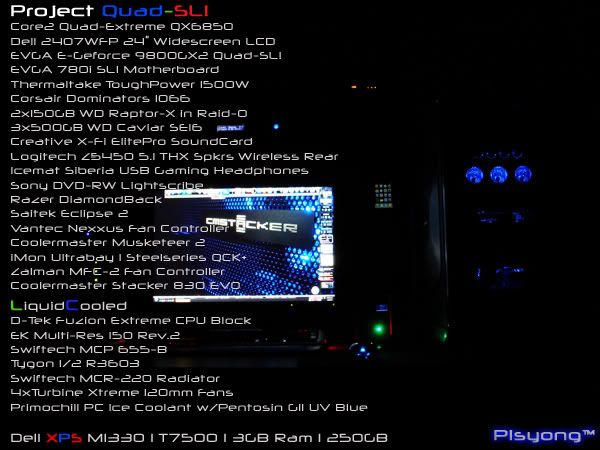
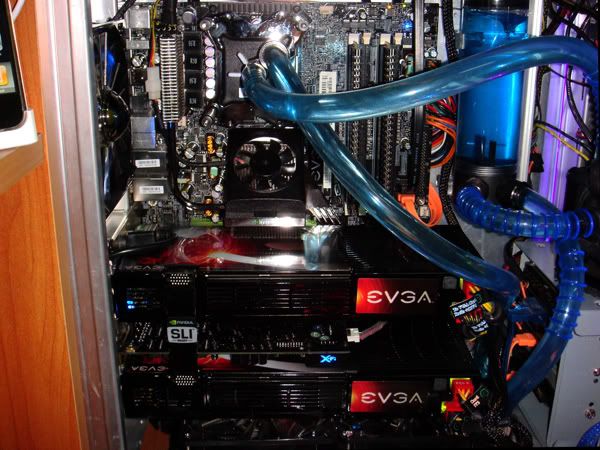
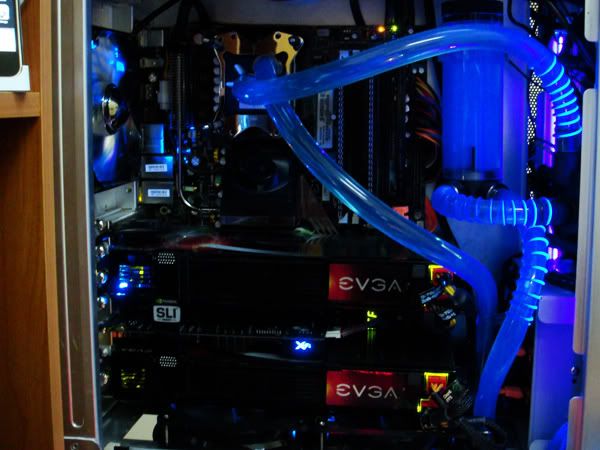
    First run of my Quad-SLI 9800GX2 using 174.74 is 17820 *disappointing*
    Second Run! 12519 WTF! the 174.74 driver got all the mess in the world!!!

    i should prolly consider the other beta driver... will find time to download and install it...


    2nd Placer WorldCyberGames Team Philippines NFS MostWanted
    _____________________________________
    Intel C2 Quad Extreme QX6850 l Crucial Ballistix Tracer x4gB lEVGA 780i 3way SLI Mobo l TT Toughpower 1500W
    EVGA 9800GX2 QUAD-SLI l Dell 2407 WFP 24" Wide LCD
    Liquid Cooled
    D-Tek Fuzion l Tygon 1/2 R3603 l EK MultiRes 150 Rev. 2 l PC Ice Coolant w/Pentosin G11 l Vista Ultimate x64 SP1
    ____________________________________________
    Dell XPS M1330
    T7500 | 3GB Ram | 250HDD 7200rpm | Slot Loading DVDRW | 13.3" Display Crystal LCD |

  17. #92
    Xtreme Member
    Join Date
    Jan 2008
    Location
    Nabootique
    Posts
    238
    I cant seem to install the 174.88 drivers as it say`s cant find the nv??-dl or something. This is with two downloads from different people, it may just be the xp x64 drivers that do it or does it happen on all of them?
    ASUS RANGER VII
    i7 4790K
    8GB CORSAIR 1600 xmp
    BE QUIET SHADOWROCK SR1
    EVGA GTX 770
    2 X 840 EVO SSD
    CORSAIR AX850W

  18. #93
    Xtreme Cruncher
    Join Date
    Nov 2006
    Location
    Minnesota
    Posts
    841
    ^Had the same error when trying to install these drivers and I am also using x64.
    QX 9650 | Maximus II Formula | G.SKILL 4GB (2 x 2GB) PC2 8500 | Sapphire 4850 X2 2GB| Auzen X-Fi Prelude 7.1 | 3x's WD 150GB Raptors & 2x's 1TB Seagate 7200.11 | Silverstone OP1200 | SilverStone TJ07 | Dell 2707WFP

    EK-RES 250 --> Swiftech MCP655 --> Apogee GTZ --> Enzotech Sapphire NB --> Feser X-Changer 360


  19. #94
    Xtreme Member
    Join Date
    Oct 2006
    Posts
    412
    Quote Originally Posted by swiftex View Post
    i did by toggling between the 2 cards in rt 2.08 and it seems to hold,

    mind you tomorrows boot may show otherwise

    Update: only one card holds the o/c - guess you just have to keep doing it manually

  20. #95
    Registered User
    Join Date
    Oct 2006
    Posts
    41

    BFG 9800 GX2 not displaying any output 2 different SIIE mobo's

    In my thread here: http://www.xtremesystems.org/forums/...=1#post2936053

    & here:

    http://forums.slizone.com/index.php?showtopic=20567

    I have outlined the problems I've had with two Asus Striker II Extreme + 9800 GX2 in as many weeks.

    If the above users with the combination of mobo and GPU would kindly let me know which PSU they are using it would be most appreciated?

    Here's the quote from my other thread @ xtremesystems.org outlining the issue in detail with the possible conclusion that the BIOS or the lack of power from my combi PSU's being the issue because I have tried this GPU on another inferior mobo and PSU and it works fine.

    "As I stated in my topic this is the second striker II extreme motherboard I have had in the last two weeks that is unable to display any thing in BIOS/DOS or Windows using my BFG 9800 GX2 GPU?

    To make matters worse when I use my BFG 8800 GTX GPU to boot into the BIOS or Windows to update BIOS from the version 0402 that the mobo shipped with I am told that, ”ROM ID in the file is incompatible with the existing BIOS"? The only too available ROM versions are 0508 & 0601.bin, neither of which seem to be compatible with the currently installed version 0402. So I’m caught in a loop, anyone got any ideas as to what the hell is going on?

    I know what you’re thinking that maybe it’s the BFG 9800 GX2 GPU that is at fault, but I have tried it on a different motherboard (ASRock 1333 FSB), and it works fine ironically on a inferior 650 Watts GPU. SIIE mobo has a superior 650 Watts ASAKA PSU with a piggyback ThermalTake power plus 250 Watts dedicated graphics card PSU which works fine with my current BFG 8800 GTX GPU.

    The other issue I have is that I can’t get both sticks of 2 x 2Gb of DDR3 OCZ - OCZ3P16004GK 2 x 2GB 7-7-7-24 – RAM to boot but one stick 2Gb is fine, anyone else having this problem?

    I only bought the 790i SLi SIIE because my first striker extreme 680i SLi is at Asus UK for repair but in the last two weeks I’ve had two SIIE, both with the same graphics card issue!"

    Sorry about the rant in the last para but you are on your 3rd mobo and into plus 1k in pennies 3 weeks sound a long time to fined a fix.

    Anyway, if you can let me know if you have this combo of mobo & GPU & what PSU run's them I would be most gratfull

    Cheers


    Thanks in advance
    -------------------------------------------------------------------------------------------------------------------------------

    Motherboard : ASRock Conroe 1333 DVI-H. * Processor : Intel® Pentium Dual Core Q6600 - G0 stepping * Memory : OCZ DDR 3- OCZ3P16004GK 2 x 2GB RAM, * Storage : Western Digital® 150 GB Velociraptor, 120 GB WD SATA, Seagate 320GB - HDD * Graphics : EVGA GeForce GTX 280 - 1 GB* Power : 1: Cooler Master Real PowerPro 1250 watt , 2: ThermalTake® PurePower Express 250w GPU PSU * Liquid Cooling : SwiftTech™ H20-220 APEX Ultra Kit : = Apogee™ GT water-block, MCP655 pump (ceramic bearing), MCR220-QP Radiator dual fans * Chassis : ThermalTake® Tenor Black desktop - CASE * Display : Gateway® 30“ XHD 3000 Quad HD

  21. #96
    Xtreme Member
    Join Date
    Oct 2006
    Posts
    412
    Quote Originally Posted by TouGe View Post
    ^Had the same error when trying to install these drivers and I am also using x64.
    i'm also using x64 xp - have you been able to install the 174.88 drivers or a no go?

  22. #97
    Xtreme Member
    Join Date
    Nov 2007
    Location
    Canada
    Posts
    296
    Quote Originally Posted by wilson View Post
    I cant seem to install the 174.88 drivers as it say`s cant find the nv??-dl or something. This is with two downloads from different people, it may just be the xp x64 drivers that do it or does it happen on all of them?
    Extract to c: and not desktop.

    that fixed it for me
    q9550 e0 4.1ghz
    Corsair H100 Mx-3 + TriCool
    Asus Rampage Formula R4 BIOS
    Sapphire 7970 3gb Dual x OC 1200/1700 (reference) re-pasted MX-3
    CM Cosmos S RC-1100 w/6 TriCools
    4xOCZ2G10662G (8gb DDR2 RAM)
    Corsair AX1200 PSU
    SB X-Fi Extreme Audio PCIE w/Z-5500's +Corsair Vengeance 2000
    G15 rev2 + G13 + G9x


    GOT RAMPAGE?
    CHECK FOR MEMORY ISSUES

  23. #98
    Xtreme Member
    Join Date
    Nov 2007
    Location
    Canada
    Posts
    296
    Quote Originally Posted by Danger30Q View Post
    I have been using my EVGA 9800GX2 for 2 days now and it plays games perfectly for hours at a time. But when I play an xvid video, I get this major pixelating green vertical lines that appear after 3-4 minutes of the video running. Then the computer locks up hard and I'm forced to do a manual restart.

    Any ideas of what this might be? I know the cooling is fine since I can play COD4 for hours and have no issues.
    Check your temperatures even when playing xvid's. It sounds like your card might be flunking...usually lines across a screen means over-heating or something burnt out

    or a crappy codec ^.^
    q9550 e0 4.1ghz
    Corsair H100 Mx-3 + TriCool
    Asus Rampage Formula R4 BIOS
    Sapphire 7970 3gb Dual x OC 1200/1700 (reference) re-pasted MX-3
    CM Cosmos S RC-1100 w/6 TriCools
    4xOCZ2G10662G (8gb DDR2 RAM)
    Corsair AX1200 PSU
    SB X-Fi Extreme Audio PCIE w/Z-5500's +Corsair Vengeance 2000
    G15 rev2 + G13 + G9x


    GOT RAMPAGE?
    CHECK FOR MEMORY ISSUES

  24. #99
    Xtreme Member
    Join Date
    Nov 2007
    Location
    Canada
    Posts
    296
    Quote Originally Posted by optical10 View Post
    In my thread here: http://www.xtremesystems.org/forums/...=1#post2936053

    & here:

    http://forums.slizone.com/index.php?showtopic=20567

    I have outlined the problems I've had with two Asus Striker II Extreme + 9800 GX2 in as many weeks.

    If the above users with the combination of mobo and GPU would kindly let me know which PSU they are using it would be most appreciated?

    Here's the quote from my other thread @ xtremesystems.org outlining the issue in detail with the possible conclusion that the BIOS or the lack of power from my combi PSU's being the issue because I have tried this GPU on another inferior mobo and PSU and it works fine.

    "As I stated in my topic this is the second striker II extreme motherboard I have had in the last two weeks that is unable to display any thing in BIOS/DOS or Windows using my BFG 9800 GX2 GPU?

    To make matters worse when I use my BFG 8800 GTX GPU to boot into the BIOS or Windows to update BIOS from the version 0402 that the mobo shipped with I am told that, ”ROM ID in the file is incompatible with the existing BIOS"? The only too available ROM versions are 0508 & 0601.bin, neither of which seem to be compatible with the currently installed version 0402. So I’m caught in a loop, anyone got any ideas as to what the hell is going on?

    I know what you’re thinking that maybe it’s the BFG 9800 GX2 GPU that is at fault, but I have tried it on a different motherboard (ASRock 1333 FSB), and it works fine ironically on a inferior 650 Watts GPU. SIIE mobo has a superior 650 Watts ASAKA PSU with a piggyback ThermalTake power plus 250 Watts dedicated graphics card PSU which works fine with my current BFG 8800 GTX GPU.

    The other issue I have is that I can’t get both sticks of 2 x 2Gb of DDR3 OCZ - OCZ3P16004GK 2 x 2GB 7-7-7-24 – RAM to boot but one stick 2Gb is fine, anyone else having this problem?

    I only bought the 790i SLi SIIE because my first striker extreme 680i SLi is at Asus UK for repair but in the last two weeks I’ve had two SIIE, both with the same graphics card issue!"

    Sorry about the rant in the last para but you are on your 3rd mobo and into plus 1k in pennies 3 weeks sound a long time to fined a fix.

    Anyway, if you can let me know if you have this combo of mobo & GPU & what PSU run's them I would be most gratfull

    Cheers


    Thanks in advance
    amprage on the +12v rail is very important. My PSU uses 60amps on a single huge rail and that seems to do very well.

    It could be that your system is lacking current, or certain parts are.

    Also, a q6600 G0 oc'ed to 3.5ghz is around 300w at load.

    a 9800GX2 at default clocks is almost 300w at load.

    that's 600w right there, not leaving much wattage left for any other devices such as USB, DVD drive etc.

    I'd say you're lacking raw power or current. My PSU is the PC power and cooling 750w silencer +12 single 60a and that couldn't even do a q6600 G0 + 9800GX2, and that PSU can handle 820w on load :O!
    Last edited by slugzkea; 04-22-2008 at 02:45 AM.
    q9550 e0 4.1ghz
    Corsair H100 Mx-3 + TriCool
    Asus Rampage Formula R4 BIOS
    Sapphire 7970 3gb Dual x OC 1200/1700 (reference) re-pasted MX-3
    CM Cosmos S RC-1100 w/6 TriCools
    4xOCZ2G10662G (8gb DDR2 RAM)
    Corsair AX1200 PSU
    SB X-Fi Extreme Audio PCIE w/Z-5500's +Corsair Vengeance 2000
    G15 rev2 + G13 + G9x


    GOT RAMPAGE?
    CHECK FOR MEMORY ISSUES

  25. #100
    Xtreme Cruncher
    Join Date
    Nov 2006
    Location
    Minnesota
    Posts
    841
    Quote Originally Posted by slugzkea View Post
    Extract to c: and not desktop.

    that fixed it for me
    I'll give it a go later this afternoon, thanks...
    QX 9650 | Maximus II Formula | G.SKILL 4GB (2 x 2GB) PC2 8500 | Sapphire 4850 X2 2GB| Auzen X-Fi Prelude 7.1 | 3x's WD 150GB Raptors & 2x's 1TB Seagate 7200.11 | Silverstone OP1200 | SilverStone TJ07 | Dell 2707WFP

    EK-RES 250 --> Swiftech MCP655 --> Apogee GTZ --> Enzotech Sapphire NB --> Feser X-Changer 360


Page 4 of 17 FirstFirst 123456714 ... LastLast

Bookmarks

Bookmarks

Posting Permissions

  • You may not post new threads
  • You may not post replies
  • You may not post attachments
  • You may not edit your posts
  •