

1.5 by 1.5 should do nicely. Good to see that this should be pretty straight-forward. I'm looking forward to what it shows.
Thx,
Bob



1.5 by 1.5 should do nicely. Good to see that this should be pretty straight-forward. I'm looking forward to what it shows.
Thx,
Bob
Me too, maybe we can find out Bob why you and I are..."abinormal".Originally Posted by 123bob


XSWCG Disclaimer:
We are not responsible for the large sums of money that you WILL want to spend to upgrade and add additional equipment. This is an addiction and the forum takes no responsibility morally or financially for the equipment and therapy cost. Thank you and have a great day.
Sigmund Freud said... "Failure to CRUNCH is a sign of Sexual Inadequacies".
Looks like a great experiment coming into being, I'd sign up (as the engineer in me is very curious) but I haven't even gotten around to changing my TIM out yet !
don_xvi helps find cures for cancer, AIDS and West Nile, among other research !
Donald A. Perlick helps find cures for Alzheimer's, cancer, and Parkinson's, among other research !
This is the complete pressure film tester list for xtremesystems if I have missed anybody let me know
123bob
Bail_w
Deux
littleowl
SiGfever
xoqolatl
Martijn
64dragon
Deadeye550
I have a total of 27 from Anandtech, hardwarelogic, overclockers.com and xtremesystems with the multiples probably hit 50 to 60 covering a full range of systems, coolers. A pretty good sample in my book.
I'll do a scan of the raw result noting the sink and setup before I send it out for a comparison to the pressure mapped analysis
Last edited by tastymannatees; 04-16-2008 at 03:54 PM.
I donno Doc...
I actually think it is the pronounced convex shape I have on this particular CPU. I'm dying to lap the be-jeebers out of it to find out. But, science must take it's course. I have to film test it first...
Regards,
Bob
EDIT: My Shin Etsu X23 mount appears to be starting to cure. I dropped 3 degrees in the last 2 hours. We'll see what she looks like in the morning. Dragon, have your temps dropped? I have 22 hours of runtime on this one. I used the 50% cycle trick overnight. I don't know if that speeded the cure up, or not....

i'm left handed too
my Shin Etsu x23 temps did not drop after 5 days, they actually went up. i'm expecting that i dont have enough paste and over time developed air pockets due to the motherboard being vertical.
original temps from 4-11-08
Shin Etsu X23 - ambient of 22C
idle temps: taken 10 minutes after startup
core 1: 24C
core 2: 30C
WCG 100% load - after 20 minutes
core 1: 33-35C
core 2: 38-40C
current temps 4-16-08
Shin Etsu X23 - ambient of 22C
idle temps:
core 1: 29C
core 2: 34C
WCG 100% load
core 1: 36C
core 2: 41C
so idle temps went up 4-5C and load went up 1-3C
i may pull the mount tonight and switch over to the IC D7, if not tonight i wont get to it until saturday
XS WCG Rules: #1: don't pull fart_plume's finger #2: Dave aka Movieman, don't give him your phone number if you like your hearing
XS WCG Note: There are 2 sets of points, WCG and Boinc. WCG = 7x Boinc
Project: Dark Matter (<- link) - Asus Maximus II Formula, Intel X3330 3.4ghz @1.32v under load, corsair ddr2 1066 8gigs, evga gtx260 core 216, pc p&c 750W, EK Supreme HF Nickel, iandh 175 res, Swiftech MCP355, Black Ice GTX G2 240, Lian Li v1200b
silverstone tj07 build log
The SPI sample they sent me is big enough that I should be able to get 2 test out of it. I will try and get time this week to try it out. In the note they sent with it it said to note the temp also but not to worry about the humidity. I will post as soon as I get it time to test!
How can I cut it so that way it is easier for me to test more then one time with it????
Do we have to email you again with our informations?
------------------------------------------------------------------------------------------------------
Crunch with us, the XS WCG team
------------------------------------------------------------------------------------------------------
due to Bob saying that he noticed a drop in temps from the Shin Etsu after 22 hrs and having had mine on for 5 days and seeing an increase in temps I decieded to pull the mount and switch to the IC D7.
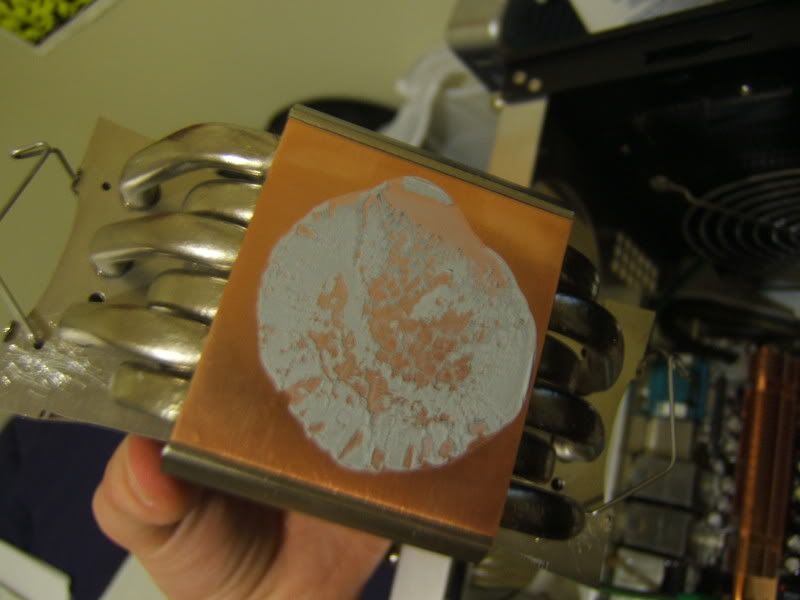
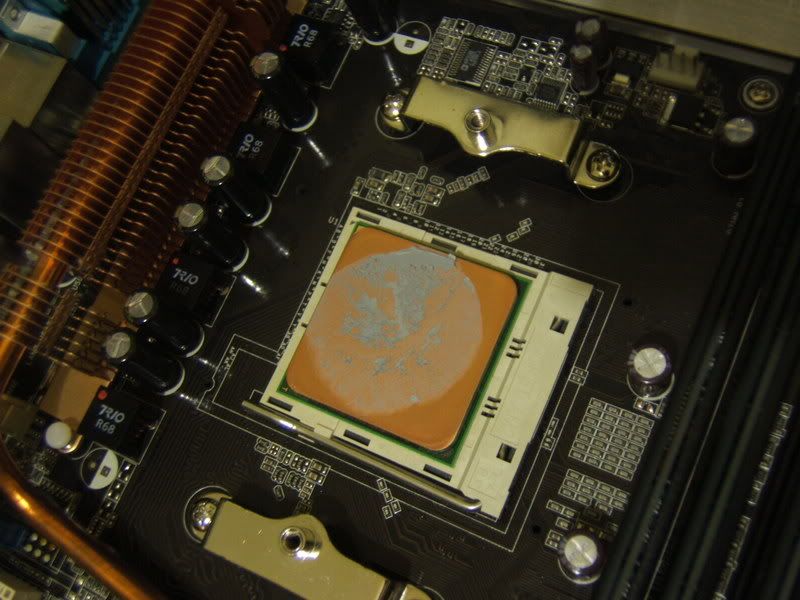
heres what I found when I pulled off the heatsink
on the CPU
i'm actually surprised with this, imo, it spread fairly well an the empty spaces on the hsf match up with the covered areas on the ish.
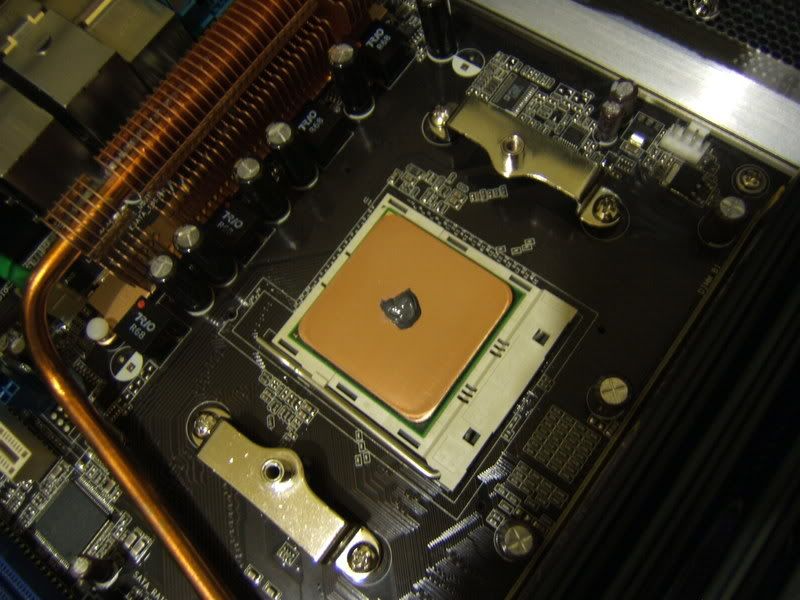
heres my blob of D7
here are my current idle temps after 1.5 hrs of application and 22C ambient
core 1: 25-26
core 2: 30-32
WCG 100% load .5 hr load
core 1: 33-35
core 2: 38-40
so, initial temps mimic those of the Shin Etsu
XS WCG Rules: #1: don't pull fart_plume's finger #2: Dave aka Movieman, don't give him your phone number if you like your hearing
XS WCG Note: There are 2 sets of points, WCG and Boinc. WCG = 7x Boinc
Project: Dark Matter (<- link) - Asus Maximus II Formula, Intel X3330 3.4ghz @1.32v under load, corsair ddr2 1066 8gigs, evga gtx260 core 216, pc p&c 750W, EK Supreme HF Nickel, iandh 175 res, Swiftech MCP355, Black Ice GTX G2 240, Lian Li v1200b
silverstone tj07 build log
I should have your addresses if I do not I will PM you for it
After app 8 days:
from 49-49-48-47 on AS5 with room temps of 68F to
46-46-46-45 on D7 with room temp right now of 71F
Yea, "3 less with 3 more"
Hows that for a slogan?
Crunch with us, the XS WCG team
The XS WCG team needs your support.
A good project with good goals.
Come join us,get that warm fuzzy feeling that you've done something good for mankind.
I am trying to consolidate results here so I went through the post results and this is what I came up with so far . I am only looking at the load temps. Some were averaged, some were interpolated. I am looking for corrections understated/overstated, missed or double entry. please review when you get a chance and suggest changes where differences occur.
It is a little chaotic on this end as some of you are in a kind of a multiple adjustment/fine tuning in process testing and others are updating results.
I was thinking that when you think you have your final number note it in a post as Final Result as it will make my job a whole lot simpler with fewer errors on my part. I am much appreciating your efforts to date, thanks again.
List of ongoing results
123bob -1.5
Martijn -5.25
Martijn -8
Martijn -7
SiGfever 3.75
123bob 0
123bob -1
123bob -1.55
David_L6 -1
littleowl 1.45
-0.25
-0.25
kiwi -1
fart_plume
Bail_w -3.55
SiGfever 2.65
littleowl 6.2??/-3.75??
Movieman -3.5
xoqolatl -6.45
xoqolatl -5.55
jspace -2.5
jsjspace -4
jspace -2
jspace -3.5
Deadeye550 -3
123bob -2.7
KaptainBlaZzed -4.5

My final results to date:
Load temps dropped by 6.44°C (averaged over 2 weeks)
This is on Q6600 at 1.35V real, 3600MHz.
I should have Athlon X2 and E6300 results soon.
www.teampclab.pl
MOA 2009 Poland #2, AMD Black Ops 2010, MOA 2011 Poland #1, MOA 2011 EMEA #12
Test bench: empty
I am going to do another run on a P4 630. Pics & temps will be up shortly.
Results in post no. 250.
EDIT: This pressure test got me thinking... It will of course also show a different picture when your IHS is slightly concave or convex
Last edited by Martijn; 04-19-2008 at 06:14 AM.
Main rig:
CPU: I7 920C0 @ 3.6Ghz (180*20)
Mobo: DFI UT X58 T3eH8
RAM: 12GB OCZ DDR3-1600 Platinum
GPU/LCD: GeForce GTX280 + GeForce 8600GTS (Quad LCDs)
Intel X25-M G2 80GB, 12TB storage
PSU/Case: Corsair AX850, Silverstone TJ07
Hire the left handed, we're the only ones in our right mind.....
I have a curious result to share. Last night my Shin X23 mount was showing a couple of degrees of improvement. Now it's right back to where it started....I had thought that the Shin was curing. What may actually be happening is that it did cure, and possibly shrunk down some? This is a convex CPU so perhaps it isn't making as good a contact as last night? I noted on shin pages that X23 is intended for smooth flat surfaces. G751 is recommended for non-flat contacts. I have G751 also and will give that a whirl soon.
So bottom line, my results appear to be in-line with Dragon's.
Regards,
Bob
haha, i wish someone would hire me, i'm graduating on May 17th and dont have a job yet...maybe i should add to my resume that i'm left handed.
back on topic
according to your post Bob, i should have better results with the X23 than cause my heatsink and ihs are lapped. i kept it to 800 grit so my microscopic hills and valley's aren't any different in size from before the lap and just made them both flat.
XS WCG Rules: #1: don't pull fart_plume's finger #2: Dave aka Movieman, don't give him your phone number if you like your hearing
XS WCG Note: There are 2 sets of points, WCG and Boinc. WCG = 7x Boinc
Project: Dark Matter (<- link) - Asus Maximus II Formula, Intel X3330 3.4ghz @1.32v under load, corsair ddr2 1066 8gigs, evga gtx260 core 216, pc p&c 750W, EK Supreme HF Nickel, iandh 175 res, Swiftech MCP355, Black Ice GTX G2 240, Lian Li v1200b
silverstone tj07 build log
Graduating engineering, right? What kind? Electrical? CS? ME? I may be able to hook you up with my division of Motorola. I've been with the company for almost 20 years. I'm a Staff EE with them.
Back OT, Theoretically then X23 should be the right paste for you. I've got quite a hill on my Farm-09 CPU. You can see it in the spread pics. The TRUE has some pretty deep mill marks too. G751 should be the ticket for that one. So far, D7 has given me reliable mounts and is right up with the others in temps. Because of this, I'd have to conclude D7 is the best choice for this machine without lapping it.
Regards,
Bob
littleowl 6.2??/-3.75??
Whats that?
ok I did some tests today I will try to post them tomorrow night at work. I am fapped here at home from my wife surfing myspace today. so not much of a connection speed.(
Edit:
First pic is my fuzion and the second is the 6002 as you can see i had lots of trouble holding the film when doing the test because of the way I made my hold down.
Last edited by littleowl; 04-18-2008 at 11:08 AM.
Color chart and graph - match the color, note the number then match the number to the curve on the graph
Bob, PM sent to continue discussion
Tasty, PM replied to
Update on D7
my current ambient is 25C - after 40ish hrs of cure time (if i added those hrs right, i'm goin on 2 hrs of sleep since 7am thrursday)
core 1: 36C
core 2: 42C
so, room temp went up 3C and cpu temps went up 1-2C
XS WCG Rules: #1: don't pull fart_plume's finger #2: Dave aka Movieman, don't give him your phone number if you like your hearing
XS WCG Note: There are 2 sets of points, WCG and Boinc. WCG = 7x Boinc
Project: Dark Matter (<- link) - Asus Maximus II Formula, Intel X3330 3.4ghz @1.32v under load, corsair ddr2 1066 8gigs, evga gtx260 core 216, pc p&c 750W, EK Supreme HF Nickel, iandh 175 res, Swiftech MCP355, Black Ice GTX G2 240, Lian Li v1200b
silverstone tj07 build log
yeah tasty I looked at the color chart but still not really sure what to make of it other then my 6002 has a hell of a lot harder clamp then my fuzion.
looking at your charts (more then I got with my free sample kit) my humidity was D 60%
looking at color my PSI would be about 80 because my chart for the fuzion shows it at about .5??? sound right??
This is the reason I opted for the full digital analysis. The white Areas are where you are not making any contact. You have to do a kind of mental averaging I would agree on the 80PSI reading in the darker areas although about 1/4 looks to be < 30psi so the 80 would drop with the digital analysis.
The first image has most of the pressure reading at the edges little or no contact in the center so something,... IHS? is a little on the concave side and looks to me < 30PSI in that center part.
The mounts both look like the have a higher pressure on the right side than on the left.
Like I said it is subjective and why I would like to put together a library with raw and digtital pics 50 or 60 samples probably will cover most variations in mounts.
well this was there free sample SPI sent me and when I get yours I will do it on the bench top and see what the different mounts look like. after I get them I will label each of them before i scan this time! I did send my samples back in today so I am excited to see what they tell me.
Tried the IC diamond compound today. (Thanks to David_L6
My 'razor blade' style method didn't work very well . I'm using the 'blob' method now. Also the mount of my TRUE wasn't optimal. I've put an old credit card under the metal bracket. Seems to work better , gives more downforce.
Sorry, don't have very reliable scientific data here , but I'm seeing a solid 5°C degree drop in coretemp
Q6600 B3 @ 3.4Ghz 1.45vcore
TRUE + 1500rpm Antec fan
Asus P5Ke Wifi
before 72-72-68-69 (23° ambient)
now 67-67-63-63 (23°C ambient)
Last edited by Jaco; 04-19-2008 at 07:09 AM.
The testing system:
CPU: P4 630 @ 3.6Ghz, 1.35v in BIOS, 1.37v measured.
Mobo: Asus P5AD2-E premium
Mem: Some crappy 2x512MB sticks I still had. DDR2-533.
GPU: ATI Radeon HD2400pro
HD: Seagate 7200.7 80GB SATA (not in the picture)
TIM: Arctic Silver 5
Original AS5:
The cooler mounted. This is a stock Conroe-L/Wolfdale heatsink.
The system as it is running right now. Yes, that is my trusty old Matrox Mystique PCI laying there.
The cooler after removal:
The CPU after removal of the cooler. It didn't have proper contact, after a remount temperatures were better.
Updated temperatures from an improved mount:
Temperatures:
Idle: 50C
Load: 70C
Ambient: 22C
More ICD7 results up tomorrow. So far the temperatures are 44C idle, 65C load with a 20C ambient.
Update:
ICD7 on the CPU:
The cooler after removal:
The CPU after removal of the cooler:
The final ICD7 results:
Ambient 19C
Idle: 41C
Load: 62C
That is a 6 degree drop in idle temp, and a 5 degree drop in load temp.
EDIT:
I had a quick chat with Andrew over PM. He asked me to post this since I noticed this while mounting my heatsink. The stock Intel heatsink, as we all know, uses push-pins to tighten the cooler to the board. Obviously, no motherboard is perfect. One of these small manufacturing errors can mean that the board has slightly larger mounting holes, or mounting holes that are slightly off-center. From time to time I have seen boards that are bent around the CPU area, obviously because the cooler applied a lot of pressure on the board. This can either be a cooler or a motherboard manufacturing error.
When mounting the stock Intel cooler on this P5AD2-E board, it took me much, much longer to mount than on my Striker Extreme (say 5 minutes vs. 1). On the P5AD2-E mobo, it seems the cooler is much more firmly attached than it was on my Striker Extreme. From the looks of it, it seems the mounting holes on the Striker are slightly bigger as well. Also, when using push-pins rather than a backplate, it could be that the cooler isn't touching the CPU perfectly, something which is less of an issue when using a backplate. This can result in different load temperatures.
Last edited by Martijn; 04-19-2008 at 12:03 PM.
Main rig:
CPU: I7 920C0 @ 3.6Ghz (180*20)
Mobo: DFI UT X58 T3eH8
RAM: 12GB OCZ DDR3-1600 Platinum
GPU/LCD: GeForce GTX280 + GeForce 8600GTS (Quad LCDs)
Intel X25-M G2 80GB, 12TB storage
PSU/Case: Corsair AX850, Silverstone TJ07


 Reply With Quote



Bookmarks