MMM
Results 1 to 25 of 8711

Thread: The Maximus Formula Thread - Help/OCing/Guide/Rampage conversion

Hybrid View

  1. #1
    Xtreme Member
    Join Date
    Oct 2006
    Posts
    412
    Quote Originally Posted by WFO View Post
    Hey guys, great work on consolidating all the Maximus info so it's easier to find the important stuff. I joined the Maximus Rampage owners today. Everything went smooth as silk! I'll be adding my graphics cards to my cooling loop and installing a 9450 this weekend before any OC attempts.

    To avoid even more repetitive questions may I suggest the syntax be changed for the flashing command?

    I had to use: AFU236U /irf0219.rom /n /pbnc

    ...to initiate the flash. Typing afudos didn't work for me. I honestly can't remember if I tried it in all caps too. This was discussed deep in the thread and is currently buried somewhere.

    Too in eastcoasthandle's post he mentions putting the board in the refrigerator as a means of assisting removal of the NB HS. In the Cliff's notes I think it should be mentioned that Component Cooling spray is available from Radio Shack and safer. It should also be stated that it is far easier to remove the NB hs from the board new out of the box. If removed after running it takes far more heat or cold as the thermal compound then acts like cured epoxy. Arcticlean works fine when removed new. After being run it takes Acitone. I only bring this up because I just removed the NB HS from a new Rampage Formula. The SB came right off. The NB needed about a 6 second blast of the Component Cooler. My Maximus was run for 2 weeks prior to removal and that ordeal took lot's of heat and about 45 minutes.
    I preferred a Part 1 & Part 11 thread myself - but some %^&*% didn't like it -

    I would have thought that over time due to popular demand and the "DEMOCRATIC" process it would have become evident as to what would have gone the way of the "DODO"

    Nonetheless, I appreciate the ability to express myself and embrace the ability of others to do so as well and naturally hope that this continues without predjudice

    That being said, y'all enjoy eh! (friggin canucks strike again) - (part 2: epilogue: by the time you hit 50 page 2's a blurr)
    Last edited by swiftex; 04-16-2008 at 08:47 PM.

  2. #2
    Xtreme Member
    Join Date
    Jun 2007
    Location
    North Rose, NY
    Posts
    280
    Got my Q6600 today and after about an hour of playing around, it is stable at 4GHz with 1.51v. It's a SLACR G0 I just picked up from fry's for $189. My board is a Maximus modded to a Rampage running 0219.

    http://valid.x86-secret.com/show_oc.php?id=346759

    I am more than impressed with the way this board handles this chip. I have had little to no trouble getting this thing up and going and not once did it not boot to windows.

    I found that using the CPU GTL set to .67x did in fact help me with stability. Next up are the RAM tweaks (hello DET DRAM), but I have a stick of 667 Value RAM here for those times when DET DRAM says hi.
    Intel i9 7900X @ 4.6GHz @ 1.126v
    ASUS X299 TUF MARK 1
    32GB G.Skill DDR4 2800
    2x ZOTAC AMP EXTREME Core GTX1080Ti's in SLi
    Loop 1: Apogee GTZ CPU block, MCR360 rad w/ Scythe fans, Micro-res, Aquaextreme 50Z pump
    U2-UFO case

  3. #3
    Xtreme Cruncher
    Join Date
    May 2007
    Location
    CA
    Posts
    1,885
    Quote Originally Posted by Renegade5399 View Post
    Got my Q6600 today and after about an hour of playing around, it is stable at 4GHz with 1.51v. It's a SLACR G0 I just picked up from fry's for $189. My board is a Maximus modded to a Rampage running 0219.

    http://valid.x86-secret.com/show_oc.php?id=346759

    I am more than impressed with the way this board handles this chip. I have had little to no trouble getting this thing up and going and not once did it not boot to windows.

    I found that using the CPU GTL set to .67x did in fact help me with stability. Next up are the RAM tweaks (hello DET DRAM), but I have a stick of 667 Value RAM here for those times when DET DRAM says hi.
    Great price on the chip Renegade. Cheapest price I saw last week when shopping was around $240. Seeing your post makes me regret buying 2 9450s even though they aren't even installed yet. Hopefully they will provide better folding performance at lower clocks and save some energy though.
    Cooler Master HAF 942
    Sabertooth X79
    Win7 64
    3960X @ 4805 1.376 v-core
    32GB DDR3 1866 G.SKILL Ripjaws Z
    OCZ RevoDrive 3 series RVD3-FHPX4-120G PCI-E 120GB
    3 X 6T Raid 0 Hitachi Storage
    Themaltake Tough Power 1200
    1 HD 7970

    F@H badge by xoqolat


  4. #4
    Xtreme Member
    Join Date
    Mar 2007
    Location
    Silicon Valley, CA, USA
    Posts
    473
    Quote Originally Posted by Diss View Post
    Anyway I got a Maximus Formula with a Q6600 GO stepping. Still on the 602 bios that came on the board.

    This is my first water cooled PC and the first real overclockable one.

    I got it up to 4GHZ and my memory running at 890 cas 4 with the settings below.

    Extreme Tweaker
    Ai Overclock Tuner : Manual
    OC From CPU Level Up : AUTO
    CPU Ratio Control : Manual
    - Ratio CMOS Setting : 9
    FSB Frequency : 445
    FSB Strap to North Bridge : AUTO
    PCI-E Frequency: 110
    DRAM Frequency: DDR2- AUTO
    DRAM Command Rate : AUTO
    DRAM Timing Control: Manual
    CAS# Latency : 4
    RAS# to CAS# Delay : 4
    RAS# Precharge : 4
    RAS# ActivateTime : 12
    RAS# to RAS# Delay : AUTO
    Row Refresh Cycle Time : AUTO
    Write Recovery Time : AUTO
    Read to Precharge Time : AUTO

    Read to Write Delay (S/D) : AUTO
    Write to Read Delay (S) : AUTO
    Write to Read Delay (D) : AUTO
    Read to Read Delay (S) : AUTO
    Read to Read Delay (D) : AUTO
    Write to Write Delay (S) : AUTO
    Write to Write Delay (D) : AUTO
    DRAM Static Read Control: AUTO
    Ai Clock Twister : AUTO
    Transaction Booster : AUTO

    CPU Voltage : 1.56875 = 1.488
    CPU PLL Voltage : 1.50 = 1.632
    North Bridge Voltage : 1.51 = 1.552
    DRAM Voltage : 2.14 = 2.24 might be more then you need for your RAM
    FSB Termination Voltage : 1.42 = 1.488
    South Bridge Voltage : AUTO = 1.072 try 1.104v
    Loadline Calibration : AUTO try Enable for vdroop correction
    CPU GTL Reference : AUTO try 63x
    North Bridge GTL Reference : AUTO try 67x
    DDR2 Channel A REF Voltage : AUTO
    DDR2 Channel B REF Voltage : AUTO
    DDR2 Controller REF Voltage : AUTO = 1.120
    SB 1.5V Voltage : AUTO = 1.552 Try 1.58~1.60 if gaming or on RAID set

    NB LED Selection : NB Volt
    SB LED Selection : SB Volt
    CPU LED Selection : CPU VOlt
    Voltiminder LED : ENABLED

    CPU Spread Spectrum : Disabled
    PCIE Spread Spectrum : Disabled

    Advanced CPU Configuration
    CPU Ratio Control : Manual
    - Ratio CMOS Setting : 9
    C1E Suppport : Disabled
    CPU TM Function : Disabled
    Vanderpool Technology : Disabled
    Execute Disable Bit : Disabled
    Max CPUID Value Limit : Disabled


    USB Configuration
    USB Functions: Enabled
    Legacy USB Support : Enabled


    Question is, should I stay with the 602 bios or is there a better one for the Q6600?
    v0602 was the best for me on a Q6x00 and E6x50. Those settings look very like to mine so I can see they work for others too. If it is stable and you like its feel, I'd stay away from th4e BETA's unless there's something you must have. Then by all means, go for it at your own risk just like the rest of us. I would first try the 500x8 like mine to see if you get the like of an OC. Mine was on air, so you have an edge already, and using lees vcore.

    Play with the settings I colored in RED, see notes. Compare to see if it feels any better and especially before you go BETA BIOS so you have something to compare it to.
    4.250GHz (1.331v) @ 212 x 21 @ 2:8 DDR1600 @ 6-7-6-18 (1.657) ASUS RAMPAGE EXTRENE w/ Q6600 @ 3.8Ghz daily

    ASUS RAMPAGE II EXTREME, X58 w/ ICH10R
    Intel Core i7 930, rev. DO, batch #3951A824
    Mushkin Redline 998691 PC3-12800
    ASUS ENGTX460 GTX-460 DirectCu 1G
    Creative X-Fi Titanium Fatal!ty Champion
    SilverStone Strider ST80F 800W Quad 12v
    WD Raptor 74GB, 10K x4
    Danger Dan WaterBox Plus
    Windows 7 Enterprise x64
    Swiftech Apogee XT Copper Top w/ AS#5 (lapped to CPU)

  5. #5
    Registered User
    Join Date
    Apr 2008
    Posts
    2
    Quote Originally Posted by Nuckin_Futs View Post
    v0602 was the best for me on a Q6x00 and E6x50. Those settings look very like to mine so I can see they work for others too. If it is stable and you like its feel, I'd stay away from th4e BETA's unless there's something you must have. Then by all means, go for it at your own risk just like the rest of us. I would first try the 500x8 like mine to see if you get the like of an OC. Mine was on air, so you have an edge already, and using lees vcore.

    Play with the settings I colored in RED, see notes. Compare to see if it feels any better and especially before you go BETA BIOS so you have something to compare it to.
    I've read a little about the GTL but I don't completely understand it. Can anyone spell it out in newb terms.
    Thanks for the ideas.

  6. #6
    Xtreme Member
    Join Date
    Feb 2008
    Location
    Portugal
    Posts
    324


    can someone give me some help, handling this DRAM SLK Skew on channel A B

    Advance 100Ps
    Advance 50Ps
    normal
    Delay 50Ps
    Delay 100Ps

    that this in fact does in terms of performance?


    SILVERSTONE TJ07 . ASUS RAMPAGE EXTREME . INTEL C2D E8600@ Q822A435 . 6GB CELLSHOCK PC3 15000 . EVGA GTX 285 . WD VELOCIRAPTOR 300HLFS . WD AAKS 640GB ''RAID0 . CORSAIR HX 1000W . X-Fi FATAL1TY TITANIUM . LOGITECH WAVE . G9 LASER . Z5500 . DELL ULTRASHARP 2047WFP
    Aquaero VFD . Enzotech revA . Laing DDC 12v . Black Ice GTS-Lite 360 . Swiftech Mcres Micro . 3/8"
    By MrHydes®

    sales
    feedback Techzone

  7. #7
    Xtreme Member
    Join Date
    Oct 2007
    Posts
    355
    Quote Originally Posted by Diss View Post
    I've read a little about the GTL but I don't completely understand it. Can anyone spell it out in newb terms.
    Thanks for the ideas.
    n00b or newB? that is the question. Are all you newies scared to blow up your cpu's? I recommend reading thoroughly your q6600 datasheets and the 2 thermal protection methods this CPU uses. If you are on air alone you have absolutely nothing to worry about. You could overlock all day long without even a heatsink, and you r little CPU will struggle through it's ordeal. Now if you OC and supercooling the cpu AND subject it to high vlts and freq, then you have something to worry about becaue you are bypassing the 2 thermal limit protections embedded in the cpu, that no software can change. READ YOUR cpu DATASHEET on intel.com! come on lamers do we have to do all the work for you?! Show me your settings...
    CPU: Lapped L727A861 Q6600 3.61GHz (450x8) (1.275VID) @ 1.700V BIOS. WC w/Apogee GTX + Cu top + custom backing plate
    GPU: EVGA 8800GT. WC w/MCW60 + RAMsinks
    MB: ASUS Maximus Formula: Rampage Formula BIOS 0402. NB @1.61V BIOS. WC w/MCW30. FSBtV=1.38V BIOS. CPUPLLV=1.82V BIOS
    RAM: Corsair Dominator PC2 8500 4x1GB 1066@1081. 2.14V BIOS

  8. #8
    Banned
    Join Date
    Nov 2007
    Posts
    1,941
    Quote Originally Posted by ElEctric_EyE View Post
    n00b or newB? that is the question. Are all you newies scared to blow up your cpu's? I recommend reading thoroughly your q6600 datasheets and the 2 thermal protection methods this CPU uses. If you are on air alone you have absolutely nothing to worry about. You could overlock all day long without even a heatsink, and you r little CPU will struggle through it's ordeal. Now if you OC and supercooling the cpu AND subject it to high vlts and freq, then you have something to worry about becaue you are bypassing the 2 thermal limit protections embedded in the cpu, that no software can change. READ YOUR cpu DATASHEET on intel.com! come on lamers do we have to do all the work for you?! Show me your settings...
    +1
    I couldnt have said it better myself
    I was wondering who else was getting tired of the "please do it for me" requests

  9. #9
    Pie assassin
    Join Date
    Nov 2007
    Location
    Where lights collide
    Posts
    2,275
    Quote Originally Posted by Grnfinger View Post
    +1
    I couldnt have said it better myself
    I was wondering who else was getting tired of the "please do it for me" requests
    i hate those pm's

    "can you mod my 2900xt for higher volts and clocks?"

    for a while i was getting like 15 a day... thank god for rbe
    Current Status - Testing & Research

  10. #10
    Xtreme Mentor
    Join Date
    Sep 2007
    Location
    Dallas
    Posts
    4,467
    I am not sure if all the "I hate lazy people posting" were aimed at me or the other guy. If it was me I assure you me asking about the voltage settings was only after I had spent the last 4 days looking at various forums. All i could fine was what people were setting theirs at and since I sometimes like to push the envelope I wanted to know if there was established guidelines to the max settings. If I pissed someone off, I truly apologize as that was not my intention.

    Utnorris
    CPUID http://valid.canardpc.com/show_oc.php?id=484051
    http://valid.canardpc.com/show_oc.php?id=484051
    http://valid.canardpc.com/show_oc.php?id=554982
    New DO Stepping http://valid.canardpc.com/show_oc.php?id=555012
    4.8Ghz - http://valid.canardpc.com/show_oc.php?id=794165

    Desk Build
    FX8120 @ 4.6Ghz 24/7 / Asus Crosshair V /HD7970/ 8Gb (4x2Gb) Gskill 2133Mhz / Intel 320 160Gb OS Drive, WD 256GB Game Storage

    W/C System
    (CPU) Swiftech HD (GPU) EK HD7970 with backplate (RAM) MIPS Ram block (Rad/Pump) 3 x Thermochill 120.3 triple rads and Dual MCP355's with Heatkiller dual top and Cyberdruid Prism res / B*P/Koolance Compression Fittings and Quick Disconnects.

  11. #11
    Xtreme Member
    Join Date
    Oct 2007
    Posts
    355

    test

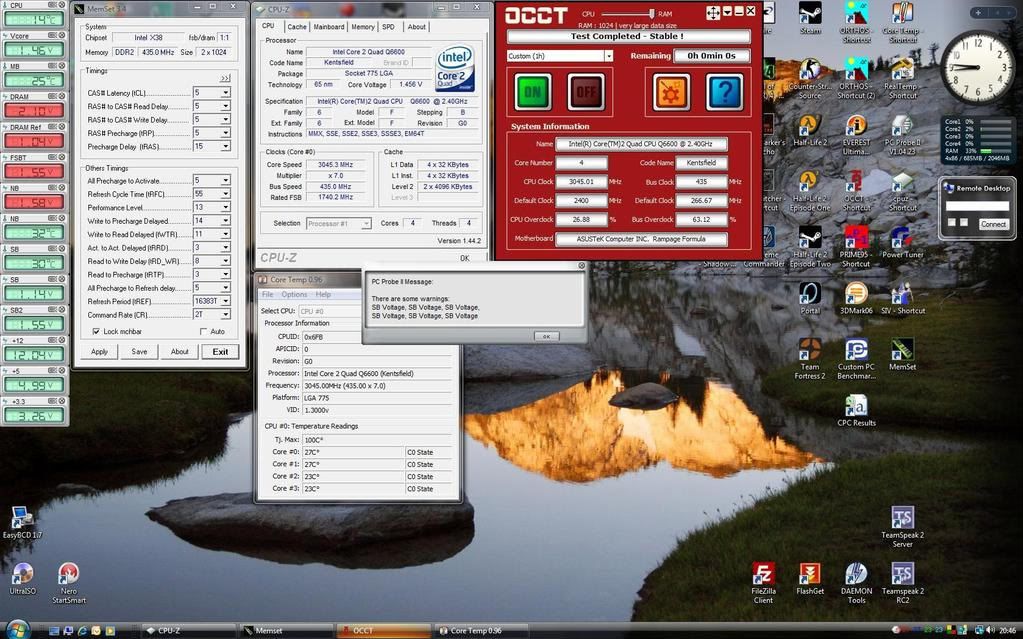
    #'s: This is with Rampage BIOS 0308. Still trying to lower Volts on CPU and NB. Core temps with Volts shown are approaching 75C on 28C ambient, 32WC loop temp. After 3 days finally got it "stable". Stable to me is posting, loading to windows vista x64, and putting up with 10 min OCCT 50/50 blend. I am overvolting my corsair ram way above spec's which worries me, but it almost time to upgrade anyway, and they are doing well with "normal" usage of gaming with front lines and video encoding with tpmgenc.
    Attached Thumbnails Attached Thumbnails Click image for larger version. 

Name:	RAM.jpg 
Views:	742 
Size:	185.5 KB 
ID:	76785  
    Last edited by ElEctric_EyE; 04-17-2008 at 03:23 PM. Reason: left out details
    CPU: Lapped L727A861 Q6600 3.61GHz (450x8) (1.275VID) @ 1.700V BIOS. WC w/Apogee GTX + Cu top + custom backing plate
    GPU: EVGA 8800GT. WC w/MCW60 + RAMsinks
    MB: ASUS Maximus Formula: Rampage Formula BIOS 0402. NB @1.61V BIOS. WC w/MCW30. FSBtV=1.38V BIOS. CPUPLLV=1.82V BIOS
    RAM: Corsair Dominator PC2 8500 4x1GB 1066@1081. 2.14V BIOS

  12. #12
    Banned
    Join Date
    Nov 2007
    Posts
    1,941
    Quote Originally Posted by ElEctric_EyE View Post
    #'s:
    you should tighten your timings ALOT, I run 2 MHz faster on my ram @ 1174MHz and my bandwidth is alot better


    5-5-5-15-3-30-6

    DRAM Static Read Control: Enabled
    Ai Clock Twister : Stronger
    Transaction Booster : Manual

    Common Performance Level [7]

Bookmarks

Bookmarks

Posting Permissions

  • You may not post new threads
  • You may not post replies
  • You may not post attachments
  • You may not edit your posts
  •