

It work's on M3A32-MVP bios 801, Thanks.Originally Posted by informal


It work's on M3A32-MVP bios 801, Thanks.
http://valid.x86-secret.com/show_oc.php?id=309887
Got a bit paranoid that my Ph. BE wont do more then 210-220 on HTT and was trying to get as high HTT as possible, setting everything else to low/slow. For some reason (and it's been mentioned elsewhere ) regular Windows XP 32-bit is a lot more stable then the X64 version. I think it goes for Vista as well. Is it a windows issue or phenom running in "long" 64 bit mode?
I am guessing Windows, but could be both.
Most of my staff, naturally, is on 2 Raid disks with WinX64
Oh well there is always Linux
World Community Grid's mission is to create the world's largest public computing grid to tackle projects that benefit humanity.
Our success depends upon individuals collectively contributing their unused computer time to change the world for the better.
Hi. It is possible to use a lower vcore than the stock in the M3A?
worked down to 0.85V if I remeber correct.
Uhm you get close.
Never used linux for stability testing. I allways use an old ide hd with winxp for that issue. Once I found a stable setting i switch to the sata hd.
I run debian testing 64 bit version and had no instability issues at those oced states.
Can it be it are driver issues under 64bit windows?
also note, that when sp2 came out some ppl were complaining about clocks not being stable ( sp2 for x86 win xp only i think )
mobo: strix b350f
gpu: rx580 1366/2000
cpu: ryzen 1700 @ 3.8ghz
ram: 32 gb gskill 2400 @ 3000
psu: coarsair 1kw
hdd's: samsung 500gb ssd 1tb & 3tb hdd

You might be able to get more stability by hitting F4 in bios and adjust your Channel A and Channel B clock skew.
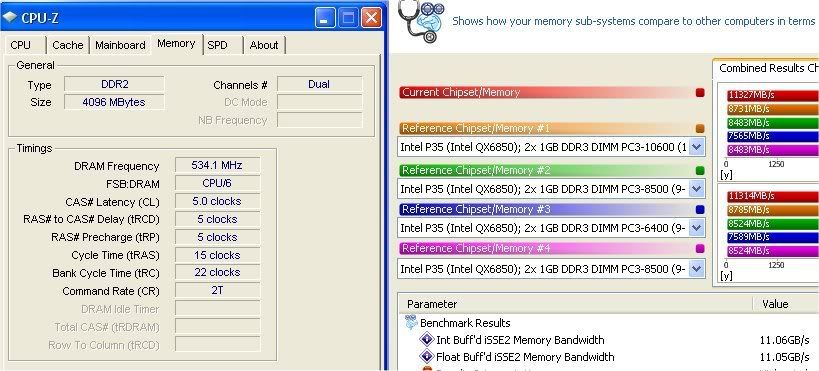
I had the X2 6400 running OCZ Reaper ddr2 800 @ 4-4-4-15 and 5-5-5-15 with the following settings. Previous to adjusting the clock skew this was impossible to run stable. It ran Orthos over night stable, and OCCT for an hour. Don't know how it's going to affect the Phenoms but I thought I'd throw it out there cause it's been a major break through for my X2. Run as high as 3.6 stable. Heat sinking the mosfets today to see what effect that has.
General Settings
FSB/HT 267
Mult 12x
Cpu Volt 1.4
DDR Volts 2.1
HT/NB link 4x (800 on this board)
Memory 5-5-5-15 with TRC set to 22
Clock Skew A and B Delay 150ps
Asus P6T Deluxe /Core i7 965 Extreme
Dominator 6GB 1866 @ 1920
2x Raid0 VelociRaptor 2x Raid0 SaS Savvio 15k.1
Quad SLI GTX-295 when I'm feeling froggy
SLI'd GTX-285 for every day use.
ThermalTake TP 1200
Mouse With A string on it's Tail
(To cheap to buy a mouse)
Here is the deal :
Win x64 never went (for me) over 2.6 without freezing.
I change 1 thing in BIOS:
RAID to IDE, under storage (not related to clocking I think
The results with XP 32 are much more promising
World Community Grid's mission is to create the world's largest public computing grid to tackle projects that benefit humanity.
Our success depends upon individuals collectively contributing their unused computer time to change the world for the better.
@SocketMan: You run crazy speeds for 1.25V! How stable is that setup?
Not stable yet by any means,but definitely a step in the right direction from not even scratching 2.6 stable or otherwise. The CPU NB was set to 1.350v, but the
CPU Vcore was stock.
Should be able to see by the end of the week what the final stable numbers will
be.
World Community Grid's mission is to create the world's largest public computing grid to tackle projects that benefit humanity.
Our success depends upon individuals collectively contributing their unused computer time to change the world for the better.
SocketMan,can you adjust Vcore with Phenom using M3A?I've heard that no matter what some users set in the BIOS,Vcore actually is locked to default.Is this true(with known BIOS versions)?What's the highest voltage you managed to boot with your Phenom?
Yeah SocketMan, with my 9500 if I applied something above 1.25V it got cut down into the 1.15V-1.25V area. What NBVID does AMD Power Monitor show if you use 1.3V for the NB? Should be 1.2V if the voltages are locked with an BE phenom also.
The maximum in BIOS for CPU and CPU NB is 1.7v
However in reality it never goes over 1.550 with X2 or Phenom even if it set to 1.7v
I leave the CPU voltage on AUTO and use AOD to change it.
The CPU NB voltage I do set in Bios as there is no way to change it with AOD.
The 1.550 limitation also applies to the CPU NB v ,thats probably as much as the board can supply.
World Community Grid's mission is to create the world's largest public computing grid to tackle projects that benefit humanity.
Our success depends upon individuals collectively contributing their unused computer time to change the world for the better.
I started with auto in bios for cpu and cpunb
and you can see the voltage changed (cpuZ,aod)
AMD power monitor will show the change in voltage for sure
(it's stock on the screen shoots)
http://valid.x86-secret.com/show_oc.php?id=315607
Last edited by SocketMan; 02-17-2008 at 05:14 PM.
World Community Grid's mission is to create the world's largest public computing grid to tackle projects that benefit humanity.
Our success depends upon individuals collectively contributing their unused computer time to change the world for the better.
You've probably seen that "extra" window in everest, that comes up if
you right click the bottom left corner ,but anyway....
World Community Grid's mission is to create the world's largest public computing grid to tackle projects that benefit humanity.
Our success depends upon individuals collectively contributing their unused computer time to change the world for the better.
Thanks SocketMan
The 1.550 limitation in the BIOS is VID, it looks pretty certain. Which means you can get around 1.7V CPU at least using AOD and at least 1.55V bootup on both the NB and CPU. It's more than enough to see the core limitation, although not convenient.
Thank you SocketMan,
This board limits the vcore based on the cpu vid lock it seems. Means it's only good for BE overclocking.
Anyone else ever get a warm boot issue where it posts and trys to load windows but slows to an absolute crawl halfway through where the only solution is to shut off the PSU and try again after a few seconds?
Doesnt matter if im running 2900Ht or 1500, stock clocks, or overclocked, XP, or Vista.
E7200 @ 4.0ghz 1.29vcore
2x 6870
OCZ 4gb @ 5-4-4-12 846mhz
yea, could be a messed up chipset or somethin' *shrug*
mobo: strix b350f
gpu: rx580 1366/2000
cpu: ryzen 1700 @ 3.8ghz
ram: 32 gb gskill 2400 @ 3000
psu: coarsair 1kw
hdd's: samsung 500gb ssd 1tb & 3tb hdd
http://forum.ncix.com/forums/index.p...d=0#msg1541484
Looks like a lot of people having trouble with the Network adapter/drivers
One of the solutions is (like yours) to take out the power cord.
I am using a wifi card and have the built in LAN disabled, cause it's using the same IRQ as my Video card.
World Community Grid's mission is to create the world's largest public computing grid to tackle projects that benefit humanity.
Our success depends upon individuals collectively contributing their unused computer time to change the world for the better.
It is the atheros, by luck ( or bad luck) all of the failed start attemps finally screwed my install. I tried to repair from vista CD and it sorta worked. Except my LAN card no longer initalizes (neither does an addin card I put in, so its a plug and play problem). Guess what....... while the LAN card isnt working I can reboot as many times as I want and never a warm boot issue! its so nice being able to hit the restart button! but now I have to somehow fix my vista install, preferable without wiping it out since I don't feel like starting the witcher over and I just got the processes how I want them.
E7200 @ 4.0ghz 1.29vcore
2x 6870
OCZ 4gb @ 5-4-4-12 846mhz
Long time lurker, first time poster ....
Hi there,
I got over that Atheros LAN issue by disabling the onboard LAN and installing a PCI ethernet card.
The freezing on cold booting process isn't exclusively related to the Atheros driver IMHO:
1. LAN onboard [Enabled] + latest drivers -> Freezing on cold boots + Internet Speed fluctuations.
2. LAN onboard [Disabled] + separate PCI ethernet card -> Freezing on cold boots.
I've already reported the problem as many of other M3A owners have on the official Asus forum, still no reaction though ....
Unplugging the power cable for a couple of seconds is the only thing that works for the time being.
CPU: AMD Athlon 64 X2 6400+ BE CPU Cooler: Scythe Mugen Mainboard: Asus M3A (Bios v0601) Memory: OCZ 2048MB KIT PC2-6400U Reaper HPC Edition CL3 PSU: Be Quiet Straight Power BQT-E5 (450 Watt) GPU: Sapphire HD 3850 512MB PCIe Hard Drive: Samsung SpinPoint 250 GB SATA II Optical Devices: 2 DVD Burners: Pioneer, Samsung Case: Chieftec BX-02B-SL Cooling: 3 Noctua 80mm NF-R8 controlled by Scythe Kaze Master.
Some time ago a guy in the asus forum reported he got the nic working after an complete bios cleanup.
Unplug power, set the jumper remove the battery, press power/reset to clear the capacitors and leave it like that for ~10 minutes.
Other types of resetting the bios did not work for him.
It might work for a couple of times but not on a regular basis. I tried that as well, to no avail though ....
Mind you, I haven't got any problems with the NIC stuff since I'm using a separate PCI ethernet card now.
The problem I'm facing is the occasional freezing on cold booting process.
Last edited by Mike_; 02-19-2008 at 07:26 AM.
CPU: AMD Athlon 64 X2 6400+ BE CPU Cooler: Scythe Mugen Mainboard: Asus M3A (Bios v0601) Memory: OCZ 2048MB KIT PC2-6400U Reaper HPC Edition CL3 PSU: Be Quiet Straight Power BQT-E5 (450 Watt) GPU: Sapphire HD 3850 512MB PCIe Hard Drive: Samsung SpinPoint 250 GB SATA II Optical Devices: 2 DVD Burners: Pioneer, Samsung Case: Chieftec BX-02B-SL Cooling: 3 Noctua 80mm NF-R8 controlled by Scythe Kaze Master.
 Posting Permissions












 Reply With Quote
Bookmarks