

I'm pretty sure Xigmatek is the OEM for Kingwin as I stated.



I'm pretty sure Xigmatek is the OEM for Kingwin as I stated.
Originally Posted by tuksonrider

Alright, that makes things more clear.
Last edited by fng77; 02-11-2008 at 11:38 PM.
MotherBoard: GigaByte G33M DS2R
Memory: 2x1 Gb HyperX DDR2-9600, 1200 Mhz
Cpu: Intel e2160 @ 3,6 Ghz on Air
Vga: XFX 4870 XXX
Cooling: Ninja Mini, 2x Ximatek 120mm, 1x Zalman 80mm, Stock Gpu
Case: Antec Fusion Remote
any updates i know you are busy just thought id ask. wanting to take advantage of the rebate they have which will expire soon. thanks again
upgrading...cooler master cm690 case, corsair hx850, samsung 1tb x 3, optiarc burners x2, gskill 4gb ripjaws, working on the rest again


Hoping for this weekend again, its once again freezing and i cant get the temp up in the garage to test properly. Even with my heater in there.
Just sell it to me, I will do a full review writeup.

ASUS P5E X38 (RF 0701 Bios) Q9550@3.51 1.248v, Xigmatek S1283, 8GB GSkill DDR2-8000@990 1.94v, XFX HD5870,
2 - Seagate 7200.10 320G RAID0, Seagate 7200.11 500G, Seagate 7200.12 1.5TB
Lian-Li (Rocketfish) Full Tower, Silverstone Zeus 750Watt, Vista Ultimate x64 SP1, Dell U2410
lol i am gona need it anyway when the next heatsink showdown comes around, and besides that, i have to write a full review myself on it, its not just for show and tell. Plus i wanna keep it and put it in my rig
not sure i can wait to much more. do you from your previous testing really feel this is that close to the true as your chart shows.. or should i simply buy the true this is less than half the price of the true after buying a fan...
i mean do you think this will perform that close to the true for me as well as it did for you? thanks again.. i need to get something soon..
upgrading...cooler master cm690 case, corsair hx850, samsung 1tb x 3, optiarc burners x2, gskill 4gb ripjaws, working on the rest again
sο guys... due to the design of the base of Xigmatek S1283, which is the best method to apply thermal paste and which thermal paste do you suggest?
AS5?
as far as arctic cooling products go, mx2 is now the top dog. no cure time either
my mini-fridge
MoBo: GA-EP45-UD3P | CPU: Q9550 3.6GHZ @ 1.216v | RAM: 4x1GB 900mhz @ 5-5-5-15 | GPU: GTX 460 900G/1800S/4400M | PSU: Corsair 750TX| HDD's: Seagate 320GB + 500GB, Samsung 1TB | Case: antec p180
I used their paste though, but is just a brand thingy and their "spec" just looks good.
i apply thermal past only on the processor?
i ask this question cause of the "weird" base of this cooler...
Spawn32 suggested ...
Sourcing parts for a mildly over clocked abacus.
 How suitable is the S1283 to be mounted on a vertical motherboard?
Hi Guys,
After following quietly , the postings comparing the TRUE & the Xigmatek S1283, I have these questions that I would appreciate being answered.
1. I have a mid tower case with the motherboard mounted vertically. Can I get away with mounting a TRUE or Xigmatek S1283 on a X38 / X48 motherboard without breaking the motherboard?
2. Will I or should I install a Backing Plate on the reverse side of the motherboard? If so, could I use the Thermalright LGA775 Bolt Thru Kit?
3. I have a Sunon KDE1212PMB1-6A (120x120x38)mm fan. Specs are: 108 cf/m @3100 rpm (42 dBA) 6.8W. Would I achieve a better cooling using this fan in place of the original on the Xigmatek S1283?
4. Would this Sunon 6.8W rated fan "kill" my motherboard if I plugged the fan directly into the Motherboard CPU Fan Header?
It is interesting comparing the specs of the fan supplied with the HDT version and the Sunon I have at home.
HDT
size = 120x120x25mm
Speed = 1000 - 2200 rpm
Air flow (CFM) = 72.1 ~99.6 CFM
Air Pressure (mmH2O) = 2.6~4.8 mmH2O
Noise Level (dB) = 20~32dBA
Sunon
size = 120x120x38mm
Speed = 3100 rpm
Air flow (CFM) = 108 CFM
Air Pressure (mmH2O) = 7.9 mmH2O
Noise Level (dB) = 42dBA
I show these 2 sets of figures because I want to question the accuracy of the air flow claim of the HDT supplied fan. I think the figures claimed of Air flow (CFM) = 72.1 ~99.6 CFM is high and not what would be achieved in a real life installation.
I am interested in what others think as well.
Thank you for your replies in answer to these questions.
David
Forgot to add.
Sorry, in my haste to ask the questions, I forgot to give my thanks to Spawne32 for all that marvelous work in compiling all the figures comparing the various coolers.
A little more info to help answer the above questions.
The weight of the Sunon fan is 326 gram, so if you assume the original fan weighs ~150 gram, then the total weight of the Xigmatek S1282 with the Sunon would be 600 - 150 = 450 + 326 = ~775gram.
So I am asking. Is 775 gram too heavy for a vertically mounted motherboard to carry over a lifetime of approx 3 years? Would it eventually crack the circuit board?
The latest fan used on the HDT model is the same as the Red Scorpion, as below.
‧ Dimension 120(W) x 120(H) x 25(D) mm
‧ Voltage Rating 12V
‧ Speed 800~1500 R.P.M.
‧ Bearing Type Rifle Bearing
‧ Air Flow 56.3 CFM
‧ Air Pressure 1.57 mmH2O
‧ Life Expectance 40,000 hrs
‧ Noise Level 27.2 dBA
‧ Connector 4 Pin with PWM
I can't speak for the TRUE (as I don't have one), but the weight of 600g is really light. I originally had the GeminII which weighs an impressive 847g withOUT the 2x fans vertically mounted without a backplate, and it was fine. I wouldn't recommend hauling it to a weekly LAN party, but it was secure. As long as you use all the appropriate motherboard stand-offs to mount your MB, it'll be fine.
It certainly doesn't hurt. The TR LGA775 Bolt Thru Kit is totally compatible with the S1283. For an avg street price of $5, it's worth the extra piece-of-mind. (http://www.sidewindercomputers.com/lgbowiscsp.html)2. Will I or should I install a Backing Plate on the reverse side of the motherboard? If so, could I use the Thermalright LGA775 Bolt Thru Kit?
**As a note, it's easier to install the HSF then trying to fit large hands pushing the push-pins. Much easier with a screwdriver. Highly recommended.
[strike]The only problem I can forsee is the mounting. The fan you have listed is 38mm thick. The stock fan is 25mm thick. It uses a rubber mounting system via plugs. I'm not certain that it'll work with a fan so thick (but it may stretch that far. The plugs are VERY elastic). [/strike]3. I have a Sunon KDE1212PMB1-6A (120x120x38)mm fan. Specs are: 108 cf/m @3100 rpm (42 dBA) 6.8W. Would I achieve a better cooling using this fan in place of the original on the Xigmatek S1283?
****EDIT: Going back, I realize that the mounting plugs do NOT go all the way into the fan, just enough to mount. The 38mm should be fine.
I have no idea. From the 6.8w, and assuming it's a 12v fan, then amperage is .56A I don't know what the maximum watts and amps the fan header on the mb is rated for.4. Would this Sunon 6.8W rated fan "kill" my motherboard if I plugged the fan directly into the Motherboard CPU Fan Header?
When I first bought the Kingwin RVT-12025 (Xigmatek HDT-1283), I found the 99CFM @ 1500rpm a little hard to beleive as well. I see that they revised the CFM to 56. Much lower than previously stated, and I feel more accurate.It is interesting comparing the specs of the fan supplied with the HDT version and the Sunon I have at home.
HDT
size = 120x120x25mm
Speed = 1000 - 2200 rpm
Air flow (CFM) = 72.1 ~99.6 CFM
Air Pressure (mmH2O) = 2.6~4.8 mmH2O
Noise Level (dB) = 20~32dBA
Sunon
size = 120x120x38mm
Speed = 3100 rpm
Air flow (CFM) = 108 CFM
Air Pressure (mmH2O) = 7.9 mmH2O
Noise Level (dB) = 42dBA
I show these 2 sets of figures because I want to question the accuracy of the air flow claim of the HDT supplied fan. I think the figures claimed of Air flow (CFM) = 72.1 ~99.6 CFM is high and not what would be achieved in a real life installation.
I am interested in what others think as well.
Thank you for your replies in answer to these questions.
David
Here's a review I did on the Kingwin RVT-12025 vs the GeminII
http://www.xtremesystems.org/forums/...60#post2666060
** I have the bolt-thru kit now, and a new TIM (IC7 Diamond).
Last edited by tuksonrider; 02-15-2008 at 09:17 AM.
Thank you tuksonrider
I apologize if it seems to be deviating from the topic of the original thread. I am very impressed with the Xigmatek S1283. I have many years experience in the building of “straight” PCs. (No heavy modifications.)
The Sunon fan has a 3 pin connector and not a 4 pin that is required for a CPU fan.
Is it the case that all I need to do is plug in a standard 4 pin fan into the CPU header and plug my Sunon 3 pin into a speed controller / monitor, such as an AeroCool Cool Panel 2, etc. That way the motherboard is happy and I am happy to use this 100+ CFM fan on the Xigmatek S1283.
Or, can I just plug the Sunon into the first 3 pins of the 4 pin CPU fan header? (I don't think this will work!)
Thank you for your advice.
David
Yes it will work fine with only 3 pins, in fact it should have a little tab sticking up that only goes across 3 pins, that should guide you in where to put the connector. As far as the thermal paste application method, if you want more of a direct explanation, have a look here...
http://www.arcticsilver.com/pdf/appi..._quad_wcap.pdf
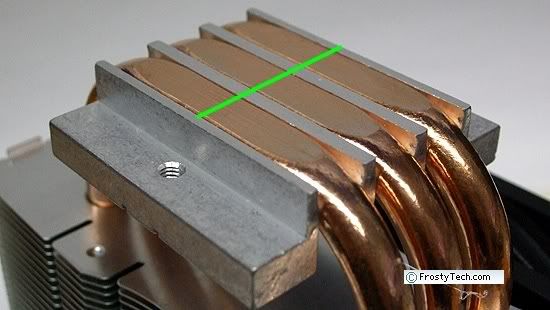
however you want to set the line so that all 3 of the heat pipes will intersect that line of thermal paste.
Coollaboratory has released a Liquid MetalPad... i was wondering if this thermal pad will co-work with this heatsink....
@Spawne32: Is this heatsink heavy enough that requires an x-tra back plate... or its mounting method is safe enough not to bend the mobo?
Last edited by P5WDHdeluxe; 02-17-2008 at 01:14 AM.
any new updates?? thanks
upgrading...cooler master cm690 case, corsair hx850, samsung 1tb x 3, optiarc burners x2, gskill 4gb ripjaws, working on the rest again
Still waiting for red scorpion review =D
seems like new egg sold out now but ........ awaiting !
How's the Xigmatek mounting system? Is it secure? Does it need modifications like TRUE or Infinity?
How credible would you guys rate frosty tech in doing the review, i mean the TRUE is placed lower than the ultra 120, that cant be right
and as for the fan usage, different fan for the Xigma 2,200RPM and only 1,600 for the TRUE ?
I would like to hear anyones feedback on that site in terms of credibility
Sure it fell and they cant test it, but claim it has 0.8c drop after lapping..The next step was to lap the base of the Thermalright Ultra-120 Extreme. This helped flatten the convex copper plate significantly, but regrettably the heatsink fell from the lapping table and was sightly damaged before we could retest it. The thermal results can't be considered reliable after such a fall, so they were not included in the above chart. It was observed that temperatures decreased by an average 0.8°C post-lapping though.
And how reliable is their synthetic testing, the way ive seen it before that synthetic doesnt really represent real world performance in some heatsinks even if the heat disspated is 1:1 with the synthetic
Last edited by Demo; 02-24-2008 at 08:18 PM.
The TRUE was tested with a Mechatronics G1225S12B 55 CFM 1500RPM fan, while the Ultra 120 was tested with a Martech D712025125Z2N 1600RPM fan.
I couldn't find CFM specs on the Martech, and neither could they.
hoping to have somthing for you guys this week, i was supposed to do the heatsink over the weekend however i caught the flu last week, and my ass is whooped.
Here is a quick comparison Xigmatek HDT-S1283 RED SCORPION vs HDT-S1283
Let's begin with both side by side in the boxes:
The RS has better packaging and mounting kit, more accessories:

Some more RS pics:


Both side by side naked out of the box:
Besides the nickel plated heatpipes and the LED fan, I found one more difference:
Did you see it? Here is a hint - deeper channels for the AMD mounting kit.
OK. Let's see what they can do:
Xigmatek HDT-S1283 with two Scythe 2600 rpm fans:
And the temps:
Xigmatek RED SCORPION with the same Scythe 2600 rpm fans:
And the temps:
My goal was to test the HSs only. I wanted to see if there is a difference in performance with same fans used. Well, there isn't any.
Last edited by angelreaper; 02-28-2008 at 12:47 PM.
 Posting Permissions


 Reply With Quote



Bookmarks