




Gigabyte sent me a sample of their new X38 chipset motherboard which has support for DDR2. > product page <
why make a high end X38 based board for DDR2 you might ask...well the answer is simple...DDR3 at this time is so expensive and provides almost no performance gain.
for the price of a kit of DDR3 one can rather purchase a nice board, GPU and a good set of
DDR2....the cost of DDR3 is such that only those with iether endless cash supplies or sponsors can contemplate running it.
this is clearly a tiny segment of the market and persuing said segment will not be very profitable for them or sensible in terms of price/performance.
they must have recently decided that the extreme end of the enthusiast market is worth persuing, presumable for the marketting/sales potential.
to this end they have enlisted the help of numerous extreme overclockers around the world to test their products and provide them feedback and tips for creating even better overclocking products.
this board is an example of what they have achieved in the short space of time this program has been in operation.
while not a perfect product for the extremist (none ever are) they are clearly heading down the right path
for instance the heatpipes on the board are a problem for enthusiast who usually like to replace motherboard heatsinks.
on the other hand i have tested the vCore and vDimm delivery of the board and found it to be extremely good
this is the most important aspect of an enthusiast board and Gigabyte have placed themselves amoung the best with this board
they have used only the best components in the power management system both to increase the motherboards longevity and to allow for maximum component overclocking success
now for some pics
the box
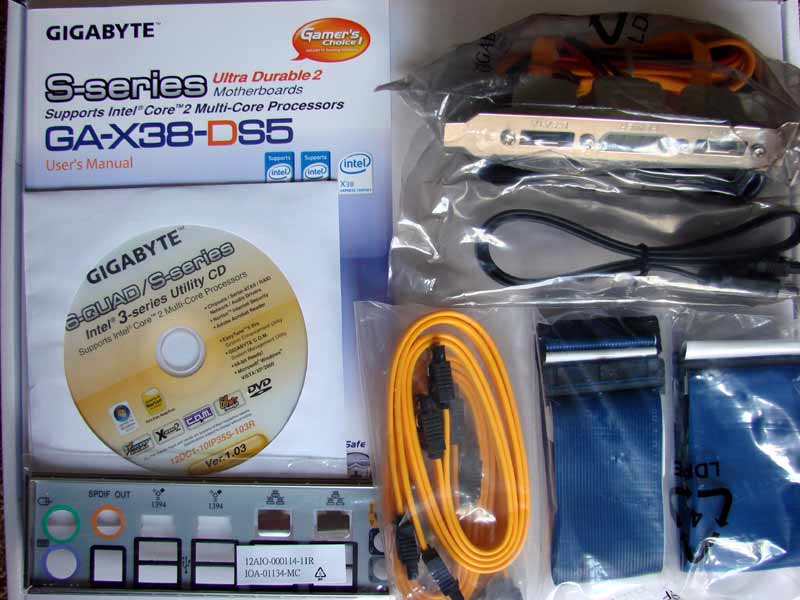
the package
the board
cpu socket area
ram slot area
bottom right corner
bottom left corner
ports
vCore Vdimm measuring points used
results table
for me the most important aspect of any motherboard is its ability to overclock a cpu...if it can overclock better than a competitors board then that will most likely lead to higher benchmark scores and therefor higher desirability.
to this end the first thing i did was identify vCore and vDimm measuring points on the board, attach my multimeters, and monitor the behavoiur of the power delivery to the critical components.
most of you will be aware that intel specifies a drop in cpu power delivery when the cpu is loaded...known commonly as vdroop.
this vdroop is often the bane of an enthusiasts existence as it usually reduces the amount of vCore on can feed a cpu at the limit.
various pencil mods and other voltmods have been devised for most intel chipset based boards to combat this problem.
now for the good news
this new board from Gigabyte displays awsome vCore characteristics.
i could hardly believe my eyes when a 1.5volt vCore setting resulted in exactly 1.5volts being delivered under load.
this is a really an increadable result usually seen only on the absolute best overclocking boards
not only was the voltage pretty much spot on but the vdroop itself is small compared to the vast majority of competing products...
in other motherboards often a 1.5vcore setting will result in more like 1.4vcore being actually delivered under load.
to say i was impressed by this result would be and understatement...its clear Gigabyte is getting really serious about the enthusiasts.
the results on this board from 1.6vCore and up were a little less impressive but i've been told to expect a new bios shortly that will improve accuracy at the higher vCore ranges too.
similarly vDimm delivery was great...starting out at 1.925 real measured vDimm as stock is the first sign of enthusiast focus in the memory overclocking department.
on many boards the usual 1.8 stock vDimm was too little to fire up enthusiast level memory that most often uses Micron D9GMH IC's
this used to result in many enthusiast having to purchase a stick of non micron ram to use as a starter stick each and every time they cleared their bios
this was a real pain i can tell you
Gigabyte has taken the trouble to ensure this won't be necessary on their enthusiast boards
from my results above it is clear that vDimm is in fact overvolted throughout the range...this i have requested be adjusted so that the bios setting more accurately reflect what will be measured when the system is loaded.
Gigabyte has finally removed the ctrl-F1 keystrokes needed to access the more advanced overclocking features of the bios
another new feature is the ability to set a series of keystrokes that will start the system from an off state.
one just enters the keystrokes and then hits enter and the machine will start...pretty cool
the bios is missing one or two features ideally needed for the enthusiast...those are the full range of ram timings and also performance level setting.
this has of course been brought to their attention
vCore and vDimm settings are more than enough to prevent vmods being needed for the extremists
some bios pics
here are two shots of a few benchies i ran...one set on the P35-DS3P board and the other on the X38-DS5.
the benchies were ran with all features enabled, an old OS install and absolutely no tweaks of any sort...the boards both basically in default state and the OS ported from one board to the other without reinstalling.
X38
P35
then by hardware and memset tweaking only (ie no software tweaks) i managed third place in the local 3600mhz challenge thread behind only those using every tweak, be it hardware or software, known to man...heheh
the board managed to max the cpu to its fsb wall of 545fsb...being an X38 chipset it required a slight overvolt and some active cooling.
all in all an impressive display from Gigabyte...i look foreward to them fine tuning their designs over time to satisfy the enthusiast even better
some ln2 overclocking will be added to this thread in about a week
just as an aside: from what i hear Gigabyte is set to revolutionise the high end graphics card market in the near future



 Reply With Quote


 1240mhz@2.02v


Bookmarks