MMM
Results 1 to 25 of 1681

Thread: **Official DFI LanParty UT 790FX-M2R Review/Overclock/Guide Thread**

Hybrid View

  1. #1
    Xtreme 3D Team Member
    Join Date
    Jun 2006
    Location
    small town in Indiana
    Posts
    2,285
    Quote Originally Posted by willyK View Post
    @ BadNizze - have you run memtest86 with those sticks at those speeds and timings with your 6400+?

    Reason I ask is that I've got 2 GB Crucial Ballistix PC2-8500 paired with a 5000+ BE, and optimized default BIOS settings set DRAM voltage to 1.96 V and speed to 800 MHz. At these settings, memtest86 results come back error free. However, if I crank the voltage up to manufacturer's spec, which is 2.2 V, I get an error very quickly that halts testing.

    800 MHz Crucial Ballistix is rated @ 2.2 V as well. Is it okay to run it undervolted, or is this just some artifact of memtest that I should ignore?



    That 2.2 is the maximum voltage. I ran my ballistix tracers for months on 1.9v with 500 mhz @ 4-4-4-9 timing on a p-35. always use a fan also. errors @ the same speed but higher voltage indicates a serious lack of airflow. ram needs a good breeze over it to disapate the heat.
    QX 9650 5ghz with 1.55v 4.8ghz with 1.5v 24/7 in a VAPOLI V-2000B+ Single stage phase cooling.
    DFI LP LT X-38 T2R
    2X HD4850's water cooled , volt modded
    Thermaltake 1KW Psu
    4x Seagate 250GB in RAID 0
    8GB crucial ballistix ram

  2. #2
    Registered User
    Join Date
    Dec 2007
    Posts
    18
    Thanks Jimmyz, the 12 cm fan on my XP-120 sits over the memory nicely.

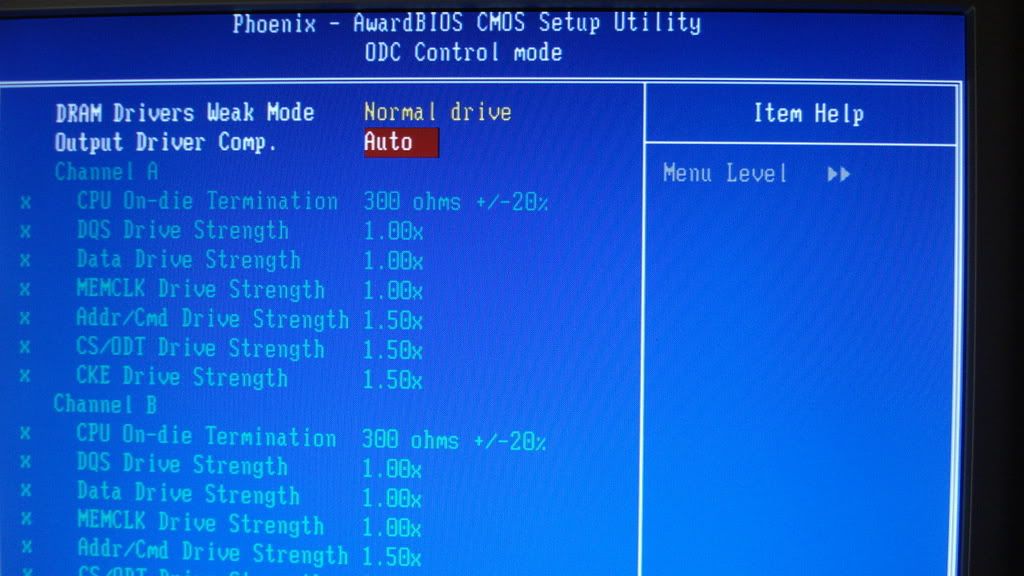
    Another strange thing I noticed using memtest86, my BIOS is set to run the memory at 400 MHz, but memtest is reporting 433 MHz. I was curious if it could be related to these settings:


    ODC control is under the DRAM settings in the Genie BIOS. I honestly have no idea what any of these settings mean, and the downloadable motherboard manual doesn't mention them. Any explanation of these settings or any other possible source of the reported memtest frequency from anyone would be appreciated.

    Also in reference to the BIOS screenshot above, "DRAM Drivers Weak Mode" has 2 settings - "Normal Drive" and "Weak Drive". Does anyone know what this refers to?

Bookmarks

Bookmarks

Posting Permissions

  • You may not post new threads
  • You may not post replies
  • You may not post attachments
  • You may not edit your posts
  •