

you should of just removed the IHS from the NB.



you should of just removed the IHS from the NB.
Asus Z9PE-D8 WS with 64GB of registered ECC ram.|Dell 30" LCD 3008wfp:7970 video card
LSI series raid controller
SSDs: Crucial C300 256GB
Standard drives: Seagate ST32000641AS & WD 1TB black
OSes: Linux and Windows x64

And how am I suppose to do so? If I remove the IHS do I need to put Thermal paste?
Main system:
Q6600 G0 L737B 3,8GHz
Maximus Formula X38
Ballistix PC2-8500 2x1GB
XFX 8800GT XT
Corsair HX620
X-Fi Platinum
150GB Raptor (Dual Boot) /2x 250GB WD Caviar (Apps)
Lian-Li V2000B Plus II
School: MacBook
Studying in: Pharmacy
Where: University of Montreal

So, if it's prime as you say, why does it happen with my B3, and when I pop in my G0, without touching bios, it does not?Originally Posted by safan80

If it was setting-related, or prime(software), then changing cpu should have no effect, no?
I just placed a 80mm near the northbridge area and my NB themp dropped to 38 degrees lol
Main system:
Q6600 G0 L737B 3,8GHz
Maximus Formula X38
Ballistix PC2-8500 2x1GB
XFX 8800GT XT
Corsair HX620
X-Fi Platinum
150GB Raptor (Dual Boot) /2x 250GB WD Caviar (Apps)
Lian-Li V2000B Plus II
School: MacBook
Studying in: Pharmacy
Where: University of Montreal
 Nope but thats a neat build you have going there
It was earlier in the thread that somone posted a picture of their board w/ a bolt replaceing one of the screws to hold down the NB heatpipe w/ a long screw and some washers along w/ wing nuts to hold up a 60 or 40 mm fan right over the fusion block area on the SE version but can't seem to find it anymore
Intel Core i7 920 D0 @ 3.2Ghz 1.2V
Prolimatech Megahalems w/ Sythe Sflex E
EVGA X58 SLI LE E757
6GB of Corsair DDR3 1600 3x2GB XMS3
EVGA Geforce 260 GTX core 216 @ stock
PC Power & Cooling Silencer 750 Quad (Black)
Western Digital HDDs 4.4 TB worth
Lite-On LH-20A1S 20X DVD burner
Asus DRW-1814BLT 18X DVD burner
Antec P180 Silver v1.1
Why does it not happen with my B3 but it happens on my C0? I think the bigger question is why does it only happen on prime SFFTs and not blend, OCCT, cinebench, or video encoding? Why does the x64 version do SFFTs just fine? under xp the second 2 cores don't always max out. If I could create the problem in a different program then there would be some merit to blaming hardware but as it stands at the moment I can't.
edit: have you tried to do a custom run setting the Max FFT size to the max your cache size is? it runs at full load even under xp.
vista pic is just a pic of standard small FFTs.
Last edited by safan80; 12-15-2007 at 10:36 PM.
Asus Z9PE-D8 WS with 64GB of registered ECC ram.|Dell 30" LCD 3008wfp:7970 video card
LSI series raid controller
SSDs: Crucial C300 256GB
Standard drives: Seagate ST32000641AS & WD 1TB black
OSes: Linux and Windows x64
Um, that's how I run prime. Check the stability testing thread from a few months back, I stated this there. I run prime 8k FFT to largest FFT that fits in cache, and I'm sure I'm one of the first to advertize running prime this way, because I'm more than aware that it's L2 cache speed capabilities that holds most core2 cpu's from getting high clocks.
I've also been playing with quads for about 8-9 months. Running prime is different on core2 than on AMD, becuase ofthe shared L2. With AMD, just running small FFT is generally enough for stability testing, especially since memorycontorller is contained within cpu.
I'm one ofthe few die-hards that insists on using prime for stability testing, and nothing else, becuase I'm more than aware of how to properly use it. I understand what causes what type of errors, and what needs adjusting in a system based on the errors it gives, and I do not call a system stable until it can runn a 2-3 day run of prime. 8-12 hours jsut isn't enough for me.
But like I said earlier, in respionse to your questions, the algorithm used in the small FFT test is the most cpu-intensive, while blend runs do not even genreate the same heat, and X64 allows the 32-bit program a different operating environment that does not put as much stress on the cpu(32-bit mode vs 64-bit), again, a function of the cpu.
It doesn't happen with your B3 because it's cache expires before current usage reaches the same limits as your C0, and OCCT, cinebench and videoencoding do not cause my system to draw even thsame power form the socket as prime does...however, when the issue is pushed to the extreme, I can get OCCT to do it too(my cpu shows issue @ 1.477, @ 1.625, OCCT has load issue as well)
Not alot of people understand how cache is limiting Core2. This is why Intel have gone to 6MB for new cpu's...the cache does not get thrashed as much, and can therefore supply the rest of the core @ higher frequencies before failing...the inverse is true for why AMD has issues getting higher clocks...
Fact of the matter is, I do undersand this issue, and it seems, at this point, even cpu's and how they run, far greater than you'd like to think.
Anyway, your pic is useless, sry. the issue is not shown except in processes tab. You show 4 cores loaded, but I can easily show the same...flop over to process tab(you are on performance, BTW, not like how my directions said...) and system process is using one of those cores. The issue is not getting load on all for cores, but getting PIRME loaded on all four cores. Also, none of your thoughts on the issue explain why lowering voltage will make the issue go away...I am stable @ 3.6ghz on G0 at a far lower votlage than what causes the issue, so it's currently not a "show-stopper" bug for me now...but only becuase I've understood the issue and took steps to correct it.
I found the real cause, and solution already thanks.
Last edited by cadaveca; 12-15-2007 at 11:13 PM.
My B3 didn't have the issue and I tersted all the way up to 1.65 volts.
none of your thoughts explain why lowering voltage the under 1.50 caused the issue for me on my QX9650. The thing is I don't believe you know what's going on. I can create the issue but it doesn't affect me on the oc that I use day-to-day. I'd rather not listen to you talk until you can provide proof that you know exactly what the issue is. Prime is the old benchmark for stability here. I can be 24/7 stable on prime and it wouldn't matter the system must be proven to be also stable in other programs like occt, & Linux kernel compilation.
Asus Z9PE-D8 WS with 64GB of registered ECC ram.|Dell 30" LCD 3008wfp:7970 video card
LSI series raid controller
SSDs: Crucial C300 256GB
Standard drives: Seagate ST32000641AS & WD 1TB black
OSes: Linux and Windows x64
current consumption I measure as Intel says, by vDrop under load. I mean really, It's not like were talking about really complicated circuits here...um...do you own a digital multimeter? Do you have a device like a killawatt?
As I explained earlier, I understand the trigger only, not the exact component on the board causing the issue, other than EPU implementation, and hence the posting about it...
I mean really, like I said, I bought a new cpu, and don't havethe issue with this one, so I'm not here posting for my own benefit, merely for those that aren't able to buy a new cpu, and are stuck with this bug...
I don't understand your aggression towards me on this when I'm simply trying to help. Had you attitude been the same, rather than just denying the issue in the first place, we'd not be having this discussion now...
So, you've stated now that you CAN recreate the issue. At what settings are you doing this?
I don't think you understand that should this require some hard mods, that's something I'll end up trying...understanding and overcoming issues such as this is part of overclocking, and something I enjoy. I spend more money than some make in a month on this I like it so much. Screw drinking, or doing drugs, modding a car, or whatever else people do for fun...I'll take a soldering iron and circuit boards, thanks!
I have a killawatt that I can use. I recreated the issue by running 10x400 with 1.41-1.42 vcore. if the pll is set to auto all will be fine. if I set the pll to 1.53-1.56 I will only have 3 cores fully loading under the standard SFFT. cores 2 or 4 will demonstrate that they are loaded but will not go past the 1st test nor will it error. I bump the pll to 1.58 or up the problem goes away. if I do a custom SFFT using 6144 in the max column I don't see the problem at all in any OC.
edit: auto for the pll voltage is listed as 1.63 in the bios.
Asus Z9PE-D8 WS with 64GB of registered ECC ram.|Dell 30" LCD 3008wfp:7970 video card
LSI series raid controller
SSDs: Crucial C300 256GB
Standard drives: Seagate ST32000641AS & WD 1TB black
OSes: Linux and Windows x64
Hi there guys..
Well back intha days i did my first install for maximus formula i posted this preety strightforward newbie guide on clunk the nice guy x38 victim forums:
http://www.clunk.org.uk/forums/hardw...mod-guide.html
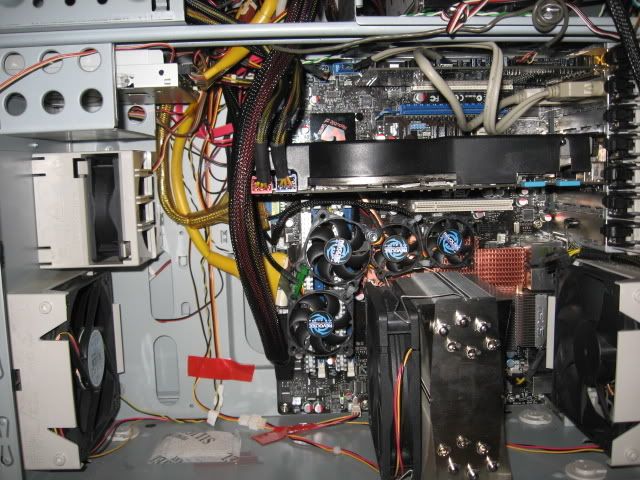
right now i have added two more smaller fans corner tightened with plastic cable ties to be placed right on top of the ram sinks, forget the corsair ram fans, horrible quality and it will steal some of the air going into the 120 extreme cooler for the cpu.
btw it was not on a nb hole, but on the mainboard middle hole, which is located perfectly for this double mini mod.
greeets
Maximus Formula Rampage modded SE all air bios 0308
Thermalright ultra120 extreme lapped+1 scythe sflex1600 push
Q6600 GO lapped p. code: BX80562Q6600SLACR FSB400x9=3.61ghz
Fpo: L728B189,Vid: 1,2875
2x50mm revoltec fan mod on NB, 2 on ram
2x1GB transcend axeram pc1200 white slots,
1200 5-5-5-15 ctwist=strong perf. level 5!! pullins disab. volt=2.24bios
1x Gigabyte 8800 Ultra thermaltake 3 fan cooler
SoundBlaster X-fi ext. music
sharkoon full tower btx mounting, fan mod 120mm titan side out
2xscythe sflex 1600rpm cpu tunnel push-pull
1xnoiseblocker 80mm add. mid-front in
Kama meter
gigabyte odin power GT 550w
2x seagate 7200.12 2x500GB on raid 0 mode-win vista sp2
1x seagate 7200.11 500GB on AHCI mode-win7
1x plextor 802SA, flashed bios into sony optiarc AD-7200S
1x plextor 760A
Does the 0902 I believe (or is it 0903?) beta bios completely suck or is my board a dud? I can only get 500 fsb when I run PL 9
Also, how do I get the NB cooler off? It's glued on pretty well...
Phenom II 940 BE / ASUS M4A79 / HD5770 Crossfire
3770mhz CPU 2600mhz NB | DDR1040 5-5-5-15 | 900/1250
I have that ram and I can tell you that FSB is too high. Unlikely it will work with anything at or over 1200.
CPU: Lapped L727A861 Q6600 3.61GHz (450x8) (1.275VID) @ 1.700V BIOS. WC w/Apogee GTX + Cu top + custom backing plate
GPU: EVGA8800GT. WC w/MCW60 + RAMsinks
MB: ASUS Maximus Formula: Rampage Formula BIOS 0402. NB @1.61V BIOS. WC w/MCW30. FSBtV=1.38V BIOS. CPUPLLV=1.82V BIOS
RAM: Corsair Dominator PC2 8500 4x1GB 1066@1081. 2.14V BIOS
802 here, 4x1gb crucial pc6400, easiest way to remove NB is freezing.

Last edited by cadaveca; 02-29-2008 at 03:12 AM.
nice clocks cadaveca
I'm one ofthe few die-hards that insists on using prime for stability testing, and nothing else, becuase I'm more than aware of how to properly use it. I understand what causes what type of errors, and what needs adjusting in a system based on the errors it gives, and I do not call a system stable until it can runn a 2-3 day run of prime. 8-12 hours jsut isn't enough for me.
You can add me to that club
Asus Maximius formula
q6600 4000mhz 445*9
OCZ Tit\Alpha
Vista 32
Water chilled
2x2900xt Sapphire
2xraptors
Galaxy 1000 psu
Gigabyte x38-dq6
q6600 4000mhz 445*9
Crucial 2x1024
vista32
water chilled
Bfg 8800gtx
2xraptors
Silverstone 1000 psu
http://service.futuremark.com/compare?3dm06=3693906
I'm good up to 550x7, but that doesn't match my cpu clocks well(3825 before it starts to fail prime, or throttle), and won't stay stable with 4x1gb, but is fine 2x1gb.
The only difference is heatpipe nothing else. 1.03 is just a mark for non-se model.
EVGA Classified E762- i7-980X cooled by EK Supreeme HF- 12GB Corsair Dominator GT 2000- 3x 100GB OCZ vertex2 SSD@raid0- 3x Gainward GTX580 Phantom 3GB (soon)ooled by EK)- Silverstone strider ST1500 1500W- Win7 Ultimate X64- LG W3000H- X-Fi Titanium Pro -Logitech Z5500
Custom WC-cooling with Thermochill PA120.3, PA140.3, 2x Feser 480 Quadrad, Scythe GT1850rpm, Noiseblocker PK3 and Swiftech MCP355 with XSPC-tops
I thought I saw some1 reported a NON SE with a 1.02G rev tho.
• DFI Lanparty LT X48-T2R
• Intel Q6600 L737B242 ~ VID 1.2125 ~ 4000mhZ @ 1.48 vcore {lapped}
• eVGA 8800GTS (G92) 512MB {stock}
• Crucial Ballistix PC8500 Tracer ~ 1200mhZ 5-5-5-12 @ 2.05v
• Lian Li PC-V1000 {modded}
• Corsair HX 620W
• Creative X-FI ExtremeMusic
• Western Digital Raptor X 150GB
• Thermalright-Ultra120 Xtreme {lapped} ft. Scythe S-Flex SFF21F S-FDB ~ Push & Pull
Crunk, don`t you have them?
The non-SE's were actually retailed in Poland (+ a couple other Central-/East European countries) some 2 weeks before the SE was released..
thats explains
• DFI Lanparty LT X48-T2R
• Intel Q6600 L737B242 ~ VID 1.2125 ~ 4000mhZ @ 1.48 vcore {lapped}
• eVGA 8800GTS (G92) 512MB {stock}
• Crucial Ballistix PC8500 Tracer ~ 1200mhZ 5-5-5-12 @ 2.05v
• Lian Li PC-V1000 {modded}
• Corsair HX 620W
• Creative X-FI ExtremeMusic
• Western Digital Raptor X 150GB
• Thermalright-Ultra120 Xtreme {lapped} ft. Scythe S-Flex SFF21F S-FDB ~ Push & Pull
I got my Maximus Formula (non-SE) from Poland and it's version 1.03G, this is what's printed on the board itself.
What were the differences?
+ Asus Maximus Formula II (Bios 2202)
+ Intel Xeon X3370 @ 4.04GHz 1.288V (475x8.5) VID 1.250
+ 4GB Kingston HyperX PC2-9600 DDR2 @ 1199MHz 5-5-5-18-2-30 @ 2.15V
+ BFG Tech 9800GTX+ OC @ 760/1890/2250
+ 4x150GB Raptor X in RAID0 via Adaptec 2405 SAS/SATA
+ Samsung SH-203B
+ Chieftec CFT-850-14C
+ Thermalright 120 Ultra Extreme 2000rpm
+ Windows XP Professional x64
+ Samsung 275T
Laptop Memory UK
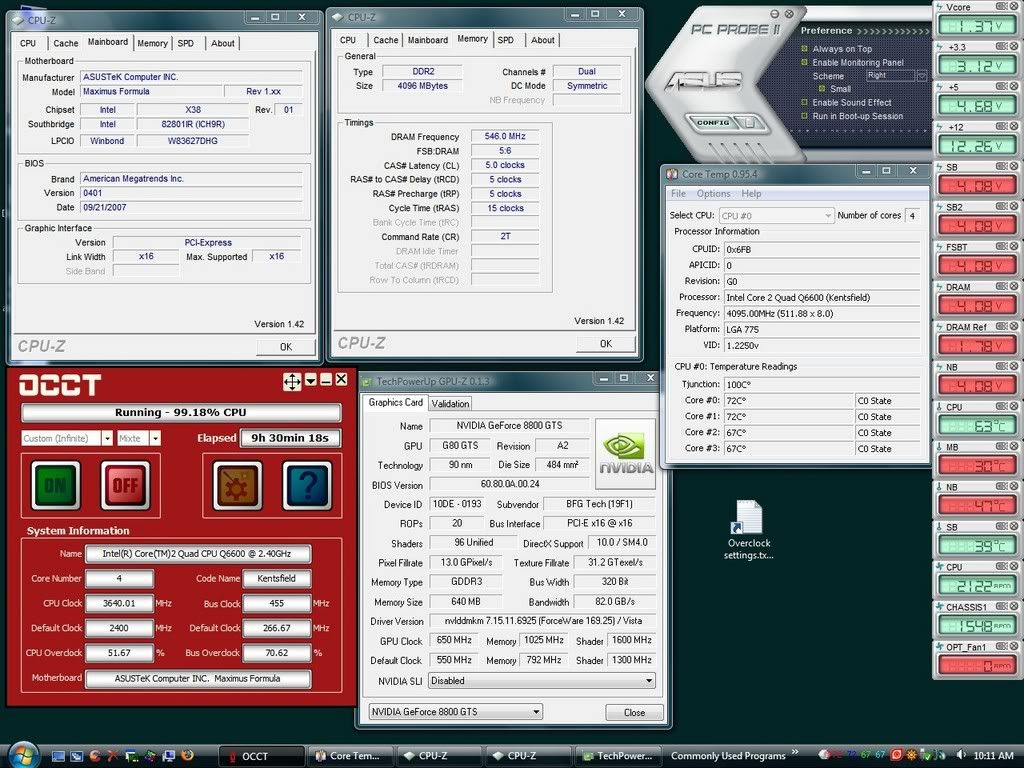
I received my Max Formula (non-SE) a few days ago and after testing several BIOS revisions, including 0903, I found 0401 to be the most stable so far.
Processor: Q6600 G0, L737B, Pack Date: 10/31/07
Here are my settings for 455x8 (3640 MHz)
== Extreme Tweaker ==
Ai Overclock Tuner : MANUAL
OC From CPU Level Up : AUTO
CPU Ratio Control : MANUAL
- Ratio CMOS Setting : 8
FSB Frequency : 455
FSB Strap to North Bridge : 333
PCI-E Frequency: 115
DRAM Frequency: DDR2-1093
DRAM Command Rate : 2T
DRAM Timing Control: Manual
CAS# Latency : 5
RAS# to CAS# Delay : 5
RAS# Precharge : 5
RAS# ActivateTime : 15
RAS# to RAS# Delay : 3
Row Refresh Cycle Time : 30
Write Recovery Time : 6
Read to Precharge Time : 3
Read to Write Delay (S/D) : 8
Write to Read Delay (S) : 3
Write to Read Delay (D) : 5
Read to Read Delay (S) : 4
Read to Read Delay (D) : 6
Write to Write Delay (S) : 4
Write to Write Delay (D) : 6
DRAM Static Read Control: DISABLED
Ai Clock Twister : STRONG
Transaction Booster : 0
CPU Voltage : 1.47500v [1.40]
CPU PLL Voltage : AUTO [1.664]
North Bridge Voltage : [1.59]
DRAM Voltage : 2.16v [2.224]
FSB Termination Voltage : 1.54v [1.600]
South Bridge Voltage : AUTO
Loadline Calibration : ENABLED
CPU GTL Reference : 0.63x
North Bridge GTL Reference : 0.67x
DDR2 Channel A REF Voltage : AUTO
DDR2 Channel B REF Voltage : AUTO
DDR2 Controller REF Voltage : AUTO
SB 1.5V Voltage : 1.55 [1.584]
NB LED Selection : NB Volt
SB LED Selection : SB Volt
CPU LED Selection : CPU VOlt
Voltiminder LED : ENABLED
CPU Spread Spectrum : DISABLED
PCIE Spread Spectrum : DISABLED
== Advanced CPU Configuration ==
CPU Ratio Control : MANUAL
- Ratio CMOS Setting : 8
C1E Suppport : DISABLED
CPU TM Function : DISABLED
Vanderpool Technology : DISABLED
Execute Disable Bit : ENABLED
Max CPUID Value Limit : DISABLED
== USB Configuration ==
USB Functions: ENABLED
Legacy USB Support : AUTO
TEMPS AT IDLE (in Celsius)
CPU = 38
MB = 28
NB = 40.5
SB = 36.5
Ambient room temp is 20C. It looks like PC Probe may have some issues either with the 8x multiplier or the 0401 BIOS. That's why I added the figures in brackets [] because they are the actual readings from the BIOS Hardware Monitor.
Test Results
Additional tests
http://i61.photobucket.com/albums/h5...--3DMark06.jpg
http://i61.photobucket.com/albums/h5...--3DMark05.jpg
http://i61.photobucket.com/albums/h5...--3DMark03.jpg
http://i61.photobucket.com/albums/h5...--3DMark01.jpg
http://i61.photobucket.com/albums/h5...arkPCIe115.jpg
Lian Li PC-A77B, Corsair 750TX PSU | Asus Max Formula->Rampage, 1001 BIOS | E8500 @4303MHz, Xigmatek S1283 | 4GB G.Skill DDR2 1066 | HIS 4890 Turbo | Super Talent FTM32GX25H SSD (boot), WD3000GLFS, ST31500341AS, WD6400AAKS | Pioneer 112D | X-Fi Titanium Fatal1ty Pro | Klipsch ProMedia Ultra 5.1 w/upgraded parts&cooling | LG W2600H 26" monitor | Windows 7 x64
I gave up trying to overclockI just stayed at 3.2GHZ 1000MHZ Ram and 1.320V but bought this baby . This overclocks real easy

Asus Maximus Formula SE (BIOS 907)
Q6600 G0 (@ 3.2GHZ @ V1.320 )
Crucial Ballistix DDR2 800 4x1GB (2 Tracers) @ 1200MHZ
Thermaltake Toughpower Modular 750W
Tuniq Tower 120 / Tuniq Thermal Grease TX-2
BFG 8800GT OC
Cooler Master CM690
Maxtor 7200.10 320GB PATA
WWW.LEOFTW.COM
so after a failed vista rc1 build 6000 upgrade tryout(the nvidia vga driver gets completely screwed up, just like in aero theme the windows become transparent, and i mean transparent really, u cant access them anymore lolol) and rolling back, im posting again to wrap it up here,
here´s two pics... i used in fact one extender bolt for the nb and ram fans, both in the same. if your config is vertical top down u can just use cable ties. if its BTX mount like mine, even better, gravity will help too lolol
close up
so i managed to have no cables whatsoever running on top.
and yes, to all people complaining on bios 0903 my personal opinion is that regardless what your results are, over 400/450 fsb is in fact unstable. I guess asus wont present us with a new bios, not in christmas and probably no anymore.
I think i´ve reached the top regarding air cooling. More than 8 fans on a mobo is preety nooby....
next dream colling system after christmas: aquacomputer aquaduct 360.....
note: anybody successfully installed vista ultimate RC1 build 6000 ?? what about the clock hack, still workin..?
greets
Maximus Formula Rampage modded SE all air bios 0308
Thermalright ultra120 extreme lapped+1 scythe sflex1600 push
Q6600 GO lapped p. code: BX80562Q6600SLACR FSB400x9=3.61ghz
Fpo: L728B189,Vid: 1,2875
2x50mm revoltec fan mod on NB, 2 on ram
2x1GB transcend axeram pc1200 white slots,
1200 5-5-5-15 ctwist=strong perf. level 5!! pullins disab. volt=2.24bios
1x Gigabyte 8800 Ultra thermaltake 3 fan cooler
SoundBlaster X-fi ext. music
sharkoon full tower btx mounting, fan mod 120mm titan side out
2xscythe sflex 1600rpm cpu tunnel push-pull
1xnoiseblocker 80mm add. mid-front in
Kama meter
gigabyte odin power GT 550w
2x seagate 7200.12 2x500GB on raid 0 mode-win vista sp2
1x seagate 7200.11 500GB on AHCI mode-win7
1x plextor 802SA, flashed bios into sony optiarc AD-7200S
1x plextor 760A
 Posting Permissions


 Reply With Quote




Bookmarks