

weird.... there are some very minor differences between the bioses that I can't account for...Originally Posted by keenan




weird.... there are some very minor differences between the bioses that I can't account for...
Asus P6T-DLX V2 1104 & i7 920 @ 4116 1.32v(Windows Reported) 1.3375v (BIOS Set) 196x20(1) HT OFF
6GB OCZ Platinum DDR3 1600 3x2GB@ 7-7-7-24, 1.66v, 1568Mhz
Sapphire 5870 @ 985/1245 1.2v
X-Fi "Fatal1ty" & Klipsch ProMedia Ultra 5.1 Speaks/Beyerdynamic DT-880 Pro (2005 Model) and a mini3 amp
WD 150GB Raptor (Games) & 2x WD 640GB (System)
PC Power & Cooling 750w
Homebrew watercooling on CPU and GPU
and the best monitor ever made + a Samsung 226CW + Dell P2210 for eyefinity
Windows 7 Utimate x64
What is your max memory clocks with your bios..?
Intel Core i5 750 @ 4.3Ghz H2O
Gigabyte P55M-UD2
Sapphire HD4890 Vapor-X @ 950/4800
2 x 2GB Ripjaw PC16000 @ 9-9-9-24-1T
2 x 250 WD Raid
OCZ StealthXtreme 600W
About 920 in most games, with the weird exception of Splinter Cell: Chaos Theory and BF2142. In those two games I have to take it down to 900.
After I finish testing Pro vs. XT BIOS, I'm going to move on to trying your BIOS.
Asus P6T-DLX V2 1104 & i7 920 @ 4116 1.32v(Windows Reported) 1.3375v (BIOS Set) 196x20(1) HT OFF
6GB OCZ Platinum DDR3 1600 3x2GB@ 7-7-7-24, 1.66v, 1568Mhz
Sapphire 5870 @ 985/1245 1.2v
X-Fi "Fatal1ty" & Klipsch ProMedia Ultra 5.1 Speaks/Beyerdynamic DT-880 Pro (2005 Model) and a mini3 amp
WD 150GB Raptor (Games) & 2x WD 640GB (System)
PC Power & Cooling 750w
Homebrew watercooling on CPU and GPU
and the best monitor ever made + a Samsung 226CW + Dell P2210 for eyefinity
Windows 7 Utimate x64
@Martin.
Could you please explain what we could learn from those 2 links you provided?
Regards.
ASUS P5K Premium 2.00G/A02 - Bios 1101
Q9650 @ 4.0@1.30 - 24/7
Corsair 4 x 2048 8500 C5
ASUS HD 6950 2 GB.
Cooling: PA 120.3 w/ shroud. (CPU / GPU / NB)
Mist 800W
Lian Li PC-A7010
I tried your bios and did a benchmark suite at the same speeds as my modded bios. Any differences were within a 1% margin of error, so I don't believe memory timings are different. I'm going to see how high I can take the memory tonight.
Asus P6T-DLX V2 1104 & i7 920 @ 4116 1.32v(Windows Reported) 1.3375v (BIOS Set) 196x20(1) HT OFF
6GB OCZ Platinum DDR3 1600 3x2GB@ 7-7-7-24, 1.66v, 1568Mhz
Sapphire 5870 @ 985/1245 1.2v
X-Fi "Fatal1ty" & Klipsch ProMedia Ultra 5.1 Speaks/Beyerdynamic DT-880 Pro (2005 Model) and a mini3 amp
WD 150GB Raptor (Games) & 2x WD 640GB (System)
PC Power & Cooling 750w
Homebrew watercooling on CPU and GPU
and the best monitor ever made + a Samsung 226CW + Dell P2210 for eyefinity
Windows 7 Utimate x64
Thanx for all this effort, I look forward to your findings...
Intel Core i5 750 @ 4.3Ghz H2O
Gigabyte P55M-UD2
Sapphire HD4890 Vapor-X @ 950/4800
2 x 2GB Ripjaw PC16000 @ 9-9-9-24-1T
2 x 250 WD Raid
OCZ StealthXtreme 600W
Hey could anyone make some new volt modded bioses for the 2900pro 1gb that have the "checksum fix" detailed right here:
http://www.xtremesystems.org/forums/...56#post2580556
Here is the stock bios:
http://www.techpowerup.com/vgabios/9...24.070809.html
Could someone do this and have 4 different versions, 1.20v, 1.25v, 1.30v and 1.35v? This would be really great because otherwise me and everybody else with an abit motherboard can't flash our bios
Asus Rampage II Gene | Core i7 920 | 6*2GB Mushkin 998729 | BFG GTX280 OCX | Auzentech X-Fi Forte | Corsair VX550
—Life is too short to be bound by the moral, ethical and legal constraints imposed on us by modern day society.
My 2X 2900PRO-XT MOD CF MODE 1000mhz gpu Test 3DMARK2006: http://expander.blogcu.com/
Liquid Nitrogen -196c
THE POWER
nice one expander how you getting the 1.4 volt everyone seems stuck at 1.35volt
He's gotta be using ATI Tool or something...
Asus P6T-DLX V2 1104 & i7 920 @ 4116 1.32v(Windows Reported) 1.3375v (BIOS Set) 196x20(1) HT OFF
6GB OCZ Platinum DDR3 1600 3x2GB@ 7-7-7-24, 1.66v, 1568Mhz
Sapphire 5870 @ 985/1245 1.2v
X-Fi "Fatal1ty" & Klipsch ProMedia Ultra 5.1 Speaks/Beyerdynamic DT-880 Pro (2005 Model) and a mini3 amp
WD 150GB Raptor (Games) & 2x WD 640GB (System)
PC Power & Cooling 750w
Homebrew watercooling on CPU and GPU
and the best monitor ever made + a Samsung 226CW + Dell P2210 for eyefinity
Windows 7 Utimate x64
No luck, my memory still sucks.I don't know why my BIOS negatively impacted your clocks... your BIOS didn't positively impact mine, so I don't have much to correlate.

Asus P6T-DLX V2 1104 & i7 920 @ 4116 1.32v(Windows Reported) 1.3375v (BIOS Set) 196x20(1) HT OFF
6GB OCZ Platinum DDR3 1600 3x2GB@ 7-7-7-24, 1.66v, 1568Mhz
Sapphire 5870 @ 985/1245 1.2v
X-Fi "Fatal1ty" & Klipsch ProMedia Ultra 5.1 Speaks/Beyerdynamic DT-880 Pro (2005 Model) and a mini3 amp
WD 150GB Raptor (Games) & 2x WD 640GB (System)
PC Power & Cooling 750w
Homebrew watercooling on CPU and GPU
and the best monitor ever made + a Samsung 226CW + Dell P2210 for eyefinity
Windows 7 Utimate x64
this topic mostly pertains to abit users, and how when hex editing the bios of our 2900xt's we get no video output. the root of this problem is that the file checksum changes. i.e. a unmodified, true bios file checksum would have 0xD200 (when checked with atiflash -cf filename.bin) after modding it the checksum becomes 0xD201. i took the easy route and changed my clock values with the quantumforce 2000xtbios tool then opened a hex editor. i looked for data that could be expendable (pick below, look to the right and ive changed some text that i will never ever ever see) and changed its values until the checksum
matched the genuine bios. (kept going back and forth between hex editor and atiflash -cf, though there are hex editors that can give checksum) when they did match, i flashed my 2nd card and viola! i get device id info, product name etc... just as if i flashed with a legit bios. so then i flashed my 1st card with the same bios and crossed my fingers then rebooted. I HAVE VIDEO W00T! bios' took and all is running well. hope you guys understand my babbling and pass on the word. here is a sc of what i did in the hex, the top window is the origional and the bottom is modified. look to the right to see what "expendable data" im talking about to get a good checksum some garbage about how you are a noob and you didnt connect the power cables
apparently only abit users need to go this extra step. im sure there is a more elegant solution based on what i did but whatever, it worked for me!
here is the bios, i believe its a 870/990 bios with 1.25 volts 512MB. took the origional from techpowerup BIOS database and is the Hynix 1.1 club3d bios (i made about 50 different ones and im a stoner with no real good labeling system)
at fan locked in at 100% i barely hit 73c with stock hsf
this really really works and wont brick your card
i use an abit ip-35 pro w/ 2 2900pro/xt bios in cf. i tested on 2nd card first to see if i got the blank info or not. blank info = no video for abit
Last edited by ZenEffect; 07-26-2010 at 08:54 PM.
Which bios has better performance, the Pro ot XT...?
Can I flash my XT with a Pro bios..?
Intel Core i5 750 @ 4.3Ghz H2O
Gigabyte P55M-UD2
Sapphire HD4890 Vapor-X @ 950/4800
2 x 2GB Ripjaw PC16000 @ 9-9-9-24-1T
2 x 250 WD Raid
OCZ StealthXtreme 600W
I think the BIOS has tighter mem timings. I flashed mine, but my mem was no longer stable at the same speeds that it's stable at today. Even if it's faster clock for clock, I figured it would be a wash when you figure in that it won't scale as high. You can give it a try if you want, however... I saw no ill effects from doing so. You'll just have to let the drivers re-initialize since your PC will think you changed graphics cards.
Asus P6T-DLX V2 1104 & i7 920 @ 4116 1.32v(Windows Reported) 1.3375v (BIOS Set) 196x20(1) HT OFF
6GB OCZ Platinum DDR3 1600 3x2GB@ 7-7-7-24, 1.66v, 1568Mhz
Sapphire 5870 @ 985/1245 1.2v
X-Fi "Fatal1ty" & Klipsch ProMedia Ultra 5.1 Speaks/Beyerdynamic DT-880 Pro (2005 Model) and a mini3 amp
WD 150GB Raptor (Games) & 2x WD 640GB (System)
PC Power & Cooling 750w
Homebrew watercooling on CPU and GPU
and the best monitor ever made + a Samsung 226CW + Dell P2210 for eyefinity
Windows 7 Utimate x64
^ all stated above is true, the 2900PRO will NOT clock as high as an XT (coming from a PRO owner)
Last edited by ZenEffect; 11-27-2007 at 02:02 PM.
*borat voice* GREAT SUCCESS!!
This has been said twice now but there is a fix for abit users! Once you do the volt mods to the bios in the hex editor, you then have to change some values so that the checksum (using the command "atitool -cf filename.bin") of the volt modded bios is the same as the checksum of the stock bios. The checksum of the stock 2900Pro 1GB bios is 0x7000.
All I changed to make the checksums match were some letters in the warning about something not being connected that is coded in the bios (very close to the top).
I volt modded the bios to 1.25v in 3D mode. Here it is if you want to use it:
http://www.mediafire.com/?0ldd0gdjxjn
EDIT:
Oh yeah, forgot to mention, I tested it (using it now) and it works great!
Last edited by 003; 11-28-2007 at 04:03 PM.
Asus Rampage II Gene | Core i7 920 | 6*2GB Mushkin 998729 | BFG GTX280 OCX | Auzentech X-Fi Forte | Corsair VX550
—Life is too short to be bound by the moral, ethical and legal constraints imposed on us by modern day society.
hello guys..im new to this forum..im using Abit AW9D-MAX mobo and need to do some extra step to my modded bios..now after chechsum bot original n mod bios, what should i do next?? im still confuse here

atlast..both checksums are equal.., but the sentence "YOU HAVE NOT ..bla bla bla" looks so terrible
All I had to do was modify three letters in the word connected. Just add a bunch of Z's, and check your checksum, it should be higher than you need. Then remove Z's and to tweak, take one of the remaining Z's and experiment with letters earlier in the alphabet.
EDIT:
Oh here's a great freeware hex editor:
http://www.chmaas.handshake.de/delph...vi32/xvi32.htm
That is the one I used, it works great.
Asus Rampage II Gene | Core i7 920 | 6*2GB Mushkin 998729 | BFG GTX280 OCX | Auzentech X-Fi Forte | Corsair VX550
—Life is too short to be bound by the moral, ethical and legal constraints imposed on us by modern day society.
where he got this bios tool from ?
http://www.iax-tech.com/video/3800biosmod/01.htm
The program's icon would seem to indicate an AMD tool...
(as you probably saw)
At first I thought those iax tech ones were done manually.

So I moded the shroud covering my HD2900XT's yesterday. I took a dremil and cut a rectangular hole from just behind the 1st crossfire link all the up to were the curvature ends for the fan shroud--exposing the two heatpipes on the heat sink. I then placed a 120mm fan right in fornt of the opening and I also have a case fan blowing inwards as well.
Previously @ 1.2V I could barely get 840/1150 stable and the core temp maxed out @ 84 degrees while playing CoD4. Now I am at 860/1000 @ 1.25V and the core temp maxed out @ 82 degrees playing CoD4 for an hour. I was also able to pass multiple3 loops of 3DMark05/06 w/o any freezes.
I have not tried to max out 1.25V yet but I will try 880 later on this weekend.
Just thought I'd share.
Last edited by TouGe; 11-30-2007 at 12:25 PM. Reason: Temp numbers were wrong
QX 9650 | Maximus II Formula | G.SKILL 4GB (2 x 2GB) PC2 8500 | Sapphire 4850 X2 2GB| Auzen X-Fi Prelude 7.1 | 3x's WD 150GB Raptors & 2x's 1TB Seagate 7200.11 | Silverstone OP1200 | SilverStone TJ07 | Dell 2707WFP
EK-RES 250 --> Swiftech MCP655 --> Apogee GTZ --> Enzotech Sapphire NB --> Feser X-Changer 360


why overdrive cannot be use in crossfire.?
[SIGPIC][/SIGPIC]
I n t e l C o r e 2 Q u a d Q 6 6 0 0 G 0 @ 2 . 4 @ 2 . 7 ( 3 0 0 x 9 )
A b i t A W 9 D - M A X
2 x 1 G b C o r s a i r D D R 2 - 8 0 0 M h z @ 9 5 0 M h z ( 4 - 4 - 4 -12 )
2 x A S U S H D 2 9 0 0 X T C r o s s f i r e @ 8 5 0 / 9 5 0
Z a l m a n 9 5 0 0 L E D
C o o l e r M a s t e r R e a l P o w e r 8 5 0 w a t t P r o
M a x t o r 1 2 0 G b S a t a 2 + W e s t e r n D i g i t a l 1 6 0 G b S a t a 2 + M a x t o r 2 0 0 G b S a t a 2
P i o n e e r D V D R W + L i t e O n C D R W
M i c r o s o f t W i n d o w s V i s t a + U b u n t u 7 . 1 0 D u a l B o o t
Touge have you been able to perceive any improvements in benches. Like in 3dmark or crysis??
I say so, cause in my case overclocking does not yield ANY improvement in benches or fps.
 Posting Permissions


 Reply With Quote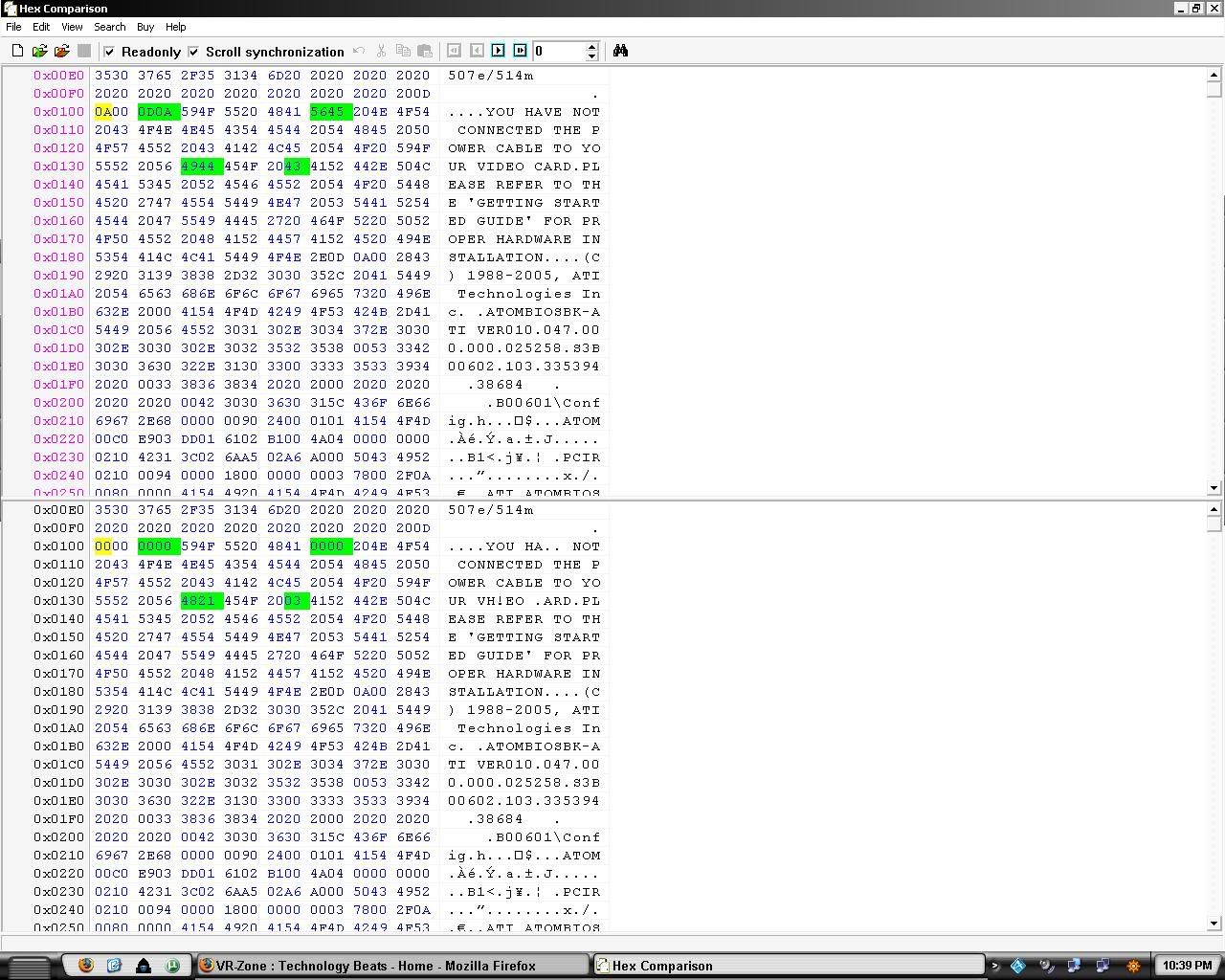

Bookmarks