MMM
Page 1 of 4 1234 LastLast
Results 1 to 25 of 96

Thread: Overclocking 6400+

  1. #1
    Xtreme Member
    Join Date
    Sep 2007
    Posts
    210

    Talking Overclocking 6400+

    All i have done is changed fsb to 222 Mhz, Ram speed = 800 Mhz DDR2 @ 5-5-5-15, CPU to NB voltage to 1.4v, NB to SB voltage to 1.4, SB Core/PCIE voltage to 1.6v, and the HT from 5x to 4x, cpu voltage = 1.5v and ram voltage 2.1v. Meaning that i can get it stable at 3536 Mhz, at 35C, but i cant go higher it will just lock up, or Blue Screen. Any suggestions???

  2. #2
    I am Xtreme zanzabar's Avatar
    Join Date
    Jul 2007
    Location
    SF bay area, CA
    Posts
    15,871
    with teh am2 u are better off changing the multi since its unlocked and the am2 runs from a cpu ram divider and not a core fsb divider
    5930k, R5E, samsung 8GBx4 d-die, vega 56, wd gold 8TB, wd 4TB red, 2TB raid1 wd blue 5400
    samsung 840 evo 500GB, HP EX 1TB NVME , CM690II, swiftech h220, corsair 750hxi

  3. #3
    Xtreme Member
    Join Date
    Sep 2007
    Posts
    210
    to what should i change it??

  4. #4
    Xtreme Addict
    Join Date
    Jul 2007
    Posts
    2,103
    Quote Originally Posted by SuperMiguel View Post
    All i have done is changed fsb to 222 Mhz, Ram speed = 800 Mhz DDR2 @ 5-5-5-15, CPU to NB voltage to 1.4v, NB to SB voltage to 1.4, SB Core/PCIE voltage to 1.6v, and the HT from 5x to 4x, cpu voltage = 1.5v and ram voltage 2.1v. Meaning that i can get it stable at 3536 Mhz, at 35C, but i cant go higher it will just lock up, or Blue Screen. Any suggestions???
    Need More info, What cooler / waterblock .?What are Idle / load temps?

    If you Idle Temps are around 29-30c raise the Vcore a lil more...

    My IDLE IS@ 25c with ambiant room temp of 23c@1.58vcore @3.48ghz........

    I also use 1.30v for CPU to northbridge....Ive noticed sometimes going past 1.35-1.4v CPU-to NB it will blue screen with certain settings Above 3.51ghz on my ASUS.

    Once i get my other Radiator back and install a D-tek ,ill start playing around more...

    If your already @35CIdle you may be too hot if your on AirWhen windows starts too load it Overheats your cores mostlikely..
    If your on water or Air with out chiller ,the 6000+ and HIGHER CHIPS likes higher Vcore...usually 1.55v-1.61v is good for 3.6ghz stable with decent temps... I would suspect your COOLING BEFORE anything else! you need too check the load temps with CoreTemp95 so you have a idea where your at...
    "AMD...Like the perfect Storm,...Everything needs to be just right"
    X555x4SuperCore@4450mhz@1.64v..........

    RYZEN 7 1800x/ ASUS ROG STRIX VEGA64/ =EK NICKEL WB, Feser THC 2x360 1x480
    X470 Gigabyte Aorus7, Patriot 3400mhz 16gb dual2x8
    SSD Samsung 970pro,,860EVO

  5. #5

  6. #6
    Xtreme Member
    Join Date
    Sep 2007
    Posts
    210
    and my temps are: idle 28 load 34, radiator termochill p 120.3, water block d-tek fuzion (1/2")

  7. #7
    Xtreme Addict
    Join Date
    Jul 2007
    Posts
    2,103
    Quote Originally Posted by SuperMiguel View Post
    What are your Temps .....Both cores should be close to 35-39c in windows if your bios is 35c and then i would say you may need bettercooling ....

    Your Cpu-Z is fine , if heat is the problem that means you cant add more Vcore to go higher!....So look into the Temps.
    "AMD...Like the perfect Storm,...Everything needs to be just right"
    X555x4SuperCore@4450mhz@1.64v..........

    RYZEN 7 1800x/ ASUS ROG STRIX VEGA64/ =EK NICKEL WB, Feser THC 2x360 1x480
    X470 Gigabyte Aorus7, Patriot 3400mhz 16gb dual2x8
    SSD Samsung 970pro,,860EVO

  8. #8
    Xtreme Addict
    Join Date
    Jul 2007
    Posts
    2,103

    Arrow Check this too , just a thought...

    Quote Originally Posted by SuperMiguel View Post
    and my temps are: idle 28 load 34, radiator termochill p 120.3, water block d-tek fuzion (1/2")
    Ok thats better Raise your Vcore to 1.55v i bet youll be stable

    Hey what if you try lower Cpu divider and 667 on the memory13 or 14 CPU and use 4x and 667 or 533 to hit 3.6ghz

    14x258=3.61ghz and 4xHT use 533 or 667 loose timings Vcore 1.55-1.58?

    13x277=3.6ghz and 4xHT use 533 or 667 loose timings Vcore 1.55-1.58?

    Also if the NB is water cooled lower your Volts to 1.30-1.32v CPU to NB that could make it more stable too ...Ive noticed 590's dont like high volts..
    Last edited by gOtVoltage; 09-22-2007 at 08:28 PM.
    "AMD...Like the perfect Storm,...Everything needs to be just right"
    X555x4SuperCore@4450mhz@1.64v..........

    RYZEN 7 1800x/ ASUS ROG STRIX VEGA64/ =EK NICKEL WB, Feser THC 2x360 1x480
    X470 Gigabyte Aorus7, Patriot 3400mhz 16gb dual2x8
    SSD Samsung 970pro,,860EVO

  9. #9
    Xtreme Member
    Join Date
    Sep 2007
    Posts
    210
    i get a blue screen if i make my fsb 225

  10. #10
    Xtreme Member
    Join Date
    Sep 2007
    Posts
    210
    i also lowered my cpu to NB to 1.3, i dont know but i have a feeling is my ram, the one that is making me crash

  11. #11
    Xtreme Member
    Join Date
    Sep 2007
    Posts
    210
    also im at the maximun cpu volt, on my bios which is 1.5625 cant increase it any more any suggestions?

  12. #12
    Xtreme Addict
    Join Date
    Jul 2007
    Posts
    2,103
    Quote Originally Posted by SuperMiguel View Post
    also im at the maximun cpu volt, on my bios which is 1.5625 cant increase it any more any suggestions?

    Try 13x277 then 533 or 667 memory this will be easier on the memory...Vcore use 1.55 for now...What Motherboard is it ?

    Your temps are good so its a divider problem most likely...your temps stay in the 30-39c range with High Vcore thats good
    Last edited by gOtVoltage; 09-22-2007 at 08:33 PM.
    "AMD...Like the perfect Storm,...Everything needs to be just right"
    X555x4SuperCore@4450mhz@1.64v..........

    RYZEN 7 1800x/ ASUS ROG STRIX VEGA64/ =EK NICKEL WB, Feser THC 2x360 1x480
    X470 Gigabyte Aorus7, Patriot 3400mhz 16gb dual2x8
    SSD Samsung 970pro,,860EVO

  13. #13
    Xtreme Member
    Join Date
    Sep 2007
    Posts
    210
    asus m2n32 same as you

  14. #14
    Xtreme Addict
    Join Date
    Jul 2007
    Posts
    2,103
    Quote Originally Posted by SuperMiguel View Post
    asus m2n32 same as you
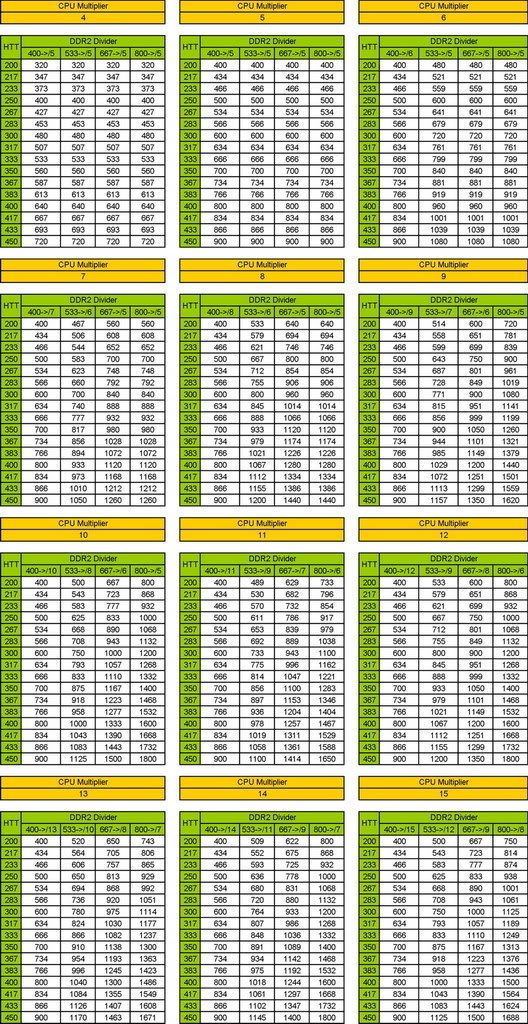
    Lower the Memory to 667 and try it with 14xCPU put the HT to 5x...if it boots your mobo likes the Higher HT...

    Also look here at the multis for you memory MHZ..

    "AMD...Like the perfect Storm,...Everything needs to be just right"
    X555x4SuperCore@4450mhz@1.64v..........

    RYZEN 7 1800x/ ASUS ROG STRIX VEGA64/ =EK NICKEL WB, Feser THC 2x360 1x480
    X470 Gigabyte Aorus7, Patriot 3400mhz 16gb dual2x8
    SSD Samsung 970pro,,860EVO

  15. #15
    Xtreme Member
    Join Date
    Sep 2007
    Posts
    210
    it will just reboot it self at 13x277

  16. #16
    Xtreme Addict
    Join Date
    Jul 2007
    Posts
    2,103
    Try 15x240=3.6ghz and use 667 x5HT

    Check the Vcore mke shure its between 1.5v-1.56 ,also make shure your memory is at correct volts...
    Last edited by gOtVoltage; 09-22-2007 at 08:42 PM.
    "AMD...Like the perfect Storm,...Everything needs to be just right"
    X555x4SuperCore@4450mhz@1.64v..........

    RYZEN 7 1800x/ ASUS ROG STRIX VEGA64/ =EK NICKEL WB, Feser THC 2x360 1x480
    X470 Gigabyte Aorus7, Patriot 3400mhz 16gb dual2x8
    SSD Samsung 970pro,,860EVO

  17. #17
    Xtreme Member
    Join Date
    Sep 2007
    Posts
    210
    wont boot at 14x258 667 Mhz 5x HT

  18. #18
    Xtreme Member
    Join Date
    Sep 2007
    Posts
    210
    and wont boot either at 15x

  19. #19
    Xtreme Addict
    Join Date
    Jul 2007
    Posts
    2,103
    Quote Originally Posted by SuperMiguel View Post
    and wont boot either at 15x
    Is any Spread Spectrum ON theyu all need to be disabled and the PCI-E both need to be set to 101
    "AMD...Like the perfect Storm,...Everything needs to be just right"
    X555x4SuperCore@4450mhz@1.64v..........

    RYZEN 7 1800x/ ASUS ROG STRIX VEGA64/ =EK NICKEL WB, Feser THC 2x360 1x480
    X470 Gigabyte Aorus7, Patriot 3400mhz 16gb dual2x8
    SSD Samsung 970pro,,860EVO

  20. #20
    Xtreme Member
    Join Date
    Sep 2007
    Posts
    210
    memory is at 2.1v which is what the manufacture wants, i have 4gb of ram and my volt is at 1.5v. Also if i set up the mult at 15x and boot using 667 it will reboot it selft if i use 533 it will give me blue screen

  21. #21
    Xtreme Member
    Join Date
    Sep 2007
    Posts
    210
    Spectrum what is that, and what do you mean with PCI-E need toe be set to 101??

  22. #22
    Xtreme Member
    Join Date
    Sep 2007
    Posts
    210
    you mean the PCIEX16_1 Clock = 101 MHz???
    PCIEX16_2 Clock = 101 Mhz???

  23. #23
    Xtreme Addict
    Join Date
    Jul 2007
    Posts
    2,103
    Quote Originally Posted by SuperMiguel View Post
    memory is at 2.1v which is what the manufacture wants, i have 4gb of ram and my volt is at 1.5v. Also if i set up the mult at 15x and boot using 667 it will reboot it selft if i use 533 it will give me blue screen

    When it reboots do you let it run and then it just keeps rebooting...?
    It gives no error beeps correct

    Lock them both
    "AMD...Like the perfect Storm,...Everything needs to be just right"
    X555x4SuperCore@4450mhz@1.64v..........

    RYZEN 7 1800x/ ASUS ROG STRIX VEGA64/ =EK NICKEL WB, Feser THC 2x360 1x480
    X470 Gigabyte Aorus7, Patriot 3400mhz 16gb dual2x8
    SSD Samsung 970pro,,860EVO

  24. #24
    Xtreme Addict
    Join Date
    Jul 2007
    Posts
    2,103
    Yeah lock them both
    LoL you made me bust out my Owners Manual i havnt see this in awhile
    Last edited by gOtVoltage; 09-22-2007 at 08:50 PM.
    "AMD...Like the perfect Storm,...Everything needs to be just right"
    X555x4SuperCore@4450mhz@1.64v..........

    RYZEN 7 1800x/ ASUS ROG STRIX VEGA64/ =EK NICKEL WB, Feser THC 2x360 1x480
    X470 Gigabyte Aorus7, Patriot 3400mhz 16gb dual2x8
    SSD Samsung 970pro,,860EVO

  25. #25
    Xtreme Member
    Join Date
    Sep 2007
    Posts
    210
    yes, it will keep rebooting, and no beeps

Page 1 of 4 1234 LastLast

Bookmarks

Bookmarks

Posting Permissions

  • You may not post new threads
  • You may not post replies
  • You may not post attachments
  • You may not edit your posts
  •