

strange problem
1 hour ago, my opteron clocked at 3033 MHz
now, sometims it just reboots at 2.9 GHz
Is my opteron f*cked up??
or my motherboard??



strange problem
1 hour ago, my opteron clocked at 3033 MHz
now, sometims it just reboots at 2.9 GHz
Is my opteron f*cked up??
or my motherboard??


are you running on air ? I'll bet your room temps are up 10c
24/7 Work & Play Rig
Gigabyte X58A-UD5, i7 920 @ 4.56ghz 1.48v 21x217, G.Skill PI 12Gb 8-8-8-24-1T 1.56V @ 1736Mhz
EK Supreme HF P1, Dual EK DCP 4.0 Pumps and EK Res, XSPC RX360 & RX240 w/ 1850rpm GT's
Sapphire HD 4870 1Gb @ 810/1020mhz, 2x Dell 2407, 2x 1Tb WD Black SATA3, 2x 2Tb Hitachi 7k2000
Cooler Master ATCS 840, Corsair 750TX PSU, running OSX 10.6.3 & Win 7 64
Sounds like a stupid question but was it stable? And has your memory died?
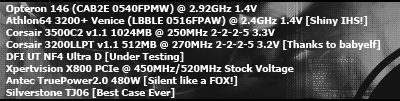
___I am Xtreme... are you?
memory not dead, i putted it to 100 MHz and it stille didnt Pi @ 1M @ 2.9 GHz
chipset too hot????
burned my cpu???
what are you temps reporting? and what board are you using. im willing to bet it either wasnt stable from the get go or its gotten a tad bit warmer in the room.
DFI NF4 Ultra D/3800 x2 @ 2.5ghz/2x512 BH-5/ EVGA 7800 GT /OCZ 600W PowerStream

Hmm, sounds like temp's raised... Usually its the other way around actually, since the higher temp makes thermalpaste spread better @ CPU, but... A temp raise is a temp raise, and a bad thing for clocking :\
20 deg difference is 200 mhz on my rig :|
Competition ranking;
2005; Netbyte, Karise/Denmark #1 @ PiFast
2008; AOCM II, Minfeld/Germany #2 @ 01SE/AM3/8M (w. Oliver)
2009; AMD-OC, Viborg/Denmark #2 @ max freq Gigabyte TweaKING, Paris/France #4 @ 32M/01SE (w. Vanovich)
2010: Gigabyte P55, Hamburg/Germany #6 @ wprime 1024/SPI 1M (w. THC) AOCM III, Minfeld/Germany #6 @ 01SE/AM3/1M/8M (w. NeoForce)
Spectating;
2010; GOOC 2010 Many thanks to Gigabyte!
Could have been just a suicide run and your chip isn't going to get 3 ghz.
2.9 is still very good, because really, for that extra 100mhz, aren't you splitting hairs?
Abit IP35-Pro - Bios: 16
Intel E8400 (Q746A381 SLAPL MALAY)
Gskill F2-8000CL5D-4GBPQ 2048X2
eVGA 8800GTA 512-P3-N841-A3
Corsair 620HX PSU
Thermalright Ultra 120 Extreme with Scthye Fan
Antec 182 Case
considering you gave us no temps or voltages, it's hard to sayOriginally Posted by GoThr3k


Got a fan over those memory sticks? No? Well get to it before you kill them
i doubt he did any stable testing..
Run:
OCCT
Memtest+
Memtest Windows
Prime95
3dmark01
Then come back and tell us if it reboots
prime and occt fail even at 2.6 GHz @ 1.55V but i can run pi 32 for ever
it was 1M stable, at 3.030 GHz at 1.55V
but after that i switched the ram to other ram slots it started happening, gonna do some test soon
mobo is a MSI K8N sLI Platinum
temps arent correct i think, only 42°c at full load, no way
did you ever move the ram back? (sorry if it's a stupid question
Got a fan over those memory sticks? No? Well get to it before you kill them
GoThr3k,
im using the msi k8n sli plat and i have trouble hitting over 270fsb
with the latest 3.7 bios. What bios are you using to achieve over this FSB
mate. I can boot over 270 but fails prime.
No matter what multi or ram settings i use.
It was never stable and will not be at 2.6 if you cannot prime or OCCT.
Here is my Opty superpi 32m at 1.45v @ 3000 Mhz.

But the max prime stable is 2940 @ 1.6v.

Your chip was never stable. OCCT and Prime it to find out what the max overclock is, then run it at those speeds and it wont crash an hour later. 2940 is really the farthest stable I can run 24/7 without crashing -
Wish people would actually test for stability before posting these suicide shots at 1M. 1M doesnt prove there is any stability.
Last edited by dnottis; 12-02-2005 at 07:56 AM.
i7-2600k @ 4.8Ghz 1.38v L044A892
ASUS P8P67 LGA
16GB G.Skill Rip Jaws DDR3 1600Mhz Memory
1/2" ID Masterkleer, Swiftech MCP-655, Thermochill PA120.3 Rad, XSPC Rasa, MCW-60
Cooler Master UCP 1100 Watt PSU
GTX 680 1300/7000
Lian Li PC V-2000
I'm I reading your CPUZ shot correct???? RAS# Precharge 2......
Asus P8P67-M Pro - Bios 413
i7-2600K LO41C106
Cooler Master V8 - Antec 180 Mini
G.SKILL Ripjaws X Series 8GB (2 x 4GB)
Sissy OC - 4.6 @ 1.3175 24/7 | 18' Idle - 55' Load
Windows 7MS Is Getting Better...
Personal Site!
problem is solved thoug
it is 1000000% stable @ 2.8GHz @ 1.45V stock cooler
stock cooler => TT BT
would be nice
which grid do you need for lapping??
dnottis: My Opteron 146 does 2920MHz @ 1.40V (BIOS) 1.36V (CPUz) 32M Stable... and it also does 6 hours of Prime95 at the same speed and voltage. Dropping the speed down to 2900MHz seems to have it 24 hours Prime95 stable.
Maybe your motherboard cant handle a high HTT... hence 32M passing but Prime95 failing.
EDIT: Ignore that last bit you have a NF4 Ultra D.
Also I dont see why you are b*tching at people for showing their times (yes times... not stability) on SuperPi, because you are one of those people who use the voltage displayed in CPUz when we all know that DFI NF4 Ultra D's never have the correct Vcore displayed in CPUz... its always a fair bit higher... so dont come along and sh*t on everyones SuperPi threads when you too are trying to make your OC look better by using CPUz Vcore readings.
Last edited by 5days; 12-02-2005 at 09:46 PM.
___I am Xtreme... are you?
Yup, thats correct!
2GB OCZ PC3200 GX XTC - also my 2GB OCZ PC4000 EB can run the same speeds / timings at 2.7 v.
http://www.3dxtreme.net/index.php?id=oczpc3200gxxtc1
i7-2600k @ 4.8Ghz 1.38v L044A892
ASUS P8P67 LGA
16GB G.Skill Rip Jaws DDR3 1600Mhz Memory
1/2" ID Masterkleer, Swiftech MCP-655, Thermochill PA120.3 Rad, XSPC Rasa, MCW-60
Cooler Master UCP 1100 Watt PSU
GTX 680 1300/7000
Lian Li PC V-2000
use the 3.1 bios, it is the best
+ maybe some more voltage to the chipset?? set it to 1.55 or 1.6
I dont know if that was meant for me - SuperPI32M isn't nearly as taxing as Prime95 is.
i7-2600k @ 4.8Ghz 1.38v L044A892
ASUS P8P67 LGA
16GB G.Skill Rip Jaws DDR3 1600Mhz Memory
1/2" ID Masterkleer, Swiftech MCP-655, Thermochill PA120.3 Rad, XSPC Rasa, MCW-60
Cooler Master UCP 1100 Watt PSU
GTX 680 1300/7000
Lian Li PC V-2000
 Posting Permissions


 Reply With Quote


Bookmarks